







Time Tracking For Remote employees gives businesses a reliable way to understand when work happens, how many hours employees work, where project time is spent, and how attendance connects with PTO, breaks, schedules, and overtime. For remote teams, accurate time records are particularly important because employees may work across different locations, time zones, and schedules without a manager physically seeing when the working day begins or ends.

However, effective remote time tracking should not be treated as constant employee surveillance. The goal is to create an accurate record of working time while giving employees clear expectations about when to clock in, when to clock out, how to report breaks, what to do when a time entry is incorrect, and how work outside the normal schedule should be handled.
A well designed system benefits both sides. Employees have a clear record of the hours they worked, while managers gain better information for attendance, workload planning, payroll review, project management, overtime control, and workforce scheduling.
The key is having both the right technology and a clear remote employee time tracking policy.
What Is Remote Employee Time Tracking?
Remote employee time tracking is the process of recording working time for employees who perform some or all of their work away from a traditional company workplace.
Depending on the organization, this may involve recording only the beginning and end of the working day or tracking more detailed information such as projects, tasks, breaks, billable hours, overtime, and attendance.
For example, a customer support employee may only need to record when their working day starts and ends. A software developer working across several client projects may need to record how much time is spent on each project or task.
This means there is no single time tracking method that works for every remote team. The amount of information collected should match the legitimate needs of the organization.
A useful system should answer questions such as:
- When did the employee begin and finish work?
- How many hours were actually worked?
- Were required breaks recorded correctly?
- Did the employee work outside their normal schedule?
- Was additional time overtime or approved extra work?
- Was the employee working, on approved PTO, absent, or scheduled off?
- Which project or task received the employee’s working time when project tracking is required?
- Does a time entry need correction?
The purpose is to produce reliable working time records, not simply to prove that an employee was sitting in front of a computer.
Why Time Tracking Is Different for Remote Teams
Time tracking exists in both office based and remote workplaces, but remote work introduces additional considerations.
An employee may begin work at home, take a longer personal break during the afternoon, and complete the remaining hours later in the evening. Another employee may work a fixed 9:00 AM to 5:00 PM schedule. Someone working internationally may begin when the rest of the organization is offline.
Without clear rules, these arrangements can create confusion.
Managers may see an employee responding to a message at 8:30 PM and wonder whether that time should have been recorded. Employees may not know whether checking email before officially clocking in counts as working time. HR may find that a person was marked absent even though an approved vacation request already existed in another system.
Remote time tracking therefore works best when schedules, working time, PTO, breaks, attendance, and exceptions are defined together.
What Should Companies Track for Remote Employees?
Companies should begin with the minimum information necessary to manage working hours accurately. More tracking is not automatically better.
| Information | Why It May Be Needed | Example |
|---|---|---|
| Work start and end time | Establish total working time and attendance | 8:55 AM to 5:15 PM |
| Breaks | Separate working time from qualifying unpaid breaks | Lunch from 1:00 PM to 1:30 PM |
| Total hours | Support payroll, overtime, and workforce analysis | 8 hours |
| Project or task time | Understand where working time is spent | 3 hours on Client A |
| PTO and leave | Explain scheduled non-working time | 8 hours vacation |
| Schedule | Compare expected hours with actual hours | Scheduled 9:00 AM to 5:00 PM |
| Corrections | Keep inaccurate or forgotten entries from remaining in records | Missed clock-out corrected the next morning |
Businesses do not necessarily need screenshots, webcam recordings, mouse activity, or continuous keyboard monitoring simply to maintain accurate time records.
Time tracking and employee surveillance are not the same thing.
Time Tracking for Remote Employees and U.S. Wage Rules
For U.S. employers, working time records can have important wage and hour implications.
Under the Fair Labor Standards Act, covered employers must maintain certain records for non exempt workers, including hours worked each day and total hours worked each workweek. The U.S. Department of Labor states that employers may use different timekeeping methods as long as the records are complete and accurate.
The Department of Labor has also specifically addressed telework. Its guidance states that employers must pay employees for compensable work that they know, or have reason to believe, is being performed, including work completed remotely.
This becomes important when an employee performs work outside scheduled hours.
For example, suppose an hourly employee finishes their scheduled remote shift at 5:00 PM but continues working for another 30 minutes to complete a report. Simply having a company rule stating that overtime must be approved does not automatically make the additional working time disappear from the time record.
The company can enforce rules concerning unauthorized overtime through its management process, but qualifying hours actually worked still need to be handled correctly under applicable wage and hour requirements.
The Department of Labor also explains that short rest periods, generally 20 minutes or less, are ordinarily counted as working time under the FLSA. Bona fide meal periods, typically 30 minutes or more, may generally be excluded when an employee is completely relieved of work duties.
Employers should always check the federal, state, local, and international rules that apply to their workforce because requirements may differ by location.
What About Salaried Remote Employees?
Not every employee is paid by the hour, but that does not mean time tracking has no value for salaried employees.
Companies may track salaried employee time for reasons such as project costing, client billing, resource planning, attendance, capacity analysis, grant requirements, or internal reporting.
The important distinction is why the data is being collected.
For a non exempt hourly employee, accurate work-hour records may directly affect wages and overtime. For an exempt salaried employee, project time may instead be used to understand how much capacity a client or project consumes.
Companies should avoid using one time tracking policy without considering differences between employee classifications and applicable employment laws.
Remote Time Tracking and Employee Privacy
A remote employee’s home is also a private environment, which makes proportionality important when choosing monitoring technology.
For example, the UK Information Commissioner’s Office notes that employee monitoring must be lawful and fair and that workers may have greater privacy expectations when working from home. Its guidance recommends defining the purpose of monitoring and considering less intrusive methods where they can achieve the same goal.
A company that needs to know whether employees started work at the correct time may be able to accomplish that with a normal clock-in system. Constant webcam images or continuous screen capture would collect much more information than is needed simply to record attendance.
A useful principle is:
Track the information required to manage work, not every possible signal generated by an employee’s device.
Employers operating internationally should assess local privacy, employment, labor, data protection, consultation, and notice requirements before introducing employee monitoring.
What Should a Remote Employee Time Tracking Policy Include?
Technology cannot solve unclear rules.
Before introducing a time tracker, organizations should create a written policy explaining exactly how working time should be recorded.
A strong remote time tracking policy should address the following areas.
Purpose of Time Tracking
Begin by explaining why time is being recorded.
The purpose might include attendance management, payroll accuracy, project costing, client billing, overtime management, resource planning, or compliance.
Employees are more likely to follow a process correctly when they understand what the records are actually used for.
Employees Covered by the Policy
Specify whether the policy applies to all remote employees or only certain groups.
For example, hourly employees might use simple clock-in and clock-out tracking while project-based teams may also need to assign time to projects and tasks.
When Employees Must Clock In
Employees should record the time when work actually begins.
The policy should also address work performed before the scheduled start time. Checking work email, completing tasks, responding to customers, or attending an early meeting can create working time depending on the circumstances and applicable law.
When Employees Must Clock Out
Employees should normally clock out after they have finished working.
Remote employees should not be expected to clock out and then continue completing work.
If additional work occurs later, the organization should have a clear method for recording it.
Break Rules
Explain how employees should handle paid rest breaks and unpaid meal periods.
If employees are required to clock out for lunch, say so. If short paid breaks remain part of working time, make that clear as well.
The policy should match applicable law in every jurisdiction where employees work.
Overtime and Work Outside the Schedule
Companies can require employees to obtain approval before working overtime or additional hours.
However, the policy should separately explain how employees must report work that actually occurs outside the approved schedule.
A useful distinction is:
Authorization controls whether additional work should have been performed. Time records establish whether work actually occurred.
Mixing those two issues can lead to inaccurate records.
Missed Punches and Corrections
Forgotten clock ins happen.
The policy should explain how employees report missing or incorrect records, how quickly corrections should be submitted, who approves them, and whether the reason for the correction is documented.
Employees should never feel that correcting an inaccurate record is more difficult than leaving incorrect hours in the system.
PTO and Other Leave
Time tracking should account for approved vacation, sick leave, personal leave, and other absences.
If PTO exists in a separate system that does not communicate with attendance records, managers may incorrectly see an employee as absent or missing working hours.
Connecting leave records and working time records creates a more complete picture of the employee’s day.
Task and Project Tracking
If employees are required to assign working time to projects or tasks, define the expected level of detail.
Tracking should be useful without creating unnecessary administrative work.
If employees need several minutes every hour merely to describe what they were doing, the system may be creating more work than value.
Privacy and Access
Employees should know what information is collected, why it is collected, who can access it, how it is used, and how long records are retained where applicable.
This is especially important if the company uses technology that goes beyond a basic clock or task timer.
Example Remote Time Tracking Policy Rules
A practical policy should turn broad expectations into specific employee actions.
| Situation | Example Policy Rule |
|---|---|
| Starting work | Clock in when actual work begins |
| Ending work | Clock out when all work for the day is complete |
| Unpaid meal | Record the meal period according to company policy |
| Work after clock-out | Record the additional working time |
| Forgotten clock-in | Submit a correction as soon as possible |
| Incorrect record | Request a correction rather than estimating later |
| Overtime | Obtain approval where required and accurately report hours actually worked |
| Vacation day | Use the approved PTO record rather than entering working hours |
| Flexible schedule | Record actual working time rather than automatically entering standard hours |
| Project work | Select the appropriate project or task before starting the timer when required |
These rules should be adapted to the organization’s employment structure and legal obligations.
Best Practices for Tracking Remote Employee Time
Choose the Simplest Tracking Method That Meets the Business Need
A company that only needs attendance data may not need task level tracking.
Employees can simply record the beginning and end of their working day.
A consulting firm that bills clients based on time may need additional project and task information.
Start with the business question you need to answer, then determine what information must be collected.
Track Actual Hours Instead of Assuming the Schedule Was Worked
A schedule tells you what was expected.
A time record tells you what happened.
Consider an employee scheduled from 9:00 AM to 5:00 PM who starts at 9:20 AM, works through the planned end time, and finishes at 5:30 PM.
Automatically recording eight hours based solely on the schedule would hide the actual attendance pattern.
Keeping schedules and actual working time separate allows managers to understand both.
Encourage Employees to Track Time as Work Happens
Employees who complete timesheets several days later are more likely to rely on memory.
Real-time clocking or start-and-stop timers can create a more accurate record because employees record activity close to when it happens.
If real-time tracking is not practical, organizations should still establish a regular deadline for submitting time records.
Create a Clear Correction Process
Accurate systems must allow human mistakes to be corrected.
An employee may forget to stop a timer, select the wrong project, or accidentally clock in twice.
A correction process should make it possible to fix the record while preserving appropriate visibility and accountability.
The goal should be accurate data, not a system where employees are afraid to report errors.
Connect Work Schedules With Attendance
A 9:15 AM clock in means different things for different employees.
If an employee was scheduled to begin at 9:00 AM, it may indicate a late arrival.
If the employee works a flexible schedule, 9:15 AM may be entirely normal.
Time tracking becomes much more useful when managers can evaluate recorded hours against the employee’s assigned work schedule.
Connect PTO With Working Time
Remote attendance becomes difficult to interpret when leave and time records are disconnected.
Suppose an employee was scheduled for eight hours but recorded only four.
That could mean the employee stopped working early.
It could also mean the employee had an approved half-day vacation.
A connected PTO and time tracking system provides the context required to distinguish between the two.
Account for Time Zones
Distributed teams should define which time zone is used for schedules, reporting periods, approvals, and deadlines.
This is particularly important when employees and managers work in different countries.
For example, an employee’s Monday evening could already be Tuesday for the manager reviewing their record.
Systems should preserve accurate local working time while making reporting understandable for the organization.
Avoid Measuring Productivity Only by Hours
Time worked is one workforce metric, not a complete measure of performance.
An employee recording nine hours is not automatically more productive than someone who completes the same work accurately in seven.
Managers should combine time data with appropriate measures such as deliverables, service quality, deadlines, customer outcomes, project completion, and role-specific objectives.
Time tracking is most valuable when it answers operational questions rather than becoming the sole measure of employee performance.
Give Managers Responsibility for Reviewing Exceptions
Managers do not necessarily need to inspect every minute of every employee’s day.
A more efficient approach is to focus attention on exceptions such as missing entries, unusually long shifts, repeated late starts, unexpected overtime, large manual corrections, or discrepancies between schedules and recorded work.
This keeps time tracking useful without turning daily management into continuous surveillance.
Train Employees Before Enforcement Begins
A policy may seem obvious to the person who wrote it, but employees often have practical questions.
Should they clock in before opening work applications or afterward? What happens if the internet disconnects? How should an interrupted lunch be recorded? What if a customer calls after they clock out?
Training employees with realistic scenarios helps create consistent records.
Review the System Periodically
Work patterns change.
A company may move from fixed schedules to flexible hours, hire employees in new countries, begin billing clients by project, or introduce new leave rules.
Time tracking policies should therefore be reviewed periodically instead of remaining unchanged for years.
How to Create a Remote Time Tracking Policy
A practical rollout begins by understanding how employees actually work.
First, identify whether employees have fixed schedules, flexible schedules, rotating shifts, or project based working arrangements. Determine which employees require hour tracking for payroll and which roles may require project level time for operational purposes.
Next, decide what employees need to record. A basic remote team may only need start time, end time, and breaks. A client-services business may also require project and task selection.
Then document the rules before configuring the software. Define clock in expectations, breaks, overtime approval, off-schedule work, corrections, PTO, responsibilities, and privacy practices.
After the policy is documented, configure schedules and time tracking rules to match it.
Test the process with realistic scenarios before applying it across the company. This helps identify situations such as forgotten timers, interrupted breaks, half-day PTO, work across midnight, flexible working hours, and employees in different time zones.
Finally, review the first few weeks of records for patterns. If employees repeatedly make the same correction, the problem may be unclear policy wording or an unnecessarily complicated process rather than employee behavior.
Sample Remote Employee Time Tracking Policy
The following is a basic example that organizations can adapt to their own requirements.
Purpose
The company records employee working time to maintain accurate attendance and working-hour records, support payroll and workforce planning, manage overtime where applicable, and understand project time where required.
Recording Working Time
Employees who are required to track working time must record when work actually begins and ends using the company’s designated time tracking system.
Employees should not perform unrecorded work before clocking in or after clocking out.
Breaks
Employees must record unpaid meal periods when required by company policy and applicable law. Paid rest periods and meal requirements will be handled according to the rules that apply to the employee’s work location.
Overtime and Additional Hours
Employees must follow the company’s approval process before working overtime or additional hours where approval is required. Any working time that actually occurs must still be reported accurately.
Corrections
Employees should report forgotten, missing, or incorrect entries as soon as they identify them. Managers may review corrections and request additional information when necessary.
PTO and Leave
Approved PTO, sick leave, and other recorded absences should be entered through the company’s leave management process. Employees should not create working time entries for periods when they were not working.
Project Tracking
Employees required to track project or task time should select the appropriate project and task when beginning work and update the entry if the recorded activity changes.
Privacy
The company will use recorded time information for legitimate business purposes and limit access according to employee responsibilities, applicable policies, and legal requirements.
Organizations should have employment or legal professionals review their final policy where appropriate, particularly when employees work across multiple jurisdictions.
Using Day Off for Remote Employee Time Tracking
Remote work becomes easier to manage when schedules, attendance, working hours, projects, and PTO are connected instead of being maintained in separate systems.
Day Off combines time tracking with leave management and attendance tools, allowing businesses to manage both working and non-working time in the same platform.
Clock In and Clock Out
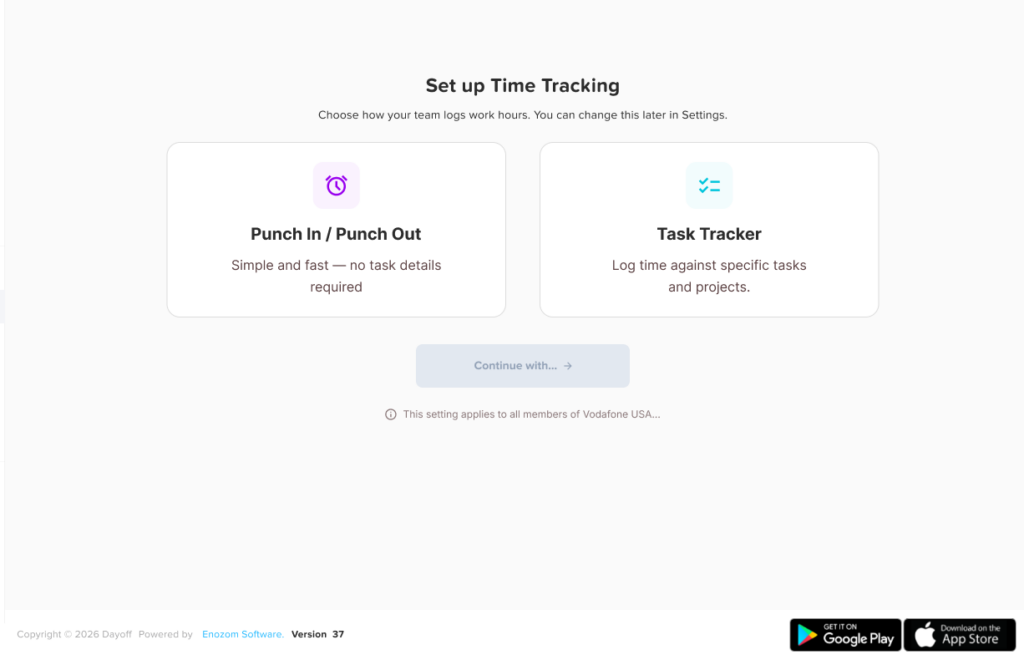
Teams that mainly need attendance tracking can use Clock In / Clock Out.
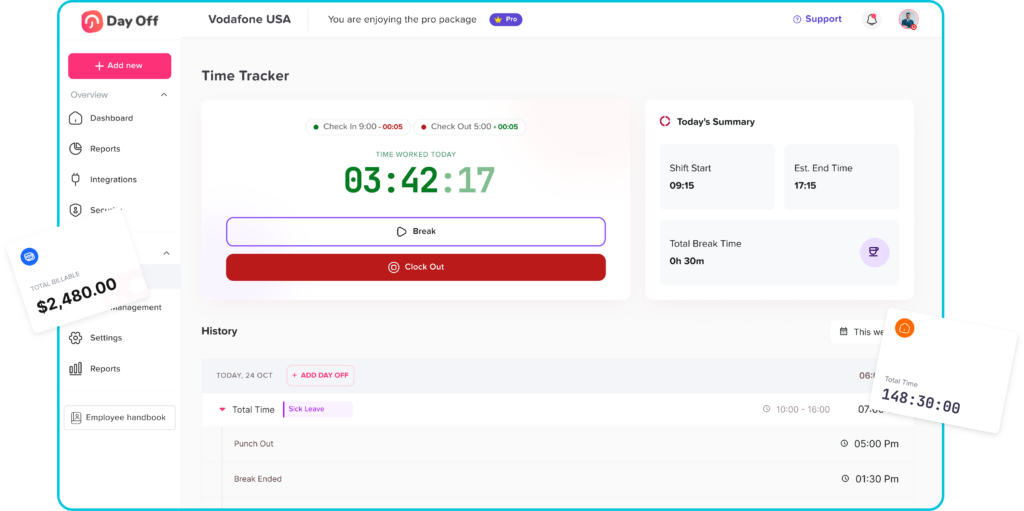
Employees start their working time when their workday begins and end the day when they finish. This provides a straightforward record of when employees actually worked without requiring them to categorize every period by task.
Task Tracker
Remote teams that need project-level information can use Task Tracker.
Tracked sessions can be associated with projects and tasks, helping companies understand not only how much time employees worked but where that time was spent. Day Off also provides history information such as start time, end time, duration, and billable status.
This can be useful for agencies, consulting businesses, distributed product teams, and other organizations that need to understand project effort.
Work Schedules and Attendance Review
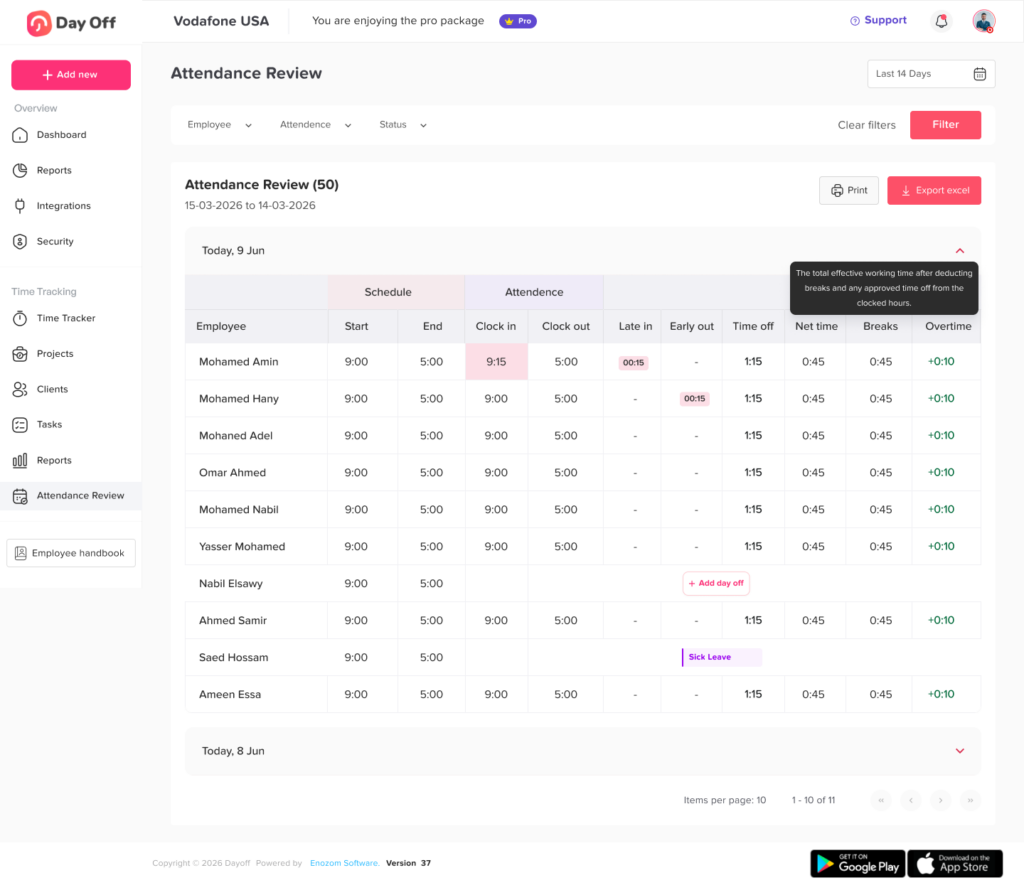
Recorded time becomes more useful when it is compared with the employee’s expected schedule.
Day Off supports work schedules and attendance review so managers can compare scheduled hours with actual attendance and identify information such as lateness, breaks, time off, working hours, and overtime.
Instead of seeing a missing time entry without context, managers can understand what the employee was expected to work and whether approved leave explains the difference.
PTO and Time Tracking Together
One of the most important advantages of connecting time tracking with leave management is that managers gain visibility into both work and approved non-working time.
An employee who does not clock in because they are on approved vacation should not be treated the same as an employee who was expected to work but did not record any working time.
Keeping PTO, schedules, and time tracking together helps HR and managers interpret attendance records more accurately.
How Often Should Remote Employee Timesheets Be Reviewed?
There is no universal review frequency that works for every organization.
For payroll related records, companies usually need a review process aligned with the payroll cycle so errors can be corrected before payroll is finalized.
Project based teams may benefit from more frequent reviews when tracked hours affect client billing, budgets, or project estimates.
Managers should pay particular attention to exceptions rather than manually reconstructing every normal workday.
Repeated missing clock outs, unexpected overtime, large corrections, or unusual differences between scheduled and actual hours may indicate that the policy needs clarification or that a manager should investigate further.
How to Know Whether Your Remote Time Tracking Process Is Working
A successful system should reduce uncertainty rather than create additional administrative work.
Useful indicators include fewer missing time entries, fewer payroll corrections, timely submission of timesheets, lower numbers of unresolved attendance exceptions, more accurate project estimates, and fewer disagreements over whether an employee was working or on approved leave.
Employee feedback also matters.
If employees regularly say they do not know when to start a timer, how to record a break, or what to do when a timer is incorrect, the system may need clearer instructions even if the software itself is working properly.
The best time tracking process is one employees can follow consistently without needing to ask HR how to handle ordinary situations every week.
FAQ
How do companies track remote employee hours?
Companies can track remote employee hours using digital clock-in and clock-out systems, timesheets, start-and-stop timers, or project and task trackers. The appropriate method depends on whether the organization only needs total working hours or also needs detailed information about how time is distributed across projects.
Is it legal to track remote employees’ working time?
Employers can generally maintain records of employee working time, but the exact legal requirements depend on the employee’s country, state, classification, and the type of monitoring being used. Basic working-time records and intrusive monitoring technologies can raise very different legal and privacy considerations. Companies operating across multiple jurisdictions should review applicable employment and data protection requirements.
Should salaried remote employees track their time?
They can. Even when time tracking is not being used to calculate hourly wages, organizations may track salaried employee time for project costing, client billing, capacity planning, attendance, workload analysis, or internal reporting. The company should clearly explain why the information is required and how it will be used.
How can employers prevent inaccurate remote timesheets?
Clear policies and simple tracking processes are usually the best starting point. Employees should understand when to clock in, how breaks work, how to record additional working time, and how to correct mistakes. Managers should review unusual entries and repeated discrepancies rather than assuming that every incorrect entry is intentional.
What should a remote employee time tracking policy include?
A remote employee time tracking policy should explain who must track time, when working time begins and ends, how breaks are recorded, how overtime or additional hours are handled, how employees correct missing entries, how PTO interacts with attendance, whether project tracking is required, and how employee time data is used and protected.
Conclusion
Time tracking for remote employees should create clarity, not unnecessary surveillance. A good system records when employees actually work, connects that information with schedules and approved time off, provides a straightforward method for correcting mistakes, and gives managers enough information to manage attendance, payroll, workloads, and projects responsibly.
The most effective remote time tracking policies also recognize that different teams have different needs. Some organizations only need a reliable clock-in and clock-out record. Others need task and project tracking, billable hours, attendance comparisons, or detailed reporting.
Whatever method a company chooses, employees should know exactly what they are expected to record and why.
With Day Off, businesses can bring time tracking, projects, work schedules, attendance, PTO, and leave management into one connected platform. Instead of trying to understand remote attendance through separate spreadsheets, timesheets, calendars, and leave systems, HR teams and managers can get a clearer view of when employees are working, when they are scheduled, and when they are legitimately away from work.