








Businesses need an accurate way to understand how employees spend their working hours. For decades, companies have used timesheets to record employee hours. Today, many businesses use time tracking software that can automatically record work sessions, projects, tasks, and other time-related information.
Although the terms are sometimes used interchangeably, time tracking and timesheets are not exactly the same.

A timesheet is a record of time worked, usually entered manually by an employee. Time tracking is the broader process of recording and monitoring working time, which can be done manually or automatically using software.
Understanding the difference can help businesses choose the right approach for tracking employee hours, managing projects, calculating billable time, and improving workforce visibility.
What Is Time Tracking?

Time tracking is the process of recording how much time employees spend working and, in many cases, what they spend that time working on.
Time tracking can be done manually, but modern time tracking software can automate much of the process.
Depending on the system, employees may be able to track:
- Start and end times
- Hours worked
- Projects
- Tasks
- Billable and non-billable time
- Breaks
- Overtime
- Attendance
- Work schedules
- Time off
For example, an employee working on several projects might record:
| Project | Task | Time |
|---|---|---|
| Website Redesign | Development | 3 hours |
| Mobile App | Testing | 2 hours |
| Internal | Team meeting | 1 hour |
| Administration | Reporting | 1 hour |
This gives the business more information than simply knowing that the employee worked seven hours.
What Is a Timesheet?
A timesheet is a record used to document the amount of time an employee spends working during a specific period.
Traditional timesheets are often completed manually. An employee might enter their hours at the end of each day or week.
A simple weekly timesheet could look like this:
| Day | Start | End | Hours |
|---|---|---|---|
| Monday | 9:00 AM | 5:00 PM | 8 |
| Tuesday | 9:00 AM | 5:00 PM | 8 |
| Wednesday | 9:00 AM | 5:00 PM | 8 |
| Thursday | 9:00 AM | 5:00 PM | 8 |
| Friday | 9:00 AM | 5:00 PM | 8 |
Total: 40 hours
A timesheet can be as simple as a spreadsheet or paper form, or it can be part of a dedicated time tracking system.
Time Tracking vs. Timesheets: The Key Difference
The simplest way to explain the difference is:
A timesheet is a record. Time tracking is the process of recording and managing time.
Timesheets traditionally depend on employees entering their hours manually. Time tracking software can provide more detailed and automated records.
For example:
Traditional timesheet:
Monday — 8 hours
Project-based time tracking:
Monday — Client Website — Development — 2h 30m
Monday — Client Website — Testing — 1h 30m
Monday — Internal Project — Planning — 2h
Monday — Administration — 2h
Both approaches can record eight working hours, but the second provides much more context about how those hours were spent.
Time Tracking vs. Timesheets Comparison
| Feature | Traditional Timesheets | Time Tracking Software |
|---|---|---|
| Record working hours | Yes | Yes |
| Manual entry | Usually | Sometimes |
| Automatic timers | No | Often |
| Project tracking | Basic or manual | Usually supported |
| Task tracking | Basic or manual | Usually supported |
| Billable time | Possible | Often supported |
| Attendance tracking | Limited | Often available |
| Overtime tracking | Manual | Can be automated |
| Real-time visibility | Limited | Better |
| Reporting | Manual | Automated |
| Data corrections | Manual | Usually easier |
| Integration with PTO | Usually separate | Can be integrated |
The exact capabilities depend on the system being used.
How Traditional Timesheets Work
With a traditional timesheet process, employees record their working hours themselves.
A company might provide a spreadsheet containing columns for:
- Date
- Start time
- End time
- Breaks
- Total hours
- Project
- Task
- Notes
At the end of the week, employees submit their timesheets to their managers or HR team.
Managers then review the information and approve it.
This approach can work well for small teams with simple schedules. However, manual timesheets can become difficult to manage as the company grows.
The Limitations of Manual Timesheets
Employees have to remember their hours
When employees complete a timesheet at the end of the week, they may have to reconstruct what they did several days earlier.
This can lead to inaccurate or incomplete records.
Data entry takes time
Employees need to enter their hours, while managers or HR teams may need to review and correct the information.
For larger teams, this creates additional administrative work.
Errors can be difficult to detect
Manual timesheets may contain:
- Incorrect start times
- Incorrect end times
- Missing hours
- Duplicate entries
- Incorrect project assignments
- Incorrect calculations
These errors can affect payroll, project reporting, or client billing.
Limited real-time visibility
A spreadsheet usually tells managers what employees recorded after the fact.
It does not necessarily provide an up-to-date view of what is happening during the workday.
Project tracking can become complicated
When employees work on multiple projects, simple timesheets may not provide enough detail.
A business may need to know not just how many hours an employee worked, but how those hours were distributed across different projects and tasks.

The Benefits of Time Tracking Software
Time tracking software can address many of the limitations of manual timesheets.
More accurate time records
Employees can use timers or digital entries to record their working sessions closer to when the work actually happens.
This can reduce reliance on memory.
Project and task tracking
Employees can associate time with specific projects and tasks.
For example:
Project: Mobile App
Task: Bug Fixing
Time: 1 hour 45 minutes
This makes it easier to understand where working hours are being spent.
Billable and non-billable time
For service businesses, time tracking software can distinguish between billable and non-billable work.
This is particularly useful for consultants, agencies, law firms, accounting firms, developers, and other businesses that charge clients based on time.
Easier reporting
Digital systems can organize time records into reports without requiring managers to manually calculate totals from multiple spreadsheets.
Better visibility
Managers can review working time, projects, tasks, and other relevant information from a centralized system.
Is Time Tracking the Same as Attendance Tracking?
No.
Although they are related, time tracking and attendance tracking answer different questions.
Attendance tracking focuses on when an employee is present or absent.
Time tracking focuses on how working time is spent.
For example:
Attendance:
Employee worked from 9:00 AM to 5:00 PM.
Time tracking:
Client Project A — 3 hours
Client Project B — 2 hours
Internal meeting — 1 hour
Administration — 2 hours
An effective workforce management system may provide both types of information.
Time Tracking and Timesheets for Remote Employees
Remote work makes accurate time records more important for some businesses.
Managers may not be able to observe when employees start working, take breaks, or finish their day.
Digital time tracking can provide a centralized record of working time without requiring employees to maintain separate spreadsheets.
However, businesses should establish clear policies about what is being tracked, why it is being tracked, and how the information will be used.
Time tracking should support transparency and accountability rather than become unnecessary surveillance.
Time Tracking for Billable Work
For businesses that bill clients based on hours, detailed time records can be particularly valuable.
Instead of recording:
Client A — 8 hours
an employee might record:
Client A — Research — 2 hours
Client A — Consulting — 3 hours
Client A — Meeting — 1 hour
Client A — Documentation — 2 hours
The business can then determine which time is billable according to the client’s agreement.
Time tracking can also help businesses compare estimated project hours with actual hours.
For example:
- Estimated project time: 40 hours
- Actual project time: 46 hours
- Difference: 6 hours
Repeated differences can indicate that future projects need more accurate estimates.
Time Tracking With Day Off
Day Off provides time tracking features alongside project management, attendance, work schedules, overtime, and leave management.
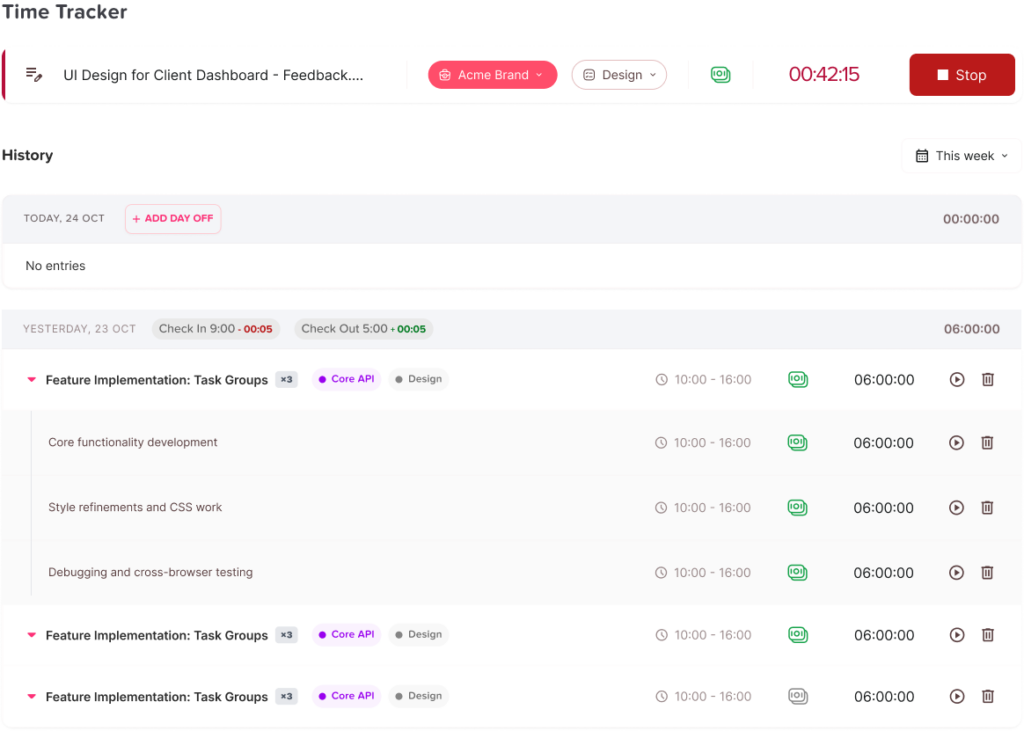
With Day Off’s time tracking functionality, employees can record working sessions against projects and tasks, making it possible to see where working time is being spent. Time sessions include information such as start time, end time, duration, and billable status.
This makes Day Off useful for teams that need more detail than a basic weekly timesheet can provide.

Track time with a timer
Employees can start and stop a timer while working on a project or task.
This can reduce the need to remember working hours and manually reconstruct them later.
Track time by project and task
Time can be associated with specific projects and tasks, allowing managers to see how working hours are distributed.
For example:
Client Website → Frontend Development → 2h 15m
This provides more context than a general “8 hours worked” entry.
Mark time as billable
Day Off allows time sessions to be identified as billable.
This can help businesses separate client-related time from internal work when reviewing project records.
Edit time entries
If an employee forgets to start or stop a timer, time records can be corrected.
This is useful because no tracking system is completely dependent on perfect human behavior.
Compare estimated and actual project hours
Day Off’s project functionality supports project hour estimates and actual tracked time.
Managers can use this information to understand whether projects are staying within expected time budgets.
Combine time tracking with attendance
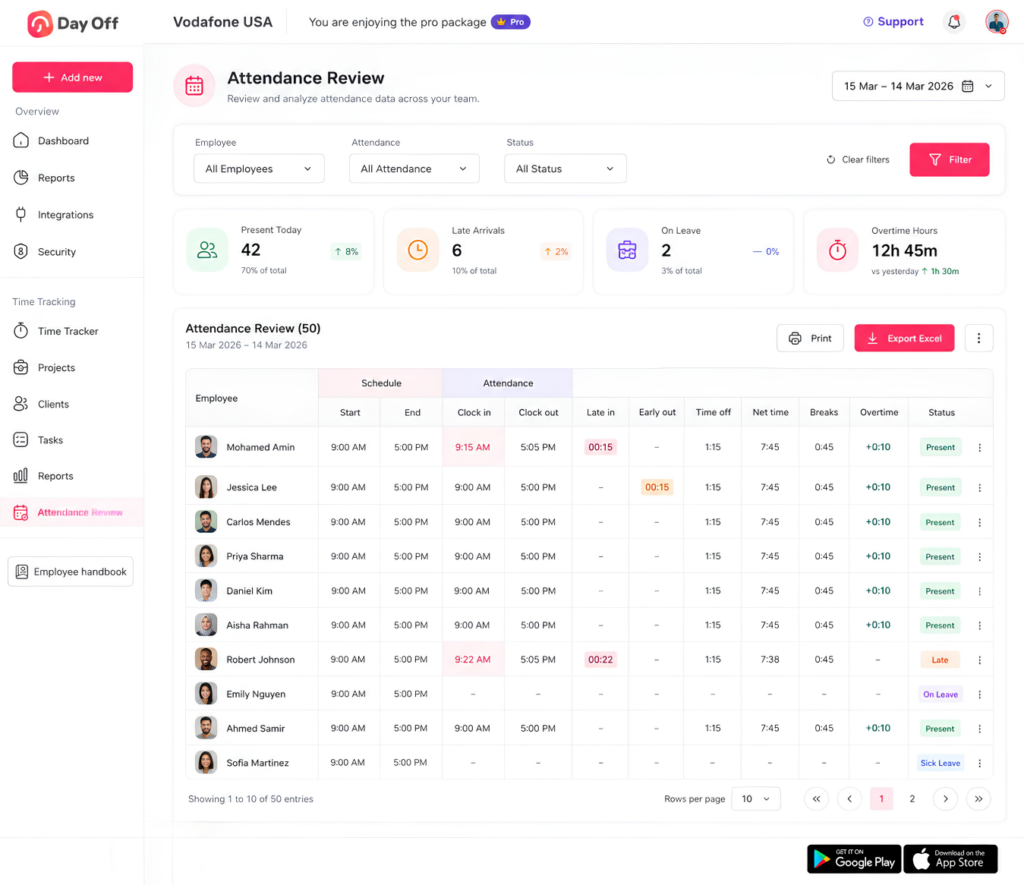
Day Off also provides attendance tracking, including information related to scheduled hours, clock-in and clock-out activity, breaks, overtime, and time off.
This creates a useful distinction between:
When someone worked → attendance
What they worked on → time tracking
When they were unavailable → PTO and leave management
Keeping these areas connected can make workforce planning easier.
When Should You Use Timesheets?
Traditional timesheets may still be appropriate for some organizations.
They can work well when:
- The team is small
- Employees have predictable schedules
- Projects are simple
- Detailed project tracking is not necessary
- The business only needs basic records of hours worked
- Employees do not need real-time tracking
A simple spreadsheet may be enough for a small business with five employees and straightforward schedules.
When Should You Use Time Tracking Software?
Time tracking software becomes more useful as complexity increases.
Consider using dedicated software when:
- Employees work on multiple projects
- You need project-level time tracking
- You bill clients by the hour
- You need billable vs. non-billable reporting
- Employees work remotely
- Teams have different schedules
- You need overtime information
- Managers need better visibility
- HR spends significant time managing spreadsheets
- You want to connect working time with attendance and PTO
The larger and more distributed the organization becomes, the more difficult manual time tracking can be to maintain.
How to Choose Between Timesheets and Time Tracking Software

There is no single solution that is right for every business.
Start by identifying what information you actually need.
If the only requirement is recording weekly hours, a simple timesheet may be sufficient.
If you need to know when employees worked, what they worked on, which projects consumed their time, how much time was billable, and how actual hours compare with estimates, dedicated time tracking software is likely to provide more value.
You should also consider:
- Ease of use
- Project and task tracking
- Billable time tracking
- Attendance features
- Overtime tracking
- PTO integration
- Reporting
- Editing and approval workflows
- Employee privacy
- Scalability
The best system is one employees can use consistently without adding unnecessary complexity to their workday.
Best Practices for Employee Time Tracking
Regardless of whether you use timesheets or dedicated software, a few practices can improve the quality of your data.
Define clear tracking rules
Employees should understand exactly what they need to record and when.
Keep project names consistent
Use standardized project and task names so reports remain easy to interpret.
Track time close to when work happens
The longer employees wait to record their time, the more likely they are to forget details.
Explain why time is being tracked
Employees are more likely to follow a tracking process when they understand how the data will be used.
Review unusual entries
Managers should look for missing records, unusually long sessions, or unexpected project allocations.
Don’t measure performance using hours alone
Time tracking is useful for understanding capacity and project costs, but hours worked do not automatically represent productivity or quality.
Frequently Asked Questions About Time Tracking and Timesheets
What is the difference between time tracking and a timesheet?
A timesheet is a record of the hours an employee worked during a specific period. Time tracking is the broader process of recording, organizing, and analyzing working time.
Traditional timesheets are often completed manually, while time tracking software can record time digitally using timers, project and task tracking, and automated calculations.
Is time tracking more accurate than timesheets?
Time tracking can be more accurate when employees use a timer or record their work close to the time it happens. Manual timesheets require employees to remember and enter their hours, which can lead to forgotten or incorrect entries.
However, accuracy depends on how consistently employees use either system and how the company reviews the records.
What are the disadvantages of manual timesheets?
Manual timesheets can require significant administrative work, especially as a company grows. Common challenges include forgotten entries, incorrect calculations, duplicate records, missing hours, and difficulty tracking time across multiple projects.
Spreadsheets can also make it harder for managers to get an up-to-date view of employee and project hours.
What are the benefits of using time tracking software?
Time tracking software can reduce manual data entry and provide more detailed information about working hours. Depending on the system, businesses can track time by employee, project, task, billable status, or work schedule.
Digital tracking can also make reporting and reviewing time records easier than managing multiple spreadsheets.
Can time tracking software replace a timesheet?
Yes. Many time tracking systems can replace traditional timesheets by digitally recording the same basic information while providing additional functionality.
For example, instead of manually entering eight hours for Monday, an employee can record individual work sessions and associate them with specific projects and tasks. The system can then calculate the total time automatically.
Is a timesheet better than a time tracker for small businesses?
It depends on the business’s needs. A simple timesheet may be sufficient for a small company that only needs to record total weekly hours.
A time tracker can be a better option when a small business needs to track projects, billable hours, overtime, remote employees, or employee attendance without spending significant time maintaining spreadsheets.
How do you track employee hours without using a spreadsheet?
Businesses can use employee time tracking software instead of spreadsheets. Employees can record their working sessions digitally, while managers can review hours, projects, tasks, overtime, and other time-related information from a centralized system.
This can reduce manual calculations and make it easier to maintain consistent records.
Can time tracking software track hours by project?
Yes. Many time tracking platforms allow employees to assign their working time to specific projects and tasks.
For example, an employee might record three hours on a website development project and two hours on an internal project. This makes it possible to understand how working time is distributed across different projects.
Can you track billable and non-billable hours with time tracking software?
Yes. Time tracking software can allow businesses to classify working sessions as billable or non-billable.
This is particularly useful for agencies, consultants, law firms, accounting firms, software companies, and other businesses that charge clients based on time.
What is the difference between attendance tracking and time tracking?
Attendance tracking focuses on when an employee is working or absent. Time tracking focuses on how working time is spent.
For example, attendance tracking might show that an employee worked from 9:00 AM to 5:00 PM. Time tracking can show that those eight hours included three hours on Client A, two hours on Client B, one hour in meetings, and two hours on administrative work.
Using both can give managers a more complete picture of employee availability and workload.
Can time tracking help calculate overtime?
Time tracking can help businesses record the hours employees work beyond their normal schedules and identify potential overtime.
The exact calculation and treatment of overtime should follow the company’s policies and applicable employment laws.
How does time tracking help remote teams?
Time tracking can give remote teams a centralized record of working hours and project time without requiring employees to maintain individual spreadsheets.
For project-based teams, employees can also associate time with specific projects and tasks, helping managers understand workload and project progress.
Companies should establish clear policies explaining what is tracked, why it is tracked, and how the information will be used.
Should employees track every hour they work?
For businesses that require detailed time records, employees should follow a consistent tracking policy covering the activities the company needs to measure.
Project-based businesses may need detailed records by project and task, while other organizations may only need daily start and end times.
The objective should be to collect useful information without creating unnecessary administrative work for employees.
How can Day Off replace manual timesheets?
Day Off provides digital time tracking that allows employees to record working sessions against projects and tasks. Time entries can include start time, end time, duration, and billable status.
Instead of maintaining a separate spreadsheet, businesses can use Day Off to manage time tracking alongside projects, attendance, work schedules, overtime, and PTO.
This can give managers a more centralized view of employee working time and project activity.
What should you look for in employee time tracking software?
When evaluating time tracking software, consider whether it supports the features your business actually needs, such as:
- Project and task tracking
- Billable and non-billable time
- Employee timesheets
- Start and stop timers
- Attendance tracking
- Overtime tracking
- Work schedules
- PTO and leave management
- Time reports
- Editable time entries
- Employee and manager access controls
The right solution should be easy for employees to use consistently and provide managers with reliable information for planning and reporting.
Final Thoughts
Understanding time tracking vs timesheets can help businesses choose a more effective way to manage employee working hours. Traditional timesheets can work well for teams that only need basic records, but they often require manual data entry and provide limited visibility into how time is being spent.
Time tracking software offers a more detailed approach by allowing businesses to track hours by project and task, monitor billable and non-billable time, and gain better insight into employee workloads and project costs.
For businesses looking to move beyond spreadsheets, Day Off brings time tracking together with project management, attendance, work schedules, overtime, and PTO management. This gives teams a centralized way to manage working time and employee availability.
Ultimately, the best solution is one that makes time tracking simple for employees while giving managers accurate, useful data for better planning and decision-making.