







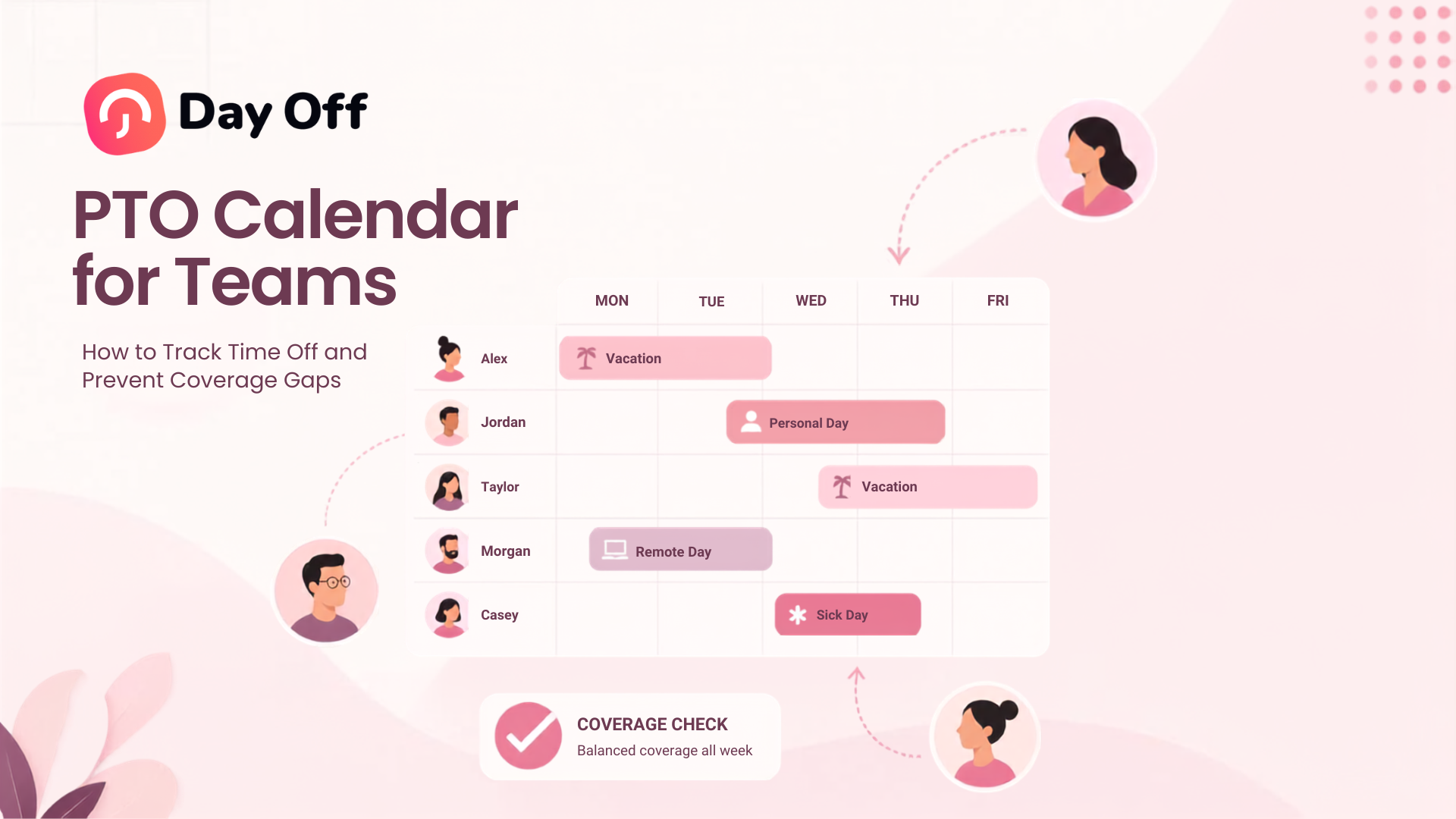
A PTO Calendar for Teams gives managers and employees a clear view of planned time off, upcoming absences, public holidays, and team availability in one place. But a useful PTO calendar should do more than show who is on vacation. It should help managers understand whether enough people will be available to keep work moving, identify overlapping requests before they become a staffing problem, and give employees enough visibility to plan their own time off responsibly.

When leave information is spread across emails, spreadsheets, chat messages, and personal calendars, coverage problems are easy to miss. Two employees with the same responsibility may receive approval for the same week. A manager may schedule an important deadline while a key team member is away. An employee may book a vacation without realizing several colleagues already have approved leave.
A well managed team PTO calendar reduces these problems by connecting leave tracking with workforce planning.
This guide explains how to build and manage a PTO calendar, what information it should contain, how to evaluate coverage before approving requests, how to handle overlapping vacations fairly, and how leave management software such as Day Off can simplify the entire process.
What Is a PTO Calendar for Teams?
A PTO calendar is a centralized calendar showing when employees are expected to be unavailable because of approved paid time off or other relevant types of leave.
Depending on the company’s leave policies, it may include:
- Vacation days
- Personal leave
- Sick leave
- Half day leave
- Hourly time off
- Company holidays
- Public holidays
- Parental leave
- Unpaid leave
- Compensatory time off
- Other approved absences
The purpose is not simply to record leave after it happens.
The calendar should help answer a more important operational question:
Who will actually be available to work on a particular day?
For a five person startup, the answer may be easy to remember. For a company with multiple departments, locations, schedules, or shifts, relying on memory quickly becomes unreliable.
A centralized PTO calendar gives everyone working from the same availability information.
PTO Calendar vs Regular Work Calendar
A work calendar and a PTO calendar serve different purposes.
A typical business calendar focuses on meetings, appointments, deadlines, and events.
A PTO calendar focuses on availability.
For example, an employee may have no meetings scheduled on August 12, but that does not mean the employee is available. They may be on approved vacation.
Likewise, a manager looking only at a personal Google or Outlook calendar may not know that three members of another department have already requested the same week off.
The strongest setup is therefore not necessarily choosing between a regular calendar and leave software. It is often connecting them.
The leave management system remains the source of truth for requests, balances, policies, and approvals, while approved leave can be synchronized with the calendars employees already use.
Why PTO Calendars Matter for Team Coverage
The main risk of poor vacation planning is not that employees take time off. Time off is a normal part of workforce management.
The problem occurs when managers cannot accurately see how one absence interacts with another.
Imagine a customer support department with eight employees.
Two employees request vacation for the same Friday. At first, six remaining employees may appear sufficient.
However:
- One remaining employee only works Monday through Thursday.
- Another has a half-day scheduled.
- One is the only person trained to handle a particular enterprise account.
- Friday is expected to have unusually high ticket volume.
Looking only at the number of PTO requests would suggest adequate coverage.
Looking at actual operational capacity tells a different story.
That distinction is what makes a PTO calendar useful.
The Four Types of Coverage Managers Should Check
Coverage should not be measured only by headcount.
Managers should consider at least four dimensions.
Headcount Coverage
This is the simplest measure:
How many people are expected to be available?
If a team normally has 10 people and three are away, seven remain.
For some teams, that is sufficient. For others, it may fall below the staffing level required to operate effectively.
Managers should define what minimum staffing means for their team rather than making the decision differently every time a leave request arrives.
Role Coverage
Five available employees do not necessarily mean five interchangeable employees.
Consider a marketing team consisting of:
- 2 content specialists
- 2 designers
- 1 performance marketer
- 1 marketing manager
If the performance marketer is away, another designer being available does not replace that role.
A PTO calendar should therefore be reviewed alongside responsibilities and roles.
Skill Coverage
Even employees with identical job titles may have different capabilities.
For example, only one member of an IT team may have administrator access to a critical system. One accountant may be responsible for payroll. One customer service employee may speak the language needed for an important customer group.
Before approving overlapping leave, managers should identify work that depends on specific knowledge or permissions.
Schedule and Shift Coverage
Coverage becomes even more important for employees who work:
- Rotating shifts
- Split shifts
- Different weekends
- Flexible schedules
- Part time schedules
- Different time zones
A person being employed by the company does not mean they are scheduled to work on the date in question.
Leave planning should therefore account for the employee’s actual work schedule.
What Should a Team PTO Calendar Include?
A useful calendar provides enough information to make planning decisions without turning the calendar into an overloaded HR database.
| Calendar Information | Why It Matters |
|---|---|
| Employee or availability label | Shows who is unavailable |
| Leave dates | Defines the absence period |
| Full day, half day, or hours | Shows the real amount of unavailable time |
| Approval status | Separates confirmed leave from requests still under review |
| Team or department | Helps managers assess relevant staffing |
| Location | Important for companies operating across offices or countries |
| Public holidays | Prevents incorrect assumptions about availability |
| Work schedules | Shows whether an employee was expected to work |
| Blockout or restricted periods | Identifies dates with special leave rules |
| Leave type, where appropriate | Helps distinguish different absence categories |
Not every employee needs access to every field.
For privacy sensitive leave types, employees may simply need to see that a colleague is unavailable, rather than the reason for the absence.
Treat the PTO Calendar as a Capacity Calendar
One of the biggest improvements companies can make is to stop thinking about PTO calendars as lists of vacations.
Instead, use the calendar to understand remaining capacity.
Suppose a team has 12 employees scheduled to work on a particular Monday.
Two have approved full-day vacation.
One employee has an approved half-day absence.
One person normally does not work Mondays.
The manager should not plan the day as if 12 employees are available.
A simple planning calculation is:
Available Capacity = Scheduled Capacity – Approved Absence Capacity
In this example:
- Scheduled employees: 11
- Two full day absences: -2
- One half day absence: -0.5
- Effective availability: approximately 8.5 full-day equivalents
This does not mean every company needs sophisticated workforce forecasting software.
It simply means managers should evaluate how much working capacity remains rather than counting colored boxes on a calendar.
How to Build a PTO Calendar That Prevents Coverage Gaps
Step 1: Create One Source of Truth
The first rule is simple: approved leave should not live in multiple disconnected systems.
Problems appear when:
- Employees email requests.
- Managers record some requests in spreadsheets.
- HR maintains another file.
- Employees add vacations manually to Google Calendar.
- Other requests remain in Slack or Microsoft Teams messages.
Sooner or later, one of those systems becomes outdated.
Choose one leave system as the authoritative source.
Employees should submit requests there, managers should approve requests there, and leave balances should update there.
Other systems can display the information, but they should not create separate versions of the truth.
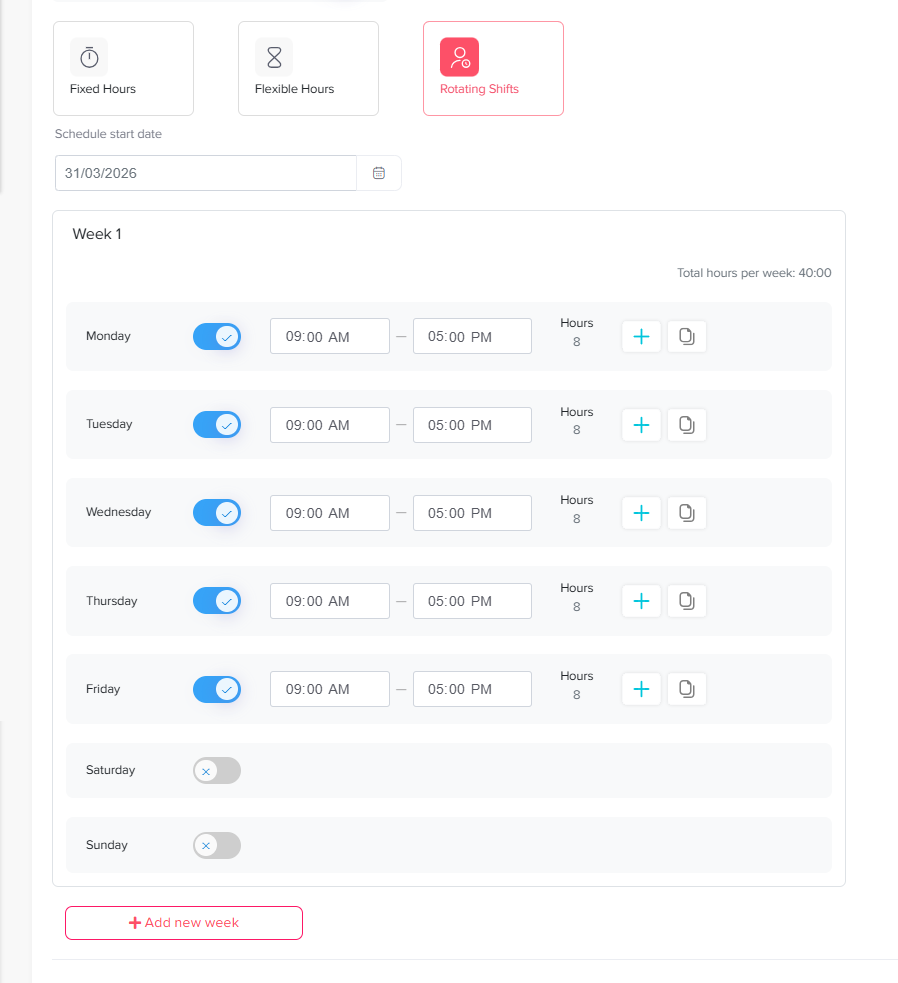
Step 2: Configure Employee Work Schedules
A leave calendar is only accurate when the system understands when employees are normally expected to work.
Consider an employee requesting Thursday through Sunday off.
For an employee working Monday through Friday, only Thursday and Friday may be working days.
For someone working a rotating Thursday through Sunday shift, all four days could matter.
Using schedules prevents managers from treating calendar days and working days as the same thing.
Day Off supports fixed days, fixed-hour schedules, flexible hours, and rotating shifts. Fixed-hour schedules can also contain split working periods.
This is particularly important when employees use hourly PTO or work nonstandard schedules.
Step 3: Add Public and Company Holidays
Public holidays change staffing requirements and leave calculations.
They also differ by location.
A U.S. employee, French employee, and German employee may follow different holiday calendars even when they work for the same company.
Your PTO calendar should therefore connect holidays with employee locations rather than assuming one company-wide calendar applies to everyone.
For international teams, location-specific calendars help managers see whether an employee’s absence overlaps with a local holiday or creates a longer period of reduced availability.
Step 4: Define Minimum Coverage Before Requests Arrive
Do not wait until four employees request the same Friday to decide how many people are allowed to be absent.
Define the rules beforehand.
A department might decide that:
- At least two support agents must remain on each shift.
- One payroll administrator must always be available during payroll processing.
- At least one manager must be reachable during business hours.
- No more than two employees from a particular operational group can take planned vacation simultaneously.
These are examples, not universal rules.
The appropriate minimum depends on workload, job responsibilities, staffing levels, seasonality, and the company’s operating model.
Predefined rules make leave decisions more consistent and easier to explain.
Step 5: Review Pending and Approved Absences Together
Approved PTO represents confirmed absence.
Pending PTO represents potential absence.
Both matter when reviewing a new request.
Suppose two employees already have pending requests for December 23, and a third person submits another request.
Looking only at approved leave could make the date appear completely available.
Managers should therefore evaluate the full request pipeline before making decisions.
This also helps avoid approving later requests without noticing that earlier ones are still waiting for review.
Step 6: Identify Busy Periods in Advance
Most organizations have periods when staffing matters more than usual.
Examples include:
- Financial year end
- Payroll processing dates
- Product launches
- Major customer events
- Inventory counts
- Holiday shopping periods
- Annual conferences
- Tax deadlines
- School enrollment periods
- Seasonal demand peaks
Marking these periods before employees request leave allows the company to communicate expectations earlier.
Some businesses choose to restrict leave completely during a very short critical period. Others allow leave but limit how many people can be away.
Day Off’s Blockout Dates feature allows companies to either prevent requests during selected periods or set a limit on how many requests can be accepted. Restrictions can also be applied at company, location, or team level.
The goal should not be to block vacation unnecessarily. It is to identify genuine operational constraints before they become emergencies.
Step 7: Use a Consistent PTO Approval Checklist
Before approving a request, managers can run through the same short checklist:
- Does the employee have enough available leave?
- Is the employee actually scheduled to work on the requested dates?
- Who else already has approved leave?
- Are there pending requests for the same period?
- Will required roles, skills, or shifts remain covered?
- Does the request overlap with an important deadline or restricted period?
- Is a handover required before the employee leaves?
This makes approval decisions more systematic.
It also reduces the risk that one manager approves leave based only on remaining PTO balance while another evaluates staffing.
Step 8: Add Handover Planning to the Process
Approving time off solves only the scheduling part of the problem.
Work still needs to be managed while the employee is away.
For longer or operationally important absences, managers should determine:
- Which tasks must be completed before leave begins
- Which work can wait until the employee returns
- Who will cover ongoing responsibilities
- Who should handle urgent questions
- Whether temporary permissions or system access are required
- Which customers or stakeholders should be informed
- Whether recurring meetings need to be reassigned
A good PTO process therefore has two stages:
Can the team support this absence?
Then:
How will the team operate during this absence?
How to Handle Overlapping PTO Requests Fairly
Overlapping requests are unavoidable, particularly around holidays and school vacation periods.
What matters is having a predictable process for resolving them.
Different organizations may use different approaches.
| Method | How It Works | Main Consideration |
|---|---|---|
| First come, first served | Earlier valid requests receive priority | Simple, but employees who plan later may repeatedly lose popular dates |
| Rotating priority | Priority changes between employees or years | Can distribute popular periods more evenly |
| Minimum staffing rule | Requests are approved until coverage reaches a defined limit | Keeps decisions tied to operational needs |
| Role-based coverage | Leave is permitted as long as required responsibilities remain covered | Useful where employees have specialized duties |
| Manager review | Manager evaluates each situation individually | Flexible, but requires clear standards to remain consistent |
Companies do not necessarily need one method for every situation.
For example, a company may normally use first come, first served but use a rotating system for Christmas and New Year.
Whatever method is selected should be documented in the PTO policy and applied consistently.
Do Not Automatically Reject Overlapping Leave
Seeing two employees request the same dates does not automatically mean one request must be denied.
Instead, ask whether there is an actual coverage conflict.
Two employees from a 30 person department taking the same week off may create no operational problem.
Two people from a three person payroll team being absent on payroll day might.
The relevant question is therefore not:
Are two employees off at the same time?
It is:
Can the teamoperate properly with both employees away?
That distinction helps organizations support time off without creating unnecessary restrictions.
PTO Calendar Privacy: What Should Employees Be Able to See?
Shared calendars are useful because employees can plan around one another.
But transparency should not mean exposing unnecessary personal information.
In many cases, employees only need to know:
- That a colleague is unavailable
- The dates of the absence
- Possibly whether it is a full or partial day
They often do not need to know the medical, family, or personal reason behind the absence.
A company might display:
Sarah: Out of office
instead of:
Sarah: Medical leave for treatment
The appropriate configuration depends on the company’s privacy policies, applicable laws, and operational needs.
Sensitive information should remain restricted to people who genuinely need access.
PTO Calendars and Legally Protected Leave
Planned vacation should not automatically be managed the same way as every other type of absence.
For U.S. employers, for example, the Fair Labor Standards Act does not generally require employers to provide paid vacation. Vacation benefits are largely governed by the employment agreement and applicable state or local rules.
Separately, eligible employees of covered employers may have job protected leave rights under laws such as the Family and Medical Leave Act. FMLA leave can also run concurrently with employer-provided paid leave in certain circumstances.
That means a rule such as “only two employees may be off at once” should not simply be applied to legally protected leave without considering the relevant legal requirements.
Organizations operating across different states or countries should review the leave laws that apply to their employees and obtain appropriate professional guidance when necessary.
How Far Ahead Should Employees Request PTO?
There is no single notice period that works for every organization.
The appropriate period depends on:
- Length of leave
- Team size
- Industry
- Employee responsibilities
- Seasonality
- Scheduling complexity
A practical policy can use different expectations for different types of leave.
For example:
- One day of planned leave: several days’ notice where practical
- One week of vacation: several weeks’ notice
- Extended planned leave: earlier discussion with the manager
Unexpected illness and emergency leave obviously cannot always follow advance notice rules.
The purpose of notice requirements should be to give managers enough time to plan coverage, not to make legitimate time off unnecessarily difficult to use.
PTO Calendar for Remote and Global Teams
Remote companies often need a PTO calendar even more than office based teams.
In an office, an employee’s absence may be visually obvious.
In a remote company, a colleague can appear to be simply offline.
Global teams add further complexity:
- Different time zones
- Different weekends
- Country-specific holidays
- Different work schedules
- Different leave policies
- Different local employment requirements
Consider a project involving employees in New York, London, and Dubai.
One person’s vacation may overlap with another employee’s local public holiday, leaving only a small window of shared availability.
A global PTO calendar should therefore make location, schedule, holidays, and leave part of the same planning picture.
Use Calendar Filters Instead of Showing Everyone Everything
As a company grows, one giant company calendar becomes less useful.
An employee on a 200-person team probably does not need to see every absence across the organization.
Useful filtering options include:
- Team
- Department
- Location
- Employee
- Date range
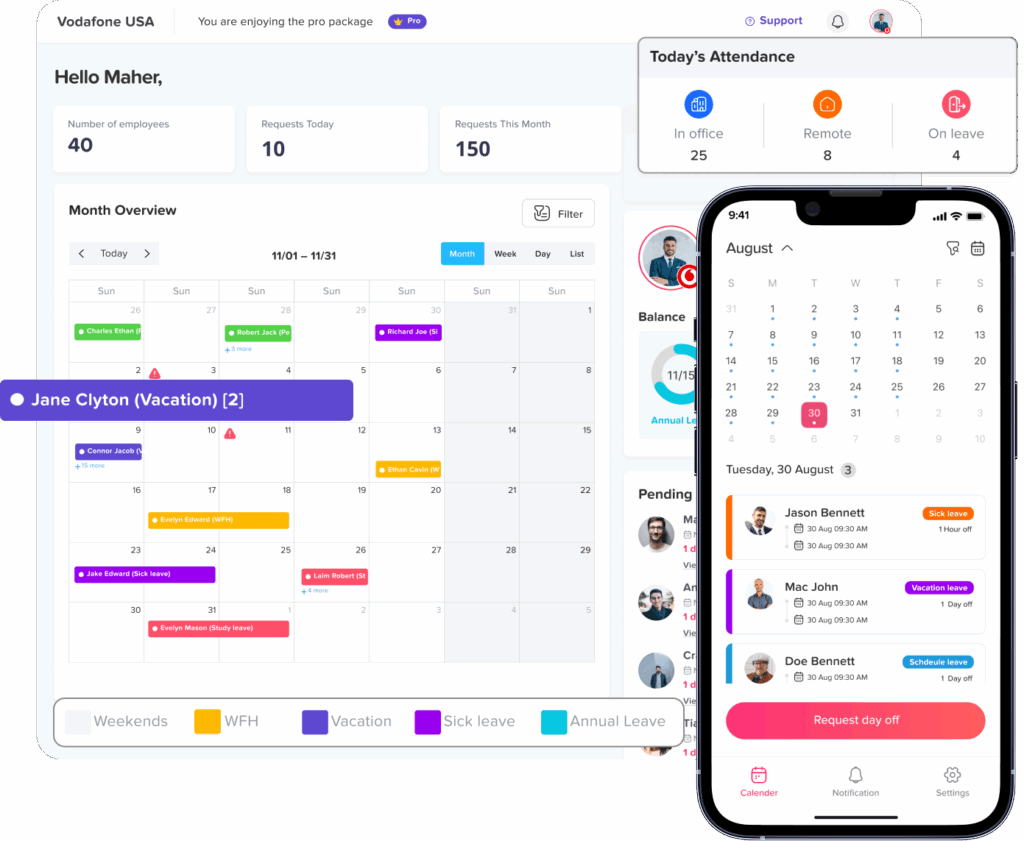
Day Off’s dashboard calendar supports monthly, weekly, and list views, and the calendar can be filtered by team or location. It also displays accepted requests and official holidays, helping managers focus on the people whose availability actually affects their work.
The goal is relevant visibility, not maximum visibility.
Sync PTO With the Tools Employees Already Use
Employees should not need to repeatedly open an HR system just to discover that a colleague is away.
Approved leave can also appear inside the collaboration tools employees use every day.
For example, Day Off can sync accepted leave with Google Calendar and Outlook Calendar. It also integrates with Slack and Microsoft Teams for leave related workflows and team availability updates.
This creates a useful separation:
Leave management system: requests, policies, balances, approvals, reports.
Work calendar: everyday awareness of who is available.
Trying to manage PTO entirely inside a general purpose calendar becomes harder once the organization needs accruals, balances, approval workflows, leave policies, carryover rules, and reporting.

How Day Off Helps Teams Manage PTO Calendars
Day Off combines leave requests, balances, policies, calendars, schedules, and approvals in one leave management system.
For calendar planning specifically, teams can use Day Off to:
- View accepted leave and holidays on a centralized dashboard calendar
- Switch between monthly, weekly, and list views
- Filter absence information by team or location
- See multiple employees taking leave on the same date
- Review request details
- Display blockout periods
- Limit or restrict leave requests during selected periods
- Organize employees into teams and departments
- Assign work schedules
- Manage multiple locations and local holidays
- Sync approved PTO with Google Calendar
- Sync approved PTO with Outlook Calendar
- Receive leave related information through Slack or Microsoft Teams
Day Off’s calendar is designed to work alongside the rest of the leave management process rather than requiring managers to maintain a separate vacation spreadsheet.
That matters because availability, balances, policies, work schedules, and approvals are connected.
A manager can make a better decision when those pieces are visible within the same system.
A Simple PTO Calendar Workflow for Teams
A practical workflow can look like this:
Employee submits a request
The employee selects the dates and appropriate leave type.
The system checks the employee’s leave setup
The request can be evaluated against available balance, policy settings, work schedule, and applicable restrictions.
Manager reviews team availability
The manager checks approved and relevant pending leave, staffing needs, and important dates.
Manager approves or rejects the request
The decision follows the organization’s PTO policy and coverage requirements.
Approved leave appears on the calendar
Relevant team members can see the employee’s availability.
External calendars or collaboration tools update
Where integrations are enabled, approved leave becomes visible in tools such as Google Calendar, Outlook, Slack, or Microsoft Teams.
Handover happens before the absence
Responsibilities are reassigned where necessary.
This creates a repeatable process instead of handling each vacation through a different combination of messages and spreadsheets.
How to Know Whether Your PTO Calendar Is Working
A PTO calendar is useful when it improves decisions, not simply because it exists.
Managers can periodically review questions such as:
- Are coverage conflicts being discovered before leave begins?
- Are employees able to see enough availability information to plan requests?
- Are managers responding to requests promptly?
- Are approved absences automatically reflected in the calendar?
- Are employees still asking who is off today because the calendar is unclear?
- Are different departments maintaining separate spreadsheets anyway?
- Are important holidays and work schedules configured correctly?
- Are blockout periods being used only where genuinely necessary?
- Are recurring staffing problems appearing around the same dates?
If the answer reveals repeated confusion, the problem may be the process rather than the calendar itself.
PTO Calendar Best Practices
A strong PTO calendar process can be summarized with a few principles:
- Keep one authoritative leave record.
- Connect PTO to actual employee schedules.
- Include location specific holidays.
- Define coverage requirements before requests arrive.
- Review pending and approved leave together.
- Consider roles and skills, not just headcount.
- Protect sensitive leave information.
- Establish fair rules for high demand periods.
- Sync approved leave with everyday work tools.
- Plan handovers for important or extended absences.
- Review recurring coverage problems and adjust staffing or policies where needed.
The aim is not to make taking PTO harder.
It is to make time off predictable and manageable for both employees and the organization.
FAQ
What is a PTO calendar for teams?
A PTO calendar for teams is a shared view of planned employee absences, such as vacation, personal leave, and other approved time off. Managers use it to understand team availability, identify overlapping absences, and plan coverage before approving additional leave.
What should managers check before approving PTO?
Managers should review the employee’s available balance, work schedule, existing approved leave, pending requests, minimum staffing requirements, critical responsibilities, and important business dates. For longer absences, they should also consider whether a handover is required.
Should pending PTO requests appear on the calendar?
Managers should have a way to consider pending requests when assessing coverage. Otherwise, several requests may be reviewed independently even though approving all of them would create a staffing problem. Whether pending requests are visible to all employees is a separate privacy and workflow decision.
How can a company prevent too many employees from taking PTO at once?
Companies can define minimum staffing levels, establish consistent rules for overlapping requests, monitor pending and approved leave, and use limited blockout periods during critical business dates. Decisions should be based on real coverage requirements rather than automatically rejecting every overlapping request.
Should employees be able to see who is on PTO?
Some visibility can help employees plan meetings, deadlines, and their own leave. However, companies should consider privacy when deciding what information appears. In many situations, employees only need to know that a colleague is unavailable and for how long, not why they are taking leave.
Is Google Calendar enough for PTO tracking?
Google Calendar can be useful for displaying approved absences, but a general calendar does not by itself provide the full leave management workflow that growing teams may require, such as leave balances, accrual rules, policies, approval workflows, carryover tracking, blockout dates, and leave reports. A leave management platform can remain the system of record while synchronizing approved PTO with Google Calendar.
How often should managers review the PTO calendar?
Managers should review relevant team availability whenever they evaluate a leave request and before periods involving major deadlines, seasonal demand, or multiple planned absences. Teams with shift-based or highly time-sensitive operations may need to review upcoming availability more frequently.
Conclusion
A PTO Calendar for Teams should do more than record vacation dates. When leave information is connected with work schedules, holidays, approval workflows, roles, and staffing requirements, the calendar becomes a practical tool for workforce planning.
The strongest PTO processes allow employees to take their earned time off while giving managers enough visibility to protect essential operations. That means reviewing actual capacity instead of simply counting absences, setting clear rules before popular vacation periods arrive, protecting employee privacy, planning handovers, and keeping one reliable source of truth for leave information.
With Day Off, teams can manage PTO requests, balances, work schedules, holidays, approvals, blockout dates, and team availability within the same platform. Calendar integrations with Google Calendar and Outlook, together with Slack and Microsoft Teams integrations, can also help keep approved absences visible where employees already work.
A well managed PTO calendar does not prevent employees from taking time off. It helps the business prepare for that time off before a coverage gap becomes a problem.