







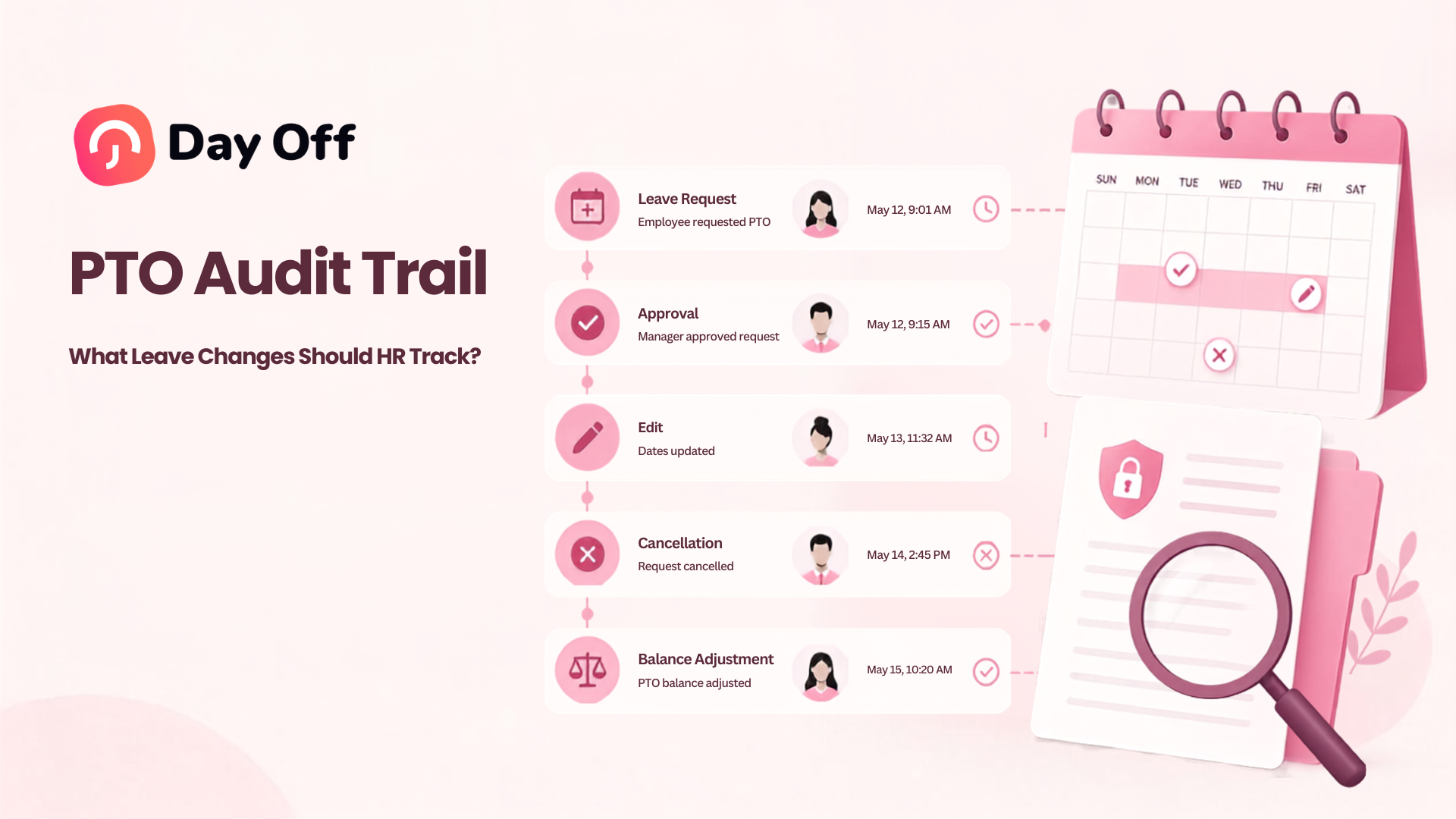
Managing paid time off is not only about knowing how many vacation days an employee has left. HR teams also need to understand how those balances changed, who approved a request, when a policy was updated, and why a manual adjustment was made. A reliable PTO audit trail creates this history by recording important actions and changes throughout the leave management process.

Without that history, a balance showing 12 remaining PTO days may look correct, but HR may have no easy way to explain how the employee reached that number. Was an accrual added? Was a request canceled? Did an administrator manually increase the balance? Did the employee move to a different policy?
These questions become particularly important during payroll reviews, employee disputes, policy audits, manager transitions, year end reconciliation, and compliance checks.
A strong PTO audit trail gives HR a chronological record that helps answer a simple but critical question:
How did the employee’s current leave record become what it is today?
This guide explains what a PTO audit trail is, which leave changes HR should track, what information each audit record should contain, and how organizations can build a more reliable PTO recordkeeping process.
What Is a PTO Audit Trail?
A PTO audit trail is a chronological record of significant activity related to employee paid time off.
Instead of storing only the employee’s current PTO balance or latest leave request, the system preserves information about the events that caused those records to change.
For example, imagine an employee currently has 64 hours of vacation available. The balance alone does not explain the history behind those 64 hours.
An audit trail may show that the employee:
received 80 hours at the beginning of the year, earned another 16 hours through monthly accruals, used 24 hours for an approved vacation, received an 8-hour manual correction, and had 16 hours carried over from the previous year.
That history makes the final balance easier to verify.
A PTO audit trail can also record changes to requests, approvals, employee assignments, leave policies, accrual rules, carryover settings, and administrative adjustments.
Why PTO Audit Trails Matter
Leave records affect much more than a calendar.
Depending on the organization and jurisdiction, PTO information can influence employee balances, payroll calculations, staffing decisions, leave payouts, attendance records, and manager approvals.
In the United States, the Fair Labor Standards Act does not generally require employers to provide vacation or paid time off. Vacation benefits are typically determined by agreements between employers and employees, although state laws and other rules can create additional requirements.
This makes accurate internal policies and records especially important. Employers may need to show that the PTO rules they established were applied correctly and consistently.
The U.S. Department of Labor also requires covered employers to maintain accurate records of items such as hours worked and wages for nonexempt employees. Payroll records generally must be retained for at least three years, while certain records used for wage calculations must generally be retained for two years.
PTO records are not automatically subject to exactly the same retention requirements in every situation, but leave can interact with payroll, hours worked, attendance, and wage calculations. Organizations should therefore establish retention practices based on the laws that apply to their location, workforce, leave programs, and payroll processes.
Operationally, a reliable PTO audit trail helps HR reconstruct what happened instead of depending on email threads, spreadsheets, manager memory, or assumptions.
What Information Should Every PTO Audit Record Contain?
Tracking that something changed is useful. Tracking exactly what changed is much more valuable.
A good audit event should normally preserve enough information for HR to reconstruct the action later.
| Audit Information | What It Should Show | Example |
|---|---|---|
| Date and time | When the action occurred | September 4, 2026, 10:42 AM |
| Employee | Whose leave record was affected | Sarah Johnson |
| Action | What happened | Balance adjustment |
| Previous value | Value before the change | 40 hours |
| New value | Value after the change | 48 hours |
| Changed by | User or process responsible | HR Admin |
| Reason | Why the change occurred | Correction for missing accrual |
| Related record | Request, policy, payroll period, or transaction | Vacation request #1842 |
| Approval information | Who approved or rejected the event when relevant | Team Manager |
| Source | Manual action, automatic rule, import, API, etc. | Manual admin adjustment |
The exact fields will vary between systems, but the central principle remains the same: HR should be able to identify who changed what, when it changed, and why.
PTO Balance Adjustments
Manual balance changes are among the most important actions to audit.
Administrators may occasionally need to add or remove PTO because of a migration error, policy correction, negotiated benefit, payroll reconciliation, previous system issue, or employee specific adjustment.
If an administrator changes an employee’s vacation balance from 40 hours to 56 hours, simply saving the new number creates a weak record.
The audit trail should preserve both values.
For example:
Previous balance: 40 hours
Adjustment: +16 hours
New balance: 56 hours
Reason: Missing January and February accruals
Changed by: HR administrator
Date: March 3
Recording the adjustment separately from the final balance makes future reconciliation much easier.
The same principle applies when PTO is deducted manually.
Accrual Transactions
If employees earn PTO gradually, every accrual transaction contributes to their balance.
HR should be able to identify when PTO was earned, how much was added, which accrual rule generated it, and which period the accrual covered.
For example, an employee may earn 6.67 hours of vacation every month.
The audit history should distinguish those automatic accruals from manual adjustments.
Otherwise, HR may see the balance increase without knowing whether the increase resulted from a scheduled accrual, administrator intervention, or another transaction.
This becomes especially valuable when employees change policies or when accrual schedules are corrected retroactively.
Leave Requests
Every leave request creates important historical information.
HR should preserve the original request details even if the request is later modified, canceled, approved, or rejected.
Important request information can include the employee, leave type, requested dates, duration, units, submission time, request reason where appropriate, and the balance impact.
For hourly PTO, the record should also make clear how many hours were requested.
For example, a request for September 14 may deduct four hours rather than one full day. That distinction matters when reviewing balances later.
Changes to Existing Leave Requests
Editing an existing request should create an audit event rather than simply overwriting the original information.
Consider an employee who originally requests:
October 12 to October 16: 5 vacation days
The request is later changed to:
October 12 to October 14: 3 vacation days
The system should preserve both versions.
Otherwise, HR may see only a three-day absence without knowing that two days were previously included and returned to the employee’s balance.
Tracking request edits is particularly useful when the modification occurs after manager approval.
Request Approvals
Approval actions should also become part of the historical record.
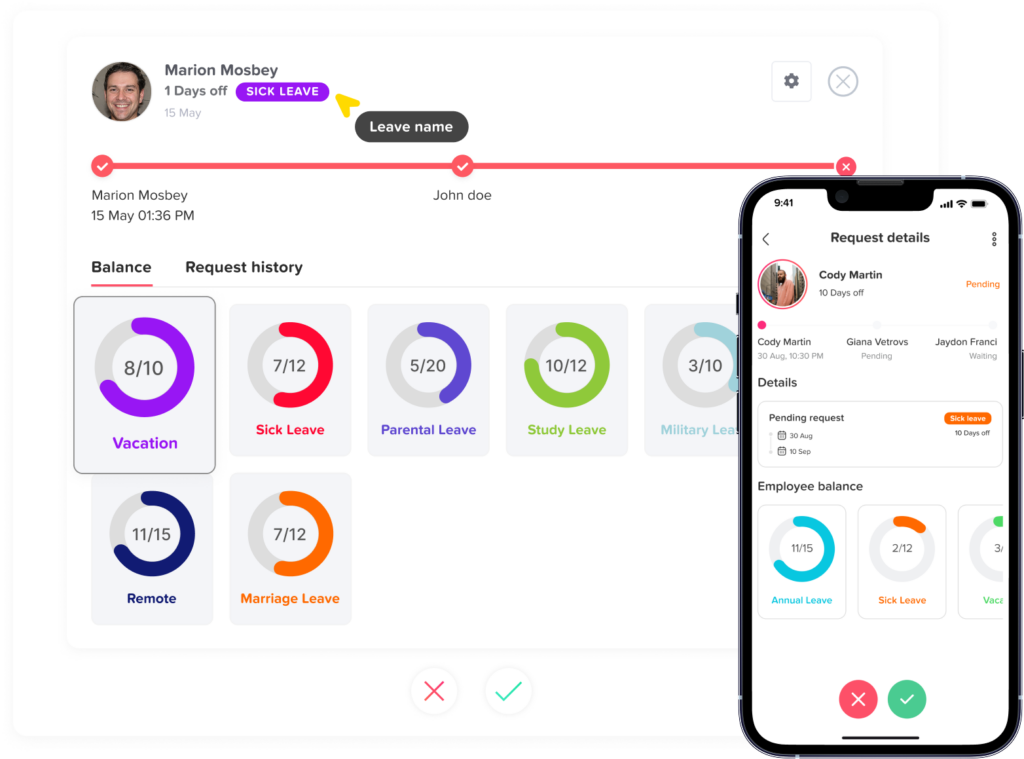
HR should be able to determine who approved the leave request, when the approval happened, which approval step was completed, and whether the request required additional approval.
This becomes more important in organizations with multiple departments, complex management structures, or multi-level approval workflows.
An employee may ask why a leave request remained pending for several days. An audit history can show when the request was submitted and when each approver acted.
That provides a factual timeline rather than requiring HR to investigate old messages.
Rejections
Rejected requests deserve the same level of traceability as approvals.
The record should show which manager or administrator rejected the request and when.
If the organization collects rejection reasons, those may also be useful to preserve, subject to appropriate privacy controls.
Tracking rejected requests allows HR to investigate patterns, respond to employee questions, and determine whether leave procedures are being applied consistently.
Canceled Leave Requests
Cancellation is another important event because it often affects an employee’s available balance.
Suppose an employee requests three vacation days and the request is approved. The system deducts 24 hours.
Two weeks later, the employee cancels the vacation.
The audit trail should show the cancellation and the corresponding return of those 24 hours.
It should not simply remove the original request as if it never existed.
The historical sequence matters:
Request submitted → approved → PTO deducted → request canceled → PTO restored.
That history explains both the calendar and the balance.
Requests Deleted by Administrators
Deletion creates a special audit risk.
If an administrator can completely erase a request without leaving any history, the organization may lose valuable information explaining previous balances or payroll records.
For this reason, systems should ideally distinguish between removing a record from normal operational views and destroying its historical existence.
At minimum, HR should consider retaining information showing that a record existed, who removed it, when it was removed, and what the record contained before deletion.
Changes to Leave Types
Leave types can affect employee balances and reporting.
Examples include vacation, sick leave, personal leave, bereavement, unpaid leave, maternity leave, paternity leave, and compensatory time.
If an administrator changes an existing request from one leave type to another, that change should be recorded.
For example:
Original request: 2 days of vacation
Updated request: 2 days of sick leave
The total absence remains two days, but the balance consequences may be completely different.
A PTO audit trail should therefore record changes in classification, not only changes in duration.
Changes to PTO Policies
Employee requests are only one side of PTO administration. The policies controlling those requests also change.
Organizations may modify accrual rates, annual allowances, carryover limits, maximum balances, eligibility rules, waiting periods, notice requirements, request limits, or other policy settings.
Those changes can affect dozens or hundreds of employees.
HR should therefore know when a policy changed, who changed it, which settings were modified, and when the new rules became effective.
| Policy Change | Example | Why the History Matters |
|---|---|---|
| Annual allowance | 15 days changed to 20 | Explains future balance differences |
| Accrual rate | 1 day/month changed to 1.5 days/month | Affects recurring balance growth |
| Carryover limit | 5 days changed to 10 | Impacts year-end balances |
| Maximum balance | 160 hours changed to 200 | Can affect accrual caps |
| Waiting period | 90 days changed to 30 | Changes employee eligibility |
| Minimum notice | 7 days changed to 14 | Affects request rules |
| Maximum request | 10 consecutive days changed to 15 | Changes allowable leave duration |
| Leave unit | Days changed to hours | Affects deduction calculations |
Policy history becomes especially important when a rule changes during the year.
HR needs to know which version of the policy applied when an earlier transaction occurred.
Employee Policy Assignments
Changing the policy assigned to an employee can have a major effect on PTO calculations.
An employee may move from one location to another, become eligible for a seniority based policy, change employment status, transfer departments, or receive a different benefit package.
The audit history should show the previous policy, new policy, assignment date, effective date, and user responsible for the change.
Without that record, a sudden balance difference may appear unexplained.
Carryover Transactions
Year-end PTO processing deserves its own audit history.
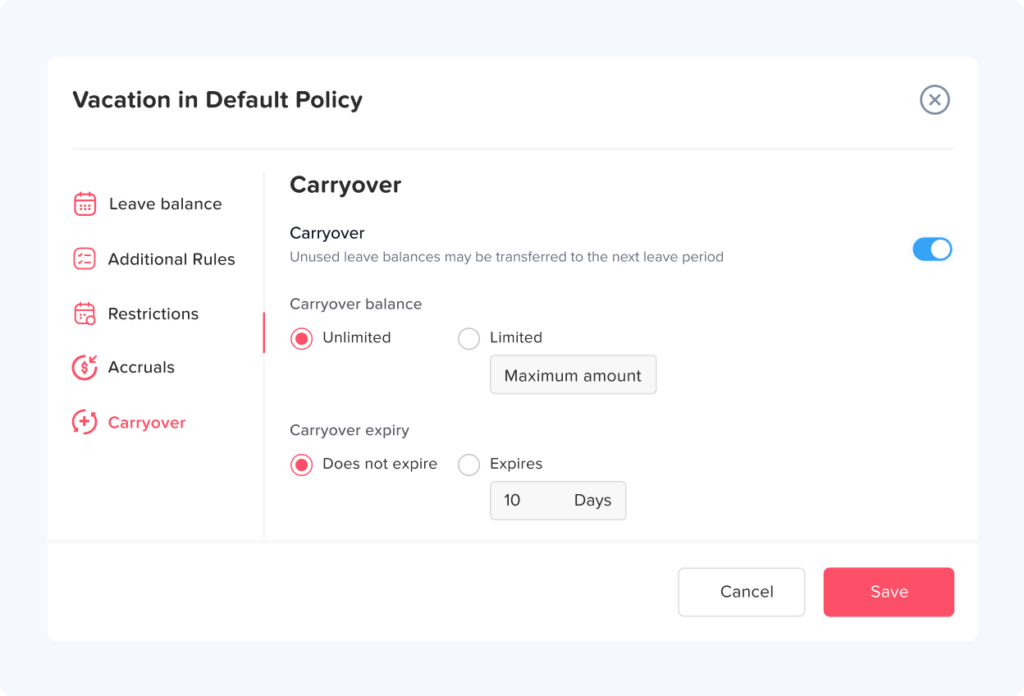
If unused leave can carry forward into the next year, HR should be able to identify the balance before year-end processing, amount carried forward, amount expired, applicable carryover limit, and resulting opening balance.
Consider an employee ending the year with 96 unused hours under a policy that allows a maximum carryover of 40 hours.
The audit history should make clear that 40 hours moved into the new year and 56 hours expired under the policy.
Simply showing a new year balance of 40 hours leaves part of the story missing.
PTO Expiration
Some leave policies include expiration rules.
For example, carried-over vacation may expire after March 31 if employees do not use it.
Expiration should create a specific transaction in the history.
An employee who sees their balance decrease from 72 hours to 48 hours should be able to receive a clear explanation such as:
24 carried over hours expired on April 1 according to the carryover policy.
That is much more transparent than an unexplained balance reduction.
Opening Balances and Data Migration
When a company begins using a new leave management system, existing employee balances often need to be imported.
Those starting balances should be distinguishable from PTO earned inside the new system.
For example:
Opening balance imported: 72 hours
Effective date: January 1
Source: Previous HR spreadsheet
This makes future audits easier because HR knows where the initial value came from.
Migration records are particularly important during the first year after switching systems.
Retroactive Adjustments
Sometimes HR discovers that a previous event should have been recorded differently.
Perhaps an employee’s accrual rate was incorrect for three months or a PTO request from a previous pay period was entered late.
Instead of quietly modifying historical balances, the system should create a correction event.
Ideally, the record should identify the original transaction, correction amount, effective date, date the correction was entered, person responsible, and reason.
This preserves both operational accuracy and historical transparency.
Compensatory Time Changes
Organizations using compensatory time should track those transactions separately from standard vacation balances.
An employee may earn additional time off because of overtime, weekend work, holiday work, or another company policy.
The record should show when the time was granted, how much was granted, why it was awarded, who approved it, and when it was later used or expired.
Mixing these transactions into generic PTO adjustments makes it harder for HR to determine where the balance came from.
Administrative Overrides
Leave management systems often give administrators additional authority.
An administrator may override a normal restriction, approve a request on behalf of a manager, correct an employee balance, or process an exceptional request.
Those actions are not necessarily problematic. HR teams need exceptions.
However, exceptions should be visible.
Administrative overrides should therefore be among the most clearly documented actions in the audit trail.
The audit history should explain what normal rule was bypassed, who performed the override, and why.
Approval Workflow Changes
Organizations sometimes change who is responsible for approving leave.
Perhaps an employee receives a new manager or the company introduces a second approval step.
Those workflow changes should be recorded because they help explain why older requests followed one process while newer requests followed another.
For example, a leave request from February may have required approval only from the direct manager, while requests submitted after July require both a manager and department head.
Historical workflow information prevents confusion when reviewing older records.
Changes to Employee Work Schedules
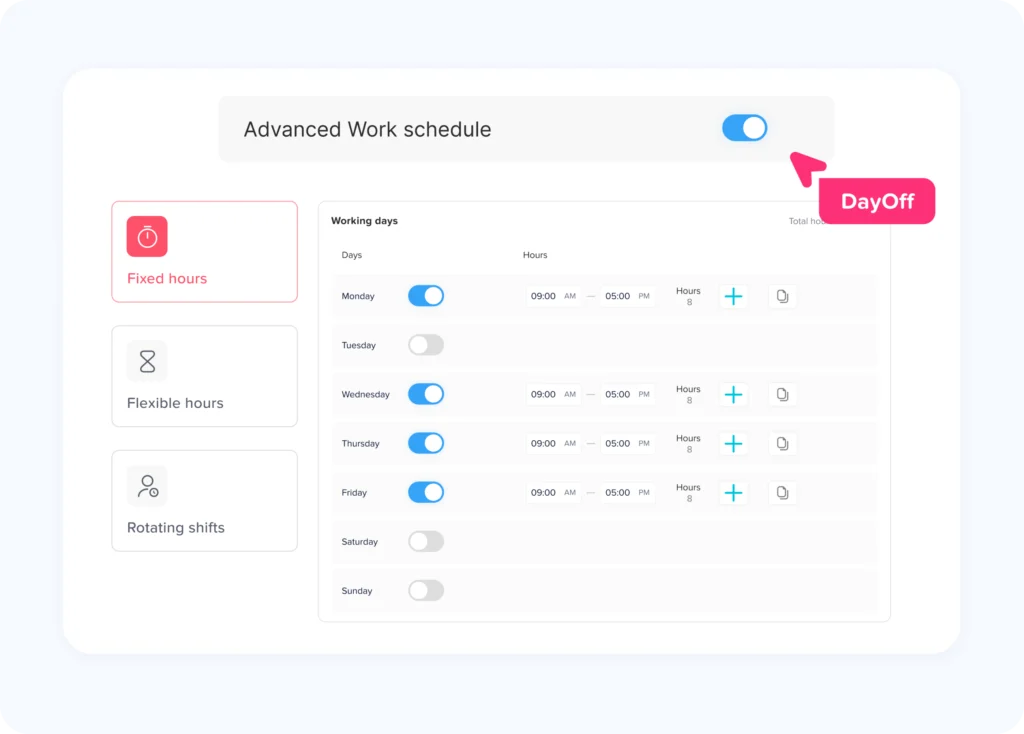
Work schedules can directly influence PTO calculations, especially when leave is tracked in hours.
Suppose one employee works eight hours Monday through Friday while another works ten-hour shifts four days per week.
A full day’s leave does not necessarily represent the same number of hours for both employees.
If an employee’s work schedule changes, HR should preserve the effective date of that change.
Otherwise, reviewing historical hourly leave deductions can become difficult because the employee’s current schedule may differ from the schedule that applied when the leave occurred.
Changes to Holiday Calendars
Public holidays can also affect PTO calculations.
Depending on company policy, holidays occurring during a vacation period may or may not deduct from an employee’s balance.
Changes to an employee’s work location or assigned holiday calendar should therefore be traceable.
For multinational organizations, this becomes even more important because employees in different countries or regions may follow different public holiday calendars.
Bulk PTO Changes
Bulk actions deserve special attention because one administrative action may affect many employees simultaneously.
Examples include annual balance resets, organization-wide PTO grants, migration imports, policy reassignment, carryover processing, and corrections after an accrual error.
A bulk operation should ideally have both an overall event record and individual employee-level transactions.
That way, HR can determine that 150 employees were updated through the same process while still examining how the operation affected one specific employee.
Manual Changes vs. Automatic Changes
| Change Source | Example | What HR Should Know |
|---|---|---|
| Employee | Submits or cancels a request | Employee, timestamp, request details |
| Manager | Approves or rejects leave | Manager, decision, timestamp |
| HR administrator | Adjusts a balance | Previous value, new value, reason |
| Automatic accrual | Monthly PTO added | Rule used, amount, accrual period |
| Carryover process | Unused leave transferred | Old balance, carried amount, expired amount |
| Expiration rule | Old leave expires | Amount removed and rule responsible |
| Import | Balances uploaded | Import source, date, affected employees |
| API/integration | External system changes a record | Integration, action, timestamp |
Should Employees Be Able to See the PTO Audit Trail?
Not every audit record needs to be visible to every employee.
However, employees benefit from being able to understand the transactions affecting their balances.
A practical employee-facing leave history may show accruals, approved leave deductions, canceled requests, carryover, expiration, and manual balance adjustments.
More sensitive administrative information can remain restricted to HR or authorized managers.
This approach combines transparency with appropriate access control.
Who Should Be Allowed to Modify PTO Records?
Auditability becomes less useful if everyone can change important records.
Organizations should define role-based permissions around sensitive actions.
A practical control structure may reserve policy configuration, historical corrections, manual balance adjustments, and bulk changes for HR or designated administrators while allowing managers to approve requests and employees to manage their own requests within defined rules.
The principle of least privilege is useful here: users should receive only the level of access necessary for their responsibilities.
Should Audit Records Be Editable?
The purpose of an audit trail is weakened if historical events can be changed without leaving evidence.
If HR needs to correct an incorrect transaction, it is generally better to create another transaction that reverses or corrects the previous one.
For example, instead of rewriting a historical +8-hour adjustment into +4 hours, the system could preserve the original event and add a -4-hour correction.
The resulting history shows both what originally happened and how the mistake was corrected.
Similar reasoning is used in reliable timekeeping practices. SHRM notes that when time records are changed, employers should document the reason for modifications and retain enough history for a third party to understand what changed and whether the records accurately reflect what occurred.
How a PTO Audit Trail Helps During Employee Disputes
Consider an employee who contacts HR and says:
“My balance should be 10 days, but the system says 7.”
Without transaction history, HR may need to inspect spreadsheets, emails, calendars, and manager messages.
With a proper audit trail, HR can reconstruct the balance:
Opening balance: 8 days
January accrual: +1 day
February accrual: +1 day
March accrual: +1 day
Vacation used: -3 days
Manual correction: -1 day
Current balance: 7 days
HR can then investigate the one-day manual adjustment rather than questioning the entire record.
The audit trail does not automatically prove every transaction was correct. It makes the transactions visible so they can be checked.
PTO Audit Trails and Payroll Reconciliation
Leave records and payroll records often interact.
Paid leave may need to appear correctly within payroll periods, while unpaid leave can affect compensation differently.
Errors may occur when leave is entered after payroll closes, when a request is modified retroactively, or when attendance and PTO records do not match.
An audit trail gives payroll and HR teams a timeline that can be compared against the relevant pay period.
For example, HR can determine whether an employee’s request was approved before payroll was processed or entered three days afterward.
That information can help explain why a correction was necessary.
PTO Audit Trails for Departing Employees
Accurate PTO history can become especially important when an employee leaves the company.
Depending on applicable laws and company policy, unused vacation balances may need to be reviewed when calculating final compensation.
Requirements vary considerably by jurisdiction, so organizations should not rely on a single universal PTO payout rule.
HR should be able to verify how the employee’s final balance was calculated, including accrued leave, leave already taken, pending requests, manual adjustments, carryover, and expiration.
A documented history makes final balance verification significantly easier.
How HR Should Review PTO Audit Logs
Audit trails are most valuable when organizations actually review them.
HR does not necessarily need to inspect every leave transaction manually. Instead, teams can focus on unusual or higher-risk activity.
Examples include large manual balance increases, frequent administrator overrides, repeated changes to previously approved requests, retroactive adjustments, unusual negative balances, mass policy changes, deleted records, and repeated corrections involving the same employee or administrator.
Periodic reviews can catch configuration errors before they affect large numbers of employees.
For example, if an accrual policy accidentally grants eight hours twice in the same month, reviewing balance transactions can reveal the duplicate much sooner.
PTO Audit Trail Retention
There is no universal retention period that applies to every PTO record in every location.
Retention requirements can depend on the country, state, employment classification, payroll relationship, type of leave, employment agreement, and whether another law applies.
For U.S. employers covered by the FLSA, certain payroll records must generally be preserved for three years, while records used as the basis for wage calculations, such as work schedules and time records, generally have a two-year retention requirement.
Employers should develop a documented retention schedule that considers federal, state, and local obligations along with internal legal and payroll requirements.
The important operational rule is consistency. HR should know which records are retained, for how long, and how they are securely deleted when the retention period ends.
Protecting Privacy in PTO Audit Records
More audit data is not automatically better.
A PTO audit trail should record information necessary to explain administrative actions without becoming an unnecessary repository of sensitive employee information.
For example, HR may need to know that an employee used sick leave. That does not automatically mean every administrator should see detailed medical information.
Access should therefore depend on role and business need.
Audit logs should also be protected against unauthorized editing, unnecessary exporting, and excessive access.
Building a Better PTO Audit Process
The strongest audit process combines software, clear rules, and defined HR responsibilities.
At minimum, organizations should decide which events must be logged, which users can make sensitive changes, when administrators must enter a reason, how corrections are performed, who can review historical records, and how long records are retained.
The process should also be tested.
Take one employee and attempt to reconstruct their balance from the beginning of the year using transaction history alone.
If HR cannot reproduce the current balance, important information is probably missing.
This simple reconciliation exercise is one of the easiest ways to evaluate whether a PTO audit trail is actually useful.
Using Day Off to Keep PTO Records Organized
Managing PTO histories becomes increasingly difficult when requests, approvals, employee balances, calendars, and policies are spread across spreadsheets, emails, and separate documents.
Day Off provides a centralized leave management environment where organizations can manage employee leave balances, leave requests, approval workflows, accruals, carryover rules, policies, employee history, and reporting.
Instead of relying on a manually updated PTO spreadsheet, HR teams can maintain leave information alongside the workflows that create those records.
Day Off also supports organizations managing different leave types, teams, locations, work schedules, and approval structures, helping HR maintain a clearer picture of employee time off across the company.
Centralization is particularly useful during balance reviews because HR can investigate leave activity within the same system used to manage requests and policies.
For organizations that also need attendance visibility, combining PTO records with time tracking and work schedule information can make it easier to investigate differences between planned leave, employee availability, and recorded work time.
PTO Audit Trail Checklist
A useful way to evaluate your current process is to select a random employee and ask whether HR can answer the following questions from existing records: What was the employee’s opening PTO balance? How much PTO has been accrued? What leave has been used? Which requests were canceled or changed? Were any manual adjustments made? Who made each adjustment? Which policy applied at the time? Was any PTO carried over or expired? Can the current balance be independently reconstructed?
If several of those questions cannot be answered, your PTO records may show the current state without providing a complete audit history.
FAQ
What is a PTO audit trail?
A PTO audit trail is a chronological history of significant changes to an employee’s paid time off records. It can include accruals, leave requests, approvals, cancellations, balance adjustments, carryover, expiration, policy changes, and administrative corrections.
What changes should be included in a PTO audit log?
HR should generally track events that affect an employee’s leave balance, request history, eligibility, approval status, or applicable PTO rules. Particularly important events include manual adjustments, request edits, policy changes, cancellations, carryover transactions, and administrative overrides.
Should PTO balance adjustments include a reason?
Yes. A manual adjustment is much easier to audit when HR can see why it occurred. A useful record should include the amount, previous balance, new balance, administrator, timestamp, and reason for the adjustment.
Can an employer change an employee’s PTO balance?
Whether and how an employer may change PTO balances depends on the applicable policy, employment agreement, and federal, state, local, or national law. Employers should document corrections clearly and make sure changes follow the rules that apply to their workforce.
How long should companies keep PTO records?
There is no single PTO retention period that applies to every organization. Requirements vary by jurisdiction and by how leave information interacts with payroll and employment records. Employers should create a documented retention policy based on applicable legal requirements and obtain appropriate legal guidance where necessary.
Should deleted PTO requests remain in the audit history?
For audit purposes, preserving evidence that a request existed and was later removed is generally more useful than erasing the event completely. HR should be able to determine who performed the deletion, when it occurred, and what record was affected.
Why should HR track old PTO policy settings?
Historical settings help explain why a previous balance or transaction was calculated differently from a current one. If an accrual rate changed from 10 days per year to 15 days, HR needs to know when that change became effective before reviewing older balances.
Conclusion
A PTO system should tell HR more than how many days an employee has available today. It should also explain how that number was reached.
A reliable PTO audit trail creates a clear history of leave requests, approvals, cancellations, accruals, balance adjustments, carryover, expiration, policy changes, employee assignments, and administrative actions.
That history gives HR something much more useful than a final number: context.
When an employee questions a balance, payroll needs to investigate a historical change, a manager asks about an old request, or HR reviews year-end records, the organization can follow a documented sequence of events rather than reconstructing the story manually.
The most effective approach is simple: preserve important changes, identify who made them, record when they happened, keep previous and new values where relevant, and document the reason behind unusual adjustments.
With structured leave management tools such as Day Off, organizations can move away from fragmented spreadsheets and manual PTO records and create a more organized process for managing employee time off, balances, policies, approvals, and reporting.
A good PTO audit trail does not merely record where a balance stands. It explains how it got there.