







Managing employee time can quickly become complicated as a company grows. HR teams often need to keep track of working hours, PTO, vacation days, sick leave, attendance, schedules, and overtime at the same time.
The challenge is that teams often keep these records in different places. Employees may clock in through one system, submit PTO requests by email, check their vacation balance in a spreadsheet, and have overtime reviewed separately by HR or payroll.
This creates unnecessary administrative work and makes it harder to get a complete picture of employee time.

A more efficient approach is to track employee hours, PTO, attendance, and overtime in one connected system.
In this guide, we’ll explain how employee time tracking works, how PTO relates to working hours, how overtime should be handled, and how a platform like Day Off can help businesses manage these processes from one place.
What Are Employee Hours, PTO, and Overtime?
Before combining employee time records, it’s useful to understand what each type of information represents.
Although working hours, PTO, and overtime are related, they are not the same thing. Keeping these categories separate while managing them within the same system is important for accurate records.
Employee Hours
Employee hours are the hours an employee actually spends working.
Depending on the organization’s policies and the type of work being performed, employee time tracking may include clock-in and clock-out times, breaks, total hours worked, project time, task time, and other attendance information.
For example, an employee scheduled to work from 9:00 AM to 5:00 PM might clock in at 8:55 AM and clock out at 5:10 PM. The time-tracking system records the employee’s actual working time and can compare it with the employee’s scheduled hours.
For businesses with larger teams, having an accurate record of working hours can help managers understand attendance, identify missing records, review overtime, and prepare information for payroll.
PTO
PTO stands for Paid Time Off. It refers to approved time away from work that is covered by an employee’s available paid leave balance.
Depending on the company’s policy, PTO may include vacation, personal leave, sick leave, or other categories of paid leave.
A PTO tracking system can keep track of:
- Available PTO balances
- PTO accruals
- Vacation days
- Sick leave
- Personal leave
- Time off requests
- Approval status
- Previous leave
- Upcoming leave
For example, if an employee has 15 vacation days available and requests three days off, the system should record the approved absence and update the employee’s available balance according to the company’s PTO policy.
Overtime
Overtime generally refers to working time that exceeds a defined working-hour threshold.
However, overtime rules are not universal. The threshold, calculation method, and treatment of PTO or holidays can depend on the employee’s location, classification, schedule, employment agreement, and applicable employment laws.
For that reason, businesses should configure overtime tracking according to the rules and policies that apply to their employees.
A good time-tracking system should provide the underlying information needed to review overtime, including scheduled hours and actual working hours.
Why Track Employee Hours and PTO Together?
More than a clock-in determines whether an employee is available.
Imagine an employee has eight scheduled hours on Wednesday but also an approved vacation day. If the employee doesn’t clock in, the absence shouldn’t simply appear as a missing attendance record without context.
The system needs to know that the employee had a work schedule and also had approved time away.
The same applies to partial-day PTO.
For example, an employee could work for four hours in the morning and use four hours of approved PTO in the afternoon.
A connected system can show:
Scheduled: 8 hours
Worked: 4 hours
PTO: 4 hours
This is much clearer than simply showing eight missing or incomplete hours.
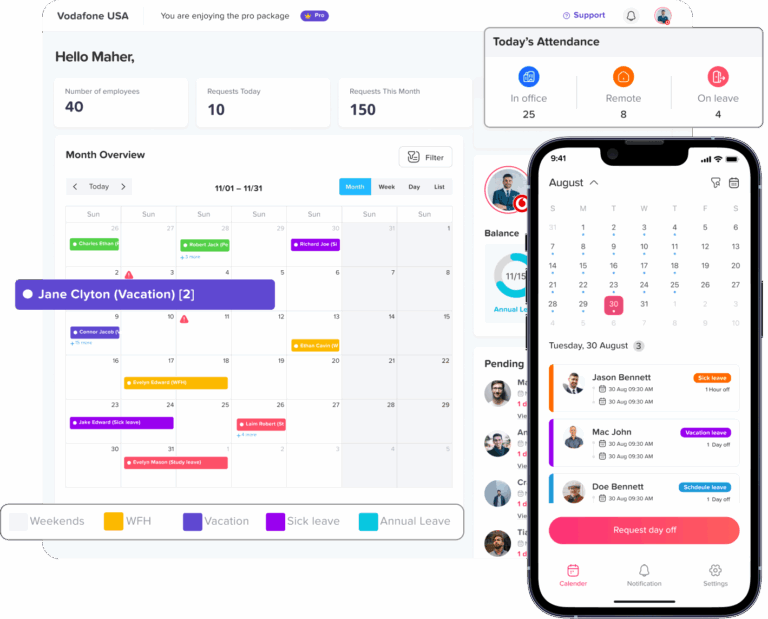
Day Off brings PTO and leave management together with employee time tracking, work schedules, attendance, and overtime information, allowing businesses to manage different aspects of employee time from the same platform.
The Problem With Tracking Everything Separately
Many small businesses begin with simple tools such as Excel, Google Sheets, email, and shared calendars.
This can work when there are only a few employees. As the team grows, however, maintaining multiple sources of information becomes increasingly difficult.
A typical process might look like this:
Employee submits PTO request → Manager approves request → HR updates spreadsheet → Employee records working hours → HR checks attendance → Payroll reviews overtime.
Every additional step creates another opportunity for information to become outdated or inconsistent.
PTO Balances Can Become Outdated
Manual PTO tracking requires someone to update balances whenever leave is earned or used.
For example, an employee may have 20 PTO days available at the beginning of the month and submit a request for five days. If the spreadsheet isn’t updated after the request is approved, the employee may continue seeing an incorrect balance.
This becomes even more difficult when the company has different accrual rules, carryover policies, leave types, or employee schedules.
Automated PTO tracking can reduce this manual work by maintaining leave balances and requests in one system.
Attendance Can Be Misunderstood
If an employee doesn’t clock in, managers need to know whether they were:
- On approved PTO
- Scheduled not to work
- Absent without approval
- Late
- Missing a clock-in record
Without connected records, determining the reason can require manual investigation.
Payroll preparation takes longer
Payroll teams may need to compare timesheets, PTO records, attendance reports, and overtime information before preparing payroll.
The more systems involved, the more manual checking is required.
Managers have less visibility
A PTO calendar shows who is away, but it doesn’t necessarily show how many hours employees actually worked.
A time clock shows working time, but it may not explain why someone wasn’t working.
Bringing the information together provides a more complete view.
Employees have to use multiple tools
Employees may need one application to request PTO, another to track working hours, and another to check their schedule.
Using fewer systems can make the process easier for employees and reduce administrative questions for HR.
What Should an Employee Time and PTO System Track?
A useful employee time management system should connect several types of information without mixing them together.
| Information | What it tells you |
|---|---|
| Work schedule | When the employee is expected to work |
| Clock-in/out | When the employee actually worked |
| Breaks | Time recorded as breaks according to company rules |
| Total hours | How much working time was recorded |
| PTO | Approved paid time away |
| Absence | Time away from scheduled work |
| Late time | Difference between expected and actual start |
| Overtime | Additional working time requiring review |
| Leave balance | Remaining available leave |
| Attendance status | Whether the employee met the expected schedule |
This structure helps HR understand the difference between scheduled time, actual working time, and approved time away.
That distinction becomes especially important when employees have flexible schedules, part-time schedules, rotating shifts, or partial-day leave.
How to Track Employee Hours, PTO, and Overtime
A reliable process starts with clear company policies and accurate employee schedules.
Once you define the rules, software can automate much of the day-to-day administration.
Define employee work schedules
Start by establishing when each employee is expected to work.
Not everyone in an organization necessarily follows the same schedule. Some employees may work standard Monday-to-Friday hours, while others may have flexible schedules, part-time hours, or rotating shifts.
For example:
Employee A: Monday–Friday, 9:00 AM–5:00 PM
Team member B: Monday–Friday, flexible eight-hour schedule
Shift worker C: Rotating weekly shifts
Having the correct schedule is important because attendance and overtime calculations need an expected working pattern to compare against.
Day Off supports fixed schedules, flexible schedules, rotating shifts, and split working periods.
Record actual working hours
Once you define schedules, employees need a consistent way to record the time they actually work.
Depending on the organization, this could involve clocking in and out or recording time against projects and tasks.
For example, a simple attendance workflow might be:
Clock in → Work → Take break → Continue working → Clock out
For a project-based team, an employee might instead track time against different tasks throughout the day.
Day Off’s Time Tracker supports clock-in and clock-out tracking as well as task and project time tracking.
Track PTO separately from working hours
PTO should remain a separate category from actual working time.
Suppose an employee has an eight-hour schedule and works four hours before taking four hours of approved PTO.
The record should show:
4 hours worked + 4 hours PTO
It shouldn’t simply show eight hours worked.
Keeping the categories separate makes reporting clearer and can help HR avoid confusion when reviewing attendance, leave, and payroll records.
Connect PTO with attendance
Approved PTO provides important context for attendance.
If an employee has an approved full-day vacation, their lack of clock-in shouldn’t be treated the same way as an unexplained absence.
Similarly, if an employee takes a half day, the attendance record should provide enough context to show that part of the employee’s scheduled time was covered by approved leave.
Connecting leave requests and attendance reduces the need for managers to manually compare separate systems.
Review overtime using actual working time
Overtime should be reviewed based on actual working time and the rules that apply to the employee.
For example, if an employee works beyond their normal schedule, the system can record the additional time.
However, that doesn’t automatically mean every additional hour is legally payable overtime. The applicable rules may depend on location, employee classification, schedule, and company policy.
For this reason, businesses should use time-tracking records as the underlying data and apply the appropriate payroll and employment rules during review.
Review records before payroll
Before payroll is processed, HR or managers should review the time records for errors and missing information.
Useful checks include:
- Missing clock-ins
- Missing clock-outs
- Unusual working hours
- Incorrect schedules
- Approved PTO
- Unapproved absences
- Late arrivals
- Early departures
- Overtime
- Schedule changes
Finding an incorrect time entry before payroll is processed is much easier than correcting it afterward.
Example: Tracking PTO and Working Hours in the Same Week
Consider an employee who normally works eight hours per day from Monday to Friday.
Their week could look like this:
| Day | Scheduled | Worked | PTO | Additional time |
|---|---|---|---|---|
| Monday | 8 hrs | 8 hrs | 0 hrs | 0 hrs |
| Tuesday | 8 hrs | 8 hrs | 0 hrs | 0 hrs |
| Wednesday | 8 hrs | 4 hrs | 4 hrs | 0 hrs |
| Thursday | 8 hrs | 8 hrs | 0 hrs | 0 hrs |
| Friday | 8 hrs | 9 hrs | 0 hrs | 1 hr |
The important point is that each category remains separate.
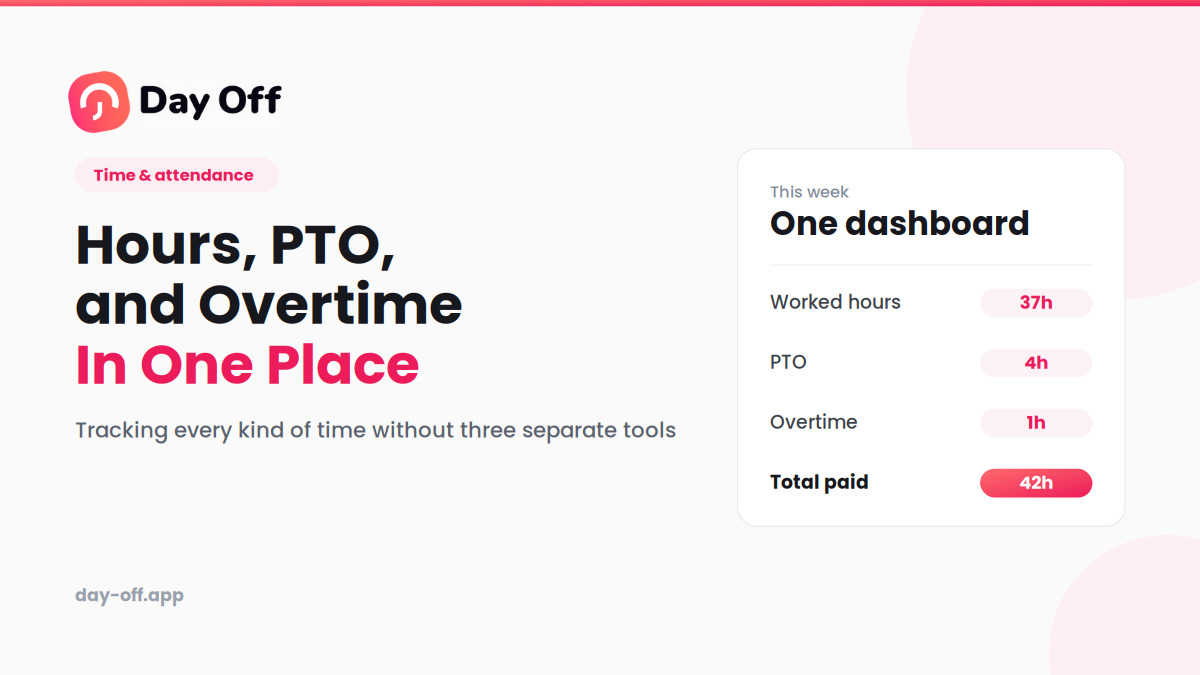
The employee actually worked 37 hours.
They used four hours of PTO.
They also recorded one additional working hour on Friday.
Whether that additional hour qualifies as overtime depends on the applicable overtime rules and company policy.
This approach gives HR much more useful information than simply recording a single weekly total.
How Day Off Connects PTO and Time Tracking
Day Off brings several employee time-management functions together in one platform.
Instead of having one application for PTO, another for attendance, and a spreadsheet for leave balances, businesses can manage these related processes within the same system.
Day Off includes:
- PTO and leave management
- Employee time tracking
- Clock-in and clock-out
- Task and project time tracking
- Work schedules
- Attendance Review
- Overtime information
- Absence tracking
- Leave balances
- Team calendars
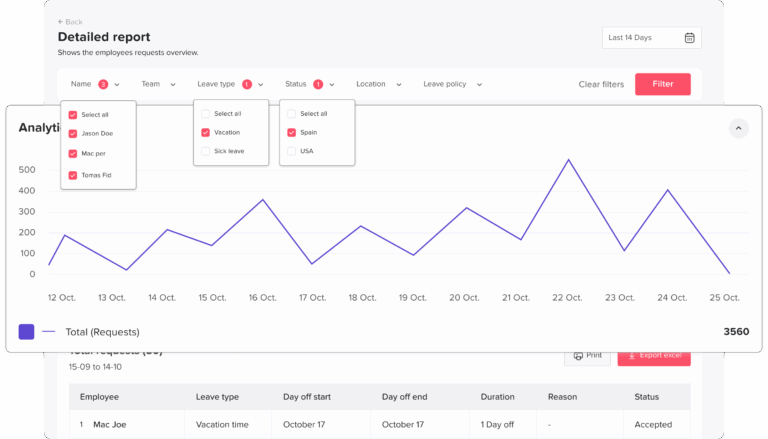
- Reports
- Calendar integrations
- Slack and Microsoft Teams integrations
- API access
This allows businesses to manage different aspects of employee time while keeping the records connected.
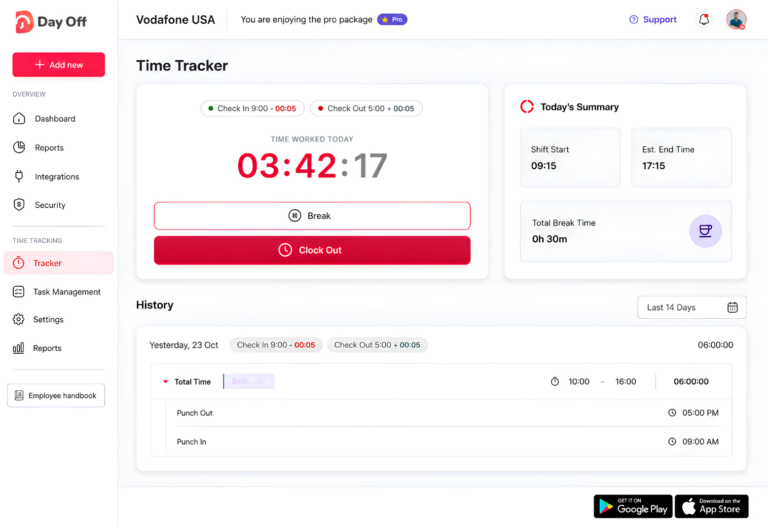
Day Off Time Tracker
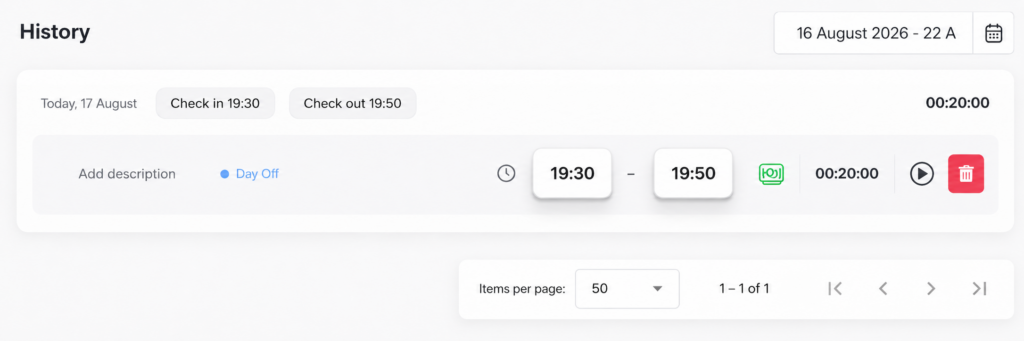
Day Off’s Time Tracker gives employees a way to record their working time without relying entirely on manual spreadsheets.
Employees can record work sessions and, where appropriate, associate their time with projects and tasks.
For example, an employee at a digital agency could record:
| Project | Task | Time |
|---|---|---|
| Client A | Website development | 3 hrs |
| Client B | SEO work | 2 hrs |
| Internal | Team meeting | 1 hr |
| Client A | Testing | 2 hrs |
This provides more context than simply saying the employee worked eight hours.
Managers can see where time was spent, while employees have a clearer record of their working sessions.
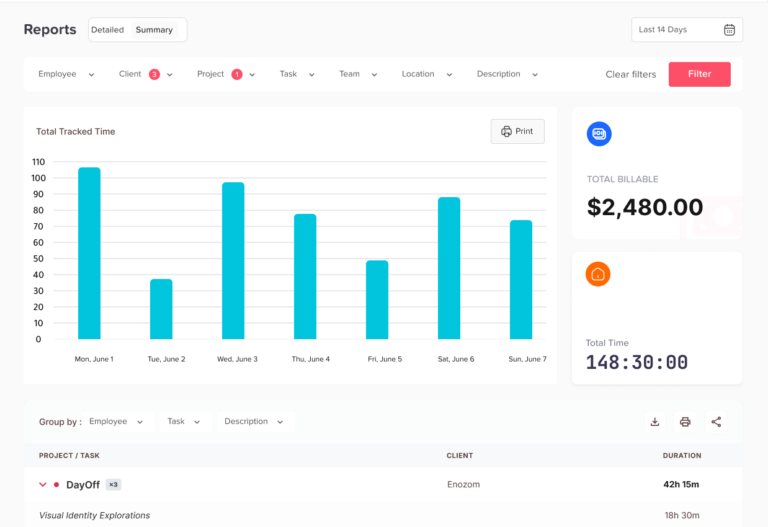
Day Off also provides time-tracking history and reporting functionality.
Day Off Work Schedules
Work schedules are an important part of accurate employee time tracking.
If the system doesn’t know when someone is expected to work, it becomes harder to determine whether an employee was late, left early, or worked additional hours.
Day Off supports different schedule structures, including fixed hours, flexible hours, rotating shifts, and split working periods.
For example, a company could have:
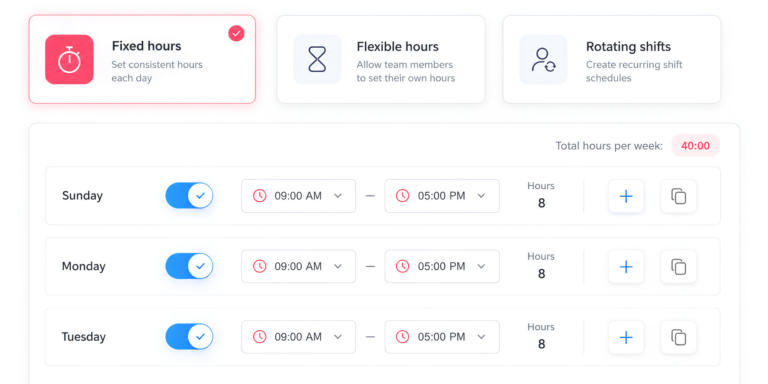
Standard schedule
Monday–Friday
9:00 AM–5:00 PM
Flexible schedule
Eight working hours per day
Rotating schedule
Different shifts across multiple weeks
This flexibility is useful for organizations where employees don’t all follow the same working pattern.
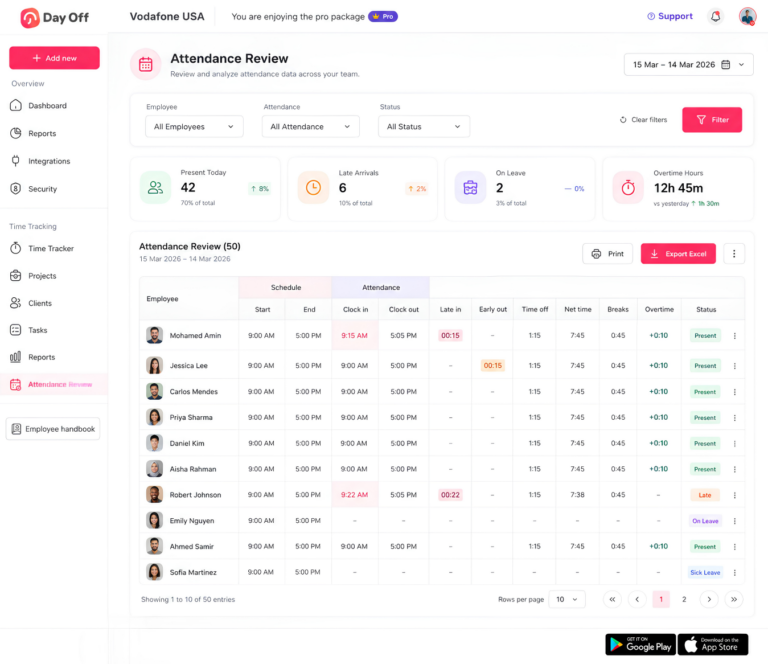
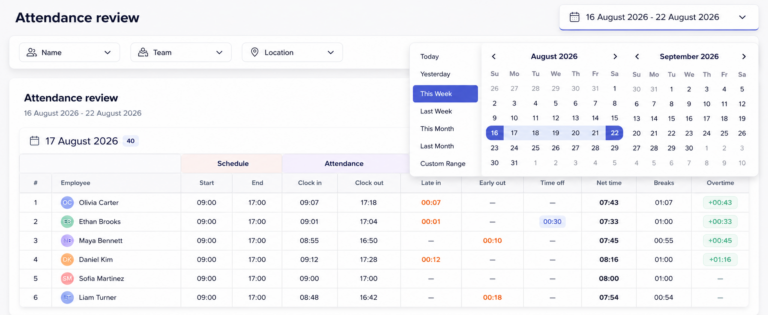
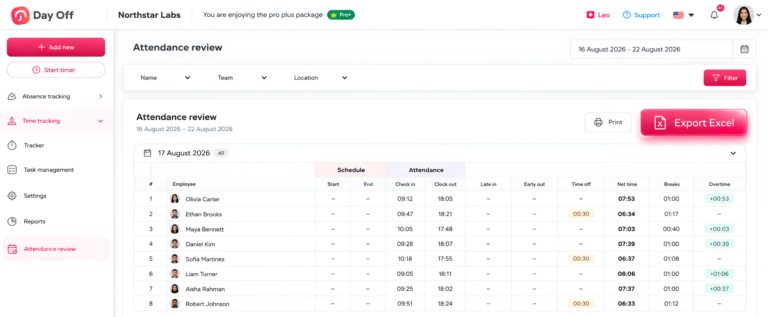
Day Off Attendance Review
Attendance Review brings scheduled work and actual attendance together.
Managers can use attendance information to understand things such as:
- Scheduled working hours
- Clock-in time
- Clock-out time
- Late time
- Early departure
- Breaks
- Time off
- Net working time
- Overtime
This is particularly useful when a manager needs to understand why an employee’s actual working time differs from their expected schedule.
For example, an employee might be scheduled for eight hours but record four hours of work and four hours of approved PTO.
Without PTO information, that could look like missing time.
With the records connected, the manager can understand the reason for the difference.
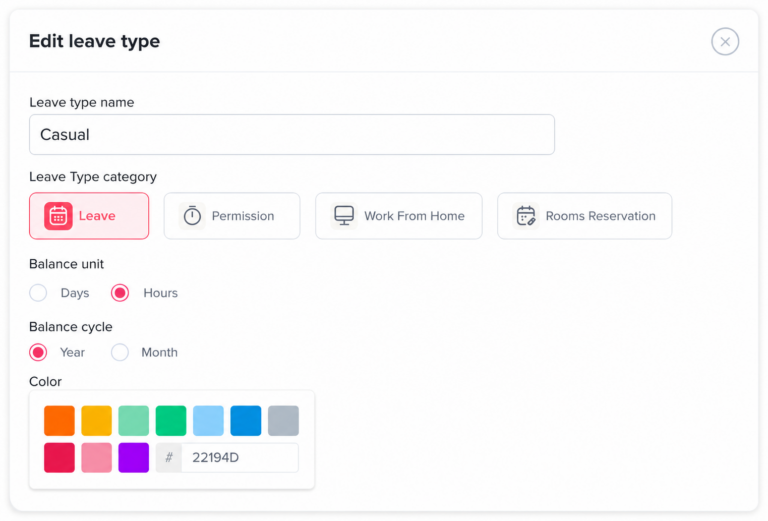
Tracking PTO in Hours Instead of Days
Many businesses think about PTO in terms of days, but some employees and organizations need to manage leave in hours.
Hourly leave can be useful for:
- Part-time employees
- Flexible schedules
- Employees with variable working hours
- Shift-based teams
- Partial-day leave
For example, an employee may have 40 hours of available PTO instead of five days.
This can make leave tracking more precise when employees work different numbers of hours per day.
Day Off supports hourly leave balances with supported advanced work schedules and can use employee schedules when determining the scheduled hours associated with leave.
PTO and Time Tracking for Remote Employees
Remote work creates additional challenges for employee time management.
A remote employee may not physically enter an office, but a company may still need to track their working time, schedule, PTO, and availability.
Remote teams may need to answer questions such as:
- Is the employee working today?
- What hours are they scheduled to work?
- Are they on PTO?
- How many hours did they work?
- Are they working in another time zone?
- Who else is unavailable?
A centralized system can make this information easier to manage without relying on messages or manually updated spreadsheets.
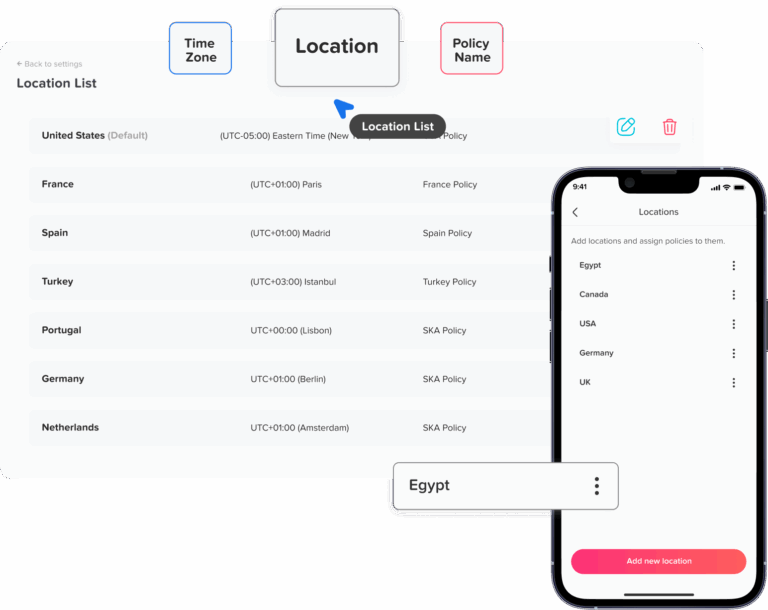
Day Off supports flexible schedules and multiple locations, which can help businesses manage teams with different working arrangements.
PTO and Time Tracking for International Teams
International teams often have additional complexity because employees may work under different schedules, locations, holidays, and leave policies.
For example, employees in different countries may have different:
- Working days
- Public holidays
- Leave entitlements
- Work schedules
- Time zones
- PTO policies
Trying to manage these differences in a single spreadsheet can become difficult.
Day Off supports multiple locations and allows businesses to configure different working days, weekends, and leave policies for different locations.
This allows HR teams to keep employee time management centralized while still accommodating differences between teams and locations.
How PTO, Time Tracking, and Attendance Work Together
One of the biggest benefits of connecting employee time systems is that each record provides context for the others. Instead of looking at scheduled hours, attendance, PTO, and attendance reviews separately, the system can bring these records together to provide a more complete picture of an employee’s workday.
Example 1: Late Arrival and Extended Hours
Scheduled time:
The employee is scheduled to work from 9:00 AM to 5:00 PM.
Actual attendance:
The employee clocks in at 9:10 AM and clocks out at 5:20 PM.
PTO:
The employee has no PTO recorded for this day.
Attendance review:
By comparing the scheduled hours with the actual attendance records, the system can identify that the employee arrived 10 minutes late but worked 20 minutes beyond the scheduled end time.
Example 2: Missing Clock-In Explained by PTO
Scheduled time:
The employee is scheduled to work from 9:00 AM to 5:00 PM.
Actual attendance:
The employee has no clock-in or clock-out records for the day.
PTO:
The employee has an approved full-day vacation.
Attendance review:
Instead of treating the missing clock-in as an attendance issue, the system can use the approved PTO record to explain the absence.
Why This Matters
The real value of connecting employee time records is the context created between them. A single record may not tell the full story, but when scheduled time, actual attendance, PTO, and attendance reviews are considered together, the system can interpret time-related events more accurately and reduce unnecessary manual review.
How to Prepare Employee Time Data for Payroll
Time tracking software can simplify payroll preparation, but HR teams should still review the underlying records before sending them to payroll.
Start by checking employee schedules.
If someone was assigned the wrong schedule, their attendance information may not accurately reflect their expected working time.
Next, review working hours.
Look for missing clock-ins, missing clock-outs, unusually long working sessions, or other records that require attention.
Then review PTO and leave.
Make sure approved leave is recorded correctly and that employees’ balances reflect the relevant requests.
Finally, review overtime information.
Overtime should be checked against the company’s policies and the applicable employment rules before payroll is finalized.
Day Off provides attendance and time-tracking reports that can be exported for payroll preparation and internal reporting.
How to Track Employee Hours Without Excel
Excel and Google Sheets can be useful when a company has a small number of employees and a simple PTO policy.
The challenge appears when the company needs to combine more information.
For example, HR may eventually need to manage:
- Employee schedules
- PTO balances
- Leave requests
- Attendance
- Clock-in and clock-out
- Overtime
- Projects
- Tasks
- Multiple locations
- Different leave policies
At this point, the issue isn’t necessarily that Excel is a bad tool.
The issue is that maintaining the entire workflow manually requires continuous administrative work.
Someone needs to collect the information, update the spreadsheet, check formulas, approve requests, update PTO balances, compare attendance, review overtime, and prepare reports.
Dedicated time and PTO software can automate many of these repetitive tasks and provide employees and managers with direct access to the information they need.
When Should a Business Move From a Spreadsheet to Time Tracking Software?
There isn’t one employee count at which every company should stop using spreadsheets.
Instead, look at how much time HR and managers spend maintaining employee time records.
Dedicated software may become useful when:
- HR spends a significant amount of time calculating PTO balances.
- Employees regularly ask HR about their remaining leave.
- Managers have difficulty seeing who is available.
- PTO and attendance need to be reconciled manually.
- Employees work different schedules.
- The company has multiple locations.
- Payroll requires several spreadsheets.
- Managers need overtime reports.
- Employees need project or task time tracking.
- HR needs historical attendance reports.
If several of these problems exist at the same time, moving to a centralized employee time-management system can reduce manual administration.
Benefits of Tracking Employee Hours, PTO, and Overtime Together
Better visibility for managers
Managers can see working schedules, attendance, upcoming PTO, and time records together. This makes it easier to understand team availability and identify potential scheduling issues.
Less manual work for HR
Instead of updating multiple spreadsheets and comparing separate records, HR can manage employee time information through a centralized system.
More accurate PTO records
When one workflow handles PTO requests, approvals, balances, and leave history, HR has fewer manual updates to perform.
Clearer attendance information
A connected system can provide context around missing or reduced working time. For example, the system can distinguish approved PTO from an unexplained absence.
Easier overtime review
Managers can review additional working time alongside employee schedules and attendance records instead of calculating everything manually.
Better workforce planning
Managers can view upcoming PTO alongside employee schedules, which helps them identify potential coverage issues before they become a problem.
Easier payroll preparation
Having working hours, PTO, attendance, and overtime-related records in one place makes it easier to review information before sending it to payroll.
Best Practices for Tracking Employee Hours and PTO
Keep employee schedules accurate
Accurate time tracking starts with an accurate work schedule. If an employee changes from a standard schedule to a flexible schedule or moves to a different shift, update their schedule in the system.
Otherwise, attendance and overtime reports may rely on outdated expectations.
Keep PTO and working time separate
PTO should remain clearly distinguishable from actual working hours. This makes reports easier to understand and prevents managers from confusing approved time away with hours actually worked.
Create clear PTO policies
Employees should understand how much PTO they receive, how it accrues, when they can use it, how to request it, and whether unused time can carry over.
Clear policies reduce confusion and make the approval process easier for both employees and managers.
Use a consistent PTO approval process
Employees should know where to submit requests and managers should know how to review them.
A consistent process makes it easier to maintain accurate leave records and keeps requests in one channel.
Let employees access their own information
When employees can see their working time and PTO balances, they can identify potential errors earlier and don’t need to contact HR for every question about their leave.
Review attendance regularly
Don’t wait until the end of the payroll period to discover missing clock-ins, incorrect schedules, or unusual working hours.
Regular reviews make errors easier to identify and correct.
Review overtime according to applicable rules
HR should review overtime records according to the laws, employee classifications, contracts, and company policies that apply to the organization.
A time-tracking system provides the underlying records, but HR and payroll teams should determine how to treat those records.
Protect employee time data
Employee time and leave records can contain sensitive employment information.
Businesses should use appropriate access controls and make sure employees only have access to the information they are authorized to see.
Day Off provides roles and permissions that can be configured for different users and areas of the platform.
Frequently Asked Questions
What is the difference between a timesheet and a time tracker?
A timesheet is usually a record of hours worked during a specific period, while a time tracker can record working time as it happens. A time tracker may also provide additional details, such as when a work session started and ended, which project was worked on, or how much time was spent on a particular task.
How can small businesses reduce the time spent managing employee hours?
Small businesses can reduce administrative work by replacing manual spreadsheets and email-based processes with a centralized time-management system. Automating tasks such as time entry, PTO requests, approvals, attendance records, and reporting can reduce repetitive data entry and make employee records easier to maintain.
How often should managers review employee time records?
The appropriate frequency depends on the company’s workflow, but reviewing records regularly is generally more practical than waiting until the end of a pay period. Frequent reviews can help identify missing entries, unusual working hours, scheduling problems, or other discrepancies while the details are still easy to verify.
What should employees do if they forget to clock in or clock out?
Companies should have a clear correction process for missed time entries. Depending on the organization’s policy, an employee may submit a correction or notify their manager or HR so the record can be reviewed and updated. A documented process helps prevent small timekeeping mistakes from becoming payroll problems.
How can companies manage time tracking for part-time employees?
Part-time employees can be managed by assigning schedules that reflect their actual working days and hours rather than applying a standard full-time schedule. This makes it easier to compare scheduled and actual hours and can also make PTO and attendance records more accurate for employees who work fewer hours.
How can employee time tracking help with workforce planning?
Historical time data can help managers understand how working hours are distributed across teams and periods. When combined with upcoming PTO and employee schedules, this information can help managers identify potential staffing gaps, plan coverage, and allocate work more effectively.
What is the difference between attendance tracking and time tracking?
Attendance tracking focuses primarily on whether an employee was present according to their expected schedule. Time tracking generally provides more detail about the amount of time worked and, depending on the system, what employees worked on during that time. Businesses may use both because they answer different questions.
Related reading: Attendance vs. Time Tracking vs. PTO Tracking: What’s the Difference?
Can employee time tracking work with flexible working hours?
Yes. Time tracking can be used with flexible schedules as long as the system can represent the company’s working-time rules. Instead of requiring every employee to work at exactly the same time, a flexible schedule can define the expected number of working hours while allowing employees greater control over when those hours are completed.
How can companies prevent inaccurate employee time records?
Clear policies, simple time-entry processes, regular reviews, and employee access to their own records can all help improve accuracy. Automated reminders and approval workflows can also reduce the number of missing or incorrect entries that HR teams have to correct manually.
What employee time reports are useful for HR managers?
Useful reports can include total hours worked, attendance summaries, PTO usage, remaining leave balances, overtime, late arrivals, absences, and project or task time. The most useful reports depend on the organization’s goals, but having several types of information available makes it easier to identify trends and investigate unusual records.
Conclusion
Tracking employee hours, PTO, attendance, and overtime doesn’t have to be a complicated process. When these records are managed across different spreadsheets, emails, and tools, HR teams can spend unnecessary time checking information and correcting errors.
A centralized employee time-tracking system makes it easier to keep everything organized. By connecting work schedules, actual hours worked, PTO requests, attendance, and overtime records, businesses can get a clearer picture of how employee time is being used while keeping each type of time separate and accurate.
Day Off brings PTO management, employee time tracking, work schedules, attendance, overtime, and reporting together in one platform. This gives employees an easier way to record their time and request leave, while managers and HR teams can review attendance, time off, and working hours from one place.
Whether you’re managing a small team or a growing workforce, moving away from manual time and PTO tracking can save administrative time and make employee records easier to manage. A consistent, centralized approach can also make it easier to prepare reports, review attendance, and keep PTO information up to date.
Getting employee hours pto overtime right helps protect both employees and the business.