







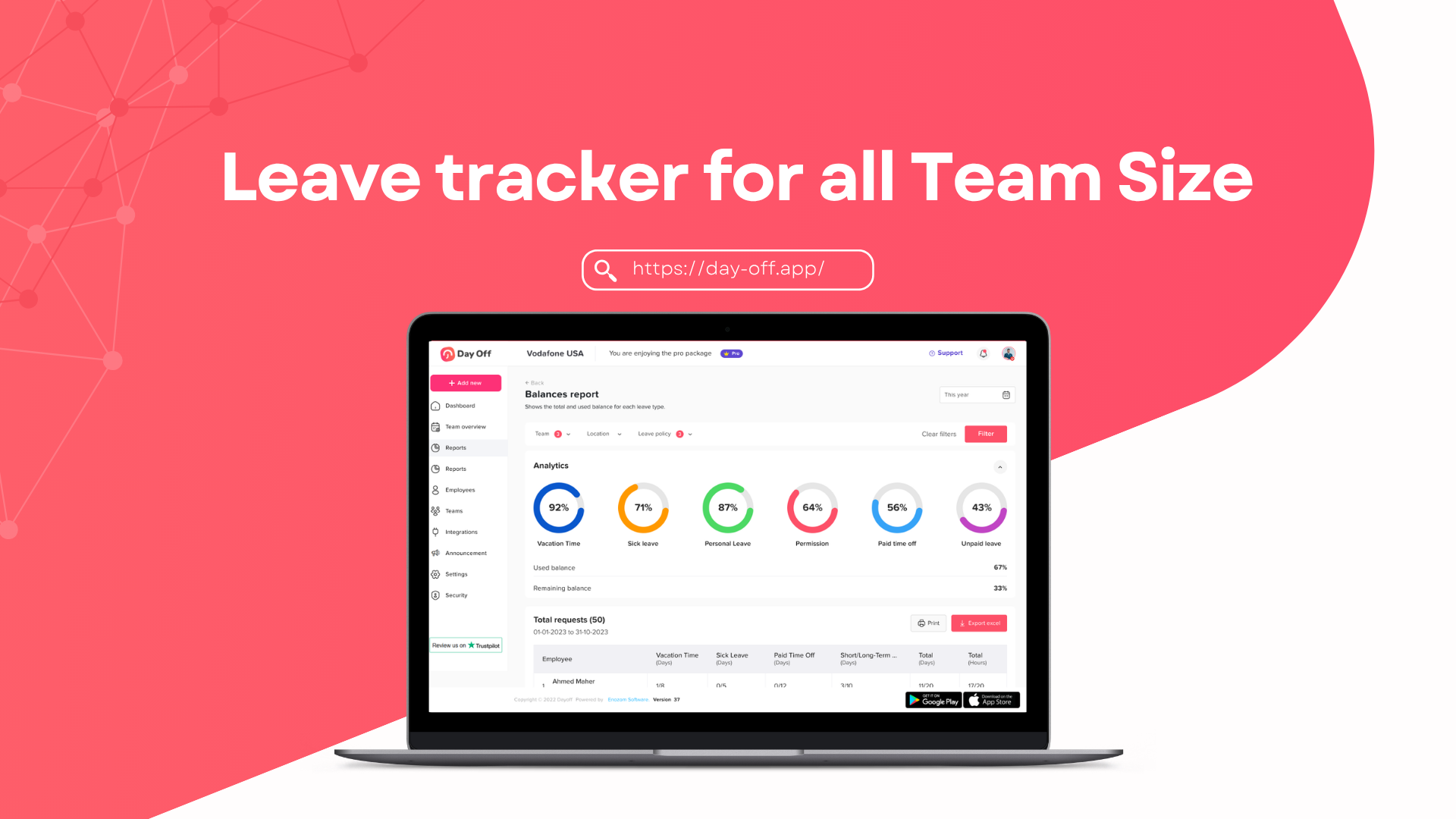
A well-defined annual leave policy is essential for any organization that wants to maintain productivity while supporting employee well-being. Whether you’re a startup building your first HR framework or an established company refining your policies, having a clear and fair leave structure helps avoid confusion, ensures compliance, and boosts employee satisfaction.
In this guide, you’ll find detailed explanations, best practices, and free annual leave policy templates you can customize for your business.

What Is an Annual Leave Policy?
Many companies underestimate how much a leave policy impacts daily operations. A vague or poorly communicated policy often leads to frustration, burnout, or staffing gaps.
Here’s a deeper look at the benefits:
Clarity and Fairness
When policies are clearly written and accessible, every employee knows the rules. This reduces perceptions of bias and ensures that decisions are based on policy, not personal judgment.
Improved Workforce Planning
Managers can anticipate absences in advance, redistribute workloads, and avoid last-minute disruptions. This is especially important for teams with tight deadlines or customer-facing roles.
Legal Protection and Compliance
Different countries have minimum leave requirements. A clear policy ensures your company complies with local labor laws and avoids potential legal disputes or penalties.
Better Employee Well-being
Employees who feel comfortable taking time off are more productive, engaged, and less likely to burn out. A good policy actively encourages rest rather than discouraging it.
Reduced Administrative Burden
When rules are clear, HR teams spend less time answering repetitive questions or resolving disputes.
Key Components of an Annual Leave Policy
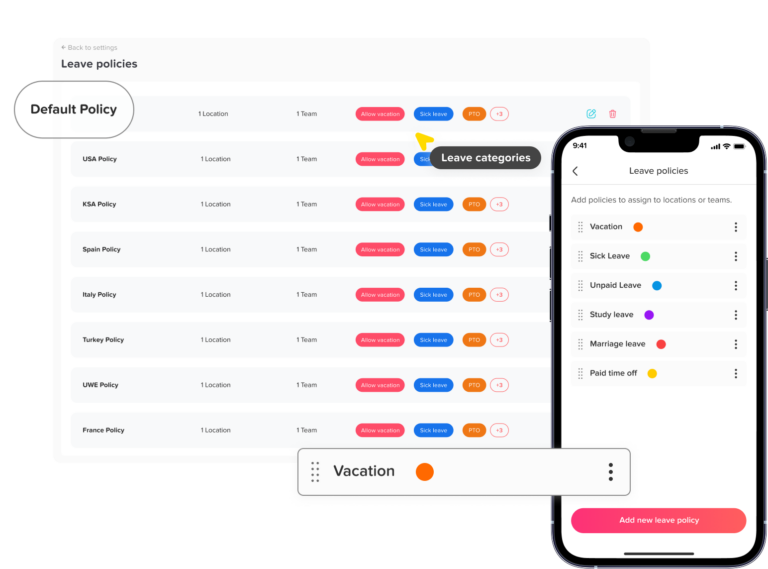
A strong leave policy isn’t just about numbers, it should be clear, fair, and easy for everyone to understand. Before jumping into templates, make sure you’ve defined these key elements:
Leave Entitlement
Start by clearly stating how many leave days employees are entitled to each year. This isn’t always one-size-fits-all, your policy may vary depending on factors like seniority, whether someone is full-time or part-time, and local labor laws. The goal is to make sure expectations are transparent from day one.
Accrual System
Next, explain how employees earn their leave. Do they receive the full balance at the start of the year, or does it build up gradually over time? Some companies prefer a monthly accrual system, while others grant leave upfront, it’s important to choose one approach and explain it simply.
Carryover Rules
Unused leave balance can quickly become confusing if it’s not clearly addressed. Let employees know whether they can carry forward unused days into the next year, if there’s a limit on how many days can roll over, and whether those days expire after a certain period.
Leave Request Process
A smooth process makes all the difference. Outline how employees should request time off, how far in advance they need to apply, and who is responsible for approvals. If you’re using a tool like Day Off, mention it here to keep everything consistent and easy to manage.
Blackout Periods
If your business has peak periods where time off is limited, be upfront about it. Clearly define any blackout dates or seasons so employees can plan ahead and avoid surprises.
Payout Policy
Finally, explain what happens to unused leave. Will employees be paid for remaining days when they leave the company, or will those days be forfeited? Setting this expectation early helps prevent misunderstandings later.
How Day Off Helps You Manage Annual Leave Efficiently
Creating a solid annual leave policy is only half the job, the real challenge is managing it consistently, accurately, and without friction as your team grows. That’s where Day Off becomes essential.
Instead of relying on spreadsheets, emails, or manual tracking, Day Off turns your leave policy into a fully automated, transparent system that works for both employees and managers.
Let’s break down how it supports every part of your leave policy, and the key features that make it powerful.
Centralized Leave Management
At its core, Day Off provides a single source of truth for all leave related data.
Rather than juggling multiple tools or communication channels, everything is stored and managed in one place:
- Employee leave balances
- Upcoming absences
- Leave history
- Company policies
This eliminates confusion and ensures that everyone, from HR to team leads, has access to accurate, real-time information.
Smart Leave Tracking & Automatic Calculations
One of the most time consuming aspects of leave management is calculating balances manually. Day Off automates this.
It handles:
- Leave accruals (monthly, weekly, bi-weekly, semi-monthly, or yearly.
- Carryover limits and expiration dates
- Deduction of used days
- Prorated leave for new hires
This ensures:
- No calculation errors
- Full alignment with your policy
- Real-time updates for employees and managers
Employees always know exactly how many days they have left, no need to ask HR.
Easy Leave Requests & Approvals
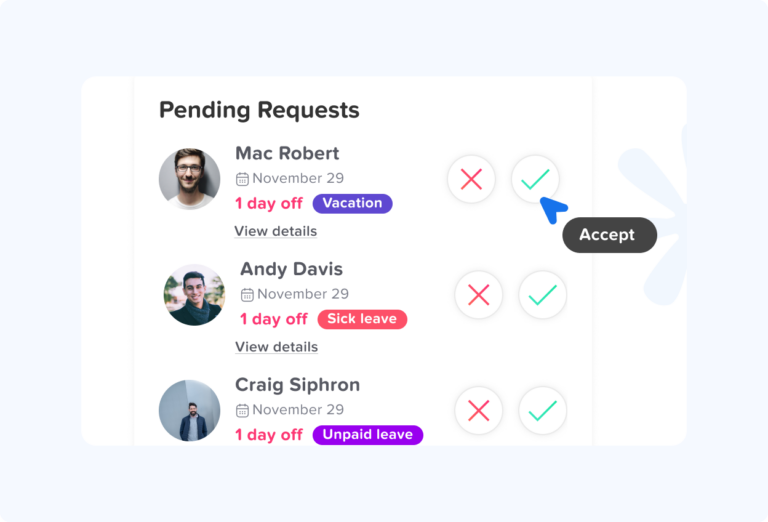
Day Off simplifies the entire request process into a few clicks.
Employees can:
- Submit leave requests instantly
- Select dates easily
- Add notes or reasons if required
Managers can:
- Approve or reject requests at ease
- See team availability before making decisions
- Avoid scheduling conflicts
This structured workflow replaces long email threads and ensures faster, more consistent decision-making.
Team Calendar & Visibility
One of the biggest operational challenges is not knowing who’s off and when.
Day Off solves this with a shared team calendar that provides:
- A clear overview of all upcoming leaves
- Department-level visibility
- Conflict detection (e.g., too many people off at once)
This feature is especially valuable for:
- Project planning
- Shift-based teams
- Cross-functional collaboration
Managers can plan ahead instead of reacting last minute.
Custom Leave Policies
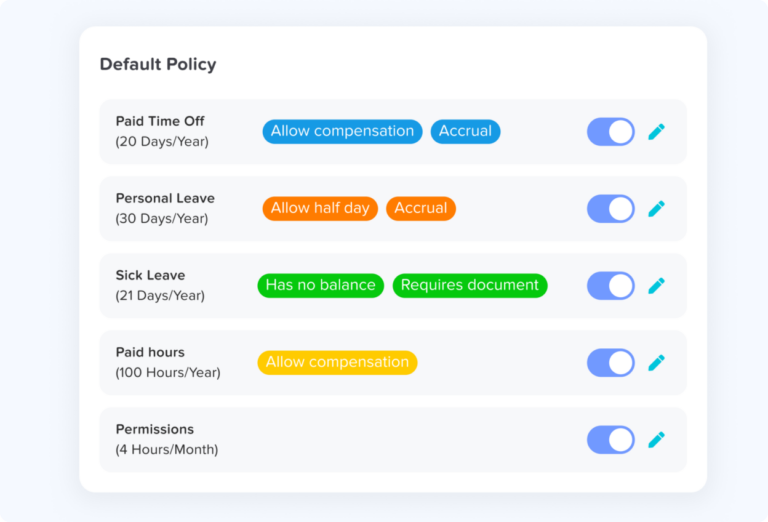
Every company is different, and Day Off reflects that by allowing full policy customization.
You can configure:
- Different leave types (annual, sick, unpaid, etc.)
- Accrual rules per employee group
- Carryover limits
- Approval workflows
This flexibility ensures your system matches your exact HR policy, not the other way around.
Multi-Team & Multi-Location Support
If your organization operates across different departments or countries, leave policies can vary.
Day Off allows you to:
- Assign different policies to different teams
- Manage employees across locations
- Adapt to regional requirements
This makes it ideal for:
- Remote teams
- International companies
- Growing startups scaling quickly
Real-Time Notifications
Communication gaps are a common problem in leave management.
Day Off keeps everyone informed with automatic notifications:
- Managers are alerted when requests are submitted
- Employees receive updates on approvals or rejections
- Teams stay aware of upcoming absences
This reduces delays and ensures smoother coordination across the company.
Reports & Insights
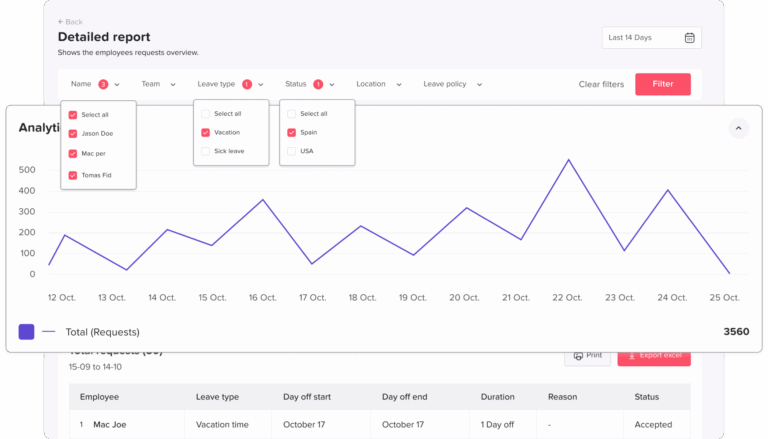
Beyond daily operations, Day Off gives you valuable insights into how leave is used across your organization.
You can generate reports on:
- Leave trends over time
- Employee absence patterns
- Department-level usage
- Remaining balances
These insights help HR and leadership:
- Identify burnout risks
- Improve planning
- Adjust policies when needed
Mobile-Friendly Experience
Modern teams aren’t always at their desks, and Day Off is built with that in mind.
Employees and managers can:
- Request or approve leave from their phones
- Check balances anytime
- Stay updated on the go
This accessibility increases adoption and ensures the system is actually used consistently.
Eliminating Manual Errors & Saving Time
When companies rely on spreadsheets or manual processes, they often face:
- Miscalculations
- Lost requests
- Approval delays
- Data inconsistencies
Day Off removes these risks entirely by automating workflows and standardizing processes.
The result:
- Less admin work for HR
- Faster processes for managers
- Better experience for employees
Supporting Your Policy in Practice
Your annual leave policy defines the rules, but Day Off ensures those rules are applied correctly every single time.
It bridges the gap between policy and execution by:
- Enforcing limits automatically
- Standardizing approvals
- Providing full transparency
- Reducing human error
This turns your policy from a static document into a living system that runs your leave management on a dailt basis.
Annual Leave Policy Examples (Free Templates)
Below are realistic, ready-to-use annual leave policy templates you can adapt to your company. Each template reflects common HR practices used by startups, SMEs, and larger organizations.
Template 1: Basic Annual Leave Policy (Standard Company Policy)
Purpose
This policy defines the rules and procedures for annual leave, ensuring employees can take time off while maintaining smooth business operations.
Eligibility
All full-time employees are eligible for paid annual leave. Part-time employees receive leave on a pro-rated basis according to their working hours.
Leave Entitlement
Employees are entitled to 21 working days of paid annual leave per year, excluding public holidays. Leave entitlement is calculated on a calendar-year basis.
Accrual
Annual leave is accrued monthly at a rate of 1.75 days per month. New employees begin accruing leave from their start date.
Carryover Policy
Employees may carry forward up to 5 unused leave days into the following year. Carried-over leave must be used within the first three months, after which it will expire unless otherwise approved.
Leave Request Process
- Leave requests must be submitted at least 7 calendar days in advance
- Requests should be submitted through the company’s leave management system
- Employees are encouraged to coordinate with their team before submitting requests
Approval Process
Managers review requests based on team availability and business needs. Employees will receive a response within 3 working days.
Additional Notes
The company encourages employees to take their full leave entitlement each year to support well-being and productivity.
Template 2: Flexible PTO Policy (Unlimited Leave Approach)
Purpose
This policy provides employees with flexibility to take time off as needed, while maintaining accountability and performance.
Eligibility
All full-time employees are eligible for flexible paid time off after completing their probation period.
Leave Entitlement
There is no fixed number of leave days. Employees are encouraged to take reasonable and responsible time off, typically aligned with industry norms (e.g., 20–25 days annually).
Guidelines
- Employees must ensure their responsibilities are managed and deadlines are met
- Adequate handover or coverage must be arranged before taking leave
- Frequent or extended absences may be reviewed by management
Request Process
All leave must be requested and recorded through the company’s system in advance. Approval is required before taking time off.
Approval Process
Managers assess requests based on performance, workload, and team coverage, not on a fixed leave balance.
Restrictions
The company reserves the right to review or limit leave usage if it negatively impacts performance or business operations.
Best Practice Note
Employees are encouraged to take a minimum amount of time off each year to avoid burnout.
Template 3: Accrual-Based Policy (Corporate / Tiered Structure)
Purpose
This policy rewards employee tenure by increasing leave entitlement over time while maintaining structured leave tracking.
Eligibility
All full-time employees are eligible for annual leave, with entitlement based on years of continuous service.
Leave Entitlement
- 0–2 years of service: 15 days per year
- 3–5 years of service: 18 days per year
- 5+ years of service: 25 days per year
Accrual Rate
Leave is accrued progressively throughout the year on a per pay period basis, ensuring fair distribution of leave over time.
Carryover Policy
Employees may carry forward up to 10 unused days into the next year.
Expiry of Leave
Carried-over leave must be used within a defined period (e.g., 6 months), or it will be forfeited unless exceptional approval is granted.
Leave Request Process
Employees must submit leave requests in advance through the company system, following internal notice period guidelines.
Unused Leave on Exit
Unused accrued leave may be paid out upon termination of employment, in accordance with company policy and local labor laws.
Template 4: Small Business Leave Policy (Simple & Practical)
Overview
This policy applies to all employees of [Company Name] and is designed to provide a simple and fair approach to managing annual leave.
Leave Entitlement
Employees are entitled to 20 working days of paid annual leave per year, excluding official public holidays.
Public Holidays
Recognized public holidays are provided in addition to annual leave and are not deducted from the employee’s leave balance.
Eligibility
Leave entitlement begins accruing from the employee’s start date.
Notice Period
Employees are required to submit leave requests at least 5 working days in advance, except in emergencies.
Approval Process
Leave requests are approved on a first-come, first-served basis, while ensuring sufficient team coverage.
Operational Needs
The company reserves the right to reschedule leave requests during busy periods or when staffing levels are critical.
Carryover Policy
Unused leave may be carried forward only with management approval.
Template 5: Remote Team Leave Policy (Distributed Teams)
Purpose
This policy is designed to manage leave effectively across remote and distributed teams working in different locations and time zones.
Eligibility
All full-time remote employees are eligible for annual leave benefits.
Leave Entitlement
Employees receive 25 working days of paid annual leave per year, regardless of location, to ensure fairness across the organization.
Time Zone Coordination
Employees must consider team collaboration needs and ensure overlap with key working hours when planning leave.
Leave Planning
- Employees are encouraged to plan leave in advance
- Coordination with team members is required to ensure coverage
- Shared calendars should be reviewed before submitting requests
Tracking & System Use
All leave must be requested, approved, and tracked using a centralized leave management system such as Day Off.
Approval Process
Managers evaluate leave requests based on team availability, project timelines, and cross-functional dependencies.
Communication
Employees must clearly communicate upcoming leave to their team and set appropriate out-of-office notifications.
Common Mistakes to Avoid in Annual Leave Policies (and How to Fix Them)
Even well-intentioned leave policies can fail in practice if key details are missing or poorly communicated. Below are the most common mistakes companies make, along with practical insights on how to avoid them.
No Clear Approval Workflow
One of the biggest sources of frustration for employees is not knowing who approves leave requests or how long it will take.
Without a defined workflow:
- Requests can sit unanswered for days
- Different managers may apply different standards
- Employees may feel decisions are unfair or inconsistent
How to fix it: Clearly define:
- Who is responsible for approvals (e.g., direct manager)
- Expected response time (e.g., within 2–3 working days)
- Criteria for approval (team availability, workload, deadlines)
Using a system like Day Off helps standardize approvals and ensures nothing gets missed.
Offering Unlimited Leave Without Clear Guidelines
Flexible or unlimited PTO sounds attractive, but without structure, it often backfires.
In reality:
- Some employees take too little leave (fear of judgment)
- Others may take too much, affecting team productivity
- Managers struggle to apply consistent decisions
How to fix it: Even with flexible policies, set clear expectations:
- Define what “reasonable time off” looks like (e.g., 20–25 days annually)
- Require manager approval for extended leave
- Encourage a minimum number of days off per year
Clarity ensures fairness and prevents misuse.
Ignoring Carryover Limits
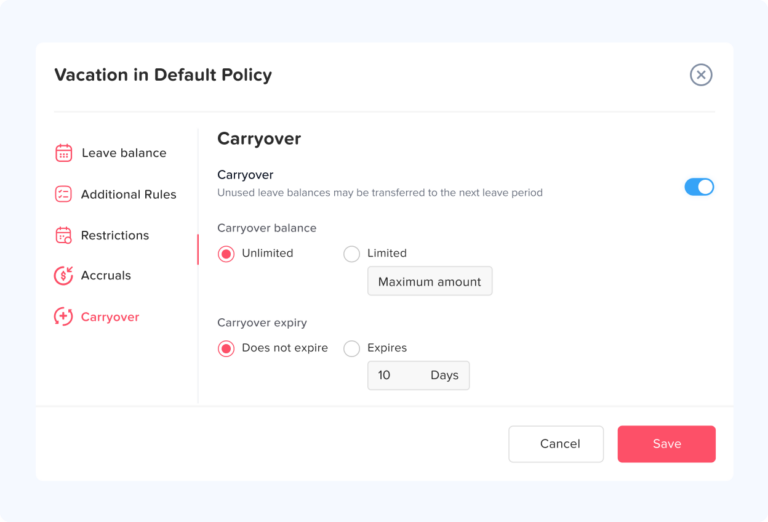
Failing to define what happens to unused leave can create serious problems over time.
Common issues include:
- Employees accumulating large leave balances
- Financial liabilities for the company
- Confusion about expiration rules
How to fix it: Set clear carryover rules:
- Maximum number of days that can be carried forward
- Deadline for using those days
- Whether unused leave is forfeited or paid out
This encourages employees to take time off regularly while keeping things manageable for the business.
Lack of Transparency
When employees don’t have visibility into leave balances or team schedules, confusion is inevitable.
This often leads to:
- Repeated questions to HR
- Scheduling conflicts
- Perceived unfairness in approvals
How to fix it: Make leave information easily accessible:
- Allow employees to check their balances anytime
- Provide a shared team calendar
- Keep policies clearly documented and easy to find
Transparency builds trust and reduces unnecessary communication.
Relying on Manual Tracking (Spreadsheets & Emails)
Many companies start with spreadsheets, but as the team grows, this approach quickly becomes inefficient and error-prone.
Typical problems include:
- Incorrect leave balances
- Lost or forgotten requests
- Version control issues
- Time wasted on admin tasks
How to fix it: Switch to an automated system like Day Off, which:
- Tracks leave balances automatically
- Centralizes requests and approvals
- Eliminates calculation errors
- Saves time for both HR and managers
Frequently Asked Questions (FAQs)
Here are answers to some common questions that aren’t always covered in standard annual leave policies but are important in practice:
Can employees take half-days or partial leave?
Yes, many companies allow employees to take half-days or even hourly leave, depending on business needs. This is especially useful for personal appointments or short breaks. If you offer this flexibility, your policy should clearly define how partial leave is calculated and approved.
What happens if an employee gets sick during annual leave?
In many organizations, if an employee becomes ill during approved annual leave, they may be able to convert those days into sick leave, provided they submit valid documentation (such as a medical certificate). This prevents employees from losing their vacation time due to illness.
Can a leave request be canceled or modified after approval?
Yes, but it usually depends on company policy and timing. Employees should:
- Inform their manager as soon as possible
- Update the request in the system
Employers may allow changes as long as it doesn’t disrupt team planning or operations.
How should companies handle overlapping leave requests?
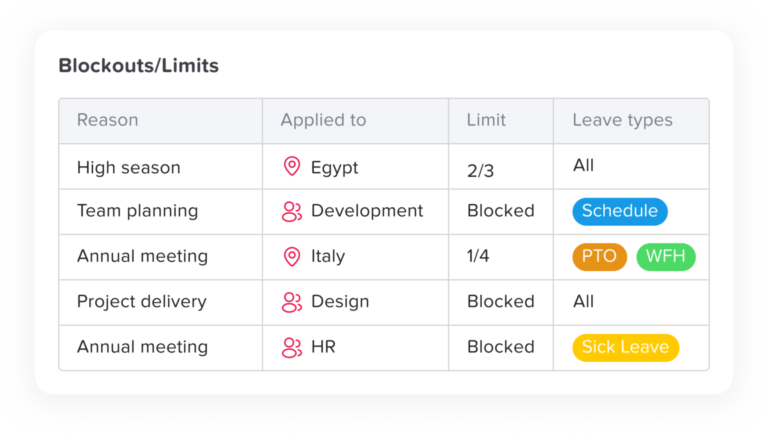
When multiple employees request the same dates, companies typically consider:
- Business priorities
- Team coverage requirements
- First-come, first-served basis
Some organizations also rotate approvals during peak seasons to ensure fairness across the team.
Should probationary employees be allowed to take annual leave?
This depends on company policy. Some businesses:
- Allow leave accrual during probation but restrict usage
- Allow limited leave with manager approval
- Or fully restrict leave except for emergencies
It’s important to clearly define this in your policy to avoid confusion for new hires
Conclusion
A strong annual leave policy brings clarity, fairness, and better planning to your workplace. With the right structure and clear guidelines, employees can take time off confidently while businesses continue to run smoothly.
Pairing your policy with a tool like Day Off makes the process even easier, helping you manage leave efficiently, reduce admin work, and create a better experience for everyone.
Related reading: PTO vs. Vacation Time: What’s the Difference?, Leave Utilization Rates: How Much Unused PTO Goes.