







A missed Clock in Clock out entry may look like a small timekeeping mistake, but it can create much larger problems when payroll, overtime, attendance, and employee records depend on accurate working hours. An employee might start work and forget to clock in, finish a busy shift without clocking out, leave a timer running after work, or notice the mistake only when reviewing their timesheet several days later.

These situations are common, especially in workplaces with changing shifts, remote employees, busy frontline teams, or employees who are still getting used to a digital time tracking system.
The important question is not whether missed punches will happen. They probably will.
The real question is how employers identify, verify, correct, and prevent them without creating inaccurate records or an unnecessarily complicated process.
A good missed clock in clock out procedure should make it easy for employees to report mistakes, give managers a consistent method for reviewing them, and ensure the final timesheet reflects the time actually worked.
This guide explains how to handle missed clock in clock out, what managers should verify before changing a timesheet, how missed punches can affect payroll and overtime, and how a time tracking system such as Day Off can make attendance records easier to manage.
What Is a Missed Clock In Clock Out?
A missed punch occurs when an employee is expected to record the beginning or end of working time but fails to create the required time entry.
There are two basic situations.
Missed Clock In
The employee begins working but forgets to start the time clock.
For example:
Scheduled start: 9:00 AM
Employee actually begins working: 9:03 AM
Employee remembers to clock in: 9:42 AM
The system initially shows that the employee started at 9:42 AM, even though the employee had already been working for 39 minutes.
Missed Clock Out
The employee records the beginning of work but forgets to end the time entry.
For example:
Clock in: 8:55 AM
Employee stops working: 5:07 PM
Clock out: Missing
Depending on the software, this could leave an incomplete timesheet or cause the timer to continue running and produce an unrealistically high number of working hours.
Both situations require correction because the raw time clock data does not accurately represent what happened.
Why Accurate Clock In Clock Out Records Matter
Time records affect much more than attendance.
For hourly and other nonexempt employees, working-time records may feed directly into payroll calculations. They can also affect overtime, labor cost reporting, attendance metrics, project costs, staffing analysis, and other business decisions.
In the United States, employers covered by the Fair Labor Standards Act must maintain certain records for covered nonexempt workers, including hours worked each day and total hours worked each workweek. The Department of Labor does not require employers to use a particular timekeeping method, but the records must be accurate.
This means the purpose of a time clock should not simply be to prove that an employee pressed a button.
The goal is to create an accurate record of working time.
If someone worked from 8:00 AM until 4:30 PM but forgot to clock in until 8:45 AM, leaving the record unchanged does not make those first 45 minutes disappear.
Similarly, employers should not automatically replace every missing clock-out with the scheduled end of the shift. The schedule shows what was supposed to happen. The time record should show what actually happened.
Common Reasons Employees Miss Clock In Clock Out
Not every missing punch indicates an attendance problem or intentional misconduct.
Employees can forget punches for many ordinary reasons, including:
Starting an urgent task immediately after arriving
Helping a customer before reaching the time clock
Forgetting to end a timer before leaving
Switching between locations or job sites
Working remotely and forgetting to open the time tracking system
Internet or device problems
Incorrect work schedules
Confusion about break procedures
Unexpected shift changes
Using an unfamiliar time tracking system
Assuming a manager will enter the time
Forgetting to resume tracking after a break
This is why managers should investigate a missing record before deciding what happened.
A blank clock in does not automatically mean the employee was absent. An unusually late clock in does not automatically mean the employee arrived late.
The time record is evidence, but an incomplete time record may require additional context.
What Should an Employer Do When an Employee Forgets to Clock In Clock Out?
A consistent process makes missed punches easier to resolve.
A useful workflow is:
Detect → Report → Verify → Correct → Review → Finalize
Here is how that process works.
Identify the Missing Entry
The first step is identifying that something is incomplete.
Common warning signs include:
Clock in with no clock out
Clock out with no corresponding clock in
No attendance record on a scheduled workday
Extremely long working duration
Extremely short working duration
Time entries outside the employee’s normal schedule
A timer that appears to have continued overnight
An unexplained difference between scheduled and actual hours
Automated attendance systems can make these exceptions easier to spot than manually checking every employee’s timesheet.
Ask the Employee What Happened
Do not immediately guess the missing time.
Ask the employee to confirm when they actually started or stopped working.
For example:
Your Tuesday time record shows a clock-in at 8:57 AM but no clock out. What time did you finish working that day?
The question is simple, specific, and tied to the missing record.
For older or disputed entries, additional information may be needed.
Verify the Correct Time
For routine mistakes, an employee’s prompt correction request may provide enough information under the company’s procedure.
When additional verification is appropriate, managers can consider reliable workplace information such as:
Assigned work schedule
Supervisor confirmation
Shift records
Work logs
Project activity
Customer service records
Building or workplace records where appropriate and lawful
Messages showing when work continued
Task completion information
The goal is not to conduct an investigation every time somebody forgets a punch.
The goal is to establish a reasonable, consistent process for producing an accurate record.
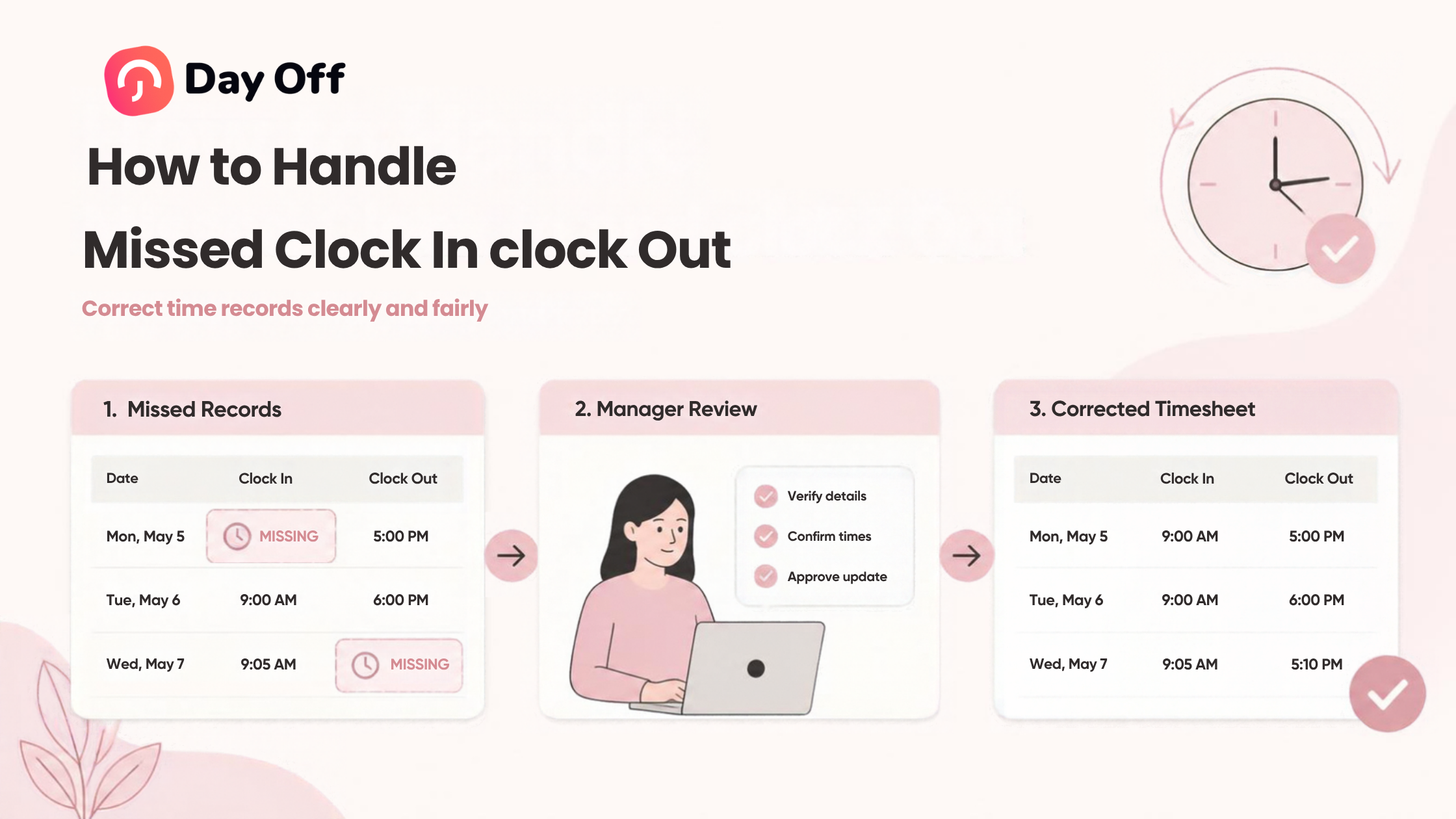
Correct the Timesheet
Once the actual time has been established, correct the entry.
Suppose an employee:
Was scheduled from 8:00 AM to 4:00 PM
Actually started at 8:04 AM
Forgot to clock in
Remembered at 8:37 AM
If 8:04 AM is verified as the actual beginning of compensable work, the corrected record should generally use 8:04 AM rather than 8:37 AM simply because that was when the employee remembered the clock.
The same principle applies to a missed clock out.
Record Why the Change Was Made
Where the system supports it, keep a clear record of corrections.
A useful correction history might contain:
Employee
Date
Original entry
Corrected entry
Reason
Person making or approving the change
Date of correction
For example:
Original: No clock out
Corrected: 5:12 PM
Reason: Employee forgot to end shift
Verified by: Shift supervisor
Corrected: September 28
This creates a much clearer record than silently changing a timesheet.
Recalculate the Day and Workweek
Do not stop after changing the individual punch.
A corrected time entry may affect:
Daily worked hours
Weekly worked hours
Overtime
Break calculations
Late time
Early departure
Project hours
Billable hours
Payroll
Attendance metrics
The corrected record should therefore flow through any totals or reports that depend on it.
Missed Clock In vs Missed Clock Out
| Situation | Main Problem | What to Verify | Appropriate Action |
|---|---|---|---|
| Missed clock-in | Start time is unknown | When compensable work actually began | Add or correct the start time |
| Missed clock-out | End time is unknown | When compensable work actually ended | Add or correct the end time |
| Late clock-in | Recorded time may not reflect actual start | Whether employee worked before punching | Correct if necessary |
| Early clock-out | Recorded time may not reflect actual finish | Whether work continued afterward | Correct qualifying working time |
| Timer left running | Recorded duration is too long | Actual time work stopped | Adjust the end time |
| No record for entire shift | Attendance status is unclear | Work, PTO, schedule, absence, or missing record | Determine the correct status before finalizing |
Should You Automatically Use the Scheduled Start or End Time?
Usually, a schedule should be treated as a reference point rather than automatic proof of actual working time.
Suppose an employee is scheduled:
9:00 AM to 5:00 PM
The employee clocks in at 9:01 AM but forgets to clock out.
It may be tempting to enter 5:00 PM automatically.
But perhaps the employee:
Left at 4:40 PM
Worked until 5:20 PM
Took an unusual break
Stayed late to finish a customer request
Had approved partial day leave
The scheduled end time cannot answer those questions.
That is why a good correction procedure verifies actual working time rather than automatically copying scheduled hours into incomplete records.
What If an Employee Works Before Clocking In?
This is an important distinction.
An employee can violate a company timekeeping procedure and still have performed compensable work.
For U.S. employers subject to the FLSA, hours worked generally include time an employee is required or permitted to work. Employers therefore need to distinguish between correcting/payrolling working time and separately addressing a failure to follow the company’s timekeeping procedure.
Consider this example:
Scheduled start: 8:00 AM
Employee starts answering customer emails: 7:52 AM
Employee clocks in: 8:06 AM
Simply using 8:06 AM because it is the recorded punch may not accurately represent the working time.
A better approach is to determine when compensable work actually began, make the time record accurate, and separately address any rule about starting work before the scheduled shift.
What If an Employee Keeps Working After Clocking Out?
The reverse problem also occurs.
An employee might clock out at 5:00 PM and then:
Finish a report
Answer work messages
Close the store
Clean equipment
Help a customer
Complete administrative work
The employer should not assume that clock out automatically means all work ended.
If compensable work continued, the time record may need to be corrected.
Managers should also investigate why employees are working after clocking out. Possible causes include unrealistic schedules, unclear rules, workload problems, poor manager instructions, or employees misunderstanding the timekeeping process.
How Missed Punches Affect Payroll
Missed punches can cause both underpayments and overpayments.
Consider the following example.
| Record | Original Timesheet | Actual Time | Difference |
|---|---|---|---|
| Monday | 8.0 hours | 8.0 hours | 0 |
| Tuesday | 7.2 hours | 8.0 hours | -0.8 |
| Wednesday | 8.0 hours | 8.0 hours | 0 |
| Thursday | 11.5 hours due to forgotten clock-out | 8.0 hours | +3.5 |
| Friday | 8.0 hours | 8.0 hours | 0 |
| Total | 42.7 hours | 40.0 hours | +2.7 hours |
The weekly total looks plausible at first glance, but two incorrect entries have distorted it.
Depending on the employee’s status and applicable rules, those errors could also affect overtime calculations.
This is why payroll teams should review exceptions rather than relying only on weekly totals.
Correct the Record First, Address the Policy Issue Separately
One of the most useful principles for managing missed punches is:
Timekeeping accuracy and policy enforcement are two different issues.
Suppose an employee repeatedly forgets to clock in.
The company may have a legitimate performance or attendance process for repeated failure to follow its timekeeping procedure.
But deliberately leaving a known inaccurate time entry in the payroll record is not a good substitute for that process.
A better sequence is:
Determine the actual working time.
Correct the time record.
Process pay based on applicable working-time requirements.
Document the missed punch.
Address repeated failure under the company’s attendance or timekeeping policy.
This keeps payroll accuracy separate from employee accountability.
How to Create a Missed Clock In Clock Out Procedure
Employees should know exactly what to do when they make a mistake.
A practical procedure can answer five questions:
Who reports the error?
Normally, the employee who notices the mistake.
Managers should also be able to flag incomplete records they discover.
Where is the correction submitted?
Choose one standard channel.
For example:
Time tracking system
Timesheet correction form
HR system
Manager approval workflow
Avoid relying on scattered texts, emails, and verbal requests whenever possible.
What information is required?
A simple correction request might ask for:
Employee name
Date
Missing clock in or clock out
Correct time
Brief explanation
Manager or supervisor approval where required
When should it be reported?
Encourage employees to report errors as soon as they discover them.
Early corrections are easier to verify and reduce last minute payroll work.
Who approves the correction?
Define who has authority to edit or approve time.
Depending on the organization, this may be:
Direct manager
Shift supervisor
HR
Payroll
Administrator
Example Missed Punch Workflow
| Step | Employee | Manager/HR |
|---|---|---|
| 1. Error discovered | Reports missing punch promptly | Receives or identifies exception |
| 2. Time provided | Provides actual start/end time | Reviews information |
| 3. Verification | Answers questions if needed | Confirms reasonable supporting details |
| 4. Correction | Reviews corrected entry where applicable | Updates or approves time record |
| 5. Payroll review | Raises any remaining discrepancy | Checks totals and overtime impact |
| 6. Pattern review | Follows timekeeping rules | Addresses repeated problems separately |
How to Handle Repeated Missed Clock In Clock Out
One forgotten clock out is usually a correction problem.
Twenty forgotten clock outs may indicate a process problem.
If the same employee repeatedly misses punches, managers should look at the pattern before assuming the cause.
Ask:
Does the employee understand the procedure?
Is the clock easy to access?
Are employees expected to begin urgent work before they can punch in?
Does the employee regularly work across multiple locations?
Are shifts changing without the system being updated?
Is the software difficult to use?
Are managers consistently reminding employees?
Are many employees experiencing the same problem?
If missed punches are widespread, the system or workflow may need improvement.
If they are concentrated around one employee after training and reminders, the organization may need to use its normal attendance or performance-management process, applied consistently and subject to applicable employment rules.
How to Reduce Missed Clock In Clock Out
The best correction process is one that employees rarely need.
Several practices can reduce missing punches.
Make Clocking In Simple
Employees are more likely to record time correctly when the process takes seconds rather than several steps.
Avoid requiring unnecessary information before someone can start recording work.
Train Employees on When Work Begins
Employees should understand whether they should clock in before:
Opening applications
Checking work messages
Preparing equipment
Helping customers
Starting setup activities
Performing required opening duties
The rule should match the organization’s actual definition of compensable working time under applicable law.
Establish a Clear End of Day Routine
Employees can be encouraged to make clock-out part of their normal closing routine:
Finish work → Check timer → Clock out → Leave
This is especially useful for employees who frequently forget to stop running timers.
Review Exceptions Regularly
Do not wait until payroll is due.
Managers can review incomplete attendance records daily or several times during the pay period.
That makes it easier to resolve a Tuesday mistake on Wednesday rather than asking someone two weeks later what time they left.
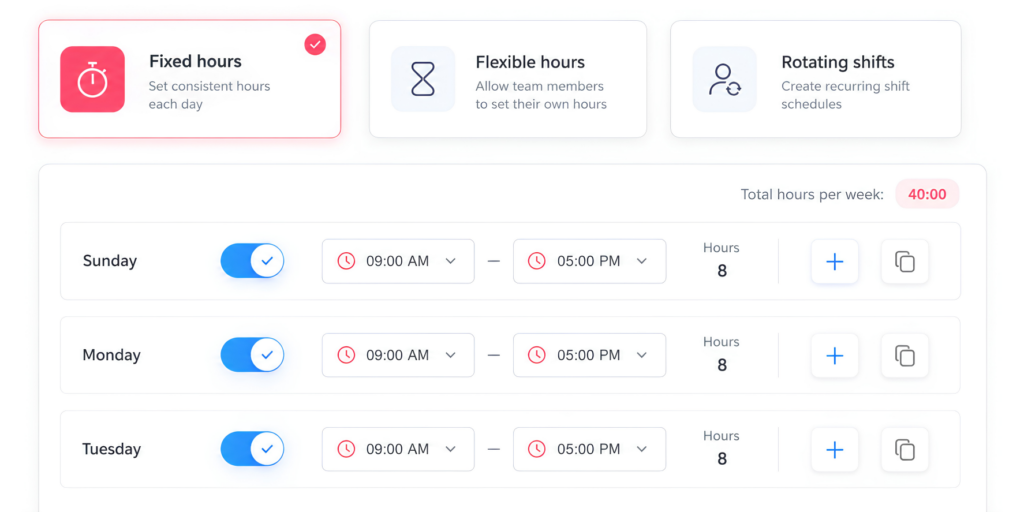
Keep Schedules Updated
An outdated schedule can make correct attendance look incorrect.
If an employee changes shifts but the schedule still shows the original shift, the attendance report may show false lateness, absence, or overtime exceptions.
Keep schedule changes and attendance records connected.
Connect PTO With Attendance
A missing clock-in may not actually be a missed punch.
The employee could be:
On vacation
Taking sick leave
Using partial day PTO
On another approved leave type
Not scheduled to work
Connecting PTO with attendance helps managers distinguish legitimate time off from missing attendance data.
How Day Off Helps Manage Clock In Clock Out Records
A reliable process becomes easier when schedules, attendance, PTO, and working time records are available in the same system.
Day Off includes Time Tracking alongside leave and absence management, allowing teams to compare expected schedules with actual attendance.
Simple Clock In / Clock Out
Companies that primarily need attendance records can use Day Off’s Clock In / Clock Out mode.
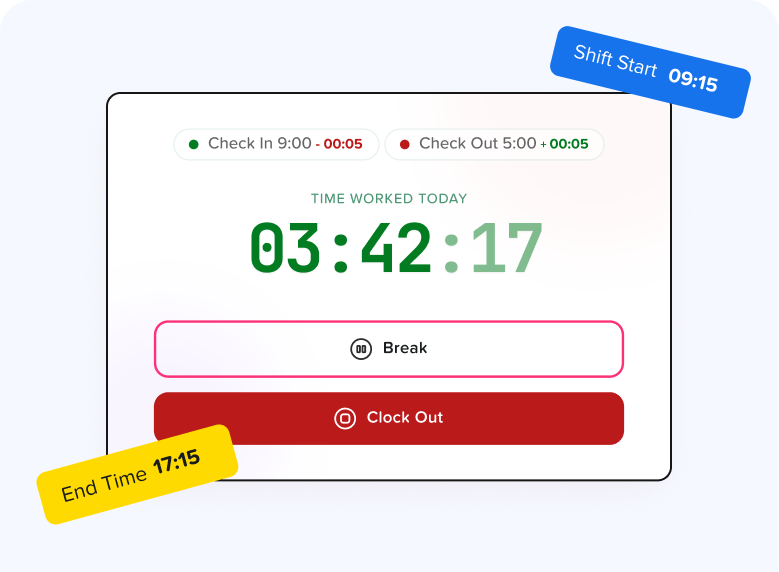
Employees start their working day using Start Time and finish it using End Day, creating a digital start and end record without requiring project or task details. Day Off also offers a Task Tracker mode for organizations that need time organized by projects and tasks.
Attendance Review
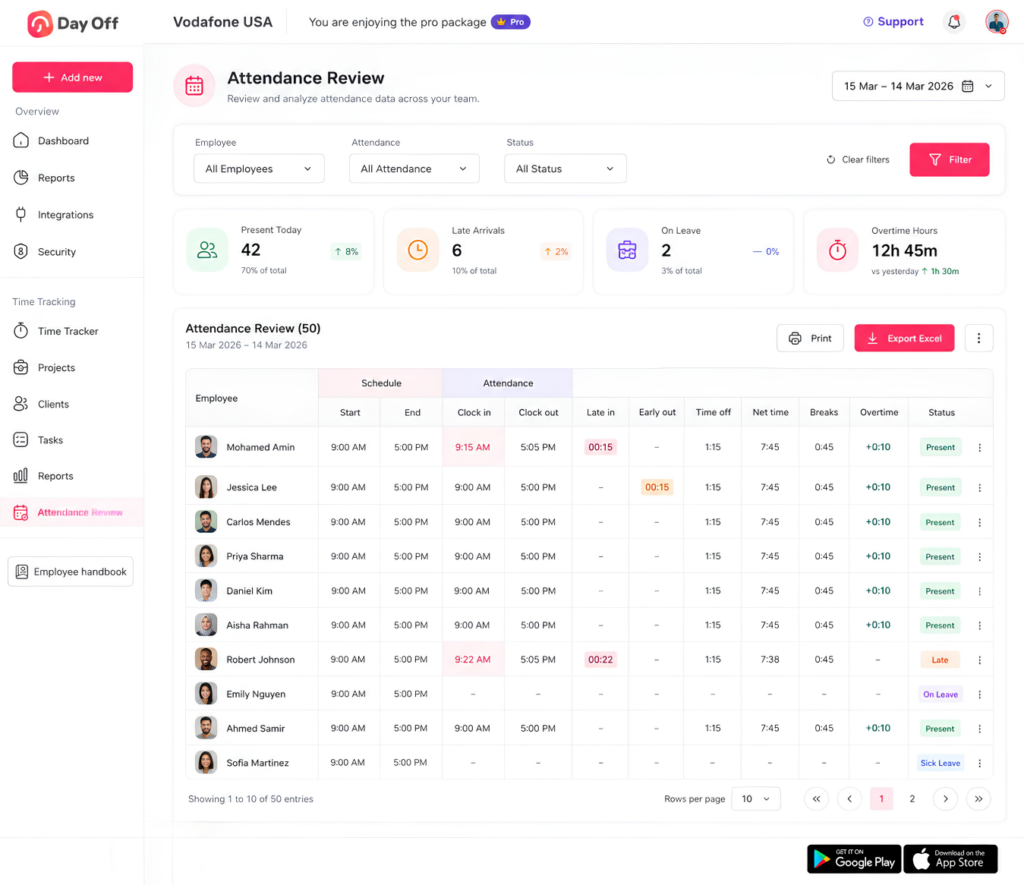
The Attendance Review page brings scheduled and actual time together.
Managers can see:
Scheduled start
Scheduled end
Actual clock in
Actual clock out
Late time
Early departure
Time off
Net working time
Breaks
Overtime
A clock in with no clock out leaves the day’s net time incomplete, making the missing record easier to identify before it is treated as final.
Editable Time History
For project and task time tracking, completed sessions are saved with their start time, end time, duration, and associated work details. Start and end times can be adjusted when a timer was stopped too early or left running too long.
This gives teams a practical way to correct verified time tracking mistakes rather than leaving inaccurate entries in the employee’s history.
PTO and Attendance Together
Day Off also connects attendance with leave information.
When an employee has no normal attendance record, managers can check whether the employee had approved time off instead of immediately assuming they missed work or forgot to clock in. Attendance Review can also show time-off information alongside working time data.
For example:
Scheduled: 9:00 AM to 5:00 PM
Worked: 9:00 AM to 1:00 PM
Approved PTO: Remaining scheduled hours
The missing afternoon work is then explained by leave rather than appearing as an unexplained attendance problem.
Payroll Ready Attendance Reports
Day Off can export attendance information including clock-in, clock-out, late time, overtime, and total worked hours, helping teams review records before payroll processing.
The goal is to move through a cleaner workflow:
Employee records time → Manager reviews exceptions → Errors are corrected → Attendance is finalized → Data is prepared for payroll
What Managers Should Check Before Payroll
Before a pay period is finalized, managers or payroll administrators should look for obvious exceptions.
Check for:
Missing clock ins
Missing clock outs
Open or unusually long timers
Unexpectedly short shifts
Entire scheduled days with no record
Working time overlapping with full day PTO
Unexpected overtime
Large differences between scheduled and actual hours
Duplicate entries
Incorrect breaks
Recently edited records
The U.S. Department of Labor notes that employers may choose their timekeeping method, but required working-time information must be complete and accurate.
A short exception review before payroll can therefore be much more effective than discovering errors after employees have already been paid.
Should Employers Round Clock In Clock Out Times?
Some organizations use time rounding, but this is different from correcting a missing punch.
Under U.S. Department of Labor guidance, certain rounding practices can be permissible when they average out over time so employees are fully compensated for the time they actually work. Practices that systematically result in employees losing compensable time can create compliance problems.
For example, rounding rules should not be used as a convenient way to erase time that the employer knows an employee actually worked.
Employers should also check applicable state and local requirements, which may be more restrictive than federal rules.
How Long Should Time Records Be Kept?
For U.S. employers covered by the FLSA, the Department of Labor states that payroll records generally must be retained for at least three years, while records used to calculate wages, including time cards and work schedules, generally should be retained for two years.
Other jurisdictions and state laws may impose different or additional requirements.
For that reason, organizations should establish a record retention policy that matches the laws applying to their workforce rather than deleting time records immediately after payroll.
FAQ
What happens if an employee forgets to clock in?
The employee should report the missing clock-in as soon as possible and provide the time they actually began working. The employer can then verify and correct the record according to its timekeeping procedure. A missing punch should not automatically be treated as proof that no work occurred.
What happens if an employee forgets to clock out?
The employer should determine when the employee actually stopped working and correct the incomplete record. Automatically assuming the scheduled end time may produce an inaccurate timesheet if the employee left early or worked late.
Can a manager edit an employee’s clock-in time?
Managers may need to correct inaccurate records, depending on the organization’s system and procedures. Corrections should reflect actual working time, and maintaining information about what changed and why can improve the reliability of the record.
Can an employer refuse to correct a missed punch?
For covered nonexempt employees in the United States, employers are responsible for maintaining accurate records of hours worked. A timekeeping policy can require employees to report mistakes promptly, but the underlying working-time record still needs to accurately reflect compensable work.
Should a missed punch count as an absence?
Not automatically.
A missing clock-in can mean several things: the employee forgot to record time, was on approved PTO, was not scheduled, had a technical issue, worked under a different shift, or was actually absent.
Managers should determine the correct status before classifying the day.
Should employers automatically deduct time for a missed clock-out?
Automatic deductions can produce inaccurate records if they do not reflect what actually happened. The safer operational approach is to verify when work ended and correct the record based on actual working time and applicable law.
What if an employee repeatedly forgets to clock in?
Correct the working-time record first. Then address repeated failure to follow the timekeeping procedure separately through training, reminders, coaching, or the company’s normal attendance process.
Can employees correct their own timesheets?
That depends on the company’s time tracking system and internal controls. Some organizations allow employees to submit corrections, while others require manager approval. Whatever method is used, the process should make corrections easy enough that employees are encouraged to report mistakes rather than leave inaccurate records untouched.
How often should managers check for missed punches?
There is no single frequency that works for every company, but frequent reviews reduce the difficulty of verifying old records. Daily exception reviews can work well for shift-based workplaces, while other organizations may review attendance several times per week and again before payroll closes.
How can businesses prevent missed clock in and clock out?
Use a simple time tracking process, train employees clearly, maintain accurate schedules, review missing entries regularly, establish a written correction procedure, and make employees responsible for checking their time records before the pay period closes.
Final Thoughts
Missed clock in clock out are normal timekeeping errors, but they should not become permanent inaccuracies.
The most effective approach is straightforward:
Identify the missing record, ask what happened, verify the actual working time, correct the entry, review any payroll impact, and document the adjustment where appropriate.
Companies should also separate two issues that are often confused: record accuracy and employee compliance.
If an employee worked, the working time record should accurately reflect that work according to applicable requirements. If the employee repeatedly fails to follow the company’s clock in clock out procedure, that behavior can be handled separately under the organization’s timekeeping or attendance policy.
A system like Day Off can make that process easier by bringing work schedules, clock in clock out records, attendance, PTO, overtime, and reporting into one place. Instead of discovering incomplete records after payroll problems appear, managers can identify exceptions earlier and keep employee working-time information more accurate.
Ultimately, good time tracking is not about making every employee punch the clock perfectly every day. It is about ensuring that when mistakes happen, there is a clear and reliable way to turn incomplete time data into an accurate record.