







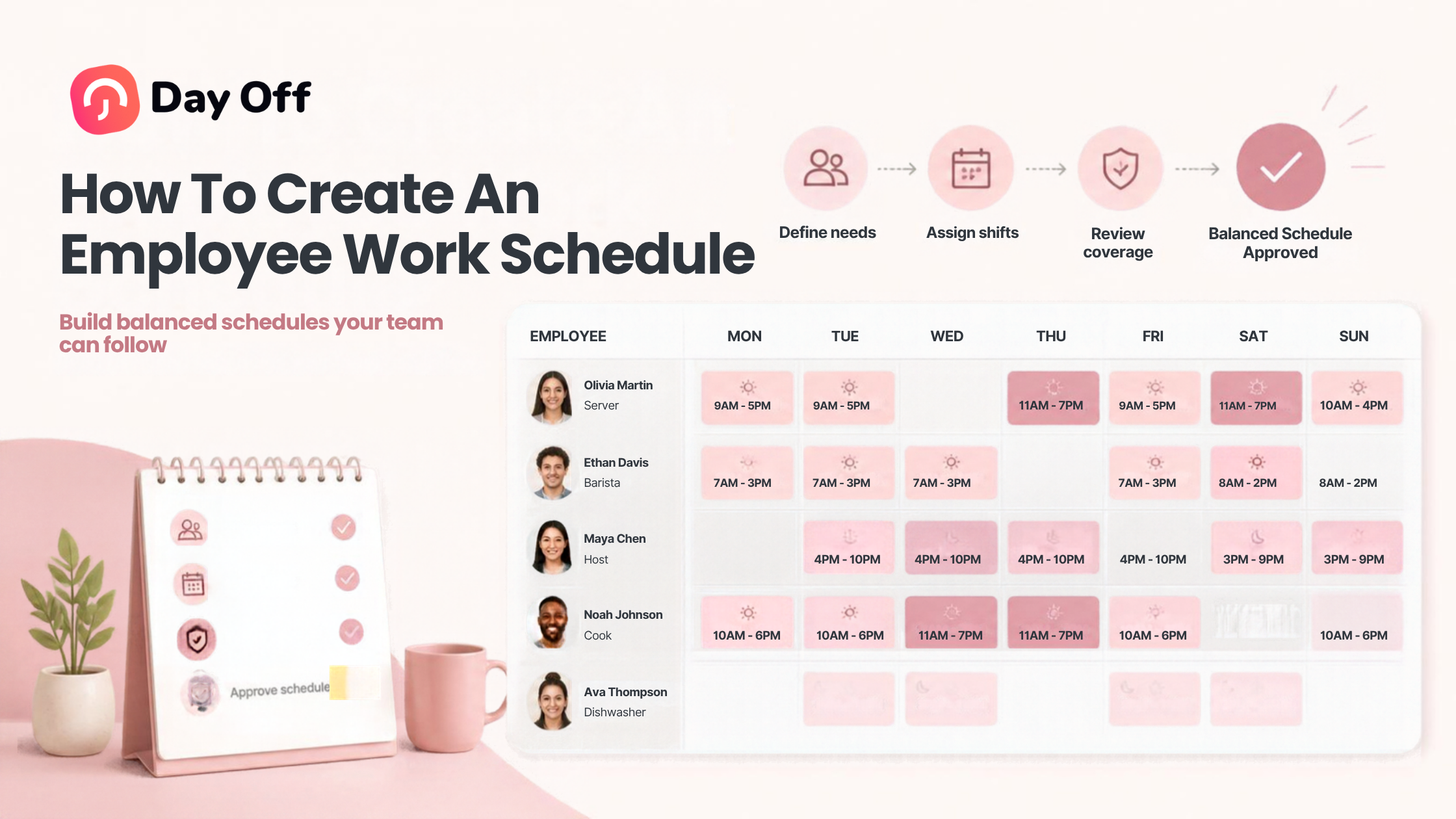
Creating an effective Employee Work Schedule is one of the most important parts of workforce management. A good schedule helps ensure that the right employees are available at the right times, workloads are distributed fairly, operational needs are covered, and employees understand exactly when they are expected to work. Poor scheduling, on the other hand, can lead to understaffing, overtime, employee frustration, attendance problems, and last minute changes that disrupt both managers and teams.

Whether you manage a small office, restaurant, retail business, healthcare team, remote workforce, or multi location company, employee scheduling requires more than simply assigning people to shifts.
Managers need to consider employee availability, contracted hours, workload, leave requests, business demand, labor costs, rest periods, and schedule changes.
This guide explains how to create an employee work schedule, the different schedule types businesses can use, common scheduling mistakes, and how workforce management tools can simplify the process.
What Is an Employee Work Schedule?
An employee work schedule is a structured plan showing when employees are expected to work.
Depending on the organization, a schedule may include:
Workdays
Start and end times
Break periods
Shift assignments
Working locations
Departments or teams
Employee roles
Days off
Approved leave
Rotating shifts
Flexible working hours
Some companies use the same schedule every week, while others create new schedules based on changing staffing requirements.
For example, an office employee may work Monday through Friday from 9:00 AM to 5:00 PM every week.
A restaurant employee, however, may work different shifts depending on customer demand, staffing levels, and opening hours.
In addition, the appropriate scheduling model depends heavily on the nature of the business.
Why Employee Work Scheduling Matters
Scheduling affects far more than attendance.
Furthermore, a well designed work schedule supports several areas of business operations.
Maintain Adequate Staffing
Moreover, managers need enough employees available to handle expected workloads.
Too few employees can result in:
Longer customer wait times
Missed deadlines
Increased pressure on available employees
More overtime
Reduced service quality
Too many scheduled employees can unnecessarily increase labor costs.
Good scheduling helps businesses find a balance between operational coverage and labor efficiency.
Improve Employee Clarity
Employees should know:
When they are expected to work
Where they should work
Which shift they are assigned
When they can take breaks
Who else is working with them
Clear schedules reduce confusion and help employees plan their personal commitments.
Reduce Scheduling Conflicts
Conflicts often occur when managers schedule employees who are:
Already on approved leave
Unavailable during certain hours
Assigned to another shift
Scheduled beyond their expected hours
Working at another location
Centralized scheduling makes these conflicts easier to identify before the schedule is published.
Control Overtime
Scheduling can also help managers monitor expected working hours before overtime occurs.
If one employee is scheduled for significantly more hours than others, managers can redistribute shifts before the schedule becomes final.
Support Fair Work Distribution
Employees often notice when undesirable shifts repeatedly go to the same people.
A structured scheduling process can help managers distribute:
Weekend shifts
Evening shifts
Holiday shifts
Opening shifts
Closing shifts
more fairly across the team.
Common Types of Employee Work Schedules
There is no single schedule that works for every organization.
Furthermore, businesses commonly use several scheduling models.
| Schedule Type | How It Works | Common Use Cases |
|---|---|---|
| Fixed schedule | Employees work the same days and hours each week | Offices, professional services |
| Flexible schedule | Employees choose or adjust working hours within defined rules | Remote teams, technology companies |
| Rotating schedule | Employees rotate between different shifts | Healthcare, manufacturing, hospitality |
| Split shift | Employees work two separate periods during the same day | Restaurants, transportation |
| Compressed schedule | Employees work longer days in exchange for fewer working days | Offices, public sector, operations |
| Part-time schedule | Employees work fewer hours than full-time employees | Retail, restaurants, seasonal businesses |
| Variable schedule | Workdays and hours change based on business demand | Hospitality, retail, events |
Identify Your Staffing Requirements
The first step in creating a work schedule is understanding how many employees are needed.
Managers should consider:
Business opening hours
Customer demand
Workload
Seasonal demand
Projects
Employee responsibilities
Minimum staffing requirements
Peak hours
Required skills
For example, a restaurant might need more employees during lunch and dinner than during mid afternoon.
A customer support department might need additional employees during hours when customer inquiries are highest.
A software development company may not need hourly staffing coverage but may require certain team members to overlap during collaboration hours.
Scheduling should therefore begin with operational demand rather than simply dividing hours among employees.
Understand Employee Availability
Before assigning shifts, managers need an accurate picture of employee availability.
Employees may have restrictions related to:
Childcare
Education
Secondary employment
Transportation
Medical appointments
Contracted working hours
Flexible work arrangements
Approved leave
Furthermore, having employees submit availability in advance helps managers avoid unnecessary scheduling changes later.
Availability should also be reviewed periodically.
Additionally, an employee who was available every evening six months ago may now have different commitments.
Review Approved Leave Before Scheduling
One of the most common scheduling mistakes is assigning a shift to someone who is already on vacation or another type of approved leave.
Before creating the schedule, managers should review upcoming:
Vacation days
Sick leave where already known
Personal leave
Parental leave
Company holidays
Unpaid leave
Compensatory time off
In addition, this is where integrating leave management with scheduling becomes valuable.
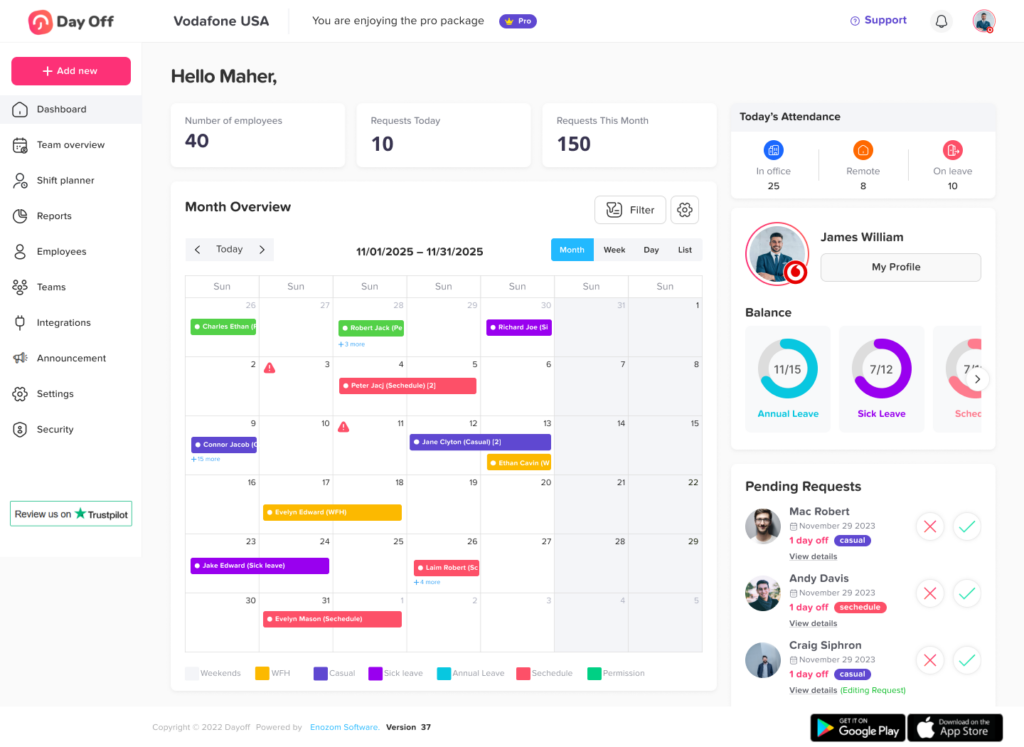
When employee leave information is visible alongside work schedules, managers can immediately see who is available before assigning work.
Platforms such as Day Off allow organizations to manage employee leave, work schedules, holiday calendars, and employee availability within the same leave management environment.
Instead of checking separate spreadsheets and calendars, managers can see approved time off when planning workforce coverage.
Define Work Schedule Rules
Managers should establish scheduling rules before assigning individual shifts.
Typical rules may include:
Maximum scheduled hours
Minimum staffing levels
Required rest periods
Break requirements
Weekend rotation rules
Shift length
Opening and closing responsibilities
Overtime approval rules
Availability requirements
Shift swap procedures
Additionally, these rules create consistency.
Moreover, without them, managers may make scheduling decisions differently from week to week.
Written scheduling policies can also help employees understand what is expected of them.
Assign Employees Based on Skills and Responsibilities
Scheduling is not only about having enough people present.
Managers also need the right mix of employees.
For example, a retail store might require at least one supervisor during every shift.
A restaurant may need:
Servers
Kitchen employees
Cashiers
Managers
Delivery staff
Furthermore, a technical support team might require employees with different product expertise.
When assigning shifts, managers should consider both headcount and employee capabilities.
A shift with five employees may still be understaffed if none of them can perform a required task.
Balance Employee Hours
Managers should review how many hours each employee has been assigned.
Look for employees who are:
Significantly under their expected hours
Approaching overtime
Working too many consecutive days
Frequently assigned undesirable shifts
Scheduled for unusually long shifts
Balancing hours can improve workforce fairness while also helping control labor costs.
For hourly employees, reviewing scheduled hours before publishing the schedule can reduce unexpected overtime.
Account for Breaks
Work schedules should account for meal and rest breaks when applicable.
Break requirements vary depending on:
Jurisdiction
Employee classification
Shift duration
Company policy
Industry
Moreover, managers should understand the employment rules that apply to their workers.
From an operational standpoint, breaks should also be staggered when necessary.
If several employees take lunch at exactly the same time, staffing coverage may temporarily fall below required levels.
Build the Schedule
Once the necessary information has been collected, managers can begin assigning employees to shifts.
A schedule should normally show:
Employee name
Date
Start time
End time
Break
Department
Location
Shift
Role
For simple teams, this may be enough.
For more complicated operations, managers may also track projects, tasks, job sites, or client assignments.
Example Employee Work Schedule
| Employee | Monday | Tuesday | Wednesday | Thursday | Friday |
|---|---|---|---|---|---|
| Sarah | 9 AM-5 PM | 9 AM-5 PM | 9 AM-5 PM | 9 AM-5 PM | PTO |
| Michael | 8 AM-4 PM | 8 AM-4 PM | Off | 8 AM-4 PM | 8 AM-4 PM |
| Daniel | 10 AM-6 PM | PTO | PTO | 10 AM-6 PM | 10 AM-6 PM |
| Emma | 9 AM-5 PM | 9 AM-5 PM | 9 AM-5 PM | Off | 9 AM-5 PM |
Even a basic schedule should make leave and non working days clearly visible.
Additionally, managers should not have to check another document to discover that someone is unavailable.
Review the Schedule Before Publishing
Never publish a schedule immediately after creating it.
Review it first.
Check for:
Employees scheduled during approved leave
Missing shifts
Understaffed periods
Double bookings
Excessive overtime
Incorrect work locations
Employees working outside availability
Missing supervisory coverage
Too many consecutive shifts
Unbalanced hours
Moreover, a short review can prevent many last minute scheduling problems.
Publish the Schedule Early
Employees need enough time to organize their lives around their working hours.
Whenever possible, publish schedules consistently and in advance.
For example, companies might publish schedules:
Weekly
Every two weeks
Monthly
Additionally, the right frequency depends on the business.
Stable office teams may schedule months ahead.
Restaurants and retailers may prefer weekly or biweekly scheduling because staffing requirements change more frequently.
In addition, the most important factor is consistency.
Employees should know when they can expect the next schedule.
Create a Process for Schedule Changes
Even the best schedule will occasionally need to change.
Employees may become sick, request emergency leave, or need to swap shifts.
Furthermore, managers should establish clear procedures for schedule changes.
For example:
Employee requests a shift change.
Manager reviews staffing coverage.
Another qualified employee agrees to cover the shift.
Manager approves the change.
Updated schedule becomes visible to everyone involved.
Additionally, without a structured process, shift swaps can happen informally through messages, increasing the risk of misunderstandings.
Fixed vs Flexible Employee Work Schedules
Different organizations require different degrees of scheduling flexibility.
| Fixed Schedule | Flexible Schedule |
|---|---|
| Same hours each week | Hours may change |
| Easier to predict staffing | More employee flexibility |
| Simple to manage | Requires stronger tracking |
| Works well for consistent operations | Works well for remote or knowledge teams |
| Easier payroll forecasting | Can support work-life flexibility |
Neither model is automatically better.
Moreover, the right approach depends on business operations.
Additionally, some organizations combine both models.
For example, employees may be allowed to choose when they start work between 7:00 AM and 10:00 AM while still being required to work eight hours.
How to Create Schedules for Different Working Patterns
Modern workplaces often contain employees with different schedule structures.
Fixed Days
In addition, employees work specific days every week.
Example:
Monday through Friday.
This structure is easy to understand and works well for traditional office environments.
Fixed Hours
Employees work defined start and end times.
Example:
Monday to Friday, 8:30 AM to 4:30 PM.
Some employees may also work split hours.
For example:
8:00 AM to 12:00 PM
2:00 PM to 6:00 PM
Flexible Hours
Employees may be required to complete a certain number of hours but have flexibility regarding when those hours are worked.
For example, an employee may need to complete eight hours between 7:00 AM and 8:00 PM.
Companies may also establish core hours during which employees must be available.
Rotating Shifts
Furthermore, rotating schedules allow employees to alternate between shifts.
For example:
Week 1: Morning shift
Week 2: Evening shift
Week 3: Night shift
Furthermore, this system is often used by organizations that operate beyond traditional business hours.
How PTO Affects Employee Scheduling
PTO and scheduling are closely connected.
Moreover, managers cannot create reliable schedules without knowing who will be available.
Leave requests should therefore be reviewed before schedules are finalized.
Check Existing PTO Requests
Approved leave should automatically remove or identify employees as unavailable during those dates.
Consider Partial Day Leave
Additionally, employees do not always take complete days off.
An employee might request:
Two hours
Half a day
Morning off
Afternoon off
Managers should consider partial day leave when calculating available working hours.
Monitor Team Coverage
Several employees requesting the same period off may create staffing problems.
A shared leave calendar helps managers identify these situations before approving additional requests.
Consider Public Holidays
Public holidays can also affect schedules.
In addition, companies operating across different countries may have employees following different holiday calendars.
Location based holiday calendars make it easier to identify which employees are expected to work on a particular date.
Employee Work Scheduling for Remote Teams
Remote teams still need schedules, even if employees are not physically present in an office.
Scheduling becomes especially important when employees work across different time zones.
Managers should define:
Expected working hours
Core collaboration hours
Time zone expectations
Meeting availability
Communication expectations
Flexible working rules
For example, a distributed team may allow employees to choose their working hours but require everyone to be available from 2:00 PM to 4:00 PM UTC.
That overlap creates predictable time for collaboration while preserving flexibility.
Employee Scheduling for Multiple Locations
Organizations with several locations face additional challenges.
Employees may work in:
Different branches
Different offices
Different stores
Multiple job sites
Furthermore, schedules should clearly identify work locations to avoid confusion.
Managers should also determine whether employees can work across locations.
If so, scheduling systems should prevent the same person from being scheduled at two locations at the same time.
How Work Schedules Affect PTO Calculations
Work schedules can also influence how leave is deducted.
Suppose two employees request Monday off.
Employee A normally works eight hours on Monday.
Employee B normally works four hours.
Even though both employees take the same calendar day off, the amount deducted from their leave balance may differ if PTO is tracked by hours.
Accurate work schedules therefore help leave management systems calculate time off correctly.
This becomes particularly important for:
Part time employees
Flexible workers
Compressed schedules
Rotating shifts
Employees with variable daily hours
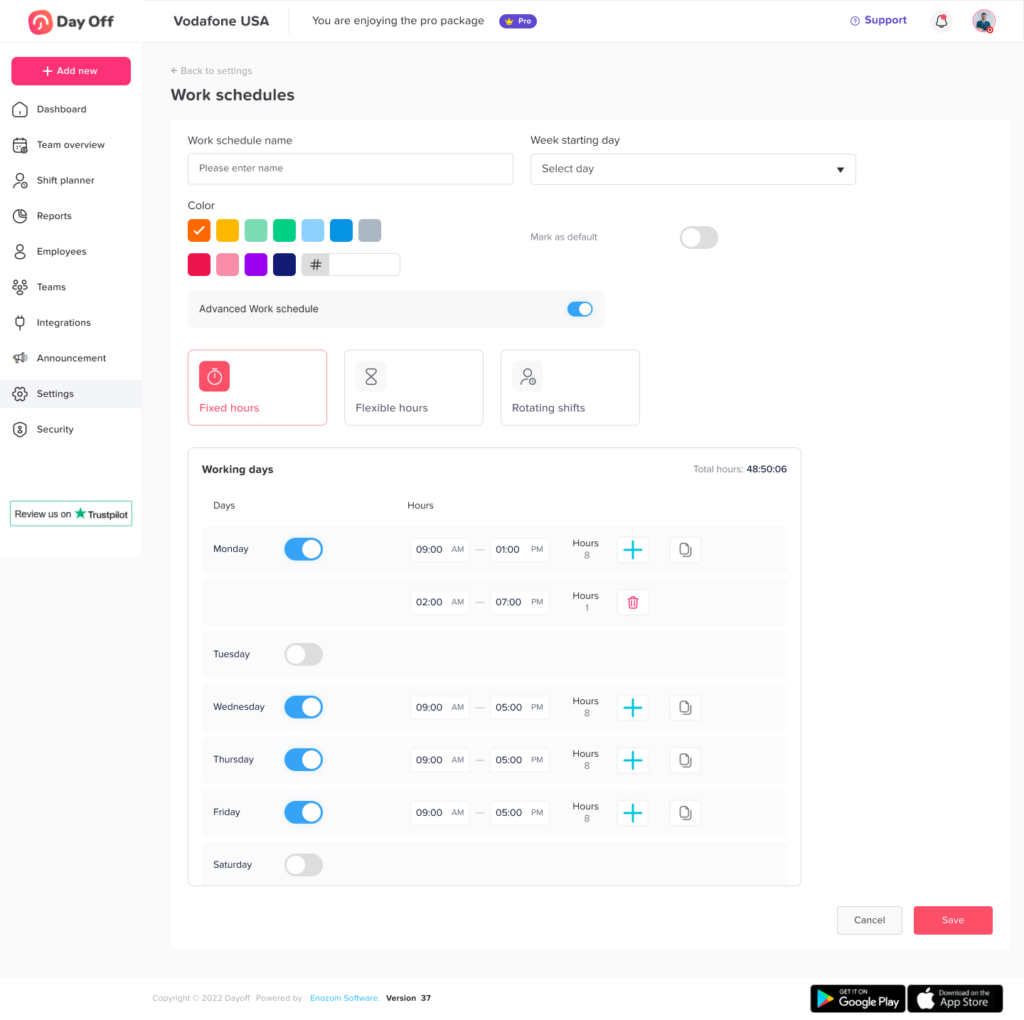
Day Off allows organizations to configure different work schedules so employee leave can reflect their actual working patterns rather than assuming everyone follows the same Monday to Friday schedule.
How Day Off Helps Manage Work Schedules and Leave
Managing schedules becomes more difficult when employee work patterns and leave information are stored separately.
Day Off helps organizations connect employee schedules with PTO and leave management.
Companies can assign employees different working patterns, including:
Fixed days
Fixed hours
Flexible hours
Rotating shifts
This is especially useful when employees do not all follow the same schedule.
Managers can also use Day Off to manage:
PTO requests
Leave balances
Accrual policies
Holiday calendars
Team calendars
Approval workflows
Partial day leave
Hour based leave
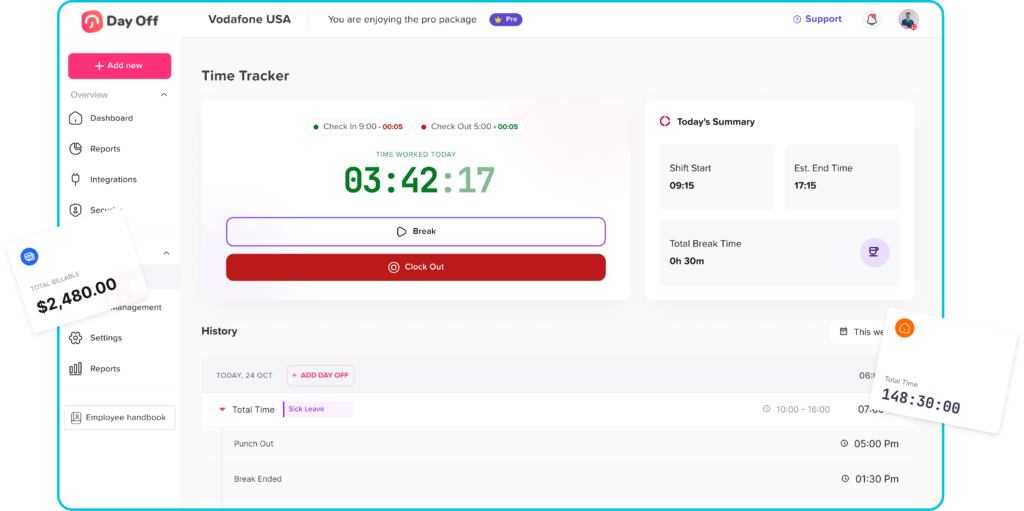
Attendance and time tracking
Because schedules and leave are connected, managers get a clearer picture of actual employee availability.
For example, if an employee is scheduled to work six hours on a particular day and requests that day off, the system can use the employee’s configured work schedule when determining the relevant leave duration.
Employee Work Schedule Best Practices
A few scheduling principles can significantly improve the process.
Create Schedules Consistently
Use the same schedule publication cycle whenever possible.
Employees should know when their schedule will be available.
Keep Availability Updated
Ask employees to update recurring availability whenever circumstances change.
Connect Scheduling and Leave
Managers should see approved leave while creating schedules.
Monitor Scheduled Hours
Review total employee hours before publishing.
Provide Clear Schedule Access
Additionally, employees should have an easy way to check their current schedule.
Define Change Procedures
Employees should understand how to:
Request changes
Swap shifts
Report absence
Request leave
Use Historical Data
Past staffing data can help managers understand busy and quiet periods.
For example, retail managers can compare sales patterns against employee coverage to improve future staffing decisions.
Review the Schedule Regularly
In addition, scheduling policies should evolve as the organization grows.
Furthermore, a scheduling model that works for five employees may become inefficient with fifty.
Employee Work Schedule Checklist
Before publishing a schedule, managers can review the following checklist:
Are all required shifts covered?
Are employees available during their assigned times?
Have approved PTO requests been considered?
Are public holidays accounted for?
Are employees assigned to the correct location?
Does each shift include the required skills?
Are scheduled hours balanced?
Is anyone approaching overtime?
Are break periods planned?
Are there accidental overlapping shifts?
Is the schedule easy for employees to access?
Have changes from the previous schedule been communicated?
Moreover, this simple review can prevent many common scheduling problems.
FAQ
How far in advance should an employee work schedule be created?
There is no single schedule publication period that works for every company. Many organizations publish schedules weekly, biweekly, or monthly. Managers should also check whether local predictive scheduling or employment laws impose specific scheduling requirements.
What information should an employee work schedule include?
At minimum, it should identify the employee, workday, start time, end time, and assigned shift. Depending on the business, it may also include locations, departments, breaks, roles, or tasks.
How do you schedule employees fairly?
Managers can improve fairness by reviewing total working hours, rotating unpopular shifts, respecting employee availability, considering approved leave, and applying scheduling rules consistently.
How should managers handle multiple employees requesting the same day off?
Managers should follow the organization’s leave policy and approval process. Factors may include staffing requirements, request timing, existing approvals, business critical roles, and any established company rules.
Can part time employees have different work schedules?
Yes. Part-time employees may have fixed, rotating, flexible, or variable schedules depending on the organization and their employment arrangements.
How do work schedules affect PTO?
A work schedule determines when an employee would normally be expected to work. This can affect how much PTO is deducted, particularly when leave is calculated in hours rather than full days.
Can employees have different schedules within the same company?
Yes. One company may have office employees working fixed hours, support employees working rotating shifts, and remote employees working flexible schedules.
What is the difference between a shift and a work schedule?
Additionally, a shift usually refers to a specific period of work, such as 8:00 AM to 4:00 PM. A work schedule is the broader arrangement showing when an employee works across multiple days or weeks.
What is the easiest way to manage employee work schedules?
For very small teams, spreadsheets or shared calendars may be sufficient. As teams grow or schedules become more complicated, workforce scheduling and leave management software can reduce manual work and improve visibility.
Should PTO be visible when managers create work schedules?
Yes. Managers should know when employees are already approved to be away from work before assigning shifts. Connecting PTO and scheduling reduces conflicts and last-minute staffing problems.
Conclusion
Creating an effective Employee Work Schedule requires more than filling open shifts. Managers need to balance business demand, employee availability, working hours, leave, skills, overtime, fairness, and staffing coverage.
In addition, the most effective scheduling process starts with accurate information.
Before publishing a schedule, managers should know who is available, who is on leave, how many hours employees are expected to work, and which skills are required during each shift.
As teams become larger or adopt flexible and rotating working arrangements, manually coordinating this information becomes increasingly difficult.
Using a centralized system such as Day Off can help organizations connect work schedules with PTO, holidays, leave balances, attendance, and employee availability. This gives managers a more accurate picture of their workforce while giving employees clearer visibility into when they work and when they are off.
Furthermore, a well designed schedule ultimately benefits both sides. Businesses gain more reliable staffing and better control over labor resources, while employees gain greater predictability, transparency, and clarity around their working time.