







Managing employee leave becomes significantly more complicated when a company operates from more than one office, branch, state, or country. If your organization needs to Track Employee Leave across multiple locations, simply recording vacation dates on a spreadsheet is rarely enough. HR teams also need to account for different leave policies, public holidays, work schedules, approval structures, local regulations, time zones, and staffing requirements.

A leave process that works perfectly for one office can create errors when applied to an international or multi branch workforce. Employees in different locations may have different annual leave entitlements, weekends, public holidays, sick leave requirements, or working hours. Even employees with the same job title may need different leave settings depending on where they work.
The goal is not to create a completely separate HR process for every location. Instead, businesses need one centralized leave management system that can apply the correct rules to each employee while giving HR a company wide view of absences.
This guide explains how to build that system, what information HR should track, which mistakes to avoid, and how leave management software can make multi location leave tracking easier.
Why Tracking Employee Leave Across Multiple Locations Is Difficult
For a company with one small office, leave tracking can appear straightforward. An employee submits a vacation request, a manager approves it, and HR deducts the appropriate number of days from the employee’s balance.
Once the workforce expands, several additional variables appear.
A business may have:
- An office in New York with one holiday calendar
- A team in London with different statutory leave requirements
- Remote employees working from several states
- A branch that operates six days per week
- Employees working rotating shifts
- Different departments with different approval chains
- Part time employees whose leave is measured in hours
- Locations with different peak seasons or blackout periods
The challenge is therefore not simply knowing who is on leave. HR needs to know whether the correct policy, balance, schedule, holiday calendar, and approval process were applied to that employee.
Multi location leave tracking works best when employee location becomes part of the leave record rather than being stored separately in another spreadsheet or HR document.
What Should HR Track for Every Employee?
Before changing software or introducing new policies, define the information that determines how leave should be calculated.
At minimum, each employee record should identify:
| Information | Why It Matters |
|---|---|
| Primary work location | Determines which location rules and holidays normally apply |
| Team or department | Helps with approvals and staffing visibility |
| Leave policy | Defines entitlement, accrual, carryover, limits, and other rules |
| Work schedule | Determines which days or hours should be deducted |
| Public holiday calendar | Prevents holidays from being incorrectly deducted as leave |
| Leave balance | Shows earned, used, scheduled, and remaining leave |
| Approver | Routes requests to the correct manager |
| Leave type | Distinguishes vacation, sick leave, unpaid leave, parental leave, and other absences |
| Employment status | Can affect eligibility or entitlement |
| Request history | Creates an audit trail of requests, approvals, cancellations, and adjustments |
The exact fields required will depend on the company and applicable employment rules, but creating this structure is an important first step.
Give Every Employee a Primary Leave Location
Every employee should normally have a clearly defined location for leave-management purposes.
This can be:
- A physical branch
- A regional office
- A country
- A state or province
- A remote employee’s legal or assigned work location
- A primary office for a hybrid employee
This becomes particularly important when employees work remotely.
For example, an employee may belong to a team headquartered in London but permanently work from another country. HR should not automatically assume that every rule associated with the London office applies to that employee.
The correct location should be determined using the company’s employment arrangements and applicable local requirements.
Avoid using department as a substitute for location
Location and department answer different questions.
Department tells you what organizational group the employee belongs to.
Location tells you where the employee is assigned for relevant working schedules, holidays, policies, reporting, and potentially legal requirements.
An employee can therefore belong to:
- Location: Toronto
- Department: Marketing
- Team: Content
- Manager: Marketing Director
Keeping these dimensions separate makes reporting and policy administration much cleaner.
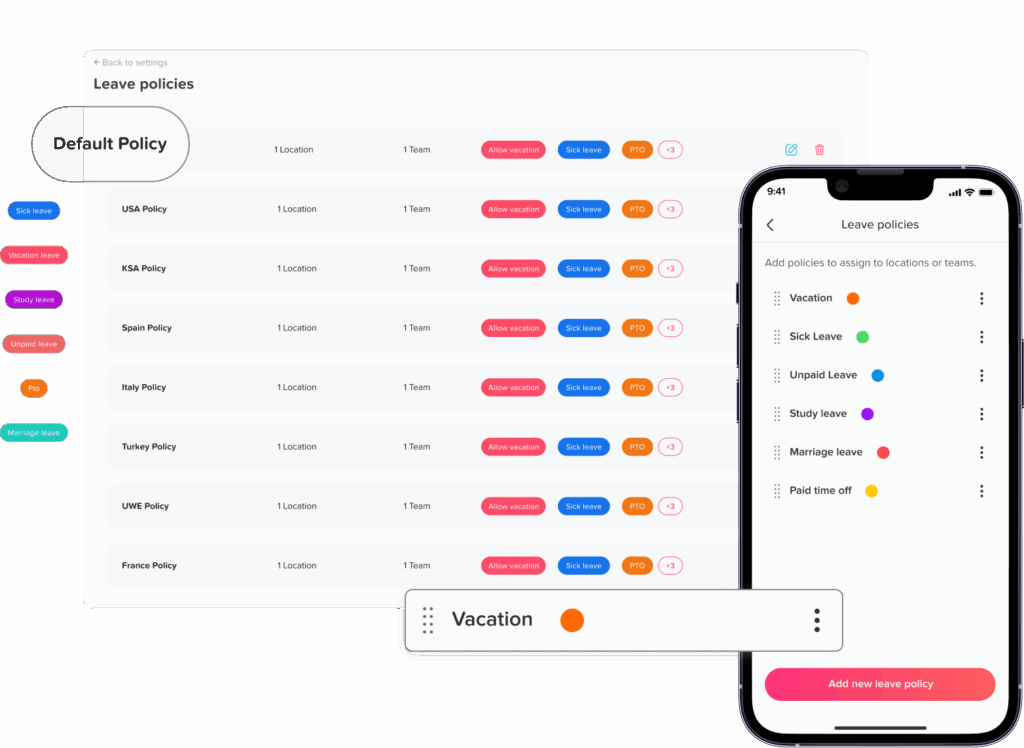
Create Leave Policies That Can Vary by Location
One company wide vacation allowance may work for some organizations, but international businesses often need more flexibility.
A location specific leave policy might control:
- Annual leave entitlement
- Sick leave
- Personal leave
- Parental leave
- Bereavement leave
- Unpaid leave
- Accrual frequency
- Carryover limits
- Carryover expiration
- Waiting periods
- Minimum notice
- Maximum request duration
- Balance reset date
- Negative balances
- Required documentation
- Approval requirements
The objective is not to make every location different. Use the same policy whenever the same rules genuinely apply.
Create separate policies only where there is a business, contractual, or regulatory reason to do so.
This reduces unnecessary administrative complexity.
Understand That Leave Requirements Differ by Jurisdiction
Companies operating across countries cannot safely assume that one leave entitlement applies everywhere.
For example, almost all workers in the United Kingdom are legally entitled to 5.6 weeks of paid statutory holiday each year. A worker who normally works five days per week generally receives 28 days.
Under the European Union Working Time Directive, workers are entitled to at least four weeks of paid annual leave, although individual countries can provide greater entitlements.
In Australia, full time and part-time employees covered by the National Employment Standards generally receive four weeks of annual leave based on ordinary working hours, while some shiftworkers are entitled to an additional week.
The United States has a different structure. Federal FMLA protections provide eligible employees of covered employers with job-protected leave for qualifying family and medical reasons. Eligibility can depend on factors including length of employment, hours worked, and worksite employee numbers. The U.S. Department of Labor also advises employers to check state requirements because state laws may provide additional protections.
These examples show why multi location tracking must be configurable.
| Example Jurisdiction | Example Leave Consideration |
|---|---|
| United Kingdom | Most workers receive 5.6 weeks of statutory paid holiday |
| European Union | EU rules establish at least four weeks of paid annual leave, with countries able to provide more |
| Australia | Most full-time and part-time employees receive four weeks of annual leave under the NES |
| United States | Federal, state, and sometimes local leave requirements may need to be considered separately |
This table is illustrative, not a complete summary of employment law. Employers should verify current requirements in every jurisdiction where they employ people.
Assign the Correct Public Holiday Calendar
Public holidays are one of the easiest sources of multi location leave errors.
Consider an employee who requests five calendar days away. If one of those days is a public holiday at the employee’s location, the business needs to know whether that day should count against the employee’s leave balance.
If every employee uses the same company-wide holiday calendar, incorrect deductions can occur.
A better setup connects each location with its own holiday calendar.
For example:
- U.S. employees follow the applicable U.S. company holiday calendar
- UK employees follow the company’s UK holiday calendar
- German employees follow applicable regional and company holidays
- Employees in another country receive the holiday calendar assigned to that location
The issue can become even more detailed in countries where public holidays vary by state, province, canton, region, or municipality.
HR should therefore avoid identifying holidays based only on company headquarters.
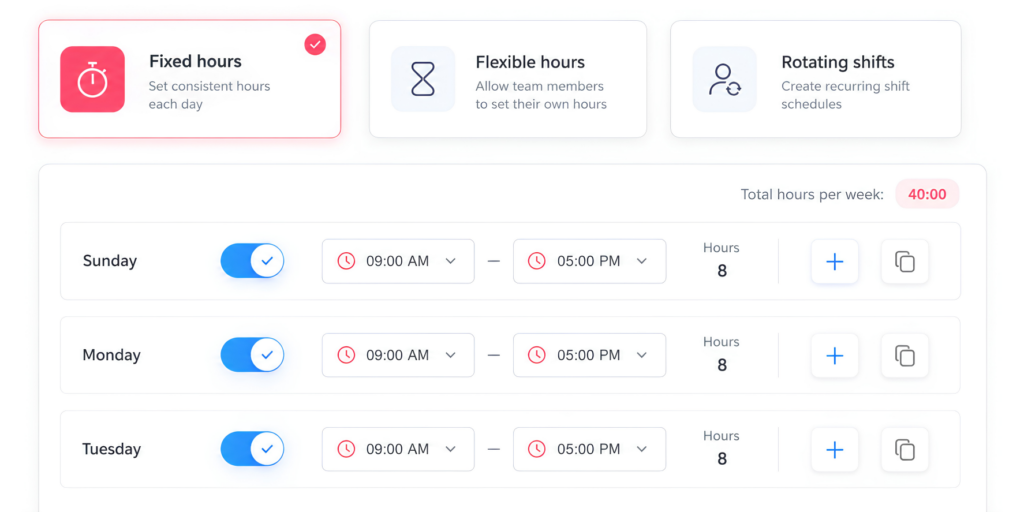
Connect Leave Tracking With Employee Work Schedules
A leave management system also needs to understand when an employee was expected to work.
Suppose two employees both request Monday off.
Employee A normally works Monday through Friday.
Employee B works Tuesday through Saturday.
Those requests should not necessarily result in the same leave deduction because Monday is not a scheduled workday for Employee B.
The same issue appears with employees who work:
- Four 10-hour days
- Rotating shifts
- Split shifts
- Flexible schedules
- Part time schedules
- Weekend schedules
- Different hours on different days
A system that simply subtracts one day whenever a date is selected can therefore produce inaccurate balances.
Leave measured in hours requires even more precision
For hourly leave, the system should consider the scheduled hours the employee would have worked.
For example, imagine an employee’s schedule is:
- Monday: 8 hours
- Tuesday: 6 hours
- Wednesday: 8 hours
- Thursday: 4 hours
- Friday: 8 hours
If the employee takes Thursday off, deducting a standard eight hours would overstate the absence. The correct deduction should reflect the applicable leave policy and four scheduled hours.
This is why work schedule data and leave data should not operate independently.
Standardize the Leave Request Process
Different locations may need different policies, but the basic employee experience should be as consistent as possible.
A good company wide workflow is:
- Employee selects the leave type.
- Employee chooses the requested dates or hours.
- The system checks the employee’s schedule.
- Public holidays and non-working days are considered.
- The employee sees the expected balance impact.
- The request goes to the correct approver.
- The manager reviews team availability.
- The manager approves or rejects the request.
- The balance and leave calendar update.
- HR retains a record of the transaction.
This provides consistency without forcing every employee to follow identical leave rules.
Avoid allowing one location to submit requests through email, another through chat messages, another through spreadsheets, and another through HR software.
When leave requests are scattered across different channels, maintaining an accurate company-wide record becomes difficult.
Design Approval Workflows Around the Organization
Companies with multiple offices should decide who has authority to approve leave.
Possible approval structures include:
Direct manager approval
Employee → Manager
Location-based approval
Employee → Branch Manager
Two-level approval
Employee → Manager → HR
Regional approval
Employee → Local Manager → Regional Manager
There is no universal workflow that fits every business.
The important requirement is that approval responsibility is defined before requests are submitted.
Without clear ownership, requests can remain pending or be approved by someone who does not understand the staffing needs of the employee’s location.
Give Managers Visibility Into Local Team Availability
Managers should not have to contact HR every time they want to know who will be available next week.
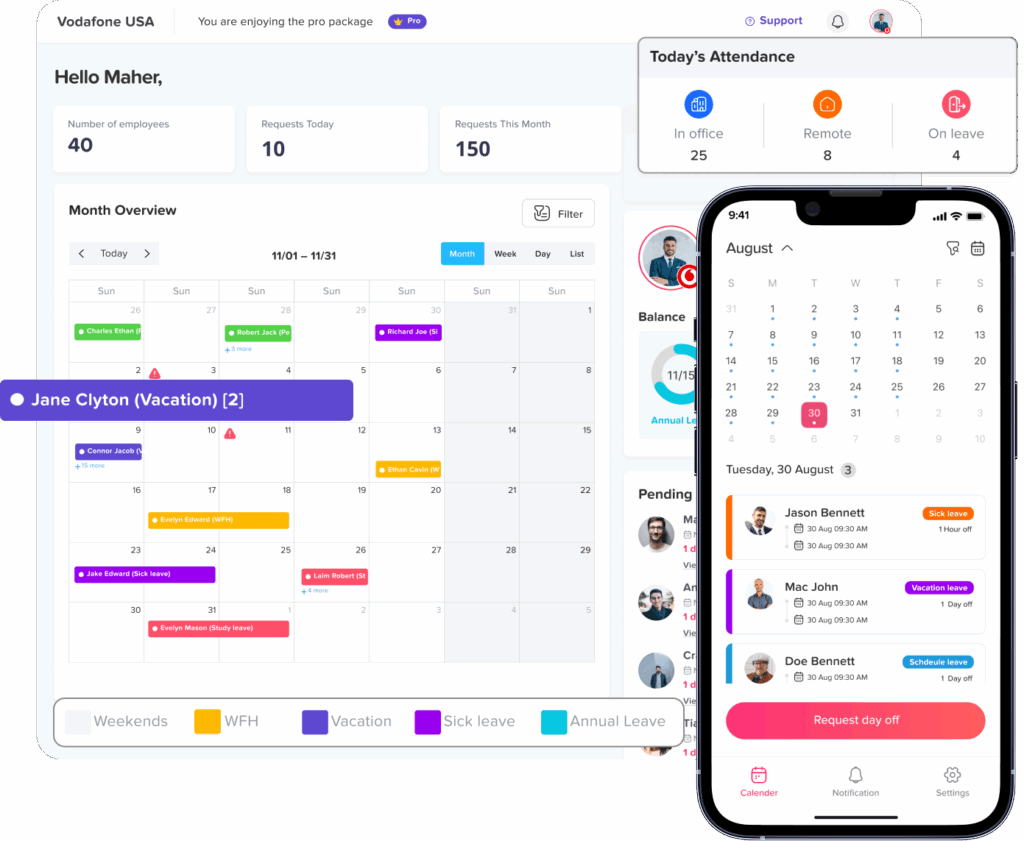
A shared leave calendar can show approved absences alongside relevant holidays, helping managers identify coverage issues before approving additional requests.
For multi location companies, calendar filtering is particularly useful.
A regional HR manager might need to see the whole organization, while a branch manager may only need:
- Their location
- Their team
- Relevant leave requests
- Applicable holidays
This approach also avoids overwhelming managers with hundreds of irrelevant absences from other offices.
With Day Off, company calendars can be filtered by team or location, subject to the organization’s visibility settings.
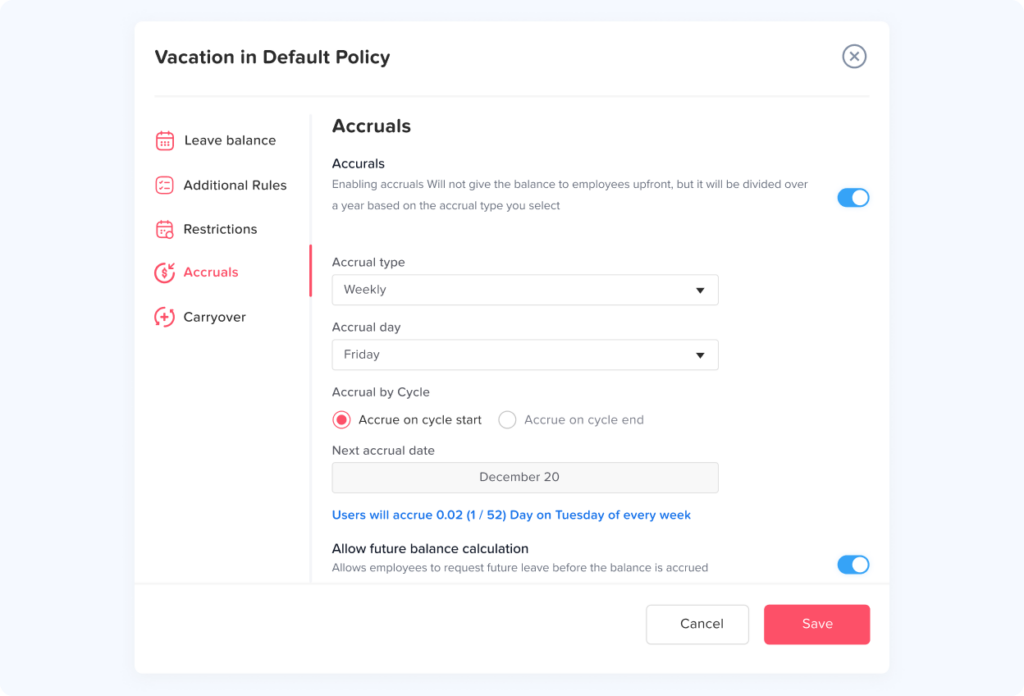
Calculate Accruals Automatically
Accruals become increasingly difficult to maintain manually as the workforce grows.
Employees may earn leave:
- Weekly
- Biweekly
- Semimonthly
- Monthly
- Annually
- Based on another defined company rule
Different employee groups may also have different entitlements.
For example:
Location A
20 days per year, granted annually.
Location B
Leave earned gradually each month.
Location C
A separate policy for employees with different service levels.
Manual spreadsheets require someone to calculate and update every balance correctly.
Automating accruals makes the rule repeatable. More importantly, it creates a traceable record explaining why an employee’s balance changed.
Decide How Carryover Works for Each Policy
Unused leave at the end of a leave year can create another layer of complexity.
Depending on the policy and applicable rules, unused leave may:
- Carry over completely
- Carry over up to a limit
- Expire
- Expire after a specified period
- Be paid out in certain situations
- Follow another locally required treatment
Do not create one global carryover rule simply because it is administratively easier.
Instead, record:
- The employee’s applicable policy
- Their balance before year end processing
- The amount carried forward
- Any amount that expires
- The reason or policy rule behind the adjustment
This creates much better records for future HR questions or audits.
Prepare for Employees Who Transfer Between Locations
Location changes deserve their own HR workflow.
Imagine an employee moves from the New York office to the London office halfway through the year.
Several questions may need to be addressed:
- When does the new policy become effective?
- Does the old balance transfer?
- Does the employee receive a prorated entitlement?
- Which holiday calendar applies after the transfer?
- Does the approval workflow change?
- Does the work schedule change?
- Should prior leave history remain visible?
- Which rules apply to leave already approved for a future date?
These decisions should not be handled informally each time someone moves.
Create a documented location transfer process.
Most importantly, preserve the historical record. Changing an employee’s current policy should not make it appear that the new policy had always applied.
Keep a Leave Audit Trail
Accurate leave tracking is not only about the current balance.
HR should also be able to answer:
Why is this the employee’s balance?
That requires a history of relevant activity.
A useful audit trail can include:
- Leave requested
- Request date
- Leave type
- Approval or rejection
- Approver
- Cancellation
- Balance deduction
- Accrual
- Carryover
- Manual adjustment
- Policy change
- Location change
- Employee schedule change
- Administrative action
Record-keeping requirements can also differ by jurisdiction. For example, UK government guidance currently states that, from April 6, 2026, employers must keep detailed annual leave and holiday pay records for at least six years.
Even where a specific rule does not apply, maintaining reliable leave records helps HR investigate disputes and correct mistakes.
Track Partial Day and Intermittent Leave Correctly
Not every absence is a full day.
Employees may take:
- Half days
- Two hour appointments
- Partial shifts
- Intermittent medical leave
- Reduced work schedules
Multi-location organizations should decide which units each leave type can use.
For instance, annual vacation may normally be requested in full or half days, while another leave type may need hourly tracking.
In the United States, eligible employees can sometimes use FMLA leave intermittently or on a reduced schedule. The Department of Labor explains that when less than a full workweek is taken, usage is calculated relative to the employee’s actual workweek.
This is another example of why a simple “days absent” column may not be sufficient for every organization.
Build Reports by Location, Not Just Company Wide
Company-level leave totals are useful, but they can hide local problems.
Suppose the company-wide absence rate looks normal while one customer support location has a large concentration of upcoming vacations.
Managers need the ability to filter leave data.
Useful reporting dimensions include:
- Location
- Department
- Team
- Employee
- Leave type
- Date range
- Request status
- Manager
- Policy
Useful leave metrics can include:
Leave usage
How much approved leave has been taken during the selected period?
Remaining leave balance
How much leave remains available?
Upcoming approved leave
Which absences are already scheduled?
Leave usage by location
Are some offices using substantially more or less leave?
Pending requests
Are requests waiting too long for approval?
Overlapping absences
How many employees from the same team or location will be away simultaneously?
Accrual and carryover records
How did balances change over time?
Reporting should help HR investigate patterns, not simply generate totals.
Establish One Source of Truth
A frequent problem in multi location businesses is duplicate leave records.
For example:
- Employees submit requests by email.
- Managers record approved leave in their calendars.
- HR updates a spreadsheet.
- Payroll keeps another file.
- Employees maintain their own balance calculations.
- Local offices create separate spreadsheets.
Soon, several versions of the same information exist.
When the records disagree, nobody knows which one is correct.
The better approach is to create a single source of truth for leave.
The central system should contain:
- Employee balances
- Leave policies
- Work schedules
- Locations
- Holidays
- Requests
- Approval status
- Leave history
- Accruals
- Carryover
- Reports
Other tools can receive information from that system, but they should not become independent competing records.
Spreadsheet vs Centralized Leave Tracking
| Process | Separate Spreadsheets | Centralized Leave System |
|---|---|---|
| Location policies | Manually maintained | Policies assigned systematically |
| Holiday calendars | Requires manual checking | Can be linked to locations |
| Balances | Formulas and manual updates | Automatically updated based on rules |
| Approvals | Email or messaging | Defined approval workflow |
| Work schedules | Often stored separately | Can be connected to leave deductions |
| Team visibility | Requires separate calendars | Shared leave calendar |
| Reporting | Files must be combined | Location and company-wide reporting |
| Audit history | Difficult to reconstruct | Actions can be recorded centrally |
| Employee access | HR often answers balance questions | Employees can view their own information |
| Scaling | Becomes harder as headcount grows | Designed for larger employee structures |
Spreadsheets can work for very small teams with simple rules. The problem appears when locations, schedules, policies, employees, and transactions multiply.
Set Privacy Rules for Shared Leave Calendars
Visibility is useful, but employees do not necessarily need to see every detail about another employee’s absence.
For example, the team may need to know that Jordan is unavailable on Tuesday.
They may not need to know:
- A medical diagnosis
- Personal family information
- Detailed leave reasons
- Uploaded documentation
A leave system should separate availability information from confidential HR information.
Calendar visibility can therefore be configured around what employees genuinely need to know.
This becomes especially important when teams operate across countries with different privacy requirements.
Account for Time Zones
Time zones rarely affect a simple full day vacation, but they can cause confusion with global teams when requests, approvals, and schedules are timestamped.
For example, an employee in Sydney may submit a request while their manager in New York is still working on the previous calendar date.
Companies should define:
- Which timezone determines the employee’s leave dates
- Which timezone appears in audit timestamps
- How overnight shifts are handled
- How cross midnight working schedules are recorded
The employee’s work location should usually provide the relevant operational context.
Create Rules for Peak Periods and Minimum Coverage
Different branches may experience peak demand at different times.
A retail business might have one location experiencing its busiest season during the summer while another location peaks around a local event or holiday.
Instead of applying one global blackout calendar, businesses can consider location-specific restrictions where appropriate.
Examples include:
- Blackout dates
- Maximum simultaneous absences
- Minimum staffing requirements
- Longer notice periods for peak dates
- Manager review for overlapping requests
These rules should be clearly communicated to employees before they submit leave.
The goal is not to discourage employees from using their entitlement. It is to provide managers with enough information to balance leave requests and operational coverage.
How Day Off Helps Track Employee Leave Across Multiple Locations
Day Off is designed to centralize leave management while allowing businesses to organize employees by location, team, department, schedule, and leave policy.
For companies operating across several offices or regions, Day Off supports multiple locations and allows organizations to customize working days, weekends, policies, and holidays rather than managing every office through a separate spreadsheet.
Manage multiple locations
Businesses can organize employees into different company locations while managing them from one system.
This makes it easier for HR to maintain a global view without removing the differences between individual offices.
Set location-specific holidays
Different locations can use appropriate holiday calendars, helping companies avoid incorrectly deducting vacation for applicable non-working holidays.
Create different leave policies
Leave policies can be configured for different employee groups, making it easier to manage different balances, accrual rules, carryover settings, and leave requirements.
Organize teams and departments
Employees can also be grouped into teams and departments, with specific approvers and policies assigned where appropriate.
View employee leave in a shared calendar
Managers and HR can use a centralized calendar to review approved absences and company holidays.
For larger organizations, calendar filters can narrow the view by team or location, making it easier to focus on the employees relevant to a particular manager.
Track balances and leave history
Instead of manually maintaining individual spreadsheets, leave balances, requests, and relevant reports can be managed in one system.
Support employees on web and mobile
Employees can check their leave information and submit requests without relying on email exchanges or asking HR to calculate their balance manually.
The result is one centralized process that can still reflect the operational differences between locations.
A Practical Multi Location Leave Tracking Checklist
When creating or reviewing your process, check the following:
Employee setup
- Is every employee assigned to the correct location?
- Is their team or department correct?
- Do they have the right manager?
- Is their work schedule accurate?
- Is the correct leave policy assigned?
Location setup
- Are working days correct?
- Are weekends correct?
- Is the correct public holiday calendar assigned?
- Are local blackout periods configured where required?
Policy setup
- Are entitlements correct?
- Are accrual rules documented?
- Are carryover rules clear?
- Are leave units defined?
- Are notice periods documented?
- Are balance reset rules correct?
Request process
- Do employees use one request channel?
- Is the correct manager notified?
- Can managers check availability before approval?
- Are employees informed when the status changes?
Records and reporting
- Can HR explain every balance?
- Is request history retained?
- Are manual adjustments documented?
- Can reports be filtered by location?
- Are employee transfers recorded?
- Are historical policy records preserved where necessary?
When Should a Business Replace Multi-Location Leave Spreadsheets?
There is no fixed employee number at which spreadsheets suddenly stop working.
Instead, look for operational warning signs.
It may be time to introduce a dedicated system when:
- HR maintains several leave spreadsheets
- Locations use different file formats
- Employees frequently ask HR for their balances
- Managers accidentally approve overlapping leave
- Public holidays are deducted incorrectly
- Leave calculations require regular manual corrections
- Employees work different schedules
- Accrual calculations are becoming difficult
- HR cannot easily produce reports by location
- Policy changes require editing many files
- Managers approve leave through email or chat messages
- Nobody is completely sure which spreadsheet is current
The more rules HR has to remember manually, the greater the value of automation.
FAQ
How do you track employee leave across multiple locations?
Start by assigning every employee to the correct location, leave policy, work schedule, holiday calendar, and approver. Leave requests should then be managed through one centralized system that applies the correct rules to each employee while allowing HR to report across the entire company.
Can different company locations have different leave policies?
Yes. Organizations may need different policies because of local employment requirements, contracts, employee classifications, business practices, or company benefits. Policies should be documented clearly and assigned consistently to the correct employees.
How do you manage public holidays for employees in different countries?
Assign a holiday calendar based on the employee’s appropriate work location rather than applying the headquarters holiday calendar to everyone. This helps ensure that relevant public holidays are considered when calculating leave.
How should remote employees be assigned to a leave location?
Remote employees should have a defined location for leave administration based on the company’s employment arrangement and applicable rules. HR should document which policy, holiday calendar, work schedule, and approval process apply rather than leaving the employee without an assigned location.
What is the best way to track employee leave for international teams?
For international teams, a centralized leave management system is generally more scalable than separate spreadsheets. The system should support multiple locations, customizable leave policies, local holiday calendars, different work schedules, approval workflows, employee balances, reporting, and historical records.
Conclusion
Learning how to Track Employee Leave across multiple locations is less about creating more HR processes and more about organizing the right information in one reliable system.
Every employee should be connected to the correct location, leave policy, work schedule, holiday calendar, and approval workflow. Once those relationships are defined, leave balances, requests, holidays, accruals, carryover, reporting, and team availability become much easier to manage.
The biggest mistake multi-location organizations can make is trying to run a growing leave process through disconnected spreadsheets, emails, calendars, and local records. That approach makes it difficult to determine which balance is correct, which policy applies, or who is actually available.
A centralized platform such as Day Off gives HR teams one place to manage employee leave while maintaining the flexibility required for different offices, countries, schedules, teams, and policies.
As a company expands, that structure becomes increasingly important. Good multi location leave tracking provides employees with clearer balances and policies, gives managers better visibility into staffing, and gives HR more reliable records across the entire organization.