







Tracking unpaid leave, sick leave, and vacation leave separately helps businesses keep employee records accurate, manage leave fairly, and avoid payroll mistakes. When every absence is grouped under one general “time off” category, HR teams can lose track of why employees are away, whether the leave should be paid, and which balance should be deducted.
Although unpaid leave, sick leave, and vacation leave all mean an employee is away from work, each one serves a different purpose. Vacation leave is usually planned; sick leave is often used for illness or medical needs, and unpaid leave applies when time off is approved without pay. Separating these leave types gives HR, managers, and payroll teams a clearer view of employee availability and leave records.

For small businesses, remote teams, hybrid teams, and growing companies, separating these leave types is one of the easiest ways to improve workforce planning. It helps managers understand who is unavailable, helps payroll teams know what should be paid, and helps HR teams keep better records.
This guide explains what each leave type means, why they should be tracked separately, what information HR should record, common mistakes to avoid, and how leave management software like Day Off can help businesses manage unpaid leave, sick leave, vacation leave, balances, approvals, calendars, and reports in one place.
What Does It Mean to Track Leave Separately?
Tracking leave separately means that every absence is recorded under the correct leave type instead of being added to one general time off bucket.
For example, instead of recording all absences as “PTO” or “Leave,” a company may use separate categories such as:
| Leave Type | Main Purpose | Paid or Unpaid | Common Use |
|---|---|---|---|
| Vacation Leave | Rest, travel, personal time | Usually Paid | Planned time off |
| Sick Leave | Illness, injury, medical care | Usually Paid | Sudden or planned health-related absence |
| Unpaid Leave | Time away without pay | Unpaid | Extended absence, no balance available, personal emergency |
| Personal Leave | Personal matters | Paid or Unpaid | Family, appointments, urgent matters |
| Public Holiday | Company or country holiday | Usually Paid | Official non-working day |
The goal is not only to record that an employee is absent. The goal is to understand the reason, payment status, balance impact, approval status, and reporting value of that absence.
When leave types are separated properly, HR can answer important questions such as:
- How many vacation days has each employee used?
- How many sick days were taken this month?
- Did unpaid leave affect payroll?
- Which teams have high absence rates?
- Are employees using vacation time regularly?
- Are sick leave patterns increasing?
- Which employees have no remaining paid leave balance?
- Are managers approving leave consistently?
- Is the company following its internal leave policy?
Without separate tracking, these questions become harder to answer.
Why Businesses Should Not Mix All Leave Types Together
Many companies start by tracking leave in a spreadsheet. At first, this may seem simple. A manager writes the employee name, the date, and the number of days off. But as the team grows, this method becomes confusing.
If unpaid leave, sick leave, and vacation leave are mixed together, several problems can happen.
Payroll mistakes become more likely
Vacation leave and sick leave may be paid, while unpaid leave should normally reduce pay. If HR does not clearly mark the leave type, payroll may pay an employee for unpaid leave by mistake or deduct pay when the employee had available paid balance.
Even small mistakes can create frustration. Employees may lose trust in the process, and payroll teams may spend extra time correcting records.
Leave balances become inaccurate
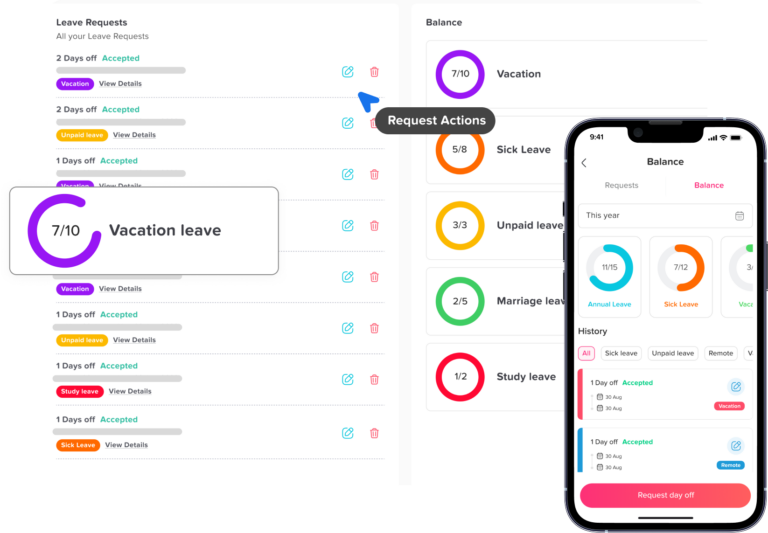
If all absences are deducted from one balance, employees may lose the wrong type of leave. For example, a sick day could be deducted from vacation balance, or unpaid leave could reduce paid leave balance when it should not.
This creates confusion when employees check their remaining balance. It can also create disputes when employees believe they have more available days than the system shows.
Managers lose visibility
Managers need to know why employees are away. A team member on vacation is different from a team member who is sick. A team member on unpaid leave may be away for a longer or more sensitive reason.
When managers can see the leave type clearly, they can plan coverage more effectively. They can decide whether to delay tasks, reassign work, approve new requests, or avoid overlapping absences.
HR reports become less useful
A general “time off” report does not show enough detail. HR teams need reports that separate vacation usage, sick leave usage, unpaid leave, absence trends, and leave balances.
For example, if sick leave usage increases in one department, HR may need to review workload, burnout, workplace health, or manager communication. If vacation usage is very low, employees may be avoiding time off, which can affect wellbeing and productivity.
Compliance risks may increase
Leave rules can vary depending on country, state, company policy, employment contract, and leave type. Some leave categories may require specific records, notices, or documentation. If all leave is grouped together, it becomes harder to prove how a request was handled.
Separating leave types helps businesses keep cleaner records and makes it easier to review past decisions when needed.
Understanding the Difference Between Unpaid Leave, Sick Leave, and Vacation Leave
Before tracking leave properly, HR teams need clear definitions. Employees and managers should understand what each leave type means and when it should be used.
What Is Unpaid Leave?
Unpaid leave is time away from work where the employee is not paid for the missed working time. It may be requested by the employee or applied when the employee does not have enough paid leave balance.
Unpaid leave may be used for:
- Extended personal time away
- Family matters
- Personal emergencies
- Education or exams
- Relocation
- Religious or personal commitments
- Additional time off after paid leave is used
- Approved absence when no paid balance remains
- Certain protected leave situations, depending on applicable law and company policy
Unpaid leave should be tracked carefully because it directly affects payroll. It may also affect benefits, accruals, attendance records, or employment status depending on company rules.
What HR should record for unpaid leave
| Field | Why It Matters |
|---|---|
| Employee name | Identifies who took the leave. |
| Leave type | Confirms the absence is unpaid. |
| Start and end date | Shows the full leave period. |
| Number of working days or hours | Helps payroll calculate deductions. |
| Reason category | Helps HR understand the purpose without exposing unnecessary private details. |
| Approval status | Shows whether the leave was approved, pending, or rejected. |
| Approver name | Creates accountability. |
| Payroll impact | Confirms whether pay should be deducted. |
| Notes or attachments | Supports the request when needed. |
| Return date | Helps managers plan coverage. |
Unpaid leave should not be treated casually. Even when it is approved, the company needs a clear record of the dates, payroll impact, and employee status.
What Is Sick Leave?
Sick leave is time off used when an employee is ill, injured, recovering, attending medical appointments, or unable to work because of health-related reasons. Depending on company policy and local rules, sick leave may be paid or unpaid.
Sick leave is often different from vacation leave because it may be unplanned. An employee may wake up sick and need to request leave on the same day. In other cases, sick leave may be planned in advance, such as for a scheduled medical appointment or treatment.
When tracking sick leave, HR should record:
| Field | Why It Matters |
|---|---|
| Employee name | Identifies the employee. |
| Leave type | Confirms it is sick leave. |
| Date or date range | Shows when the employee was away. |
| Full day, half day, or hourly leave | Helps deduct the correct amount. |
| Paid or unpaid status | Shows whether sick balance is available. |
| Sick leave balance before and after | Keeps records accurate. |
| Approval status | Confirms manager or HR review. |
| Documentation status if required | Shows whether a note or certificate was provided. |
| Return-to-work date | Helps managers plan schedules. |
| Confidential notes if needed | Keeps sensitive details limited and controlled. |
Sick leave records may include sensitive health-related information, so companies should avoid collecting more information than necessary. HR should focus on the leave request, dates, approval, and documentation status rather than unnecessary personal medical details.
What Is Vacation Leave?
Vacation leave is planned time off for rest, travel, family time, personal plans, or general time away from work. It is usually requested in advance and deducted from an employee’s vacation or PTO balance.
Vacation leave is important because it helps employees rest and return to work more focused. It also helps companies plan workloads, avoid burnout, and maintain employee satisfaction.
What HR should record for vacation leave
| Field | Why It Matters |
|---|---|
| Employee Name | Identifies the employee. |
| Leave Type | Confirms it is vacation leave. |
| Start and End Date | Shows the vacation period. |
| Number of Working Days | Deducts the correct vacation balance. |
| Balance Before and After | Keeps vacation records accurate. |
| Approval Status | Confirms whether the request is accepted. |
| Approver Name | Creates a clear approval trail. |
| Team Calendar Visibility | Helps prevent scheduling conflicts. |
| Overlap with Other Employees | Helps managers plan team coverage. |
| Notes (Optional) | Adds context for the request when needed. |
Vacation leave is usually easier to plan than sick leave, but it still needs structure. Without a clear approval process, too many employees may request the same dates, leaving the team short-staffed.
Key Differences Between Unpaid Leave, Sick Leave, and Vacation Leave
Unpaid leave is usually not paid. It may reduce the employee’s salary for the pay period.
Sick leave is used for illness, injury, medical care, or recovery. It is usually paid if the employee has available sick leave balance.
Vacation leave is planned time off for rest or personal reasons. It is usually paid and deducted from vacation balance.
The biggest difference is how each leave type affects pay, balances, approvals, reports, and team planning.
That is why businesses should not track all three under one general category.
How to Track Unpaid Leave, Sick Leave, and Vacation Leave Separately
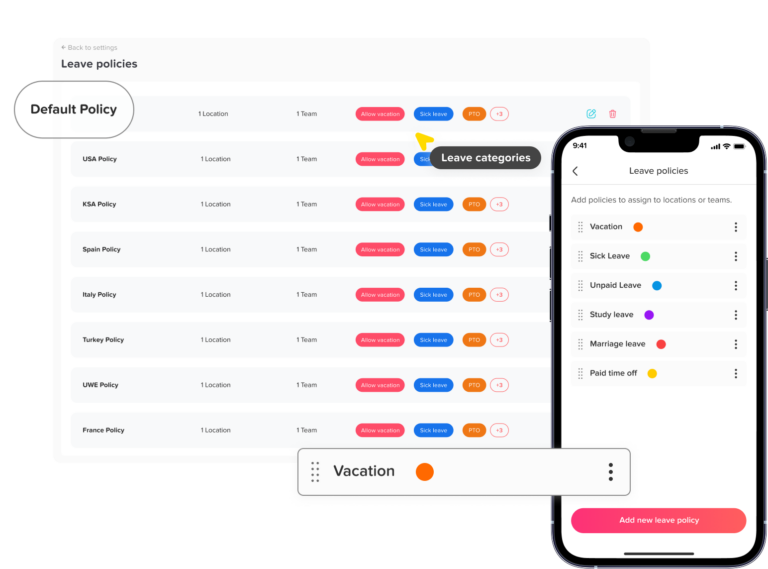
Step 1: Define Each Leave Type Clearly
The first step is to create clear leave type definitions.
Employees should know when to choose unpaid leave, when to choose sick leave, and when to choose vacation leave.
A clear policy should explain whether each leave type is paid or unpaid. It should also explain whether a balance is required and who needs to approve the request.
For example, vacation leave can be defined as paid time off requested in advance for rest, travel, or personal plans.
Sick leave can be defined as time off used when an employee is ill, injured, attending medical care, or unable to work for health-related reasons.
Unpaid leave can be defined as approved time away from work without pay.
These definitions should be simple, but specific enough to avoid confusion.
Step 2: Create Separate Leave Balances
Vacation leave and sick leave should usually have separate balances.
If an employee takes a sick day, it should reduce the sick leave balance. If the employee takes vacation, it should reduce the vacation balance.
Unpaid leave often does not have a balance because it is not usually earned like paid leave.
Instead, unpaid leave is usually tracked as approved unpaid days or unpaid hours.
Some companies may still set limits for unpaid leave. For example, they may allow only a certain number of unpaid days per year.
Other companies may require HR approval after a certain number of unpaid days.
These rules should be written clearly in the leave policy.
Step 3: Decide How Leave Will Be Measured
Leave can be tracked in full days, half days, hours, shifts, calendar days, or working days.
The best option depends on how your team works.
For office teams, full-day and half-day tracking may be enough. For part-time employees, hourly tracking may be more accurate.
For retail, restaurants, field teams, and shift-based businesses, tracking leave by hours or shifts may work better.
This matters because one working day is not the same for every employee.
One employee may work 8 hours per day, while another may work 4 hours. Their leave deductions should reflect their actual schedules.
Step 4: Build a Clear Leave Request Process
Employees should know exactly how to request each leave type.
The process should not depend on random emails, chat messages, paper notes, or verbal approvals.
A clear request process should explain where employees submit leave requests, how much notice is required, who approves the request, and what happens after approval.
A simple process may look like this:
- The employee selects the correct leave type.
- The employee chooses the date range or hours.
- The employee adds a reason if required.
- The request goes to the correct approver.
- The manager reviews team availability.
- The manager approves or rejects the request.
- The employee receives a notification.
- The leave calendar is updated.
- The correct balance is updated.
- Payroll receives unpaid leave details if needed.
This keeps employees, managers, HR, and payroll aligned.
Step 5: Use Different Approval Rules
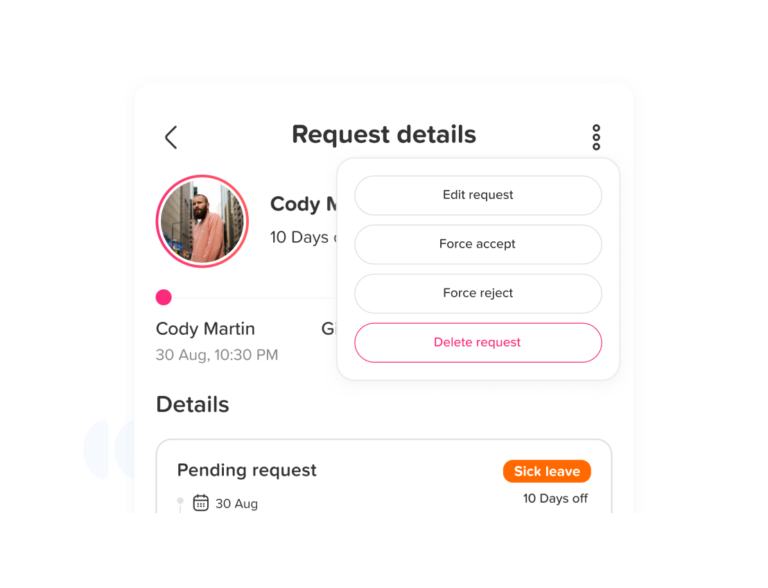
Not every leave type needs the same approval process.
Vacation leave usually requires manager approval because it affects planning and team coverage.
Sick leave may need a faster process because it can happen suddenly.
Unpaid leave may require both manager and HR approval because it affects payroll and employee records.
Emergency leave may need a flexible process. The employee may notify the manager first and complete the formal request later.
The approval workflow should be simple enough for employees to follow.
At the same time, it should protect the business from payroll errors and unclear records.
Step 6: Connect Unpaid Leave With Payroll
Unpaid leave must be visible to payroll.
If payroll does not know that a leave request is unpaid, the employee may be paid incorrectly.
HR should share the unpaid leave dates, number of unpaid days or hours, pay period affected, approval status, and any partial-day details.
Paid vacation and paid sick leave may not reduce salary, but they still need to be recorded.
Payroll may need these records for reports, pay slips, attendance reviews, or internal documentation.
A strong leave process should clearly separate paid leave from unpaid leave.
Step 7: Use a Shared Leave Calendar
A shared leave calendar helps managers see who is away and when.
It is useful for vacation leave, sick leave, unpaid leave, public holidays, and team availability.
A calendar also helps managers avoid approving too many overlapping requests.
However, businesses should be careful with sensitive information.
For example, the team may need to see that an employee is away. But private medical details should not be visible to everyone.
A good leave calendar should support planning without exposing unnecessary personal information.
Step 8: Track Balances Automatically
Manual balance tracking often leads to mistakes.
A request may be approved but not deducted. A canceled request may not be restored. A half-day may be deducted as a full day.
Sick leave may also be deducted from vacation balance by mistake.
Automation helps prevent these issues.
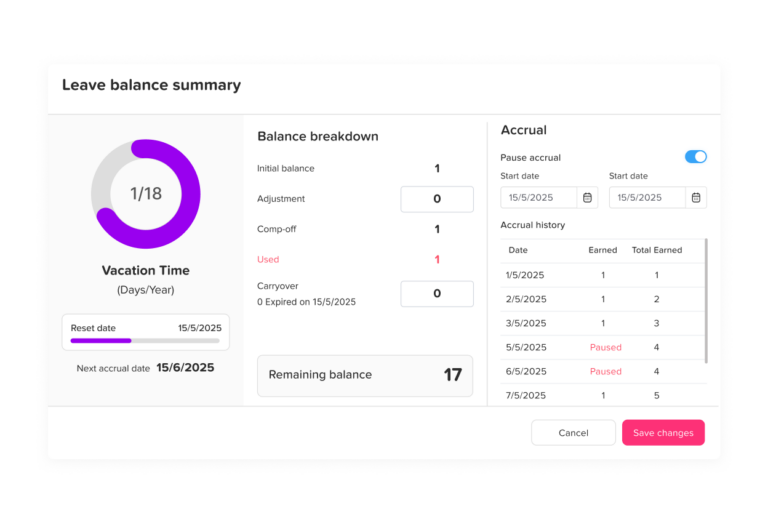
When vacation leave is approved, the vacation balance should update automatically. When sick leave is approved, the sick leave balance should update automatically.
When unpaid leave is approved, paid leave balance should not decrease unless the company policy says otherwise.
If a request is canceled, the balance should be restored. If a request is rejected, no balance should change.
This gives employees more confidence in their leave balances and reduces manual HR work.
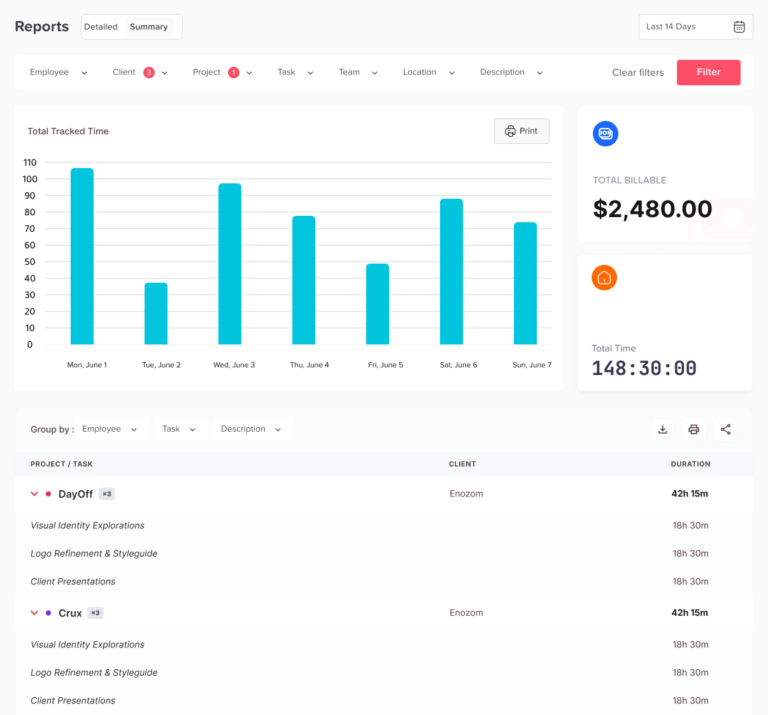
Step 9: Create Reports for Each Leave Type
Separate reports help HR understand what is happening across the company.
Vacation leave reports show how employees use planned time off.
Sick leave reports show health-related absence trends.
Unpaid leave reports show unpaid absence patterns and payroll impact.
HR teams should also review balance reports, monthly leave reports, payroll reports, team absence reports, and overlap reports.
These reports help businesses make better workforce decisions.
Step 10: Review Leave Policies Regularly
Leave tracking should not be a one-time setup.
HR should review policies regularly to make sure they still work for the business.
The review should check whether employees are using the correct leave types and whether managers are approving requests consistently.
It should also check whether payroll deductions are accurate and whether leave balances are correct.
A regular review helps the company fix small issues before they become bigger problems.
Common Mistakes When Tracking Different Leave Types
Mistake 1: Using One General PTO Category for Everything
Some companies use one category called “PTO” for all leave.
This can work if the company has a combined PTO policy.
But if the company offers separate vacation leave, sick leave, and unpaid leave, each type should be tracked separately.
Otherwise, balances and reports can become confusing.
Mistake 2: Deducting Unpaid Leave From Paid Leave Balance
Unpaid leave should not normally reduce vacation or sick leave balance.
The only exception is when company policy requires employees to use paid leave before unpaid leave.
If unpaid leave is deducted from paid leave by mistake, employee balances become inaccurate.
Mistake 3: Not Showing Payroll Impact
Unpaid leave should be clearly marked for payroll.
It should show whether salary deduction is required and how many unpaid days or hours were taken.
If payroll impact is hidden in notes or emails, it can easily be missed.
Mistake 4: Allowing Leave Requests Through Too Many Channels
Leave requests should not be scattered across emails, chats, paper forms, and verbal conversations.
When requests come from too many places, approvals become harder to track.
A centralized system keeps everything in one place and creates a clear approval history.
Mistake 5: Not Tracking Half Days or Hours
Not every leave request is a full day.
Employees may need a half-day vacation, a short medical appointment, or a few unpaid hours.
If the system only supports full days, balances may be deducted incorrectly.
Mistake 6: Making Sick Leave Too Public
Sick leave should be handled carefully.
Managers may need to know that an employee is away, but medical details should not be visible to the whole team.
A good leave system should separate calendar visibility from sensitive HR information.
Mistake 7: Not Updating Balances After Cancellations
If an employee cancels approved vacation leave, the balance should be restored.
If HR forgets to update it, the employee may lose days they did not actually use.
Automation helps prevent this mistake.
Mistake 8: Ignoring Leave Trends
Leave tracking is not only about recording absences. Reports can reveal trends that help the business.
For example:
- High sick leave usage may suggest burnout or health concerns.
- Low vacation usage may suggest employees are not taking enough rest.
- Frequent unpaid leave may suggest financial, scheduling, or policy issues.
- Repeated overlapping vacation requests may suggest poor planning around peak periods.
When leave is tracked separately, these trends are easier to understand.
Best Practices for Tracking Unpaid Leave
Unpaid leave has a direct payroll impact, so it should be managed carefully.
Best practices include:
- Create a clear unpaid leave policy.
- Explain when unpaid leave is allowed.
- Require approval before unpaid leave is taken, except in emergencies.
- Connect unpaid leave records with payroll.
- Track unpaid leave by hours or working days.
- Record whether paid leave must be used first.
- Keep manager and HR approval history.
- Review unpaid leave patterns monthly.
- Make unpaid leave visible in reports.
- Avoid mixing unpaid leave with vacation or sick leave.
Unpaid leave should not disappear into general absence records. It should be clearly marked and easy to report.
Best Practices for Tracking Unpaid Leave
Unpaid leave has a direct payroll impact, so it should be managed carefully.
Best practices include:
- Create a clear unpaid leave policy.
- Explain when unpaid leave is allowed.
- Require approval before unpaid leave is taken, except in emergencies.
- Connect unpaid leave records with payroll.
- Track unpaid leave by hours or working days.
- Record whether paid leave must be used first.
- Keep manager and HR approval history.
- Review unpaid leave patterns monthly.
- Make unpaid leave visible in reports.
- Avoid mixing unpaid leave with vacation or sick leave.
Unpaid leave should not disappear into general absence records. It should be clearly marked and easy to report.
Best Practices for Tracking Sick Leave
Sick leave should be simple for employees to request, especially when they are unwell. At the same time, HR needs accurate records.
Best practices include:
- Create a separate sick leave type.
- Allow urgent or same-day requests.
- Track full-day, half-day, or hourly sick leave.
- Keep medical details private.
- Define when documentation is required.
- Deduct sick leave from the correct balance.
- Mark sick leave as paid or unpaid based on available balance and policy.
- Track recurring sick leave patterns carefully and fairly.
- Train managers to handle sick leave consistently.
- Review sick leave reports without exposing sensitive details.
Sick leave tracking should balance business needs with employee privacy and fairness.
Best Practices for Tracking Vacation Leave
Vacation leave is usually planned, so the process should focus on advance notice, team coverage, and balance accuracy.
Best practices include:
- Require employees to submit vacation requests in advance.
- Show approved vacation leave on a shared calendar.
- Check overlapping leave before approval.
- Deduct vacation leave from the correct balance.
- Allow employees to view their remaining balance.
- Set rules for carryover and expiry if applicable.
- Review unused vacation balances regularly.
- Encourage employees to take time off.
- Plan around busy seasons and blackout periods.
- Use reports to understand vacation usage by team.
Vacation leave should support both employee wellbeing and business continuity.
How Separate Leave Tracking Helps Different Teams
HR Teams
HR teams benefit from cleaner records, fewer manual updates, and better reports. They can easily see how much leave each employee used, which leave types are most common, and whether policies are being followed.
Managers
Managers can plan work better when they know who is away, why they are away, and when they will return. They can avoid approving too many overlapping vacation requests and can prepare coverage when someone is on unpaid leave or sick leave.
Payroll Teams
Payroll teams need to know which absences are paid and which are unpaid. Separate leave tracking reduces payroll errors and makes pay period review easier.
Employees
Employees benefit because they can see their balances clearly. They know how many vacation days they have left, whether sick leave was deducted correctly, and whether unpaid leave was approved.
Leadership
Leadership can use leave reports to understand workforce trends, staffing risks, and employee wellbeing. Separate tracking creates better data for decision-making.
How Day Off Helps Track Unpaid Leave, Sick Leave, and Vacation Leave Separately
Day Off helps businesses manage different leave types in one organized system. Instead of tracking unpaid leave in one file, sick leave in another file, and vacation leave through emails, teams can manage the full process in one place.
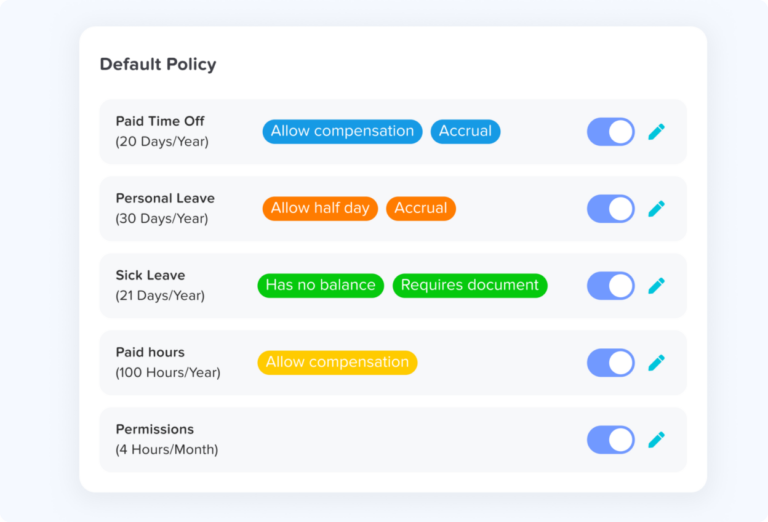
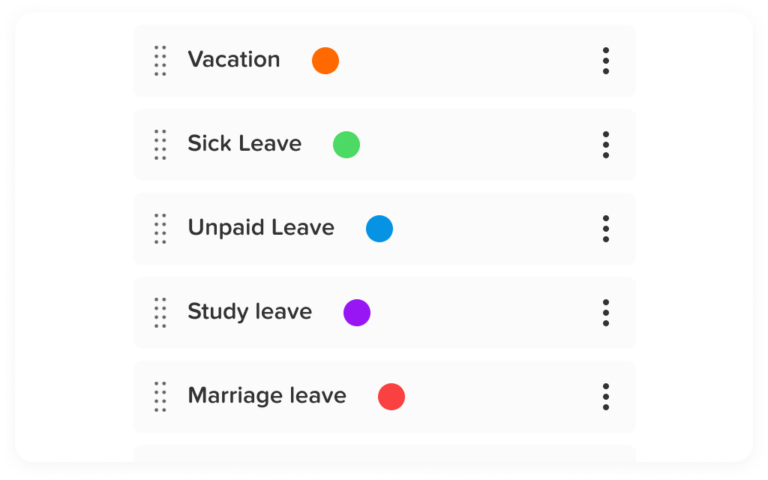
With Day Off, companies can create separate leave types such as vacation leave, sick leave, unpaid leave, personal leave, maternity leave, public holidays, and more. Each leave type can have its own rules, balance, approval flow, and visibility.
Day Off helps businesses:
- Create separate leave types for unpaid leave, sick leave, and vacation leave.
- Track employee balances accurately.
- Allow employees to request leave from one place.
- Let managers approve or reject requests.
- Show approved leave on a shared team calendar.
- Prevent confusion around overlapping leave.
- Keep HR records organized.
- Export reports for review and payroll.
- Manage teams, locations, and policies.
- Improve visibility into who is working and who is away.
For companies that also need attendance and time tracking, Day Off can support a clearer view of employee availability by connecting leave records with schedules, attendance, and time off data.
This helps HR teams avoid the common problem of managing leave in one system and attendance in another. When leave and attendance are connected, managers can better understand whether an employee is working, on vacation, sick, absent, or on unpaid leave.
Example: How Separate Leave Tracking Works in Practice
Imagine a company has three employees with different leave situations in the same week.
- Sara requests 3 vacation days for a planned trip.
- Ahmed takes 1 sick day because he is unwell.
- Lina requests 2 unpaid days because she has no vacation balance left.
If the company tracks all of these as “time off,” payroll and HR may not know how to handle each case.
But if they are tracked separately:
| Employee | Leave Type | Paid or Unpaid | Balance Impact | Payroll Impact |
|---|---|---|---|---|
| Sara | Vacation leave | Paid | Deduct 3 vacation days | No salary deduction |
| Ahmed | Sick leave | Paid | Deduct 1 sick day | No salary deduction |
| Lina | Unpaid leave | Unpaid | No paid balance deduction | Deduct 2 days from pay |
This simple separation prevents confusion. It also helps managers see the difference between planned vacation, health-related absence, and unpaid time away.
Monthly Checklist for HR Teams
HR teams should review leave records every month to make sure everything is accurate.
Use this checklist:
- Review all approved vacation leave.
- Review all sick leave records.
- Review unpaid leave and payroll impact.
- Check remaining balances for each employee.
- Confirm canceled leave was restored correctly.
- Check whether any leave was deducted from the wrong balance.
- Review overlapping leave requests.
- Export payroll reports.
- Review employees with high unpaid leave usage.
- Review employees with unused vacation balances.
- Confirm sick leave records are handled privately.
- Check whether any leave requests are still pending.
- Update policies if needed.
A monthly review helps keep leave tracking accurate and prevents year-end problems.
FAQ
What is the best way to track unpaid leave?
The best way to track unpaid leave is to create a separate unpaid leave type, record the exact dates or hours, require approval, and connect the record with payroll. Unpaid leave should be clearly marked so it is not confused with paid vacation or sick leave.
Should sick leave and vacation leave be tracked separately?
Yes. Sick leave and vacation leave should be tracked separately if your company has separate policies or balances for each one. Sick leave is used for health-related absence, while vacation leave is usually planned time off for rest or personal plans.
Does unpaid leave reduce vacation balance?
Unpaid leave should not usually reduce vacation balance unless the company policy requires employees to use paid vacation before unpaid leave. HR should define this clearly in the leave policy.
How do you track sick leave accurately?
To track sick leave accurately, create a separate sick leave category, record full-day, half-day, or hourly absences, deduct the correct sick leave balance, and keep sensitive health-related information private.
How do you track vacation leave for employees?
Vacation leave can be tracked by allowing employees to submit requests, routing those requests to managers for approval, deducting approved days from vacation balance, and showing approved leave on a shared calendar.
Why is separate leave tracking important for payroll?
Separate leave tracking is important for payroll because paid and unpaid absences affect salary differently. Vacation leave and paid sick leave may not require pay deductions, while unpaid leave usually does.
Can leave management software track different leave types?
Yes. Leave management software can help companies create separate leave types, manage balances, approve requests, show leave on a shared calendar, and generate reports for HR and payroll.
What happens if all leave types are tracked together?
If all leave types are tracked together, HR may lose visibility into why employees are absent, payroll mistakes may increase, leave balances may become inaccurate, and reports may not show useful trends.
Should unpaid leave appear on the team calendar?
Unpaid leave should usually appear on the team calendar as an approved absence so managers can plan coverage. However, sensitive details should only be visible to authorized people.
How often should HR review leave records?
HR should review leave records at least monthly. This helps confirm that balances are accurate, unpaid leave is reported to payroll, sick leave is handled correctly, and vacation requests are properly recorded.
Conclusion
Tracking unpaid leave, sick leave, and vacation leave separately is one of the most important steps in building a clear and reliable leave management process. Although these leave types may all result in an employee being away from work, they have different meanings, different payroll effects, and different reporting needs.
Unpaid leave affects pay and should be clearly connected with payroll. Sick leave may involve urgent requests and should be handled with privacy and care. Vacation leave is usually planned and should be managed through balances, approvals, and a shared calendar.
When companies mix all leave types together, they increase the risk of payroll errors, inaccurate balances, unclear reports, and scheduling confusion. But when each leave type is tracked separately, HR teams can work more accurately, managers can plan better, employees can trust their balances, and leadership can make better workforce decisions.
Day Off helps businesses manage unpaid leave, sick leave, vacation leave, PTO balances, approvals, team calendars, reports, and employee availability in one place. Instead of relying on spreadsheets, emails, and manual updates, companies can use Day Off to create a cleaner, easier, and more reliable leave tracking process.