







The way we work has fundamentally changed over the past few years, with Work From Home (WFH) leading this transformation. What was once considered an alternative arrangement is now a core part of how businesses operate. Companies are no
Most companies today don’t struggle with understanding remote or hybrid work, they struggle with making it efficient, scalable, and easy to manage.
The real difference between teams that thrive and teams that constantly deal with confusion comes down to one thing: How well they manage visibility, scheduling, and time off
In this article, we’ll go deeper into the real operational challenges behind work from home (WFH) and hybrid work, and how tools like Day Off can solve them in a practical, scalable way.

1. Visibility vs Flexibility: The Daily Trade Off
Flexibility is one of the biggest advantages of modern work, but it comes with a hidden trade-off: you lose natural visibility.
In a physical office, awareness happens automatically. You can instantly see who is present, who is absent, and who is available for a quick discussion. This passive visibility disappears in work from home (WFH) and becomes fragmented in hybrid environments.
In fully remote teams, this often leads to:
- Managers second-guessing availability instead of acting confidently
- Employees unintentionally overlapping responsibilities
- Delays simply because no one is sure who is online or available
In hybrid setups, the issue becomes even more subtle:
- Employees may come into the office on different days, missing each other entirely
- Teams assume alignment, but in reality, they are working in parallel silos
- Visibility exists, but only partially and inconsistently
Over time, these blind spots don’t just create confusion, they reduce speed, confidence, and overall team performance.
How Day Off Solves This
Day Off rebuilds that missing layer of visibility by creating a single, reliable source of truth:
- A shared, real-time calendar clearly shows who is on leave and when
- Teams can instantly understand availability without asking questions
- Managers can plan workloads and deadlines with confidence
Instead of relying on assumptions, your team operates with clarity, whether fully remote or hybrid.
2. Collaboration Breaks Down Without Context
Most teams think collaboration problems come from lack of communication. In reality, they come from lack of context around that communication.
In work from home (WFH) environments:
- Messages are sent without knowing if the recipient is available
- Important discussions are delayed or fragmented
- Async communication becomes inefficient when timing is unclear
In hybrid environments:
- Some decisions happen in person, others online
- Remote employees may miss key conversations or updates
- Teams end up duplicating discussions across channels
The real issue isn’t communication volume, it’s communication timing and awareness.
When people don’t know who is available, collaboration becomes reactive instead of intentional.
How Day Off Improves Collaboration
Day Off doesn’t replace communication tools, it makes them more effective by adding context:
- Teams can check availability before reaching out
- Meetings can be scheduled when all key participants are present
- Fewer interruptions and fewer delayed responses
This small shift, knowing availability in advance, makes collaboration smoother, faster, and more respectful of everyone’s time.
3. Scheduling Complexity Quietly Kills Productivity
Scheduling is one of the biggest hidden drains on productivity in flexible work environments.
Every day, teams deal with small but constant uncertainties:
- Is someone on leave today?
- Will we have enough coverage this week?
- Should we delay this task or move forward?
Individually, these questions seem minor. Collectively, they create:
- Decision fatigue
- Delays in execution
- Misaligned priorities
In hybrid environments, scheduling becomes even more critical:
- Office days need coordination to be meaningful
- Teams need overlap to collaborate effectively
- Unplanned absences can disrupt entire workflows
Without a clear system, scheduling becomes reactive, and reactive teams are always one step behind.
How Day Off Brings Structure to Scheduling
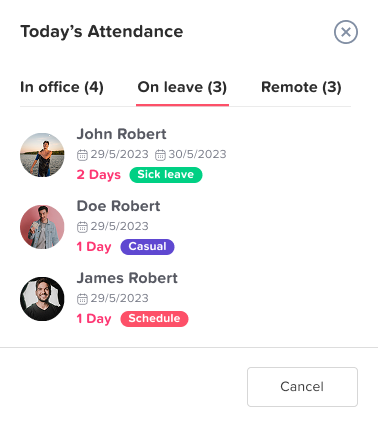
Day Off transforms scheduling from guesswork into proactive planning:
- Teams can see upcoming leaves in advance
- Managers can approve or adjust requests based on team capacity
- Workloads can be distributed more evenly
Instead of constantly reacting to absences, your team plans around them, resulting in smoother execution and fewer surprises.
4. Manual Processes Create Friction at Scale
At first, managing time off through spreadsheets or emails feels manageable. But as teams grow, these systems quickly become bottlenecks.
Manual processes introduce:
- Inconsistent record keeping
- Human errors in leave calculations
- Delayed approvals
- Lack of transparency across the team
More importantly, they consume time, both for employees and HR teams.
What starts as a simple process eventually becomes a source of inefficiency and frustration.
How Day Off Eliminates Manual Work
Day Off replaces outdated processes with a fully automated system:
- Employees submit leave requests instantly
- Managers approve with full visibility into schedules
- Leave balances are calculated and updated automatically
- No need for spreadsheets or manual tracking
This not only reduces errors but also frees up time for more valuable work.
5. Poor Leave Management Has a Ripple Effect
Leave management is often treated as an administrative task, but its impact is much broader.
When it’s not handled properly, it leads to:
- Overlapping absences that leave teams understaffed
- Last minute surprises that disrupt planning
- Uneven workloads that increase burnout
Over time, this creates a ripple effect across the organization:
- Deadlines slip
- Productivity drops
- Employee satisfaction declines
In flexible work environments, leave management becomes even more critical because visibility is already limited.
Day Off provides a complete set of features to manage leave effectively:
Custom Leave Policies
Easily create and manage leave policies that reflect your company’s structure and culture. Whether it’s annual leave, sick days, remote work allowances, or special categories like parental or unpaid leave, you can tailor each policy with specific rules, accruals, and limits. This ensures every employee clearly understands their entitlements while maintaining consistency across teams and locations.
Real-Time Leave Balances
Give employees instant visibility into their available leave days with automatically updated balances. As requests are submitted and approved, the system adjusts in real time, eliminating guesswork and reducing dependency on HR for simple inquiries. This transparency empowers employees to plan ahead while minimizing administrative overhead.
Structured Approval Workflows
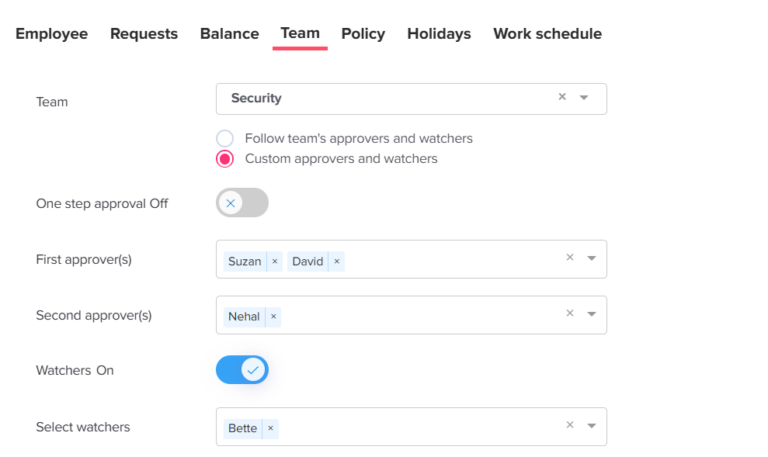
Streamline the leave approval process with clearly defined workflows that match your organizational hierarchy. Requests are automatically routed to the appropriate managers or approvers, ensuring nothing gets missed or delayed. This structured approach improves accountability, maintains operational continuity, and ensures fair and consistent decision-making across the company.
Instant Notifications
Keep everyone aligned with real-time notifications for every stage of the leave process. Employees receive updates when requests are submitted, approved, or declined, while managers are promptly alerted when action is required. This reduces delays, enhances communication, and ensures that no request goes unnoticed.
Advanced Reporting & Insights
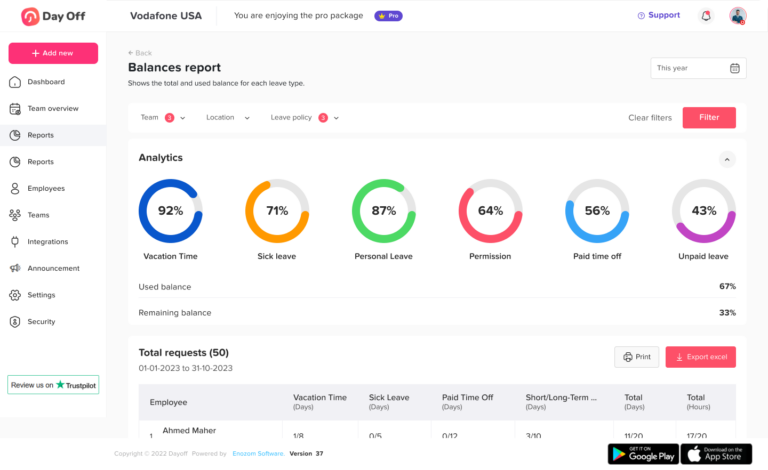
Leverage powerful analytics to gain a deeper understanding of leave patterns across your organization. Identify trends such as peak vacation periods, frequent absences, or department-level imbalances. With these insights, HR teams and managers can make data-driven decisions, improve workforce planning, and proactively address potential challenges.
Multi-Team & Multi-Location Support
Designed for modern, distributed organizations, Day Off seamlessly supports multiple teams, departments, and locations. Whether your team is in different cities or countries, the platform adapts to local policies, time zones, and structures, so you can coordinate smoothly and stay consistent at scale.
6. Hybrid Work Requires Intentional Coordination
Hybrid work introduces a unique challenge: coordination without consistency.
Unlike fully remote teams, hybrid teams must align not only on tasks, but also on physical presence.
Without proper coordination:
- Office days lose their value because the right people aren’t present
- Teams miss opportunities for collaboration
- Employees feel disconnected despite being “hybrid.”
Hybrid work only works when schedules are aligned with purpose.
How Day Off Supports Hybrid Teams
Day Off helps hybrid teams coordinate more effectively by:
- Providing visibility into who is on leave before planning office days
- Helping managers align team schedules for better collaboration
- Ensuring that key team members are available when needed
This turns office time into something intentional, not accidental.
7. Employee Experience Depends on Simplicity and Transparency
Employees don’t just want flexibility, they want clarity, fairness, and ease of use.
When systems are unclear or slow:
- Employees feel frustrated waiting for approvals
- They become uncertain about their leave balance
- Trust in the system decreases
A poor experience in something as simple as leave management can impact overall job satisfaction.
How Day Off Enhances Employee Experience
Day Off focuses on making the experience simple and transparent:
- Clean, intuitive interface that requires no training
- Mobile access for managing leave anytime, anywhere
- Clear visibility into requests, approvals, and balances
- Faster processes with less back-and-forth communication
This creates a smoother experience for both employees and managers, leading to better engagement and satisfaction.
Work From Home vs Hybrid Work: Comparison Table
| Aspect | Work From Home (WFH) | Hybrid Work Model |
|---|---|---|
| Flexibility | Offers maximum flexibility, allowing employees to work from anywhere and often manage their own schedules for better focus and autonomy. | Provides balanced flexibility by combining remote work with structured office days, giving employees both freedom and routine. |
| Visibility | Lower natural visibility, making it harder to track who is available or on leave without proper tools and systems. | Improved visibility during office days, but can still be inconsistent if team schedules are not aligned. |
| Collaboration | Relies heavily on async communication and digital tools, which requires strong processes to stay aligned. | Combines in-person and remote collaboration, enabling faster discussions and stronger team connections. |
| Scheduling Complexity | Moderate complexity, mainly focused on managing availability and time zones. | Higher complexity due to the need to coordinate office days, remote work, and time-off schedules. |
| Employee Experience | Great for independence and work-life balance, but may lead to isolation without proper engagement. | Offers a more balanced experience with both social interaction and flexibility, improving engagement. |
| Operational Costs | Lower costs due to reduced need for office space, utilities, and infrastructure. | Moderate costs since companies maintain office spaces while supporting remote work. |
| Management Complexity | Requires strong systems for communication, performance tracking, and availability management. | More complex due to managing both remote and in-office employees simultaneously. |
| Best Fit For | Teams that work independently and rely on asynchronous workflows. | Teams that benefit from collaboration, teamwork, and maintaining company culture. |
| Leave & Availability Management | Critical due to lack of visibility. Requires tools like Day Off to track availability and avoid confusion. | Essential for coordinating office days and ensuring proper team coverage without scheduling conflicts. |
Frequently Asked Questions (FAQ)
Which is better for productivity: WFH or hybrid work?
There is no one-size-fits-all answer. Productivity depends more on how well the system is managed than the model itself. Work From Home (WFH) can boost deep focus and individual output, while hybrid improves collaboration. The most productive teams are those that combine flexibility with clear visibility and structured processes.
What is the biggest challenge in remote and hybrid work?
The biggest challenge is lack of visibility into team availability and schedules. When teams don’t know who is working or on leave, it leads to delays, confusion, and poor planning. This is why centralized tools like Day Off are essential.
How can companies track employee availability without micromanaging?
The key is to track availability, not activity. Instead of monitoring employees, companies should provide transparent systems where team members can:
- Request time off
- View schedules
- Check availability
Day Off enables this balance by offering visibility without intrusive tracking.
How do you prevent scheduling conflicts in hybrid teams?
Scheduling conflicts can be reduced by:
- Planning leave in advance
- Using a shared calendar
- Aligning office days intentionally
With Day Off, teams can see all leave requests in one place, making it easier to avoid overlaps and ensure proper coverage.
Why is leave management important in remote teams?
In remote environments, you lose natural visibility, so leave management becomes critical for planning and coordination. Without it, teams risk:
- Overlapping absences
- Missed deadlines
- Increased workload on available employees
Can small teams benefit from leave management tools like Day Off?
Absolutely. Even small teams face scheduling and visibility challenges. In fact, a single absence in a small team can have a bigger impact. Using Day Off early helps build scalable processes as the team grows.
How does Day Off improve team productivity?
Day Off improves productivity by:
- Eliminating time wasted on manual tracking
- Reducing back-and-forth communication
- Providing instant visibility into availability
- Helping managers plan workloads more effectively
Is Day Off suitable for global and distributed teams?
Yes. Day Off is designed to support:
- Multiple teams and departments
- Different locations and time zones
- Remote and hybrid work environments
This makes it ideal for modern, distributed organizations.
What features should you look for in a leave management system?
A good system should include:
- Leave requests and approvals
- Shared calendar visibility
- Custom leave policies
- Real-time balance tracking
- Notifications and reporting
Day Off includes all of these features in one simple platform.
How can companies transition smoothly to work from home (WFH) or hybrid work?
Start with:
- Clear policies and expectations
- The right tools for visibility and coordination
- A focus on outcomes rather than hours
Most importantly, invest in systems like Day Off to ensure your operations remain organized and scalable.
Final Thoughts
Work From Home (WFH) and hybrid models are not inherently successful or problematic; it all depends on how they are managed.
The biggest challenges companies face today, lack of visibility, scheduling conflicts, and communication gaps, are all system problems, not policy problems.
By implementing tools like Day Off, organizations can:
- Replace confusion with clarity
- Turn reactive workflows into proactive systems
- Improve both productivity and employee experience
In the end, flexibility is only valuable when it’s supported by the right structure.