







Managing employee time off should be simple. An employee submits a leave request, the manager reviews it, HR updates the balance, and the team plans around the absence.
But when this process is handled manually, things often become slower, messier, and harder to control.
Many companies still manage leave requests using spreadsheets, emails, chat messages, paper forms, or shared calendars. These methods may seem easy at the beginning, especially for small teams. But as the company grows, manual leave tracking can quickly become a daily source of confusion.

What starts as a simple spreadsheet can turn into:
- Missed leave requests
- Incorrect leave balances
- Slow approval processes
- Overlapping vacations
- Repeated questions from employees
- Extra administrative work for HR
- Poor visibility into team availability
Manual leave tracking does not only affect HR. It slows down managers, employees, and the entire team. When time off information is scattered across different places, people waste time checking, confirming, correcting, and following up.
That is why many growing teams are moving to leave tracking apps like Day Off to manage PTO, vacation days, sick leave, approvals, balances, holidays, and reports in one organized place.
What Is Manual Leave Tracking?
Manual leave tracking means managing employee time off without a dedicated leave management system.
Instead of using one central platform, companies rely on different tools and manual steps, such as:
- Excel sheets or Google Sheets
- Email requests
- WhatsApp or Slack messages
- Paper forms
- Shared calendars
- Manual HR records
- Verbal approvals
- Separate payroll notes
For example, an employee may send a vacation request by email. The manager replies with approval. HR then updates a spreadsheet, adjusts the employee’s remaining balance, adds the absence to a calendar, and informs the team if needed.
This process may sound manageable, but it depends on every person remembering every step.
If one email is missed, one balance is updated incorrectly, or one calendar entry is forgotten, the entire process becomes unreliable.
Why Manual Leave Tracking Becomes a Problem
Manual leave tracking usually works only when the team is very small. But once the company starts growing, the process becomes harder to manage.
More employees means more leave requests. Additional managers mean more approval paths. Each extra team means more schedules to coordinate. More locations means different public holidays and leave rules.
Over time, manual tracking creates problems such as:
- Too many files to update
- Too many messages to follow
- No clear approval status
- An inaccurate view of who is off
- Leave balances that are hard to check
- No reliable reporting
- More chances for human error
The bigger the team becomes, the more time the company spends managing leave instead of focusing on actual work.
Manual Leave Tracking Wastes Time
One of the biggest problems with manual leave tracking is how much time it takes from everyone involved.
HR teams spend time checking balances, updating spreadsheets, replying to employees, preparing reports, and reminding managers to approve pending requests.
Managers spend time searching through messages, checking calendars, and trying to understand whether approving a request will affect team coverage.
Employees also lose time because they need to ask basic questions instead of finding answers quickly.
Common employee questions include:
- “How many vacation days do I have left?”
- “Was my leave request approved?”
- “Can I take these dates off?”
- “Is anyone else already off during that week?”
- “Did HR update my balance?”
- “Which leave type should I choose?”
Each question may only take a few minutes to answer. But across the whole company, these small delays add up.
With a leave tracking app like Day Off, employees can check their balances, submit requests, and track approval status without needing to ask HR every time. This saves time for employees, managers, and HR teams.
Leave Approvals Become Slow and Unclear
Manual leave approvals often get lost in inboxes or chat threads.
An employee may send a request by email, but the manager forgets to respond. Another employee may send a request through a messaging app, but HR is not included. A manager may approve a request verbally, but no one updates the official records.
This creates confusion for everyone.
Without a clear approval workflow, teams may face problems like:
- Employees not knowing whether their request is approved
- Managers forgetting pending requests
- HR receiving incomplete information
- Approved leave not being recorded
- Rejected requests not being documented
- Duplicate follow ups from employees
A slow approval process can also affect employee planning. If someone is waiting to book travel or arrange personal plans, delayed approval can become frustrating.
A proper leave management system makes approvals clearer. Employees submit requests in one place. Managers review them from the same system. HR can see whether a request is pending, approved, or rejected.
This makes the process faster, more transparent, and easier to manage.
Manual Tracking Increases Human Error
Manual leave tracking depends heavily on people entering information correctly. That makes it easy for mistakes to happen.
A small error in a spreadsheet can lead to bigger issues later.
For example:
- An employee’s balance may be calculated incorrectly
- A public holiday may be counted as a leave day
- Sick leave may be recorded as vacation leave
- A request may be added under the wrong employee
- A manager may approve leave without checking team availability
- HR may forget to update a balance after approval
These mistakes can damage trust in the leave process. Employees expect their time off balances to be accurate. Managers expect availability records to be reliable. HR needs correct data for reporting and planning.
When the data is wrong, everyone has to spend extra time fixing it.
Manual errors can also create uncomfortable situations, such as telling an employee they have fewer days available than they expected, or discovering that too many people are off at the same time.
Using a digital leave tracking system helps reduce these risks by keeping requests, balances, approvals, and leave history organized in one place.
Managers Lose Visibility Into Team Availability
Good leave management is not only about approving requests. It is also about understanding who is available and when.
When leave data is scattered across spreadsheets, emails, and calendars, managers may not have a clear view of team availability.
This can lead to:
- Too many employees being off at the same time
- Poor coverage during busy periods
- Delayed projects
- Missed deadlines
- Overloaded team members
- Last minute scheduling problems
For example, a manager may approve one employee’s vacation without realizing that another team member already has approved leave during the same week. This can create staffing gaps and put pressure on the rest of the team.
A centralized leave calendar makes planning much easier. Managers can quickly see upcoming absences before approving new requests. HR can monitor company wide leave patterns. Employees can also plan their time off with better visibility.
With Day Off, teams can manage leave requests and see availability in one place, helping managers make better decisions faster.
HR Teams Spend Too Much Time on Repetitive Tasks
HR should not have to spend hours every week updating spreadsheets and answering the same leave related questions.
But with manual tracking, HR often becomes the middle point for every small task.
HR may need to manually:
- Check available balances
- Confirm leave policies
- Update used days
- Record approved requests
- Add absences to calendars
- Prepare leave reports
- Follow up with managers
- Correct old records
- Respond to employee questions
This creates unnecessary administrative work.
Instead of focusing on employee experience, policy improvement, hiring, performance, and company culture, HR teams get stuck handling repetitive leave management tasks.
A leave tracking app reduces this workload by allowing employees and managers to handle many steps directly through the system.
Employees can submit requests. Managers can approve them. Balances update more clearly. HR can access organized records when needed.
Employees Get a Poor Leave Experience
Time off is important to employees. It helps them rest, recover, travel, spend time with family, and manage personal responsibilities.
When the leave process is slow or unclear, the employee experience suffers.
Employees may feel frustrated when:
- They do not know how many days they have left
- Their requests take too long to approve
- They need to follow up several times
- Their balances look incorrect
- The leave policy is unclear
- Requests are handled differently by different managers
A poor leave experience can make the company feel disorganized.
On the other hand, a smooth leave process shows employees that the company respects their time and values transparency.
When employees can easily check balances, submit requests, and receive clear updates, the whole process feels more professional and reliable.
Reporting Becomes Difficult and Time Consuming
Leave reports are important for HR and management. They help companies understand how employees are using time off and whether policies are working well.
But when leave tracking is manual, reporting becomes difficult.
HR may need to collect information from multiple sources, clean the data, fix mistakes, and manually calculate totals.
This becomes even harder when the company needs reports based on:
- Employee name
- Team or department
- Leave type
- Date range
- Location
- Remaining balance
- Used leave days
- Pending requests
- Carryover balances
Manual reports take time and are more likely to contain errors.
With a system like Day Off, HR teams can access organized leave data more easily. Reports become clearer, faster, and more useful for decision making.
Manual Leave Tracking Does Not Scale
A spreadsheet may work for a team of five people. It may even work for a team of ten or fifteen.
But as the company grows, manual leave tracking becomes harder to maintain.
Growing companies often need to manage:
- More employees
- Multiple teams
- Different managers
- Several leave types
- Different work schedules
- Public holidays in different countries
- Remote or hybrid employees
- Approval workflows
- Carryover and accrual rules
- Detailed reporting
Manual systems are not built for this level of complexity.
The more the company grows, the more fragile the process becomes. What used to be a simple spreadsheet becomes a source of confusion, errors, and delays.
A scalable leave management system helps companies stay organized as they grow. Instead of rebuilding the process every time the team expands, businesses can rely on one system that supports their leave policies and workflows.
Scattered Leave Data Creates Confusion
When leave information is stored in different places, no one knows which source is correct.
One manager may check a calendar. HR may check a spreadsheet. An employee may refer to an old email. Another manager may rely on a chat message.
This creates different versions of the truth.
Scattered data can cause problems such as:
- Outdated leave balances
- Conflicting approval records
- Missing requests
- Duplicate entries
- Incorrect team availability
- Miscommunication between HR and managers
A central leave tracking system solves this by keeping everything in one place.
Everyone works from the same information, which makes the process clearer and more reliable.
Manual Tracking Can Affect Productivity
Leave management may seem like a small administrative task, but when it is handled manually, it can affect productivity across the company.
Employees wait for answers. Managers pause to check availability. HR spends time fixing records. Teams deal with unexpected absences or poor coverage.
These delays may not always be obvious, but they slowly reduce efficiency.
Manual leave tracking can slow productivity by:
- Interrupting HR with repeated questions
- Delaying approval decisions
- Creating scheduling conflicts
- Making team planning harder
- Increasing admin work
- Causing avoidable mistakes
- Reducing visibility into availability
A smoother leave process helps teams work with fewer interruptions and better planning.
The Better Way: Use a Leave Tracking App
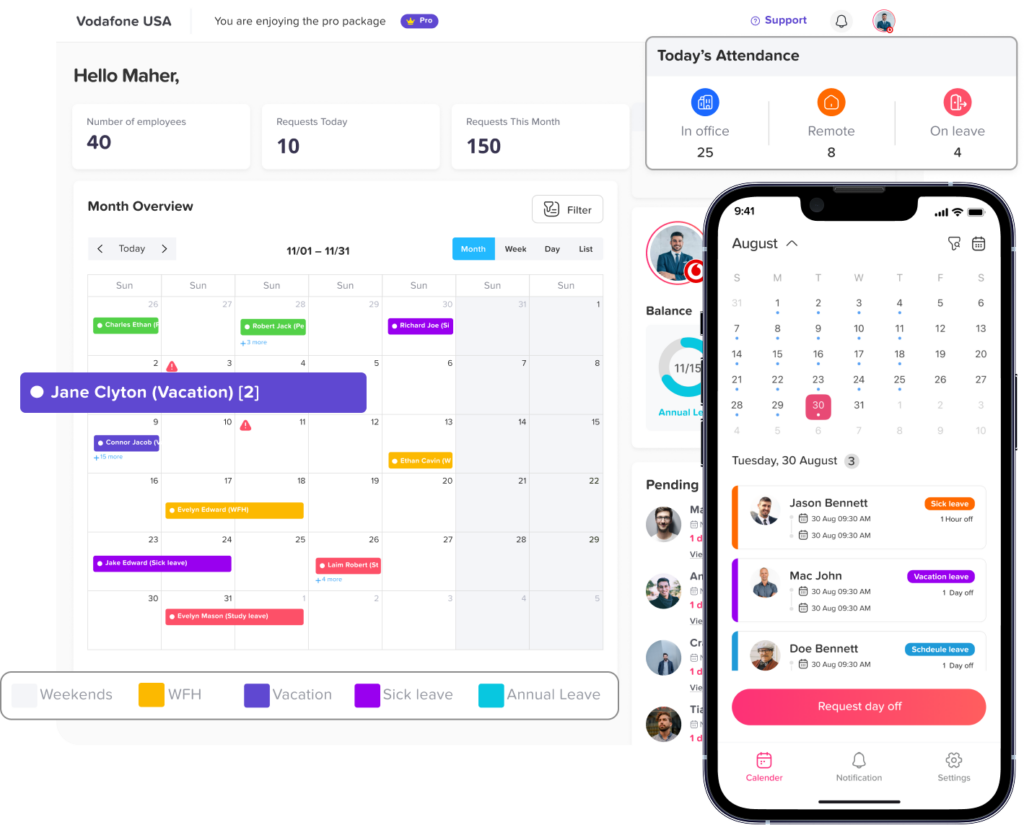
A leave tracking app helps businesses replace manual work with a clear, organized, and automated process.
Instead of managing leave through emails, spreadsheets, and messages, companies can manage everything from one platform.
A good leave tracking app helps with:
- Submitting leave requests
- Approving or rejecting requests
- Tracking PTO and vacation balances
- Managing sick leave
- Viewing team availability
- Avoiding overlapping absences
- Managing public holidays
- Organizing leave policies
- Generating reports
- Keeping leave history in one place
This gives employees, managers, and HR teams a much better experience.
How Day Off Helps Teams Move Beyond Manual Leave Tracking
Day Off is a simple leave management and PTO tracking app built to help teams manage time off more easily.
With Day Off, companies can bring their leave process into one organized system instead of relying on scattered spreadsheets and messages.
Day Off helps teams:
- Track vacation days, sick leave, PTO, and other leave types
- Allow employees to submit leave requests easily
- Help managers approve or reject requests faster
- Give employees visibility into their leave balances
- Show who is off and when
- Reduce overlapping leave requests
- Manage company holidays
- Support teams through web, iOS, and Android
- Keep HR records organized
- Make leave reporting easier
For growing teams, this means less confusion, fewer manual updates, and faster leave management.
Instead of chasing leave requests across emails and spreadsheets, companies can manage time off from one clear place.
Signs Your Team Needs a Better Leave Tracking System
Your team may have outgrown manual leave tracking if you notice any of these signs:
- HR spends too much time updating leave records
- Employees often ask about their remaining balance
- Managers forget to approve requests
- Leave requests get lost in emails or chats
- Different teams follow different approval processes
- Overlapping leave happens often
- Reports take too long to prepare
- Balances are sometimes inaccurate
- Employees are unsure about request status
- Team availability is hard to check
- Public holidays are counted incorrectly
- The spreadsheet has become too complicated
If several of these problems sound familiar, your current process may be slowing your team down.
FAQ
What is manual leave tracking?
Manual leave tracking is the process of managing employee time off without a dedicated leave management system. It usually involves spreadsheets, emails, chat messages, paper forms, or shared calendars.
While this may work for very small teams, it becomes harder to manage as the company grows. Requests can get missed, balances can become inaccurate, and HR teams may spend too much time updating records manually.
Why is manual leave tracking a problem?
Manual leave tracking becomes a problem because it depends on too many manual steps. HR, managers, and employees all need to communicate, update records, and check information separately.
This can lead to:
- Delayed approvals
- Incorrect leave balances
- Missed requests
- Overlapping vacations
- Poor visibility into team availability
- More administrative work for HR
Over time, these small problems can slow down the entire team.
How does manual leave tracking affect HR teams?
Manual leave tracking creates extra work for HR teams. Instead of focusing on people, policies, and employee experience, HR often spends time updating spreadsheets, answering balance questions, following up with managers, and preparing reports manually.
A leave tracking app helps reduce this repetitive work by keeping requests, approvals, balances, and reports in one organized system.
How does manual leave tracking affect employees?
Employees may experience delays and confusion when leave is tracked manually. They may not know how many days they have left, whether their request has been approved, or who to contact for updates.
This can make the leave process frustrating and unclear. A digital leave tracking system gives employees more visibility and helps them request time off with less back and forth communication.
Can manual leave tracking cause payroll or balance errors?
Yes. Manual leave tracking can lead to balance and payroll related errors if leave days are recorded incorrectly, public holidays are counted by mistake, or approved requests are not updated on time.
Accurate leave records are important because they affect employee balances, payroll calculations, reports, and company planning.
What is the best way to replace manual leave tracking?
The best way to replace manual leave tracking is to use a dedicated leave tracking app. Instead of using spreadsheets, emails, and separate calendars, a leave tracking app keeps everything in one place.
A good leave tracking system should help companies:
- Manage leave requests
- Track PTO and vacation balances
- Approve or reject requests
- View team availability
- Manage holidays
- Generate reports
- Keep accurate leave history
How does Day Off help with leave tracking?
Day Off helps teams manage employee time off in a simpler and more organized way. Employees can submit leave requests, managers can approve or reject them, and HR can track balances, holidays, policies, and reports from one place.
Day Off is available on web, iOS, and Android, making it easier for teams to manage leave wherever they work.
Is a leave tracking app useful for small businesses?
Yes. A leave tracking app is useful for small businesses because it helps them build an organized leave process early. Even if the team is small, manual tracking can still lead to missed requests, unclear balances, and unnecessary admin work.
Using a system like Day Off helps small businesses save time, avoid mistakes, and create a more professional employee experience.
When should a company stop using spreadsheets for leave tracking?
A company should consider moving away from spreadsheets when leave tracking starts taking too much time or causing confusion.
Common signs include:
- Employees often ask about their leave balance
- Managers miss or forget requests
- HR spends too much time updating records
- Leave reports are hard to prepare
- More than one person is editing the same spreadsheet
- Team availability is difficult to check
- Overlapping leave requests happen often
These are signs that the company needs a more reliable leave management system.
Does leave tracking software help prevent overlapping leave?
Yes. Leave tracking software can help managers see who is already off before approving new requests. This makes it easier to avoid overlapping vacations, staffing gaps, and scheduling problems.
With better visibility into team availability, managers can approve leave requests more confidently.
Final Thoughts
Manual leave tracking may look simple, but it can quietly create delays, errors, and unnecessary work across the company.
When leave requests are managed through spreadsheets, emails, calendars, and chat messages, the process becomes harder to control. HR spends more time on admin tasks. Managers lose visibility into team availability. Employees wait longer for answers. Reports become harder to prepare. Mistakes become more common.
As teams grow, leave management needs to become faster, clearer, and more reliable.
Using a leave tracking app like Day Off helps businesses manage PTO, vacation days, sick leave, approvals, balances, holidays, and reports in one place. It gives employees a better experience, helps managers make better decisions, and allows HR teams to save time.
If your team is still tracking leave manually, it may already be slowing you down more than you realize.
Moving to a dedicated leave management system can help your company stay organized, reduce errors, and manage time off with confidence.