







Managing employee time off sounds simple until several people leave requests the same days off at the same time. One employee wants a vacation, another needs sick leave, a third has already planned personal time, and suddenly the team is short staffed during an important week.

Overlapping leave requests are one of the most common challenges HR teams and managers face. They can affect productivity, delay projects, increase pressure on available employees, and create confusion around who should approve or reject requests. When handled poorly, they can also lead to frustration among employees who feel that leave decisions are unfair or unclear.
The good news is that overlapping leave requests can be prevented with the right process, clear policies, better visibility, and reliable leave tracking tools. Instead of reacting to conflicts after they happen, businesses can create a system that helps employees plan time off responsibly while allowing managers to maintain proper team coverage.
This article explains how to avoid overlapping leave requests, why they happen, and what HR teams can do to manage employee time off more effectively.
What Are Overlapping Leave Requests?
Overlapping leave requests happen when two or more employees request time off during the same period, creating a potential staffing or coverage problem.
This can happen in many situations, such as:
- Multiple employees requesting vacation during holidays.
- Several team members taking time off before a long weekend.
- Employees from the same department requesting the same dates.
- Managers approving leave without checking team availability.
- HR teams tracking leave manually in spreadsheets or emails.
- Public holidays or seasonal busy periods causing higher leave demand.
Not every overlap is a problem. In some teams, two employees can be away at the same time without affecting operations. However, in smaller teams or critical departments, even one overlap can cause delays, missed deadlines, or poor customer service.
The goal is not to prevent employees from taking leave. The goal is to make sure time off is planned in a way that works for both employees and the business.
Why Overlapping Leave Requests Are a Problem
Overlapping leave requests can create several issues for HR teams, managers, and employees. When there is no clear system in place, time off can quickly become difficult to manage.
Reduced Team Productivity
When too many employees are away at the same time, the remaining team members may struggle to handle the workload. Tasks can be delayed, meetings may be postponed, and important projects may slow down.
This is especially challenging in departments where employees have specialized roles. If two people with the same responsibilities are away at once, there may be no one available to cover their work.
Increased Pressure on Other Employees
Overlapping leave often means that employees who are still working must take on extra tasks. This can lead to stress, longer working hours, and lower morale.
If this happens often, employees may feel that leave planning is unfair or disorganized. Over time, this can affect employee satisfaction and engagement.
Customer Service Issues
For customer facing teams, overlapping leave can directly affect response times and service quality. If too many support agents, sales representatives, or account managers are away at once, customers may experience delays.
This can damage the customer experience and put pressure on the business during important periods.
Approval Confusion
Without a clear leave approval process, managers may approve requests without knowing who else is already off. HR may discover the overlap later, after the employee has already made travel plans or personal arrangements.
This creates an uncomfortable situation where the business may need to reverse a decision, ask an employee to change their plans, or operate understaffed.
Unfair Leave Decisions
When leave conflicts are handled manually, employees may feel that approvals are based on favoritism or unclear judgment. For example, one employee may wonder why another person’s vacation was approved while theirs was rejected.
Clear rules and transparent leave tracking help reduce these concerns and make the process feel fairer.
Common Reasons Leave Requests Overlap
To prevent overlapping leave requests, it is important to understand why they happen in the first place.
Lack of Visibility
One of the biggest causes of overlapping leave is poor visibility. If employees cannot see team availability, they may request time off without knowing that others are already away.
Managers may also approve requests without checking a shared leave calendar or updated leave records.
Manual Leave Tracking
Many businesses still track leave using spreadsheets, emails, paper forms, or chat messages. While this may work for very small teams, it becomes harder as the company grows.
Manual leave tracking can lead to:
- Missed requests
- Outdated leave balances
- Duplicate approvals
- Confusing communication
- Limited visibility into team availability
When leave data is scattered across different places, overlaps become much more likely.
Unclear Leave Policies
If employees do not understand how leave requests are handled, they may submit requests at the last minute or during busy periods without knowing the rules.
A weak leave policy may not explain:
- How far in advance leave should be requested
- How many people can be away at the same time
- How leave is approved during peak seasons
- What happens when multiple employees request the same dates
- Whether approvals are first come, first served
Without clear expectations, managers are forced to make decisions case by case.
Seasonal Leave Demand
Certain times of the year naturally create more leave requests. These may include summer vacations, public holidays, school breaks, religious holidays, year end periods, or long weekends.
If the business does not plan ahead, managers may receive too many requests for the same dates.
No Minimum Staffing Rules
Some companies do not define how many employees must be available in each team, department, or location. Without minimum staffing rules, managers may approve leave without realizing that the team will not have enough people available.
This is especially important for teams that depend on shift coverage, customer support, operations, healthcare, retail, or service based work.
How to Avoid Overlapping Leave Requests
Avoiding overlapping leave requests requires a combination of planning, communication, policy, and technology. The best approach is to create a process that makes leave easy to request, easy to review, and easy to track.
Create a Clear Leave Policy
A clear leave policy is the foundation of good leave management. Employees should know exactly how time off works before they submit a request.
Your leave policy should explain:
- Types of leave available, such as vacation, sick leave, unpaid leave, and personal days.
- How employees should submit leave requests.
- How much notice is required.
- Who approves leave requests.
- How overlapping requests are handled.
- How many employees can be away at the same time.
- Rules for busy seasons or restricted periods.
- Whether leave is approved based on request date, seniority, role coverage, or business needs.
The policy should be easy to understand and accessible to all employees. Avoid using complicated language. Employees should be able to quickly understand what is expected from them.
A strong leave policy does not only protect the company. It also protects employees by making the process fair and transparent.
Use a Shared Leave Calendar
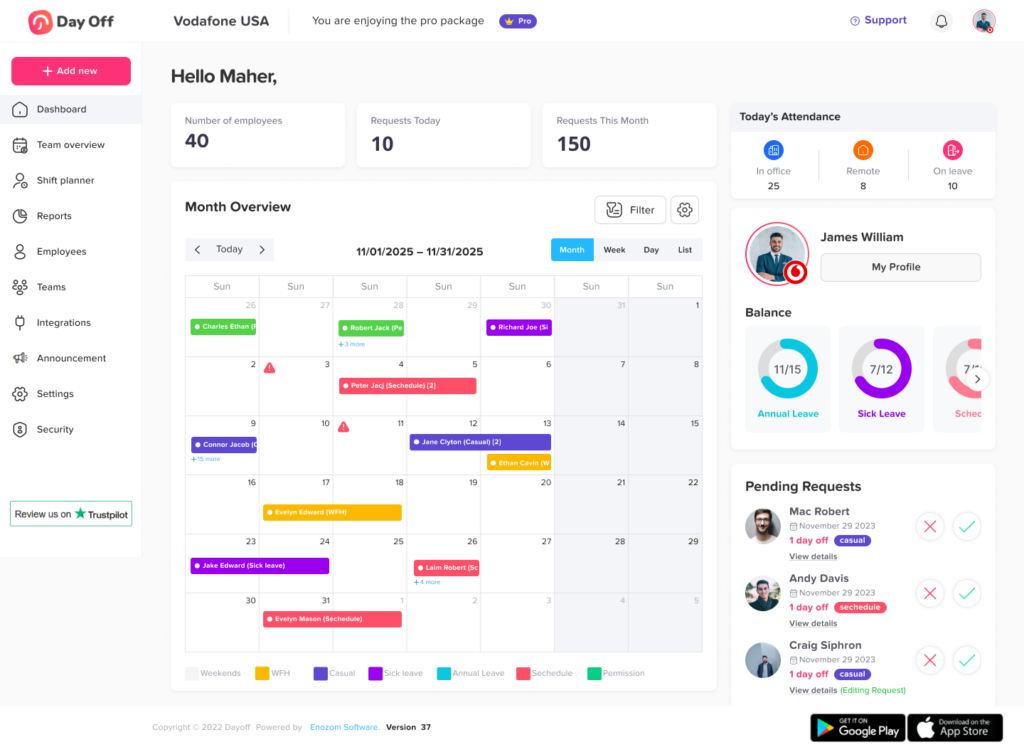
A shared leave calendar is one of the easiest ways to prevent overlapping leave requests. It gives managers and employees a clear view of who is off and when.
With a shared calendar, employees can check team availability before requesting time off. Managers can also review requests in context instead of making decisions blindly.
A good leave calendar should show:
- Approved leave
- Pending leave requests
- Public holidays
- Team availability
- Department or location-based leave
- Leave type, when appropriate
- Upcoming absences
This makes it easier to spot conflicts before they become problems.
For example, if an employee wants to request vacation during the same week that two team members are already away, they can choose another date or discuss coverage with their manager before submitting the request.
Set Minimum Staffing Requirements
Minimum staffing rules help managers know how many employees must be available at any given time. This is especially important for departments where daily coverage matters.
For example:
- A customer support team may need at least five agents available each day.
- A retail store may need at least two supervisors on shift.
- A finance team may need key employees available during payroll week.
- A project team may need at least one senior developer available during a release.
Minimum staffing rules should be based on the real needs of each department. They should not be too strict, but they should protect the business from being understaffed.
When these rules are clear, managers can make leave decisions more confidently.
Encourage Employees to Request Leave Early
Last minute leave requests are harder to manage because managers have less time to plan coverage. Encouraging employees to request leave early helps reduce conflicts.
For planned leave, such as vacations or personal time, businesses can ask employees to submit requests a certain number of days or weeks in advance.
For example:
- Vacation leave should be requested at least two weeks in advance.
- Longer leave should be requested one month in advance.
- Holiday season requests should be submitted by a specific deadline.
- Emergency leave and sick leave can follow a separate process.
Early requests allow managers to compare availability, plan workloads, and avoid approving too many absences at once.
It also helps employees because they receive approval earlier and can plan their time off with more confidence.
Plan Ahead for Busy Seasons
Every business has periods when employee availability is more important. These may include end-of-month closing, product launches, peak sales seasons, holiday periods, tax season, school terms, or major company events.
During these times, overlapping leave can cause bigger problems than usual.
To avoid this, companies should Use Blockout Periods When Needed.
Some businesses have specific periods when leave should be limited or restricted. These are often called blockout periods.
Blockout periods may apply during:
- Product launches
- Annual audits
- Payroll processing
- Peak sales seasons
- Important client deadlines
- Major company events
- Inventory periods
- End of year closing
During these periods, employees may still be able to request leave for emergencies or special cases, but planned vacation may be limited.
- Only a limited number of employees can take leave.
- Leave requests must be submitted earlier than usual.
- Certain roles must always have backup coverage.
- Managers must review requests based on business priority.
- Some dates may be marked as restricted or limited.
Blockout periods should be used carefully. They should not be applied too broadly, or employees may feel that their time off is being restricted unfairly. However, when used for genuine business needs, they can help prevent serious staffing problems.
Use a Leave Management System
A leave management system helps businesses avoid overlapping leave requests by keeping all leave information in one place.
Instead of using spreadsheets, emails, and manual updates, a leave management system allows employees to submit requests, managers to approve them, and HR to track everything clearly.
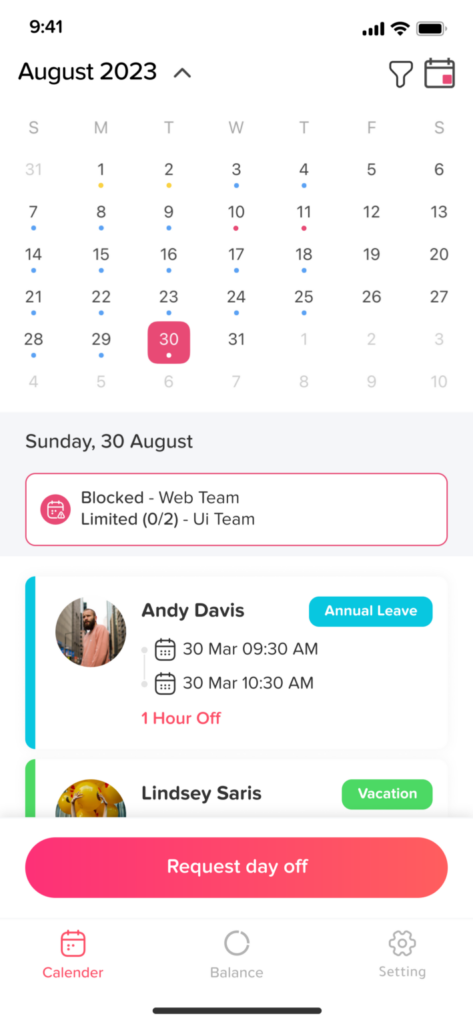
A tool like Day Off can help teams manage leave requests, balances, approvals, and team availability from one system. This makes it easier to see who is off, who is available, and whether a new request could create an overlap.
A leave management system can help with:
- Automated leave requests
- Approval workflows
- Real time leave balances
- Shared team calendars
- Custom leave policies
- Public holiday tracking
- Reports and exports
- Notifications for managers and employees
- Better visibility across teams and locations
This reduces manual work and helps managers make faster, more informed decisions.
Define Approval Workflows
A clear approval workflow helps prevent confusion around who is responsible for approving leave. In some companies, HR approves all leave requests. In others, direct managers approve requests first, while HR reviews the final records.
The right workflow depends on the company structure, but it should be clearly defined.
For example:
- Employees submit leave requests through the leave tracking system.
- Direct managers review team availability.
- Managers approve or reject the request.
- HR receives a record of the decision.
- The leave calendar updates automatically.
For larger organizations, a two-level approval workflow may be useful. A direct manager can review the request first, then a department head or HR manager can give final approval.
This helps prevent situations where one person approves leave without considering wider staffing needs.
Make Team Availability Visible to Managers
Managers need accurate visibility before approving leave. They should be able to see who is already off, who has pending requests, and whether the team can still operate smoothly.
Without this visibility, managers may make decisions based only on the individual request, not the overall team schedule.
Before approving leave, managers should check:
- How many people are already off
- Whether the employee’s role needs coverage
- Whether there are important deadlines during that period
- Whether another employee can cover urgent tasks
- Whether the request conflicts with company policy
- Whether the absence affects other departments
The more visibility managers have, the easier it is to avoid overlapping requests.
Track Pending Requests, Not Just Approved Leave
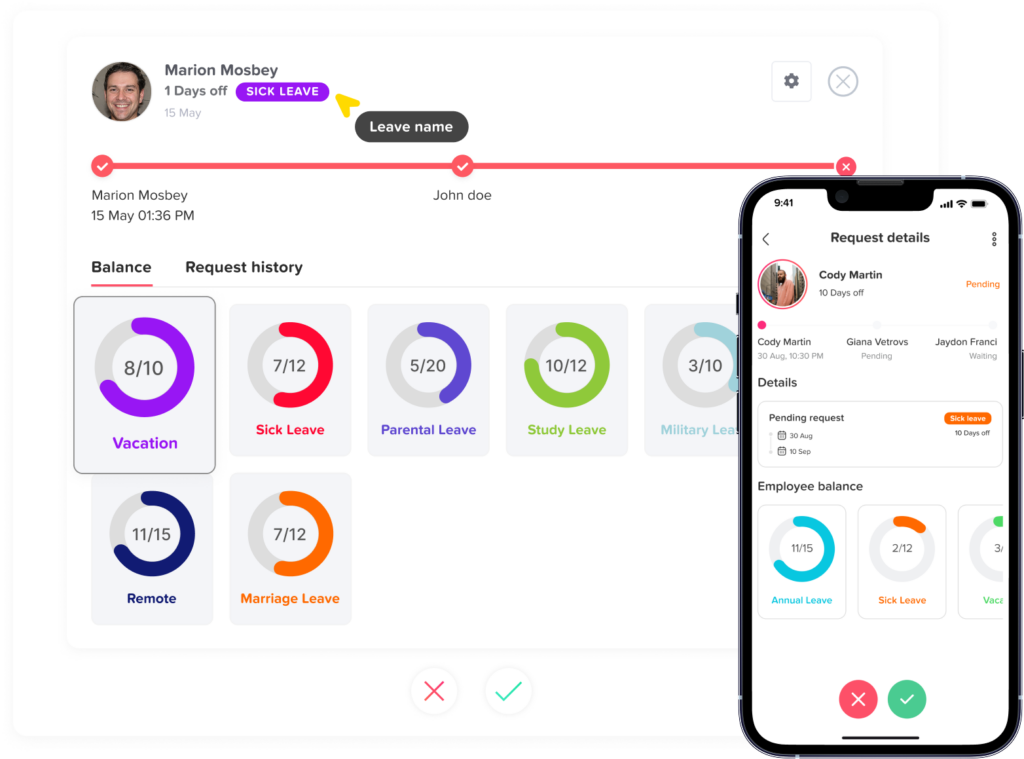
Many overlaps happen because managers only look at approved leave and ignore pending requests. This can lead to situations where multiple requests are being reviewed at the same time without anyone noticing the conflict.
Pending requests should be visible in the leave calendar or approval dashboard. This helps managers avoid approving one request while another related request is still waiting.
For example, if three employees request the same week off and all requests are pending, the manager should review them together instead of approving them one by one without comparing the impact.
Tracking pending requests improves decision-making and helps prevent accidental overlaps.
Avoid Managing Leave Through Chat Messages
Many teams use tools like WhatsApp, Slack, Microsoft Teams, or email to discuss leave. While these tools are useful for communication, they should not be the main place where leave is tracked.
When leave requests are sent through chat, they can easily get lost. Managers may forget to update the calendar, HR may not receive the information, and employees may not know whether the request was officially approved.
A better process is to use chat only for discussion, while official leave requests are submitted through a leave management system.
This keeps records accurate and avoids confusion.
Create a Clear Process for Emergency Leave
Not all leave can be planned in advance. Sick leave, emergency leave, and urgent personal leave may happen suddenly.
Businesses should have a separate process for emergency leave so employees know what to do when they cannot follow the normal request timeline.
The policy should explain:
- Who the employee should notify
- How soon they should submit the request
- Whether documentation is required
- How managers should handle coverage
- How the leave should be recorded
Emergency leave should be handled with flexibility and empathy. At the same time, having a clear process helps the business respond quickly and keep records organized.
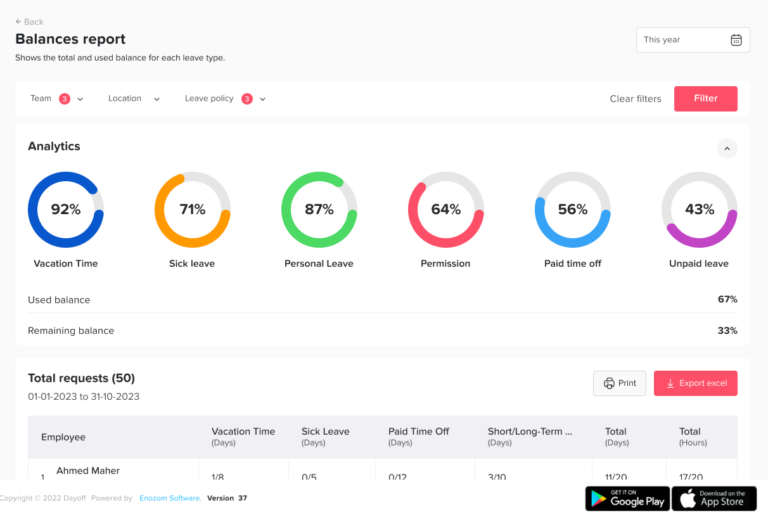
Use Reports to Improve Leave Planning
Leave reports help HR teams and managers make better long-term decisions. Instead of guessing, they can use real data to understand leave patterns and coverage issues.
Reports can help identify:
- Teams with frequent overlapping leave
- Employees with unused leave balances
- Peak leave periods
- Leave types used most often
- Absence trends over time
These insights can help businesses adjust staffing, improve policies, and plan better for future leave demand.
How a Good Leave Request Process Works
Here is an example of a simple, effective leave request process:
- The employee checks their leave balance and team calendar.
- The employee submits a leave request through the leave management system.
- The manager receives a notification.
- The manager reviews team availability, pending requests, and workload.
- The manager approves or rejects the request.
- The employee receives a notification.
- The leave calendar updates automatically.
- HR can view the request history and reports when needed.
This process reduces manual work and makes leave decisions clearer for everyone.
The Role of Technology in Preventing Overlapping Leave
Technology does not replace good management, but it makes leave management much easier. A leave management system gives HR teams and managers the visibility they need to prevent overlaps before they happen.
Instead of relying on spreadsheets or scattered messages, companies can use one central platform to manage:
- Leave requests
- Approvals
- Balances
- Team calendars
- Public holidays
- Departments and locations
- Reports
- Leave policies
Day Off, for example, helps businesses track employee time off, manage approval workflows, and view team availability in one place. This allows managers to approve leave with more confidence and helps employees plan time off without unnecessary back and forth communication.
For growing teams, this kind of system can save hours of manual work and reduce the risk of scheduling mistakes.
FAQs
What is the best way to avoid overlapping leave requests?
The best way to avoid overlapping leave requests is to use a clear leave policy, a shared leave calendar, and a reliable leave management system. Employees should be able to check team availability before requesting leave, and managers should review pending and approved requests before making decisions.
Should employees be allowed to take leave at the same time?
Yes, employees can take leave at the same time if the team still has enough coverage. The issue is not the overlap itself, but whether the overlap affects business operations, deadlines, or customer service.
How should managers handle two employees requesting the same dates?
Managers should follow the company’s leave policy. This may include first come, first served, role coverage, business needs, or a rotating priority system during high-demand periods. The decision should be fair, consistent, and clearly communicated.
Can a leave management system prevent overlapping requests?
A leave management system can help prevent overlapping requests by showing team availability, pending requests, approved leave, holidays, and leave balances in one place. It gives managers better visibility before approving time off.
What should a company do during peak vacation seasons?
During peak vacation seasons, companies should plan early, communicate deadlines for leave requests, set minimum staffing rules, and review requests carefully. Some companies may also use limited availability periods or blockout dates when necessary.
Why is manual leave tracking risky?
Manual leave tracking is risky because it depends on spreadsheets, emails, or messages that can easily become outdated or incomplete. This increases the chance of missed requests, incorrect balances, and overlapping approvals.
Final Thoughts
Overlapping leave requests are a normal part of managing a team, but they should not create confusion or stress. With the right process, businesses can give employees the flexibility to take time off while maintaining proper team coverage.
The key is visibility. Employees need to know when their team is available. Managers need to know who is already off. HR teams need accurate records, clear policies, and reliable reports.
By using a structured leave policy, planning ahead, and managing time off through a leave tracking system like Day Off, businesses can reduce conflicts, avoid scheduling problems, and create a smoother leave experience for everyone.
A better leave process does more than prevent overlaps. It helps teams stay organized, supports employee well being, and gives managers the confidence to approve time off fairly and efficiently.