







Related reading: Looking for a broader solution than a punch in punch out app? Check out our Attendance Tracking App For Employees And Remote Teams.
A Punch in Punch out app allows employees to record when their workday begins and ends, but modern businesses often need much more than a digital time clock. They also need to track paid time off, sick leave, vacations, work schedules, overtime, breaks, absences, and employee availability. Combining time tracking and leave management in one system gives HR teams and managers a more complete picture of how employee time is being used.

When attendance records and leave information are managed separately, simple questions can become difficult to answer. Did an employee miss a shift, arrive late, forget to clock in, or take approved PTO? Should the missing hours be unpaid, deducted from a leave balance, or corrected as a timekeeping error?
A punch in punch out app with PTO and leave tracking connects these records. Instead of reviewing one platform for worked hours, another for leave requests, and a spreadsheet for balances, businesses can manage employee time from one organized system.
What Is a Punch in Punch out App?
A punch in punch out app is a digital timekeeping tool employees use to record their working hours.
An employee typically:
- Punches in when starting work.
- Records a break when required.
- Punches back in after the break.
- Punches out when finishing work.
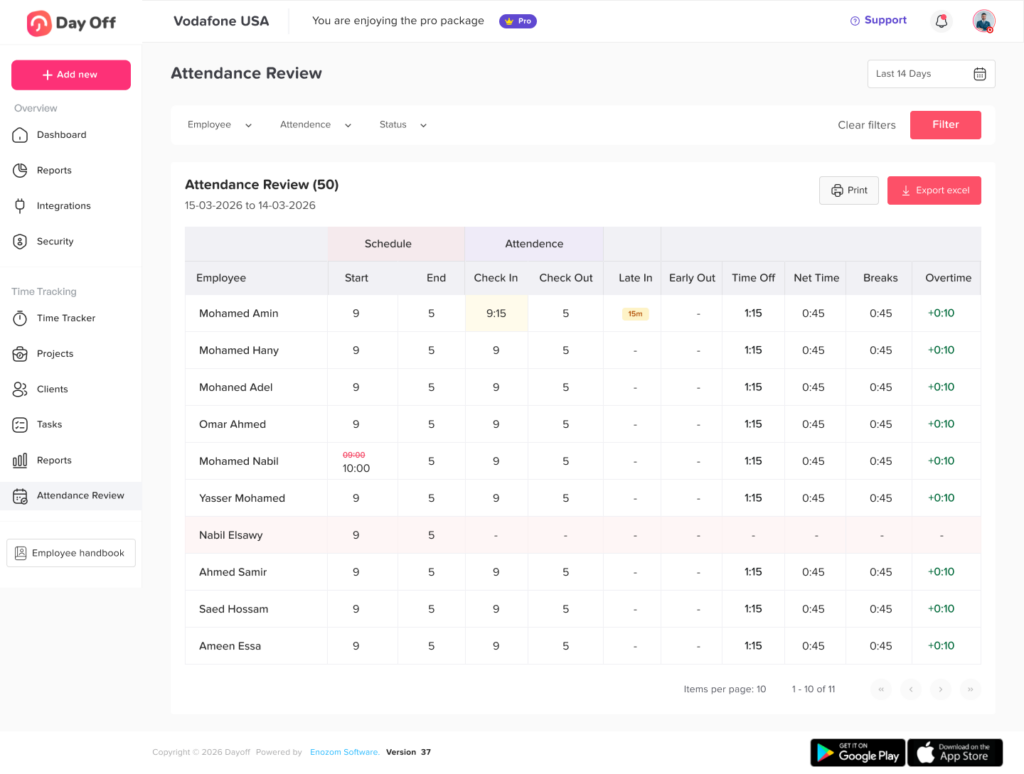
The app stores these time entries and calculates the employee’s recorded working time. Depending on the system, managers may also be able to compare punches with work schedules, review missed entries, monitor late arrivals, identify early departures, and calculate overtime.
For U.S. employers covered by the Fair Labor Standards Act, accurate records of hours worked and wages earned must be maintained for covered nonexempt employees. Federal rules do not require one specific timekeeping format, so an employer may use a time clock, digital app, timesheet, or another reliable method, provided the records are complete and accurate.
What Does PTO and Leave Tracking Add?
Time tracking records when an employee works. PTO and leave tracking records when an employee is authorized to be away from work.
A complete leave tracking system may manage:
- Vacation days
- Paid time off
- Sick leave
- Personal leave
- Parental leave
- Bereavement leave
- Unpaid leave
- Compensatory time
- Floating holidays
- Half-day requests
- Hourly leave
- Public holidays
- Company-specific absence types
The system may also calculate available balances, route requests to managers, apply accrual and carryover rules, show approved absences on a shared calendar, and maintain a record of previous requests.
In the United States, the FLSA generally does not require employers to provide paid vacation, sick leave, or holiday leave. These benefits are normally determined by company policy, employment agreements, collective bargaining agreements, and applicable state or local laws.
This is one reason configurable leave policies are important. Two companies may use the same time clock process while applying very different PTO rules.
Punch Records, Work Schedules, and Leave Records Are Different
| Record | Question It Answers | Example |
|---|---|---|
| Work schedule | When was the employee expected to work? | Monday, 9:00 a.m. to 5:00 p.m. |
| Punch record | When did the employee actually work? | Punched in at 9:07 a.m. and out at 5:12 p.m. |
| PTO record | Was any time away approved or paid? | Two hours of approved medical leave |
| Attendance status | Did actual attendance match the schedule? | Late arrival, approved leave, absent, or present |
| Payroll record | How should the employee be paid? | Regular hours, overtime, paid leave, or unpaid time |
These records become more useful when connected.
For example, suppose an employee is scheduled to begin at 9:00 a.m. but does not punch in until 11:00 a.m. A time clock alone shows two missing hours. It does not explain whether the employee:
- Arrived late without approval
- Had an approved medical appointment
- Used two hours of PTO
- Worked remotely but forgot to punch in
- Was assigned a different schedule
- Experienced a technical problem with the app
When managers can review the punch record, work schedule, and leave request together, they can classify the situation correctly instead of guessing.
Why Businesses Should Track Work Hours and PTO Together
It Distinguishes Approved Leave from Unplanned Absence
A missing punch does not automatically mean an employee was absent.
The employee may have been on approved vacation, sick leave, unpaid leave, or another authorized absence. When PTO records are visible beside attendance data, managers can understand why the employee was not working.
This reduces incorrect attendance warnings and unnecessary follow-up messages.
It Improves Timesheet Accuracy
Manual timesheets often require HR employees to collect information from several sources.
They may need to compare:
- Clock in clock out reports
- Shift schedules
- Leave request emails
- Manager approvals
- PTO spreadsheets
- Holiday calendars
- Payroll adjustments
An integrated system can place the relevant information in one record. HR can identify missing punches, approved leave, schedule differences, and overtime before the payroll period closes.
It Prevents Incorrect PTO Deductions
A PTO balance should not be reduced merely because an employee has fewer recorded hours than expected.
Before deducting leave, the company should determine:
- Whether a leave request was submitted
- Whether the request was approved
- Which leave category applies
- Whether the time should be paid or unpaid
- How many hours should be deducted
- Whether the employee had enough available balance
- Whether company policy permits a negative balance
- Whether the employee forgot to record working time
Connecting leave requests with attendance helps prevent automatic or unsupported balance changes.
It Provides a Clearer View of Employee Availability
Managers need to know more than whether an employee has punched in.
They also need to see:
- Who is scheduled
- Who is currently working
- Who is on approved leave
- Who has not arrived
- Who is working remotely
- Who is approaching overtime
- Which shifts may need additional coverage
A combined dashboard helps managers make faster scheduling decisions.
It Makes Overtime Review More Reliable
PTO and worked hours should be displayed separately because paid leave is not necessarily treated as time worked when overtime is calculated.
Under the FLSA, paid vacation, sick leave, and holiday time generally do not have to be included as hours worked when determining federal overtime. An employer may choose to provide a more generous policy, and state laws or employment agreements may impose additional requirements.
Consider this example:
| Day | Hours Worked | Paid Leave | Total Paid Hours |
|---|---|---|---|
| Monday | 8 | 0 | 8 |
| Tuesday | 8 | 0 | 8 |
| Wednesday | 8 | 0 | 8 |
| Thursday | 8 | 0 | 8 |
| Friday | 0 | 8 | 8 |
| Saturday | 5 | 0 | 5 |
| Weekly total | 37 | 8 | 45 |
The employee has 45 paid hours, but only 37 hours were actually worked. Under the general federal rule, this example would not automatically create five overtime hours because the eight PTO hours are not hours worked.
A reliable app should therefore report worked time and leave time separately rather than combining everything into one unexplained total.
Essential Features in a Punch in Punch out App with PTO Tracking
Simple Punch In Punch Out
Employees should be able to record their time without completing a complicated process. The app should clearly show whether the employee is currently punched in, when the latest shift started, and whether a punch was recorded successfully.
Mobile and Web Access
Different teams work in different environments. Office employees may use a web dashboard, while remote employees, field workers, retail employees, and mobile teams may need access through a phone.
A consistent experience across devices reduces confusion and makes the process easier to adopt.
Work Schedule Management
A punch has limited meaning without a schedule for comparison.
Work schedules allow managers to determine whether an employee:
- Arrived on time
- Arrived late
- Left early
- Worked beyond the scheduled shift
- Missed a scheduled day
- Worked on an unscheduled day
The app should support the schedules used by the organization, such as fixed, flexible, part-time, overnight, or rotating schedules.
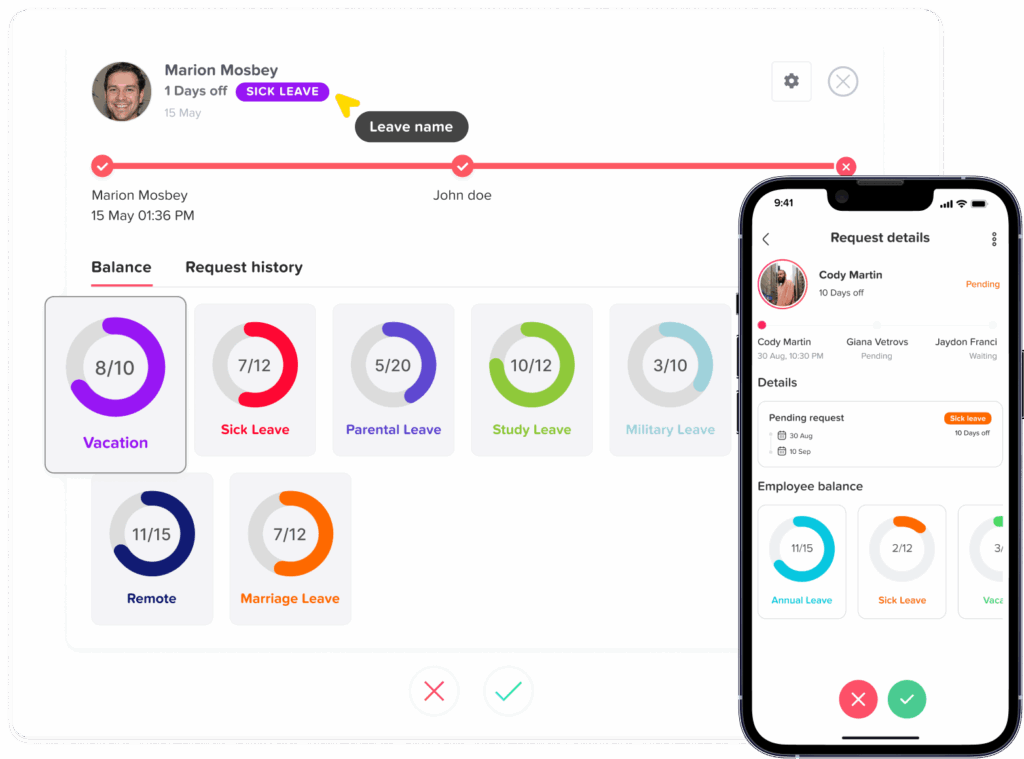
PTO Balance Tracking
Employees should be able to see their available leave before submitting a request.
Depending on company policy, the system may need to display:
- Current balance
- Accrued balance
- Pending requests
- Approved future leave
- Used leave
- Carryover amount
- Expiring balance
- Manual adjustments
- Negative balance, when permitted
Transparent balances reduce repeated questions to HR and help employees plan leave responsibly.
Leave Request and Approval Workflows
Employees should be able to choose a leave type, select a date or time range, add a note when necessary, and submit the request to the correct approver.
Managers should be able to review:
- The requested dates
- The requested number of hours or days
- The employee’s available balance
- Other approved absences
- Team coverage
- Relevant policy restrictions
- Previous requests when appropriate
For companies with more complex structures, the app may need multiple approval levels or different approvers for specific teams and locations.
Hourly and Partial Day Leave
Not every absence lasts a full day.
An employee may need:
- Two hours for a medical appointment
- A half day for a family responsibility
- One hour of personal leave
- An early departure using PTO
- A late arrival covered by paid leave
The app should support hourly or partial day requests when the company’s policy permits them. This prevents HR from recording a full day absence for a much shorter period.
Break Tracking
Organizations that track meal or rest breaks should clearly define how employees record them.
The system may allow employees to:
- Punch out and back in for a meal
- Start and stop a break timer
- Confirm that a scheduled break was taken
- Report a missed or interrupted break
- Request correction of an incorrect deduction
Short rest periods are generally treated differently from bona fide meal periods under federal wage rules. The Department of Labor explains that meal periods are normally not work time only when the employee is completely relieved from duty.
Automatic meal deductions should be used carefully. Employees need a practical way to report that they worked through lunch, returned early, or had their meal interrupted.
Missed Punch Corrections
Employees will occasionally forget to punch in or out. A good correction process should preserve accuracy without allowing silent changes.
A correction workflow may include:
- The employee submits the missing time.
- The employee adds a reason.
- A manager reviews the request.
- The original and corrected records remain visible in an audit history.
- Approved changes are included in the timesheet.
This is safer than allowing records to be edited without documentation.
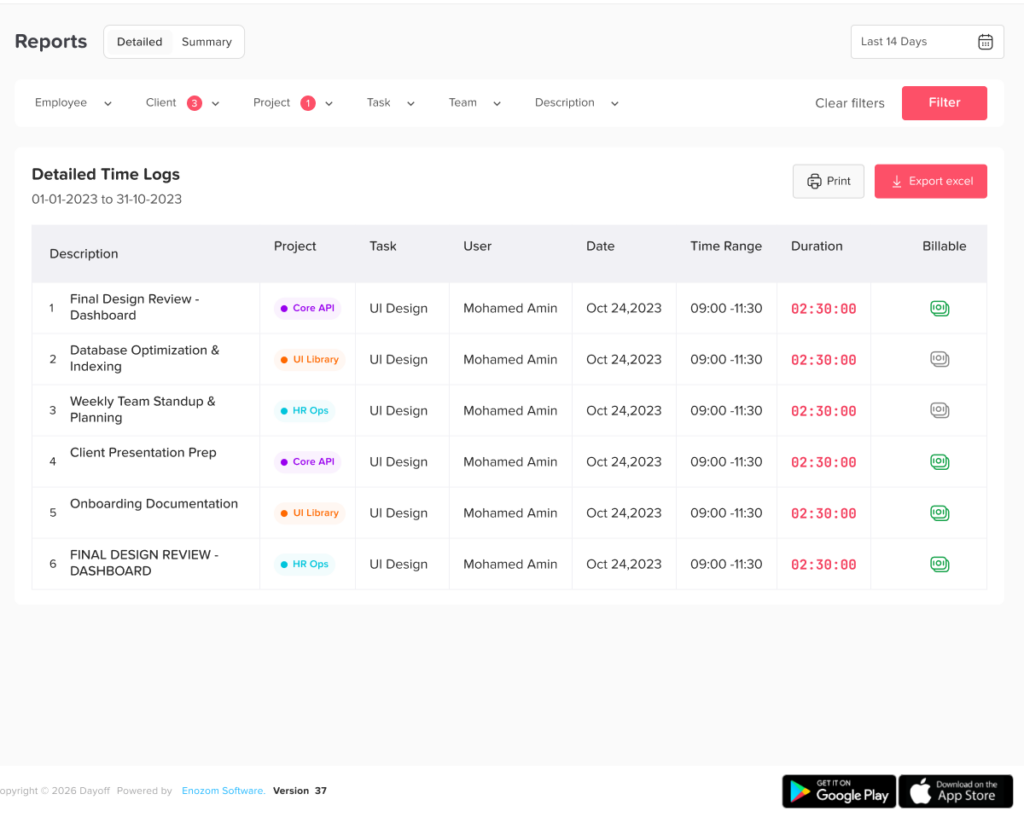
Overtime and Late Time Reports
The app should help managers identify exceptions, not just calculate total hours.
Useful reports may include:
- Employees approaching overtime
- Overtime by employee or department
- Late arrivals
- Early departures
- Missed punches
- Unscheduled work
- Absence frequency
- PTO usage
- Unused leave balances
- Manual time corrections
- Differences between scheduled and actual hours
These reports help managers correct problems before payroll is processed.
Shared Team Calendar
A shared calendar gives managers and employees visibility into approved time off.
It can help teams avoid:
- Overlapping vacation requests
- Understaffed shifts
- Meetings scheduled during approved leave
- Project deadlines with unavailable employees
- Confusion about public holidays
- Last minute coverage problems
Privacy controls are important. Employees may need to see that a coworker is unavailable without seeing private medical or personal details.
Notifications
Timely notifications keep requests and corrections from remaining unresolved.
Notifications may be used for:
- New leave requests
- Request approvals or rejections
- Missing punch reminders
- Upcoming shifts
- Employees who have not clocked out
- Low PTO balances
- Schedule changes
- Overtime warnings
- Pending time corrections
Notifications should be helpful without becoming excessive. Organizations should choose alerts that require action.
Audit History
The system should retain a history of important changes, including:
- Who created a time entry
- Who corrected it
- What the original entry showed
- Why it was changed
- Who approved a leave request
- When a balance was adjusted
- Which policy rule was applied
An audit trail improves accountability and makes payroll questions easier to investigate.
How a Punch in Punch out App Works in Practice
Consider a customer support employee scheduled from 8:00 a.m. to 4:00 p.m.
The employee has an approved medical appointment from 8:00 a.m. to 10:00 a.m. and submits a two-hour sick leave request in advance. On the scheduled day, the system shows:
- Scheduled start: 8:00 a.m.
- Approved sick leave: 8:00 a.m. to 10:00 a.m.
- Actual punch in: 10:00 a.m.
- Actual punch out: 4:00 p.m.
- Hours worked: 6
- Paid sick leave: 2
- Unexplained absence: 0
Without connected leave data, the attendance report might incorrectly show that the employee was two hours late. With integrated tracking, the system can show that the scheduled time was fully accounted for through six worked hours and two approved leave hours.
How to Choose the Right Punch in Punch out App
Before choosing an app, determine what the organization actually needs to manage.
Ask the following questions:
- Can employees punch in and out from the devices they use?
- Does the system support office, remote, field, and shift-based work?
- Can managers compare scheduled and actual hours?
- Does it support hourly, half-day, and full-day leave?
- Can the company create different leave types?
- Does it calculate PTO balances automatically?
- Can leave rules differ by team, location, or policy?
- Does it support more than one approver?
- Are manual changes recorded in an audit history?
- Can HR export attendance and leave reports?
- Does the app keep worked hours separate from paid leave?
- Can employees correct missed punches?
- Are privacy and permission controls available?
- Can the system grow as the company adds employees or locations?
The best choice is not necessarily the system with the longest feature list. It is the one that matches the company’s schedules, leave policies, approval structure, reporting needs, and employee workflow.
How Day Off Connects Attendance, PTO, and Leave
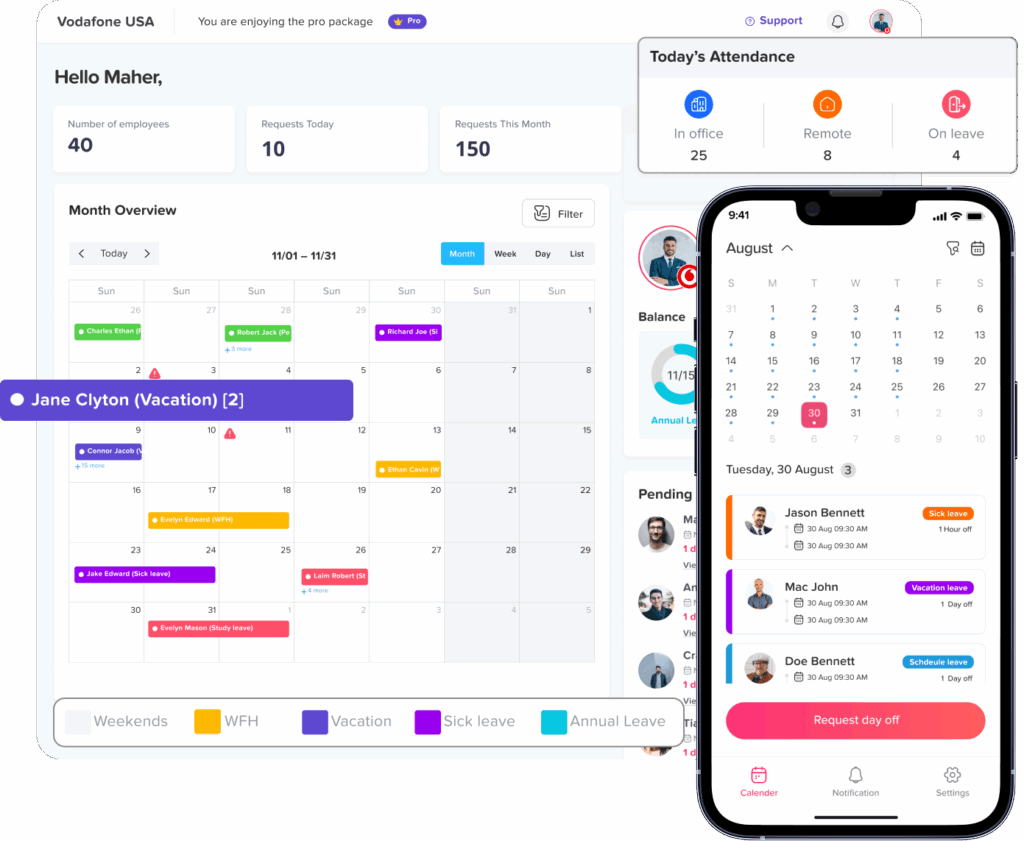
Day Off brings employee time tracking and leave management into one platform. Employees can clock in and clock out, while managers can review daily attendance, worked hours, schedules, missed punches, leave requests, and employee availability.
The PTO and leave management side helps teams organize:
- Leave requests
- PTO balances
- Vacation and sick leave
- Approval workflows
- Shared calendars
- Leave policies
- Public holidays
- Employee availability
- Reports and exports
Day Off also supports centralized PTO management and integrations with workplace tools such as Slack, Microsoft Teams, Google Calendar, and Outlook Calendar.
Connecting these functions means a manager can review not only whether an employee punched in, but also whether the employee was scheduled, on approved leave, working fewer hours, or unavailable for a documented reason.
FAQ
What is a Punch in Punch out app?
A Punch in Punch out app is a digital tool employees use to record when they start and finish work. It creates time records that managers can review for attendance, total hours, late arrivals, early departures, missed punches, and overtime.
Can a punch in punch out app track PTO?
Yes. Some apps combine punch records with PTO balances, leave requests, approvals, work schedules, shared calendars, and absence reports. This allows managers to see worked time and approved leave together.
What is the difference between PTO tracking and time tracking?
Time tracking records hours actually worked. PTO tracking records approved time away from work, such as vacation, sick leave, or personal leave. The two records should be connected but reported separately.
Does PTO count as hours worked for overtime?
Under the general federal FLSA rule, paid vacation, sick leave, and holidays do not have to be counted as hours worked when calculating overtime. A company policy, contract, state law, or local rule may provide a different or more generous result.
Can employees use a punch in punch out app on their phones?
Many modern time tracking apps provide mobile access. This can be useful for remote workers, field employees, traveling teams, and workplaces that do not use a physical time clock.
What happens if an employee forgets to punch out?
The employee should submit a correction containing the actual finishing time and a reason for the missing punch. A manager can then review and approve the correction. The system should preserve the original record and the correction history.
Should PTO be deducted automatically when an employee misses hours?
Not without confirming why the hours are missing. The difference may be caused by approved leave, unpaid time, a forgotten punch, a schedule change, or a technical issue. PTO should be deducted according to the organization’s policy and the employee’s actual leave record.
Can an employee punch in while on approved PTO?
An employee who performs work during approved leave should report the work according to company procedures. The employer may need to record the working time and adjust the leave entry. Approved PTO should not be used to hide time that was actually worked.
Is a punch in punch out app useful for salaried employees?
It can be useful when the company needs attendance records, project hours, schedule visibility, leave coordination, or information about workload. However, the level of tracking should match the role, business purpose, and applicable employment rules.
How accurate does a time clock app need to be?
The system should reliably record actual working time and allow employees to report mistakes. Employers covered by federal recordkeeping rules must maintain accurate information about hours worked and wages earned, although no single timekeeping format is required.
Can a punch in punch out app replace payroll software?
A time tracking app can provide approved hours, overtime, attendance, and leave information used to prepare payroll. Whether it can replace payroll software depends on whether it also calculates wages, taxes, deductions, benefits, filings, and payments.
What reports should a time and PTO tracking app provide?
Useful reports include worked hours, overtime, missed punches, late arrivals, early departures, PTO usage, leave balances, overlapping requests, absence patterns, schedule differences, and manual corrections.
Conclusion
A punch in punch out app becomes much more valuable when it is connected with PTO and leave tracking. Work schedules show when employees are expected to work, punch records show when they actually worked, and leave records explain approved time away. Together, these records create a clearer and more accurate view of employee availability.
For employees, the system makes it easier to record hours, check balances, request leave, review schedules, and correct mistakes. Managers benefit from improved attendance visibility, leave planning, shift coverage, and approval decisions. For HR and payroll teams, it reduces manual comparisons between timesheets, leave spreadsheets, calendars, and messages.
The goal is not simply to monitor when employees arrive and leave. It is to create a reliable employee time management process that treats working hours, approved leave, overtime, schedules, and absences as connected parts of the same operational system.
With Day Off, businesses can manage punch in and punch out records alongside PTO requests, leave balances, schedules, attendance, and team availability. This creates a simpler workflow for employees and gives managers the information they need to plan work with fewer errors and less manual administration.