


Time Tracker Software

Built Into Day Off

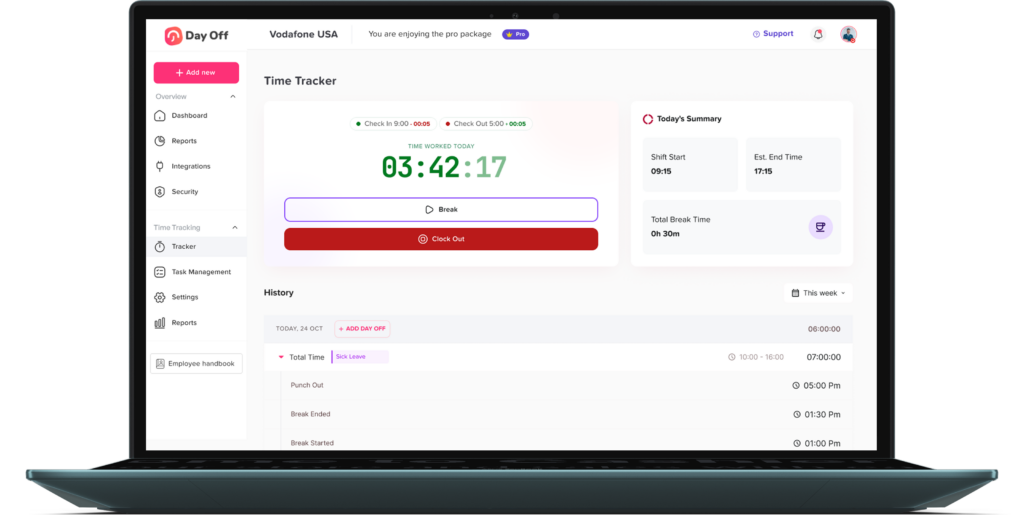
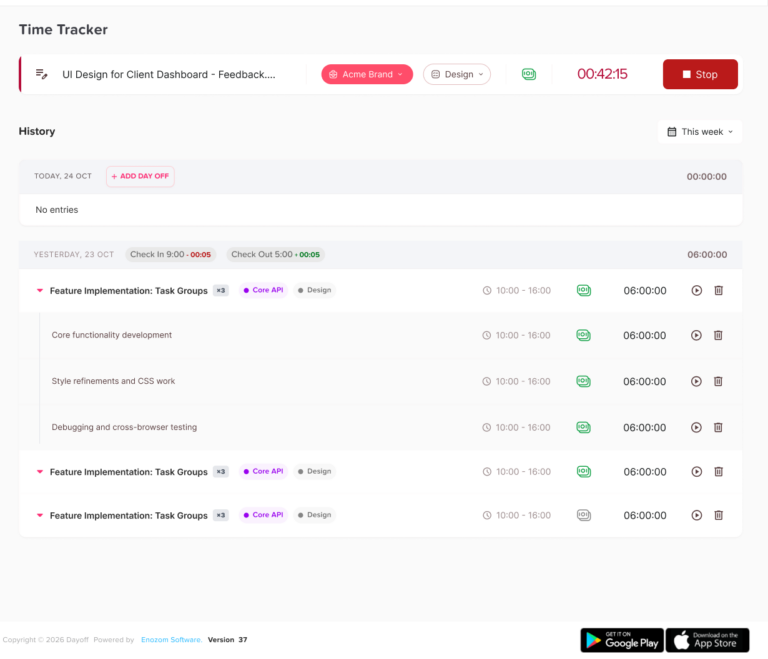
Track work hours, punch ins, punch outs, daily tasks, leave requests, and absences in one connected platform. Day Off Time Tracker helps teams manage attendance, calculate late time and overtime based on work schedules, and keep time tracking fully integrated with time off management.

Day Off app feature showing employee leave tracking, PTO management and absence scheduling – Day OffDay Off
Requests annually
0 M+
Monthly active users
0 K+
Companies rely on Day Off
0 K+
Countries supported
0 +

Real time attendance tracking connected to time off.

Manage daily punch ins, punch outs, work hours, leave requests, and absences from one cloud based time tracking platform. Day Off helps HR teams and managers keep attendance records accurate while connecting every missed workday, approved leave, and absence to the same shared calendar.

Time tracking interface in Day Off showing work hours, shifts and employee time logs – Day OffDay Off

Everything your team needs to track time accurately.

Day Off combines employee time tracking, attendance management, work schedules, tasks, and leave requests in one simple platform.

Day Off app feature showing employee leave tracking, PTO management and absence scheduling – Day OffDay Off

Punch In and Punch Out

Employees can clock in and clock out from Day Off, making it easy to track daily attendance, worked hours, and missed punch ins using a simple punch clock app.

Day Off app feature showing employee leave tracking, PTO management and absence scheduling – Day OffDay Off

Tasks and Work Logs

Let employees add their daily tasks while tracking time. A practical solution for project based companies that need to follow work progress, employee hours, and billable time in one place.

Leave management screen in Day Off app showing employee time off requests, approvals and absence tracking – Day OffDay Off

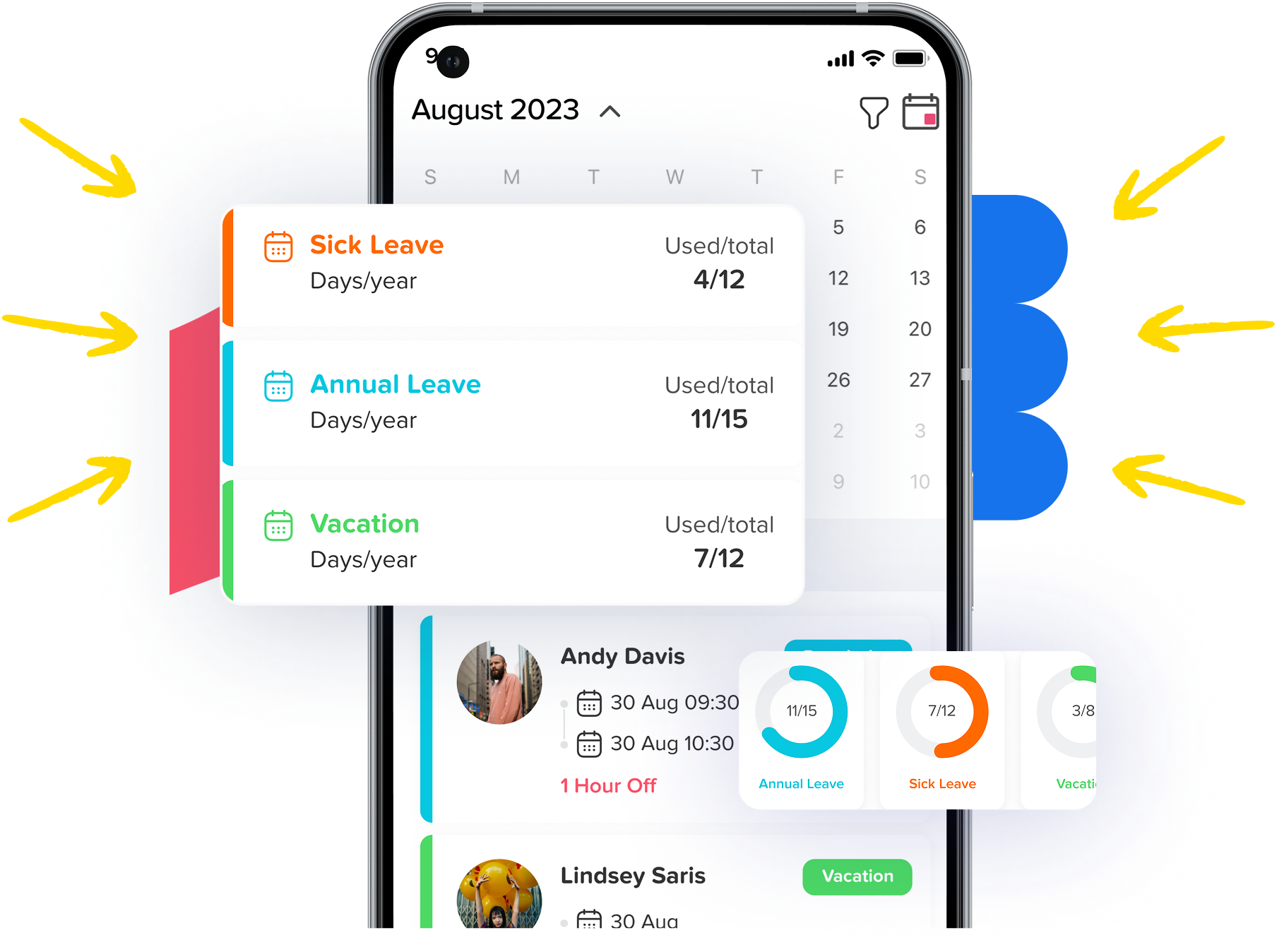
Connected to Leave and Absence

Attendance is integrated with your leave requests and absence records. If an employee did not punch in on a workday, you can quickly use +Add Day Off to keep records accurate.

Employee attendance tracking screen in Day Off app showing daily presence, absences and work hours – Day OffDay Off

Attendance Sheets for Payroll

Export attendance sheets with clock in times, clock out times, late time, overtime, and total worked hours, so your team can use accurate time records for payroll processing.

Work schedule and shift planning screen in Day Off app for employee roster management – Day OffDay Off

Flexible Work Schedules

Support different types of attendance, including fixed hours, flexible hours, and rotating shifts. Day Off calculates late time and overtime based on each employee’s assigned work schedule.

Everything HR teams and managers need to track attendance.

Employee attendance tracking screen in Day Off app showing daily presence, absences and work hours – Day OffDay Off

Real time attendance visibility

See who punched in, who punched out, who is working, and who is absent from one real-time employee tracking tool. Managers can follow daily attendance without chasing updates.

Day Off app feature showing employee leave tracking, PTO management and absence scheduling – Day OffDay Off

Punch in and punch out tracking

Give employees a simple punch in punch out app to record their working hours accurately. Replace manual attendance logs and paper punch cards with a digital punch card system for business.

Work schedule and shift planning screen in Day Off app for employee roster management – Day OffDay Off

Work schedule calculations

Day Off calculates late time, overtime, and total worked hours based on each employee’s work schedule, including fixed hours, flexible hours, and rotating shifts.

Leave management screen in Day Off app showing employee time off requests, approvals and absence tracking – Day OffDay Off

Leave and absence connection

Time tracking is integrated with your leave requests and absence records. If an employee did not punch in on a working day, managers can use +Add Day Off to keep attendance and time off aligned.

Employee attendance tracking screen in Day Off app showing daily presence, absences and work hours – Day OffDay Off

Payroll ready attendance sheets

Export attendance sheets with punch-in times, punch-out times, late time, overtime, absences, and total worked hours to support payroll and automate employee timesheets.

Day Off app feature showing employee leave tracking, PTO management and absence scheduling – Day OffDay Off

Tasks and project time logs

Employees can add tasks while tracking their time, making Day Off useful for project-based companies that need to track employee hours, daily work, and billable time more easily.

Set up in minutes. Track time automatically.

Give your team a simple mobile clock in app to punch in, punch out, and log daily tasks from anywhere. Day Off keeps work hours, attendance logs, leave requests, and absences connected, so managers can track time worked and time off from the same app.

How it Works?

Day Off app feature showing employee leave tracking, PTO management and absence scheduling – Day OffDay Off

Set up your team

Create your company in Day Off, add employees, assign teams, and enable Time Tracker alongside your existing leave and absence management setup.

Day Off app feature showing employee leave tracking, PTO management and absence scheduling – Day OffDay Off

Configure work schedules

Set fixed hours, flexible hours, or rotating shifts for each team or employee. Day Off uses the assigned work schedule to calculate worked hours, late time, and overtime.

Day Off app feature showing employee leave tracking, PTO management and absence scheduling – Day OffDay Off

Review, approve, and export

Managers can review attendance logs, track missing punch-ins, add a day off when needed, and export attendance sheets to support payroll and automate employee timesheets.

Day Off app feature showing employee leave tracking, PTO management and absence scheduling – Day OffDay Off

Employees punch in and add tasks

Employees can punch in, punch out, and add their daily tasks from one simple employee time clock. It works as an online employee punch card and web-based time clock tracker for everyday attendance.

Day Off app feature showing employee leave tracking, PTO management and absence scheduling – Day OffDay Off

Capterra score

Trusted by teams worldwide

Day Off app feature showing employee leave tracking, PTO management and absence scheduling – Day OffDay Off

This is a really useful app that fills a need in the market, we’ve got about 30 employees, and getting them all set up on the app was fast and easy.

Carlo Pannella

CFO, Lorne Park

Day Off app feature showing employee leave tracking, PTO management and absence scheduling – Day OffDay Off

I like how easy it is to set up and implement, employees are able to set up their accounts with their invite and use it without question, I’m able to make sure there’s no overlapping vacation and that people are able to take the required time off.

Josh L.

Manager

Day Off app feature showing employee leave tracking, PTO management and absence scheduling – Day OffDay Off

Day off is a great app, easy to manage and easy to set up, allows you to eliminate paper work and be more organized.

Janaina s.

Operador de atendimento

Day Off app feature showing employee leave tracking, PTO management and absence scheduling – Day OffDay Off

I love it, we’re a small company and it’s easy to let time off get way off track if not monitored, this solves all my issues with tracking and is easy for all of us at any time.

Stephanie B.

CEO

Day Off app feature showing employee leave tracking, PTO management and absence scheduling – Day OffDay Off

I can better plan the staff slack scale, and plan better in relation to scheduling vacations, and I don’t get lost when an employee is on sick leave.

Teri A.

CEO

Track employee time from mobile

Give your team a simple mobile clock in app to punch in, punch out, and log daily tasks from anywhere. Day Off keeps work hours, attendance logs, leave requests, and absences connected, so managers can track time worked and time off from the same app.

phone container Time Tracker
Team absence management view in Day Off showing all employees leave status and upcoming time off – Day OffDay Off

Small Teams & Startups

Small teams need a simple way to know when employees start and finish work without relying on manual updates, spreadsheets, or chat messages. With Day Off Time Tracker, employees can punch in and punch out easily, while managers can track attendance, working hours, late arrivals, and daily availability from one place.

Time tracking interface in Day Off showing work hours, shifts and employee time logs – Day OffDay Off
Day Off app feature showing employee leave tracking, PTO management and absence scheduling – Day OffDay Off

HR Departments at Growing Companies

As companies grow, tracking employee attendance manually becomes harder and more time consuming. HR teams need accurate records for work hours, overtime, late time, absences, and payroll preparation. Day Off centralizes time tracking, leave requests, schedules, and reports, helping HR manage employee attendance and PTO together in one organized system.

Absence and attendance report in Day Off app with leave statistics, trends and team analytics – Day OffDay Off
Team absence management view in Day Off showing all employees leave status and upcoming time off – Day OffDay Off

Remote & Distributed Teams

Remote and distributed teams need a clear way to track working hours without relying on messages, manual updates, or separate spreadsheets. With Day Off Time Tracker, employees can punch in and punch out from wherever they work, while managers can monitor attendance, daily availability, late time, overtime, and work hours in one centralized system. Day Off also supports different work schedules, making it easier to manage employees across locations, time zones, flexible hours, fixed hours, and rotating shifts.

Employee attendance tracking screen in Day Off app showing daily presence, absences and work hours – Day OffDay Off

Who Uses Day Off Time Tracker?

Whether you’re a 5-person startup or a 500-person company with employees across multiple countries, Day Off adapts to how your team works.

Related Articles

Frequently Asked Questions

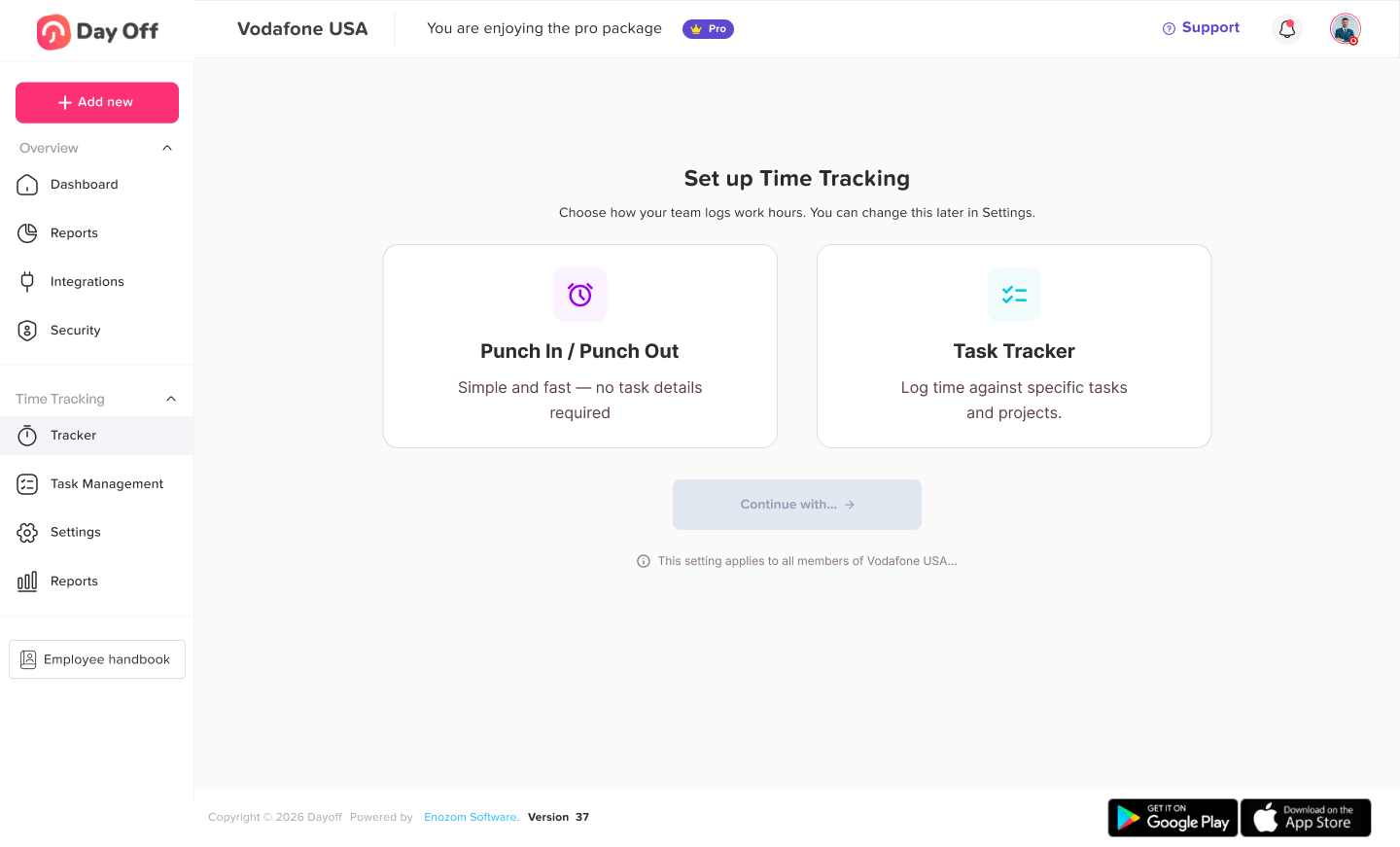
Admins can choose how employees will record their working time depending on whether they only need attendance tracking or need to track time by project and task.

To set it up:

  • Go to Time Tracking.
  • Open Settings.
  • Select General.
  • Under the General card, choose one of the following:
    • Clock In / Clock Out: Employees simply start and end their working day.
    • Task Tracker: Employees track their time against projects and assigned tasks.
  • Confirm your selection.

The selected tracking method will determine how employees use the Start Time option.

If your company uses the Clock In  Clock Out tracking method, you can record the beginning and end of your working day directly from your Day Off account.

To clock in:

  • Log in to your Day Off account.
  • Find Start Time on the left sidebar.
  • Click Start Time when you begin working.

To clock out:

  • When your working day is finished, click End Day.
  • Day Off will record your working time for that day.

Clients can be added when you want to organize projects and tracked time according to the customers your team works with.

To add a client:

  • Go to Time Tracking.
  • Open Settings.
  • Select Clients.
  • Click Add Client.
  • Enter the:
    • Client name
    • Currency
    • Time rate
  • Save the client.

You can then connect projects to that client for easier reporting and time analysis.

Projects allow employees to record their working time against specific work or client activities.

To create a project:

  • Go to Time Tracking.
  • Open Settings.
  • Select Projects.
  • Click Add Project.
  • Enter the project name.
  • Select the related client.
  • Save the project.

The project will then become available when employees start tracking their time.

Admins can create tasks and assign them to specific employees so each employee only sees the tasks relevant to their work.

To add a task:

  • Go to Time Tracking.
  • Open Settings.
  • Select Task Management.
  • Click Add Task.
  • Add the:
    • Task name
    • Assignee
    • Estimated time
  • Save the task.

The assigned task will then be available to that employee when they start tracking time.

If your company uses Task Tracker, you will start your working time normally and then select the work you are doing.

To start tracking time:

  • Log in to Day Off.
  • Click Start Time from the left sidebar.
  • Select the Project you are working on.
  • Select a Task from the tasks assigned to you.
  • Start tracking your time.

When moving to another task, you can stop the current task and select the next project or task you are working on.

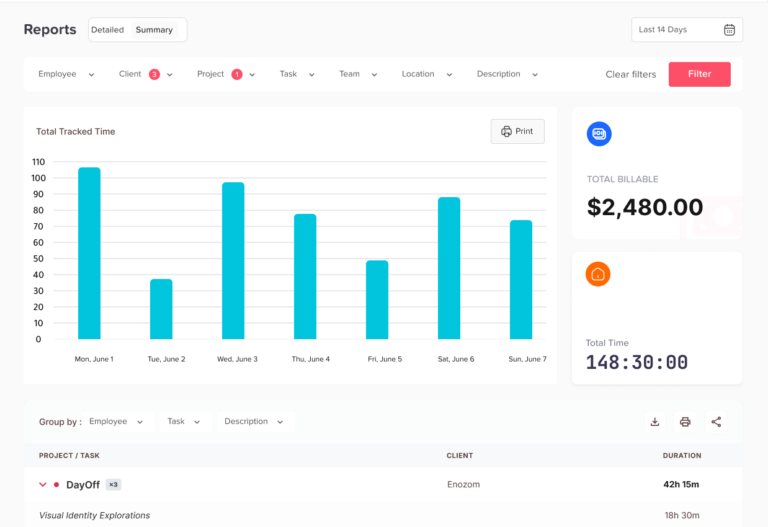
Time Tracking reports give admins a detailed view of how employees are spending their working time.

To view reports:

  • Go to Time Tracking.
  • Select Reports.
  • Choose the required date or reporting period.
  • Review tracked durations for each employee.
  • View the time recorded against different:
    • Employees
    • Projects
    • Tasks

This gives admins a clearer view of employee activity and time distribution.

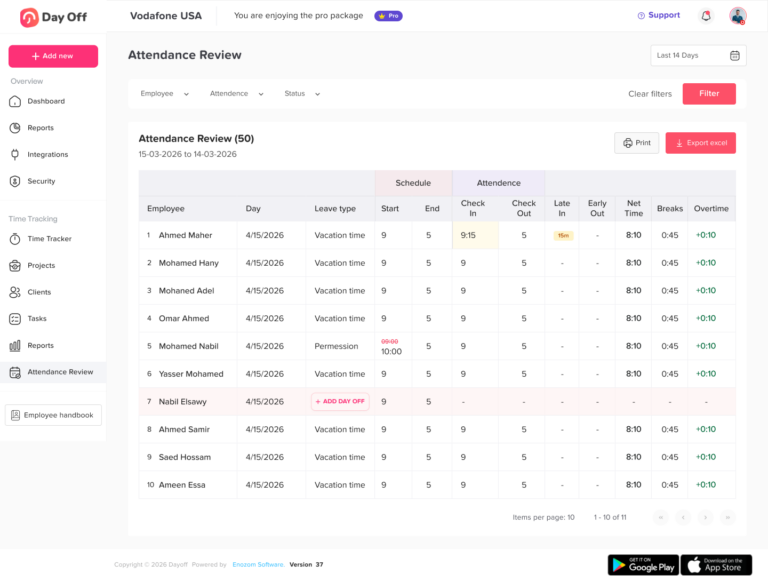
The Attendance Review section compares employees’ actual tracked time with their assigned work schedules.

To review attendance:

  • Go to Time Tracking.
  • Open Attendance Review.
  • Select the required period.
  • Review each employee’s scheduled and actual attendance.

Admins can review information such as:

  • Scheduled working hours
  • Clock in time
  • Clock out time
  • Late arrival
  • Early departure
  • Breaks
  • Time off
  • Net working hours
  • Overtime
  • Attendance status

This makes it easier to identify attendance exceptions from one screen.

Yes. Access to Time Tracking information can be managed through Day Off’s roles and permissions.

Admins can use permissions to control who is able to access areas such as:

  • Time Tracking settings
  • Employee time information
  • Reports
  • Attendance Review

This allows companies to give managers or other users access based on their responsibilities.

Yes. Admins can export Time Tracking information when they need to use the data outside Day Off.

To export the data:

  • Open the required Time Tracking report or Attendance Review.
  • Select the required reporting period.
  • Review the displayed information.
  • Use the available Export option.

The exported data can then be used for internal reporting, attendance analysis, payroll preparation, or record keeping.

Day Off app feature showing employee leave tracking, PTO management and absence scheduling – Day OffDay Off

Start Employee Time Tracker the smart way

Track employee work hours, punch in punch out records, overtime, late arrivals, and leave requests with Day Off’s all in one time Tracker and PTO management system.