







Managing employee time becomes much easier when working hours and time off are treated as parts of the same process. A PTO Tracker with a time clock helps businesses understand not only who is away, but also who worked, how long they worked, what hours they were expected to work, and how approved leave affected their attendance. Instead of maintaining separate spreadsheets, timesheets, leave calendars, and approval records, companies can build a clearer picture of employee time in one connected system.

This connection is especially useful for growing businesses, shift-based teams, remote employees, agencies, and organizations with flexible schedules. A traditional PTO systems may tell a manager that an employee took vacation on Monday. A basic time clock may show that no hours were recorded on Monday. When the two systems are connected, the absence has context: the employee was not simply missing from the time clock, they were on approved paid leave.
That distinction matters for attendance reviews, leave balances, workforce planning, payroll preparation, and accurate employee records.
What Is a PTO Tracker With a Time Clock?
A PTO tracker with a time clock combines two related functions.
A PTO tracker manages employee time off, including:
- Vacation
- Sick leave
- Personal leave
- Paid time off
- Unpaid leave
- Comp time
- Custom leave types
- Leave balances
- Accruals
- Requests and approvals
- Employee availability
A time clock records when employees work, including:
- Clock in time
- Clock out time
- Total working hours
- Breaks
- Late arrivals
- Early departures
- Overtime
- Missing time entries
- Attendance history
When these functions work together, managers can compare an employee’s expected working time with the hours actually worked and any approved time off.
That creates a much more complete employee time record.
| System | Main Question It Answers | Typical Information |
|---|---|---|
| PTO Tracker | When is the employee away, and how much leave is available? | Leave requests, balances, approvals, vacation, sick leave |
| Time Clock | When did the employee actually work? | Clock-in, clock-out, breaks, hours worked, overtime |
| PTO Tracker + Time Clock | What happened during the employee’s scheduled working time? | Worked hours, approved leave, absences, attendance exceptions, schedule differences |
Why PTO Tracking and Time Clocks Should Work Together
Time off and working time may look like separate HR processes, but they frequently affect the same employee record.
Suppose an employee is scheduled to work from 9:00 AM to 5:00 PM.
If the time clock shows no activity for the entire day, several explanations are possible:
- The employee was on approved vacation.
- The employee called in sick.
- It was a scheduled non-working day.
- The employee forgot to clock in.
- The employee was absent without approved leave.
- The employee’s schedule changed.
- There is simply a missing time entry.
A time clock alone cannot always explain the difference.
A PTO tracker provides the missing context.
Instead of showing a blank attendance record, an integrated system can show that the employee had an approved leave request covering that period.
This reduces the amount of manual investigation required from managers and HR teams.
The Difference Between Scheduled Time, Worked Time, and PTO
One of the most important concepts in employee time management is that scheduled hours, worked hours, and paid hours are not always the same thing.
Consider an employee scheduled for eight hours.
They could:
- Work all eight hours.
- Work six hours and use two hours of PTO.
- Take eight hours of PTO.
- Work seven hours and leave one hour early without PTO.
- Work nine hours because additional work was required.
- Have no hours because it was a scheduled day off.
A useful PTO and time clock system should keep these categories distinct rather than treating every non-worked hour as an absence.
Scheduled Hours
Scheduled hours describe the time an employee was expected to work.
For example:
Monday: 9:00 AM to 5:00 PM
The schedule becomes the baseline against which attendance can be reviewed.
Worked Hours
Worked hours are the actual time recorded through clock-ins, clock-outs, timers, timesheets, or other approved time records.
An employee scheduled for eight hours might actually record:
7 hours 35 minutes worked
This alone does not explain the missing 25 minutes.
PTO Hours
PTO hours represent approved time away from work that is covered by the company’s leave policy.
For example:
2 hours of approved personal leave
If the employee worked six hours and had two approved PTO hours, the manager can understand why the employee did not record a full eight-hour workday.
How a PTO Tracker With a Time Clock Works
Although the exact workflow varies by software, a connected system generally follows a simple sequence.
The Company Defines Work Schedules
The system first needs to understand when employees are expected to work.
Schedules may include:
- Fixed working days
- Fixed start and end times
- Flexible working hours
- Rotating shifts
- Split shifts
- Part time schedules
- Compressed workweeks
This information creates the expected attendance baseline.
Employees Request Time Off
An employee submits a leave request and selects:
- Leave type
- Start date
- End date
- Partial day or hourly leave, when available
- Reason, if required
- Supporting documentation, if required
The request then follows the company’s approval process.
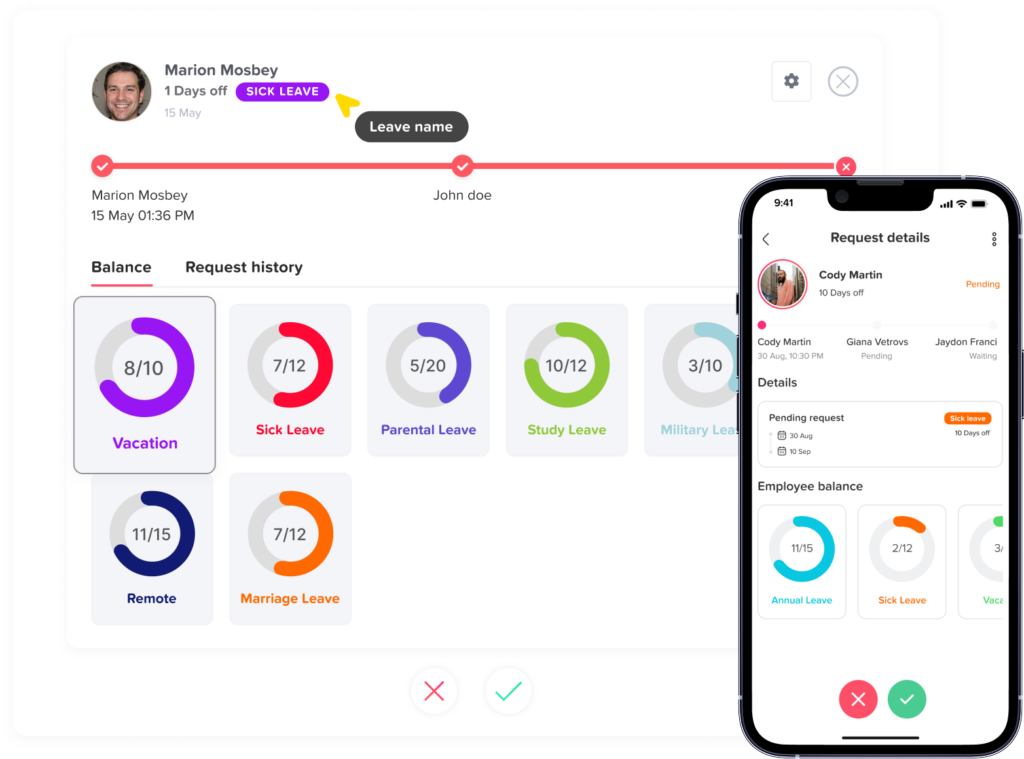
Approved PTO Is Added to the Employee Record
Once approved, the leave becomes part of the employee’s schedule and availability.
The relevant amount is deducted from the employee’s leave balance according to the company’s policy.
For schedule-aware systems, the leave deduction can reflect the employee’s actual scheduled hours instead of assuming that every working day has the same length.
Employees Record Their Working Time
On normal working days, employees clock in and clock out.
Depending on the system, they may also record:
- Breaks
- Projects
- Tasks
- Billable hours
- Different work sessions
- Overtime
Managers Review Attendance
The system can then compare:
Expected time + approved leave + actual worked time
This gives managers much more useful information than reviewing a timesheet or PTO report separately.
Example: How PTO and Time Clock Records Work Together
| Situation | Scheduled Hours | Worked Hours | Approved PTO | What the Record Shows |
|---|---|---|---|---|
| Normal workday | 8 | 8 | 0 | Complete attendance |
| Full vacation day | 8 | 0 | 8 | Approved PTO |
| Partial-day leave | 8 | 5 | 3 | Work + approved PTO |
| Late arrival | 8 | 7 | 0 | Possible attendance exception |
| Approved 1-hour leave | 8 | 7 | 1 | Complete with partial PTO |
| No clock-in and no PTO | 8 | 0 | 0 | Requires review |
| Overtime day | 8 | 10 | 0 | 2 additional worked hours |
This is why combining the two records is valuable.
A seven hour time entry does not automatically mean the employee failed to complete their scheduled day. They might have had one hour of approved leave.
Likewise, zero recorded hours do not automatically mean an unexcused absence.
Benefits of Using a PTO Tracker With a Time Clock
More Accurate Attendance Records
Attendance data becomes more meaningful when approved leave is included.
Without PTO information, managers may see an employee as absent when they were actually on approved vacation or sick leave.
A connected system helps distinguish between:
- Approved absence
- Scheduled day off
- Missing punch
- Late arrival
- Early departure
- Unplanned absence
- Partial day PTO
This helps managers review attendance based on context rather than assumptions.
Easier PTO Balance Management
PTO tracking becomes more accurate when leave deductions are connected to work schedules.
This is especially important when employees do not all work identical days.
For example:
Employee A works eight hours on Monday.
Employee B works ten hours on Monday.
If both employees take Monday off, deducting one generic “day” may hide an important difference. Tracking leave in hours allows the company to deduct the amount of scheduled work missed.
This becomes particularly important for compressed schedules, part-time employees, split shifts, and rotating schedules.
Better Handling of Partial Day PTO
Partial day leave is one of the clearest reasons to connect PTO with a time clock.
Imagine an employee who:
- Is scheduled for eight hours
- Works from 9:00 AM to 1:00 PM
- Takes approved PTO for the remaining four hours
A disconnected time clock might simply show a four-hour workday.
A connected system can explain that the employee completed:
4 worked hours + 4 PTO hours
That produces a much clearer attendance record.Fewer Manual Corrections
When systems are separate, HR teams often spend time reconciling records manually.
They may need to compare:
- PTO spreadsheets
- Timesheets
- Email approvals
- Calendar entries
- Payroll records
- Manager messages
- Employee explanations
This creates unnecessary administrative work.
Connecting PTO and attendance data reduces the number of situations that require someone to investigate why hours are missing.
Clearer Employee Availability
A PTO tracker tells managers who is expected to be away.
A time clock shows who is actually working.
Together, they provide a clearer real-time and historical view of workforce availability.
Managers can answer questions such as:
- Who is scheduled today?
- Who is currently working?
- Who is on approved leave?
- Who has not clocked in?
- Who left early?
- Which employees are working overtime?
- Does the team have enough coverage?
This is particularly useful for distributed, hybrid, and shift-based teams.
Better Payroll Preparation
A PTO tracker with a time clock can also make payroll preparation easier because payroll teams need to understand how employee time should be categorized.
A pay period might contain:
- Regular worked hours
- PTO hours
- Sick leave
- Unpaid leave
- Overtime
- Holidays
- Additional hours
- Attendance corrections
Keeping these categories separate makes payroll review easier and reduces the need to reconstruct employee attendance at the end of the pay period.
However, businesses should not assume that all paid hours are legally treated as hours worked.
For U.S. employers, the Fair Labor Standards Act does not require employers to provide paid vacation or sick leave. The U.S. Department of Labor also explains that paid vacation, holiday, and sick leave generally do not need to be counted as “hours worked” when determining federal overtime because the employee did not perform work during those hours. State laws, contracts, collective bargaining agreements, and company policies may impose additional requirements.
This is another reason PTO hours and actual worked hours should remain clearly identified rather than being combined into one generic total.
Better Overtime Visibility
A connected system helps separate working time from paid leave.
For example, an employee may have:
- 32 actual worked hours
- 8 PTO hours
- 40 total paid hours
Those numbers should not automatically be interpreted as 40 hours worked.
Likewise:
- 42 actual worked hours
- 8 PTO hours
is different from:
- 34 actual worked hours
- 8 PTO hours
A strong time tracking process keeps worked hours, leave hours, and other paid categories distinct so the business can apply the appropriate payroll and overtime rules.
Better Records for Managers and HR
Managers often need more than a monthly total.
They may need to understand exactly what happened on a particular date.
For example:
Employee scheduled: 8 hours
Employee worked: 6 hours
Approved PTO: 2 hours
Attendance result: Complete with approved leave
That record is much more informative than simply showing “6 hours worked.”
How Work Schedules Affect PTO Tracking
A PTO tracker with a time clock works best when it also understands employee schedules.
This is because the number of hours an employee misses depends on what they were actually scheduled to work.
Fixed Days
A fixed-days schedule defines which days of the week an employee normally works.
For example:
Monday through Friday are working days.
Saturday and Sunday are non-working days.
If the employee requests Friday through Monday as vacation, the system should understand which days are actual working days rather than deducting leave for every calendar day.
Fixed Hours
Fixed-hour schedules define expected start and end times.
For example:
8:00 AM to 4:00 PM
This provides a clear baseline for identifying:
- Late arrivals
- Early departures
- Partial-day leave
- Additional hours
- Missing attendance
Flexible Hours
With flexible schedules, employees may not have one fixed start time.
Instead, they might be required to work a specific number of hours each day.
In this situation, attendance should not automatically mark someone as late simply because they did not start at 9:00 AM.
The system needs to evaluate the employee according to the rules of the flexible schedule.
Rotating Shifts
Rotating schedules create additional complexity because expected working hours change.
An employee may work:
- Morning shift this week
- Evening shift next week
- Different working days during another cycle
A PTO tracker needs to know the assigned shift on the requested date to determine how much scheduled work the leave replaces.
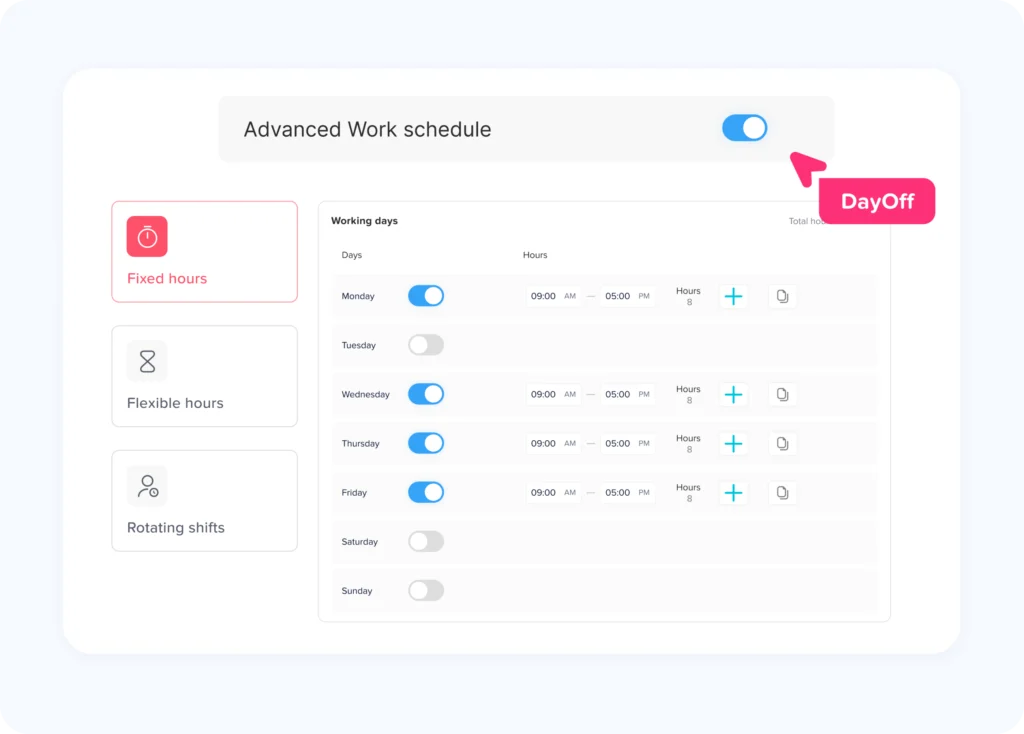
Day Off supports Fixed Days, Fixed Hours, Flexible Hours, and Rotating Shifts. Its advanced work schedules are designed to connect employees’ actual scheduled hours with leave calculations, including different work patterns rather than relying on one company-wide schedule.
PTO Tracking for Employees Who Work Different Hours Each Day
Not every employee works a traditional eight-hour day.
Consider this weekly schedule:
- Monday: 10 hours
- Tuesday: 10 hours
- Wednesday: 10 hours
- Thursday: 10 hours
- Friday: Off
If the employee takes Monday off, a schedule-aware system may need to deduct 10 PTO hours.
By contrast, an employee working eight hours Monday through Friday would normally use eight hours for the same calendar date.
This is why PTO tracking based only on calendar days can become inaccurate for non-standard schedules.
The better approach is to connect the requested leave period with the employee’s scheduled working time.
PTO Tracker With a Time Clock for Hourly Employees
Hourly employees make the connection between PTO and time tracking especially important.
Managers need to understand:
- Actual hours worked
- Approved paid leave
- Unpaid leave
- Overtime
- Schedule differences
- Missed punches
- Partial day absences
For example, an hourly employee scheduled for eight hours may work six hours and use two hours of PTO.
A complete record should preserve both pieces of information instead of changing the time clock entry to eight worked hours.
The employee did not work eight hours.
They worked six and used two hours of paid leave.
That distinction creates more reliable attendance and payroll records.
What Happens When an Employee Works Fewer Hours Than Scheduled?
This is another situation where the PTO tracker provides context.
Imagine:
Scheduled: 8 hours
Worked: 6 hours
The remaining two hours could represent:
- Approved PTO
- Sick leave
- Unpaid leave
- Early departure
- Schedule adjustment
- Missing time entry
Managers should investigate the reason before classifying the difference.
A good attendance review process should flag the exception without automatically deciding why it occurred.
PTO Accrual and Time Tracking
PTO accrual rules vary significantly between employers.
Some employees receive a fixed annual allowance.
Others earn PTO:
- Monthly
- Every pay period
- Weekly
- Based on tenure
- Based on hours worked
If PTO is earned according to hours worked, accurate time tracking becomes particularly important.
For example, suppose a policy provides:
1 PTO hour for every 30 eligible hours worked
If an employee records 120 qualifying worked hours, the theoretical accrual would be:
120 ÷ 30 = 4 PTO hours
However, businesses must clearly define what counts as an eligible hour.
Questions may include:
- Do overtime hours count?
- Does paid vacation count?
- Does paid sick leave count?
- Do holidays count?
- Do unpaid hours count?
- Are there accrual caps?
- Are different employee groups subject to different rules?
The PTO system should follow the written company policy and applicable law rather than simply using every paid hour shown in payroll.
What Should a Good PTO Tracker With a Time Clock Include?
| Feature | Why It Matters |
|---|---|
| PTO balances | Shows how much leave employees have available |
| Leave requests | Gives employees a structured way to request time off |
| Approval workflows | Ensures the right managers review requests |
| Clock in and clock out | Records actual working time |
| Work schedules | Establishes expected employee hours |
| Partial-day leave | Handles appointments and shorter absences accurately |
| Hour-based PTO | Supports employees with different daily schedules |
| Attendance review | Compares expected hours, actual hours, and leave |
| Overtime visibility | Highlights hours above normal working expectations |
| Reports | Provides historical records for HR and managers |
| Employee calendar | Shows planned absences and availability |
| Projects or tasks | Helps businesses understand how working time is used |
The right combination depends on the organization.
A professional services company may care heavily about project time and billable hours.
A retail team may prioritize shifts, attendance, and PTO coverage.
A small office may mainly need simple clock-ins, vacation approvals, and reliable leave balances.
How to Implement a PTO Tracker With a Time Clock
Software alone does not create accurate employee records. Businesses also need clear policies and processes.
Step 1: Define Leave Types
Start by deciding which absences need to be tracked.
Examples include:
- Vacation
- Sick leave
- Personal PTO
- Unpaid leave
- Parental leave
- Bereavement
- Comp time
- Remote work, when tracked through requests
Avoid creating multiple leave types that mean essentially the same thing unless there is a policy reason for the distinction.
Step 2: Define Employee Work Schedules
Make sure each employee is connected to the correct schedule.
Incorrect schedules can affect:
- PTO deductions
- Attendance status
- Late time
- Early departure calculations
- Expected working hours
- Coverage planning
Step 3: Document Clock-In Rules
Employees should know:
- When to clock in
- When to clock out
- How breaks are recorded
- Whether early clock-ins are permitted
- What to do after forgetting a punch
- How corrections are requested
- Whether project or task selection is required
Step 4: Define Partial-Day PTO Rules
Explain how employees should request time away for:
- Doctor appointments
- Late arrivals
- Early departures
- Personal appointments
- Short absences
Do not force employees to request a full day when the policy allows leave to be used hourly.
Step 5: Define How PTO Interacts With Attendance
Employees and managers should understand that approved PTO is different from an attendance violation.
An attendance policy should explain how the business treats:
- Approved PTO
- Unapproved absence
- Sick leave
- No-call/no-show
- Late arrival
- Early departure
- Missing punches
Step 6: Review Exceptions Regularly
Do not wait until payroll processing to investigate attendance problems.
Managers should regularly review:
- Missing clock-outs
- Missing clock-ins
- Hours below schedule
- Unexpected overtime
- Work recorded during PTO
- Long breaks
- Unapproved absences
Early review makes corrections easier because employees and managers are more likely to remember what happened.
Step 7: Keep an Audit Trail
Changes to employee time records should be traceable.
Depending on the organization, this may include:
- Original time
- Corrected time
- Who made the correction
- Date of correction
- Reason
- Related PTO adjustment
This creates more reliable historical records.
How Day Off Connects PTO, Work Schedules, and Attendance
Day Off is designed primarily around employee leave management and PTO tracking, including leave requests, approvals, balances, calendars, work schedules, attendance information, and reporting. Day Off’s current scheduling tools support Fixed Days, Fixed Hours, Flexible Hours, and Rotating Shifts, helping businesses connect employee leave with different working patterns.
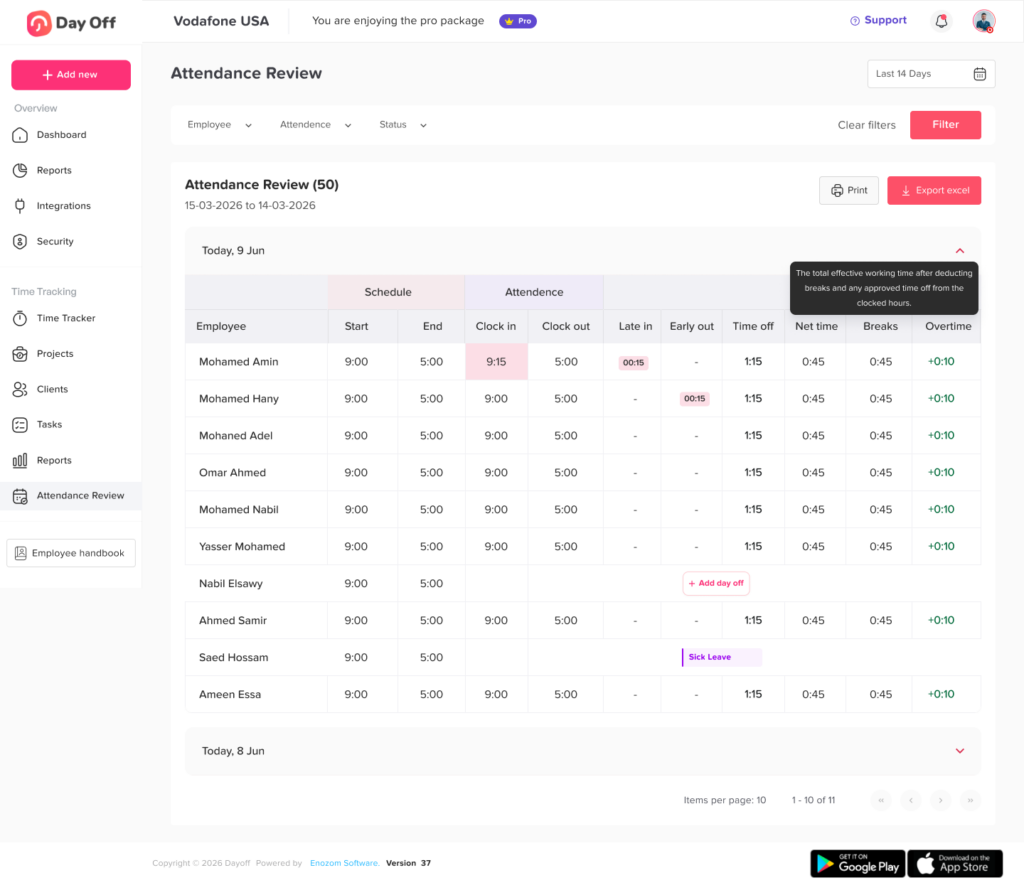
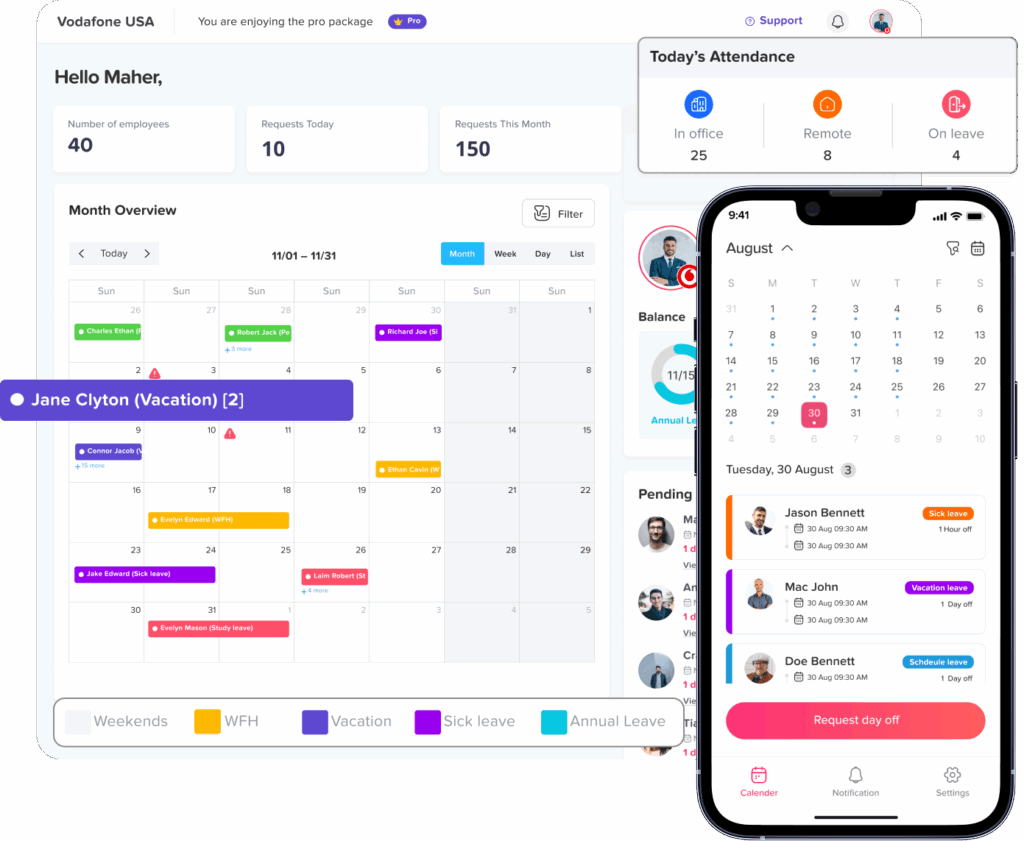
Its Attendance Review functionality also allows admins to review employee attendance in context. For days without recorded attendance, the system can display leave information where applicable, helping distinguish approved time off from a day that simply has no attendance record.
Bringing PTO and employee time information into the same environment gives managers a clearer view of:
- Who is working
- Who is away
- What employees were scheduled to work
- How much leave was used
- Whether an attendance record needs review
- How employee availability affects the rest of the team
This is particularly useful for businesses that want to move beyond basic vacation spreadsheets and manage employee time more systematically.
Frequently Asked Questions
What is a PTO tracker?
A PTO tracker is software used to manage employee paid time off and other leave. It typically tracks leave requests, approvals, PTO balances, accruals, vacation, sick leave, and employee availability.
What is a PTO tracker with a time clock?
A PTO tracker with a time clock combines leave management with employee work-hour tracking. It helps businesses see both approved time away and actual working hours in one connected process.
Why should PTO tracking be connected to a time clock?
Connecting PTO with a time clock gives attendance records more context. If an employee records fewer hours than scheduled, managers can determine whether the missing time is covered by approved PTO instead of assuming the employee was absent.
Can employees use PTO for part of a workday?
Many company policies allow partial-day or hourly PTO. For example, an employee might work six hours and use two PTO hours. The exact rules depend on the employer’s policy, employee classification, and applicable law.
Does PTO count as hours worked for overtime?
For covered U.S. employees under the federal FLSA, vacation, holiday, and sick leave generally do not need to be counted as hours worked when calculating federal overtime because no work was performed during those hours. Employers must also consider applicable state and local requirements, contracts, and company policies.
Can a PTO tracker manage employees with different work schedules?
Yes, schedule-aware PTO tracking software can support employees with different working patterns. This allows leave deductions and attendance reviews to reflect the actual hours an employee was expected to work.
What happens if an employee works while on PTO?
The record should be reviewed. The employee may have returned from leave early, the PTO request may need to be adjusted, or the work entry may be incorrect. Employers should follow their policy and applicable employment rules before changing either record.
Can a PTO tracker help with payroll?
Yes. A PTO tracker connected with employee time records can improve payroll preparation by clearly separating worked hours, paid leave, unpaid leave, overtime, and other time categories. It does not replace the need to apply the correct payroll and employment rules.
Is a PTO tracker with a time clock useful for small businesses?
Yes. Small businesses can use a connected system to reduce spreadsheet work, maintain accurate PTO balances, track employee attendance, manage requests, and improve visibility into team availability.
What is the difference between PTO tracking and attendance tracking?
PTO tracking focuses on planned or approved employee time away and leave balances. Attendance tracking focuses on whether employees worked according to their schedules. Connecting both provides a more complete record of employee time.
Final Thoughts
placed next to each other. The real value comes from connecting an employee’s schedule, actual working time, and approved time away.
When those records are managed separately, managers are often left asking why an employee recorded fewer hours, whether an absence was approved, how much PTO should be deducted, or whether a timesheet needs correction.
When they are connected, the picture becomes much clearer.
Managers can understand what the employee was expected to work, what they actually worked, and whether the remaining time was covered by approved leave. Employees receive clearer balances and attendance records. HR teams spend less time reconciling spreadsheets. Payroll teams receive better organized time information. Businesses gain a more reliable view of employee availability.
For organizations moving beyond manual leave spreadsheets and basic punch clocks, combining PTO tracking with work schedules, attendance, and time tracking creates a stronger foundation for managing employee time.