







Flexible work schedules give employees more control over when they begin and end their workday, but they can make traditional attendance methods less effective. When there is no universal 9:00 AM start time, employers need a different way to Track Attendance accurately. Instead of focusing only on whether someone arrived “on time,” you should measure attendance using scheduled hours, actual hours worked, required availability, breaks, leave, overtime, and any attendance rules established by the organization.
This does not mean attendance becomes unimportant. It means the definition of good attendance changes.

An employee who starts at 10:00 AM may be perfectly on time if the company’s flexible schedule allows employees to begin between 7:00 AM and 11:00 AM. At the same time, an employee who starts at 8:00 AM could still have an attendance issue if they work only five hours when they should complete eight.
For companies adopting flexible, hybrid, remote, or variable schedules, the goal should be to measure whether employees fulfill their working time requirements rather than forcing flexible employees into attendance rules designed for fixed work schedules.
What Does Attendance Mean When There Is No Fixed Start Time?
Under a traditional fixed schedule, attendance is relatively simple to evaluate.
An employee may be scheduled from:
9:00 AM to 5:00 PM
If they clock in at 9:25 AM, the system can identify a 25-minute late arrival.
Flexible schedules work differently.
For example, a company might allow an employee to:
- Start anytime between 7:00 AM and 10:00 AM.
- Complete eight working hours per day.
- Take a 60-minute unpaid break.
- Be available during designated core hours.
- Finish their workday according to their actual starting time.
In this situation, measuring attendance against 9:00 AM would produce inaccurate results.
Instead, employers need to determine whether the employee:
- Worked the required number of hours.
- Started within the permitted working window.
- Was available during required core hours.
- Recorded required breaks correctly.
- Took approved leave for hours that were not worked.
- Worked unauthorized or approved overtime.
- Completed their weekly or pay-period work requirement.
For instance, one recognized flexible scheduling model uses both core hours, when employees are expected to be working, and flexible hours, during which employees can choose their arrival and departure times. The U.S. Office of Personnel Management uses this structure for federal flexible work schedules.
The exact structure can vary by employer, but the same principle is useful for private organizations: flexibility works best when employees know which parts of their schedule are flexible and which requirements remain fixed.
Why Traditional Late and Early Attendance Rules Do Not Always Work
A common mistake is enabling flexible working hours while keeping attendance rules designed for fixed schedules.
Consider two employees who both need to work eight hours:
| Employee | Clock In | Clock Out | Break | Net Hours | Attendance Result |
|---|---|---|---|---|---|
| Employee A | 8:00 AM | 5:00 PM | 1 hour | 8 hours | Requirement met |
| Employee B | 10:00 AM | 7:00 PM | 1 hour | 8 hours | Requirement met |
| Employee C | 9:30 AM | 4:30 PM | 1 hour | 6 hours | 2 hours missing |
If start times are flexible, don’t automatically consider Employee B late simply because the employee arrived later than Employee A.
Employee C, however, may have an attendance exception because they didn’t complete the required number of hours.
The question therefore changes from:
“Did the employee arrive at the scheduled start time?”
to:
“Did the employee satisfy the attendance requirements for the day?”
That distinction is essential for accurate flexible-schedule attendance management.
Define the Employee’s Required Working Hours
First, before you can measure attendance, the organization needs a clearly defined work requirement.
For example:
- 8 working hours per day
- 40 working hours per week
- 80 hours per two-week period
- 6 hours on Monday and 8 hours Tuesday through Friday
- A different number of scheduled hours depending on the employee’s shift
Without a defined requirement, managers cannot reliably determine whether an employee completed their expected working time.
For some flexible arrangements, the daily total may matter most. In other cases, employers may allow hours to vary from one day to another as long as employees complete a weekly requirement.
For example:
Monday: 7 hours
Tuesday: 9 hours
Wednesday: 8 hours
Thursday: 9 hours
Friday: 7 hours
Weekly total: 40 hours
If the company’s policy permits this flexibility, each day does not have to look identical.
What matters is that the attendance system understands the employee’s actual work requirement.
Create a Flexible Start Time Window
Flexibility does not necessarily mean employees can work at any time of the day.
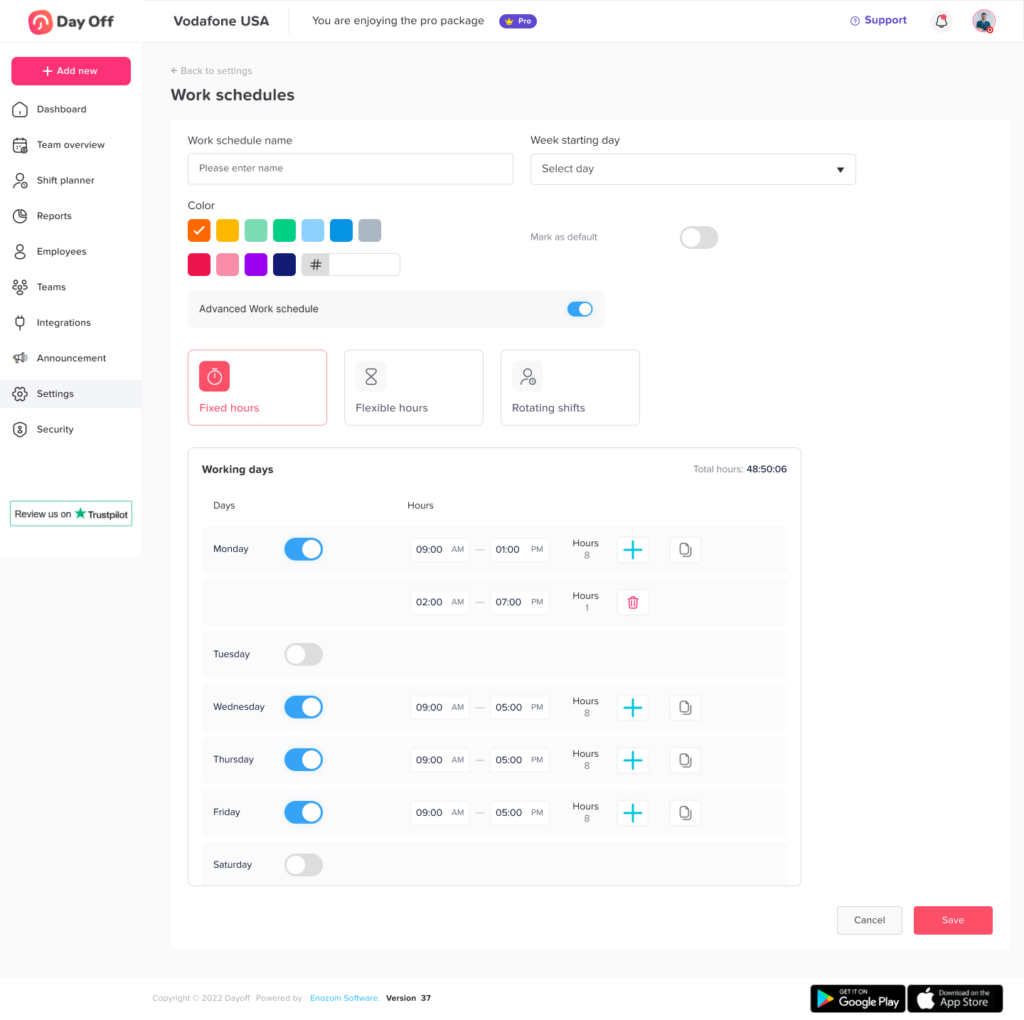
A company can establish an approved starting window.
For example:
Employees may start their workday between 7:00 AM and 10:00 AM.
An employee clocking in at:
- 7:15 AM is within the window.
- 8:45 AM is within the window.
- 9:55 AM is within the window.
- 10:30 AM is outside the permitted window.
This allows employers to provide meaningful flexibility while maintaining operational boundaries.
It also gives the attendance system a measurable rule. So, instead of asking whether someone was late compared with one exact start time, the system can determine whether the employee started within the permitted range.
Establish Core Working Hours When Necessary
Some businesses need employees to be available together for meetings, customer requests, collaboration, or operational coverage.
Core hours can solve this problem.
For example:
Flexible working window: 7:00 AM to 8:00 PM
Core availability: 11:00 AM to 3:00 PM
Daily requirement: 8 hours
An employee could work:
7:00 AM to 4:00 PM
while another works:
10:00 AM to 7:00 PM
Both schedules provide eight working hours with a one-hour break, and both cover the required 11:00 AM to 3:00 PM core period.
Formal flexible scheduling models commonly use core hours to preserve periods when employees are expected to be working while still allowing flexibility around arrival and departure.
Not every organization needs core hours. Teams that work asynchronously may rely more heavily on total hours, deadlines, service coverage, or agreed availability.
Record Actual Clock In Clock Out Times
Flexible schedules make accurate time records more important, not less important.
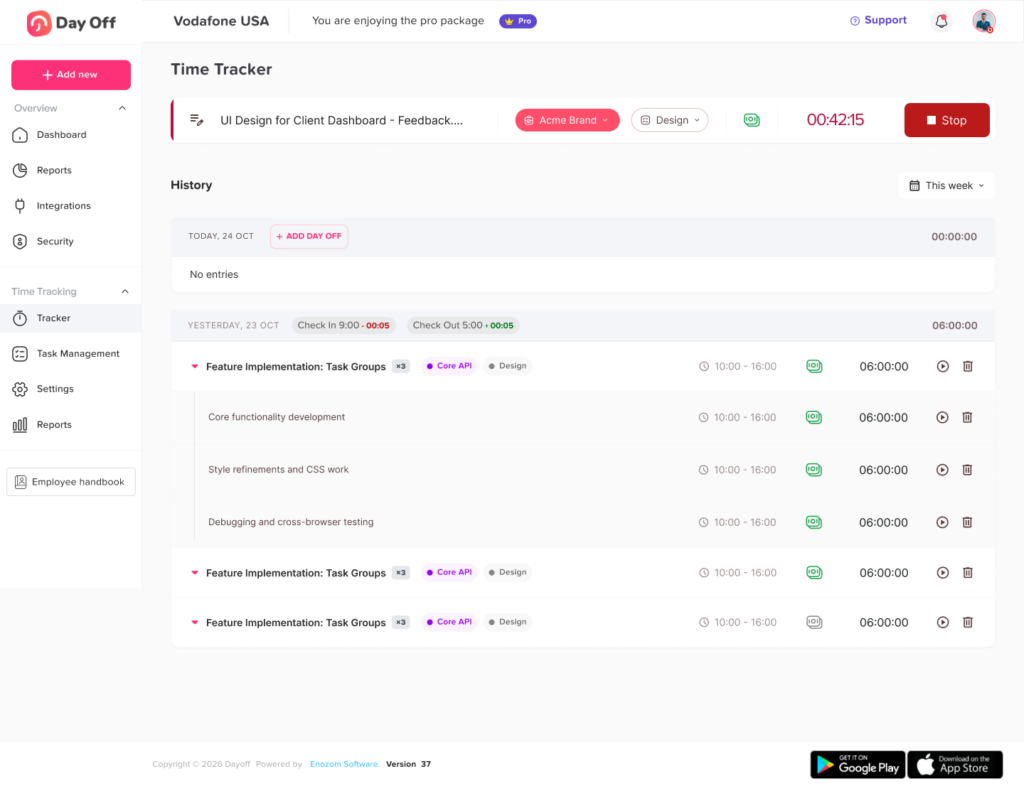
Instead of assuming that an employee worked eight hours because you scheduled eight hours, employers should record actual working time when time tracking is required.
A time record might show:
Clock in: 8:37 AM
Break start: 12:42 PM
Break end: 1:27 PM
Clock out: 5:12 PM
The system can then calculate the employee’s actual working time.
For U.S. employers covered by the Fair Labor Standards Act, the Department of Labor requires employers to maintain accurate records of hours worked for covered nonexempt employees. Also, employers don’t have to use a specific timekeeping format. As a result, they can use time clocks, timekeepers, employee-entered records, and other methods as long as the records are complete and accurate.
This makes actual time tracking particularly important when employee start and finish times vary from day to day.
Calculate Net Working Hours, Not Just Time Between Punches
Clock in clock out times alone do not always tell the full story.
Suppose an employee records:
Start: 8:00 AM
End: 5:00 PM
The elapsed time is nine hours.
However, if the employee takes an unpaid one-hour meal break, the net working time is:
9 hours total duration – 1 unpaid hour = 8 working hours
Attendance systems should therefore distinguish between:
- Total duration
- Paid breaks
- Unpaid breaks
- Actual working time
- Paid leave
- Unpaid leave
- Overtime
Otherwise, an employee may appear to have completed the required hours even when part of that period was not working time.
Track Missing Hours Instead of Only Tracking Lateness
For a flexible employee, “missing time” is often more meaningful than “late time.”
Consider an employee required to work eight hours.
They clock in at 9:30 AM and clock out at 4:30 PM, with a one-hour unpaid break.
Their net working time is:
6 hours
If no leave or other approved exception exists, the employee has:
2 missing hours
This gives managers a much clearer attendance record than simply labeling the employee “late.”
Missing hours can later be classified as:
- Approved PTO
- Sick leave
- Personal leave
- Unpaid time
- Authorized schedule adjustment
- Unexcused absence
- Time that must be corrected
- Another category defined by company policy
This creates a cleaner connection between attendance and leave management.
Connect PTO and Attendance Records
Attendance and leave tracking should not operate independently.
For example, suppose an employee should work eight hours but has an approved three-hour medical appointment.
The attendance record could show:
Worked: 5 hours
Approved leave: 3 hours
Required: 8 hours
The employee should not appear to have an unexplained three-hour attendance shortage.
A connected system can distinguish between:
5 hours worked + 3 hours approved leave
and:
5 hours worked + 3 hours unexplained absence
Both employees worked five hours, but their attendance situations are completely different.
This is especially important for organizations using PTO balances measured in hours.
Use the Employee’s Actual Work Schedule When Calculating Leave
Flexible schedules can become complicated when employees work different numbers of hours on different days.
Consider this schedule:
| Day | Scheduled Hours | Leave Taken | Hours Worked | Attendance Result |
|---|---|---|---|---|
| Monday | 8 | 0 | 8 | Complete |
| Tuesday | 6 | 2 | 4 | Complete with leave |
| Wednesday | 9 | 0 | 9 | Complete |
| Thursday | 7 | 0 | 5 | 2 hours missing |
| Friday | 8 | 8 | 0 | Full-day leave |
A basic attendance system that assumes every day equals eight hours could incorrectly calculate Tuesday, Wednesday, and Thursday.
The better approach is to compare:
Required hours for that specific day
against:
Worked hours + approved leave
This becomes increasingly important for flexible hours, rotating shifts, split shifts, part-time schedules, and variable weekly schedules.
Define What Counts as an Attendance Exception
Managers should not have to interpret every attendance record manually.
Create clear rules for what the system should flag.
Possible exceptions include:
- Employee did not clock in.
- Employee forgot to clock out.
- Start time was outside the permitted flexible window.
- The employee missed required core hours.
- The employee didn’t complete daily required hours.
- Weekly required hours were not completed.
- The record shows an unusually long break.
- Employee worked during approved full-day leave.
- Employee recorded fewer hours than scheduled with no leave request.
- Employee exceeded scheduled hours.
- Overtime requires manager review.
- The employee worked on a scheduled day off.
- Someone edited a time entry after submission.
The purpose of an attendance exception is not automatically to penalize an employee.
It is to identify records that need review.
A forgotten clock-out, for example, is different from an unauthorized absence. The system should help managers identify the problem before deciding what it means.
Create a Process for Missed Clock Ins and Time Corrections
Flexible schedules can produce incomplete records if employees forget to start or stop their timer.
Organizations should have a defined correction process.
A useful workflow might be:
- The system identifies a missing or incomplete time entry.
- The employee submits the correct time.
- The editor adds a reason for the correction.
- A manager reviews the change if required.
- The original and corrected records remain available for auditing.
This prevents managers from relying on memory or informal messages to reconstruct attendance later.
It can also reduce payroll disputes when an employee believes their recorded hours are incorrect.
Separate Attendance Problems From Performance Problems
Flexible work can make it tempting to use productivity as a substitute for attendance.
For example:
“The employee completed all their tasks, so their working hours do not matter.”
That approach may not be appropriate for every worker or every organization.
Attendance and performance answer different questions.
Attendance asks:
- Did the employee work the expected hours?
- Were required periods covered?
- Was missing time approved?
- Were attendance records complete?
Performance asks:
- Was the work completed?
- Were deadlines met?
- Was the quality acceptable?
- Were goals achieved?
An employee can perform well while having attendance problems, or maintain perfect attendance while performing poorly.
Keeping these measurements separate gives managers a more accurate view of both.
Track Weekly Hours When Daily Start Times Are Highly Flexible
Some organizations care less about the exact number of hours worked each day and more about the weekly total.
For example, an employee might need to complete 40 hours per week.
Their actual hours could be:
- Monday: 9
- Tuesday: 7
- Wednesday: 8
- Thursday: 9
- Friday: 7
Total: 40 hours
If company policy permits employees to distribute their hours this way, the attendance system should evaluate the weekly requirement instead of generating daily attendance warnings unnecessarily.
However, design flexible scheduling policies carefully around applicable wage-and-hour requirements. In the United States, for example, employers still need accurate records of hours worked for covered nonexempt employees, and applicable overtime requirements are based on hours worked rather than simply whether an employee met an internal scheduling target.
Companies should review the employment laws that apply in their jurisdiction when designing flexible working time rules.
Do Not Ignore Unscheduled Work
Flexible and remote employees may sometimes work outside the hours managers expect.
For example, an employee might answer messages or complete tasks after officially ending their workday.
Simply having a rule against unauthorized work does not necessarily mean the time disappears from the attendance record.
For covered U.S. workers, the Department of Labor has specifically addressed employers’ responsibility to use reasonable diligence to identify compensable work performed by teleworking employees, including unscheduled work.
A practical attendance policy should therefore make it easy for employees to report all time actually worked while separately addressing whether working outside approved hours violated company policy.
Accurate time records and schedule compliance are two different issues.
Create a Flexible Attendance Policy
Above all, employees should understand exactly how you will measure attendance.
A flexible attendance policy should answer questions such as:
- How many hours must employees work?
- Are hours measured daily, weekly, or by pay period?
- Is there a permitted start-time range?
- Is there a latest permitted finishing time?
- Are there required core hours?
- How should breaks be recorded?
- What happens if an employee forgets to clock in?
- How are time corrections submitted?
- How should employees record partial-day leave?
- Can employees make up missing hours later?
- Does making up time require approval?
- When does overtime require approval?
- What happens if an employee works on an approved PTO day?
- How are attendance exceptions reviewed?
The more clearly these rules are defined, the less likely employees and managers are to interpret flexible working differently.
Use Attendance Statuses That Reflect What Actually Happened
A simple Present/Absent status is often too limited for flexible teams.
More useful attendance statuses may include:
- Complete
- Working
- On leave
- Partial leave
- Missing hours
- Missing clock in
- Missing clock out
- Outside flexible window
- Core hours missed
- Overtime
- Day off
- Holiday
- Pending review
These statuses give managers more context without requiring them to inspect every individual time entry.
Review Attendance by Exception
Managers should not need to manually review every employee’s time every day.
An exception based system is more scalable.
If 90 employees complete their scheduled requirements correctly and 10 records contain problems, the manager should be able to focus on those 10 exceptions.
An attendance review dashboard might highlight:
| Exception | What Manager Should Check | Possible Resolution |
|---|---|---|
| Missing clock-out | Whether employee forgot to stop time | Correct time entry |
| Hours below requirement | Leave, schedule change, or absence | Approve correction or classify absence |
| Excess hours | Whether overtime was authorized | Approve or investigate |
| Core hours missed | Whether exception was approved | Accept or flag |
| Worked during PTO | Whether leave plans changed | Adjust leave or time record |
| Long break | Whether break record is accurate | Correct or confirm |
Consider Remote and Hybrid Employees
Flexible schedules are especially common among remote and hybrid teams.
In these environments, physical presence is usually not an effective attendance measure.
Instead of asking whether someone entered an office at 9:00 AM, employers may need to track:
- Actual clock in and clock out
- Total working hours
- Required availability
- Approved remote days
- Office attendance when required
- Breaks
- PTO
- Schedule changes
- Overtime
- Missing time
Remote workers should generally follow the same clearly defined time-recording rules as comparable employees working from an office when accurate working-time records are required.
The attendance process should focus on the employee’s work requirements, not simply their location.
Avoid Excessive Employee Monitoring
Accurate attendance tracking does not require monitoring every movement an employee makes.
For many organizations, employers only need enough information to determine:
- When work began.
- When work ended.
- Whether required hours were completed.
- Whether required breaks were recorded.
- Whether missing time was approved.
- Whether attendance rules were satisfied.
Constant screenshots, continuous webcam monitoring, or invasive activity surveillance are not necessary simply because an organization uses flexible schedules.
The objective should be reliable attendance records with reasonable employee flexibility.
Give Managers the Same Attendance Rules
Flexible scheduling becomes difficult when individual managers use different standards.
For example:
One manager may consider 10:05 AM late.
Another may accept any start before 11:00 AM.
A third may only care about weekly hours.
Employees working under the same policy can quickly experience inconsistent treatment.
Organizations should therefore configure shared rules for:
- Flexible windows
- Core hours
- Required hours
- Breaks
- Missing time
- Overtime
- Schedule exceptions
- Leave deductions
Managers can still review individual circumstances, but the baseline attendance calculation should remain consistent.
Combine Work Schedules, Time Tracking, and Leave Management
Attendance becomes easier to understand when three records are connected:
Work schedule
Shows what the employee was expected to work.
Time tracking
Shows what the employee actually worked.
Leave tracking
Explains approved time the employee was not expected to work.
Together, the system can calculate:
Scheduled Hours – Actual Worked Hours – Approved Leave = Unaccounted Time
For example:
Scheduled: 8 hours
Worked: 5.5 hours
Approved PTO: 2.5 hours
Unaccounted time: 0 hours
Another employee might have:
Scheduled: 8 hours
Worked: 5.5 hours
Approved PTO: 0 hours
Unaccounted time: 2.5 hours
Without connecting attendance and leave records, these situations could incorrectly look identical.
How Day Off Can Help Track Flexible Attendance
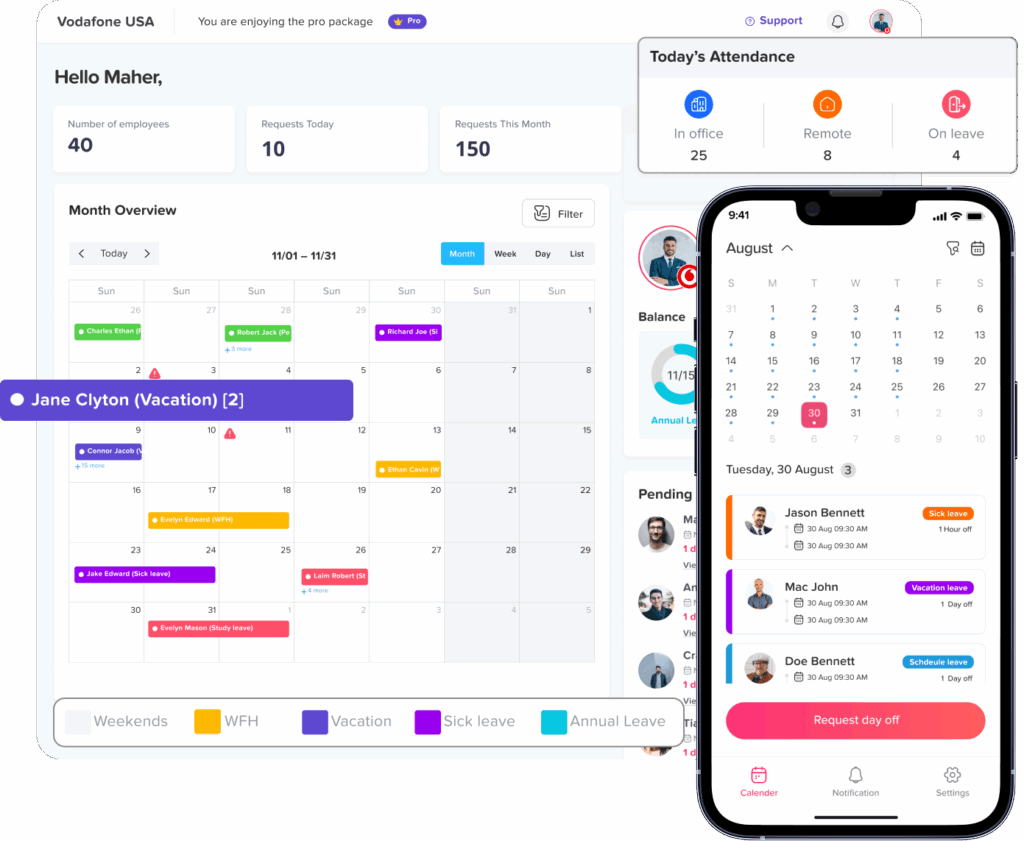
Day Off combines work schedules, leave management, and time tracking so companies can manage employee attendance alongside PTO and working time requirements.
Organizations can use different work schedule structures depending on how their teams operate, including:
- Fixed Days
- Fixed Hours
- Flexible Hours
- Rotating Shifts
For teams using Flexible Hours, attendance can be reviewed using actual clock-in and clock out activity alongside the employee’s expected schedule.
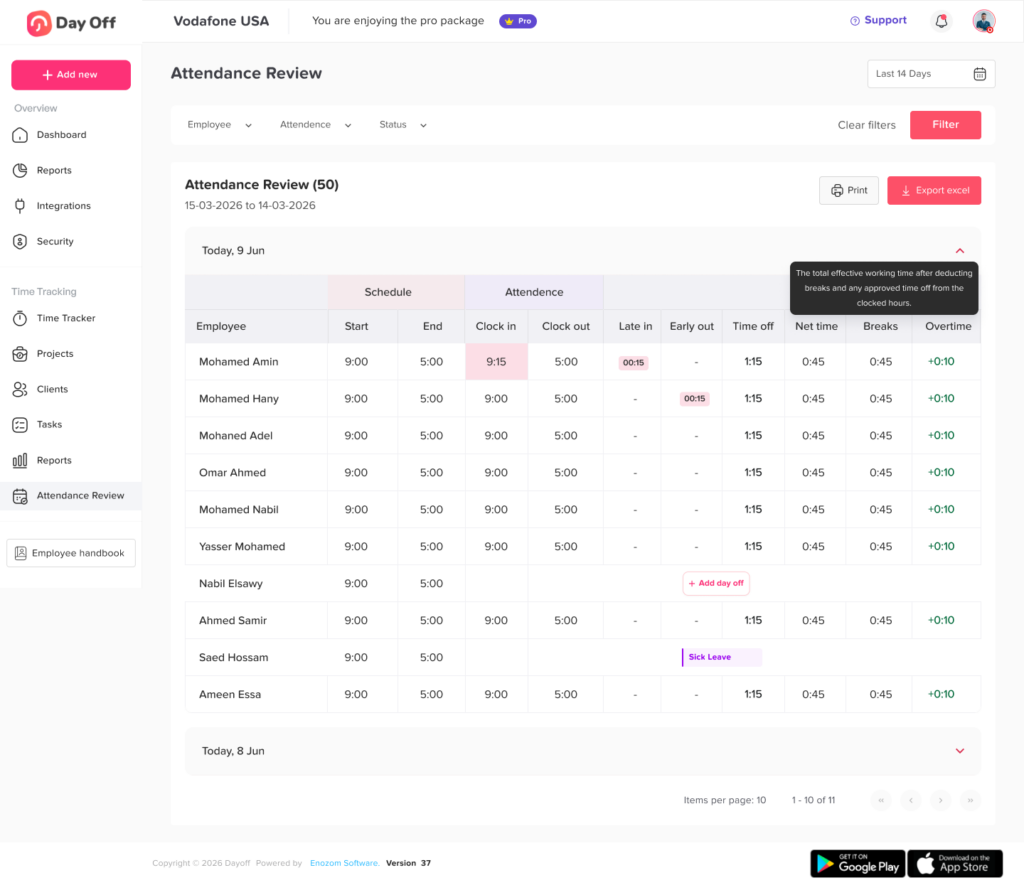
Admins can use Attendance Review to compare scheduled working hours with actual recorded time and review information such as:
- Clock in and clock out times
- Late time where applicable
- Early departures
- Breaks
- Time off
- Net working hours
- Overtime
- Attendance status
Because leave and attendance records exist in the same system, managers can understand whether missing working time is connected to approved PTO instead of treating every difference as an attendance problem.
This is particularly useful for organizations moving away from a single fixed start time while still needing accurate and consistent workforce records.
Best Practices for Tracking Attendance Without Fixed Start Times
A flexible attendance system works best when flexibility has clearly defined boundaries.
Employers should:
- Define required daily or weekly working hours.
- Establish flexible start and end windows when needed.
- Create core hours only when business operations require them.
- Track actual hours worked.
- Record breaks consistently.
- Connect PTO with attendance.
- Compare actual time with each employee’s real schedule.
- Create clear rules for missing hours.
- Flag exceptions rather than manually checking every employee.
- Maintain a time-correction process.
- Keep attendance and performance measurements separate.
- Train managers to apply flexible attendance rules consistently.
- Review attendance policies as working arrangements change.
- Check applicable employment laws before introducing or changing timekeeping practices.
The goal is not to make flexible work less flexible. It is to make expectations measurable enough that employees know what is required and managers can identify genuine attendance issues fairly.
Example: How Flexible Attendance Tracking Works
Consider an employee with the following rules:
Daily requirement: 8 hours
Start window: 7:00 AM to 10:00 AM
Core hours: 11:00 AM to 3:00 PM
Break: 1 unpaid hour
On Monday, the employee works:
Clock in: 9:15 AM
Break: 1:00 PM to 2:00 PM
Clock out: 6:15 PM
The employee was at work for nine elapsed hours.
After the one-hour unpaid break:
Net working time = 8 hours
The employee:
- Started within the flexible window.
- Covered the required core hours.
- Completed eight working hours.
- Recorded the required break.
Their attendance should therefore be complete.
On Tuesday, the same employee works:
Clock in: 9:45 AM
Clock out: 4:45 PM
Break: 1 hour
Net working time is only six hours.
If there is no approved leave or schedule adjustment, the appropriate attendance exception is not necessarily “late.”
It is:
2 hours below required working time.
That is the key difference between tracking attendance for fixed and flexible schedules.
Frequently Asked Questions
How do you track attendance when employees have flexible hours?
Start by defining the employee’s required working hours, flexible working window, core hours if applicable, and break rules. Then compare actual clock in, clock out, breaks, and approved leave against those requirements. Employees do not need identical start times for attendance to be measured accurately.
Can employees have different start times every day?
Yes, if the employer’s flexible work policy allows it. A company might permit employees to begin between 7:00 AM and 10:00 AM each day rather than assigning one permanent start time. The employee would still need to satisfy the company’s daily, weekly, availability, and attendance requirements.
How do you know if someone is late on a flexible schedule?
The definition of late depends on the flexible schedule rules. If employees can start anytime between 7:00 AM and 10:00 AM, an employee arriving at 9:45 AM would normally still be within the permitted window. Arriving after the end of the flexible window could create an attendance exception.
Should flexible employees still clock in and out?
Flexible schedules and time tracking address different issues. Flexible scheduling determines when an employee may work, while time tracking records when the employee actually worked. Organizations that need accurate working-time records can therefore use clock-in and clock-out tracking even when employees do not have fixed start times.
For covered nonexempt workers in the United States, FLSA recordkeeping requirements include maintaining accurate information about hours worked, although employers may choose the timekeeping method they use.
Should attendance be tracked daily or weekly for flexible employees?
It depends on the organization’s work schedule and policy. Some employers require a specific number of hours each day, while others allow employees to distribute required hours across the week. Even when weekly flexibility is permitted, employers may still need accurate daily time records for payroll, overtime, leave, and legal compliance.
Can an employee make up missing hours later in the day?
Yes, if company policy allows it. For example, an employee who takes two hours away from work in the afternoon might be permitted to work later that evening. Employers should clearly define whether schedule changes require approval and whether there are limits on when work can be performed.
How should partial day PTO work with flexible schedules?
Partial day PTO should normally be compared with the employee’s scheduled working requirement. If an employee is expected to work eight hours, works six, and has two approved PTO hours, the full eight-hour requirement has been accounted for. When employees have variable daily schedules, leave calculations should use the hours applicable to that specific day.
What happens if an employee forgets to clock out?
The attendance record should be flagged as incomplete rather than automatically assuming a finishing time. The employee or an authorized manager can then correct the entry according to the organization’s time-correction policy. Keeping a record of corrections can improve accountability and payroll accuracy.
How do you track attendance for remote employees with no fixed hours?
Use measurable requirements such as actual working time, expected weekly or daily hours, approved working windows, core availability where necessary, PTO, and attendance exceptions. Physical office arrival should not be the main attendance measure when the employee’s role is designed for remote work.
What is the difference between flexible attendance and unlimited working hours?
Flexible attendance gives employees some control over when they complete their work while still operating within defined requirements. It does not necessarily mean employees can work any number of hours at any time. Organizations should define expected working hours, availability rules, overtime procedures, and any permitted working windows.
Conclusion
Tracking attendance without fixed start times requires a different approach from traditional 9-to-5 attendance management. Instead of measuring every employee against one arrival time, companies should focus on whether employees complete their required hours, stay within permitted working windows, meet core-hour requirements where applicable, record breaks correctly, and account for missing time through leave or approved schedule changes.
The most effective approach connects work schedules, actual time records, and PTO. This allows managers to distinguish between genuine attendance problems and normal variations created by flexible work.
With clear policies and the right tracking system, businesses can give employees greater control over their schedules without losing visibility into working hours, attendance, overtime, or time off.