







An automated employee timer system helps businesses track employee work hours in a more accurate, organized, and transparent way. Instead of relying on manual updates or memory, employees can clock in and clock out digitally, managers can review attendance data in real time, and HR teams can connect work-hour records with payroll, PTO, scheduling, and reporting.
For small businesses, growing companies, remote teams, hybrid workplaces, agencies, retail stores, restaurants, field teams, and service-based businesses, automated time tracking can make daily workforce management much easier. It helps answer important questions such as: Who is working today? Who is on leave? How many hours were worked? Did anyone arrive late? Was overtime approved? Are employees working on the right projects? How much PTO does each person have left?

This article explains what an automated employee timer system is, why it matters, how it works, what features to look for, how it connects with leave management, and which tools businesses can consider, including Day Off, Clockify, Toggl Track, Harvest, Jibble, Hubstaff, QuickBooks Time, and Deputy.
What Is an Automated Employee Timer System?
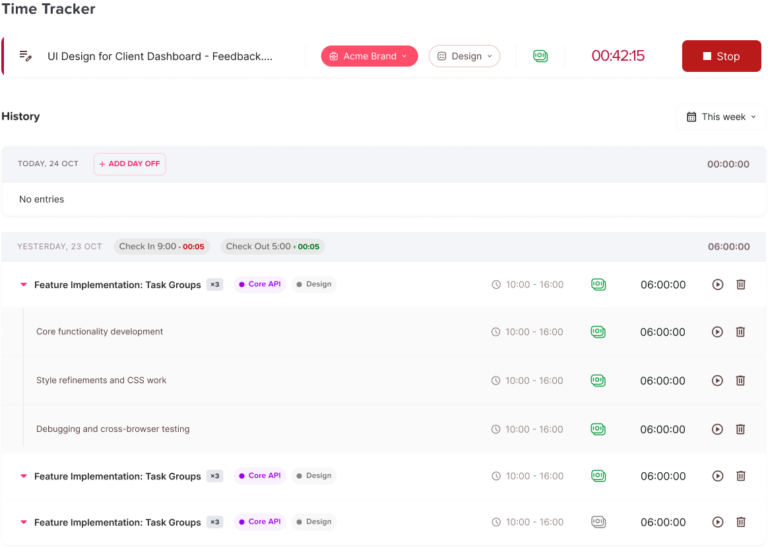
An automated employee timer system is a digital tool that allows employees to record their working time automatically or semi-automatically. Employees usually use a web app, mobile app, desktop app, tablet kiosk, or browser extension to start and stop a timer, clock in and clock out, log breaks, add notes, choose a project, or submit timesheets.
The main goal of an employee timer system is to replace manual time tracking with a more reliable process. Instead of asking employees to write their hours at the end of the week or asking managers to collect attendance records from different places, the system stores time data in one central platform.
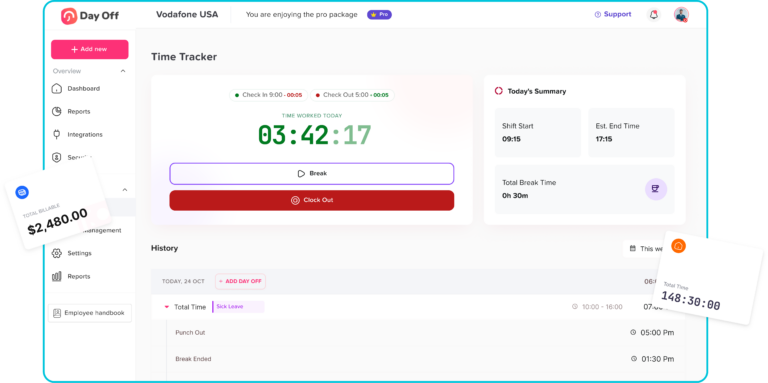
A basic employee timer system may only track start and end times. A more advanced system may include attendance tracking, GPS location, geofencing, biometric verification, project tracking, billable hours, timesheet approvals, overtime rules, payroll exports, leave management, and workforce reports.
For example, an employee working in an office may clock in from a shared tablet kiosk. A remote employee may start a timer from a desktop app. A field worker may clock in from a mobile app with location tracking. A consultant may track billable time by client or project. An HR manager may review all time entries, approved leave days, absences, and overtime from a single dashboard.
Best Tools for Automated Employee Time Tracking
There are many tools available, and each one serves a slightly different business need. Below are some popular options to consider.
Day Off
Day Off is best known as a PTO tracker and leave management system. It helps businesses manage vacation days, sick leave, personal leave, unpaid leave, leave balances, approval workflows, shared calendars, policies, and reports.
Day Off is a valuable option for companies that want to manage employee availability clearly. Time tracking becomes more useful when it is connected with leave management because attendance data alone does not explain the full picture. If an employee is not working, the company needs to know whether that absence is approved, unplanned, paid, unpaid, or part of a company policy.
With Day Off, businesses can organize PTO requests, approvals, leave balances, and absence records in one place. This makes it easier for managers to plan team coverage and for HR teams to reduce manual updates. For companies looking for an automated employee timer system, Day Off is especially relevant because it supports the broader time management process, not just clock-in and clock-out records.
Best for: businesses that want to connect employee availability, PTO, leave requests, absence tracking, and workforce planning.
Clockify
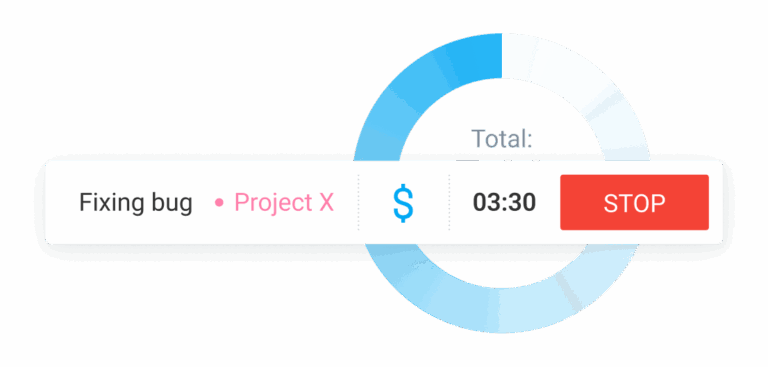
Clockify is a time tracking and timesheet tool that helps teams track work hours, productivity, attendance, billable time, and project time. Employees can use timers, timesheets, manual entries, and reports to understand where time is spent.
Clockify is useful for teams that need a flexible timer system. It can work for freelancers, agencies, consultants, remote teams, and businesses that need project-based time tracking. Employees can track time against projects and tasks, while managers can review reports and timesheets.
Best for: teams that need a simple and flexible time tracker for projects, attendance, and billable hours, but the price can be too much.
Toggl Track
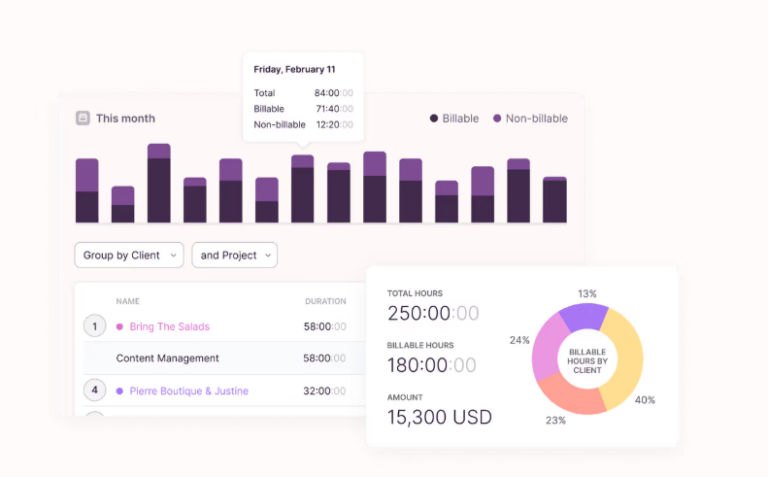
Toggl Track is a time tracking tool designed for teams that want simple time entry, project tracking, calendar views, reporting, and cross-device access. It is often used by agencies, freelancers, consultants, creative teams, and remote teams.
Toggl Track is useful when employees need to track time across different tasks or projects without a complicated setup. It can help businesses understand how time is spent, improve estimates, and review productivity patterns.
Best for: teams that want easy project-based time tracking with strong reporting and flexible workflows.
Harvest
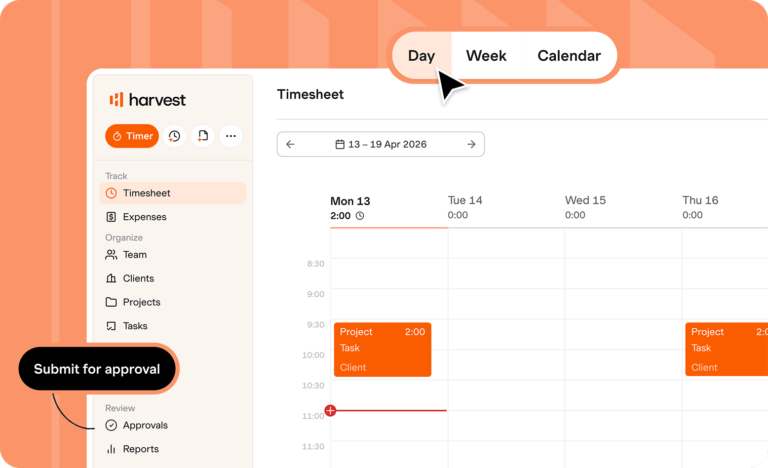
Harvest is a time tracking tool that also focuses on reporting, budgets, invoicing, payments, expenses, and project profitability. It is especially useful for service businesses that bill clients based on hours worked.
With Harvest, teams can track time, review project budgets, analyze reports, and connect time data with invoicing. This makes it useful for agencies, consultants, professional services firms, design teams, and development teams.
Best for: businesses that need time tracking connected with project budgets, client billing, and invoicing.
Jibble
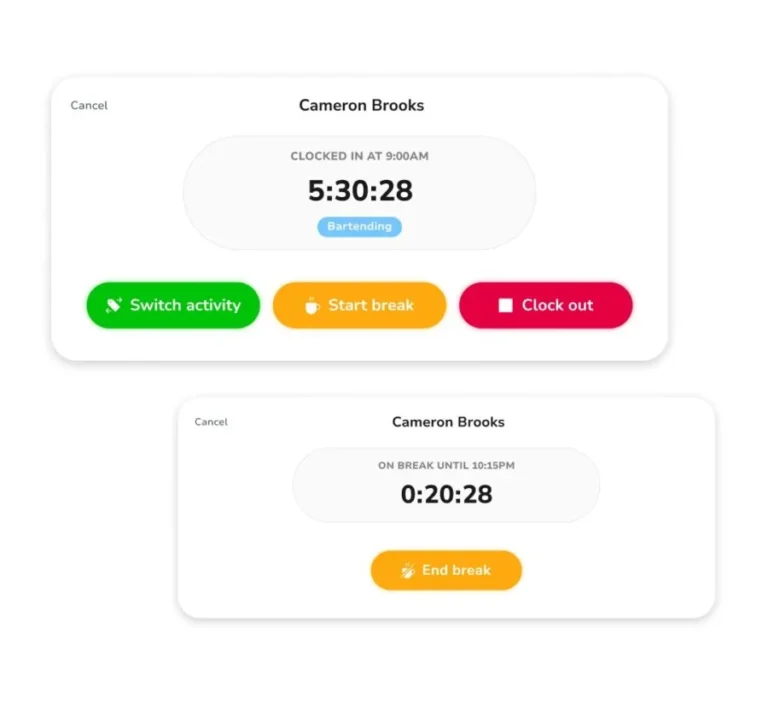
Jibble is a time tracking and attendance tool that helps businesses track employee hours, automate timesheets, and manage attendance. It includes features that can support clock-ins, timesheets, mobile time tracking, kiosk mode, GPS, and biometric attendance.
Jibble is useful for companies that need a practical attendance system for office teams, field teams, shift workers, or businesses with multiple locations.
Best for: businesses that need attendance tracking, automated timesheets, and employee clock-in options.
Key Features of an Automated Employee Timer System
Not every business needs the same level of time tracking. A small office team may need a simple timer and timesheets. A restaurant may need shift clock-ins and break tracking. A construction company may need GPS and mobile time tracking. An agency may need billable project hours.
Before choosing a system, businesses should look for features that match their work style.
Clock In and Clock Out
The most basic feature is the ability for employees to clock in when they start work and clock out when they finish. This creates a digital attendance record.
A good clock-in and clock-out system should be simple enough for employees to use every day. If the process is complicated, employees may forget to use it or make mistakes. The best systems make time tracking quick, clear, and accessible from web, mobile, desktop, or kiosk devices.
Real-Time Timer
A real-time timer allows employees to start tracking work as soon as they begin a task. This is especially useful for agencies, freelancers, consultants, remote teams, and project-based businesses.
Instead of entering hours later, employees can track time while working. This improves accuracy and helps businesses understand how time is spent across projects, clients, departments, or tasks.
Manual Time Entry
Even with automation, businesses may still need manual time entry. Employees may forget to start a timer, work offline, attend meetings, or complete tasks away from their device.
Manual time entry allows employees to add or edit time records when needed. However, it should usually include manager review or approval to prevent errors or misuse.
Timesheets
Timesheets organize work-hour records into daily, weekly, or monthly summaries. Employees can review their hours, submit them for approval, and managers can approve or reject them.
Timesheets are useful for payroll, invoicing, attendance reporting, and project analysis. A strong timesheet system should show total hours, breaks, overtime, project time, notes, and approval status.
Break Tracking
Break tracking helps businesses record lunch breaks, rest breaks, and unpaid time. This is important for payroll accuracy and compliance with company policies or local labor rules.
Some systems allow employees to start and end breaks manually. Others can apply automatic break rules based on shift length or company policy.
Overtime Tracking
Overtime tracking helps managers see when employees work more than their regular hours. This is useful for cost control, payroll preparation, and employee wellbeing.
An automated employee timer system can help identify overtime before it becomes a bigger issue. Managers can review overtime trends and decide whether to adjust staffing, redistribute workloads, or approve extra hours.
PTO Leave Tracking
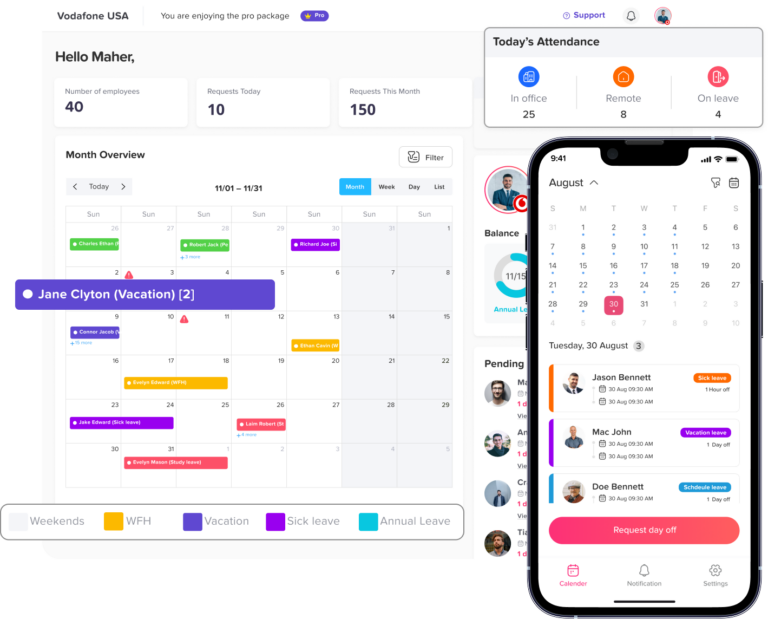
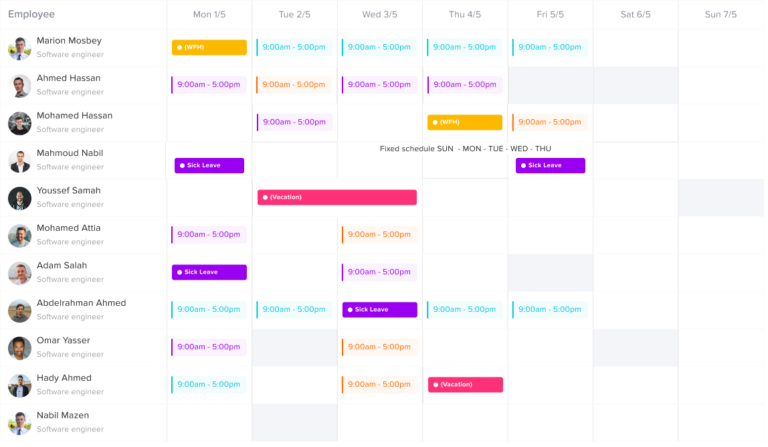
PTO tracking is an important part of employee time management. If someone is away on approved vacation, sick leave, personal leave, unpaid leave, or any other type of leave, the attendance system should reflect that clearly.
Day Off is especially useful in this area because it focuses on PTO and leave management. Businesses can use Day Off to manage leave requests, approvals, balances, policies, shared calendars, and reports. When paired with employee timer functionality, Day Off can help companies understand both working time and time off in one organized workflow.
Employee Self-Service
Employee self-service allows employees to check their own time records, PTO balances, leave requests, schedules, and approvals. This reduces HR questions and improves transparency.
Employees should be able to see what has been recorded, what needs correction, and what has been approved. This helps build trust and reduces disputes about hours or leave balances.
Manager Approvals
Manager approvals are important because time records often affect payroll, billing, and attendance decisions. A good system should allow managers to approve timesheets, review corrections, reject inaccurate entries, and add notes when needed.
Approval workflows create accountability and help businesses avoid processing incorrect data.
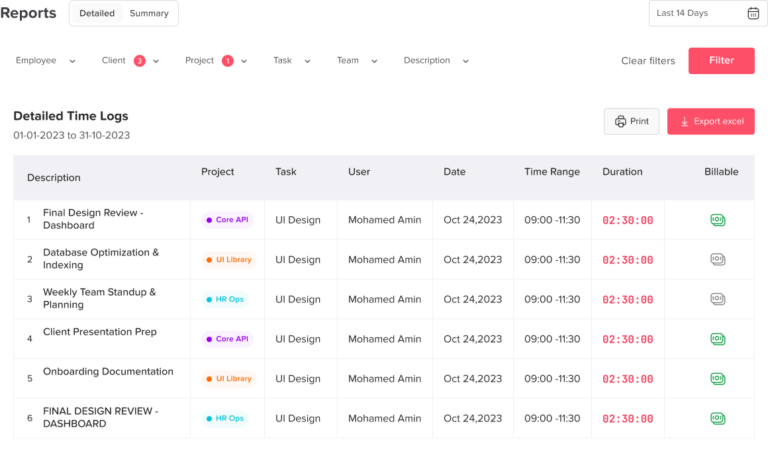
Reports and Analytics
Reports help businesses turn time data into useful insights. Instead of only collecting hours, companies can analyze patterns such as overtime trends, absenteeism, late arrivals, project costs, employee capacity, and team availability.
Reports can help answer questions like:
- Which teams work the most overtime?
- Which projects take more time than expected?
- How often do employees miss clock-ins?
- Which departments have frequent absences?
- How much time is spent on billable work?
- How does PTO affect team coverage?
Good reporting helps businesses make better staffing, payroll, and planning decisions.
Mobile Access
Mobile access is important for field teams, remote employees, sales teams, construction workers, healthcare workers, delivery teams, and businesses with multiple locations.
A mobile time tracking app allows employees to clock in and out from their phones. Some tools also include GPS tracking, geofencing, photo verification, or mobile timesheet approvals.
GPS and Geofencing
GPS and geofencing features help businesses verify where employees clock in and out. GPS shows the location of a clock-in, while geofencing can limit clock-ins to approved locations.
These features can be useful for field services, construction, logistics, home healthcare, cleaning companies, multi-location retail, and mobile teams. However, companies should use location tracking carefully and transparently. Employees should know what is being tracked, when it is tracked, and why the company uses it.
Kiosk Mode
Kiosk mode allows employees to clock in and out from a shared device, such as a tablet at the workplace entrance. This is useful for restaurants, retail stores, warehouses, factories, clinics, and offices where employees work from the same location.
Some kiosk systems support PIN codes, QR codes, facial recognition, or photo capture to reduce buddy punching and improve attendance accuracy.
Integrations
Integrations help businesses connect time tracking with other tools, such as payroll software, accounting systems, project management platforms, calendars, communication apps, HR software, and invoicing tools.
For example, a business may want time tracking data to connect with payroll, project management, or billing. A company using Day Off may also benefit from integrations with communication and calendar tools so employees and managers can stay updated on leave and availability.
How Automated Employee Timer Systems Improve Leave Management
Time tracking and PTO tracking should not be treated as separate issues. They both answer the same bigger question: How is employee time being used?
An employee can be working, on break, absent, on approved leave, late, working overtime, or unavailable. If every status is stored in a different place, managers may struggle to understand team capacity.
A connected approach helps businesses manage time more accurately.
Approved PTO vs. Unplanned Absence
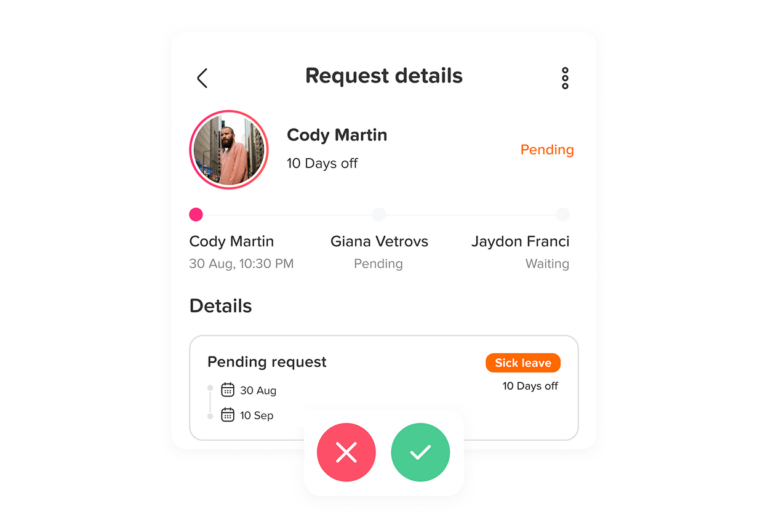
One of the biggest problems with manual attendance tracking is confusion between approved and unapproved absence. If an employee does not clock in, the manager needs to know whether the person is on approved leave, sick leave, unpaid leave, or unexpectedly absent.
Day Off helps solve this by keeping leave requests, approvals, and PTO balances organized. When businesses connect this leave data with attendance and time tracking, they can quickly understand why someone is not working.
Better Team Planning
A shared leave calendar helps managers see who is away before approving new requests or assigning work. When this is combined with time tracking, managers can understand both current availability and future availability.
For example, if two employees are already on vacation next week and another employee has high overtime this week, a manager may decide to adjust assignments or delay non-urgent work.
More Accurate PTO Balances
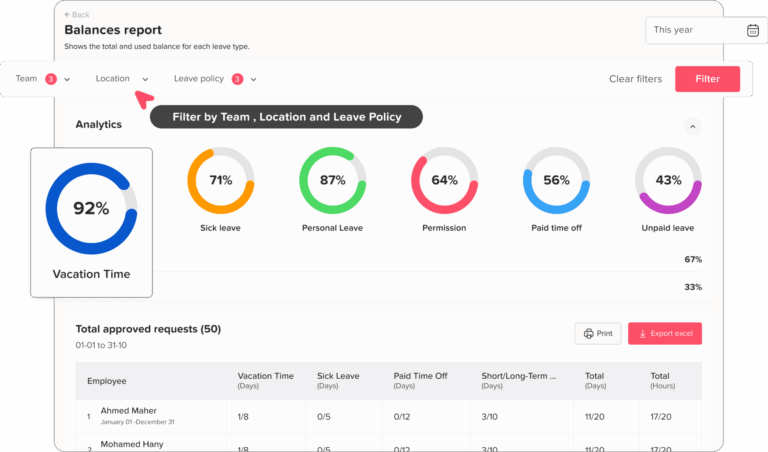
PTO balances should update after approved leave requests. If HR tracks PTO manually, balances can become outdated. Employees may ask HR for updates, managers may approve requests based on old information, and payroll may use incorrect leave records.
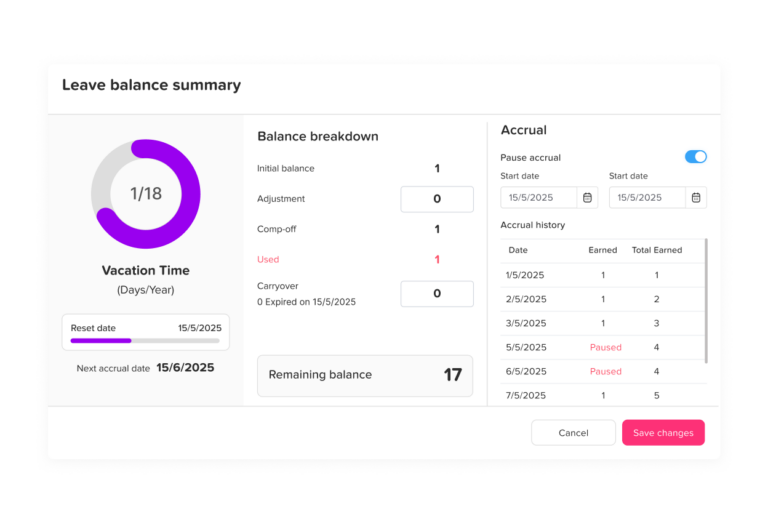
Day Off helps companies manage balances, leave policies, accruals, carryover, and approvals more clearly. This reduces confusion and gives employees better visibility into their available time off.
Lorem ipsum dolor sit amet, consectetur adipiscing elit. Ut elit tellus, luctus nec ullamcorper mattis, pulvinar dapibus leo.
Easier Reporting
When businesses track work hours and PTO in a structured way, reporting becomes much easier. HR can review leave usage, absence trends, employee availability, and time-off balances. Managers can review work hours, overtime, and team coverage. Finance teams can prepare payroll with fewer manual corrections.
This creates a stronger foundation for workforce planning.
Different Types of Employee Timer Systems
There are several types of automated employee timer systems. The right option depends on how a business operates.
Simple Timer Tools
Simple timer tools are best for individuals, freelancers, agencies, and small teams that mainly need to track time spent on projects or tasks. Employees start and stop a timer, assign time to a project, and review reports later.
These tools are useful when the main goal is productivity tracking, project cost tracking, or billable hour tracking.
Examples include Clockify, Toggl Track, and Harvest.
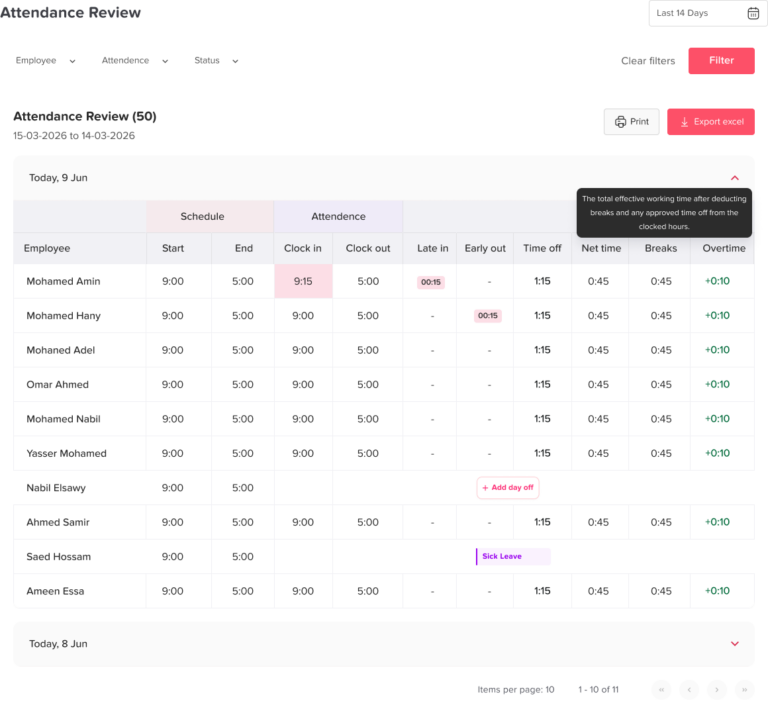
Attendance and Time Clock Systems
Attendance and time clock systems are best for businesses that need employees to clock in and out for shifts. These tools often include timesheets, breaks, overtime, kiosk mode, GPS, and attendance reports.
They are useful for retail, restaurants, healthcare, construction, warehouses, offices, and shift-based teams.
Examples include Day Off, Jibble, Deputy, QuickBooks Time, and Hubstaff.
Project-Based Time Tracking Tools
Project-based time tracking tools help companies understand how much time employees spend on clients, projects, tasks, or budgets. They are useful for agencies, software companies, consultants, architects, accountants, legal teams, and professional services firms.
Examples include Harvest, Clockify, and Toggl Track.
Workforce Management Systems
Workforce management systems combine time tracking with scheduling, shift planning, attendance, communication, payroll, and sometimes leave management.
These systems are useful for businesses that need more than a timer. They help companies plan who should work, track who actually worked, and review the results.
Examples include Deputy, QuickBooks Time, and Hubstaff.
PTO and Leave Management Systems
PTO and leave management systems focus on employee time off. They help businesses manage vacation requests, sick leave, leave policies, approval workflows, balances, shared calendars, holidays, and reports.
Day Off is a strong example of this type of tool. It is especially useful for companies that want a simple and organized way to manage PTO, leave requests, employee availability, and absence tracking. As businesses add employee timer functionality, Day Off can help create a more complete system for managing both working time and time off.
Best Practices for Using an Automated Employee Timer System
Buying software is only the first step. To get real value, businesses need a clear process.
Create a Clear Time Tracking Policy
Employees should understand when to clock in, when to clock out, how to track breaks, what to do if they forget, how overtime is approved, and how time corrections work.
A written policy reduces confusion and helps everyone follow the same process.
Train Employees Before Launch
Even simple tools need proper introduction. Show employees how to use the timer, submit timesheets, request corrections, check PTO, and contact HR if something is wrong.
Training reduces mistakes and improves adoption.
Connect Time Tracking With PTO Tracking
Time tracking shows work hours. PTO tracking shows approved time away. Businesses need both to manage employee time properly.
Using Day Off for PTO and leave management can help companies organize leave requests, balances, approvals, and shared calendars. This gives managers a clearer view of availability when reviewing attendance and work-hour data.
Review Timesheets Regularly
Managers should review timesheets before payroll or reporting deadlines. This helps catch missing entries, incorrect hours, unapproved overtime, and unusual patterns.
Regular review prevents small mistakes from becoming payroll problems.
Use Reports for Planning, Not Just Control
Time tracking reports should not only be used to monitor employees. They should help businesses improve planning, reduce overload, understand project costs, manage staffing, and protect work-life balance.
For example, repeated overtime may show that a team needs more support. Frequent missed clock-ins may show that the process is unclear. High absence levels may show a need for better leave planning.
Respect Employee Privacy
Some automated employee timer systems include monitoring features such as screenshots, app usage, website tracking, GPS, or activity levels. These features should be used carefully.
Employees should know what is being tracked and why. Businesses should avoid unnecessary surveillance and focus on fair, transparent time management.
Keep the System Simple
A system that is too complicated may create more work instead of reducing it. Choose a tool that matches your actual needs. Start with the most important features, then add more if needed.
For many businesses, the most important starting points are clock-in and clock-out, timesheets, PTO tracking, approvals, shared calendars, and reports.
Common Mistakes to Avoid
An automated employee timer system can improve accuracy, but only when implemented correctly. Businesses should avoid these common mistakes.
Using Time Tracking Without a Clear Policy
If employees do not know how to track time, the data will become inconsistent. A clear policy is essential.
Ignoring PTO and Leave Data
Attendance records are incomplete without leave context. If PTO is managed separately, managers may misinterpret absences. Tools like Day Off help solve this by organizing leave requests and availability.
Overcomplicating the Process
Too many rules, categories, or steps can frustrate employees. Keep the system simple and practical.
Not Reviewing Data Before Payroll
Automation reduces manual work, but it does not replace review. Managers should approve timesheets before payroll.
Using Monitoring Features Without Transparency
Employee monitoring can damage trust if it is not explained clearly. Businesses should be open about what is tracked and avoid collecting unnecessary data.
Choosing a Tool Based Only on Price
Free or low-cost tools can be useful, but businesses should also consider usability, reporting, integrations, support, scalability, and whether the tool fits their workflow.
How Day Off Fits Into Employee Time Management
Day Off is not only about tracking vacation days. It helps businesses manage one of the most important parts of workforce planning: employee availability.
When a business manages work hours but ignores PTO, it only sees part of the picture. Employees may be unavailable because they are on vacation, sick leave, personal leave, unpaid leave, or public holiday leave. Managers need this information before assigning work, approving overtime, or planning schedules.
Day Off helps by giving businesses a structured way to manage leave requests, approvals, balances, policies, shared calendars, and reports. This makes it easier to see who is available, who is away, and how leave affects team planning.
For businesses adopting an automated employee timer system, Day Off can be part of a complete time management approach. The timer tracks working hours, while Day Off tracks approved time off. Together, these areas help HR and managers understand employee time more clearly.
FAQ
What is an automated employee timer system?
An automated employee timer system is software that helps employees track their working hours digitally. It can include clock-in and clock-out, real-time timers, timesheets, breaks, overtime, attendance reports, project tracking, and manager approvals.
Why should businesses use an automated employee timer system?
Businesses should use an automated employee timer system because it improves work-hour accuracy, reduces manual timesheet work, supports payroll preparation, helps managers monitor attendance, and gives HR better visibility into employee time.
Can an employee timer system help with PTO tracking?
Yes, an employee timer system can support PTO tracking when it is connected with leave management. Day Off helps businesses manage PTO, leave requests, balances, approvals, and shared calendars, making it easier to understand both working time and approved time off.
What is the difference between time tracking and attendance tracking?
Time tracking records how much time employees spend working, often by task, project, or client. Attendance tracking focuses on whether employees are present, late, absent, or working according to schedule. Many businesses need both.
What features should I look for in an automated employee timer system?
Important features include clock-in and clock-out, real-time timers, manual time entry, timesheets, break tracking, overtime tracking, PTO tracking, manager approvals, mobile access, reports, and integrations.
Is Day Off useful for employee time management?
Yes. Day Off is useful for employee time management because it helps businesses manage PTO, leave requests, employee availability, shared calendars, balances, approvals, and reports. When combined with time tracking, it gives businesses a clearer view of employee work time and time off.
Which tools can businesses use for employee time tracking?
Businesses can consider tools such as Day Off, Clockify, Toggl Track, Harvest, Jibble, Hubstaff, QuickBooks Time, and Deputy. The best choice depends on whether the business needs PTO tracking, project tracking, attendance tracking, scheduling, GPS, payroll support, or invoicing.
Can automated employee timer systems help with payroll?
Yes. Automated employee timer systems can help payroll by providing accurate records of work hours, breaks, overtime, and approved timesheets. However, businesses should still review and approve time records before processing payroll.
Are employee timer systems useful for remote teams?
Yes. Employee timer systems are useful for remote teams because they allow employees to track hours from different locations and give managers visibility into work activity, project time, and availability. PTO tools like Day Off also help remote teams see who is away and who is available.
Are employee timer systems only for large companies?
No. Small businesses can also benefit from automated employee timer systems. Even a small team can save time, reduce payroll errors, manage PTO more clearly, and improve attendance tracking by moving away from manual spreadsheets.
Final Thoughts
An automated employee timer system helps businesses track work hours, attendance, breaks, overtime, and payroll data more accurately. Instead of relying on spreadsheets or manual updates, companies can use digital tools to create a clearer and more organized time management process.
Different tools serve different needs. Clockify, Toggl Track, and Harvest are useful for project and billable time tracking, while Jibble, Deputy, Hubstaff, and QuickBooks Time support attendance, scheduling, and workforce tracking. Day Off is especially useful for managing PTO, leave requests, employee availability, shared calendars, and absence tracking.
When businesses combine employee time tracking with PTO management, they get a complete view of who is working, who is away, and how employee time is being used. This helps reduce manual work, improve payroll accuracy, and support better team planning.
