







An Attendance Log is more than a daily list of employees who arrived at work. When maintained correctly, it provides a reliable record of working hours, late arrivals, early departures, absences, breaks, overtime, schedule exceptions, and attendance corrections. These records help HR teams, managers, payroll departments, and employees understand what happened during each workday.

Traditional attendance logs were often kept on paper, in spreadsheets, or through basic punch card systems. These methods may work for a very small team, but they become difficult to manage as an organization adds employees, departments, locations, shifts, and attendance rules.
Attendance log software replaces disconnected records with a centralized system. Employees can record attendance, managers can review exceptions, and payroll teams can access approved work hour data without manually combining information from several sources.
However, simply purchasing software does not guarantee accurate attendance records. Businesses also need clear policies, suitable permissions, consistent review procedures, and a correction process that protects both employees and the organization.
This guide explains what attendance log software is, which features matter most, how it benefits businesses, and the best practices organizations should follow when implementing it.
What Is Attendance Log Software?
Attendance log software is a digital system used to record, organize, review, and report employee attendance information.
Depending on the system, employees may record their attendance through:
- A web browser
- A mobile application
- A shared workplace device
- A tablet or kiosk
- A physical time clock
- A badge, PIN, or access card
- An approved integration with another business system
The software creates a timestamped attendance record whenever an employee starts work, ends work, begins a break, returns from a break, or submits a correction.
A basic employee attendance log may only show whether someone was present or absent. A more complete system can also compare actual attendance with planned schedules, identify missing punches, calculate total work hours, record approved leave, and prepare attendance information for payroll review.
The purpose is not simply to monitor employees. A well-designed attendance system should create an accurate and transparent record that both employees and managers can understand.
What Information Should an Attendance Log Include?
The exact information depends on the organization, local employment requirements, and the way employees work. However, a useful Attendance Log normally contains the following details:
- Employee name or identification number
- Work date
- Scheduled start and end times
- Actual clock in time
- Actual clock out time
- Break start and end times
- Total recorded work hours
- Late arrival duration
- Early departure duration
- Overtime or additional hours
- Attendance status
- Leave or absence category
- Missing punch indicators
- Manual corrections
- Correction reason
- Name of the person who approved the change
- Date and time of the approval
- Notes needed to explain an unusual situation
Not every person should be able to view every field. For example, team members may need to know whether a colleague is unavailable, but they may not need access to medical details, attendance notes, payroll information, or disciplinary records.
A strong system combines complete internal records with carefully controlled visibility.
Attendance Log, Work Schedule, and Timesheet: What Is the Difference?
These terms are related, but they do not describe the same record.
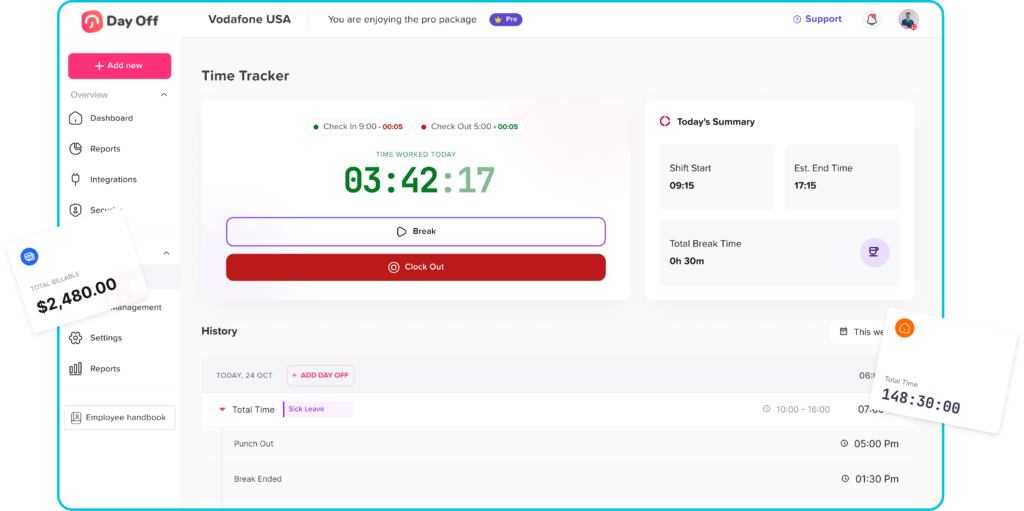
A work schedule shows when an employee is expected to work.
An Attendance Log shows whether the employee attended and when attendance events occurred.
A timesheet summarizes the number of hours worked, often for payroll, billing, project management, or cost allocation.
A schedule may show that an employee was expected to work from 9:00 a.m. to 5:00 p.m. The attendance record may show that the employee clocked in at 9:12 a.m., started lunch at 1:00 p.m., returned at 1:35 p.m., and clocked out at 5:20 p.m. The timesheet may then summarize the approved payable hours for that day.
These records should work together, but they should not automatically be treated as identical. Scheduled hours are planned hours. Attendance information should reflect what actually happened.
Essential Features of Attendance Log Software
The best attendance tracking system is not necessarily the one with the longest feature list. It is the one that supports the organization’s real attendance policy, working arrangements, approval process, and payroll requirements.
Accurate Clock In Clock Out Records
The software should record the exact time an employee begins and ends work. Each event should include a reliable date and timestamp.
Depending on company policy, the system may also record:
- The device used
- The workplace location
- The attendance method
- The employee’s assigned shift
- Whether the entry was created manually
- Whether the event was added after the original work date
Managers should be able to distinguish between an employee-created punch, an imported entry, and a manager correction.
Break Tracking
Break rules vary by company, employee category, schedule, and jurisdiction. Attendance log software should support the organization’s actual break process rather than forcing every employee into one fixed method.
The system may need to record:
- Paid breaks
- Unpaid meal periods
- Multiple breaks during one shift
- Missed breaks
- Shortened breaks
- Breaks taken later than scheduled
- Manual break adjustments
Automatic break deductions should be used carefully. A scheduled break does not always prove that the employee stopped working. When an employee works through a break, there should be a clear process for reporting and correcting the record.
Schedule Comparison
Connecting attendance with work schedules helps managers identify exceptions without reviewing every record manually.
The software can flag:
- Late arrivals
- Early departures
- Missed shifts
- Unscheduled attendance
- Incomplete shifts
- Clock ins before the scheduled start
- Clock outs after the scheduled end
- Attendance recorded on a day off
These flags should start a review process rather than automatically assuming misconduct. A late punch may result from a technical problem, an approved schedule change, a manager request, or an emergency.
Attendance Statuses
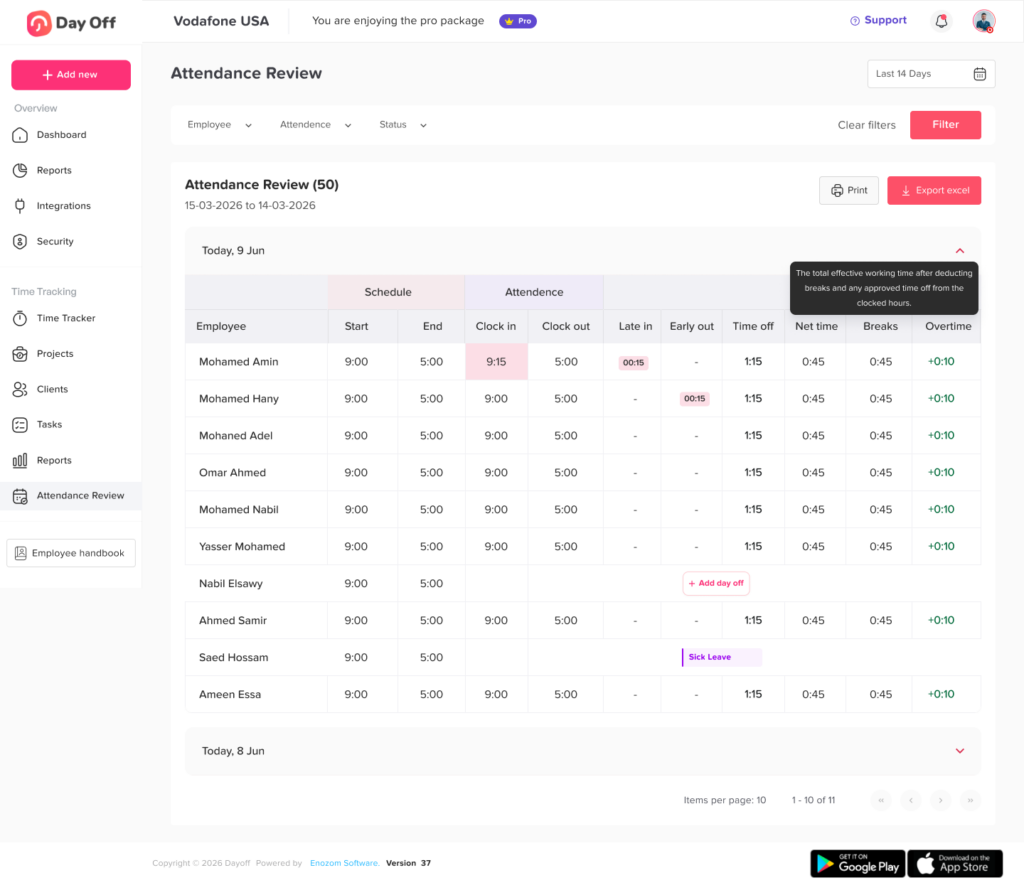
Clear attendance statuses make records easier to understand and report.
Common statuses include:
- Present
- Absent
- Late
- Left early
- Working remotely
- On approved leave
- Sick leave
- Unpaid leave
- Public holiday
- Weekend or scheduled day off
- Missed punch
- Partial shift
- Training
- Business travel
- On call
- Schedule changed
- Pending review
Status names should match the language used in the organization’s attendance policy. Too many overlapping statuses can make reports confusing, while overly broad statuses may hide important differences.
Missing Punch Detection
A missing clock-in or clock-out can affect total hours, overtime, payroll, and attendance reports.
The software should automatically identify incomplete records, such as:
- A clock in without a clock-out
- A break start without a break end
- A clock-out without a matching clock-in
- Multiple clock-ins without an intervening clock-out
- Attendance recorded outside the expected date or shift
Employees and managers should receive the notification early enough to correct the issue before payroll closes.
Correction and Approval Workflows
Employees should not need to contact HR for every small attendance error. A self-service correction process allows the employee to submit the correct time, explain what happened, and send the request to the appropriate manager.
A reliable correction record should preserve:
- The original entry
- The requested replacement
- The reason for the change
- The employee who submitted it
- The manager who reviewed it
- The approval or rejection time
- Any supporting note
The original record should not disappear after a correction. Preserving both versions provides a clearer audit trail.
Overtime and Extra Hours Tracking
Attendance software can help identify when recorded hours exceed scheduled or standard hours.
Useful overtime features include:
- Daily overtime identification
- Weekly overtime identification
- Preapproved overtime
- Unapproved additional hours
- Overtime alerts
- Different overtime categories
- Compensatory time tracking
- Reports showing scheduled versus actual hours
The software should not be used to erase hours simply because the overtime was not approved in advance. Approval policies and payment obligations are separate questions. Organizations should review applicable employment rules and obtain professional advice when necessary.
Leave and Absence Integration
Attendance records become more accurate when the system can recognize approved time off.
For example, an employee who does not clock in because of approved vacation should not automatically appear as an unexplained absence. The Attendance Log should show that the employee was unavailable because of approved leave.
Useful leave integrations include:
- Vacation or PTO
- Sick leave
- Personal leave
- Parental leave
- Unpaid leave
- Public holidays
- Half-day leave
- Hourly leave
- Company closures
- Other organization specific absence types
This connection reduces duplicate data entry and helps managers distinguish authorized leave from unexpected absence.
Audit Logs
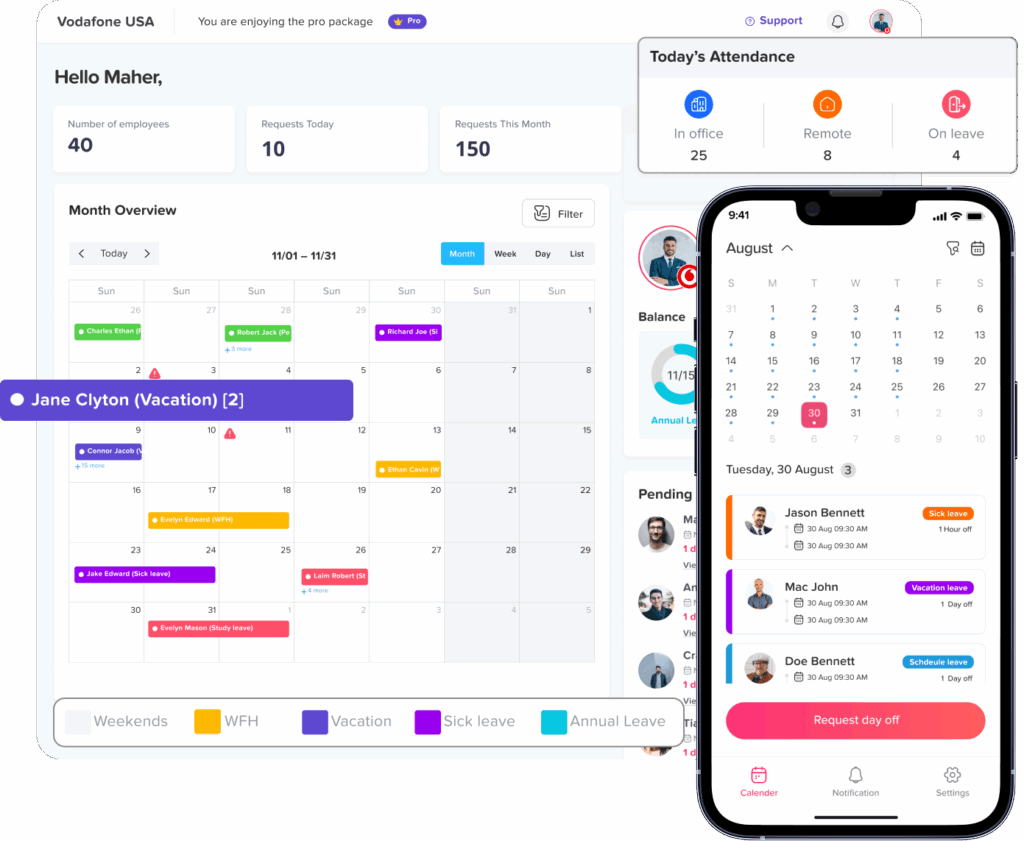
An audit log records changes made inside the attendance system.
A useful audit trail should answer:
- What was changed?
- What was the previous value?
- What is the new value?
- Who made the change?
- When was it changed?
- Why was it changed?
- Who approved it?
- Was the change made before or after payroll approval?
NIST security guidance describes useful audit records as including what occurred, when and where it occurred, the source, the result, and the identity associated with the event. It also recommends protecting audit information from unauthorized modification or deletion.
Role Based Permissions
Attendance data should not be equally accessible to every user.
A good permission structure may allow:
- Employees to view their own records
- Team leaders to view assigned employees
- Managers to approve corrections
- HR to review attendance across the company
- Payroll staff to access approved hour totals
- Auditors to access selected historical records
- Administrators to configure policies and permissions
Permissions should follow the principle of least privilege. Users should receive the access required for their role, but not unnecessary control over sensitive records or system settings.
Reports and Exports
Attendance reports help organizations turn daily records into useful information.
Important reports may include:
- Daily attendance
- Late arrival report
- Absence report
- Missing punch report
- Overtime report
- Break exception report
- Schedule variance report
- Manual edit report
- Employee attendance history
- Department or location summary
- Payroll period attendance report
- Audit log report
Filters should make it possible to review a selected employee, team, location, date range, attendance status, or approval state.
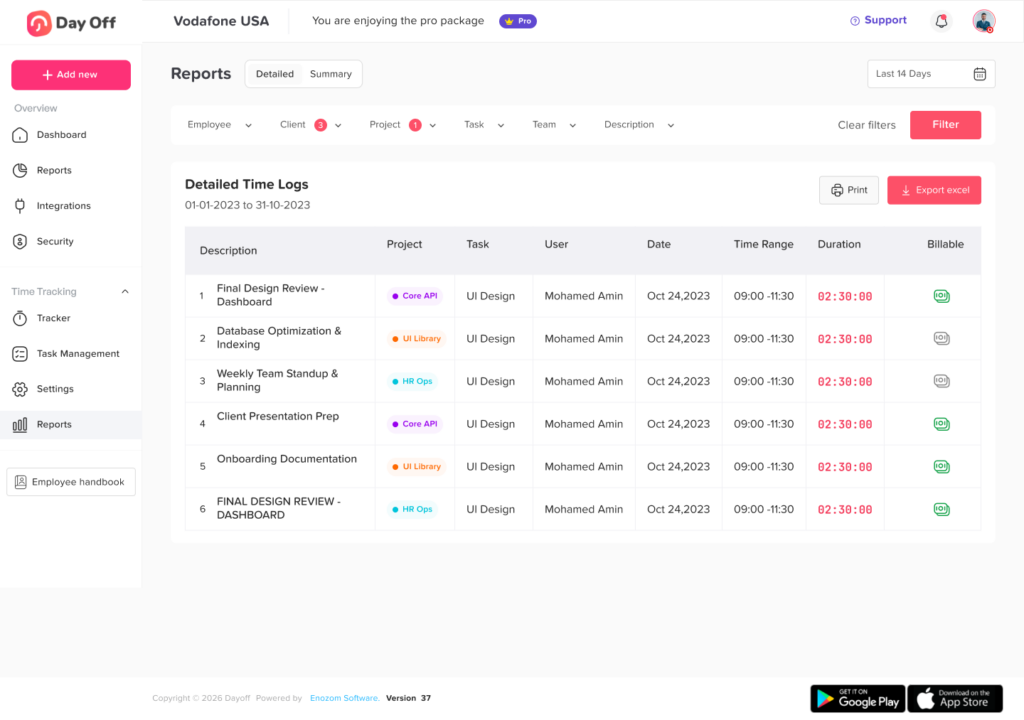
Attendance Log Software Features at a Glance
| Feature | What It Does | Why It Matters |
|---|---|---|
| Clock-in and clock-out | Records actual attendance times | Creates a consistent daily work record |
| Schedule comparison | Compares planned and actual attendance | Identifies late arrivals, missed shifts, and extra hours |
| Missing punch alerts | Flags incomplete records | Reduces payroll corrections |
| Break tracking | Records paid and unpaid breaks | Improves work-hour accuracy |
| Leave integration | Connects approved absence with attendance | Prevents approved leave from appearing as unexplained absence |
| Correction workflow | Allows documented attendance changes | Creates accountability and employee involvement |
| Audit log | Preserves system and record changes | Supports investigations and historical review |
| Permissions | Limits access by role | Protects sensitive employee information |
| Reports | Summarizes attendance patterns | Supports payroll, staffing, and management decisions |
| Integrations | Transfers approved data to other systems | Reduces duplicate data entry |
Benefits of Using Attendance Log Software
More Accurate Attendance Records
Manual attendance records are vulnerable to typing errors, missing formulas, duplicate entries, overwritten cells, and inconsistent status names.
Digital software standardizes how attendance is captured. It can also identify incomplete or conflicting records before they become payroll problems.
Software does not eliminate every error. Employees may still forget to clock out, select the wrong status, or submit an incorrect correction. The advantage is that the system can make these problems visible and provide a documented process for resolving them.
Faster Payroll Preparation
Payroll teams often lose time collecting attendance information from managers, spreadsheets, emails, and paper forms.
A centralized system can provide one set of approved records for the pay period. Instead of rebuilding the attendance history, payroll can focus on reviewing exceptions.
This is especially useful for organizations with:
- Hourly employees
- Multiple shifts
- Different locations
- Overtime
- Variable schedules
- Unpaid breaks
- Hourly leave
- Frequent schedule changes
Consistent Attendance Decisions
Managers may handle the same attendance issue differently when the company lacks a shared system.
One manager may document a late arrival, while another ignores it. One department may allow informal corrections, while another requires written approval.
Attendance software cannot create fairness by itself, but it can support a consistent process. The same statuses, correction forms, approval rules, and reporting standards can be applied across departments.
Better Workforce Planning
Attendance records help managers understand whether planned staffing levels match actual attendance.
A manager can identify:
- Shifts with repeated understaffing
- Departments with frequent late arrivals
- Times when overtime regularly increases
- Roles that require additional backup coverage
- Locations with recurring scheduling problems
- Employees who frequently work beyond their planned hours
These patterns should be reviewed in context. Repeated overtime may indicate strong demand, poor scheduling, understaffing, or unrealistic workloads. It should not automatically be treated as an employee problem.
Improved Employee Self-Service
Employees should be able to understand their own attendance records.
Self-service access may allow them to:
- Review clock-in and clock-out times
- See total recorded hours
- Identify missing punches
- Request corrections
- Check correction status
- View approved leave
- Review attendance history
- Confirm records before payroll processing
This improves transparency and gives employees an opportunity to report errors early.
Stronger Historical Records
When attendance information is scattered across spreadsheets, emails, and paper forms, it becomes difficult to reconstruct what happened several months earlier.
Centralized software keeps the attendance event, correction, approval, and audit history together. This can be useful during payroll reviews, employee questions, internal audits, and policy evaluations.
Support for Remote and Multi-Location Teams
A digital Attendance Log can provide one process for employees working from offices, stores, job sites, homes, and multiple company locations.
Organizations can apply shared attendance standards while still allowing different schedules, holidays, time zones, and approval responsibilities.
Manual Attendance Log vs. Attendance Log Software
| Area | Manual Attendance Log | Attendance Log Software |
|---|---|---|
| Data entry | Entered by hand or copied between files | Recorded through structured attendance actions |
| Missing records | Often discovered during payroll | Can be flagged automatically |
| Corrections | May overwrite the original value | Can preserve the original and revised entries |
| Approvals | Managed through messages or signatures | Routed through a defined workflow |
| Reporting | Requires formulas and manual filtering | Generated from centralized records |
| Leave records | Often stored separately | Can connect approved leave with attendance |
| Access control | Difficult to manage in shared files | Can be limited by employee role |
| Audit history | Limited or unavailable | Can record who changed what and when |
| Multiple locations | Requires separate files or consolidation | Can organize records by location |
| Payroll preparation | Data must be collected and checked manually | Approved records can be prepared for export or integration |
Best Practices for Managing an Attendance Log
Create a Written Attendance Policy
The software should reflect a defined policy rather than becoming the policy itself.
The written policy should explain:
- When employees must clock in and out
- How breaks are recorded
- What counts as late
- How schedule changes are handled
- How employees report absences
- How missing punches are corrected
- Who approves changes
- How overtime is requested
- When attendance records are reviewed
- How employees can raise a concern
The policy should also explain that employees must record actual work time accurately.
Use Clear Attendance Statuses
Avoid creating several statuses that mean nearly the same thing.
For example, “Absent,” “Did Not Attend,” “No Attendance,” and “Missing Shift” may produce inconsistent records when managers choose different labels for the same event.
Create a controlled list, define each status, and train managers to use it consistently.
Record Actual Attendance, Not Only the Schedule
A work schedule is not proof of attendance.
An employee may start early, stay late, take a different break, leave for an appointment, or work during a planned absence.
The attendance record should show the actual event. Differences between actual and scheduled time can then be reviewed and explained.
Make Clocking In Simple
A complicated attendance process increases the chance of missing or inaccurate records.
Employees should be able to complete the required attendance action quickly using an approved device or method.
The system should also provide a backup process for:
- Internet interruptions
- Device failure
- Forgotten credentials
- App problems
- Workplace emergencies
- Employees working at temporary locations
Require Reasons for Manual Changes
A manager should not be able to silently replace an employee’s attendance time.
Manual changes should require a reason such as:
- Employee forgot to clock out
- Device was unavailable
- Manager requested additional work
- Approved schedule change
- Break was entered incorrectly
- Duplicate record removed
- Time zone corrected
- Payroll correction required
The explanation should be specific enough for another reviewer to understand the decision later.
Review Exceptions Before Payroll Closes
Managers do not need to inspect every ordinary attendance event individually. They should focus on exceptions.
A pre-payroll review should include:
- Missing clock-ins or clock-outs
- Unapproved corrections
- Unusual overtime
- Work recorded during leave
- Leave recorded during worked hours
- Extremely long or short shifts
- Missing breaks
- Repeated manual entries
- Attendance outside the assigned schedule
- Changes made after manager approval
This review should occur early enough for employees to answer questions before payroll is finalized.
Preserve Original Records
Correcting a mistake should not erase the history.
The system should retain the original event, the corrected event, the reason, the approver, and the date of the change.
This protects the employee, the manager, and the organization by showing how the final record was created.
Limit Administrator Access
Not every manager needs full system administration rights.
Managers may need to view their teams and approve corrections. They usually do not need permission to change company policies, delete audit history, manage security settings, or view every employee’s records.
Create separate roles for:
- Employees
- Team leaders
- Managers
- HR
- Payroll
- Auditors
- System administrators
Review permissions whenever responsibilities change.
Train Employees and Managers Separately
Employees and managers use attendance software differently.
Employee training should cover recording attendance, checking records, requesting corrections, and reporting technical issues.
Manager training should cover reviewing exceptions, evaluating correction requests, protecting privacy, and completing approvals before payroll deadlines.
Audit the Attendance Process Regularly
Organizations should periodically review whether the system is being used correctly.
An audit can examine:
- Repeated missing punches
- Frequent manager corrections
- Deleted or replaced entries
- Changes after payroll approval
- Unusual login activity
- Shared user accounts
- Managers with unnecessary access
- Old accounts that remain active
- Departments with high exception rates
- Integrations that fail or duplicate records
The goal should be to improve the process, not simply identify individual mistakes.
Attendance Log Best Practice Checklist
| Stage | Recommended Action | Desired Result |
|---|---|---|
| Policy design | Define attendance, break, correction, overtime, and approval rules | Clear expectations before configuration |
| System setup | Configure schedules, statuses, roles, and notifications | Software reflects the real attendance policy |
| Employee onboarding | Explain recording and correction procedures | Fewer missing or inaccurate entries |
| Daily management | Review urgent exceptions and technical problems | Problems are corrected while details are recent |
| Pre-payroll review | Resolve missing punches, leave overlaps, and overtime questions | Accurate approved hours for payroll |
| Access review | Remove unnecessary permissions and inactive accounts | Better protection of employee data |
| Periodic audit | Review corrections, trends, audit logs, and process failures | Improved accuracy and accountability |
| Policy update | Adjust rules when schedules or legal requirements change | Attendance procedures remain relevant |
How to Choose Attendance Log Software
Before comparing software providers, document how attendance currently works.
Ask the following questions:
Does It Support Your Work Arrangements?
Confirm that the system can handle:
- Fixed schedules
- Flexible schedules
- Overnight shifts
- Rotating shifts
- Split shifts
- Remote work
- Multiple locations
- Different time zones
- Hourly and salaried employees
- Part-time and seasonal employees
Can It Match Your Attendance Policy?
The system should support your real rules for lateness, breaks, overtime, corrections, leave, and approvals.
Avoid selecting a system that requires employees to follow an artificial workflow simply because the software cannot be configured properly.
Does It Provide a Complete Audit Trail?
Ask whether the software records:
- Original values
- Revised values
- User identity
- Date and time
- Approval history
- Change reasons
- Deleted records
- Permission changes
A report that only displays the latest value is not a complete audit trail.
Are Permissions Granular Enough?
Confirm whether managers can be limited to assigned teams, departments, or locations.
Also ask whether report access, editing access, approval access, and administrative access can be managed separately.
Can Employees Review Their Own Records?
Employee access improves transparency and allows errors to be reported before payroll.
The system should make it easy to view attendance history and submit a correction without giving employees permission to edit approved records directly.
Does It Integrate With Existing Systems?
Evaluate integrations with:
- Payroll
- HR systems
- Scheduling tools
- Leave management software
- Identity providers
- Accounting systems
- Communication platforms
- Business intelligence tools
Also confirm which system will be the source of truth for employee names, identification numbers, schedules, leave types, and approved hours.
Is the Software Easy to Use?
A feature-rich platform provides little value when employees cannot use it consistently.
Test the software with real scenarios, including:
- Normal clock-in and clock out
- Forgotten clock-out
- Overnight shift
- Half day leave
- Remote work
- Missed break
- Schedule change
- Manager correction
- Payroll export
- Employee transfer between locations
Frequently Asked Questions
What is an Attendance Log?
An Attendance Log is a record showing when employees attended work and what attendance events occurred. It may include clock-in and clock-out times, breaks, absences, late arrivals, early departures, overtime, leave, corrections, and approval history.
What is attendance log software used for?
Attendance log software is used to record employee attendance, compare attendance with schedules, detect missing punches, manage corrections, prepare reports, and provide approved work-hour information for payroll and workforce planning.
What should be included in an employee attendance log?
An employee attendance log should normally include the work date, scheduled hours, actual start and end times, breaks, total hours, attendance status, exceptions, manual corrections, correction reasons, and approval information.
The exact fields should reflect the organization’s policy and applicable employment requirements.
Is an attendance log the same as a timesheet?
No. An attendance log records attendance events, such as arrivals, departures, breaks, and absences. A timesheet usually summarizes approved work hours and may allocate those hours to projects, clients, or payroll categories.
The two records may be connected, but they serve different purposes.
Can employers use spreadsheets as an Attendance Log?
A spreadsheet can be used for a small and simple attendance process, but it may become difficult to control as the team grows.
Common challenges include overwritten data, inconsistent formulas, limited permissions, missing approval history, and difficulty tracking who changed a record.
How often should attendance records be reviewed?
Employees should be encouraged to check their records regularly. Managers should review exceptions throughout the pay period and complete a final review before payroll closes.
Organizations should also conduct periodic audits of permissions, manual changes, unusual attendance patterns, and closed-period corrections.
Can an employee correct a missing clock-out?
Yes, when the organization allows self-service correction requests. The employee should enter the correct time, provide a reason, and submit the request for review.
The original missing record and the approved correction should both remain visible in the audit history.
Should attendance software automatically calculate overtime?
Software can identify hours that may qualify as overtime based on configured rules. However, payroll and HR teams should confirm that the configuration reflects applicable law, employee classification, company policy, and any contractual requirements.
How long should an employer keep attendance records?
The required period depends on the country, state, industry, employee type, and purpose of the record.
For covered U.S. employers, the Department of Labor states that payroll records generally must be kept for at least three years, while records used to calculate wages, such as time cards and work schedules, should generally be retained for two years. Other rules may require longer retention.
What is the most important feature in attendance log software?
Accuracy is the most important outcome, but several features support it. These include reliable timestamps, missing punch detection, employee correction requests, manager approvals, audit logs, role-based permissions, and pre-payroll exception reports.
Conclusion
Attendance log software provides more than a digital replacement for a paper attendance sheet. It creates a structured process for recording work attendance, detecting missing information, reviewing schedule differences, managing corrections, tracking leave, and preparing accurate records for payroll.
The most effective system is one that reflects the organization’s real working arrangements and attendance policy. It should record actual events rather than relying only on scheduled hours, preserve original entries, protect employee data, and make corrections transparent.
Successful implementation also requires clear responsibilities. Employees should record attendance and report errors. Managers should review exceptions consistently. HR should define policies and access rights. Payroll should use approved records rather than unresolved raw data.
When attendance log software is combined with clear policies, employee self-service, secure permissions, regular reviews, and reliable audit records, it can reduce administrative work while improving accuracy, transparency, and workforce planning.