







Managing employee time off should not require endless spreadsheets, scattered email threads, manual calendar updates, or last-minute staffing surprises. As teams grow, PTO tracking becomes more than just recording who is taking vacation. It becomes a core part of workforce planning, team visibility, employee experience, and operational efficiency.
That is why many companies are now looking for a PTO tracker with calendar integration.
A PTO tracker with calendar integration helps businesses manage leave requests, approvals, balances, holidays, and team availability in one connected system. Instead of approving a leave request in one place and then manually updating another calendar, the right PTO tracking software keeps everything synchronized automatically.

Day Off is designed to make this process simple. It helps companies manage employee leave from a central platform while integrating with tools teams already use, including Google Calendar, Microsoft Outlook, Slack, and Microsoft Teams. With Day Off, managers can see who is off, employees can request leave easily, and HR teams can maintain accurate records without relying on manual updates.
In this article, we will explore why calendar integration matters, what features to look for in a PTO tracker, and how Day Off helps businesses simplify leave management from request to approval to calendar visibility.
What Is a PTO Tracker with Calendar Integration?
A PTO tracker with calendar integration is a digital leave management tool that allows companies to track employee paid time off while automatically syncing approved absences with calendar platforms.
PTO may include vacation days, sick leave, personal leave, annual leave, unpaid leave, emergency leave, or any other time off category defined by the company. A PTO tracker helps manage these leave types by keeping requests, approvals, balances, and employee availability organized in one place.
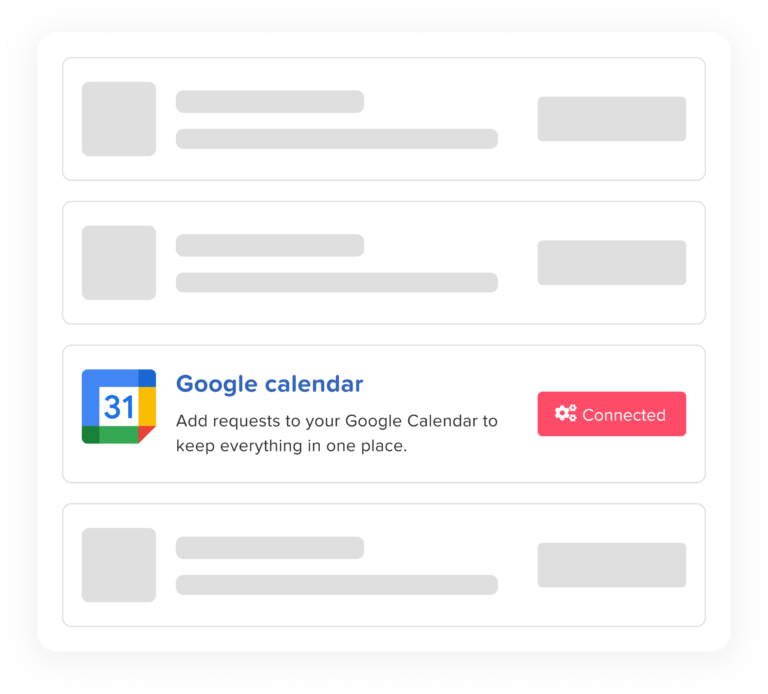
Calendar integration adds another important layer. Once a leave request is approved, the absence can appear on connected calendars such as Google Calendar or Microsoft Outlook. This gives managers and teams better visibility into who is available and who is away.
Instead of checking a spreadsheet, asking HR, searching through emails, or manually adding events to a calendar, everyone can rely on a shared and updated view of employee time off.
A PTO tracker with calendar integration helps answer questions such as:
- Who is off this week?
- Are too many people from the same team away at the same time?
- Has this employee’s vacation been approved?
- How many leave days does the employee have left?
- Will this absence affect project deadlines or shift coverage?
- Are upcoming holidays already visible on the calendar?
This level of visibility is especially useful for growing companies, remote teams, hybrid workplaces, multi-location businesses, and organizations with different departments, schedules, and leave policies.
Why Calendar Integration Matters in PTO Tracking
Calendar integration is one of the most important features in modern PTO tracking software because employee absence affects daily planning.
When time off is not visible on the calendar, managers may accidentally schedule meetings with absent employees, assign tasks to people who are unavailable, or approve overlapping leave requests without realizing the impact. HR teams may also need to manually update shared calendars, which increases the risk of mistakes.
A connected calendar helps prevent these problems.
With calendar integration, approved leave becomes part of the team’s normal planning workflow. Managers can check availability before approving new requests. Team members can see upcoming absences before planning meetings or deadlines. HR teams can reduce manual calendar updates and keep leave records consistent.
For example, if an employee requests annual leave for three days and the manager approves it through Day Off, the approved absence can be reflected in the connected calendar. This gives the team a clear view of the employee’s availability without needing a separate reminder.
Calendar integration is not only about convenience. It helps companies improve planning, reduce confusion, and maintain smoother operations.
Common Problems Without Calendar Integration
Many companies start by tracking PTO manually. This may work for very small teams, but it quickly becomes difficult as the organization grows.
Without a PTO tracker with calendar integration, businesses often face several problems.
Leave Requests Get Lost
When employees request time off through emails, messages, or verbal conversations, requests can easily be missed. A manager may forget to respond, HR may not receive the update, or the employee may not know whether the request was officially approved.
This creates confusion for everyone involved.
Calendars Become Outdated
Even if a leave request is approved, someone still needs to update the team calendar. If that step is missed, the employee may be away while the calendar still shows them as available.
This can lead to scheduling conflicts, missed meetings, and poor planning.
Managers Lack Visibility
Managers need to know who is available before approving leave. Without a centralized calendar, they may approve multiple requests from the same team during the same period.
This can create coverage issues, project delays, or operational pressure.
HR Teams Spend Too Much Time on Manual Updates
Manual PTO tracking creates repetitive work for HR teams. They may need to update balances, send reminders, check policies, follow up with managers, and maintain spreadsheets or calendars by hand.
Over time, these tasks take valuable time away from more strategic HR responsibilities.
Employees Keep Asking About Balances
When employees cannot check their own PTO balances, they often need to ask HR how many days they have left. This adds more administrative work and slows down the leave request process.
A modern PTO tracker solves these problems by making leave requests, approvals, balances, and calendars part of one connected workflow.
How Day Off Works as a PTO Tracker with Calendar Integration
Day Off is a leave management and PTO tracking platform built to help companies manage employee time off more efficiently. It gives employees, managers, and HR teams a simple way to handle leave requests, approvals, balances, policies, and absence visibility.
The platform is available on web and mobile, making it suitable for office teams, remote teams, frontline employees, shift-based workers, and multi-location companies.
With Day Off, employees can submit leave requests in a few steps. Managers receive notifications and can approve or reject requests quickly. HR teams can manage policies, leave types, balances, locations, schedules, and reports from one central dashboard.
Once leave is approved, calendar integrations help make that absence visible where teams already plan their work.
Day Off integrates with commonly used workplace tools such as:
- Google Calendar
- Microsoft Outlook
- Slack
- Microsoft Teams
These integrations help companies reduce manual work and improve team visibility. Instead of managing PTO separately from daily work tools, Day Off brings leave management closer to the way teams already communicate and plan.
Google Calendar Integration
Google Calendar is widely used by teams for meetings, deadlines, availability, and daily planning. When employee leave is not reflected in Google Calendar, teams may accidentally schedule work during someone’s time off.
Day Off helps solve this by supporting Google Calendar integration.
With Google Calendar integration, approved time off can be visible alongside other calendar events. This makes it easier for employees and managers to understand availability before scheduling meetings, assigning tasks, or planning project timelines.
For teams that rely heavily on Google Workspace, this integration helps connect leave management with everyday work planning.
Benefits of Google Calendar integration include:
- Better visibility into employee absences
- Fewer scheduling conflicts
- Less manual calendar updating
- Improved coordination across teams
- Clearer planning for managers and employees
When PTO data is connected to Google Calendar, time off becomes easier to see, easier to plan around, and harder to overlook.
Microsoft Outlook Calendar Integration
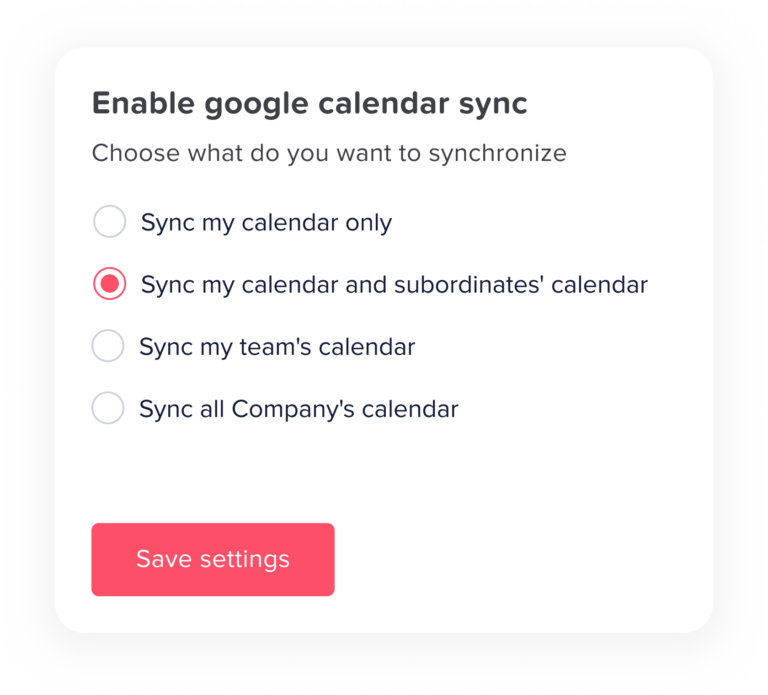
Many companies use Microsoft Outlook as their main calendar and communication platform. For these organizations, PTO tracking becomes more effective when approved leave can be synchronized with Outlook calendars.
Day Off supports Outlook calendar integration, helping teams keep absence information visible within their existing Microsoft environment.
This is especially useful for companies that use Outlook to manage meetings, department schedules, and internal coordination. Instead of manually creating calendar events for every approved leave request, Day Off helps streamline the process.
Outlook calendar integration helps businesses:
- Keep employee availability updated
- Prevent meeting conflicts
- Improve department planning
- Reduce manual admin work
- Make approved leave easier to track
For managers, this creates a clearer view of who is available before planning meetings or approving new time off requests. For employees, it reduces confusion and improves transparency.
Slack Integration
PTO tracking is not only about calendars. Communication is also important.
Many teams use Slack as a central communication tool. If leave requests and approval updates happen outside Slack, employees and managers may miss important updates.
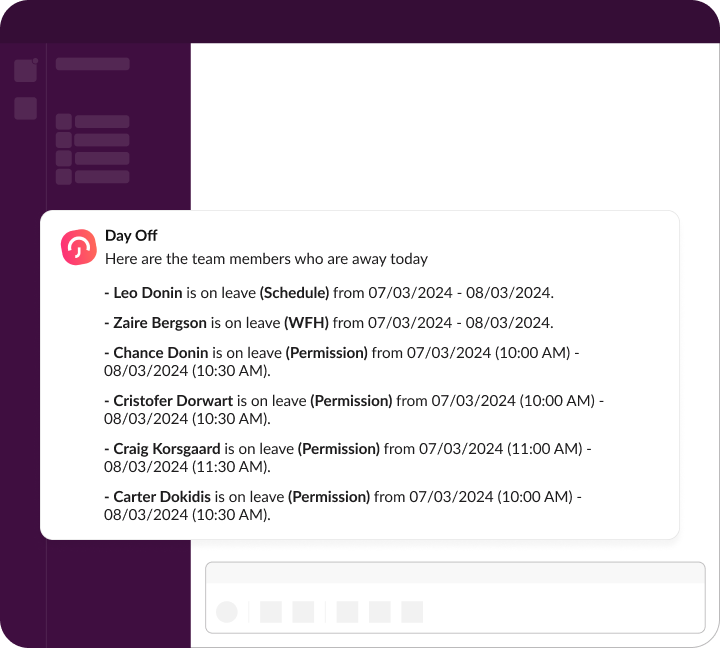
Day Off integrates with Slack to help keep leave-related communication visible and timely.
With Slack integration, teams can receive notifications related to leave requests, approvals, and updates. This helps managers respond faster and keeps employees informed about the status of their requests.
Slack integration is useful for:
- Remote teams
- Fast-moving teams
- Companies that rely on chat-based communication
- Managers who need quick leave request alerts
- Employees who want faster updates
Instead of leaving PTO updates buried in email inboxes, Slack notifications help bring leave management into the team’s daily workflow.
Microsoft Teams Integration
Microsoft Teams is another important workplace communication platform, especially for companies that use Microsoft 365.
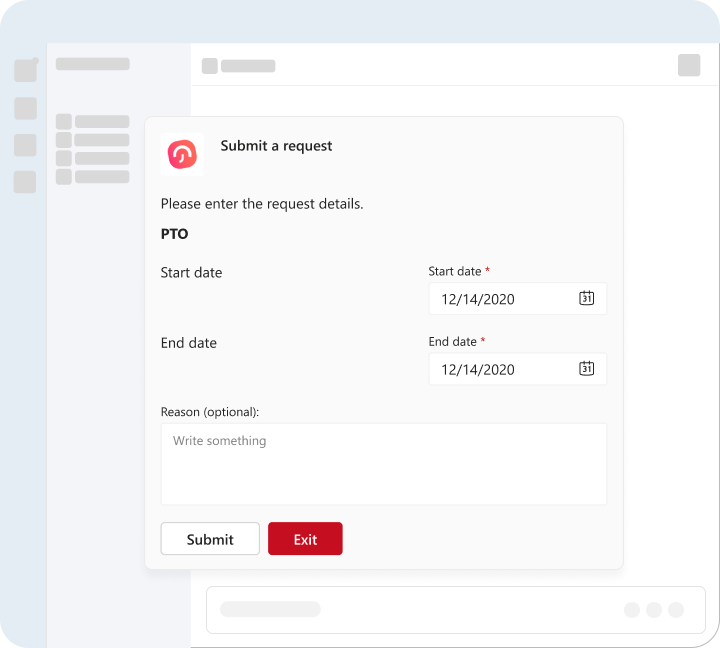
Day Off integrates with Microsoft Teams to help employees and managers stay updated on leave activity. This is useful for teams that use Teams for internal communication, approvals, collaboration, and daily updates.
With Microsoft Teams integration, leave-related updates become easier to access. Managers can stay aware of new requests, employees can receive updates, and teams can improve visibility around upcoming absences.
Microsoft Teams integration is especially valuable for:
- Hybrid teams
- Enterprise teams
- Companies already using Microsoft 365
- Managers handling multiple employees
- Organizations that want leave notifications inside their communication tools
By connecting PTO tracking with Microsoft Teams, Day Off helps reduce missed updates and keeps leave management closer to where daily collaboration happens.
Shared Team Calendar
A strong PTO tracker should include more than external calendar integrations. It should also offer a built-in team calendar designed specifically for leave management.
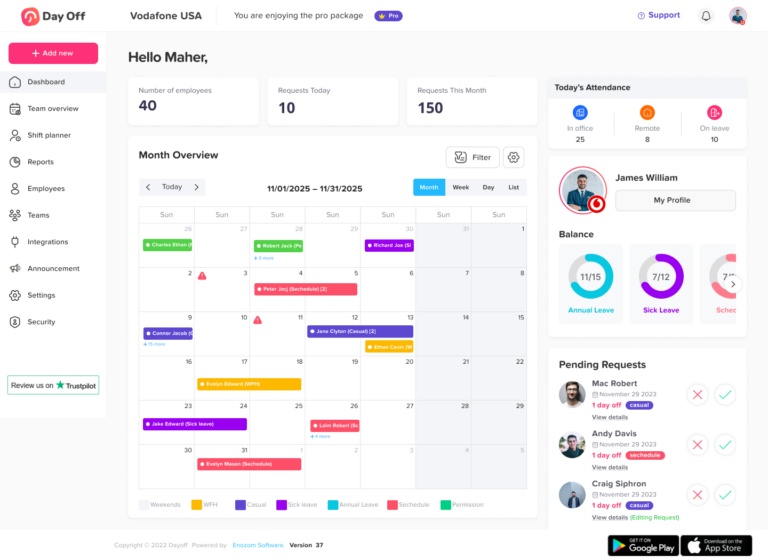
Day Off includes a shared team calendar that gives managers and employees a clear view of who is off and when.
This calendar helps teams avoid overlapping absences, plan around upcoming vacations, and maintain better coverage. Managers can review team availability before approving new requests, while employees can check the calendar before submitting leave.
The shared calendar can show:
- Approved leave
- Pending requests
- Public holidays
- Team availability
- Upcoming absences
- Department or location-based leave activity
This helps businesses move away from scattered absence records and gives everyone a reliable source of truth.
For managers, the shared calendar supports smarter decision-making. For employees, it makes the leave process more transparent. For HR, it reduces repeated questions and manual tracking.
Easy Leave Requests
A PTO tracker should make it simple for employees to request time off. If the process is too complicated, employees may avoid using the system or continue sending requests through informal channels.
Day Off provides an easy leave request process that works on both web and mobile.
Employees can choose the leave type, select the dates, add any necessary notes, and submit the request. The request is then sent to the right approver based on the company’s workflow.
This creates a clear and consistent process for every employee.
Instead of asking through email, chat, paper forms, or verbal conversations, employees can submit requests from one platform. This makes tracking easier for HR and gives employees a better experience.
Fast Approval Workflow
Approval delays are one of the most common problems in leave management. When requests sit unanswered, employees become frustrated and managers may lose visibility into upcoming absences.
Day Off helps speed up the approval process with a clear approval workflow.
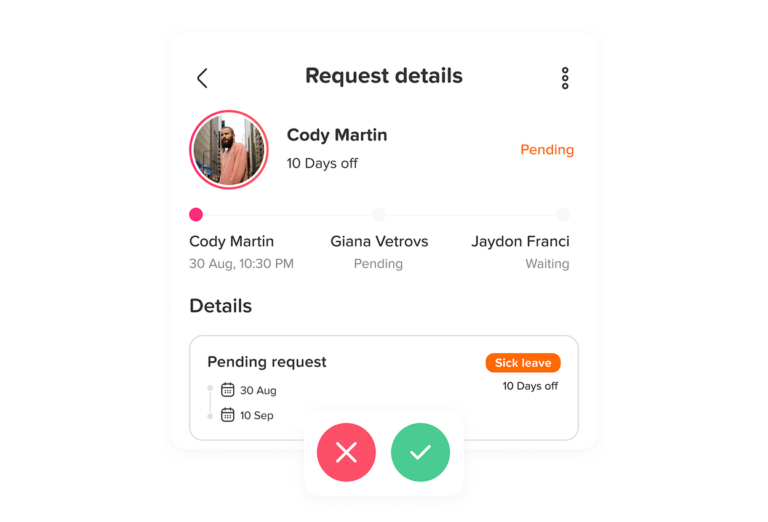
Managers can receive notifications when a new request is submitted. They can review the request, check team availability, and approve or reject it quickly.
Day Off also supports flexible approval workflows, including multi-level approvals. This is useful for companies where leave requests need to be reviewed by more than one person, such as a direct manager, department head, or HR administrator.
A structured approval workflow helps companies:
- Avoid missed requests
- Reduce approval delays
- Maintain accountability
- Ensure the right people review requests
- Keep leave records accurate
This is especially helpful for larger companies, multi-department organizations, and teams with more complex reporting structures.
Real-Time Leave Balances
Employees should not need to contact HR every time they want to know how many leave days they have left.
Day Off provides real-time leave balance tracking, allowing employees to check their available balance directly. This improves transparency and reduces repetitive HR questions.
For HR teams, automatic balance tracking helps reduce manual calculations and errors. Instead of updating spreadsheets every time someone takes leave, Day Off keeps balances updated based on company policies and approved requests.
Real-time balances are useful for tracking:
- Annual leave
- Vacation leave
- Sick leave
- Personal leave
- Emergency leave
- Unpaid leave
- Custom leave types
Accurate balances help employees plan time off confidently and help HR teams maintain cleaner records.
Custom Leave Types
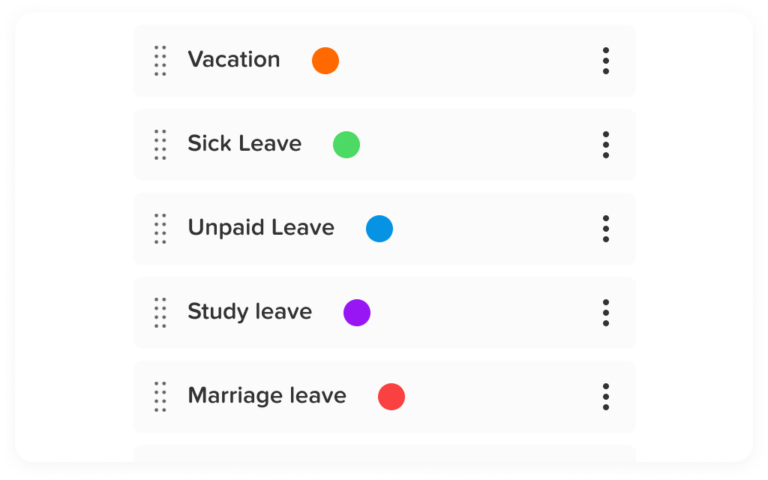
Every company manages leave differently. Some businesses only track vacation and sick leave, while others manage several categories such as personal leave, maternity leave, paternity leave, unpaid leave, emergency leave, study leave, compensatory time off, or custom internal leave types.
Day Off supports multiple leave types, allowing companies to create a leave structure that matches their policies.
This flexibility is important because a one-size-fits-all approach does not work for every organization. Different countries, departments, contracts, and employee groups may require different leave categories.
With custom leave types, companies can build a more accurate and organized leave management process.
Custom Leave Policies
Leave policies define how employees earn, use, and carry over their time off. Managing these policies manually can become complicated, especially when companies have different rules for different employee groups.
Day Off supports custom leave policies so companies can manage PTO in a way that reflects their internal rules.
Policies may include:
- Annual allocations
- Accrual-based leave
- Monthly accruals
- Weekly or biweekly accruals
- Carryover rules
- Carryover limits
- Carryover expiry
- Different balances for different employees
- Different policies by location or team
This is especially useful for companies operating across multiple locations or countries. Instead of forcing every employee into the same leave setup, Day Off allows businesses to create policies that reflect real workforce needs.
Accrual and Carryover Management
PTO accrual can be difficult to manage manually. Some employees receive their full balance at the start of the year, while others earn time off gradually based on months worked, pay periods, or employment anniversaries.
Day Off helps companies manage accrual-based leave more accurately.
The platform can support different accrual structures, helping HR teams reduce manual calculations and avoid balance errors.
Carryover is another common challenge. Some companies allow employees to carry unused PTO into the next year, while others set limits or expiration dates.
Day Off helps businesses manage carryover rules so unused leave is handled consistently.
This helps prevent confusion around:
- How much PTO employees can carry forward
- When carried over leave expires
- Which leave types allow carryover
- How balances update after a reset period
By automating accrual and carryover management, Day Off reduces administrative work and improves accuracy.
Flexible Leave Type Resets
- Multiple leave types
- Different employee groups
- Location-based policies
- Anniversary-based leave rules
- Complex internal leave structures
This feature helps businesses manage leave in a way that reflects their actual policies rather than forcing manual workarounds.
Multi-Location Support
Companies with multiple offices, branches, countries, or facilities often need different leave settings for different locations.
A public holiday in one location may not apply to another. A leave policy in one country may be different from another. A manager in one branch may need visibility only over their own team.
Day Off supports multi-location leave management, helping companies organize employees by location and apply the right rules where needed.
This is useful for:
- International companies
- Remote-first teams
- Businesses with multiple branches
- Companies with different regional holidays
- Organizations with location-specific leave policies
Multi-location support helps keep leave management organized as companies grow.
Teams and Departments
A PTO tracker should make it easy to organize employees by team, department, or group.
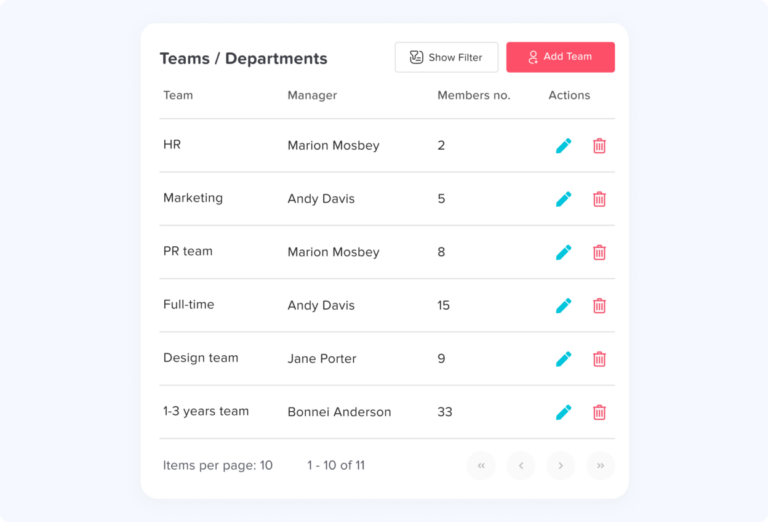
Day Off allows companies to structure employees into teams and departments, making it easier to manage approval workflows, calendars, reporting, and visibility.
For example, a marketing manager may only need to approve leave for the marketing team, while an operations manager may need visibility into several shift-based teams. HR may need a company-wide view across all departments.
Organizing employees into teams helps create a cleaner workflow and better reporting structure.
Work Schedules
Employee leave tracking becomes more accurate when the system understands work schedules.
Not every employee works Monday to Friday. Some employees work fixed hours, flexible hours, part-time schedules, or rotating shifts. If a PTO tracker does not account for work schedules, leave balances and absence records can become inaccurate.
Day Off supports work schedules, helping companies calculate leave based on how employees actually work.
This is useful for:
- Full-time employees
- Part-time employees
- Flexible-hour teams
- Shift-based teams
- Rotating schedules
- Companies with different working days by location
Work schedule support helps ensure that leave calculations are more accurate and aligned with each employee’s real availability.
Shift Planner
For shift-based businesses, leave management and shift planning are closely connected. When employees request PTO, managers need to understand how that absence affects coverage.
Day Off includes shift planning capabilities that help companies manage employee availability alongside scheduling needs.
This is especially helpful for industries such as:
- Healthcare
- Manufacturing
- Retail
- Hospitality
- Customer support
- Field service
- Operations teams
By connecting leave visibility with scheduling, managers can reduce coverage gaps and plan more effectively.
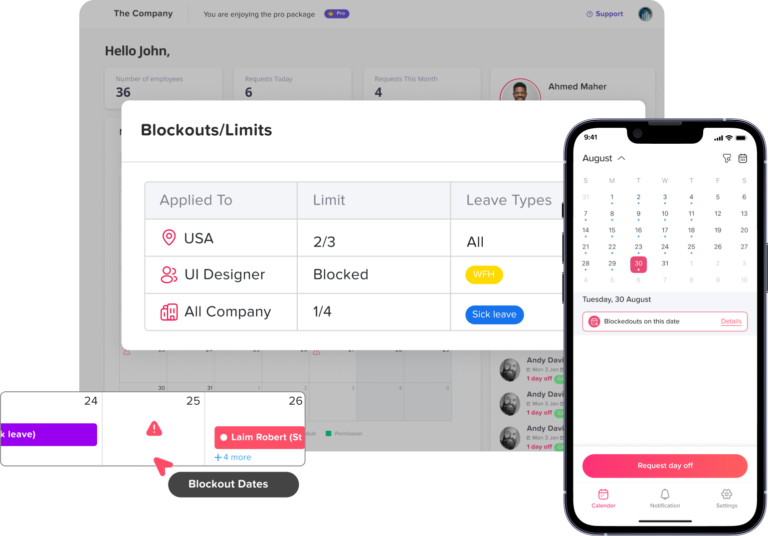
Blockout Dates
Some periods are too important for companies to allow too many employees to take time off. These may include peak seasons, financial closing periods, product launches, holiday rush periods, inventory periods, or major operational events.
Day Off supports blockout dates, allowing companies to restrict or control leave requests during critical periods.
This helps businesses maintain coverage when they need it most.
Blockout dates are useful for:
- Retail holiday seasons
- Manufacturing production peaks
- Accounting closing periods
- Customer support high-volume periods
- Project deadlines
- Company-wide events
By setting blockout periods, companies can reduce staffing risks and avoid last-minute disruptions.
Reports and Analytics
A PTO tracker should help HR teams understand leave trends, not just record requests.
Day Off provides reports and analytics that help companies monitor employee leave activity, balances, team availability, and absence trends.
Reports can help answer important questions such as:
- How much leave has each employee used?
- Which teams have the highest absence rates?
- How much PTO liability does the company have?
- Who has upcoming leave?
- Which leave types are used most often?
- Are there patterns in employee absences?
These insights help HR teams and managers make better workforce decisions.
Instead of manually preparing reports from spreadsheets, Day Off gives companies easier access to leave data.
Dashboard Calendar
Day Off includes a dashboard calendar that gives administrators and managers a quick view of employee time off.
This helps decision-makers understand upcoming absences without searching through individual employee records. The dashboard calendar gives a clear overview of leave activity across the organization.
For busy managers, this is especially valuable. They can quickly see who is away, what requests are pending, and whether there are any potential coverage issues.
Mobile App and Web App
Modern teams need access to leave management from anywhere.
Day Off is available on mobile and web, making it easy for employees, managers, and HR teams to manage leave whether they are in the office, working remotely, traveling, or on the production floor.
Employees can use the mobile app to:
- Submit leave requests
- Check leave balances
- View request status
- See team availability
- Receive notifications
Managers can use Day Off to:
- Review requests
- Approve or reject leave
- Check calendars
- Monitor team availability
- Stay updated through notifications
HR teams can use the web app to:
- Manage employees
- Set policies
- Configure locations
- Review reports
- Adjust balances
- Manage company-wide leave settings
This flexibility makes Day Off suitable for different types of workplaces, from small businesses to larger organizations.
Bulk Actions
As companies grow, HR teams need faster ways to manage employee records and settings.
Day Off supports bulk actions, helping administrators update multiple employees at once instead of repeating the same action manually for each person.
Bulk actions can help with tasks such as:
- Assigning employees to teams
- Applying policies
- Setting locations
- Changing approvers
- Adding days off
- Managing employee records more efficiently
This feature saves time for HR teams and reduces repetitive administrative work.
Announcements
Leave management is closely connected to communication. Employees need to know about policy updates, holidays, changes in procedures, or company-wide notices.
Day Off includes announcements that allow companies to share updates with employees, teams, or locations.
This helps HR teams communicate important information directly through the platform, keeping employees informed and reducing scattered communication.
Roles and Permissions
Not every employee should have the same level of access to leave data.
Day Off supports roles and permissions, helping companies control who can view, approve, manage, or edit leave information.
For example:
- Employees can request leave and view their own balances.
- Managers can review requests for their teams.
- HR administrators can manage policies and reports.
- Company admins can configure organization-wide settings.
Role-based access helps protect sensitive information while giving each user the tools they need.
SSO and Security
As companies grow, secure access becomes more important.
Day Off supports Single Sign-On, helping organizations simplify login access and improve security. SSO is especially useful for larger teams and companies that want employees to access systems through approved identity providers.
Security-focused features such as role-based permissions and SSO help companies manage leave data more responsibly and reduce access-related risks.
API Access
Some companies need to connect their leave management system with internal tools, HR systems, payroll platforms, or custom workflows.
Day Off supports API access, allowing businesses to extend the platform and connect leave data with other systems where needed.
This is useful for companies with more advanced operational requirements or custom software environments.
Why Day Off Is More Than a Calendar Integration Tool
Calendar integration is important, but it is only one part of effective leave management.
A calendar can show who is off, but it does not manage balances, approvals, policies, accruals, carryover, reports, permissions, or employee records by itself.
That is why companies need a dedicated PTO tracker.
Day Off combines calendar visibility with complete leave management features. It helps companies manage the full PTO process from request to approval to reporting.
This means businesses do not need to depend on spreadsheets, manual calendar updates, or disconnected approval messages. Everything is handled in one organized system.
Frequently Asked Questions
What is a PTO tracker with calendar integration?
A PTO tracker with calendar integration is software that helps companies manage employee time off while syncing approved absences with calendar tools such as Google Calendar or Microsoft Outlook. It helps teams see who is off, avoid scheduling conflicts, and manage leave more efficiently.
Why is calendar integration important for PTO tracking?
Calendar integration is important because it makes employee absences visible in the tools teams already use for planning. This helps managers avoid scheduling conflicts, prevents missed updates, and reduces the need for manual calendar entries.
Does Day Off integrate with Google Calendar?
Yes. Day Off supports Google Calendar integration, helping teams keep approved leave visible alongside meetings, holidays, and other work events.
Does Day Off integrate with Outlook Calendar?
Yes. Day Off supports Microsoft Outlook calendar integration, making it easier for companies using Microsoft tools to track employee availability and approved time off.
Can Day Off send leave notifications through Slack?
Yes. Day Off integrates with Slack so teams can receive leave-related notifications and updates inside their communication workspace.
Can Day Off work with Microsoft Teams?
Yes. Day Off integrates with Microsoft Teams, helping employees and managers stay updated on leave requests, approvals, and absence activity.
Can employees request PTO from their phones?
Yes. Day Off is available on mobile, allowing employees to submit leave requests, check balances, and view request status from their smartphones.
Can Day Off handle different leave types?
Yes. Day Off supports multiple leave types, including vacation leave, sick leave, personal leave, unpaid leave, and custom leave types based on company needs.
Can Day Off manage PTO accrual and carryover?
Yes. Day Off supports accrual-based leave policies and carryover rules, helping companies manage employee balances more accurately.
Is Day Off suitable for remote and hybrid teams?
Yes. Day Off is suitable for remote, hybrid, and in-office teams because it provides web access, mobile access, shared calendars, real-time updates, and integrations with tools like Slack, Microsoft Teams, Google Calendar, and Outlook.
Final Thoughts
A PTO tracker with calendar integration helps companies manage employee time off with more clarity, accuracy, and efficiency.
Instead of tracking requests in spreadsheets and manually updating calendars, businesses can use a connected platform that keeps leave requests, approvals, balances, policies, and calendars aligned.
Day Off gives companies a simple and powerful way to manage PTO. With Google Calendar and Outlook integration, Slack and Microsoft Teams notifications, shared team calendars, mobile access, real-time balances, custom policies, reports, roles, SSO, API access, and more, Day Off helps businesses build a smoother leave management process.
For employees, it makes requesting time off easier. For managers, it improves visibility and planning. For HR teams, it reduces manual work and improves accuracy.
If your company wants to stop managing PTO across spreadsheets, emails, chat messages, and disconnected calendars, Day Off provides a smarter way to keep employee leave organized and visible.