







Learning how to keep track of employee days off in one place is important for any business that wants better visibility, fewer scheduling mistakes, and a smoother leave management process. When employee days off are tracked through emails, spreadsheets, chat messages, paper forms, and separate calendars, it becomes difficult for managers and HR teams to know who is available, who is on leave, and whether there is enough coverage for daily work.
Employee days off can include vacation leave, sick leave, unpaid leave, personal days, public holidays, maternity or paternity leave, half days, remote days, and other types of approved time away from work. If these records are not organized clearly, businesses may face overlapping leave, missed approvals, payroll errors, and confusion around employee availability.

A single place for tracking days off gives everyone a clearer view. Managers can plan schedules with confidence. HR teams can keep accurate records. Employees can check their leave balances and request time off without sending repeated follow-up messages.
In this article, we will explain why tracking employee days off in one place matters, what information should be included, which manual methods cause problems, and how a PTO tracking system like Day Off can help businesses manage time off more easily.
Why Tracking Employee Days Off Matters
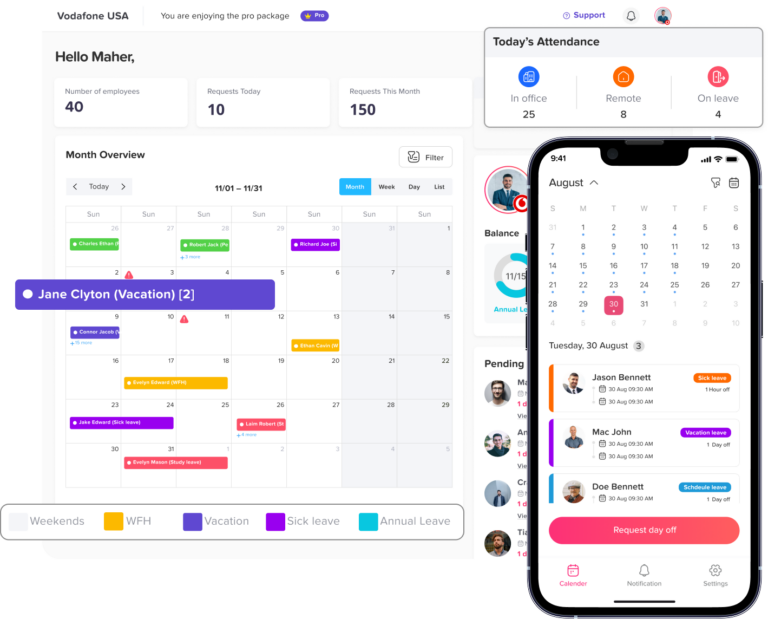
Employee time off is part of normal business operations. People take vacations, get sick, attend personal appointments, observe public holidays, or need unpaid time away from work. The challenge is not the leave itself. The real challenge is keeping that information visible and accurate.
When days off are not tracked properly, managers may schedule employees who are unavailable. HR teams may approve too many requests for the same period. Payroll may not know whether an absence should be paid or unpaid. Employees may be unsure how many days they have left.
A clear tracking process helps businesses answer simple but important questions:
- Who is off today?
- Who is working this week?
- How many vacation days does each employee have left?
- Are there overlapping leave requests?
- Did a manager approve the time off?
- Should the absence be paid or unpaid?
- Are public holidays already included in the calendar?
- Is there enough team coverage during busy periods?
Without one reliable source of information, these questions become harder to answer.
Common Problems When Employee Days Off Are Tracked Manually
Many businesses start by tracking employee days off manually. This may work for a very small team, but it usually becomes harder as the company grows.
Manual tracking often depends on spreadsheets, email requests, paper forms, shared calendars, or direct messages. These tools can be useful for basic communication, but they are not always reliable for managing leave records.
Leave Requests Get Lost
When employees request time off through email or chat, messages can easily be missed. A manager may forget to reply. HR may not be copied. An approved request may not be added to the calendar.
This creates confusion because the employee may think the request is approved, while the manager may not remember confirming it.
Spreadsheets Become Outdated
Spreadsheets are common for tracking PTO and days off, but they depend on manual updates. If one person forgets to update the file, the information becomes incorrect.
Old spreadsheet versions can also cause problems. Different managers may use different copies, which means the team may not be working from the same information.
Overlapping Leave Is Hard to Notice
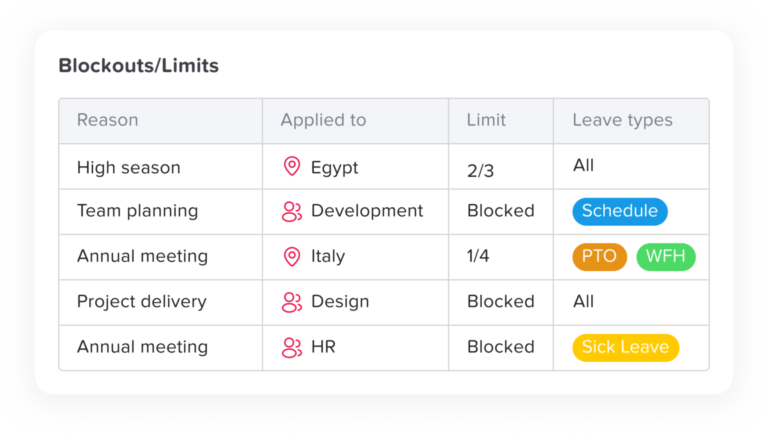
When leave requests are handled separately, managers may not notice that several employees are asking for the same dates off. This can lead to understaffing, missed deadlines, and pressure on the remaining team members.
A shared calendar makes overlaps easier to see before requests are approved.
Payroll Mistakes Become More Likely
Different types of days off may affect payroll differently. Vacation leave may be paid. Sick leave may follow a specific company policy. Unpaid leave should not be paid. Public holidays may have separate rules.
If all days off are mixed together or tracked manually, payroll teams may need extra time to check records and correct mistakes.
Employees Keep Asking for Their Balances
When employees cannot see their remaining leave balance, they often ask HR or managers for updates. This creates repeated work for HR teams and slows down the leave request process.
A clear PTO tracking system allows employees to check their own balances before submitting requests.
What Should Be Tracked in One Place?
To manage employee days off properly, businesses should track more than just the date of absence. A complete record gives managers and HR teams the context they need.
Employee Name
Every day off should be connected to the right employee. This sounds simple, but mistakes can happen when records are handled manually, especially in larger teams.
Leave Type
The system should show the type of day off, such as vacation, sick leave, unpaid leave, personal leave, public holiday, or maternity leave. This helps HR understand why the employee is away and how the absence should be handled.
Start Date and End Date
Each request should include clear dates. If the employee is taking more than one day off, the full period should be visible.
Full Day or Half Day
Some employees may take a full day off, while others may request a half day. This should be recorded clearly because it affects leave balances, schedules, and payroll.
Approval Status
The record should show whether the request is pending, approved, rejected, or canceled. This helps managers avoid treating pending requests as confirmed time off.
Leave Balance
Employees and managers should be able to see how many days are available before and after a request is approved.
Public Holidays
Public holidays should be visible in the same calendar. This helps prevent employees from requesting PTO on days that are already company holidays.
Team and Location
For businesses with multiple teams, departments, branches, or countries, days off should be connected to the employee’s team and location. This makes filtering and planning much easier.
The Best Way to Keep Track of Employee Days Off
The best way to keep track of employee days off is to use one shared system that combines leave requests, approvals, PTO balances, public holidays, and team availability in a single calendar.
Instead of depending on separate tools, businesses should create one source of truth for all time off information.
A good process usually includes:
- A clear way for employees to request time off
- A manager approval workflow
- Automatic balance updates
- A shared leave calendar
- Public holiday tracking
- Team and location filters
- Reports for HR and payroll
- Employee self-service access
This helps reduce manual work and keeps everyone aligned.
Why a Shared Leave Calendar Is Important
A shared leave calendar is one of the most useful tools for tracking employee days off. It gives managers and employees a visual view of who is away and when.
With a shared calendar, managers can quickly check availability before approving requests, assigning tasks, scheduling meetings, or planning shifts.
For example, if two employees from the same team are already off next Friday, the manager can review whether a third leave request should be approved or moved to another date.
A shared calendar also helps employees make better decisions. Before requesting vacation, they can see whether other team members are already away during the same period.
Employee Days Off Tracking: Manual vs. Software
Manual Tracking vs PTO Tracking Software
| Area | Manual Tracking | PTO Tracking Software |
|---|---|---|
| Leave requests | Emails, chats, or paper forms | Submitted in one system |
| Approval status | Hard to track | Clear pending, approved, or rejected status |
| Leave balances | Updated manually | Updated automatically |
| Team availability | Requires checking multiple sources | Visible in a shared calendar |
| Public holidays | Usually tracked separately | Added to the same calendar |
| Payroll review | More manual checking | Easier to review reports |
| Overlapping leave | Easy to miss | Easier to notice |
| Employee self-service | Limited | Employees can check balances and requests |
| Accuracy | Depends on manual updates | More organized and reliable |
Manual tracking can work for a small team for a short time, but it often becomes difficult as the number of employees, leave types, and approval steps increases.
Steps to Keep Track of Employee Days Off in One Place
List All Leave Types
Start by defining the types of days off your company allows. Common examples include:
- Vacation leave
- Sick leave
- Unpaid leave
- Personal leave
- Public holidays
- Half days
- Maternity leave
- Paternity leave
- Bereavement leave
- Compensatory time off
Clear leave types help employees choose the right option and help HR keep better records.
Create a Clear Leave Policy
A leave policy explains how employees can request time off, how much leave they receive, who approves requests, and what happens if they take unpaid leave or sick leave.
Your policy should answer questions such as:
- How many days off does each employee get?
- When does the leave balance reset?
- Can unused leave carry over?
- How far in advance should vacation be requested?
- What happens if multiple employees request the same dates?
- Who approves time off?
- Are half days allowed?
A clear policy reduces confusion and helps managers make fair decisions.
Use One Central Calendar
All approved days off should appear in one central calendar. This calendar should include employee leave, public holidays, and other important availability information.
The calendar should be easy to filter by team, location, department, or leave type. This helps managers focus only on the information they need.
Set Up Approval Workflows
Leave requests should not depend on informal messages. A proper approval workflow ensures every request is reviewed and recorded.
For example, an employee submits a request, the manager receives a notification, the manager approves or rejects it, and the calendar updates automatically.
This creates a clear record and reduces the chance of missed requests.
Keep Leave Balances Updated
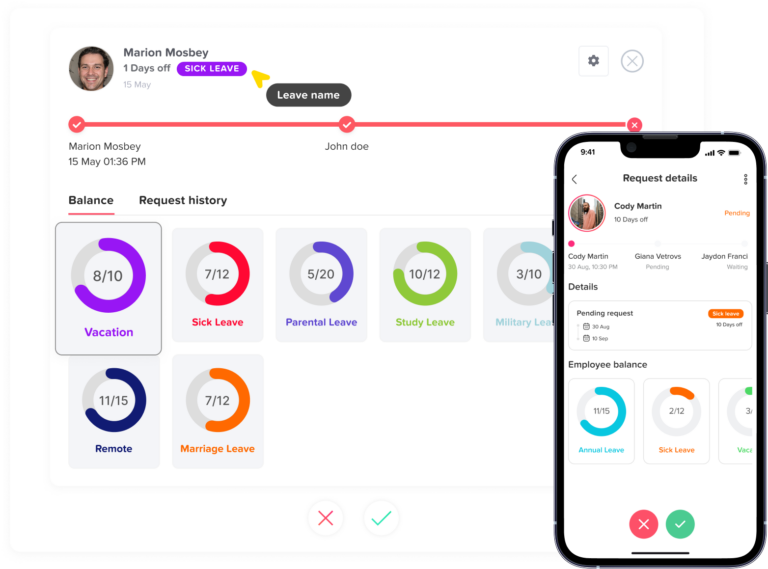
Leave balances should update automatically after approval. This helps employees know how many days they have left and helps managers review requests quickly.
If balances are updated manually, mistakes can happen easily, especially when employees take half days, unpaid leave, or different types of leave.
Include Public Holidays
Public holidays should be added to the same system used for employee days off. This is especially important for companies with employees in different countries, states, or locations.
When holidays are visible, managers can avoid scheduling mistakes and employees can see which days are already considered non-working days.
Review Team Coverage Before Approval
Before approving time off, managers should check whether the team will still have enough coverage.
This is important for:
- Customer support teams
- Sales teams
- Retail stores
- Restaurants
- Operations teams
- Remote teams
- Project-based teams
- Small businesses
A shared calendar makes this review easier because managers can see who is already away.
Use Reports for HR and Payroll
Reports help HR teams review leave usage, remaining balances, unpaid leave, sick leave, and employee absence patterns.
Payroll teams can also use reports to confirm whether days off should be paid or unpaid. This helps reduce errors and saves time at the end of the month.
Benefits of Tracking Employee Days Off in One Place
Better Visibility
Managers can see who is working and who is away without checking several tools. This makes planning easier and reduces confusion.
Fewer Mistakes
When requests, balances, approvals, and calendars are connected, there is less room for manual errors.
Faster Approvals
Managers can review requests quickly because they can see employee balances and team availability in one place.
Better Employee Experience
Employees can submit requests, check balances, and view approved days off without waiting for HR to respond manually.
Easier Payroll Preparation
HR and payroll teams can review leave records more easily when all days off are organized in one system.
Stronger Team Planning
Managers can plan projects, shifts, meetings, and deadlines around real employee availability.
Who Needs a Central System for Employee Days Off?
A central system is useful for almost every business, but it becomes especially important when a company has:
- More than one team
- Remote or hybrid employees
- Multiple locations
- Shift-based workers
- Flexible work schedules
- Part-time employees
- Frequent PTO requests
- Public holidays in different regions
- A growing workforce
- HR teams spending too much time on manual tracking
As teams grow, informal tracking becomes harder to manage. A central system helps keep the process organized.
How Day Off Helps You Track Employee Days Off
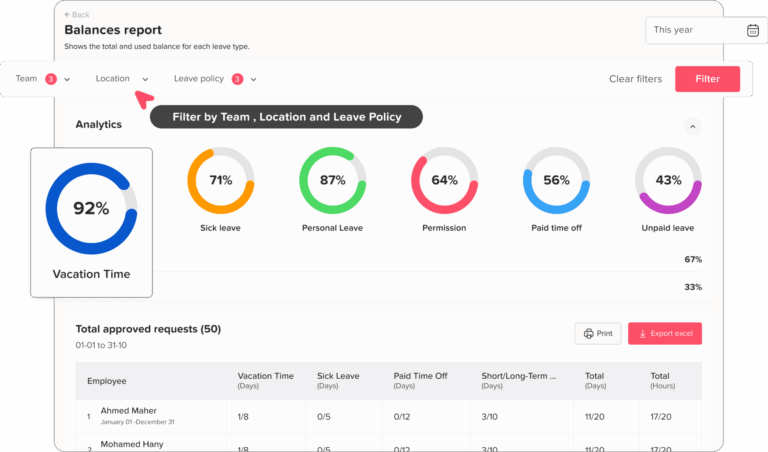
Day Off helps businesses manage employee days off in one place. Instead of using spreadsheets, emails, and separate calendars, teams can use Day Off to track PTO, sick leave, unpaid leave, public holidays, leave balances, approvals, and employee availability from one platform.
Employees can request time off easily, managers can approve or reject requests, and HR teams can keep accurate records without manual follow-ups. Approved leave appears in a shared calendar, helping everyone understand who is working and who is away.
Day Off also supports teams, locations, leave policies, public holidays, reports, and integrations with tools like Slack, Microsoft Teams, Google Calendar, and Outlook Calendar. This helps businesses keep leave information visible where teams already work.
For companies that also need attendance and work-hour tracking, Day Off can help connect time off with schedules and employee availability, giving managers a clearer view of workforce planning.
FAQs About Tracking Employee Days Off
What is the best way to track employee days off?
The best way to track employee days off is to use one system that includes leave requests, approval workflows, PTO balances, public holidays, and a shared leave calendar.
Can I track employee days off in Excel?
Yes, you can track employee days off in Excel, but it can become difficult as your team grows. Spreadsheets require manual updates and can lead to mistakes if they are not maintained carefully.
Why should employee days off be tracked in one place?
Tracking employee days off in one place improves visibility, reduces scheduling conflicts, keeps leave balances accurate, and helps managers plan around employee availability.
What types of days off should be tracked?
Businesses should track vacation leave, sick leave, unpaid leave, personal leave, public holidays, half days, maternity leave, paternity leave, and any other leave types included in the company policy.
How does a shared leave calendar help managers?
A shared leave calendar helps managers see who is off, who is working, and whether there is enough coverage before approving requests or planning work schedules.
How can Day Off help with tracking employee days off?
Day Off helps teams manage PTO, leave requests, approvals, balances, public holidays, reports, and employee availability in one place, making it easier to keep work and leave visible.
Final Thoughts
Keeping track of employee days off in one place is one of the simplest ways to improve team planning, reduce HR workload, and avoid scheduling mistakes.
When leave requests, PTO balances, public holidays, approvals, and calendars are managed separately, important details can easily be missed. But when everything is organized in one system, managers can plan with confidence, employees can understand their time off clearly, and HR teams can maintain accurate records.
A central employee days off tracker gives your business one reliable view of who is working, who is away, and how much leave each employee has left. This makes daily operations smoother and helps teams stay organized as they grow.