







An employee schedule calendar helps businesses see who is working, who is off, who is on leave, and who is scheduled for each shift. Instead of checking separate spreadsheets, emails, chat messages, and leave requests, managers can use one calendar to understand team availability clearly.
For many companies, scheduling becomes difficult when work hours and leave are managed separately. A manager may also create a weekly work schedule without knowing that an employee has approved vacation. HR may approve sick leave without realizing it creates a gap in shift coverage. Payroll may also receive attendance records that do not match approved time off. These problems usually happen when teams do not have one shared view of work and leave.

A clear employee schedule calendar solves this problem by bringing work schedules, PTO, sick leave, unpaid leave, public holidays, absences, and employee availability into one organized view. It helps managers plan better, reduces confusion, and gives employees more transparency about their own schedules.
In this article, we will also explain what an employee schedule calendar is, why it matters, what it should include, and how businesses can use it to keep work and leave visible.
What Is an Employee Schedule Calendar?
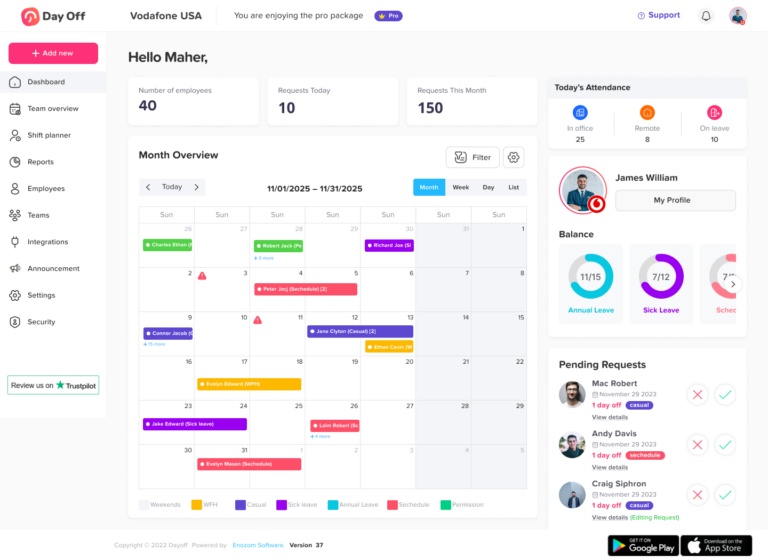
An employee schedule calendar is a shared calendar that shows employee work schedules and time off in one place. It can also include regular working days, shifts, flexible schedules, approved leave, public holidays, remote work days, absences, and other availability details.
The goal is simple: everyone who needs schedule information should also be able to see it clearly.
For managers, the calendar helps answer questions such as:
- Who is working today?
- Who is on vacation?
- Who is on sick leave?
- Which employees are scheduled for this shift?
- Are there overlapping leave requests?
- Is the team short-staffed on a specific day?
- Are public holidays already included in the schedule?
For employees, the calendar helps them understand their own schedule, see approved leave, and avoid requesting time off during busy or blocked periods.
Why Work Schedules and Leave Should Be Managed Together
Many businesses manage employee schedules in one tool and leave requests in another. For example, the work schedule may be in a spreadsheet, PTO requests may be sent by email, public holidays may be listed in a separate document, and attendance may be tracked somewhere else.
This creates gaps in visibility.
When work schedules and leave are separated, managers may not know the full picture before making decisions. An employee may also appear available on the work schedule, even though they already have approved leave. A shift may look fully covered, but one person may be away on sick leave. HR may approve leave without seeing whether enough employees are still available.
Managing work and leave together helps prevent these issues. It connects planning with real availability.
Common Problems When Work and Leave Are Not Visible
Poor schedule visibility can affect daily operations, employee experience, payroll accuracy, and team planning. Even small mistakes can create bigger problems when they happen often.
| Problem | What Can Happen |
|---|---|
| Leave is tracked separately from schedules | Managers may schedule employees who are already off |
| Public holidays are not added to the calendar | Employees may be scheduled by mistake |
| PTO requests are handled through email | Requests can be missed or forgotten |
| Employees do not see team availability | More overlapping leave requests may happen |
| Schedules are updated manually | Old versions can cause confusion |
| Managers do not see absences in real time | Shift coverage becomes harder |
| Payroll and attendance are disconnected | Paid and unpaid time may be recorded incorrectly |
A good employee schedule calendar helps reduce these problems by keeping schedule and leave information visible to the right people.
What an Employee Schedule Calendar Should Include
A useful employee schedule calendar should do more than show working days. It should also give managers and employees a complete view of availability.
Here are the most important details to include.
Work Schedules
The calendar should show when employees are expected to work. This may also include fixed schedules, flexible hours, rotating shifts, part-time schedules, or custom work patterns.
For example, some employees may work Monday to Friday from 9 AM to 5 PM. Others may also work flexible hours as long as they complete a required number of hours per day. Some teams may work rotating shifts that change every week.
When work schedules are visible, managers can plan workloads, meetings, coverage, and deadlines more accurately.
Approved Leave
The calendar should clearly show approved time off, including vacation leave, sick leave, personal leave, unpaid leave, maternity or paternity leave, and other company leave types.
This helps prevent scheduling conflicts. If an employee has approved leave, managers should be able to see that before assigning work or creating shifts.
Approved leave should also be easy for employees to review, so they know when their time off is confirmed.
Pending Leave Requests
Pending leave requests are important because they may affect future availability. Managers should be able to see requests that are waiting for approval before finalizing schedules.
For example, if three employees request the same week off, a manager needs to review coverage before approving all requests. A calendar view makes these overlaps easier to notice.
Public Holidays
Public holidays should be included in the employee schedule calendar, especially for teams working across different countries, states, or locations.
Without public holidays in the calendar, managers may also accidentally schedule employees on non-working days. For companies with global teams, holiday visibility is even more important because employees in different locations may follow different holiday calendars.
Employee Availability
Availability is not only about whether someone is working or off. It can also include remote work days, office days, part-time availability, blocked days, and working preferences.
A clear calendar gives managers a better understanding of who is available for meetings, projects, shifts, or urgent tasks.
Absences and Attendance Notes
Sometimes employees are absent without planned leave. The calendar should also make it easy to record and review absences, late arrivals, missed shifts, and attendance notes.
This helps HR and managers keep accurate records and understand patterns over time.
Teams, Departments, and Locations
For larger companies, the calendar should allow filtering by team, department, location, or branch. A company-wide calendar can also become difficult to read if every employee appears at once.
Filters help managers focus only on the people they are responsible for. For example, a sales manager may only need to see the sales team, while HR may need a full company view.
Benefits of Using an Employee Schedule Calendar
An employee schedule calendar improves planning, communication, and accuracy. It helps teams move away from scattered updates and gives everyone one reliable place to check schedule information.
Better Team Visibility
Managers can quickly see who is working and who is away. This makes daily planning easier, especially for remote, hybrid, and shift-based teams.
Instead of asking employees one by one or checking multiple documents, managers can open the calendar and get a clear view of availability.
Fewer Scheduling Conflicts
Scheduling conflicts happen when employees are assigned work while they are unavailable. This can happen because of approved leave, public holidays, sick leave, or overlapping PTO requests.
A shared employee schedule calendar helps managers catch conflicts before they become problems.
Easier PTO Planning
Employees often want to know whether other team members are already off before requesting leave. If the calendar shows approved leave and availability, employees can also choose better dates and avoid busy periods.
This is especially useful during holidays, summer vacations, end-of-year periods, and other times when many employees may request time off.
Improved Shift Coverage
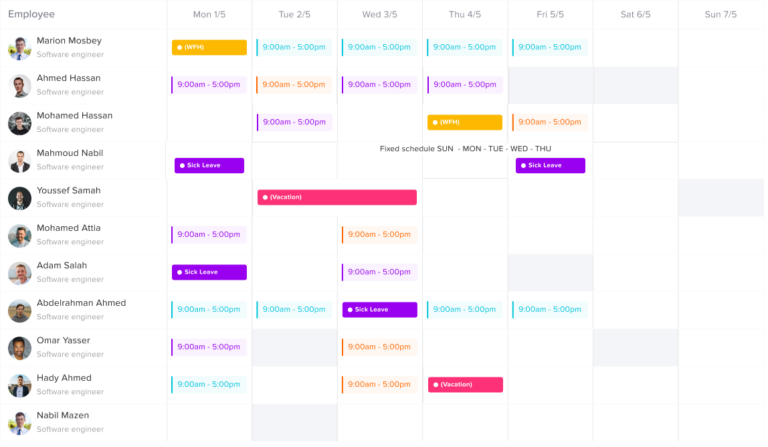
For businesses that depend on shift coverage, visibility is essential. Restaurants, retail stores, healthcare teams, support teams, and service businesses need to know whether each shift has enough people.
A schedule calendar helps managers see staffing gaps early and adjust schedules before operations are affected.
More Accurate Payroll Support
Payroll can become complicated when working hours, leave, unpaid leave, overtime, absences, and holidays are tracked separately.
When schedule and leave data are organized, HR and payroll teams can review records more easily. This helps reduce mistakes such as paying for unpaid leave, missing approved PTO, or misreading an absence as a working day.
Clearer Communication
Employees should not have to ask several people to know when they are working or whether their leave was approved. A shared calendar creates one source of truth.
This reduces repeated questions, email follow-ups, and misunderstandings between employees, managers, and HR.
Employee Schedule Calendar vs. Regular Calendar
A regular calendar can show events, meetings, or reminders. However, an employee schedule calendar is designed specifically for workforce planning.
| Feature | Regular Calendar | Employee Schedule Calendar |
|---|---|---|
| Shows meetings | Yes | Sometimes |
| Shows employee shifts | Limited | Yes |
| Shows PTO and leave | Manual | Yes |
| Shows public holidays by location | Limited | Yes |
| Shows team availability | Limited | Yes |
| Supports approval workflows | No | Yes |
| Helps prevent overlapping leave | Manual | Yes |
| Supports HR reporting | No | Yes |
| Connects schedules with attendance | Usually no | Yes, if included |
A regular calendar may work for a very small team, but as a business grows, it usually becomes harder to manage work schedules and leave manually.
How to Set Up an Employee Schedule Calendar
Creating an effective employee schedule calendar requires more than adding names to a calendar. The system should also reflect how the company actually works.
Define Work Schedule Types
Start by identifying the schedule types used in your company. Common examples include:
- Fixed work schedules
- Flexible work schedules
- Rotating shifts
- Part-time schedules
- Remote or hybrid schedules
- Custom schedules by team or location
This helps ensure that the calendar matches real working patterns.
Add Leave Types
Next, add the leave types your company uses. These may include:
- Vacation leave
- Sick leave
- Personal leave
- Unpaid leave
- Maternity leave
- Paternity leave
- Bereavement leave
- Public holidays
- Compensatory time off
Each leave type should be clear, so employees and managers understand how it affects availability and payroll.
Set Approval Rules
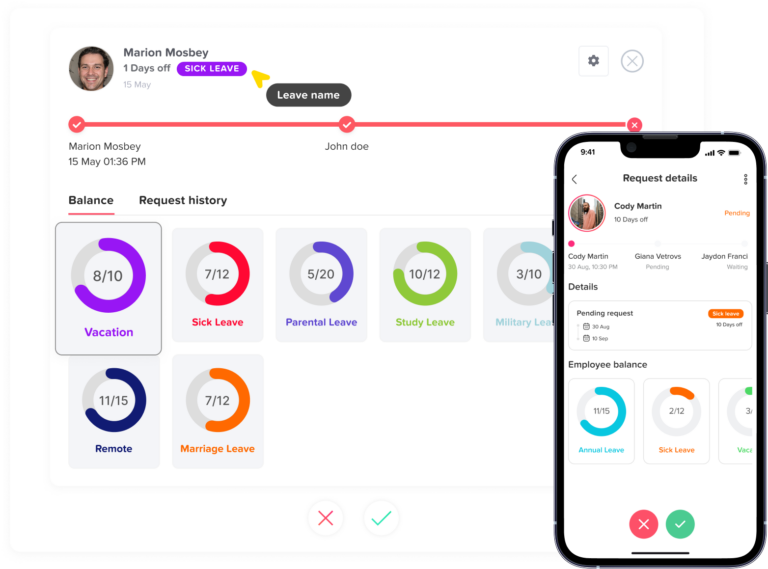
Leave requests should follow a clear approval process. Some companies require one manager approval, while others may need approval from both a direct manager and HR.
Approval rules help ensure that leave is reviewed properly before it appears as confirmed time off on the calendar.
Add Public Holidays
Public holidays should be added based on country, state, branch, or employee location. This is important for companies with employees in different regions.
A public holiday in one country may also be a normal working day in another. Location-based holiday calendars help avoid mistakes.
Use Team and Location Filters
If the calendar includes many employees, filters are important. Managers should also be able to view only their team, department, location, or branch.
This makes the calendar easier to read and more useful for daily planning.
Keep the Calendar Updated
An employee schedule calendar is only useful if it stays updated. Approved leave, schedule changes, holidays, absences, and shift updates should also appear quickly.
When updates are delayed, employees may lose trust in the calendar and return to asking managers manually.
Best Practices for Keeping Work and Leave Visible
A schedule calendar should be simple, clear, and reliable. These best practices can also help businesses get more value from it.
Make the Calendar Easy to Read
The calendar should not be overloaded with unnecessary details. Use clear labels, leave types, filters, and date views so managers can understand availability quickly.
Daily, weekly, and monthly views can also all be useful depending on the situation.
Use Color Coding Carefully
Color coding can make leave types easier to recognize, but too many colors can create confusion. Use consistent colors for major categories such as working days, vacation, sick leave, public holidays, and unpaid leave.
Show Only the Right Information to the Right People
Not every employee needs access to every detail. Managers may also need more visibility than employees. HR may need full company records. In addition, employees may only need to see their own schedule and basic team availability.
Role-based access helps protect privacy while keeping planning transparent.
Review Overlaps Before Approving Leave
Before approving PTO, managers should check whether other employees are already off during the same period. This is especially important for small teams, customer support, operations, and shift-based work.
A calendar view makes overlaps easier to identify.
Connect Leave Planning With Workload Planning
Leave affects deadlines, meetings, customer support, and project delivery. Managers should use the calendar when planning workloads, not only when approving time off.
This helps avoid assigning important tasks to employees who will be unavailable.
Keep Employees Informed
Employees should know where to check their schedule, how to request leave, and how schedule changes are communicated.
Clear communication reduces confusion and improves adoption.
Who Needs an Employee Schedule Calendar?
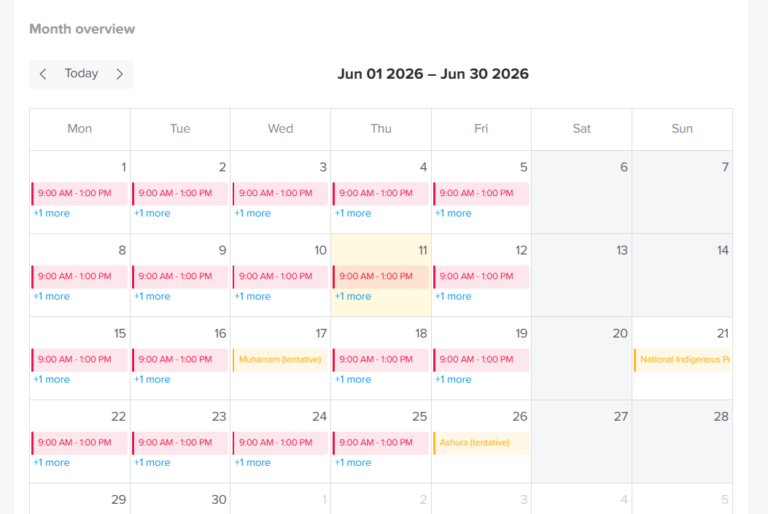
An employee schedule calendar is useful for many types of businesses, but it becomes especially important when teams grow or work in different ways.
It is helpful for:
- Small businesses that want to replace spreadsheets
- Remote and hybrid teams that need better visibility
- Companies with multiple departments
- Businesses with multiple locations or branches
- Teams with rotating shifts
- Retail stores and restaurants
- Customer support teams
- Agencies and project-based teams
- HR teams managing PTO and attendance
- Managers who need better workforce planning
Any company that needs to know who is working, who is away, and who is available can also benefit from a shared schedule calendar.
Example: How Visibility Prevents Scheduling Problems
Imagine a customer support team with eight employees. Two employees already have approved vacation next Monday. One employee works part-time and is not available in the afternoon. Another employee has a public holiday because they work in a different location.
If the manager only checks a basic work schedule, the team may also appear fully available. But in reality, coverage is limited.
With an employee schedule calendar, the manager can also see all availability details in one place. This makes it easier to adjust shifts, approve or reject new leave requests, and avoid service gaps.
Signs Your Business Needs a Better Schedule Calendar
Your current scheduling process may need improvement if:
- Managers often ask who is working today
- Employees request leave through email or chat
- PTO overlaps happen often
- Public holidays are missed in the schedule
- HR manually updates several spreadsheets
- Employees are scheduled while on approved leave
- Payroll needs extra checking every month
- Managers do not have a clear view of team availability
- Different departments use different tracking methods
These are signs that work schedules and leave data are too scattered.
How Day Off Helps Keep Work and Leave Visible
Day Off helps businesses manage PTO, leave requests, work schedules, holidays, attendance, and employee availability in one place. Instead of using separate spreadsheets, emails, and calendars, teams can use Day Off to create a clearer view of who is working and who is away.
With Day Off, companies can also manage different leave types, approve requests, track PTO balances, add public holidays, organize employees by team or location, and view leave on a shared calendar. This helps managers plan schedules with better visibility and helps employees understand their time off clearly.
For teams using work schedules and time tracking, Day Off also helps connect attendance, working hours, leave, and availability. This gives HR and managers a more complete view of employee time.
FAQs About Employee Schedule Calendars
What is an employee schedule calendar?
An employee schedule calendar is a shared calendar that shows employee work schedules, leave, PTO, holidays, absences, and availability in one place. It helps managers and HR teams plan work more clearly.
Why is an employee schedule calendar important?
It is important because it helps businesses avoid scheduling conflicts, overlapping leave, missed shifts, and confusion around employee availability. It also improves communication between employees, managers, and HR.
What should an employee schedule calendar include?
It should include work schedules, approved leave, pending leave requests, public holidays, sick leave, unpaid leave, employee availability, teams, locations, and attendance notes when needed.
Can an employee schedule calendar help with PTO planning?
Yes. A calendar makes PTO planning easier because managers can see who is already off before approving new requests. Employees can also choose better dates when they understand team availability.
Is a regular calendar enough for employee scheduling?
A regular calendar may work for a very small team, but it usually becomes limited as the business grows. An employee schedule calendar is better for managing shifts, leave requests, public holidays, approvals, and team availability.
How does Day Off help with employee schedule calendars?
Day Off helps teams manage leave requests, PTO balances, public holidays, work schedules, attendance, and employee availability in one place. This gives managers and HR teams a clearer view of work and leave.
Final Thoughts
An employee schedule calendar is more than a simple planning tool. It is an important part of workforce management. When work schedules, PTO, sick leave, public holidays, absences, and availability are visible in one place, managers can plan with more confidence and employees can understand their schedules more clearly.
Without a shared calendar, teams may also face overlapping leave, missed shifts, payroll confusion, and constant follow-ups. With the right calendar, businesses can reduce manual work, improve communication, and keep daily operations running smoothly.
For growing teams, remote teams, hybrid workplaces, and shift-based businesses, an employee schedule calendar helps create one reliable view of work and leave.