







A geofenced time attendance app helps companies confirm that employees clock in and out from the right work location. Instead of relying only on manual timesheets, paper attendance sheets, or messages from employees, geofencing uses location-based rules to make attendance tracking more accurate, organized, and easier to review.
This is especially useful for businesses with field employees, multiple branches, retail stores, construction sites, clinics, restaurants, warehouses, or teams that do not work from one fixed office every day.

When attendance is tracked manually, small problems can quickly become bigger ones. Employees may forget to clock in, managers may not know who is actually on-site, HR may spend hours checking timesheets, and payroll reports may include mistakes. A geofenced attendance system helps reduce these issues by connecting clock-in activity with approved work locations.
In this article, we’ll explain what a geofenced time attendance app is, how it works, when companies should use it, what features to look for, and how it can work alongside PTO and leave management tools like Day Off.
What Is a Geofenced Time Attendance App?
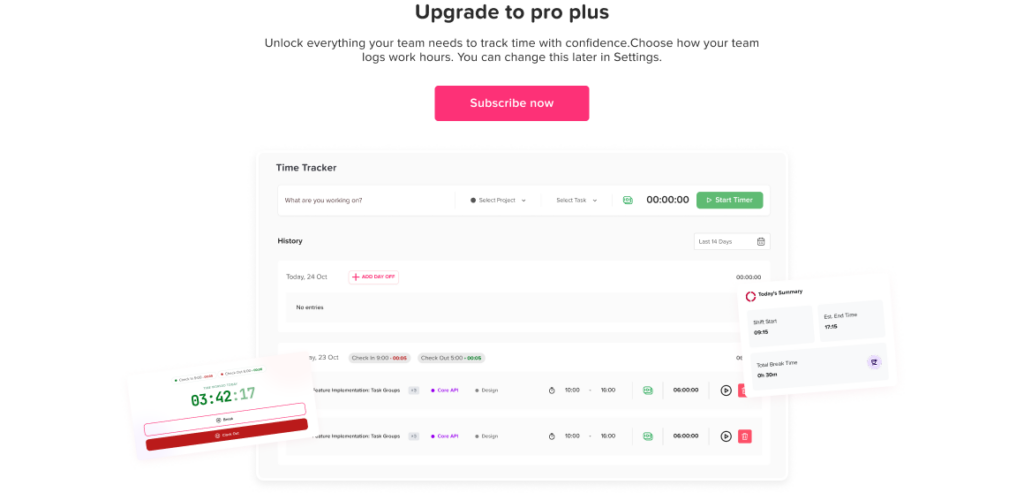
A geofenced time attendance app is an attendance tracking tool that allows employees to clock in or out only when they are within a specific approved location.
This approved area is called a geofence.
A geofence is a virtual boundary around a real place, such as:
- An office
- A store branch
- A warehouse
- A restaurant
- A job site
- A client location
- A construction area
- A clinic or medical center
- A delivery hub
When an employee opens the app to clock in, the system checks whether the employee is inside the approved location range. If they are inside the geofence, the clock-in can be accepted. If they are outside the location, the app may block the clock-in, flag it for review, or ask the employee to submit a note depending on the company’s settings.
The goal is not to monitor employees all day. The goal is to confirm that attendance records are connected to the correct work location at the time of clock-in and clock-out.
How Does Geofenced Attendance Work?
A geofenced time attendance app usually works through a few simple steps.
First, the admin or HR manager adds work locations to the system. Each location is assigned a specific address or map point. Then, the company sets a radius around that location, such as 100 meters, 200 meters, or another distance that makes sense for the workplace.
When employees arrive at work, they open the mobile app and clock in. The app checks their current location and compares it with the approved geofence.
If the employee is inside the allowed area, the clock-in is recorded.
If the employee is outside the area, the system can prevent the clock-in or send the record to a manager for review.
For clock-out, the same rule can apply. Employees may need to be within the approved work area to clock out, or the company may allow clock-out from a different location depending on the role.
Why Companies Use Geofenced Time Attendance
Companies use geofenced attendance tracking because location matters for many jobs.
For office employees, it may be enough to know when they started and ended their workday. But for field teams, branch employees, retail staff, and mobile workers, managers often need to know whether the employee was at the right location when the shift started.
A geofenced time attendance app helps answer questions like:
- Did the employee clock in from the correct branch?
- Did the field employee arrive at the job site?
- Did the team member clock in before reaching the workplace?
- Are employees using the correct location for attendance?
- Are attendance records reliable enough for payroll review?
- Are managers able to check attendance without calling employees one by one?
When attendance data is accurate, it becomes easier to manage payroll, staffing, scheduling, overtime, absence records, and employee accountability.
Geofenced Attendance vs Manual Attendance
Manual attendance can work for very small teams, but it becomes harder to manage as the company grows.
Here is a simple comparison:
Manual Attendance vs Geofenced Time Attendance App
| Manual Attendance | Geofenced Time Attendance App |
|---|---|
| Employees may write hours by hand | Employees clock in from the app |
| Location is usually not verified | Location can be checked at clock-in |
| Managers need to review records manually | Records are stored automatically |
| Mistakes are easier to make | Errors can be reduced |
| Payroll preparation takes longer | Reports are easier to review |
| Hard to manage field employees | Better for mobile and multi-location teams |
| Attendance history may be unclear | Clock-in and clock-out history is easier to track |
The biggest difference is visibility. A geofenced app gives managers a clearer view of when and where employees started work, while manual tracking often depends on trust, memory, and repeated follow-up.
Who Needs a Geofenced Time Attendance App?
Not every company needs geofencing. For fully remote teams or office teams with flexible work rules, standard time tracking may be enough.
However, geofenced attendance can be very useful for businesses where employees must be physically present at a specific location.
Field Teams
Field employees often move between job sites, customer locations, or service areas. Geofencing helps confirm that the employee arrived at the assigned location before clocking in.
This can be useful for maintenance teams, installation teams, cleaning services, home service companies, and technical support teams.
Retail Stores
Retail employees usually work from specific branches. A geofenced time attendance app can help prevent employees from clocking in before reaching the store or from using the wrong branch location.
This is helpful for companies with several stores and rotating staff.
Restaurants and Cafes
Restaurants depend on accurate shift coverage. If employees clock in late, leave early, or forget to record their time, managers may struggle to prepare payroll and schedule future shifts.
Geofencing can help managers confirm attendance at the restaurant location.
Construction Companies
Construction teams often work across changing job sites. A geofenced system can be set up around each active site, helping supervisors verify attendance by location.
This is useful when teams are spread across different projects.
Healthcare and Clinics
Clinics, medical offices, and care teams need reliable attendance records because staffing directly affects service quality.
Location-based attendance can help confirm that employees are present at the assigned clinic or facility.
Warehouses and Logistics Teams
Warehouses, distribution centers, and delivery hubs depend on shift timing and location accuracy. A geofenced attendance app can help managers track who is present and when work begins.
Main Benefits of a Geofenced Time Attendance App
More Accurate Clock-In Records
The main benefit of geofencing is accuracy.
When employees can only clock in from approved locations, attendance records become more reliable. This reduces problems caused by early clock-ins from home, wrong-location clock-ins, or unclear shift start times.
Better Visibility for Managers
Managers do not need to call or message employees to ask whether they arrived at work. The attendance record shows when the employee clocked in and whether the location matched the approved area.
This is especially helpful for managers who supervise multiple branches or field teams.
Less Manual Work for HR
Manual attendance tracking creates a lot of admin work. HR may need to collect timesheets, check missing entries, correct errors, and confirm details with managers.
A geofenced time attendance app stores records in one place, making it easier to prepare attendance reports and review employee hours.
Fewer Payroll Mistakes
Attendance data is often used for payroll. If clock-in and clock-out records are inaccurate, payroll mistakes can happen.
Geofenced attendance helps create cleaner records by reducing incorrect clock-ins and missing location details.
Better Accountability
When employees know that clock-ins are linked to approved work locations, attendance rules become clearer. This supports fairness across the team because everyone follows the same process.
Easier Multi-Location Management
For companies with more than one branch, geofencing can help separate attendance by location.
Managers can see which employees worked at which branch, which shifts were covered, and where attendance issues happened.
Useful for Field and Mobile Work
Field work is harder to track than office work. Geofencing gives companies a practical way to verify attendance without requiring employees to visit an office just to clock in.
Common Problems a Geofenced App Can Solve
A geofenced time attendance app can help companies reduce several common attendance problems.
Employees Clocking In Before Arriving
Without location rules, employees may clock in while commuting, from home, or before reaching the job site.
Geofencing helps prevent this by allowing clock-ins only within the approved work area.
Wrong Branch Clock-Ins
Employees who work in multiple branches may accidentally select the wrong location. A geofenced app can help match the employee’s clock-in with the actual location.
Missing Attendance Records
Employees may forget to write down their hours or send their attendance manually. A mobile app makes the process easier and faster.
Unclear Attendance Disputes
If an employee or manager questions a timesheet, digital attendance history can make the review easier.
The system can show clock-in time, clock-out time, location status, and any manager edits or notes.
Time Theft Concerns
Some companies use geofencing to reduce time theft, such as clocking in before reaching work or recording time for hours not actually worked.
However, businesses should use this feature fairly and transparently. Employees should understand how the system works and what information is collected.
Important Privacy Considerations
Location-based attendance can be useful, but it must be handled carefully.
Employee location data is sensitive. Companies should collect only what they need, explain the purpose clearly, and avoid unnecessary tracking.
A good geofenced time attendance policy should explain:
- When location is checked
- Why location is needed
- Whether the app tracks location all day or only during clock-in and clock-out
- Who can access attendance location data
- How long records are stored
- How employees can report an issue
- What happens if GPS is inaccurate
- Whether exceptions are allowed
The best approach is transparency. Employees should not feel that the company is secretly tracking them. They should understand that location is used to verify attendance at the time of work.
Geofencing Is Not the Same as Tracking Employees All Day
This is an important point.
A geofenced time attendance app should not mean constant employee tracking.
In many cases, the app only checks location when an employee takes an action, such as clocking in or clocking out. This is different from live tracking, where an employee’s location may be followed continuously.
For attendance purposes, most companies only need to confirm whether an employee was at the approved work location when starting or ending work.
Before using any location-based system, companies should choose settings that match their real business need and respect employee privacy.
What Features Should a Geofenced Time Attendance App Include?
When choosing a geofenced time attendance app, look for features that support accuracy, fairness, and easy management.
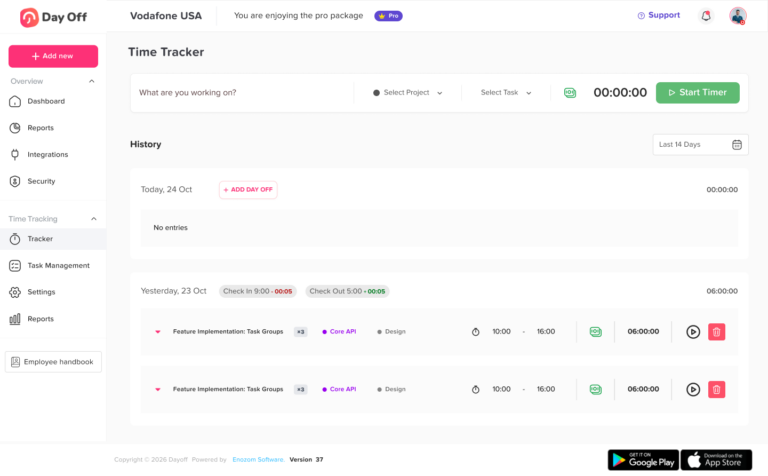
Location-Based Clock-In and Clock-Out
The app should allow admins to create approved work locations and define the allowed clock-in area.
Employees should be able to clock in only when they are within the correct location, or the system should flag the record for review.
Mobile Access
Geofenced attendance is most useful when employees can use it from their phones.
A mobile app helps field employees, retail staff, branch workers, and remote site teams record attendance without needing a desktop computer.
Multiple Work Locations
Companies with more than one branch or job site need the ability to add multiple locations.
This allows employees to clock in from the correct office, store, site, or client location.
Manager Approval for Exceptions
Sometimes employees may need to clock in outside the geofence for a valid reason.
For example:
- GPS signal is weak
- The employee is working from a nearby approved area
- The job site address is not exact
- The employee was asked to start from a different place
- The phone did not detect the location correctly
A good system should allow employees to submit a note and let managers approve or reject the exception.
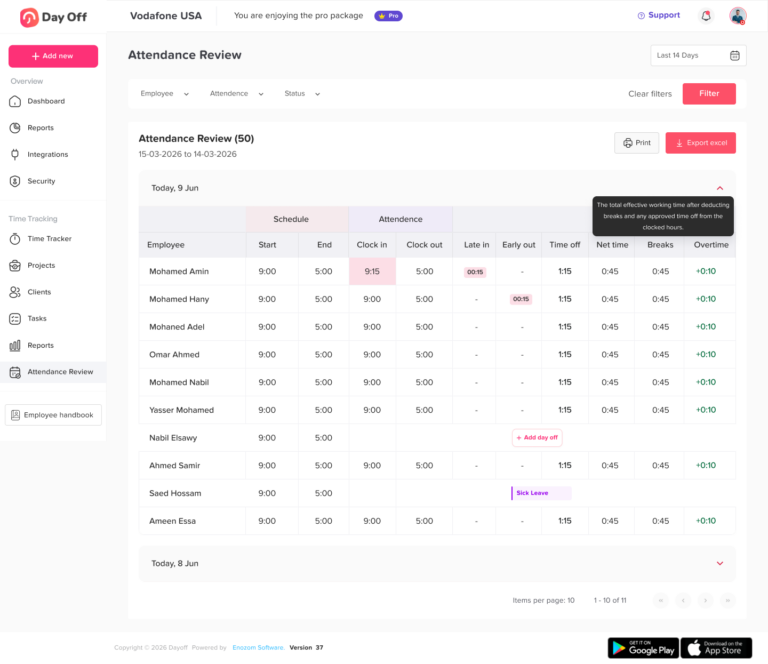
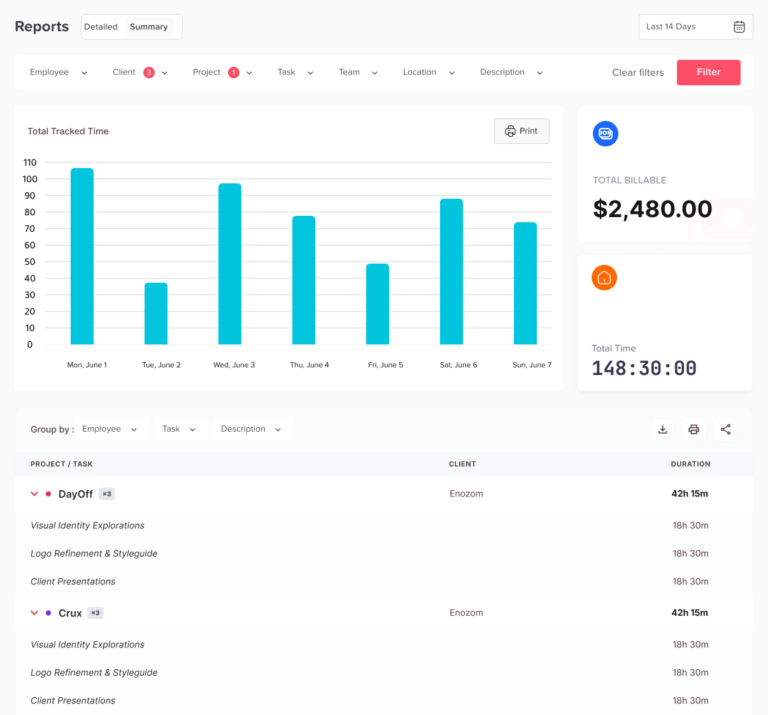
Attendance Reports
Reports help HR review employee hours, late arrivals, early departures, absences, and missing clock-outs.
Without reports, attendance data becomes hard to use.
Shift and Schedule Connection
Attendance is more useful when it can be compared with employee schedules.
For example, if an employee is scheduled to start at 9:00 AM but clocks in at 9:20 AM, the system should make that visible.
PTO and Leave Connection
Attendance should not be separate from leave management.
If an employee is absent, on vacation, using sick leave, or taking unpaid leave, managers should be able to see that clearly.
This is where a tool like Day Off can help. Day Off helps teams manage PTO, leave requests, approvals, work schedules, and absence visibility in one place. When time attendance and leave management are connected, HR gets a clearer picture of both worked time and approved time off.
Notifications
The system should notify managers or employees when action is needed.
For example:
- Employee forgot to clock out
- Clock-in was outside the approved location
- Attendance record needs approval
- Employee is late
- Shift starts soon
- Leave request overlaps with scheduled work
Notifications reduce the need for manual follow-up.
Clear Employee Records
Employees should be able to see their own attendance history, leave balances, and submitted requests.
This improves transparency and reduces repeated HR questions.
How Geofenced Attendance Supports PTO Management
Attendance and PTO are closely connected.
If attendance records show that an employee did not work on a certain day, HR needs to know why.
Was the employee on vacation?
Was it approved sick leave?
Was it unpaid leave?
Was the employee absent without approval?
Was there a schedule change?
Without a connected process, HR may need to check attendance records in one place, leave requests in another place, and schedules in another system.
This can create confusion.
A better approach is to manage attendance, leave, and schedules together.
For example, if an employee has approved PTO, the manager should already see that the employee is not expected to clock in that day. If an employee misses a shift without approved leave, the absence can be reviewed properly.
Day Off helps companies keep PTO and leave requests organized, while time attendance tracking helps show when employees actually worked. Together, they give HR and managers a clearer view of employee availability.
Geofenced Time Attendance for Remote and Hybrid Teams
Geofencing is not only for field workers. It can also support hybrid teams, but it should be used carefully.
For example, a company may allow employees to work from:
- The main office
- A coworking space
- A branch office
- A client location
- Home, if approved
In this case, geofencing can help confirm attendance from approved work areas. However, companies should avoid using location controls in a way that conflicts with flexible work policies.
If employees are allowed to work from anywhere, strict geofencing may not make sense. But if employees are expected to work from specific approved locations on certain days, geofencing can support that policy.
The key is matching the attendance rule to the actual work arrangement.
How to Create a Fair Geofenced Attendance Policy
Before launching a geofenced time attendance app, companies should create a clear policy.
The policy should answer these questions:
Where Can Employees Clock In?
List the approved work locations and explain whether employees can clock in from branches, job sites, client locations, or remote locations.
When Is Location Checked?
Explain whether location is checked only during clock-in and clock-out or during the workday.
For most attendance policies, checking location at clock-in and clock-out is usually enough.
What Happens If GPS Is Wrong?
GPS is not always perfect. Buildings, poor signal, phone settings, or location permissions can affect accuracy.
Employees should know what to do if the app does not detect their location correctly.
Can Managers Approve Exceptions?
There should be a clear process for exceptions.
For example, an employee may submit a note explaining why the clock-in happened outside the geofence. The manager can then review and approve it if valid.
How Is Employee Data Protected?
Explain who can view attendance data and how it is used.
Employees should know that the data is used for attendance, payroll, scheduling, and workforce management, not unnecessary monitoring.
How Are Leave and Absences Managed?
The policy should explain how employees request PTO, sick leave, unpaid leave, or other time off.
Attendance rules become clearer when employees know how approved leave affects their expected work hours.
Mistakes to Avoid When Using Geofenced Attendance
Making the Geofence Too Small
If the approved area is too small, employees may be blocked even when they are actually on-site.
For example, a large warehouse, hospital, construction site, or office campus may need a wider radius.
Not Allowing Exceptions
No system is perfect. Employees need a way to report location issues, emergency changes, or manager-approved off-site work.
Tracking More Than Necessary
Only collect the location data needed for attendance. Avoid unnecessary monitoring that may create privacy concerns or reduce employee trust.
Not Explaining the Policy
Employees should understand why geofencing is used and how it works.
If the system is introduced without explanation, employees may see it as surveillance instead of attendance verification.
Keeping Attendance and Leave Separate
Attendance data is less useful if it is disconnected from PTO and leave requests.
If an employee is absent, HR should be able to quickly see whether that absence was approved.
Ignoring Local Laws
Labor, privacy, and data protection rules can vary by country, state, or region. Companies should review applicable laws before using location-based attendance tracking.
Best Practices for Using a Geofenced Time Attendance App
To use geofencing in a fair and effective way, follow these best practices:
- Use geofencing only where location verification is truly needed
- Tell employees what data is collected and why
- Check location only at clock-in and clock-out unless there is a clear business reason
- Set a reasonable geofence radius for each workplace
- Allow manager-approved exceptions
- Keep attendance records organized and secure
- Connect attendance data with schedules and PTO
- Give employees access to their own records
- Review attendance reports regularly
- Update locations when job sites or branches change
These steps help companies improve attendance accuracy while keeping the process transparent and practical.
How Day Off Helps Teams Manage Attendance and Leave Together
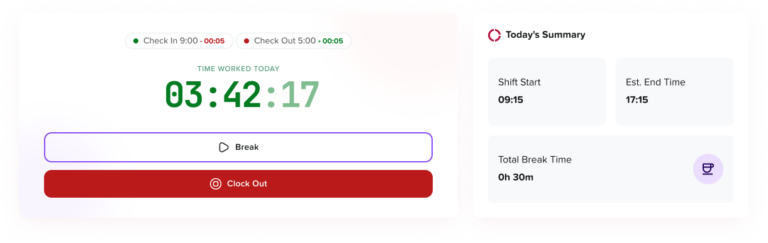
A geofenced time attendance app can help confirm where employees clock in, but attendance is only one part of workforce management.
Companies also need to manage:
- PTO requests
- Sick leave
- Unpaid leave
- Work schedules
- Team availability
- Leave approvals
- Employee balances
- Reports
- Holidays
- Absence history
Day Off helps businesses keep leave and time-off management organized in one simple system. Employees can submit leave requests, managers can approve them, and HR can track balances and team availability without relying on scattered messages or spreadsheets.
For teams using attendance tracking, Day Off adds important context. If someone is not clocked in, managers can check whether that employee is on approved leave. If someone requests PTO, managers can review the team calendar before approving it. If HR needs reports, leave records are easier to find and review.
This helps companies move from separate manual processes to a clearer system where attendance, time off, and schedules are easier to manage.
FAQ
What is a geofenced time attendance app?
A geofenced time attendance app is a tool that lets employees clock in and out only from approved work locations. It uses a virtual boundary around a workplace, branch, job site, or client location to verify where the employee is when recording attendance.
Is geofenced attendance the same as employee tracking?
No. Geofenced attendance usually checks location only when an employee clocks in or clocks out. It should not be used as constant employee tracking unless there is a clear business reason and proper legal review.
Who should use a geofenced time attendance app?
Geofenced attendance is useful for field teams, retail stores, restaurants, construction companies, warehouses, healthcare teams, and businesses with multiple locations.
Can geofencing reduce attendance mistakes?
Yes. Geofencing can reduce wrong-location clock-ins, early clock-ins from outside the workplace, missing records, and unclear attendance disputes.
What should companies consider before using geofenced attendance?
Companies should consider privacy, employee communication, location accuracy, exception rules, local laws, and how attendance records connect with payroll, schedules, and PTO.
How does Day Off support attendance and leave management?
Day Off helps teams manage PTO, leave requests, approvals, work schedules, employee balances, and absence visibility. This gives managers and HR a clearer view of who is working, who is off, and how employee availability affects daily operations.
Final Thoughts
A geofenced time attendance app can be a powerful tool for companies that need accurate clock-in and clock-out records by location.
It helps confirm that employees are starting work from approved places, reduces manual attendance errors, improves payroll accuracy, and gives managers better visibility across branches, job sites, and field teams.
However, geofencing should be used carefully. Companies should be transparent with employees, collect only the data they need, allow exceptions when needed, and connect attendance tracking with PTO and leave management.
The best attendance system is not just about knowing where someone clocked in. It is about helping the business manage work hours, absences, schedules, and employee availability clearly.
With Day Off, teams can manage PTO, leave requests, approvals, and absence visibility in one place, making it easier to connect attendance records with real workforce planning.