







PTO for Customer Support is not only about giving agents time away from work. It is about keeping service levels stable, protecting team morale, and making sure customers are not left waiting when key team members are on leave. PTO for Customer Support teams work under constant pressure, with live chats, tickets, emails, calls, escalations, and sometimes 24/7 coverage. When PTO is not planned clearly, one approved vacation can quickly create long response times, stressed agents, missed SLAs, and unhappy customers.

Unlike some departments where work can pause for a few days, PTO for Customer Support needs daily coverage. Customers still need answers during holidays, weekends, sick days, and vacation seasons. That is why PTO planning for support teams should be connected to schedules, shifts, team capacity, and real-time availability.
The goal is not to make leave harder to take. The goal is to make time off easier to approve without putting the rest of the team under pressure. With the right process, PTO for Customer Support managers can give employees the rest they need while keeping coverage clear and fair.
Why PTO Is Different for Customer Support Teams
PTO for Customer Support teams do not operate like traditional office departments. Their work depends on timing, volume, and availability. A missing agent during a quiet period may not cause a problem, but the same absence during a product launch, holiday rush, or high ticket volume week can affect the entire customer experience.
Support teams also deal with different types of coverage needs, such as:
- Live chat coverage
- Email ticket queues
- Phone support
- Weekend support
- Night shifts
- Escalation handling
- Technical support availability
- Multilingual support
- Regional time zone coverage
This means PTO decisions cannot be made in isolation. Managers need to know who is already off, who is scheduled to work, which shifts are covered, and whether the remaining team can handle the expected workload.
When PTO is managed manually through messages, spreadsheets, or email threads, this visibility becomes difficult. Managers may approve leave without noticing that another agent is already away, or that the employee requesting PTO is assigned to a critical shift.
The Real Problem: PTO Without Coverage Visibility
The biggest PTO issue in customer support is usually not the leave request itself. It is the lack of coverage visibility.
For example, an agent requests two days off. The manager checks the request quickly and approves it. Later, they realize that another agent from the same shift is also off, a third person is working reduced hours, and the backup agent is assigned to another queue. Suddenly, the team is short-staffed.
This leads to common problems:
- Longer response times
- Overloaded agents
- Missed service level targets
- More escalations
- Unbalanced workloads
- Last minute schedule changes
- Frustration between team members
- Customers waiting longer for answers
The problem becomes even bigger for remote, hybrid, or global support teams. When employees work across different locations and time zones, managers need a clear view of both PTO and schedules in one place.
A Better Way to Think About PTO: Coverage First, Approval Second
PTO for Customer Support teams need a PTO process that starts with one simple question:
Can we approve this leave while keeping customer coverage clear?
This does not mean managers should reject PTO often. It means they should have enough information before making a decision. A strong PTO process helps managers check:
- Who else is off during the same period
- Which shifts need coverage
- Whether the employee works fixed, flexible, or rotating hours
- Whether the request affects weekends or peak periods
- Whether another trained agent can cover the queue
- Whether the leave overlaps with blockout dates or busy seasons
- Whether the remaining team can manage expected ticket volume
This makes approvals faster, fairer, and easier to explain.
Why Work Schedules Matter in PTO Planning
PTO tracking becomes much more accurate when it is connected to the employee’s real work schedule. A day off does not always mean the same thing for every support agent.
For example:
An agent working Monday to Friday may request Friday off.
Another agent may work a rotating shift that includes Saturday and Sunday.
A third agent may work flexible hours and cover different times based on demand.
If PTO is tracked without considering the work schedule, leave balances and coverage planning can become inaccurate.
Day Off supports different work schedule types that help teams manage leave more clearly:
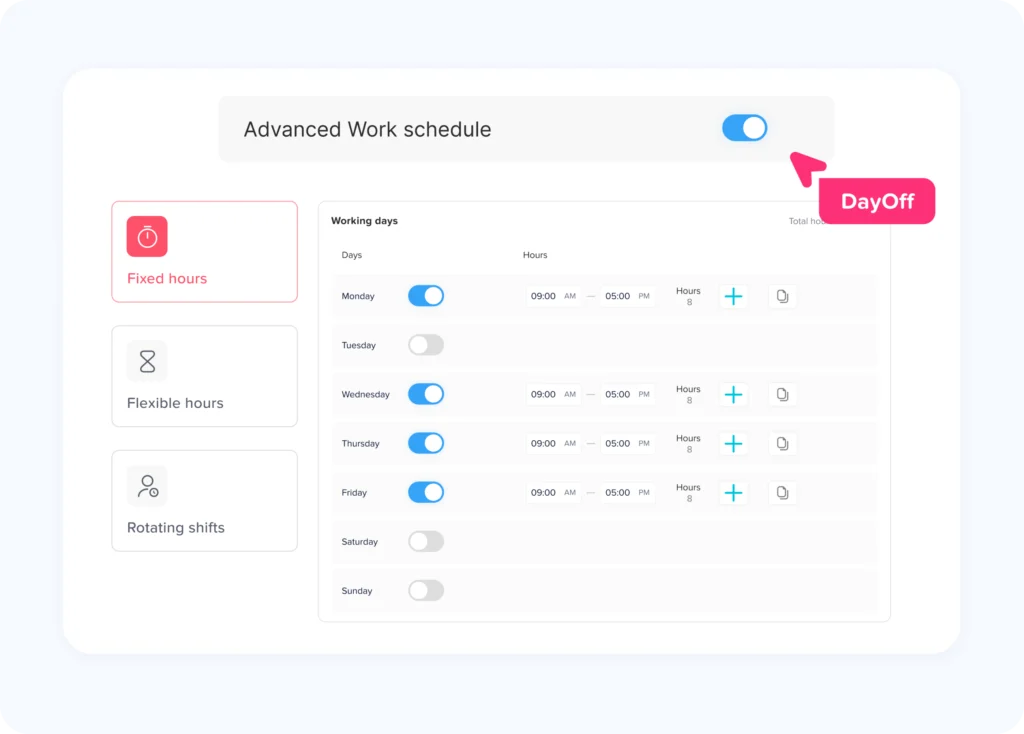
Fixed Hours Work Schedule
A fixed hours schedule is useful for employees who work the same hours and days each week. For example, a support agent may work Monday to Friday from 9:00 AM to 5:00 PM.
This type of schedule is simple and easy to manage. It works well for support teams that operate during standard business hours or for back-office support roles that do not require shift rotation.
With a fixed schedule, PTO is easier to calculate because the employee’s working days are predictable.
Flexible Hours Work Schedule
A flexible hours schedule gives employees more freedom around when they work, while still keeping track of their expected working time.
This can be helpful for PTO for Customer Support teams that manage async support, email tickets, or remote agents in different time zones. Employees may not all start and end work at the same time, but managers still need to understand who is available and when.
Flexible schedules are useful when support coverage depends more on output and queue ownership than strict shift timing.
Rotating Shift Work Schedule
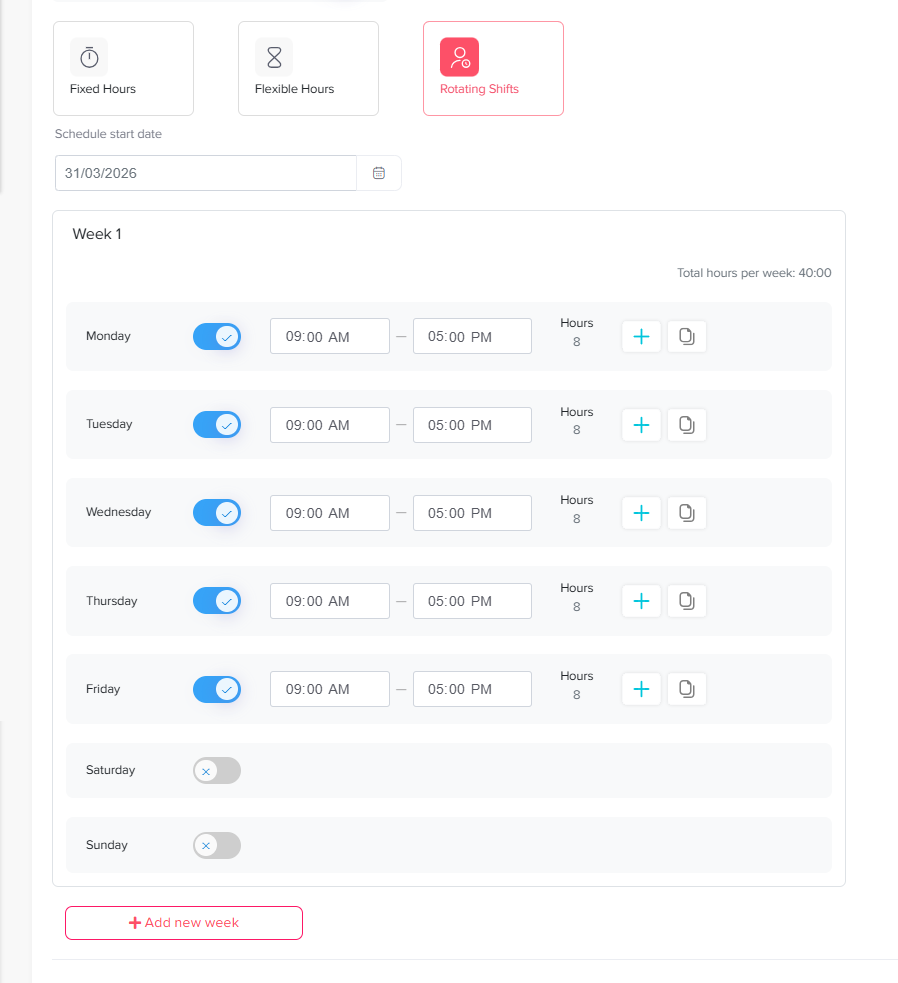
A rotating shift work schedule is especially important for PTO for Customer Support teams that need coverage across mornings, evenings, nights, weekends, or different regions.
In a rotating schedule, employees do not work the same shift every week. One agent may work the morning shift this week, the evening shift next week, and weekend coverage the week after. This helps distribute less desirable shifts more fairly and keeps support coverage balanced.
For PTO for Customer Support teams, rotating shifts can be essential because customer requests do not always arrive during standard office hours. A rotating schedule helps managers cover extended support hours without depending on the same people every time.
When PTO is connected to a rotating shift schedule, managers can see exactly which shift will be affected before approving leave. This is important because an employee’s PTO may not just remove one person from the team; it may remove coverage from a specific queue, time slot, or customer region.
Why Rotating Shifts Are So Important for Support Coverage
PTO for Customer Support teams often face uneven demand. Some hours are busier than others. Some days bring more tickets. Some seasons bring more pressure. A rotating shift schedule helps managers spread coverage across the team instead of relying on the same agents for difficult hours.
Here is why rotating shifts matter:
They Support Longer Coverage Hours
Many companies need support outside the traditional 9-to-5 schedule. Customers may contact support early in the morning, late at night, or during weekends. Rotating shifts allow the team to cover more hours without forcing one group of employees to always work inconvenient times.
They Make Weekend and Evening Work Fairer
Without rotation, the same employees may keep covering weekends or late shifts. Over time, this can create burnout and dissatisfaction. A rotating schedule helps distribute these shifts more fairly.
They Reduce Single-Person Dependency
If only one agent usually handles a certain shift or queue, PTO can become difficult to approve. Rotating shifts help more team members gain experience across different times and responsibilities, making coverage easier when someone is away.
They Improve PTO Approval Confidence
When managers can see rotating shifts and PTO together, they can approve requests with more confidence. They do not have to guess whether a specific shift will be affected. The schedule already shows the impact.
They Help Global and Remote Teams
For support teams working across time zones, rotating shifts help balance availability. Some employees may cover early hours, others may cover late hours, and managers can adjust coverage based on customer demand.
Common Challenges in PTO for Customer Support Teams
Even strong support teams can struggle with PTO when the process is unclear. Here are some of the most common challenges.
Too Many Agents Off at the Same Time
This is one of the biggest risks in support teams. If multiple agents from the same shift or queue take leave at once, the remaining team may not be able to handle the workload.
A shared leave calendar helps managers see overlapping requests before approving them.
PTO Requests During Peak Support Periods
Some times of the year are busier than others. This may include holidays, sales campaigns, product releases, renewal periods, or seasonal demand.
Support managers need a way to identify busy periods and plan PTO carefully.
Unclear Backup Coverage
Approving PTO is easier when there is a backup plan. If no one knows who will cover the absent employee’s queue or shift, the team may face confusion later.
Managers should define backup coverage before leave begins.
Manual PTO Tracking
Spreadsheets and messages can work for very small teams, but they become risky as the team grows. Manual tracking makes it easy to miss requests, forget approvals, or lose track of balances.
PTO for Customer Support teams need a system that shows leave requests, balances, approvals, and calendars clearly.
Different Schedules Across the Team
Support agents may not all work the same schedule. Some may work fixed hours, some flexible hours, and some rotating shifts. If PTO is tracked the same way for everyone, the records may become inaccurate.
Work schedules should be part of the PTO process.
Last Minute Sick Leave
PTO for Customer Support teams also need to manage unexpected absences. Sick leave can happen at any time, so managers need fast visibility into who is available and who can help cover the shift.
How to Keep PTO Coverage Clear
A clear PTO process does not need to be complicated. It needs to answer the right questions before leave is approved.
Build a Shared Leave Calendar
A shared leave calendar gives managers and employees a simple view of upcoming absences. This helps everyone understand who will be away and when.
For PTO for Customer Support teams, this is especially useful because coverage depends on team availability. A shared calendar can prevent overlapping leave and help managers plan ahead.
Connect PTO to Work Schedules
PTO should be connected to the employee’s real working days. This is important for fixed, flexible, and rotating schedules.
For example, if an agent is scheduled to work Saturday and Sunday, weekend PTO should be counted correctly. If another agent does not work weekends, those days should not be treated the same way.
This keeps leave balances accurate and makes coverage planning more reliable.
Set Clear Approval Rules
Support teams should define who approves PTO and what managers need to check before approval.
A clear approval process may include:
- Direct manager review
- HR review for policy compliance
- Coverage check before approval
- Escalation approval for long leave periods
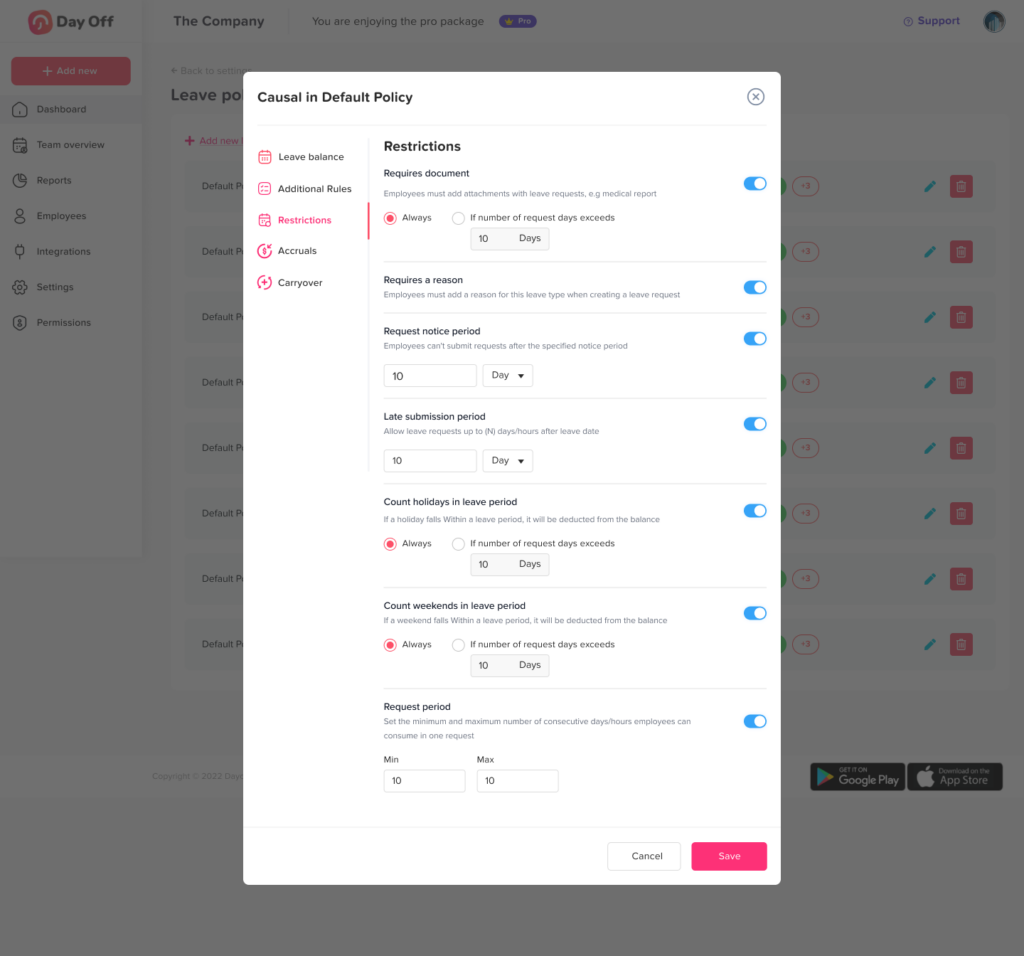
- Rules for peak seasons or blockout dates
This reduces confusion and helps employees understand how leave decisions are made.
Use Leave Policies for Different Types of Time Off
Not every absence should be treated the same way. Vacation leave, sick leave, unpaid leave, personal leave, and half day leave may each need different rules.
A clear leave policy helps employees know what they can request and helps managers apply the same rules fairly.
Plan Around Peak Support Periods
PTO for Customer Support managers should plan ahead for periods when coverage matters most, such as product launches, major campaigns, public holidays, renewal periods, or high demand seasons.
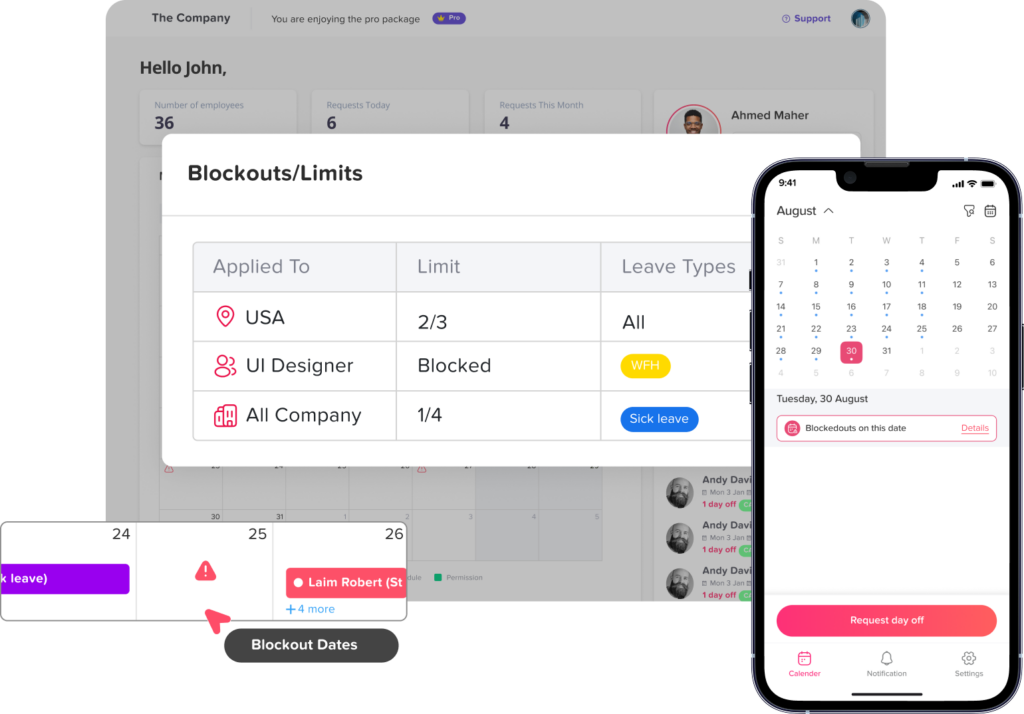
During these busy times, teams can use Day Off’s blockout feature to limit or prevent PTO requests on critical dates. This helps managers avoid too many overlapping absences, protect support coverage, and arrange backup plans before the team becomes short staffed.
Create Backup Plans for Key Roles
Some support agents handle special responsibilities, such as technical escalations, VIP customers, or specific languages. When these employees take leave, coverage needs to be planned carefully.
Managers should identify backup agents before approving long or critical PTO requests.
Review PTO Regularly
PTO planning should not happen only when someone submits a request. Managers should review upcoming absences weekly, especially in support teams with shift based work.
A weekly review helps managers spot coverage gaps early and adjust schedules before the problem becomes urgent.
How Day Off Helps Customer Support Teams Manage PTO
Day Off helps PTO for Customer Support teams manage PTO, leave requests, schedules, and team availability in one organized system. Instead of checking spreadsheets, emails, and chat messages, managers can see who is off, who is available, and how leave affects the team calendar.
For support teams, this makes PTO planning more practical because leave is not separated from daily operations.
Centralized Leave Requests
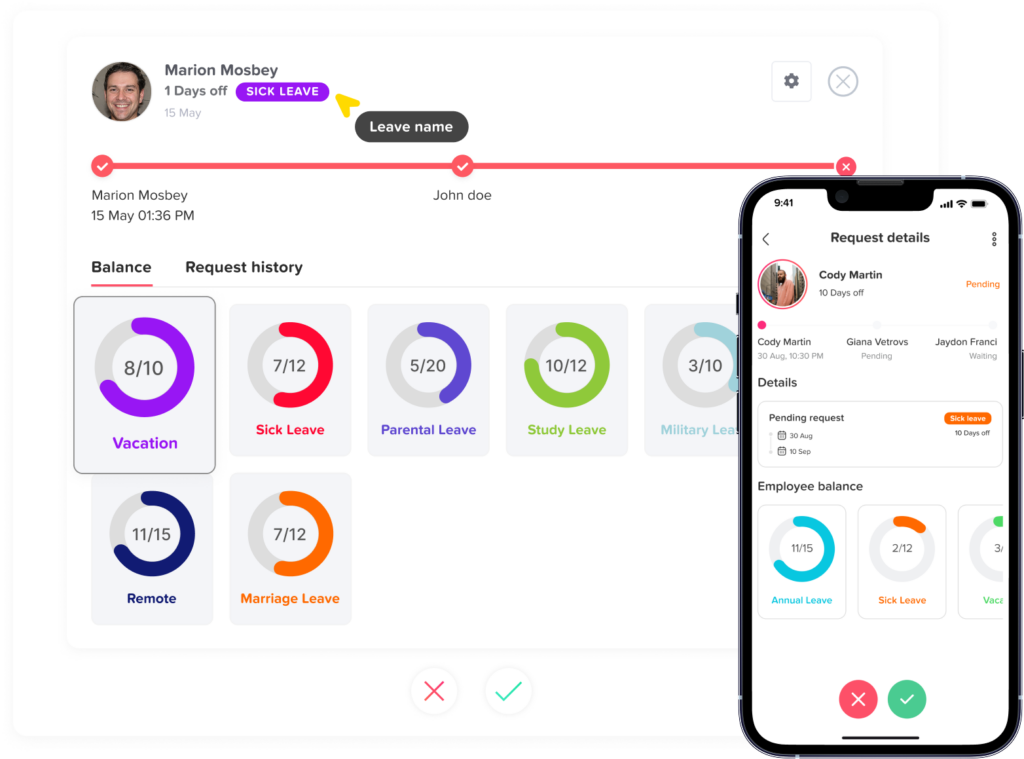
Employees can submit leave requests through Day Off instead of sending messages through different channels. Managers receive the request and can review it clearly before approving or rejecting it.
This keeps the process organized and reduces missed requests.
Shared Leave Calendar
Day Off gives teams a shared leave calendar, making it easier to see upcoming absences. PTO for Customer Support managers can use this calendar to check whether too many agents are off during the same period.
This is especially useful for teams that need continuous coverage.
Leave Balances
Employees can see their available leave balances without asking HR or their manager. This reduces back-and-forth messages and helps employees plan their time off more responsibly.
Managers can also review balances before approving requests.
Work Schedules
Day Off supports work schedule types such as fixed hours, flexible hours, and rotating shifts. This helps support teams track PTO based on how employees actually work.
For PTO for Customer Support teams, rotating shift schedules are especially valuable because they help managers plan coverage across different hours, weekends, and time zones.
Approval Workflows
Day Off allows companies to set approval workflows so the right person reviews each request. This helps support teams keep PTO decisions consistent and organized.
For example, a team lead can review coverage while HR can make sure the request follows company policy.
Notifications
Day Off helps employees and managers stay updated through notifications. This reduces the chance of forgotten requests or missed approvals.
For support teams, fast notifications can make a big difference because coverage often needs to be confirmed quickly.
Reports
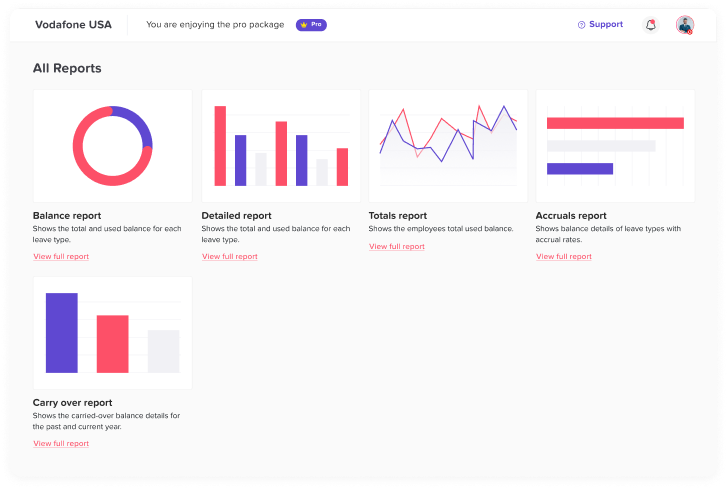
Managers and HR teams can use reports to understand leave usage, absence patterns, and team availability. This helps with future planning and can show whether certain periods need better coverage rules.
Example: PTO Planning for a Customer Support Team
Imagine a PTO for Customer Support team with 18 agents. The team covers live chat, email, and weekend support. Some agents work fixed hours, some work flexible hours, and others rotate between morning, evening, and weekend shifts.
Without a clear PTO system, the manager may have to check:
- A spreadsheet for PTO balances
- A chat message for leave requests
- A separate schedule for shifts
- A calendar for upcoming absences
- A manager’s notes for backup coverage
This creates too many places to check.
With a clear PTO system like Day Off, the manager can review requests, check the shared leave calendar, understand the employee’s schedule, and approve leave with better confidence.
If an agent assigned to a weekend rotating shift requests PTO, the manager can see the coverage impact before approving. If another agent is already off, the manager can arrange backup or suggest another date.
This makes the process smoother for everyone.
Best Practices for PTO for Customer Support Teams
Keep the Leave Calendar Visible
Managers should not be the only ones with access to leave visibility. When employees can see upcoming absences, they can plan requests more responsibly and avoid unnecessary conflicts.
Set Minimum Coverage Rules
Support teams should define the minimum number of agents needed for each shift or queue. For example, a live chat shift may require at least three agents, while email support may need five agents during peak hours.
These rules help managers approve PTO based on real coverage needs.
Avoid First-Come, First-Served Only
First-come, first-served can be simple, but it is not always fair. Some employees may always request holidays early, while others may have fewer chances.
Support teams should combine early planning with fairness, rotation, and business needs.
Track PTO by Team or Queue
If your support team is divided by function, such as billing support, technical support, or VIP support, PTO should be reviewed by team or queue. One department may be fully covered while another is short.
Use Rotating Shifts Fairly
Rotating shifts should be planned clearly so employees understand when they are expected to work. When PTO is requested, managers should check how it affects the rotation and whether another agent can cover without creating unfair pressure.
Encourage Early PTO Requests
Employees should be encouraged to request planned vacation as early as possible. This gives managers more time to adjust schedules and arrange coverage.
Make Sick Leave Easy to Record
Sick leave is often unplanned, so the process should be simple. Employees should know how to report sick leave, and managers should be able to update the schedule quickly.
Review Coverage Before Holidays
PTO for Customer Support teams should review PTO requests before major holidays or long weekends. These periods often bring more leave requests and sometimes higher customer demand.
PTO Should Protect Both Customers and Employees
Good PTO planning is not only about protecting customer experience. It also protects employees.
When coverage is unclear, the agents who remain at work often carry extra pressure. They may handle more tickets, work longer hours, or deal with frustrated customers. Over time, this can lead to burnout.
Clear PTO planning helps prevent that. Employees can take time off without feeling guilty, and the rest of the team can work with a manageable workload.
This balance is especially important in PTO for Customer Support, where emotional energy is part of the job. Agents need rest to stay patient, helpful, and focused.
Signs Your Support Team Needs a Better PTO Process
Your customer support team may need a better PTO system if:
- Managers approve leave without checking coverage
- Agents often ask who is off
- PTO requests are sent through chat or email
- Leave balances are tracked manually
- Rotating shifts are hard to adjust
- Weekend coverage is often unclear
- The same agents keep covering gaps
- Response times increase when someone is away
- HR and support managers use different records
- Employees are confused about PTO rules
If these problems happen often, the team does not only need better tracking. It needs a clearer connection between PTO, schedules, and coverage.
FAQs
What is PTO for customer support teams?
PTO for customer support teams refers to the process of managing paid time off for agents while making sure customer service coverage remains clear. It includes tracking leave requests, balances, schedules, and team availability.
Why is PTO planning important for customer support?
PTO planning is important because PTO for Customer Support teams need daily coverage. If too many agents are off at the same time, response times may increase, workloads may become unbalanced, and customer satisfaction may drop.
How can managers avoid coverage gaps during PTO?
Managers can avoid coverage gaps by using a shared leave calendar, checking work schedules before approval, setting minimum coverage rules, and planning backup coverage for important shifts or queues.
Why are rotating shifts important for customer support teams?
Rotating shifts help support teams cover different hours, weekends, and regions more fairly. They also prevent the same agents from always working difficult shifts and make it easier to maintain PTO for Customer Support coverage.
How does Day Off help with PTO for customer support?
Day Off helps PTO for Customer Support teams manage PTO requests, leave balances, work schedules, approvals, shared calendars, and notifications in one system. This makes it easier to approve leave while keeping coverage clear.
Conclusion
PTO for customer support teams needs more structure than a simple approval message. Support managers must keep customers covered, employees rested, and shifts balanced. Without clear visibility, PTO can create coverage gaps, delayed responses, and unnecessary pressure on the team.
The best approach is to connect leave requests with work schedules, shared calendars, approval workflows, and real time availability. This is especially important for teams using rotating shift schedules, where one absence can affect a specific shift, queue, or time zone.
Day Off helps PTO for Customer Support teams manage PTO in a clearer and more organized way. With leave requests, balances, calendars, approvals, notifications, and work schedules in one place, managers can approve time off while keeping coverage under control.
When PTO is planned well, PTO for Customer Support teams do not have to choose between happy employees and happy customers. They can support both.