







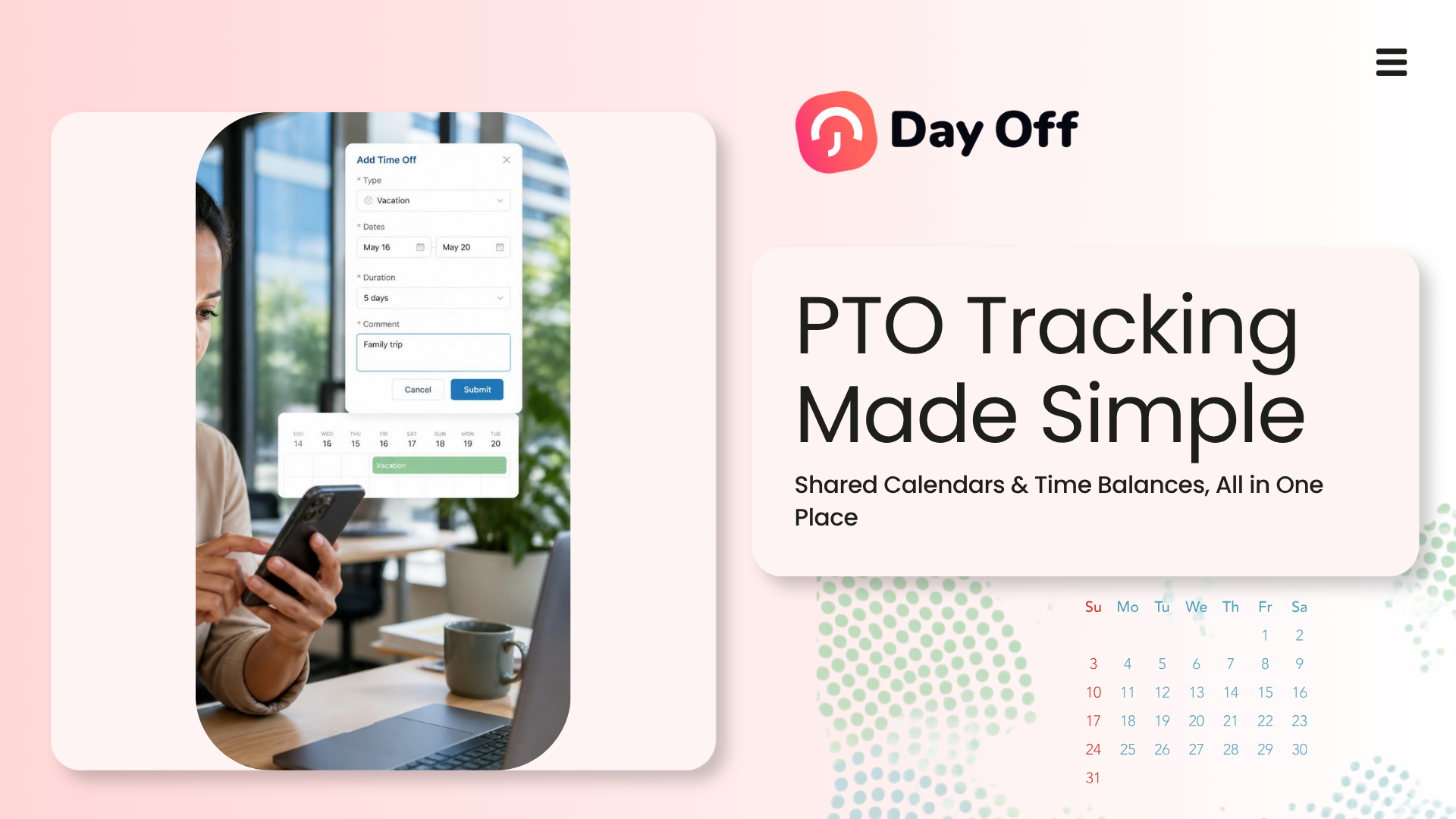
Managing employee time off becomes increasingly complicated as a company grows. PTO Tracking Software provides one central place to manage leave requests, approval workflows, employee time balances, company policies, and shared calendars. Instead of relying on spreadsheets, emails, or separate calendars, businesses can create a clear and consistent process that helps employees, managers, and HR teams understand exactly how much leave is available and when team members will be away.

A reliable system does more than record vacation days. It gives employees access to their current balances, allows managers to review requests with the right context, and helps the company plan workloads around upcoming absences.
This guide explains how PTO tracking software with shared calendars and time balances works, why these features matter, and what businesses should consider when choosing a system.
What Is PTO Tracking Software?
PTO tracking software is a digital system used to organize paid time off, vacation days, sick leave, personal leave, unpaid leave, parental leave, compensatory time, and other employee absence types.
The software replaces disconnected processes such as:
- Email based leave requests
- Paper request forms
- Manually updated spreadsheets
- Private manager calendars
- Separate balance calculations
- Informal approvals through chat messages
Employees submit leave requests through the system, and the request is automatically sent to the correct manager or approver. Once approved, the absence can appear on the company’s shared leave calendar and the employee’s available balance is updated according to the organization’s policy.
This creates a more transparent process for everyone involved.
Why PTO Management Becomes Difficult Without Software
A simple spreadsheet may work when a business has only a few employees. However, manual tracking becomes harder when the company adds more people, departments, locations, policies, or approval levels.
Common problems include inaccurate balances, overlapping requests, delayed approvals, missed emails, and confusion about who is available.
For example, an HR employee may need to calculate how many vacation hours an employee earned, subtract previously approved leave, check whether carryover rules apply, and confirm whether the employee is requesting time off during a restricted period.
When these steps are handled manually, even a small mistake can affect payroll preparation, staffing plans, employee trust, or policy consistency.
PTO tracking software reduces this administrative burden by organizing the information in one place.
The Importance of Shared Leave Calendars
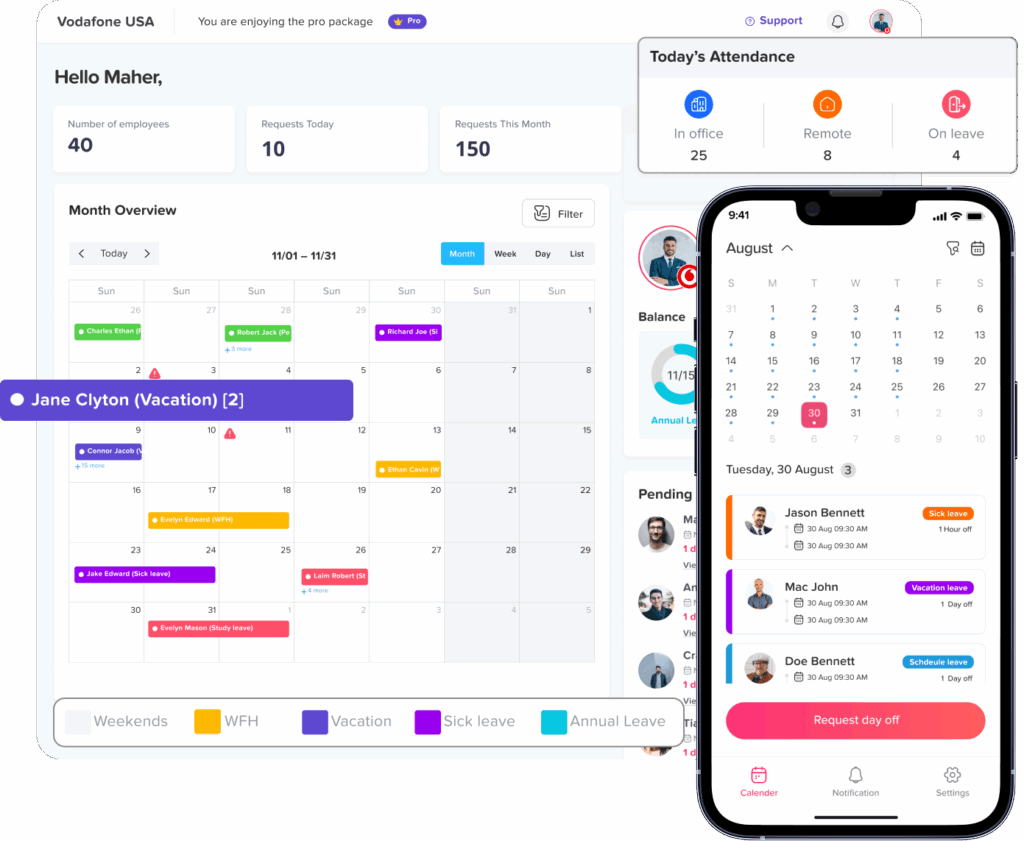
A shared leave calendar provides a clear view of approved and, depending on the system settings, pending employee absences.
Instead of asking HR who will be away next week, managers can review the calendar before assigning work, approving another request, or scheduling an important meeting.
What a Shared PTO Calendar Can Show
A well organized calendar may display:
- Employee names
- Leave dates
- Full day or partial day absences
- Leave type
- Pending or approved status
- Team or department
- Office location
- Public holidays
- Company wide closure days
- Work schedules
Visibility should be controlled through permissions. Some organizations allow employees to see that a colleague is unavailable without displaying the reason for the absence. This helps support workforce planning while protecting personal information.
How Shared Calendars Improve Workforce Planning
Shared calendars help managers identify staffing gaps before they become operational problems.
For example, a manager reviewing two vacation requests can see whether several people from the same department are already scheduled to be away. The manager can then discuss coverage, adjust deadlines, or approve the requests with a clear backup plan.
Without a shared calendar, the manager may approve each request separately without noticing the overlap.
A central calendar can support:
- Project planning
- Shift coverage
- Customer support scheduling
- Deadline management
- Meeting coordination
- Product launches
- Seasonal workforce planning
- Cross-department collaboration
The goal is not to prevent employees from taking leave. The goal is to make employee absences visible enough that work can be planned fairly and responsibly.
What Are PTO Time Balances?
A PTO time balance shows how much leave an employee currently has available.
Depending on the company’s policy, the balance may be measured in days or hours. It may also include different categories, such as vacation leave, sick leave, personal leave, or floating holidays.
A basic PTO balance calculation may look like this:
Available balance = Starting balance + Accrued time + Adjustments – Used leave – Scheduled leave
However, real policies are often more complex. A company may have waiting periods, maximum balance limits, carryover rules, expiration dates, different accrual rates, or separate policies for different employee groups.
PTO tracking software can apply these rules automatically when it is configured correctly.
Types of Time Balances a System May Track
Businesses may need to manage:
- Vacation balances
- Sick leave balances
- Personal leave balances
- Floating holiday balances
- Unpaid leave usage
- Compensatory time
- Bereavement leave
- Parental leave
- Volunteer leave
- Study or training leave
- Custom company specific leave types
Separating these balances helps employees understand what type of leave they can request and prevents HR from combining allowances that follow different rules.
How Shared Calendars and Time Balances Work Together
Shared calendars and time balances solve different parts of the leave management process.
The time balance answers:
Does the employee have enough available leave?
The shared calendar answers:
Can the team support the absence during those dates?
Both questions are important.
An employee may have ten available vacation days, but their request may overlap with several approved absences or a critical business period. Another employee may request dates with no staffing conflict but have an insufficient balance.
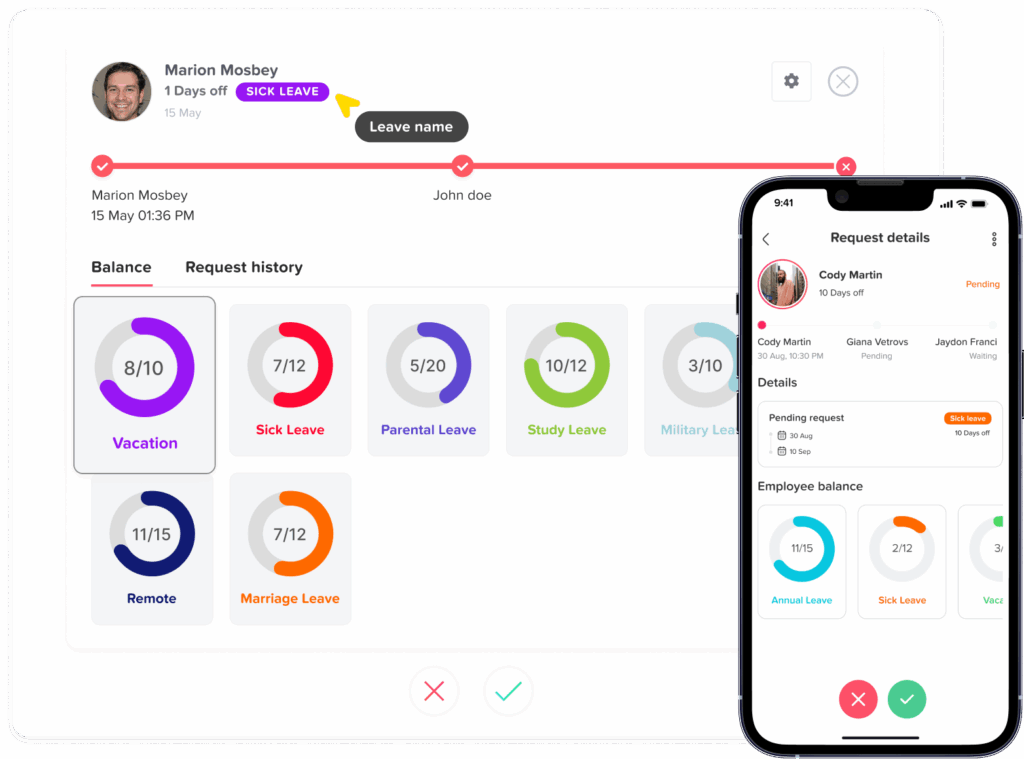
When calendars and balances are connected, managers can evaluate both the employee’s entitlement and the team’s operational needs from one screen.
| PTO Feature | Question It Helps Answer | Business Benefit |
|---|---|---|
| Current leave balance | How much time can the employee request? | Reduces balance disputes and manual calculations |
| Shared leave calendar | Who else will be away? | Helps prevent staffing shortages |
| Policy rules | Is the request allowed under the policy? | Supports consistent leave administration |
| Approval workflow | Who should review the request? | Reduces delays and missed requests |
| Holiday calendar | Is the requested date already a holiday? | Prevents incorrect deductions |
| Reports | How is leave being used? | Supports workforce planning and policy reviews |
Benefits of PTO Tracking Software With Shared Calendars
Employees Can Check Their Own Balances
Employees should not need to contact HR every time they want to know how many vacation days they have left.
Self service access allows employees to view their current balances before submitting a request. This reduces repetitive questions and helps employees plan their leave more responsibly.
The software should also make it clear whether the displayed balance includes approved future leave.
For example, an employee may have eight days remaining today but already have five approved days scheduled for next month. A clear system can show both the current balance and the amount available after scheduled leave.
Managers Make Better Approval Decisions
Managers need more than a simple approve or reject button.
They may need to review:
- The employee’s available balance
- Other absences during the same dates
- Important deadlines
- Minimum staffing requirements
- The employee’s work schedule
- Company holidays
- Restricted leave periods
- Previous or upcoming requests
PTO tracking software gives managers this context without requiring them to check several different systems.
HR Teams Spend Less Time on Administration
Manual PTO management creates repetitive work.
HR teams may receive frequent questions about balances, update spreadsheets after every approval, remind managers about pending requests, correct calculation mistakes, and prepare reports manually.
Automation reduces much of this work. Once policies and approval workflows are configured, the system can calculate balances, route requests, update calendars, and maintain records.
HR still oversees the process, but the team spends less time performing basic administrative tasks.
Leave Policies Are Applied More Consistently
When policies are managed through informal conversations, different managers may interpret the same rule differently.
One manager may allow employees to request half days, while another may believe only full days are permitted. Another manager may approve leave during a restricted period without realizing that the company has a blockout policy.
A configured system helps standardize the process by applying the same rules to employees covered by the same policy.
Teams Can Prepare for Absences Earlier
Approved leave becomes more useful when it is visible before the absence begins.
Managers can reassign tasks, adjust schedules, prepare handover notes, inform clients, and change deadlines in advance.
This is especially valuable for project-based teams, customer support departments, restaurants, healthcare operations, retail businesses, and other workplaces where coverage matters.
Leave Records Are Easier to Review
A centralized system creates a consistent history of requests, approvals, rejections, cancellations, and balance adjustments.
This information can help HR answer questions such as:
- When was the request submitted?
- Who approved the request?
- Was the balance deducted?
- Was the request later cancelled?
- Why was a manual adjustment made?
- Which employees have upcoming leave?
- How much leave remains unused?
Reliable records are important for internal reviews, employee questions, payroll coordination, and policy planning.
PTO Tracking Software vs Manual Leave Tracking
| Area | Manual Tracking | PTO Tracking Software |
|---|---|---|
| Leave requests | Sent through email, chat, or paper | Submitted through one system |
| Balance calculations | Updated manually | Calculated based on configured policies |
| Calendar visibility | Spread across personal calendars | Displayed on a shared leave calendar |
| Approvals | Easy to miss or delay | Routed to the correct approver |
| Records | Stored in multiple places | Saved in a centralized history |
| Employee access | Employees ask HR for information | Employees check balances directly |
| Reporting | Requires spreadsheet preparation | Generated from recorded leave data |
| Policy consistency | Depends heavily on each manager | Supported by configured rules |
| Multi-location management | Difficult to organize | Policies and calendars can be separated by location |
| Administrative workload | Requires frequent updates | Many repetitive steps are automated |
Essential PTO Tracking Software Features
Not every leave management system offers the same capabilities. Businesses should evaluate features based on their actual policies and workforce structure.
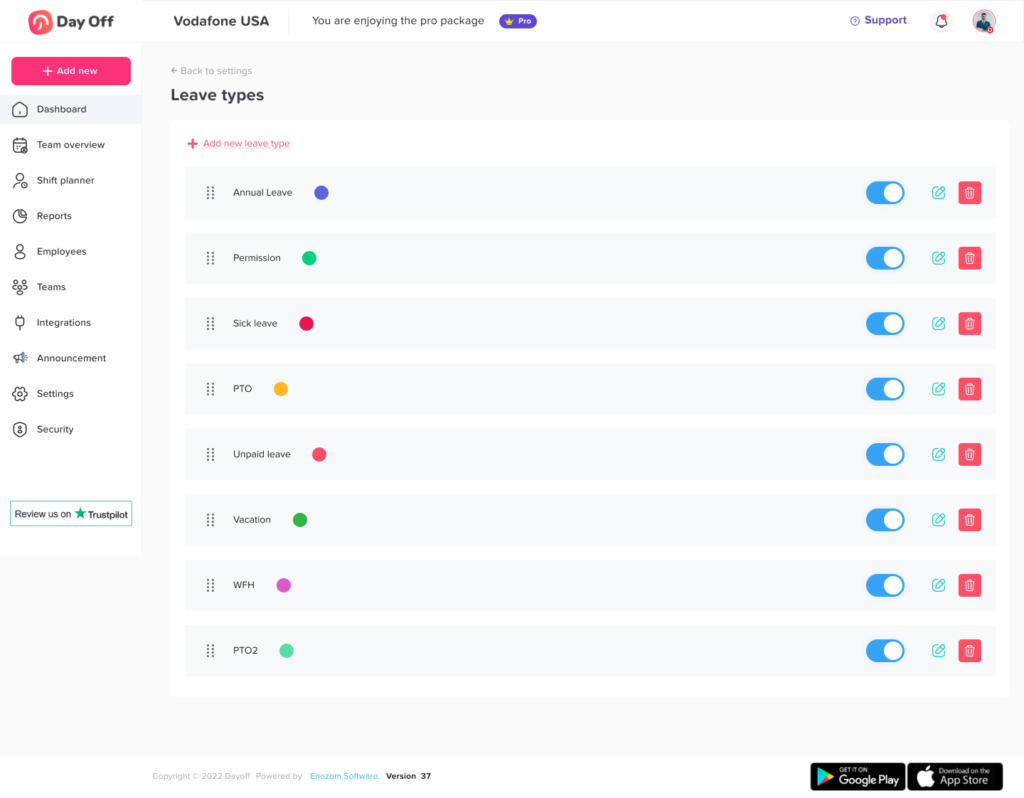
Custom Leave Types
The system should allow the company to create leave categories that reflect its policies.
A business may need vacation, sick leave, personal leave, unpaid leave, parental leave, bereavement leave, or custom absence types.
Each leave type may require its own allowance, approval process, documentation rules, and visibility settings.
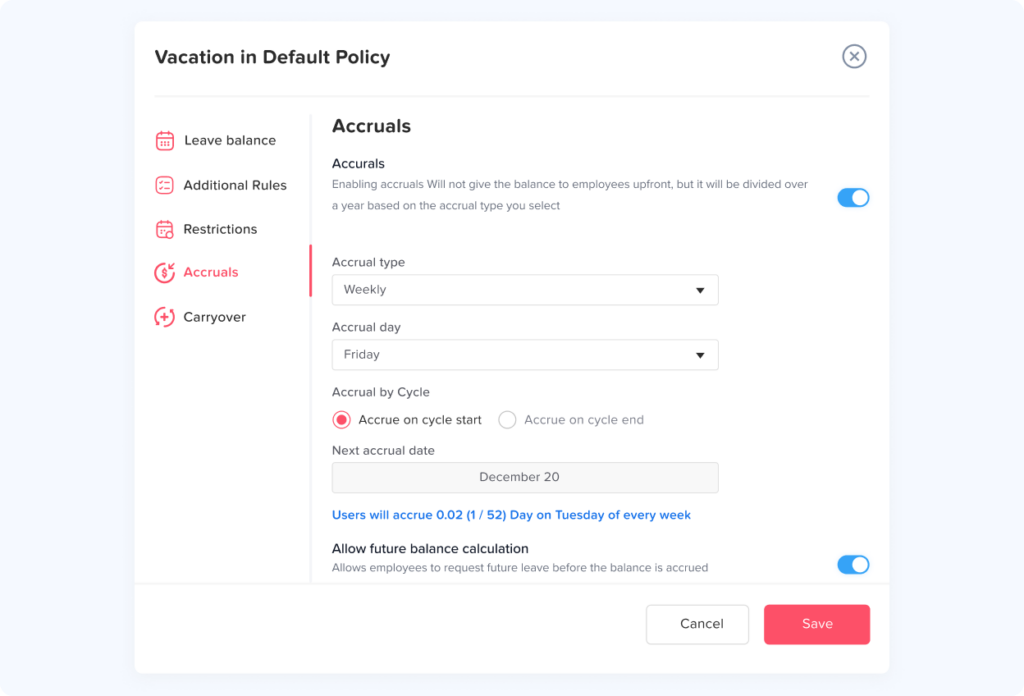
Flexible Accrual Settings
Some companies provide the full annual allowance at the beginning of the year. Others allow employees to earn leave gradually.
Common accrual frequencies include:
- Weekly
- Bi Weekly
- Twice per month
- Monthly
- Annually
- On an employee’s work anniversary
The software should support the company’s real policy rather than forcing HR to adapt the policy to the software.
Carryover and Expiration Rules
Unused PTO may be carried into the next policy year, limited to a maximum amount, or subject to an expiration date.
A flexible system should allow HR to configure:
- Whether carryover is permitted
- The maximum carryover amount
- When carried leave expires
- Whether different leave types follow different rules
- Which employees or policies are affected
Because leave laws and employment rules vary by jurisdiction, businesses should review their policies with qualified legal or HR professionals before applying expiration or forfeiture rules.
Multiple Approval Levels
Some leave requests require only one manager’s approval. Other organizations require approval from both a direct manager and HR.
A PTO system should support the company’s approval structure, including:
- Single level approvals
- Two level approvals
- Department specific approvers
- Location based approvers
- Backup approvers
- Manager or HR overrides
Partial Day and Hour Based Leave
Not every absence lasts a full day.
Employees may need two hours for an appointment, a half day for a personal commitment, or a few hours of compensatory time.
Hour based tracking is especially useful for part time employees, hourly workers, flexible schedules, and companies that provide leave in hours rather than days.
Public Holiday Calendars
Public holidays should be considered when calculating leave deductions.
For example, if an employee requests a full week off and one day is a company holiday, the system should avoid deducting that holiday from the employee’s PTO balance when the policy requires it.
Businesses with multiple locations may need different holiday calendars for each country, state, or office.
Work Schedule Support
PTO calculations depend on when an employee is expected to work.
A Monday to Friday schedule should not deduct leave for Saturday or Sunday. Similarly, an employee who works four longer days each week should have leave calculated according to that schedule.
The system should account for:
- Fixed schedules
- Part time schedules
- Flexible schedules
- Rotating schedules
- Different weekend days
- Location-specific working weeks
Calendar Integrations
Calendar integrations help employees and managers see approved leave in the tools they already use.
Depending on the platform, approved absences may be synchronized with Google Calendar, Outlook Calendar, or workplace communication tools.
This can improve visibility without requiring every team member to open the PTO system throughout the day.
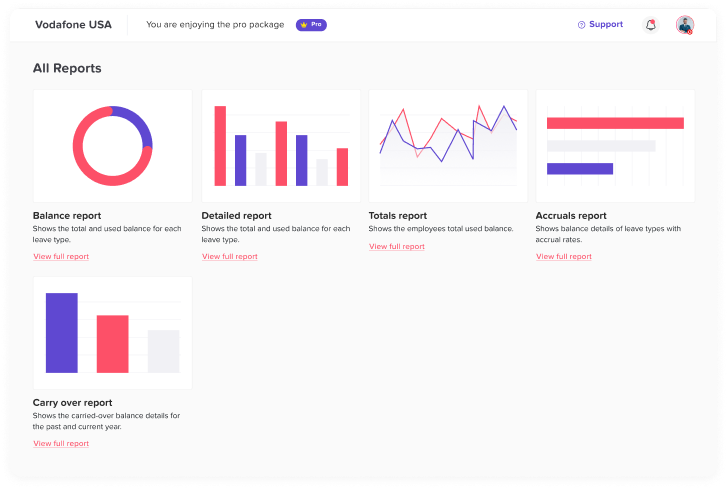
Reports and Exports
Reporting features help HR teams review leave activity and identify patterns.
Useful reports may include:
- Current employee balances
- Leave taken by employee
- Leave taken by department
- Upcoming absences
- Pending requests
- Approved and rejected requests
- Leave balance adjustments
- Unused allowance
- Leave by location
- Leave by absence type
Reports should be used carefully. High leave usage does not automatically indicate abuse or poor performance. Employees may be using earned benefits, managing health needs, or responding to personal circumstances.
How PTO Balance Calculations Work
PTO policies commonly use one of several approaches.
Annual Allowance
Employees receive their entire allowance at the beginning of the policy year.
For example, an employee may receive 20 vacation days on January 1. Approved leave is deducted throughout the year.
This approach is easy for employees to understand, although the company must decide how to manage employees who leave after using more time than they have proportionally earned.
Accrued PTO
Employees earn leave gradually over time.
For example, an employee with an annual allowance of 12 days may earn one day per month.
Accrual policies may include:
- Waiting periods
- Maximum balance caps
- Different rates based on tenure
- Prorated allowances for new employees
- Limits on how much time can be used before it is earned
Anniversary Based Balances
The leave year begins on the employee’s work anniversary rather than on the same company wide date.
This can distribute balance resets throughout the year, but it is more difficult to manage manually because every employee may have a different reset date.
PTO tracking software can automate anniversary based renewals and calculations.
Unlimited PTO
Unlimited PTO does not mean that leave should be completely untracked.
Companies with unlimited policies still need a system for submitting requests, recording approvals, viewing team availability, and monitoring whether employees are taking reasonable time away from work.
The system may not deduct from a fixed allowance, but the shared calendar and request history remain important.
How to Implement PTO Tracking Software
Successful implementation requires more than purchasing a tool. The organization must configure the system to match its actual policies.
Step 1: Review Existing Leave Policies
Document each leave type and answer questions such as:
- Who is eligible?
- How much leave is provided?
- Is the allowance given upfront or accrued?
- When does the balance reset?
- Can unused leave carry over?
- Are there balance limits?
- Can employees request partial days?
- How many approval levels are required?
- Are there restricted dates?
- Are public holidays excluded from deductions?
Unclear policies should be resolved before the software is configured.
Step 2: Organize Employees Into the Correct Policies
Not every employee necessarily follows the same rules.
Policies may vary based on:
- Country
- Office location
- Department
- Employment type
- Seniority
- Full time or part time status
- Contract terms
- Local requirements
Employees should be assigned to the correct policy group to prevent balance errors.
Step 3: Import Starting Balances Carefully
Before moving away from spreadsheets, verify every employee’s starting balance.
Check whether the balance includes:
- Carried leave
- Previously approved future leave
- Manual adjustments
- Accrued time
- Leave already taken
- Prorated allowances
Keep a copy of the previous records during the transition so that discrepancies can be reviewed.
Step 4: Configure Approval Workflows
Assign the correct approver for each team, department, or location.
The company should also decide what happens when a manager is unavailable. A backup approver or HR administrator may need permission to process urgent requests.
Step 5: Set Calendar Privacy Rules
Decide what employees can see on the shared leave calendar.
Possible visibility options include:
- Employee name and dates only
- Leave type visible to managers but not colleagues
- Department level visibility
- Company wide visibility
- Private leave types hidden from other employees
The system should provide enough information for planning without exposing unnecessary personal details.
Step 6: Test the System
Test common and unusual situations before launching the software.
Examples include:
- A normal full-day vacation request
- A half-day request
- An employee with an insufficient balance
- A request covering a public holiday
- A cancellation after approval
- A carryover balance
- A new employee with a prorated allowance
- A request requiring two approvers
- An employee with a nonstandard work schedule
Testing helps identify incorrect settings before they affect the whole team.
Step 7: Explain the Process to Employees
Employees should understand:
- How to submit a request
- Where to check balances
- How to view request status
- How to cancel or edit a request
- Who approves requests
- What appears on the shared calendar
- Where to ask policy questions
Clear communication increases adoption and reduces confusion.
Common PTO Tracking Mistakes
Treating the Shared Calendar as the Official Balance Record
A calendar shows when employees are away, but it does not always show how much leave they have available.
The PTO system should remain the official source for balances, deductions, accruals, and adjustments.
Failing to Include Future Approved Leave
An employee may appear to have ten available days while already having eight approved days scheduled later in the year.
The software should clearly show whether future approved leave has been reserved or deducted.
Ignoring Part-Time and Alternative Schedules
Applying a standard five-day schedule to every employee can create incorrect deductions.
Employee work schedules should be reviewed before leave policies are assigned.
Using One Policy for Every Location
Businesses operating in multiple regions may have different public holidays, weekends, leave entitlements, or company policies.
Separate policy settings and holiday calendars may be necessary.
Making Balance Changes Without Documentation
Manual adjustments are sometimes necessary, but they should include a clear reason.
Documented adjustments make it easier to answer employee questions and review historical records.
Collecting More Personal Information Than Necessary
The team needs to know when an employee is unavailable. Colleagues do not always need to know the private reason behind the absence.
Use role based permissions and calendar visibility settings to protect employee information.
How Day Off Supports PTO Tracking
Day Off is an example of PTO tracking software designed to organize employee leave requests, approval workflows, shared calendars, policies, and time balances in one system.
Businesses can use Day Off to create custom leave types, assign employees to policies, configure accrual and carryover rules, and give employees access to their available balances.
Approved absences can be displayed on a shared team calendar, helping managers see upcoming availability before approving additional requests or planning workloads.
Day Off also supports features such as:
- Web and mobile access
- Custom leave policies
- Single level and multi level approvals
- Teams and locations
- Public holiday calendars
- Employee self service balances
- Reports and exports
- Google and Outlook Calendar integrations
- Slack and Microsoft Teams integrations
- Google and Microsoft single sign on
The right configuration depends on the organization’s size, structure, leave rules, and approval process.
FAQ
What is the best way to track employee PTO?
The best approach is to use a centralized system that combines leave requests, approvals, balances, policies, and calendar visibility. This is more reliable than storing information across spreadsheets, emails, and personal calendars.
Can PTO tracking software calculate leave balances automatically?
Yes. PTO tracking software can calculate balances based on annual allowances, accrual schedules, leave taken, approved future leave, carryover rules, and manual adjustments. The calculations will only be accurate when the policy settings and employee schedules are configured correctly.
What is a shared PTO calendar?
A shared PTO calendar displays employee absences in one calendar view. It helps employees and managers understand who will be unavailable on particular dates. Visibility settings can limit which details are shown to different users.
Should employees be able to see their PTO balances?
Giving employees direct access to their balances improves transparency and reduces routine questions for HR. Employees should be able to see available, used, scheduled, and pending leave when possible.
Can PTO software track sick leave and vacation separately track sick leave and vacation separately?
Yes. Most leave management systems allow companies to create separate leave types with different balances, eligibility rules, accrual settings, and approval requirements.
Does unlimited PTO still need to be tracked?
Yes. Even without a fixed balance, companies still need to manage requests, approvals, calendar availability, and absence records. Tracking also helps organizations determine whether employees are taking enough time away from work.
Can PTO tracking software work for remote teams?
Yes. A shared online system is especially useful for remote and hybrid teams because employees and managers can submit, review, and track leave from different locations and time zones.
How does PTO software handle public holidays?
A properly configured system can exclude company holidays from PTO deductions when the holiday falls within the requested leave period. Businesses with multiple locations may need separate holiday calendars.
Can employees request half days or a few hours off?
Many PTO systems support partial-day and hour-based requests. This is useful for appointments, flexible work schedules, part-time employees, and policies that measure leave in hours.
Is PTO tracking software only for large companies?
No. Small businesses can benefit from using PTO software before manual processes become difficult to manage. A centralized system helps establish consistent leave records and approval processes as the company grows.
Conclusion
PTO tracking software with shared calendars and time balances gives businesses a clearer way to manage employee absences.
Employees can check their balances and submit requests without depending on HR for every update. Managers can review team availability before approving leave. HR teams can automate calculations, maintain organized records, and apply policies more consistently.
The most effective system connects four important elements: accurate time balances, clear approval workflows, shared calendar visibility, and flexible policy settings.
When these elements work together, employee leave becomes easier to plan, easier to understand, and less dependent on manual administration. Businesses can support employees in taking the time off available to them while still preparing teams, workloads, and schedules for upcoming absences.