







Emergency Leave Requests can arrive without warning. An employee may become seriously ill, experience a family crisis, lose a loved one, face an unexpected childcare problem, or need to support a dependant during an emergency. In these situations, managers must respond quickly and compassionately while also making sure customer service, deadlines, shifts, and essential business operations continue.

The goal should not be to make emergency leave difficult to take. In addition, employees facing genuine emergencies need a clear, respectful process that allows them to step away without unnecessary pressure. At the same time, the organization needs enough visibility to redistribute responsibilities, inform the right people, and protect critical work.
Managing emergency leave successfully therefore requires two processes to happen at the same time:
- A people focused process that supports the employee.
- A coverage process that keeps essential work moving.
With clear policies, predefined backup arrangements, shared absence visibility, and a leave management system such as Day Off, businesses can respond to emergencies without depending on scattered messages, spreadsheets, or last minute improvisation.
What Is Emergency Leave?
Emergency leave is time away from work taken because of an urgent, unexpected event that requires an employee’s immediate attention.
Depending on the company’s policy and local employment laws, emergency leave may be recorded as:
- Emergency leave
- Compassionate leave
- Bereavement leave
- Sick leave
- Family or medical leave
- Time off for dependants
- Personal leave
- Unpaid leave
- Regular PTO
- Another company specific leave type
Common reasons for emergency leave include:
- A sudden illness or injury affecting the employee
- A family member being hospitalized
- The death of a close relative
- An accident involving a dependant
- Unexpected childcare or school closure
- A breakdown in care arrangements
- An urgent domestic or personal crisis
- A natural disaster or serious disruption affecting the employee
- A mental health emergency
- An immediate safety concern
Not every emergency will also fit into the same leave category. HR should review the circumstances, the company policy, the employment contract, and any applicable legal protections before deciding how the absence should be recorded.
Emergency leave rights also vary by location. For example, qualifying employees in the United States may be entitled to protected leave under the Family and Medical Leave Act for certain serious health and family situations. When the need is unforeseeable, employees are generally expected to notify the employer as soon as reasonably practical.
In the United Kingdom, employees can take a reasonable amount of time off to assist a dependant during an unexpected emergency. Employees should tell their employer as soon as possible, although advance notice may not be possible in a genuine emergency.
Because requirements differ by country, state, employee status, and reason for leave, organizations should have their emergency leave policy reviewed by a qualified HR or legal professional.
Why Emergency Leave Creates a Coverage Challenge
Planned vacation usually gives managers time to review workloads, assign backup employees, and adjust deadlines. Emergency leave does not offer the same preparation period.
A manager may also discover at the beginning of a shift that a key employee will not be available. The absent employee may be responsible for customer requests, payroll activities, system access, project approvals, or other time sensitive work.
Without a prepared response, the business may experience:
- Missed deadlines
- Unanswered customer requests
- Understaffed shifts
- Delayed approvals
- Confusion over task ownership
- Overloaded coworkers
- Interrupted projects
- Inaccurate absence records
- Employees being contacted repeatedly during leave
- Managers making rushed and inconsistent decisions
Furthermore, the problem is rarely the emergency leave itself. The larger problem is that essential knowledge and responsibilities may be concentrated in one person, while the organization has no reliable backup plan.
Emergency Leave Scenarios and the First Management Response
| Emergency Situation | Appropriate Initial Response | Immediate Coverage Priority |
|---|---|---|
| Employee becomes suddenly ill | Acknowledge the absence and avoid requesting unnecessary medical details | Reassign urgent tasks and customer commitments |
| Family member is hospitalized | Confirm that the employee can step away and establish when an update may be possible | Identify meetings, deadlines, or approvals requiring reassignment |
| Death in the family | Respond with compassion and explain the available bereavement or compassionate leave process | Remove nonessential contact and assign a temporary work owner |
| Childcare arrangement suddenly fails | Determine whether a partial day, full day, or flexible arrangement is needed | Review shift, meeting, and customer coverage |
| Employee experiences a personal crisis | Protect privacy and involve HR when appropriate | Share only the operational information coworkers need |
| Emergency occurs during a critical project | Separate the leave decision from project pressure | Reduce scope, move deadlines, and activate backup ownership |
| Employee cannot submit the request personally | Accept notification from an appropriate contact when reasonable | Record the absence and verify details later |
How to Manage Emergency Leave Requests Step by Step
Create a Clear Emergency Leave Policy
An emergency leave policy should explain what employees need to do when they cannot attend work because of an unexpected situation.
The policy should cover:
- How employees should notify the company
- Who should receive the notification
- What information is required initially
- Which communication channels are acceptable
- What happens when the employee cannot contact the manager personally
- How the absence will be recorded
- Whether emergency leave is paid or unpaid
- When supporting documentation may be required
- Who makes the approval or classification decision
- How often the employee should provide updates
- How privacy will be protected
- How the employee should confirm a return date
Keep the initial notification requirements simple. During an emergency, an employee may not be able to complete a long form or provide exact dates.
A practical initial notification may only need:
- The employee’s name
- Confirmation that an emergency has occurred
- Whether the employee will miss a full day or part of a day
- The expected duration, when known
- A safe method and time for follow up communication
The policy should also distinguish emergency leave from planned PTO. Requiring two weeks’ notice may be reasonable for a vacation request, but it is impossible for an unexpected hospitalization or family emergency.
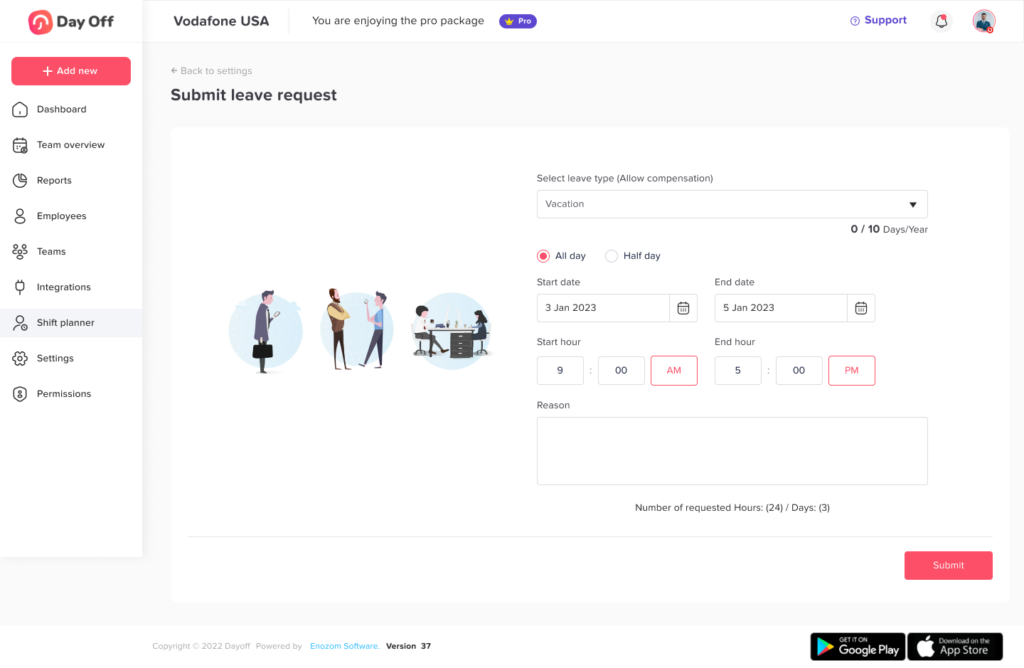
Provide One Reliable Way to Submit the Request
Emergency requests become difficult to manage when they arrive through multiple channels. One employee emails HR, another sends a private message to a supervisor, and another asks a coworker to pass on the information.
The company should also identify one primary process for reporting emergency leave. This might be a leave management application, a manager contact process, or a dedicated HR channel.
Employees should also know what to do when they cannot access the normal system. For example, the policy could allow an employee or appropriate family contact to notify the manager by phone, after which the manager or HR team records the absence.
The important point is that the leave must eventually be entered into the organization’s official system. Otherwise, calendars, leave balances, payroll records, and reports may remain inaccurate.
Acknowledge the Employee Before Discussing Work
The manager’s first message sets the tone for the entire experience.
A useful response could be:
“Thank you for letting me know. Please focus on the situation. We will arrange coverage here. When you are able, let me know whether you expect to be away tomorrow as well.”
This response does four things:
- Confirms that the message was received
- Shows empathy
- Removes immediate pressure about work
- Establishes a reasonable point for the next update
Managers should avoid beginning with questions such as:
- “Who will finish your work?”
- “Can you still join the meeting?”
- “Can you answer messages during the day?”
- “Why didn’t you tell us earlier?”
- “Can you provide proof immediately?”
Some follow up information may be necessary, particularly when legal leave protections or documentation requirements apply. However, the questions should be handled by the appropriate HR person and asked at a reasonable time.
Record the Absence Immediately
Even when details are incomplete, the absence should be recorded as soon as possible.
A temporary status such as “pending classification” can be used until HR determines whether the time should be recorded as emergency leave, sick leave, bereavement leave, protected family leave, PTO, or unpaid leave.
Recording the absence immediately helps managers see that the employee is unavailable. It also reduces the risk of:
- Scheduling the employee for meetings
- Assigning new tasks to the employee
- Marking the absence incorrectly
- Forgetting to update the leave balance
- Losing the original request in a chat or email thread
Day Off centralizes employee leave requests, approval workflows, balances, and request records. Managers can also receive notifications, review requests, and use single or multiple approvers depending on the organization’s workflow.
Separate the Leave Decision From the Coverage Decision
Managers sometimes delay responding because they are worried about coverage. This can also make an employee feel that the emergency is being questioned or that permission depends on finding a replacement.
A better process separates the two decisions.
Leave decision:
Does the employee need to be away, and how should the absence be classified under policy and law?
Coverage decision:
Which tasks must continue, which can be reassigned, and which can wait?
In a genuine emergency, coverage should also be a management responsibility. Employees may provide useful handover information when they are able, but the organization should not depend on an employee managing the entire transition during a crisis.
Check Current Team Availability
Before assigning work, managers need an accurate view of who is:
- Working
- Already on approved leave
- Scheduled for a different shift
- Working from another location
- Assigned to another urgent project
- Available but already at full capacity
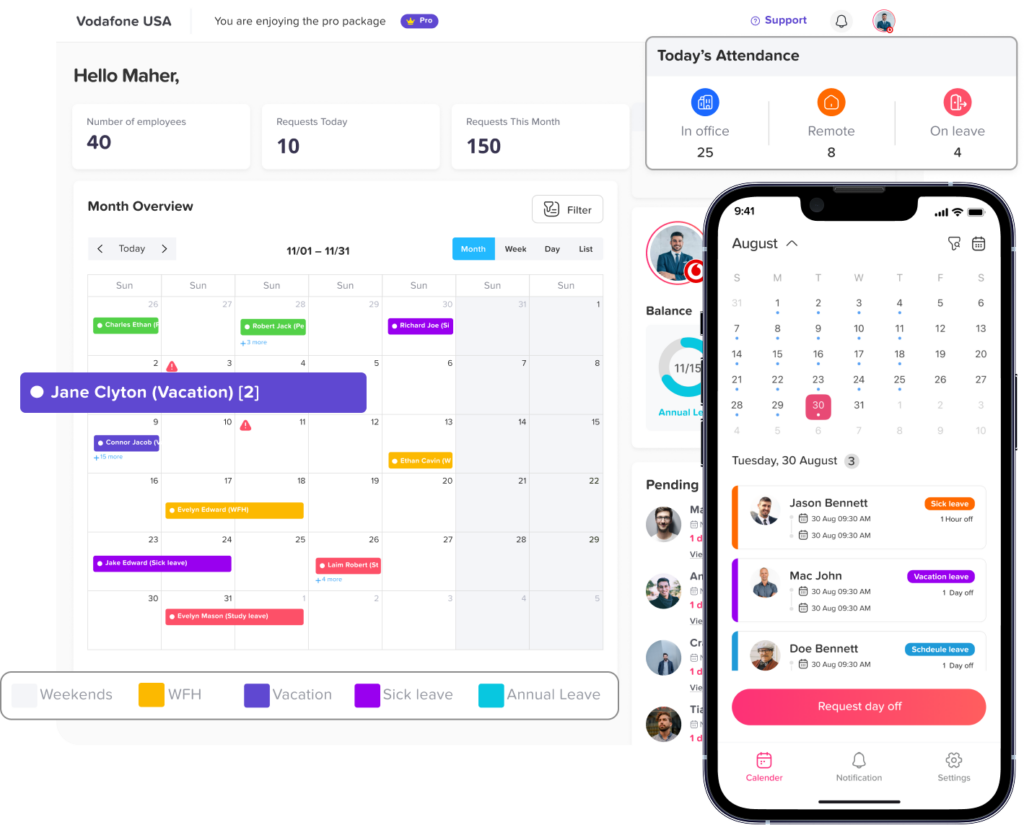
A shared leave calendar can help managers avoid transferring urgent work to someone who is also unavailable.
Day Off provides a centralized calendar that displays approved leave, holidays, and team availability in monthly, weekly, and list views. Its calendar and location features help managers review availability across teams, departments, and locations.
This visibility is especially important when the emergency affects:
- A small department
- A customer support team
- A shift based operation
- A remote team
- A multi location business
- A project with a fixed launch date
- A role with specialized knowledge
Activate a Predefined Coverage Plan
The best time to decide who can cover an employee is before an emergency happens.
Each business critical role should have:
- A primary backup
- A secondary backup
- Shared access to required files
- Documented procedures
- Clear escalation contacts
- Defined approval authority
- A list of daily and weekly critical responsibilities
A coverage plan should not require the backup person to perform every part of the absent employee’s job. The purpose is to protect essential operations until the employee returns or a longer term arrangement is made.
Emergency Coverage Decision
| Work Category | Recommended Action | Example |
|---|---|---|
| Critical and time-sensitive | Reassign immediately | Responding to a major customer incident |
| Important but transferable | Assign to a trained backup | Preparing a scheduled client report |
| Important but flexible | Adjust the deadline | Internal project documentation |
| Low priority | Pause until the employee returns | Nonurgent process improvement work |
| Requires specialist access | Escalate to the designated secondary owner | Approving a restricted financial transaction |
| Can be automated or templated | Use the approved standard process | Sending routine status notifications |
Prioritize Work Instead of Redistributing Everything
When an employee is unexpectedly absent, managers should reduce the workload before redistributing it.
Start by asking:
- What must be completed today?
- What affects customers, payroll, safety, or compliance?
- What deadline can be moved?
- What meeting can be cancelled?
- What work can be paused?
- What work requires the absent employee’s unique knowledge?
- What can be completed using existing documentation?
- Which stakeholders need to be informed?
Trying to maintain 100 percent of the original workload may also overload the rest of the team. Emergency coverage should protect essential work, not create an unsustainable workload for everyone else.
Assign One Temporary Coverage Owner
For each major responsibility, assign one clearly named owner.
Avoid sending a general message such as:
“Can someone handle Maria’s work today?”
Instead, specify:
- The task
- The temporary owner
- The deadline
- The information available
- The person to contact for escalation
For example:
“Daniel will also manage urgent customer tickets today. Sara will handle the 3 p.m. client call. The weekly internal report will also move to Thursday.”
Clear ownership prevents duplicate work, missed tasks, and confusion.
Communicate on a Need to Know Basis
The team needs to know that an employee is unavailable, but it usually does not need personal details about the emergency.
A suitable internal message might say:
“Ahmed is unexpectedly away today. Please direct urgent account questions to Lina. Moreover, the project review has been moved to Wednesday.”
This communicates the operational information without revealing medical, family, or personal details.
Managers should avoid sharing:
- Medical diagnoses
- Details about a family crisis
- Personal documents
- Speculation about the employee’s situation
- Information the employee has not authorized for wider disclosure
A respectful process protects employee trust while still giving coworkers enough information to continue working.
Set a Reasonable Communication Schedule
An employee on emergency leave should not be expected to remain continuously available.
However, the organization may need limited updates about:
- Whether the absence will continue
- The employee’s expected return date
- Whether additional leave is needed
- Whether HR documentation will be provided
- Whether a return to work adjustment is required
Agree on a reasonable communication schedule based on the situation.
For example:
- A same day emergency may require an update before the next shift.
- An uncertain hospitalization may require an update every two or three days.
- Approved longer term medical leave may follow a formal HR communication schedule.
Use one designated contact person whenever possible. This prevents the employee from receiving repeated calls from HR, the direct manager, project managers, and coworkers.
Review Whether Additional Leave Protection Applies
An emergency absence may begin as one day but develop into a longer period.
HR should review whether the employee may qualify for:
- Sick leave
- Bereavement leave
- Family or medical leave
- Disability related leave or accommodation
- Parental or caregiver leave
- Domestic violence leave
- Unpaid leave
- Another statutory or contractual entitlement
Furthermore, employees do not always know the legal name of the leave they need. Under the U.S. FMLA, for example, an employee does not have to specifically mention “FMLA” in the first request, but must provide enough information for the employer to recognize that the situation may qualify.
Managers should therefore send potentially protected situations to HR instead of denying the request because the employee selected the wrong leave category.
Prepare for a Longer Absence Early
If the employee may be away for more than a few days, move from short term emergency coverage to a structured temporary plan.
This may involve:
- Reassigning projects
- Temporarily changing approval authority
- Adjusting shift schedules
- Informing customers about a new point of contact
- Delaying nonessential work
- Hiring temporary support
- Cross training another employee
- Redistributing workload across departments
- Reviewing overtime and capacity
- Documenting temporary decisions
Do not wait until coworkers are already overwhelmed. Early planning allows the business to create a fairer and more stable arrangement.
How Day Off Simplifies Emergency Leave Management
Day Off helps companies organize emergency leave without depending on spreadsheets, separate calendars, or scattered messages.
| Day Off Feature | How It Supports Emergency Leave Management |
|---|---|
| Centralized leave requests | Keeps the request and its status in one organized system |
| Approval workflows | Routes requests to the assigned manager or multiple approvers |
| Instant notifications | Helps managers see and respond to urgent requests quickly |
| Custom leave policies | Allows companies to manage emergency, compassionate, sick, personal, or unpaid leave according to internal rules |
| Real-time leave balances | Shows available allowances without requiring HR to calculate them manually |
| Shared team calendar | Helps managers see who is already away before assigning coverage |
| Teams and locations | Supports coverage planning across departments, offices, and international teams |
| Detailed reports | Creates a record of pending, approved, and rejected leave requests |
| Google and Outlook Calendar integrations | Syncs approved time off with the calendars teams already use |
| Slack and Microsoft Teams integrations | Makes leave requests, balances, and team availability easier to access within workplace communication tools |
| Web, iOS, and Android access | Allows employees and managers to manage requests from different devices |
Day Off supports centralized employee management, approval workflows, calendar visibility, custom policies, reports, integrations, and mobile applications for iOS and Android.
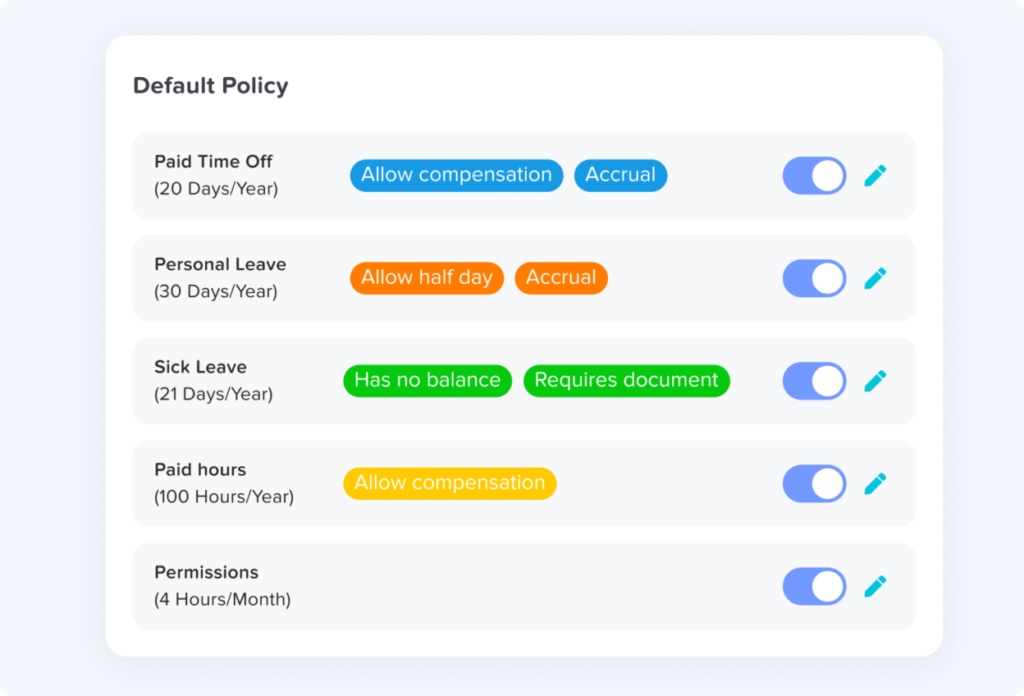
Create a Dedicated Emergency Leave Type
Companies can configure an appropriate leave type for emergencies or compassionate situations.
The policy can explain:
- Whether the leave is paid
- Whether a balance applies
- Which employees are eligible
- Whether manager and HR approval are required
- What documentation may be requested
- Whether employees can request hours, half days, or full days
- Which related leave type should be used when emergency leave is exhausted
A dedicated category helps HR separate emergency absences from vacation and analyze the records more accurately.
Use Multiple Approvers Where Necessary
Some emergency requests may require only direct manager approval. Others may require HR review because the absence could involve legal protection, documentation, payroll treatment, or an extended period.
Day Off allows organizations to assign multiple approvers to employees and send notifications for fast approval decisions.
A practical workflow might be:
- The manager acknowledges the request and begins arranging coverage.
- HR reviews the appropriate leave category.
- The final status is recorded in the system.
- The employee’s balance and calendar are updated.
- Reports preserve the request history.
This process keeps operational decisions fast while allowing HR to handle the policy and compliance details.
Use the Shared Calendar to Find Available Coverage
Once an absence is approved, managers can review the team calendar to identify available employees.
The calendar can help answer:
- Who is already away?
- Which team has more available capacity?
- Are public holidays affecting another location?
- Is a trained backup scheduled to work?
- Will the emergency absence overlap with another approved request?
Day Off’s calendar displays holidays and approved leave while its team and location features support availability planning across different organizational groups.
Day Off does not replace project or task management software, but it gives managers the absence information they need before assigning tasks in their normal work management system.
Keep Workplace Calendars Updated
Approved time off can be synchronized with Google Calendar and Microsoft Outlook. Day Off also supports Slack and Microsoft Teams integrations for leave management and team availability updates.
This reduces the risk of:
- Meetings being scheduled with an absent employee
- Coworkers missing the absence notification
- Managers relying on an outdated spreadsheet
- HR manually entering the same absence in multiple systems
Maintain Accurate Records and Reports
Emergency leave should not disappear after coverage has been arranged.
HR may later need to review:
- The leave type
- The number of days or hours used
- The approval status
- The start and end dates
- The remaining leave balance
- The reason recorded by the employee
- Accrual or carryover information
- Repeated absence patterns
- Payroll related information
Day Off provides balance, detailed, total, accrual, and carryover reports to help HR review leave usage and employee balances.
Reports should also be used to improve policies and staffing plans, not to punish employees for legitimate emergencies.
Build an Emergency Coverage System Before It Is Needed
Organizations should prepare a coverage framework for every critical function.
Identify Business Critical Responsibilities
List the tasks that cannot stop when someone is away, including:
- Payroll processing
- Customer support
- Security monitoring
- Financial approvals
- Shift supervision
- Production checks
- Compliance deadlines
- Client communication
- System administration
- Order fulfillment
Assign Primary and Secondary Backups
Every essential responsibility should also have at least two people who understand the process.
The secondary backup matters because the primary backup may also be:
- On leave
- Sick
- Working in another location
- Handling another emergency
- Unavailable because of workload
- Missing the necessary access
Cross Train Employees
Cross training reduces the operational risk of relying on one person.
Training should include:
- Basic procedures
- System access
- Escalation rules
- Customer communication standards
- Approval limits
- Security and confidentiality requirements
- Common exceptions
- Contact details for specialist support
Document Repeated Processes
Employees should not need to recreate instructions during an emergency.
Create simple documentation for recurring tasks such as:
- Daily opening or closing procedures
- Customer escalation steps
- Weekly reporting
- Invoice approval
- Payroll submission
- System monitoring
- Project status updates
- Vendor communication
Documentation should also be stored in a shared, secure location and reviewed regularly.
Review Coverage During Busy Periods
Coverage plans should account for:
- Product launches
- Seasonal demand
- Public holidays
- Financial closing periods
- Major client deadlines
- School holiday periods
- Industry events
- Multiple employees requesting leave
- High volume customer support periods
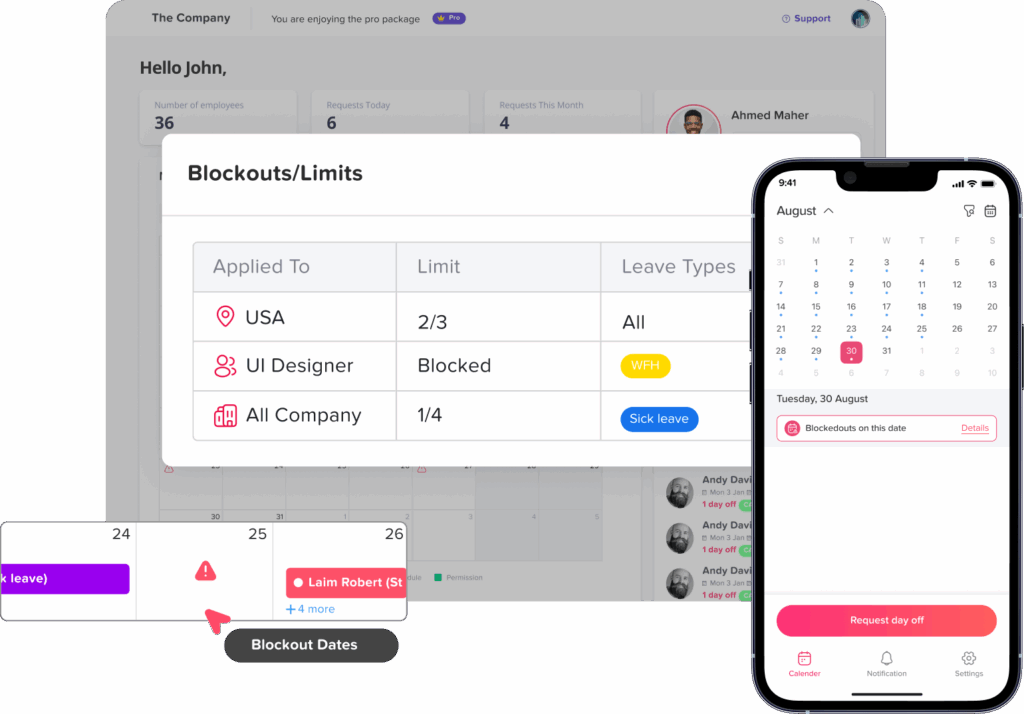
Blockout dates or request limits can help businesses manage planned leave during critical periods, but these rules should not be used to prevent employees from taking legitimate emergency or legally protected leave. Day Off allows organizations to block dates or cap time off requests for important business periods.
FAQ
What qualifies as emergency leave?
Emergency leave generally covers urgent and unexpected situations that require an employee’s immediate attention, such as sudden illness, injury, bereavement, hospitalization of a family member, or a breakdown in dependant care. Moreover, the exact definition depends on company policy and local law.
Can an employer refuse an emergency leave request?
Furthermore, the answer depends on the reason for the leave, the employee’s location, the company policy, and whether a legal leave entitlement applies. Managers should involve HR before rejecting a request that may relate to a serious medical condition, dependant emergency, disability, bereavement, or another protected reason.
Does an employee need to provide proof of an emergency?
Employers may be able to request reasonable documentation in certain situations, especially for extended medical leave or benefits administration. However, documentation requirements should be lawful, consistent, proportionate, and clearly explained in the policy. Immediate proof should not always be expected during the first hours of an emergency.
How much notice should an employee give for emergency leave?
Employees should also normally notify the employer as soon as reasonably possible. Advance notice may not be possible when the event is sudden. The company policy should also provide an alternative process for situations where the employee cannot use the normal request method.
Should emergency leave be paid?
Payment depends on local law, the employment contract, collective agreements, and company policy. Some organizations provide paid compassionate or emergency leave, while others allow employees to use sick leave, PTO, unpaid leave, or another applicable entitlement.
Can emergency leave be taken for part of a day?
Yes, when company policy or the applicable leave entitlement allows it. An employee may also need a few hours to attend an urgent appointment, collect a child, support a dependant, or manage an immediate personal issue.
How can managers maintain coverage when leave is unexpected?
Managers should also use predefined backup owners, shared absence calendars, cross training, documented procedures, workload prioritization, and clear temporary ownership. The focus should be on protecting essential work rather than trying to complete every planned task.
Should employees work during emergency leave?
Employees should generally be allowed to focus on the emergency. Occasional contact may be necessary for a critical question or an update about the expected return date, but the employee should not be expected to perform normal duties while on approved leave.
How can leave management software help with emergency requests?
Leave management software creates one place for submitting requests, notifying approvers, recording decisions, checking balances, reviewing team availability, and maintaining absence reports. This helps managers activate coverage faster and reduces the risk of losing requests in emails or chat messages.
Can Day Off manage emergency and compassionate leave?
Day Off allows organizations to manage different leave policies and leave types, approval workflows, balances, calendars, reports, teams, locations, and workplace integrations. Companies can also use these capabilities to organize emergency, compassionate, sick, personal, unpaid, and other forms of leave according to their internal rules.
Final Thoughts
Managing emergency leave requests without losing team coverage is not about making employees justify a crisis or remain available while they are away. It is about building an organization that can also respond with both compassion and operational discipline.
A strong process includes:
- A clear emergency leave policy
- A simple request and notification process
- Fast acknowledgement
- Appropriate HR review
- Shared visibility into employee availability
- Primary and secondary backup owners
- Documented critical processes
- Fair workload prioritization
- Respect for employee privacy
- Accurate leave records
- A supportive return to work process
Day Off helps bring these parts together by centralizing leave requests, approval workflows, employee balances, policies, shared calendars, reports, notifications, teams, locations, and integrations.
With better visibility and preparation, managers can support employees through unexpected situations while keeping essential work, customer service, and team operations moving.