







A timesheet can look complete and still contain errors.
An employee may have clocked in every day but forgotten to clock out once. A lunch break may have been recorded incorrectly. A project entry may have been assigned to the wrong client. Approved PTO may overlap with tracked working time. An unusually long timer may have continued running after the employee finished work.
Individually, these mistakes may appear small. Across an entire workforce and multiple pay periods, however, inaccurate time records can affect payroll, overtime calculations, attendance reporting, project costs, client billing, and workforce planning.

A Timesheet Audit Checklist gives HR teams, managers, and payroll administrators a repeatable process for finding those problems before the records are finalized.
The goal of a timesheet audit is not to search for employee wrongdoing. Most discrepancies are better treated first as records that need explanation. The audit should answer a simpler question:
Does the timesheet accurately represent what happened during the period being reviewed?
This guide explains how to audit timesheets, which time tracking errors to look for, how often reviews should happen, and how Day Off can help managers compare tracked time with schedules, PTO, attendance, projects, tasks, and detailed time reports.
What Is a Timesheet Audit?
A timesheet audit is a systematic review of employee time records to identify missing, inconsistent, duplicate, incomplete, or incorrectly categorized entries.
Depending on the organization, a timesheet audit may compare:
- Clock-in and clock-out records
- Employee work schedules
- Breaks
- PTO and other leave
- Overtime
- Manual time entries
- Projects
- Tasks
- Billable and non-billable time
- Attendance exceptions
- Payroll periods
- Manager approvals
A good audit does not simply ask whether the total number of hours looks reasonable.
It examines the records that created that total.
For example:
Timesheet total: 40 hours
At first glance, the record looks correct.
But a closer review might show:
- Monday: 8 hours
- Tuesday: 8 hours
- Wednesday: 12 hours
- Thursday: 8 hours
- Friday: 4 hours
The weekly total is still 40 hours, but Wednesday and Friday deserve investigation.
The employee may have genuinely worked those hours, or one entry may contain an incorrect start or end time.
That is why a total-hours check alone is not a complete timesheet audit.
Why Timesheet Accuracy Matters
For employers covered by the U.S. Fair Labor Standards Act, records for covered nonexempt employees must include hours worked each day and total hours worked each workweek, along with other wage and employment information. The Department of Labor does not require employers to use one particular timekeeping method, but the records must be complete and accurate.
This means companies can use:
- Electronic time trackers
- Time clocks
- Employee-entered timesheets
- Other reliable timekeeping methods
but the resulting records still need to reflect actual working time.
Accurate time records are also useful beyond legal recordkeeping.
They support:
- Payroll preparation
- Overtime review
- Attendance management
- Project costing
- Client billing
- Workforce planning
- Schedule analysis
- Internal audits
The best time to discover an error is usually before the timesheet feeds into another process.
Timesheet Audit Checklist at a Glance
Before going deeper into the audit, this checklist shows the main areas to review.
| Audit Area | What to Check | Common Warning Sign |
|---|---|---|
| Completeness | Every required workday has a record | Missing clock-in or clock-out |
| Time ranges | Start and end times make sense | 15-hour timer with no explanation |
| Duplicates | Same time is not recorded twice | Two overlapping entries |
| Schedule | Actual time matches or explains schedule variance | Employee appears late every day |
| PTO | Leave and working time do not conflict incorrectly | Full-day PTO plus full-day work |
| Breaks | Breaks follow actual records and policy | Identical automatic break every day despite interruptions |
| Overtime | Extra hours are identified and reviewed | Weekly hours exceed expected amount |
| Projects | Time is assigned to the correct project | Employee logs hours to inactive or wrong project |
| Tasks | Task selection reflects actual work | Large amount of uncategorized project time |
| Billable status | Client work is categorized correctly | Internal meeting marked billable |
| Manual changes | Corrections are reasonable and documented | Repeated edits immediately before payroll |
| Payroll period | Correct dates are included | Hours missing from first or last day |
| Approval | Required reviews are complete | Timesheet reaches payroll without manager review |
The easiest way to make this manageable is to audit timesheets in several passes rather than checking every possible problem at once.
Pass 1: Check Whether the Timesheet Is Complete
The first audit pass should answer:
Is all expected time represented?
Do not begin by investigating individual minutes. First identify obvious gaps.
Look for Missing Clock-Ins
If an employee was scheduled to work but has no clock-in, several explanations are possible:
- The employee forgot to clock in.
- The employee was absent.
- The employee was on approved PTO.
- The employee was not actually scheduled.
- The work schedule is incorrect.
- The time entry has not yet been submitted.
A missing record is therefore an exception to investigate, not automatically proof of an absence.
Example
Schedule:
Monday, 9:00 AM to 5:00 PM
Time record:
No clock-in
Before marking the employee absent, check:
- Was Monday a scheduled workday?
- Was PTO approved?
- Was the employee working under a different schedule?
- Was time recorded elsewhere?
- Did the employee simply miss the punch?
This is where connected schedule, leave, and attendance information becomes particularly useful.
Look for Missing Clock-Outs
A clock-in without a clock-out leaves the day’s total incomplete.
Example:
Clock-in: 8:58 AM
Clock-out: Missing
Do not guess that the employee left at their scheduled end time.
Ask the employee or manager to verify what actually happened.
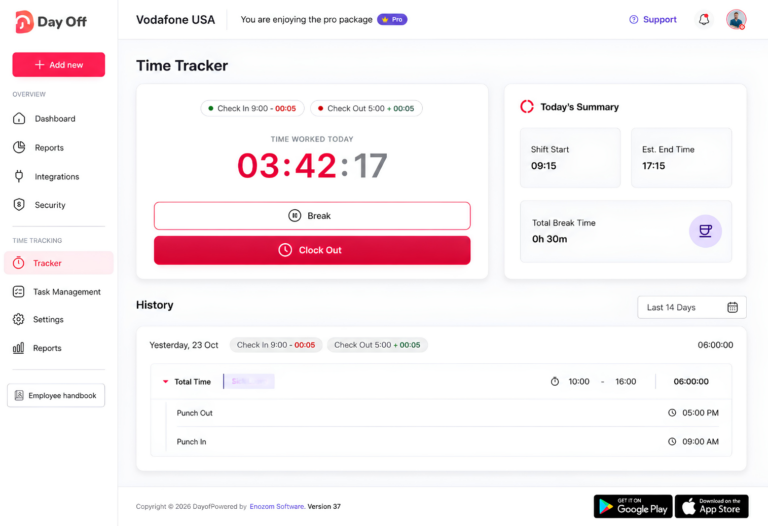
Day Off’s Attendance Review specifically makes this type of exception visible. A clock-in with an empty clock-out means the day is incomplete and the net working time should not be treated as final until the missing record is resolved.
Check for Entire Missing Days
One missing punch is relatively easy to notice.
An entire missing day can be easier to overlook, particularly if the auditor only reviews recorded entries rather than comparing the report with employee schedules.
For each employee, compare:
Expected working days
with:
Days containing time, PTO, or another valid status
Every expected day should have an explanation.
Check the Audit Period
A surprisingly simple timesheet error is reviewing the wrong date range.
If payroll covers:
August 16 to August 31
but the report is filtered to:
August 17 to August 31
one day of activity disappears from the review.
Always confirm:
- Pay period start
- Pay period end
- Time zone where relevant
- Correct employee population
before auditing totals.
Pass 2: Compare Tracked Time With the Work Schedule
Once the timesheet is complete, compare actual working time with expected working time.
A schedule difference is not automatically an error.
It is something that needs context.
Review Late Starts
Example:
Scheduled: 9:00 AM
Clock-in: 9:27 AM
Schedule variance:
27 minutes late
Possible explanations include:
- Unapproved lateness
- Approved schedule change
- Flexible schedule
- Partial-day PTO
- Incorrect schedule assignment
- Employee forgot to clock in at the actual start time
The audit should determine which explanation applies.
Review Early Departures
Example:
Scheduled end: 5:00 PM
Clock-out: 4:10 PM
Difference:
50 minutes
Again, the timesheet alone cannot explain the reason.
Check whether:
- Hourly PTO covered the missing time
- The manager approved an early departure
- The employee worked an adjusted schedule
- The time entry is incorrect
Review Consistently Unusual Patterns
A single late start may be ordinary.
A repeated pattern deserves more attention.
For example:
| Day | Scheduled Start | Clock-In |
|---|---|---|
| Monday | 9:00 | 9:44 |
| Tuesday | 9:00 | 9:47 |
| Wednesday | 9:00 | 9:42 |
| Thursday | 9:00 | 9:46 |
| Friday | 9:00 | 9:43 |
Before concluding that the employee is approximately 45 minutes late every day, verify the schedule.
The real problem may be that the employee was assigned a 9:00 AM schedule even though the approved shift begins at 9:45 AM.
Timesheet audits should therefore investigate both:
the time record
and
the data being used as the comparison point.
Do Not Apply Fixed-Schedule Logic to Flexible Employees
An employee who must work eight hours per day but can choose their starting time should not necessarily be flagged for arriving after 9:00 AM.
For flexible workers, an audit might focus more on:
- Required total hours
- Core availability periods
- PTO
- Missing time
- Total net work
than on exact start time.
Pass 3: Audit Hours That Can Affect Payroll
The next pass focuses on records that may affect paid working time.
These deserve particular attention because small errors can change totals.
Check for Unusually Long Time Entries
Example:
Start: 8:55 AM
End: 11:40 PM
Duration:
14 hours 45 minutes
That may be correct.
But it should probably be reviewed if the employee normally works eight hours.
Possible explanations include:
- Genuine extended work
- Forgotten timer
- Incorrect end time
- Duplicate work session
- Shift coverage
- Travel or special assignment
Avoid automatically shortening a long record because it “looks wrong.”
Verify it first.
Check for Very Short Entries
Example:
10:07 AM to 10:09 AM
A two-minute entry may be completely legitimate.
But dozens of tiny entries could indicate:
- Timer mistakes
- Fragmented project tracking
- Accidental starts
- Duplicate activity
- A tracking process that is too complicated
Short entries are often more important for project-time audits than simple attendance audits.
Check for Overlapping Time Entries
Suppose an employee has:
Project A: 10:00 AM to 12:00 PM
and:
Project B: 11:30 AM to 1:00 PM
The 30 minutes from:
11:30 AM to 12:00 PM
appears in both records.
If the system or workflow permits overlapping entries, the auditor should confirm whether this represents valid concurrent activity or duplicate working time.
Why This Matters
If you simply sum the entries:
2 hours + 1.5 hours = 3.5 hours
but the real elapsed period is:
10:00 AM to 1:00 PM = 3 hours
the project totals may be overstated by 30 minutes.
Review Duplicate Entries
Duplicate time can appear when:
- An employee manually logs time after already using a timer.
- A record is imported twice.
- An employee restarts a task without realizing the first timer is still active.
- A correction creates a second entry rather than replacing the incorrect one.
Look for identical:
- Employee
- Date
- Start time
- End time
- Project
- Task
The more fields that match, the more likely the entries deserve investigation.
Audit Breaks Carefully
Break errors can be less obvious than missing punches.
Check:
- Whether a break was recorded
- Break duration
- Whether the employee was actually relieved from work
- Whether an automatic break deduction matches what happened
- Whether break rules comply with applicable law
For U.S. FLSA purposes, short rest periods of about 20 minutes or less are generally counted as compensable working time. Bona fide meal periods, typically 30 minutes or more, generally do not need to be counted as work time when the employee is completely relieved from duty.
Example: Interrupted Meal Period
Timesheet:
Lunch deducted: 30 minutes
But the employee reports that they answered customer calls throughout lunch.
That record should not simply be accepted because the timesheet contains a 30-minute deduction.
The Department of Labor has specifically noted in healthcare guidance that where an employer automatically deducts a meal period, the employer remains responsible for ensuring employees actually receive the full, uninterrupted meal period.
State and local break rules may impose additional requirements.
Check for Off-the-Clock Work
One of the most important audit questions is:
Was work performed outside the recorded time?
For U.S. FLSA purposes, if an employer requires or allows an employee to work, that time is generally considered hours worked even when the work was not specifically requested.
Possible warning signs include:
- Work emails before the first recorded punch
- Task records outside clocked working time
- Repeated work after clock-out
- Managers regularly asking employees to finish tasks after ending time
- Pre-shift setup that is not recorded
A timekeeping rule should not encourage employees to remove actual working time simply because the work was not approved in advance.
The organization can address unauthorized work under its policy while still keeping accurate working-time records.
Review Overtime Separately
Do not look only for employees whose total appears dramatically high.
Review:
- Weekly totals
- Daily totals where local rules matter
- Work across multiple projects
- Work across different departments
- Extra hours before and after shifts
- Hours recorded on normally non-working days
For covered nonexempt employees under the federal FLSA, overtime generally applies after more than 40 hours worked in a workweek, although state laws and specific employee situations can impose different rules.
Example
Monday: 9 hours
Tuesday: 9 hours
Wednesday: 8 hours
Thursday: 9 hours
Friday: 8 hours
Total:
43 hours
A manager checking only whether every day “looks normal” could miss the weekly overtime total.
Timesheet audits should therefore review both:
daily records
and
period totals.
Pass 4: Compare Timesheets With PTO and Attendance
A time tracking audit becomes much stronger when PTO is reviewed alongside working time.
Without leave context, an auditor may misinterpret a valid absence as missing time.
Check for PTO Overlapping With Work
Example:
Employee has:
8 hours approved PTO
and also records:
8 working hours
for the same day.
That does not automatically mean one record is wrong.
Possible explanations include:
- PTO was canceled but not updated.
- The employee worked despite an approved request.
- The leave should have been partial-day rather than full-day.
- The time entry belongs to another date.
- An administrator needs to correct the leave record.
But the overlap should be investigated.
Check Partial-Day PTO
Example:
Scheduled: 8 hours
Worked: 5 hours
Approved PTO: 3 hours
Combined:
8 hours accounted for
This may be completely correct.
Without the PTO record, however, the timesheet would appear three hours short.
Review Missing Attendance Against Leave
If an employee has no clock-in:
- Check the assigned schedule.
- Check approved PTO.
- Check holidays or non-working days.
- Check other approved absence.
- Only then classify unresolved missing attendance.
This prevents payroll or HR from treating approved time away as a timekeeping error.
Pass 5: Audit Project, Task, and Billable Time
For businesses using time tracking for project management or client billing, an accurate clock-in total is only half of the audit.
You also need to ask:
Was the time recorded in the right place?
Check Project Assignment
Suppose an employee logs:
7 hours
against:
Website Redesign
but the employee actually worked on:
Mobile App
The total attendance may be correct, but the project report is wrong.
This can affect:
- Project budgets
- Cost analysis
- Client reporting
- Capacity planning
- Estimates vs actual comparisons
Watch for Old or Incorrect Projects
Audit whether employees are still recording hours against:
- Completed projects
- Duplicate projects
- Old client names
- Test projects
- Generic placeholders
A clean timesheet requires a clean project structure.
Check Tasks Where Task-Level Data Matters
A project may contain:
- Development
- Design
- Testing
- Meetings
- Support
If almost all hours are logged only to the project without meaningful task detail, determine whether:
- High-level project tracking is sufficient, or
- Employees are failing to use the intended task structure.
Do not require granular task tracking unless the resulting information is actually useful.
Audit Estimated vs Actual Hours
Suppose a task was estimated at:
12 hours
Actual tracked time:
34 hours
That does not mean the time record is wrong.
It could mean:
- The original estimate was poor.
- Scope increased.
- Rework was required.
- Work was assigned incorrectly.
- A timer was left running.
- Several activities were grouped under the wrong task.
The audit should distinguish between:
time tracking error
and
project performance variance.
They are not the same thing.
Check Billable Status
If project time feeds client billing, verify whether each entry is correctly marked billable or non-billable.
For example:
Client implementation: Billable
Internal training: Non-billable
Internal team meeting: Usually non-billable, depending on the agreement
Client meeting: Potentially billable
Incorrect billable status can create a financial problem even when the duration is correct.
A Better Way to Audit: Start With Exceptions
For a company with five employees, reviewing every line manually may be reasonable.
For a company with hundreds of employees, it becomes inefficient.
An exception-based audit focuses attention on unusual records.
High-Priority Timesheet Exceptions
Review first:
- Missing clock-out
- Missing scheduled day
- Very long shift
- PTO plus working time
- Large overtime amount
- Overlapping entries
- Duplicate entries
- Unusual manual edits
- Break anomaly
- Work on a scheduled day off
- Time assigned to the wrong project
- Billable-status mismatch
Medium-Priority Exceptions
Then review:
- Small schedule variance
- Repeated late starts
- Frequent manual time entry
- Unusually low daily total
- High number of tiny project sessions
- Time concentrated in one unexpected task
This approach lets payroll and HR spend more time investigating meaningful discrepancies instead of manually rereading thousands of normal records.
Use Summary Data to Find the Problem, Then Detailed Data to Explain It
A practical audit often works best from general to specific.
Start with summarized data.
Ask:
- Which employees have unusually high hours?
- Which days have unusually low time?
- Which projects have unexpected totals?
- Which teams show unusual patterns?
Then move into detailed records.
For example:
Summary View
Employee A:
58 hours
This is the warning sign.
Detailed View
Monday: 8 hours
Tuesday: 8 hours
Wednesday: 8 hours
Thursday: 8 hours
Friday: 26 hours
Now you know where to investigate.
This is more efficient than beginning with every individual session.
How Day Off Helps With Timesheet Audits
Day Off combines time tracking with employee schedules, attendance, PTO, projects, tasks, and reporting. That gives managers several layers of information to use when reviewing timesheets rather than relying on one total-hours column.
A useful Day Off timesheet audit can follow four stages.
Stage 1: Start With the Summary Report
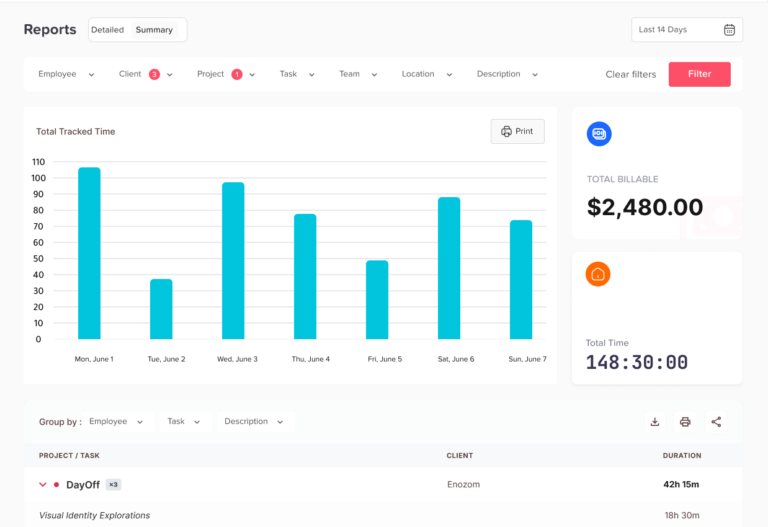
Day Off’s Summary Report groups tracked time so administrators can analyze totals instead of reviewing every individual session immediately.
The same tracked-time data can be grouped by areas such as:
- Employee
- Client
- Project
- Team
- Location
- Date
This makes the Summary Report useful for spotting unusual totals and patterns before opening individual records.
For example, you might notice:
Project A: 122 hours
when the project normally uses approximately 60 hours per week.
That becomes an audit target.
Stage 2: Move to the Detailed Report
Once a suspicious total is identified, use the Detailed Report to inspect the individual entries behind it.
Day Off’s Detailed Report shows individual tracked sessions with information including:
- Description
- Project
- Task
- Employee
- Date
- Start and end time
- Duration
- Billable status
The report does not aggregate the individual sessions, making it much more useful when the question becomes:
Which exact entry caused this total?
For example:
Summary:
Employee A: 51 hours
Detailed review:
Wednesday, 9:02 AM to 11:47 PM
The detailed entry gives the auditor something specific to verify.
Stage 3: Compare Time With Attendance Review
The time report tells you what was tracked.
Attendance Review adds schedule and leave context.
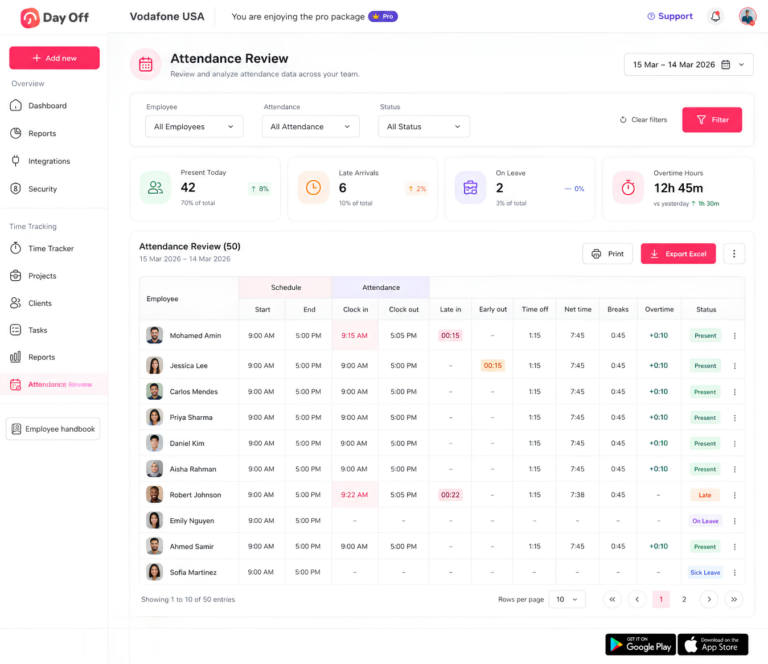
Day Off Attendance Review shows:
- Scheduled start
- Scheduled end
- Clock-in
- Clock-out
- Late in
- Early out
- Time off
- Net time
- Breaks
- Overtime
This allows managers to compare expected working time with what actually happened.
Example
Schedule: 9:00 AM to 5:00 PM
Clock-in: 9:18 AM
Clock-out: 6:05 PM
Instead of simply seeing 8+ hours, the manager can review both the late start and time worked after the scheduled end.
Missing Clock-Outs Are Easier to Spot
Day Off Attendance Review also makes incomplete records visible. If an employee clocked in but has no clock-out, the day’s net time is incomplete and should be reviewed before the record is treated as final.
Stage 4: Filter and Export the Records You Need
Day Off time reports allow administrators to apply a date range and filters such as:
- Employee
- Client
- Project
- Task
- Team
- Location
- Description
The filtered view can then be exported to Excel or printed. The export reflects the selected filters and period rather than automatically exporting the entire company history.
This is useful when HR or payroll needs to review only:
One employee
One department
One project
or:
One payroll period
rather than sorting through unrelated time records.
Auditing Project and Task Time in Day Off
For companies using Task Tracker, Day Off records working sessions against projects and, where appropriate, tasks.
In Task Tracker mode, a project must be selected for the entry to be saved. A task can then add more detailed classification where needed.
That gives auditors a consistent project field to examine.
Review Project Names
Check for:
- Wrong project
- Similar project names
- Unexpected client assignment
- Inactive work still receiving time
- Generic catch-all projects
Day Off projects can be linked to clients, assigned codes, marked billable, and configured to require more granular task-level tracking if the company chooses.
Review Task Assignment
Tasks in Day Off belong to projects and can include:
- Assignee
- Estimated hours
- Actual time spent
This can help managers identify whether an unusual duration is a recording problem or simply a task that required more work than expected.
Review Billable Time
In Day Off’s Detailed Report, entries include a billable indicator.
The billable status begins with the project’s configuration but can be overridden on an individual time entry. This means an auditor should not assume every hour under a billable project is automatically billable.
For example:
Project: Client Website
Project default: Billable
Individual entry:
Internal team training: Non-billable
That distinction helps produce cleaner client-time records.
How to Handle a Timesheet Error When You Find One
Finding the error is only half the audit.
Identify the Record
Document:
- Employee
- Date
- Entry
- Problem
Example:
Employee: Jordan Smith
Date: August 25
Issue: No clock-out
Ask for Verification
Do not guess.
Ask the employee or manager what actually happened.
For example: Your August 25 entry has a 9:02 AM clock-in but no clock-out. What time did you finish working?
Correct the Record
Update the record using the verified information.
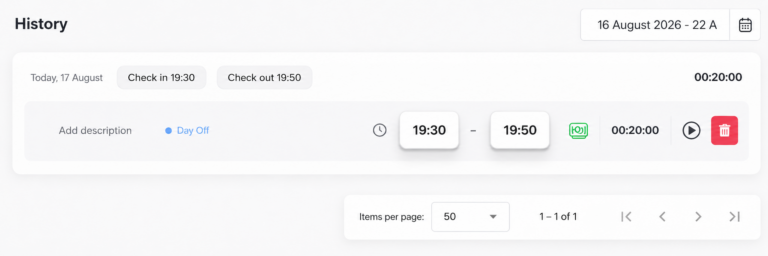
Day Off’s time history allows start and end times to be adjusted when a timer was stopped too early or left running too long.
Recalculate the Impact
After correction, check whether the change affects:
- Daily hours
- Weekly hours
- Overtime
- Project totals
- Billable time
- Attendance
- Payroll
One corrected entry can change several totals.
Investigate Repeated Problems Separately
An occasional missed punch and a recurring timekeeping problem are different issues.
For example:
One forgotten clock-out: Correction
Twelve forgotten clock-outs this month: Correction + process review
Always keep the first goal focused on accurate records.
Policy enforcement can be handled separately.
Do Not “Fix” a Timesheet by Removing Actual Work
This distinction is important.
Suppose an employee was scheduled until:
5:00 PM
but worked until:
5:35 PM
without getting advance approval.
The employer may have a policy requiring overtime or schedule extensions to be approved.
But if the employee actually worked those 35 minutes and the employer knew or had reason to know the work occurred, simply changing the timesheet to 5:00 PM can create an inaccurate record.
The U.S. Department of Labor states that work an employer suffers or permits generally counts as hours worked, including work that was not specifically requested.
The organization can address failure to follow the approval process separately.
The time record should still reflect actual compensable work where applicable.
How Often Should Timesheets Be Audited?
There is no universal audit frequency for every business.
The right schedule depends on:
- Payroll frequency
- Workforce size
- Number of time entries
- Overtime exposure
- Project billing
- Number of manual corrections
- Industry
- Compliance requirements
A practical schedule might look like this:
| Frequency | Audit Focus |
|---|---|
| Daily | Missing punches, active timers, obvious attendance exceptions |
| Weekly | Schedule variance, overtime trends, project coding |
| Before payroll | Complete time, breaks, PTO, overtime, corrections |
| Monthly | Repeated errors, employee patterns, project allocation |
| Quarterly | Process quality, manager consistency, reporting accuracy |
| Annually | Policies, retention, access, system configuration |
The most important review is usually the one that happens before the data becomes harder to correct.
For payroll-related time, that means reviewing exceptions before payroll is finalized.
Timesheet Record Retention
Organizations should also determine how long time records need to be retained.
For employers subject to the U.S. FLSA, the Department of Labor states that payroll records generally must be preserved for at least three years. Records used as the basis for wage calculations, including time cards and work and time schedules, generally should be retained for two years.
Other federal, state, local, contractual, or industry requirements may require longer periods.
Employers should therefore establish a retention policy appropriate to their workforce rather than deleting time records immediately after payroll.
Copyable Timesheet Audit Checklist
Use the following checklist before approving a payroll period or closing a time reporting cycle.
Employee and Period
Correct employee list is included
Correct audit period is selected
Correct work schedules are assigned
New hires and terminated employees are handled correctly
Completeness
Every scheduled workday has an explanation
Missing clock-ins have been reviewed
Missing clock-outs have been reviewed
Open timers have been closed or verified
Entire missing days have been investigated
Time Accuracy
Unusually long entries were reviewed
Very short or accidental entries were reviewed
Duplicate entries were checked
Overlapping sessions were investigated
Manual corrections were verified
Actual working time was not removed simply because it was unapproved
Schedule and Attendance
Late arrivals were compared with the correct schedule
Early departures were reviewed
Flexible schedules were treated appropriately
Work on scheduled days off was verified
Schedule changes were reflected correctly
PTO and Leave
Approved PTO appears correctly
PTO does not incorrectly overlap with work
Partial-day PTO matches missing scheduled hours
Employees on leave are not treated as missing attendance
Holidays and non-working days are recognized correctly
Breaks
Recorded breaks were reviewed
Unusual break durations were investigated
Automatic deductions match actual practice
Interrupted meal periods were reviewed where relevant
Applicable break requirements were considered
Overtime
Daily totals were reviewed
Weekly totals were reviewed
Overtime hours were identified
Work across different projects or roles was combined where required
Unusual overtime was verified
Projects and Tasks
Time is assigned to the correct project
Completed or incorrect projects were checked
Task selection is accurate where required
Estimated vs actual outliers were reviewed
Project totals align with employee time
Billable Time
Billable entries belong to the correct client/project
Non-billable internal work is categorized correctly
Unusual billable hours were reviewed
Client-facing reports match underlying entries
Final Review
Employee corrections are complete
Manager review is complete where required
Payroll-impacting changes were recalculated
Correct report period is ready for export
Final records are retained according to company requirements
Common Timesheet Audit Mistakes
Looking Only at Total Hours
A 40-hour total can still contain incorrect daily entries.
Review the records underneath the total.
Assuming Every Schedule Difference Is Misconduct
The issue may be:
- PTO
- Flexible scheduling
- Incorrect schedule setup
- A missed punch
- An approved change
Investigate before classifying.
Automatically Replacing Missing Clock-Outs With Scheduled End Times
The scheduled time is not proof of when the employee actually stopped working.
Verify the real end time.
Ignoring PTO During the Audit
A timesheet without leave context can make valid absences look like errors.
Ignoring Project Coding
Attendance can be accurate while project reporting is wrong.
Businesses that bill or budget by project should audit both.
Waiting Until After Payroll
Errors are usually easier to correct while employees and managers still remember the workday.
Treating Every Error as Time Theft
Most audit exceptions are not evidence of fraud.
A forgotten timer, incorrect project, or missing clock-out can be an ordinary error.
Correct the record first and investigate patterns separately.
Frequently Asked Questions About Timesheet Audits
What should you check when reviewing a timesheet?
When reviewing a timesheet, check more than the total number of hours.
A good timesheet review should include:
- Missing clock-ins and clock-outs
- Incorrect start or end times
- Duplicate or overlapping entries
- Break records
- Overtime
- PTO overlapping with working time
- Work performed on scheduled days off
- Manual corrections
- Project and task assignments
- Billable and non-billable time
- Manager approval
The best approach is to compare the timesheet with the employee’s actual work schedule, approved leave, and attendance records before approving it.
What are the most common timesheet errors?
Common timesheet errors include missed punches, forgotten running timers, incorrect hours, duplicate entries, overlapping time, inaccurate breaks, incorrect project assignments, and unreviewed overtime.
Another common problem is an incorrect work schedule. For example, an employee may appear late every day because the system contains the wrong scheduled start time rather than because the employee is actually arriving late.
Timesheet errors should therefore be investigated before the record is corrected.
What happens if an employee forgets to clock out?
If an employee forgets to clock out, the timesheet may remain incomplete or show an incorrect number of working hours.
The employee should report the missed punch as soon as possible, and the employer should verify the actual time the employee stopped working before correcting the record.
Employers should not simply assume that the employee left at their scheduled end time. The corrected timesheet should reflect the hours actually worked. This is also a frequently searched timekeeping question and appears prominently in current employee and employer time-clock guidance.
What happens if an employee forgets to clock in?
A missed clock-in does not mean the employee did not work.
If the employee actually began working at 9:00 AM but forgot to clock in until 9:40 AM, the final record should reflect the actual compensable working time once it has been verified.
The employee should report the mistake promptly so the manager or timekeeper can correct the record before payroll is processed. Current timekeeping guidance consistently treats missed punches as records that need correction rather than as lost working time.
Can an employer change an employee’s timesheet?
Employers may need to correct timesheets when records are incomplete or inaccurate, such as after a missed punch, duplicate entry, or incorrect start or end time.
However, a correction should make the record more accurate, not remove hours the employee actually worked.
For U.S. employers covered by the FLSA, accurate records of hours worked are required. Changing a timesheet to avoid paying recorded or known working time can create wage-and-hour problems. This is also a current Google search topic, with recent search results specifically addressing whether employers can change timesheets.
Can an employer change a timesheet without telling the employee?
The exact procedure depends on company policy and applicable law, but any change should reflect the employee’s actual working time and should ideally be documented.
A good audit trail records:
- What was changed
- The original entry
- The corrected entry
- Who made the change
- Why it was changed
- Who approved the correction
Documented changes make it easier to investigate payroll questions and explain how the final working-time total was calculated.
Should timesheets be approved before payroll?
Timesheets should generally be reviewed before payroll whenever the organization uses them to calculate employee pay.
The review gives managers and payroll teams an opportunity to catch:
- Missing punches
- Incorrect breaks
- Overtime
- PTO conflicts
- Unusual working hours
- Unapproved or unexplained edits
before wages are calculated.
Audit findings from public organizations have specifically recommended ensuring timesheets are reviewed and approved before payroll because missing approval increases the risk that incorrect time reaches payroll.
Who should approve employee timesheets?
The appropriate approver depends on the organization.
Often, the employee’s direct manager or supervisor is best positioned to review the timesheet because they are familiar with the employee’s schedule and work performed.
A strong approval process may separate responsibilities so employees do not approve their own records and payroll does not rely on unreviewed timesheets.
Audit guidance has specifically recommended that timesheets be approved by an authorized supervisor who is knowledgeable about the employee’s actual working time.
Are timesheets legally required?
In the United States, the FLSA does not require employers to use a particular type of timesheet or time clock.
However, covered employers must maintain certain records for nonexempt employees, including hours worked each day and total hours worked each workweek.
The employer may use a time clock, electronic time tracker, timesheet, or another reliable method as long as the required records are complete and accurate.
How long should employers keep employee timesheets?
For employers covered by the U.S. FLSA, payroll records generally must be kept for at least three years.
Records used to calculate wages, including time cards and work schedules, generally should be preserved for at least two years.
State, local, contractual, and industry-specific rules may require longer retention periods, so employers should check the requirements that apply to their workforce. Questions about how long to keep timesheets also appear frequently in current search results.
How often should timesheets be reviewed?
There is no single audit schedule that works for every company.
For payroll-related time tracking, a good practice is to review exceptions before each payroll is finalized.
Companies may also perform:
- Daily checks for missing punches
- Weekly checks for schedule variance and overtime
- Monthly reviews for repeated timekeeping problems
- Quarterly audits of approval and correction processes
Organizations with project billing or large hourly workforces may need more frequent reviews than small teams.
What should you do if a timesheet does not match the employee’s schedule?
Do not automatically change the timesheet to match the schedule.
First determine why the difference exists.
Possible explanations include:
- The employee actually worked different hours
- The manager approved a schedule change
- PTO covered part of the day
- The assigned schedule is incorrect
- The employee forgot to clock in or out
- The employee worked overtime
A work schedule shows what was expected. The timesheet should ultimately reflect what actually happened.
Can an employee work without being clocked in?
Employees should follow the company’s timekeeping procedure, but if compensable work was actually performed, the time should still be recorded where applicable.
A company can address an employee’s failure to follow clock-in procedures separately from paying for actual working time.
For U.S. employers covered by the FLSA, work that an employer requires or permits generally counts as hours worked even if the work was not specifically requested.
What happens if a timesheet is wrong after payroll has already been processed?
The employer should investigate the discrepancy and determine whether the incorrect record affected wages, overtime, PTO, project totals, or another payroll calculation.
Once the correct working time is confirmed, the timesheet should be corrected according to the company’s process, and any necessary payroll adjustment should be handled promptly.
This is one reason timesheet audits are most useful before payroll is finalized rather than after employees receive their pay.
What is the difference between a timesheet and a timecard?
A timecard traditionally focuses on when an employee started and ended work.
A timesheet can contain broader information, such as:
- Working hours
- Projects
- Tasks
- Breaks
- Billable time
- PTO
- Descriptions of work performed
Today, many digital systems use the terms interchangeably, but project-based timesheets often contain more detail than a simple clock-in and clock-out record. This distinction also appears frequently in current timesheet search results.
Conclusion
A good Timesheet Audit Checklist turns time review from a last-minute payroll task into a repeatable quality-control process.
Start with completeness, then compare actual time with schedules, review breaks and overtime, connect missing time with PTO, and finally check project, task, and billable classifications. The goal is not to make every employee’s timesheet look identical. It is to make sure each record accurately explains what happened.
With Day Off, managers can move between summary time reports, detailed individual entries, Attendance Review, work schedules, PTO, projects, tasks, and filtered exports. That added context makes it easier to identify where a strange total came from, correct incomplete records, and prepare cleaner time data for payroll, reporting, and project analysis.