







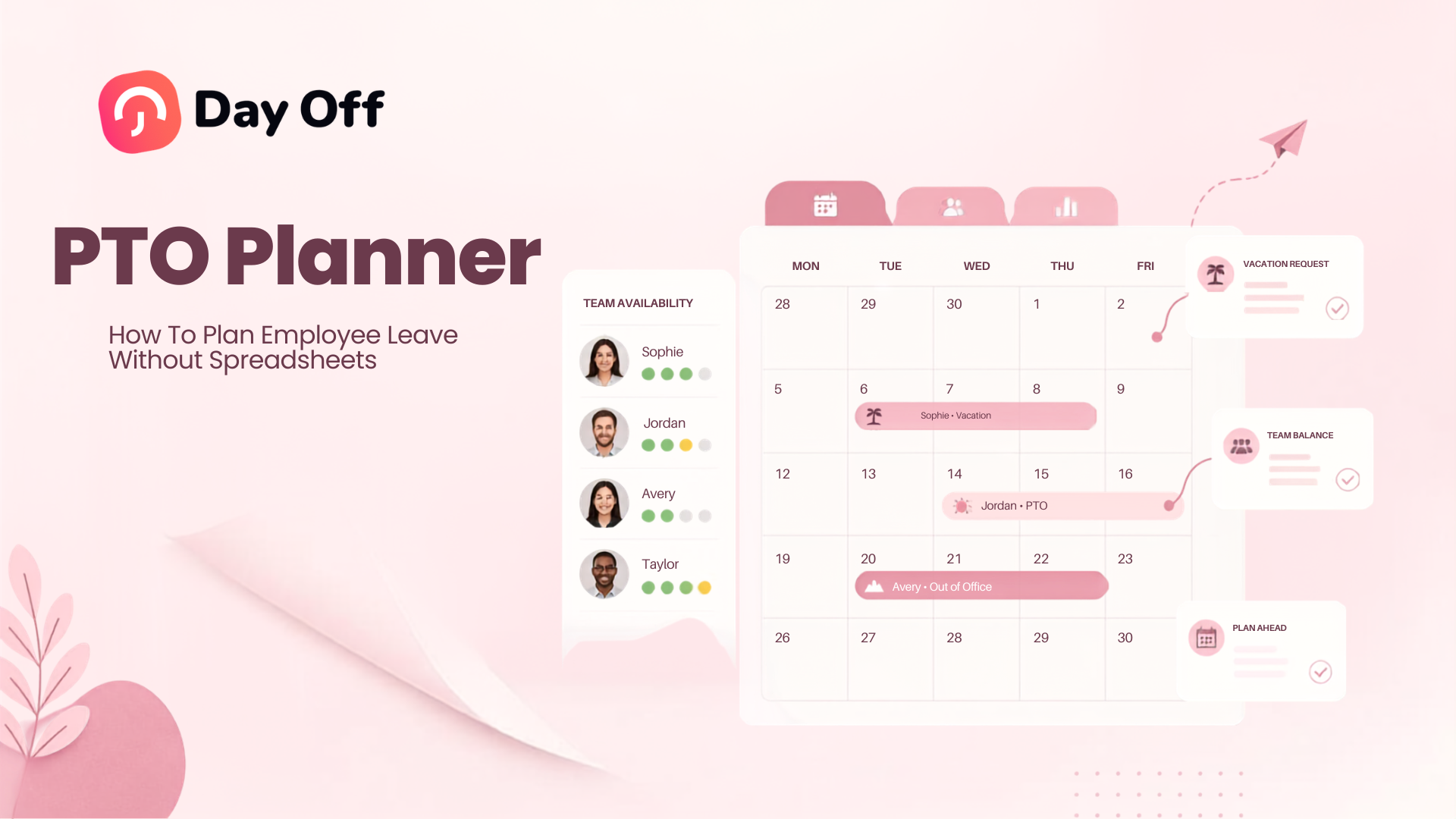
Managing employee time off becomes much harder when every vacation request, sick day, remaining balance, public holiday, and approval has to be updated manually. A PTO planner gives HR teams and managers a structured way to organize employee leave, understand team availability, prevent scheduling conflicts, and keep PTO planner records accurate without relying on complicated spreadsheets.

For a very small team with simple policies, a spreadsheet may initially seem sufficient. An employee name goes in one column, available PTO planner goes in another, and approved days are marked on a calendar. But as the company grows, the spreadsheet must also account for accruals, carryover, different leave types, work schedules, half days, hourly leave, multiple teams, public holidays, approval status, and policy changes.
At that point, PTO planner is no longer simply a matter of counting vacation days.
It becomes a workforce planning process.
A good PTO planner system should help answer questions such as:
- Who is already scheduled to be off?
- Does the employee have enough available PTO planner?
- Will approving this request leave the team understaffed?
- Are two employees with critical responsibilities away at the same time?
- Which requests are still waiting for approval?
- How much PTO planner will an employee have by a future date?
- Which employees have large unused balances?
- Is unused leave approaching a carryover or expiration deadline?
- Are employees being treated consistently when popular dates are requested?
- How will upcoming absences affect projects, deadlines, and customer coverage?
This guide explains how to build a reliable PTO planner process, why spreadsheets often become difficult to manage, which information a PTO planner should contain, and how leave management software can give HR and managers better visibility throughout the year.
What Is a PTO Planner?
A PTO planner is a system used to organize, schedule, approve, and monitor employee paid time off.
Depending on the organization, the planner may include:
- Vacation
- Paid time off
- Sick leave
- Personal leave
- Unpaid leave
- Compensatory time
- Half day leave
- Hourly leave
- Parental leave
- Bereavement leave
- Custom company leave types
The purpose of a PTO planner is not simply to record absences after they happen. It should help the organization plan them before they happen.
That distinction is important.
A leave record tells HR that an employee will be away from July 14 through July 18.
A useful PTO planner also shows:
- Whether another employee is already away
- How much leave the employee has available
- Whether the request conflicts with a blackout period
- Which manager needs to approve it
- Whether the request is approved or still pending
- What other absences are scheduled during the same period
- Whether public holidays or nonworking days fall inside the request
- How much leave should actually be deducted
- What the employee’s remaining balance will be afterward
A planner therefore connects PTO planner tracking with workforce availability.
Why Employee Leave Needs to Be Planned
Employees taking time off is normal and should be expected. The operational problem usually comes from poor visibility rather than from the leave itself.
Consider a five person customer support team.
One employee requests Friday off several weeks in advance. The request looks reasonable, so the manager approves it.
A second employee later requests the same Friday. That request also appears reasonable.
Then another team member becomes unavailable unexpectedly.
The issue is not necessarily that too much PTO was approved. The issue is that each decision was made independently without a complete view of the team’s expected capacity.
Effective PTO planning allows managers to consider individual leave requests in the context of the broader schedule.
This helps organizations protect both employee access to time off and operational coverage.
What Should a PTO Planner Track?
A useful PTO planner needs more information than employee names and vacation dates.
| Information | Why It Matters |
|---|---|
| Employee | Identifies whose leave is being planned |
| Team or department | Helps managers evaluate staffing coverage |
| Leave type | Separates vacation, sick leave, unpaid leave, and other categories |
| Start and end dates | Shows the period of absence |
| Duration | Determines how much leave should be deducted |
| PTO balance | Confirms how much leave remains available |
| Request status | Distinguishes pending, approved, and rejected requests |
| Approver | Shows who is responsible for the decision |
| Work schedule | Helps calculate actual working time affected |
| Public holidays | Prevents incorrect leave deductions where applicable |
| Carryover | Identifies leave brought forward from another cycle |
| Expiration date | Shows when unused leave may expire |
| Team availability | Helps identify overlapping absences |
| Notes or reason | Provides context where company policy requires it |
Not every organization needs every field. The important point is that PTO planner should reflect the company’s actual leave rules rather than forcing every employee into the same simple calendar.
Why PTO planner Spreadsheets Become Difficult to Manage
Spreadsheets are flexible, inexpensive, and familiar. They can be perfectly reasonable for a simple starting process.
The difficulty is that leave management rarely stays simple.
Every Change Requires an Update
Suppose an employee’s annual allowance is 20 days.
They use three days.
Someone needs to change the balance from 20 to 17.
Later, the employee cancels one approved day.
The balance must change again.
Then an accrual occurs.
Another update is required.
If any step is missed, the number shown in the spreadsheet can stop matching what actually happened.
The Calendar and Balance Can Become Disconnected
Many companies maintain one spreadsheet for balances and another calendar for absences.
That creates two sources of information.
A manager may approve an employee’s vacation and update the calendar but forget to update the balance.
Or HR may update the balance but forget to add the absence to the team calendar.
The result is a common leave-management problem: each file appears correct individually, but the records do not agree.
Formulas Do Not Understand Company Policy
A formula can subtract five days from a balance.
It does not automatically know whether all five days should count.
For example, a request may include:
- A weekend
- A public holiday
- A nonworking Friday
- A half day
- A four-hour shift
- A company closure
- A day that should be deducted from a different leave type
The more complex the work schedule becomes, the more complex the spreadsheet formulas become.
Approvals Happen Somewhere Else
A spreadsheet may contain the final record, but the actual request often happens through:
- Slack
- Microsoft Teams
- A paper form
- A private message
- A conversation with a manager
The manager then needs to approve the request, tell the employee, inform HR, update the calendar, and update the spreadsheet.
This creates unnecessary administrative steps around a simple request.
Version Control Becomes a Problem
Files may be downloaded, copied, emailed, renamed, or edited simultaneously.
Soon there may be:
PTO Tracker.xlsxPTO Tracker Final.xlsxPTO Tracker Updated.xlsxPTO Tracker 2026 FINAL 2.xlsx
Even with cloud spreadsheets, organizations still need to control who can edit balances, formulas, employee information, and historical records.
Planning Future Capacity Is Hard
Most PTO planner spreadsheets are built to answer:
How much leave has this employee used?
Managers often need a different answer:
What will my team look like three months from now?
A planning system should make future absences visible before schedules, projects, launches, and deadlines are finalized.
PTO Planner vs Spreadsheet
The difference is not simply whether the data is digital. Both systems are digital.
The difference is how much work the system performs automatically.
| Task | Spreadsheet | Dedicated PTO Planner |
|---|---|---|
| Record leave requests | Usually manual | Centralized |
| Update PTO balances | Manual or formula-based | Automatically calculated |
| Approval workflow | Usually handled separately | Built into the process |
| Show team availability | Requires calendar maintenance | Updated from leave records |
| Track request status | Manual | Recorded automatically |
| Apply accrual rules | Formula or manual update | Automated |
| Manage carryover | Requires calculations | Policy-based |
| Handle multiple leave types | Possible but increasingly complex | Designed for it |
| Maintain history | Depends on manual recordkeeping | Centralized record |
| Notify managers | Separate process | Automated notifications |
| Employee self-service | Limited | Employees can view and request |
| Reporting | Requires building reports | Available from stored leave data |
The main benefit is not that software replaces a grid of colored cells.
It removes the need to repeatedly transfer the same information between the request, approval, balance, calendar, and report.
How to Build an Effective PTO planner Process
Technology helps, but software alone does not create a good process. Companies first need clear rules for how employee leave should be planned.
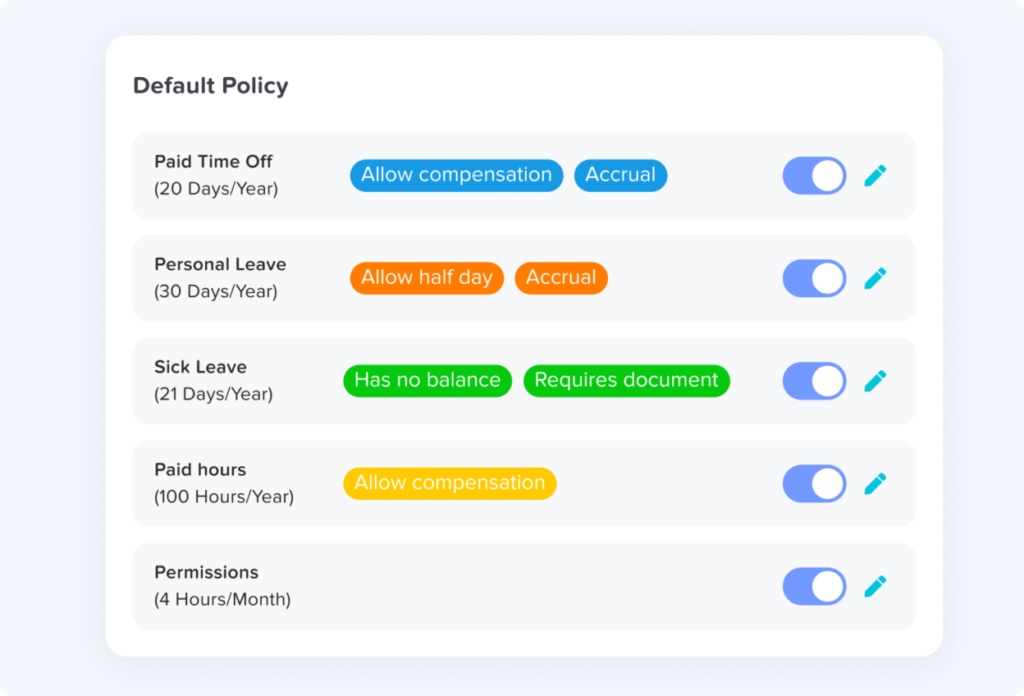
Step 1: Define Your Leave Types
Start by identifying every absence category employees may use.
Examples include:
- Vacation
- Sick leave
- Personal leave
- Unpaid leave
- Parental leave
- Bereavement
- Comp time
- Study leave
- Volunteer leave
- Custom company leave
Do not combine categories purely because it makes the spreadsheet easier.
If different leave types have different balances, approval requirements, documentation rules, or payroll treatment, they should usually be tracked separately.
Step 2: Define How Employees Receive PTO planner
Employees may receive leave in different ways.
Common approaches include:
Annual allowance:
Employees receive a defined amount for a leave year.
Accrual:
Employees earn PTO planner gradually, such as weekly, biweekly, semimonthly, monthly, or annually.
Hours-based accrual:
Leave is earned according to hours worked.
Tenure-based entitlement:
Employees receive a higher allowance or accrual rate after reaching service milestones.
Unlimited PTO planner:
Employees do not have a traditional fixed vacation balance, although requests and absences still need to be planned and approved.
The PTO planner should reflect whichever method the organization actually uses.
Step 3: Establish the Leave Year
Not every company’s PTO planner cycle begins on January 1.
Organizations may use:
- Calendar year
- Fiscal year
- Employee anniversary year
- Another defined leave cycle
This matters because balance resets, carryover, accrual schedules, and expiration dates may depend on the leave year.
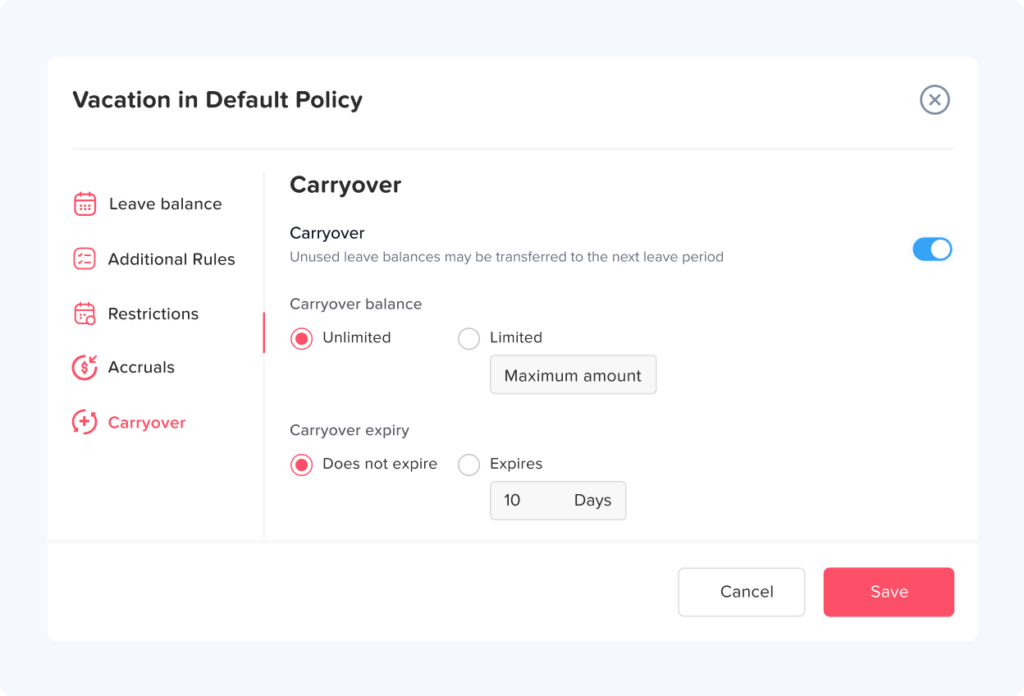
Step 4: Define Carryover and Expiration Rules
If unused PTO planner can move into the next cycle, define:
- How much may carry over
- Whether all or only some leave types carry over
- Whether carried leave expires
- When it expires
- Whether employees must use carried leave first
- Whether a maximum overall balance applies
These rules should be configured consistently rather than recalculated manually each year.
Employment requirements concerning vacation, accrued leave, payout, expiration, and sick leave vary between jurisdictions. Employers should make sure their policy and system configuration comply with the rules that apply to their workforce.
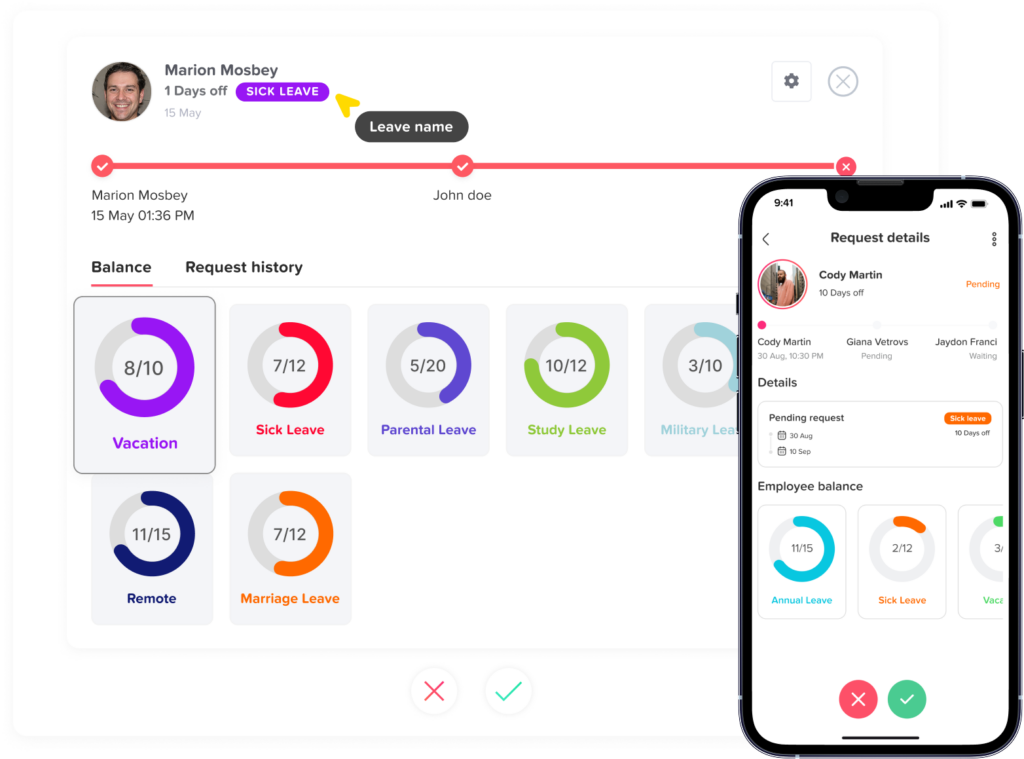
Step 5: Define the Approval Workflow
Determine who approves each request.
For example:
Employee → Team Manager → HR
Or:
Employee → Department Head
The appropriate process depends on the company.
The important part is that employees know:
- Where to submit a request
- Who reviews it
- How they will know whether it was approved
- What happens if the approver is unavailable
- Whether certain requests require additional review
Avoid creating a process where different teams submit leave through different channels unless there is a clear reason.
Step 6: Define Coverage Rules
This is where a PTO planner becomes useful for workforce planning.
A company may need rules such as:
- At least two support agents must remain available
- A department manager and deputy cannot both be away
- Only a certain number of employees may take vacation simultaneously
- Specific skills must remain available
- Leave during major operational periods requires additional approval
- Critical project dates need special consideration
Coverage does not always need to be expressed as a fixed number.
For knowledge based teams, the better question may be:
Can the team still perform its essential responsibilities if this leave is approved?
How to Plan PTO Throughout the Year
PTO planning works best as a continuous process rather than something HR reviews only during summer and December.
Start With Known Dates
At the beginning of a planning period, add dates that are already predictable:
- Public holidays
- Company closures
- Peak business periods
- Important launches
- Financial deadlines
- Seasonal demand periods
- Major conferences
- Inventory periods
- School holiday periods where relevant
- Known employee leave
This gives managers an initial picture of where staffing pressure may occur.
Encourage Employees to Plan Major Leave Early
Employees cannot predict every absence, and sick leave should not be treated like planned vacation.
However, longer vacations are often known in advance.
Encouraging employees to submit major planned leave earlier helps managers:
- Arrange coverage
- Redistribute projects
- Avoid overlapping vacations
- Give employees earlier certainty
- Plan deadlines more realistically
Early planning should not necessarily mean first-come, first-served priority in every situation. Companies should define a fair method for handling competing requests.
Review Team Capacity Before Approval
A manager should not approve a request based only on the employee’s balance.
Before deciding, check:
- Does the employee have sufficient leave?
- Who else is already scheduled to be away?
- Are other requests still pending?
- What level of staffing will remain?
- Are critical skills still covered?
- Are major deadlines scheduled during the absence?
- Can responsibilities be reassigned?
- Does the request comply with company policy?
This turns approval into an informed planning decision.
Example: Planning Overlapping PTO Requests
Imagine a marketing department with six employees.
Two employees request the same week in August.
A spreadsheet may simply show:
- Sarah: August 10-14
- Daniel: August 10-14
The dates alone do not tell the manager whether the overlap is a problem.
The manager should consider:
- What responsibilities do Sarah and Daniel own?
- Are they working on the same client or project?
- Is someone else able to cover those responsibilities?
- Are any campaigns launching that week?
- Is another employee’s request still pending?
- Is a manager also scheduled to be away?
If Sarah handles paid advertising and Daniel handles design, the overlap may be manageable.
If both employees are the only team members responsible for the same critical function, approving both requests may create a coverage problem.
Effective PTO planning therefore requires both calendar visibility and operational context.
Use a PTO Calendar to See Absences Before They Become Conflicts
One of the most useful parts of a PTO planner is a shared leave calendar.
Instead of reviewing employees individually, managers can see absences together.
A PTO calendar can make it easier to spot:
- Overlapping vacations
- Long periods of reduced staffing
- Popular holiday weeks
- Multiple managers away simultaneously
- Employees with frequent scheduled leave
- Departments with very different absence patterns
- Upcoming staffing gaps
The goal is not to discourage people from taking leave.
The goal is to make leave predictable enough that teams can prepare for it.
Day Off provides a shared PTO calendar alongside requests, balances, approvals, and leave policies. Approved time off can also be connected with Google Calendar and Outlook, helping teams keep absence information visible in tools they already use.
Plan PTO Around Work Schedules, Not Just Calendar Days
One of the biggest weaknesses of basic PTO planning is treating every weekday as identical.
Employees may work:
- Monday through Friday
- Four day workweeks
- Part time schedules
- Fixed hour schedules
- Flexible schedules
- Split shifts
- Rotating shifts
- Different weekly patterns
Suppose two employees request Monday through Friday off.
Employee A normally works eight hours each day.
Employee B works Monday, Tuesday, Thursday, and Friday.
Those requests cover the same calendar period, but they do not necessarily require the same leave deduction.
A reliable PTO planning process should use the employee’s actual working schedule when determining how much leave is used.
This becomes particularly important for organizations that track PTO in hours rather than whole days.
Include Half Days and Hourly Leave in Your Planning
Not every absence lasts a full day.
Employees may need:
- Two hours for an appointment
- A half day for personal reasons
- Three hours at the end of a shift
- A late start
- Part of a split shift
If the company allows partial-day PTO, the planner should represent the actual duration rather than forcing the absence into a whole-day format.
This improves both balance accuracy and workforce planning.
A manager seeing “Tuesday off” will plan differently from a manager seeing “Tuesday, 2:00 PM to 5:00 PM.”
Track Pending Requests, Not Only Approved PTO
A common planning mistake is displaying only approved absences.
Pending requests also matter.
Imagine a manager sees that nobody is away during the first week of July and approves a new request.
However, another manager already has three requests waiting for review for that exact week.
The calendar looked available, but the organization had hidden demand.
A complete PTO planning process should distinguish between:
- Approved
- Pending
- Rejected
- Cancelled
Pending leave should not be treated as confirmed absence, but managers should be able to see that potential scheduling pressure exists before approving additional requests.
Create a Fair Process for Popular Dates
Certain dates naturally attract more requests.
Examples include:
- Summer vacation periods
- Days around public holidays
- School breaks
- December holidays
- Long weekends
- Major cultural or religious holidays
When demand exceeds available staffing capacity, managers need a consistent decision process.
Possible approaches include:
- First come, first served
- Rotation
- Seniority
- Employee preference ranking
- Previous year history
- Minimum staffing rules
- A combination of several factors
There is no universal method that works for every business.
What matters is that employees understand how competing requests will be handled and that managers apply the same process consistently.
Avoid Making PTO Planning Too Restrictive
A PTO planner should improve coordination, not create unnecessary barriers to taking leave.
Overly restrictive planning can result in:
- Employees delaying vacation
- Large unused balances
- Heavy year end demand
- Employees feeling that PTO exists on paper but is difficult to use
- Managers making inconsistent exceptions
- Increased administrative disputes
The objective should be to create enough structure for teams to maintain coverage while still making time off practically usable.
Watch Employees With Large Unused PTO Balances
PTO planning is not only about employees taking too much leave at once.
It is also about employees taking very little leave.
If employees accumulate large balances throughout the year, managers may face a concentration of requests near the end of the leave cycle.
For example, an employee with 18 unused days in October may have limited opportunities to use those days before year end.
A proactive PTO planner allows HR to identify large balances earlier and encourage employees to schedule leave gradually.
This can make workforce planning easier for both the employee and the manager.
Plan Ahead for Carryover and PTO Expiration
Carryover is another reason PTO should be reviewed throughout the year.
Suppose an employee has:
- 5 carried days from last year
- 15 days from the current year
- A policy that expires the carried balance on September 30
Simply displaying “20 days available” is not enough.
The employee and HR also need to know that part of the balance has an earlier deadline.
As expiry dates approach, HR can identify employees who still have unused carryover and encourage them to plan before everyone tries to use leave at the same time.
Review PTO Data Regularly
A PTO planner becomes more valuable when HR uses the data for planning rather than storing it passively.
A practical review cycle might look like this:
| Frequency | What to Review |
|---|---|
| Weekly | Pending requests, near-term overlaps, staffing risks |
| Monthly | PTO balances, upcoming leave, unusual usage, large balances |
| Quarterly | Department patterns, unused PTO, policy issues, seasonal demand |
| Before peak periods | Coverage, overlapping requests, critical roles |
| Before year-end | Carryover, expiring leave, remaining balances |
| Annually | Policy effectiveness, approval process, accrual rules |
This does not mean HR needs to hold a meeting for every review.
The goal is simply to prevent PTO information from being ignored until a problem occurs.
Use PTO Reports for Better Leave Planning
Calendar visibility answers:
Who is away?
Reports can answer broader questions:
- Which employees have the most unused PTO?
- How much leave has each department used?
- Which leave types are used most frequently?
- Who has carried leave from a previous cycle?
- When does carryover expire?
- Are balances increasing faster than employees are using leave?
- Which requests are still pending?
- How much leave has accrued?
Day Off currently provides separate balance, detailed, total, accrual, and carryover reporting views, allowing HR teams to review employee leave from several perspectives instead of maintaining separate spreadsheet reports.
How to Move From a PTO Spreadsheet to a PTO Planner
Moving away from spreadsheets does not mean importing every cell exactly as it exists.
Start by cleaning the information first.
Review Existing Employee Balances
Confirm each employee’s current balance before migration.
Check:
- Annual allowance
- Accrued leave
- Used leave
- Adjustments
- Carryover
- Expired leave
- Pending requests
Do not assume the current spreadsheet balance is correct simply because it is the latest number.
Document Your Policies
Write down the rules currently hidden inside formulas or known only by HR.
For example:
- When does PTO accrue?
- When does the leave year begin?
- What happens to unused PTO?
- Who approves requests?
- Can employees request half days?
- Can they request leave in hours?
- Do public holidays count against PTO?
- Are negative balances permitted?
- Do different locations follow different holidays?
- Are some employees assigned different policies?
Configure Leave Types
Create each leave category and decide:
- Whether it has a balance
- Whether it is paid
- How it accrues
- Whether it carries over
- Whether documentation is required
- Who approves it
Add Employee Work Schedules
Accurate schedules improve leave calculations and help managers understand actual coverage.
Configure Approval Responsibility
Make sure requests reach the correct person rather than relying on employees to remember whom to message.
Import or Enter Current Balances
Use verified balances as the starting point.
Test the System
Before fully replacing the spreadsheet, test common scenarios.
For example:
- Full day vacation
- Multi day vacation
- Half day leave
- Hourly leave
- Request containing a public holiday
- Carryover usage
- Leave cancellation
- Employee with an alternative work schedule
- Multiple simultaneous requests
Give Employees Access
Employees should know:
- Where to see their balance
- How to submit leave
- Where to see request status
- How to cancel or update a request when applicable
- Where to see team availability if permitted
Self service is important because a PTO planner should reduce HR administration rather than simply move the spreadsheet into another system.
How Day Off Can Work as a PTO Planner
Day Off combines employee leave tracking with the planning information HR and managers need in one system.
Instead of maintaining separate files for requests, balances, calendars, and reports, organizations can use Day Off to manage:
- PTO and vacation requests
- Sick leave and other absence types
- Employee leave balances
- Approval workflows
- Accruals
- Carryover
- Leave policies
- Team availability
- Shared leave calendars
- Work schedules
- Public holidays
- Reports
- Google Calendar integration
- Outlook Calendar integration
- Slack and Microsoft Teams integrations
- Web, iOS, and Android access
This creates a direct connection between the leave request and the information used for planning.
When an employee requests time off, managers can review the request within the same leave-management process rather than collecting information from several spreadsheets and messages.
Day Off’s current feature set includes configurable leave management, balance and reporting tools, shared calendar visibility, work schedule options, and integrations designed to reduce manual PTO administration.
What Makes a Good PTO Planner?
When evaluating a PTO planning system, do not focus only on whether it contains a calendar.
Look for a system that supports the full process.
A strong PTO planner should offer:
Clear Employee Balances
Employees and managers should be able to see available leave without asking HR to calculate it manually.
Simple Leave Requests
Employees should have one consistent place to request time off.
Approval Workflows
Requests should automatically reach the right manager.
Team Calendar Visibility
Managers should be able to identify overlapping leave before approving additional requests.
Work Schedule Support
Leave deductions should reflect when the employee was actually scheduled to work.
Accrual Management
If employees earn leave gradually, the system should apply the company’s accrual rules consistently.
Carryover Rules
Unused balances should move, reset, cap, or expire according to company policy.
Multiple Leave Types
Vacation should not be the only absence the system understands.
Reporting
HR should be able to review balances, usage, accruals, requests, and carryover without building a new spreadsheet each time.
Mobile Access
Employees should be able to check their balance and request time off without being limited to an HR computer or office network.
Calendar and Workplace Integrations
Connecting leave data with the calendars and communication tools employees already use reduces manual updates and improves visibility.
PTO Planning Checklist
Before approving and planning employee leave, HR teams and managers can use the following checklist:
- Confirm the employee’s available leave.
- Check the requested leave type.
- Review the employee’s work schedule.
- Check existing approved absences.
- Review pending requests for the same dates.
- Confirm minimum staffing or coverage needs.
- Identify critical roles that will be unavailable.
- Review major deadlines or operational events.
- Apply the same approval rules consistently.
- Confirm public holidays and nonworking days.
- Make sure the correct duration is deducted.
- Update the employee’s remaining balance.
- Keep the team calendar current.
- Review unused balances regularly.
- Check carryover and expiration deadlines.
- Review PTO patterns before peak vacation periods.
With a dedicated system, many of these checks can be supported by the information already stored in the PTO planner rather than by manually comparing several files.
FAQ
What is a PTO planner?
A PTO planner is a system that helps companies organize employee paid time off, leave requests, approvals, balances, and team availability. It allows HR and managers to see planned absences and make better staffing decisions before approving leave.
What is the difference between a PTO planner and a PTO tracker?
A PTO tracker primarily records leave balances and usage. A PTO planner also helps organizations look ahead by showing upcoming absences, team availability, potential scheduling conflicts, pending requests, and future staffing needs. Many modern leave management systems provide both functions.
Can I use Excel as a PTO planner?
Yes. Excel can work for organizations with simple leave policies and limited administrative requirements. However, as the number of employees, policies, leave types, accrual rules, work schedules, and approvals increases, maintaining accurate spreadsheets can require significant manual work.
What should a PTO planner include?
At minimum, a PTO planner should show the employee, leave dates, leave type, duration, request status, available balance, and team availability. More advanced systems may also manage accruals, carryover, public holidays, work schedules, approval workflows, notifications, integrations, and reports.
How do you prevent too many employees from taking PTO at once?
Managers should review existing approved leave, pending requests, team responsibilities, minimum staffing needs, critical roles, and operational deadlines before approving overlapping requests. Clear company rules for high-demand periods can also make the process more consistent.
How far in advance should employees plan PTO?
There is no single notice period that works for every company. The appropriate period depends on the length of leave, the employee’s role, staffing requirements, industry, and company policy. Longer planned vacations generally benefit from earlier notice because managers have more time to arrange coverage.
Should pending PTO requests appear in the planner?
Yes, pending requests can be useful for planning because they show potential demand for the same dates. They should be clearly distinguished from approved leave so managers understand that the absence is not yet confirmed.
How often should HR review the PTO planner?
Near-term requests and coverage may need to be reviewed weekly, while balances, usage, carryover, and broader absence trends can be reviewed monthly or quarterly. More frequent review may be useful before major holiday periods or seasonal peaks.
Can a PTO planner handle hourly leave?
A suitable system can track leave in hours where company policy allows it. This is useful for employees who take partial days or who work schedules where a full working day does not always represent the same number of hours.
Why is a shared PTO calendar useful?
A shared calendar helps managers and authorized employees see upcoming absences in one place. This can reduce scheduling conflicts and help teams plan meetings, projects, deadlines, and coverage around employee leave.
Final Thoughts
A spreadsheet can record employee PTO, but effective leave planning requires more than recording dates and subtracting balances.
Organizations need to understand who is away, who may be away, how much leave employees have, how requests affect team capacity, which policies apply, and what future staffing will look like.
That is the real purpose of a PTO planner.
By bringing requests, approvals, balances, work schedules, team calendars, accruals, carryover, and reporting into one process, businesses can spend less time maintaining leave spreadsheets and more time planning employee availability effectively.
For employees, the result is greater visibility into their time off.
For managers, it is better information before approving requests.
For HR, it means fewer manual calculations, fewer disconnected records, and a clearer view of employee leave throughout the year.
Day Off helps businesses manage PTO and employee leave from one place, including requests, approvals, balances, calendars, policies, schedules, and reports, so teams can move beyond spreadsheet-based PTO planning and build a more organized leave process.