







Knowing how many employees you have is not the same as knowing how many employees are actually available to work. Employee Availability Tracking gives managers a clear picture of who is scheduled, who is on approved leave, who is working remotely, who has a different shift, and who can realistically be assigned work at a specific time. When this information is accurate, businesses can plan staffing more effectively, prevent coverage gaps, and make better decisions before approving time off or assigning new work.

For a small team, availability might be easy to remember. A manager may already know that one employee works Monday through Thursday, another is on vacation next Friday, and someone else starts later in the day.
As the business grows, that approach becomes unreliable.
Different work schedules, PTO requests, public holidays, rotating shifts, flexible hours, remote work, multiple locations, and last-minute absences can all affect whether someone is actually available.
A structured employee availability tracking process turns these different pieces of information into a usable answer to a simple question:
Who can work when we need them?
This guide explains how employee availability works, what information should be tracked, how to calculate workforce coverage, and how HR teams and managers can build a more reliable Employee Availability Tracking process.
What Is Employee Availability Tracking?
Employee availability tracking is the process of recording and reviewing when employees are expected and able to work.
It combines information such as:
- Employee work schedules
- Assigned shifts
- Approved PTO
- Vacation
- Sick leave
- Public holidays
- Flexible working arrangements
- Remote or office status
- Part time working patterns
- Planned absences
- Attendance records
- Location
- Team or department
- Working hour restrictions
The goal is not simply to create another employee calendar.
The goal is to give managers enough information to determine whether the organization has the people it needs at a specific date and time.
For example, imagine a customer support department has 12 employees.
At first glance, the team appears fully staffed.
But on Friday:
- 2 employees are on vacation
- 1 employee works Monday through Thursday
- 1 employee is on sick leave
- 2 employees start the evening shift
- 1 senior employee is attending training
The business may technically employ 12 people, but only five or six may be available for the Friday morning workload.
That difference is why employee availability matters.
What Does “Available To Work” Actually Mean?
One of the biggest mistakes in workforce planning is using the word “available” too broadly.
An employee may appear on the company roster without actually being available for a particular assignment.
A useful availability definition is:
An employee is available when they are expected to work during the required period and there is no known schedule, leave, holiday, assignment, or other approved restriction preventing them from doing that work.
Availability therefore depends on context.
An employee might be:
- Available today but not tomorrow
- Available in the afternoon but not the morning
- Available for remote work but not on-site work
- Available for their normal role but already assigned to another project
- Scheduled to work but currently absent
- Not scheduled today but potentially available for an additional shift
Good employee availability tracking should make these differences visible.
Employee Availability vs. Work Schedule vs. Attendance
These terms are closely related, but they are not interchangeable.
Work Schedule
A work schedule tells you when an employee is expected to work.
For example:
Monday to Friday
9:00 AM to 5:00 PM
Availability
Availability tells you whether the employee can realistically be considered for work during that period.
The employee may be scheduled Monday to Friday but unavailable on Wednesday because they have approved PTO.
Attendance
Attendance tells you what actually happened.
An employee may have been scheduled and available at 9:00 AM but clocked in at 9:27 AM.
Capacity
Capacity describes how much additional work an available employee can realistically handle.
An employee can be available but already fully occupied with existing tasks.
This distinction is important:
Scheduled does not always mean available. Available does not always mean working. Working does not always mean having additional capacity.
Why Employee Availability Tracking Matters
Employee availability affects far more than scheduling.
It influences workload distribution, customer service, PTO approvals, project planning, overtime, and even payroll preparation.
Prevent Staffing Shortages
Managers can identify days when too many employees will be unavailable before the problem happens.
If eight employees normally cover a shift but four have already been approved for leave, the manager can reconsider another request or arrange alternative coverage.
Make Better PTO Decisions
A PTO request should not be reviewed without context.
Before approving it, a manager may need to know:
- Who else is already off?
- How many employees are scheduled?
- Are key roles still covered?
- Is it a public holiday period?
- Is the department experiencing unusually high demand?
- Does another employee have overlapping leave?
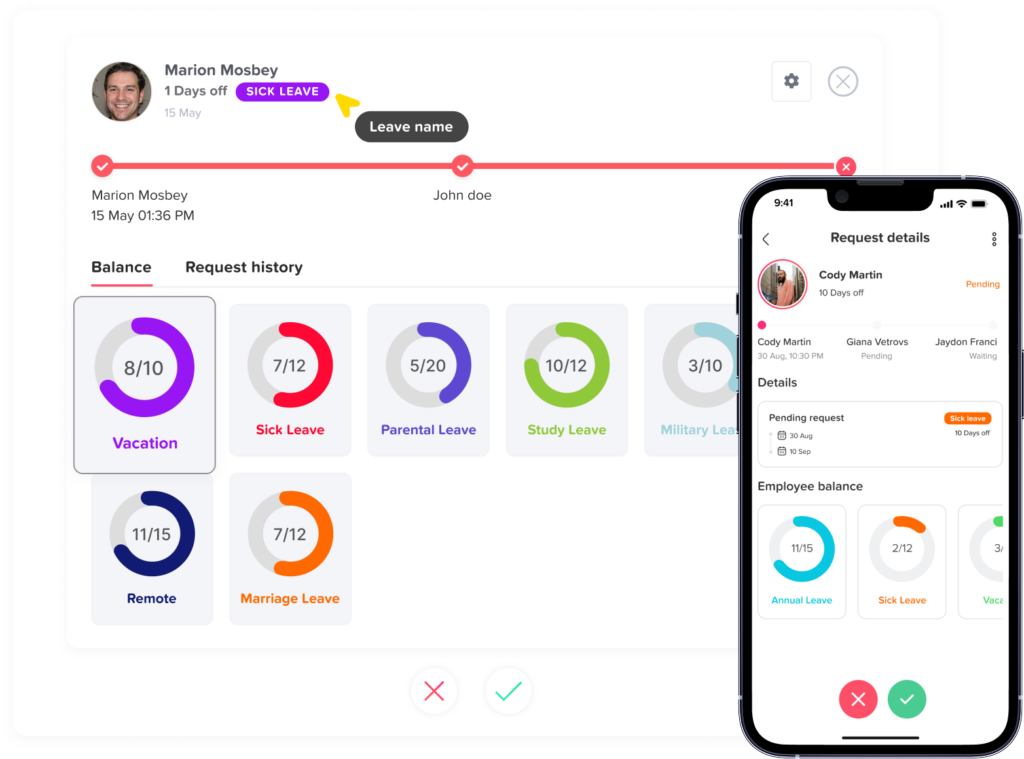
This makes Employee Availability Tracking an important part of leave management.
Distribute Work More Fairly
Without clear availability data, managers may repeatedly assign urgent work to the same visible employees.
A better availability view helps managers understand who is working before assigning tasks or requesting overtime.
Reduce Last-Minute Schedule Changes
Finding out on Monday morning that several employees are unavailable creates unnecessary disruption.
Knowing about planned absences earlier gives managers time to:
- Adjust shifts
- Reassign work
- Move deadlines
- Arrange backup coverage
- Inform customers
- Redistribute responsibilities
Support Remote and Hybrid Teams
Physical office presence is no longer a reliable indication of availability.
A remote employee may be fully available while someone sitting in the office is about to leave for approved half-day PTO.
For hybrid teams, Employee Availability Tracking should separate:
- Working
- Working remotely
- Working in office
- On leave
- Not scheduled
- Absent
Improve Workforce Planning
Historical availability data can reveal patterns.
For example, HR may discover that:
- Friday coverage is consistently low
- Certain holiday periods create staffing shortages
- One department frequently requires overtime
- PTO usage is heavily concentrated during summer
- Specific shifts are difficult to cover
Those insights can inform hiring, schedule design, cross-training, and leave policies.
What Information Should You Track?
An effective employee availability system does not need dozens of data points.
It needs the right ones.
| Availability Information | What It Tells Managers |
|---|---|
| Employee name | Who the availability record belongs to |
| Team or department | Which workforce group is affected |
| Location | Where the employee normally works |
| Work schedule | When the employee is expected to work |
| Shift start and end | Exact working period for hourly or shift employees |
| Approved leave | Whether the employee is unavailable because of PTO or another leave type |
| Public holidays | Whether normal work is affected by a location-specific holiday |
| Remote or office status | Where the employee is working |
| Attendance status | Whether the employee actually started work |
| Partial-day absence | Whether only part of the scheduled period is unavailable |
| Role or skill | Whether the employee can cover a specific operational requirement |
Not every business needs every field.
A professional services company may care more about project assignments and working hours, while a restaurant may need exact shift availability and role coverage.
How To Track Employee Availability Step by Step
A reliable availability process should start with scheduled work and progressively account for anything that changes it.
Create Accurate Work Schedules
Employee availability starts with knowing when someone is normally expected to work.
Schedules may include:
- Fixed working days
- Fixed start and end times
- Flexible schedules
- Part time schedules
- Rotating shifts
- Split shifts
- Weekend schedules
Consider two employees.
Employee A
Monday-Friday
9:00 AM-5:00 PM
Employee B
Monday-Thursday
8:00 AM-6:00 PM
Looking only at employee headcount would suggest both people are available Friday.
Their schedules show otherwise.
Work schedules should therefore be the baseline for availability.
Add Approved PTO and Leave
Once schedules are established, approved absences need to be applied to them.
Common leave types include:
- Vacation
- Sick leave
- Personal leave
- Unpaid leave
- Parental leave
- Bereavement leave
- Compensatory time off
- Half day leave
- Hourly leave
If an employee normally works 9:00 AM to 5:00 PM but has approved leave from 1:00 PM onward, their availability is not simply “working” or “off.”
Their actual availability is:
Available: 9:00 AM-1:00 PM
Unavailable: 1:00 PM-5:00 PM
Tracking partial-day leave is particularly important for businesses that schedule meetings, appointments, support coverage, or shifts by hour.
Include Public Holidays
Public holidays can significantly affect availability, especially for international teams.
A company with employees in the United States, Egypt, France, and Saudi Arabia may have different non-working days across locations.
A holiday affecting one location should not automatically make employees elsewhere unavailable.
Your system should therefore associate holidays with the appropriate employee or location.
Track Shift Assignments
For shift-based organizations, knowing that someone works “Tuesday” is not enough.
You need the actual shift.
For example:
Morning: 7:00 AM-3:00 PM
Evening: 3:00 PM-11:00 PM
Night: 11:00 PM-7:00 AM
An employee assigned to the evening shift should not normally be considered available to cover work at 10:00 AM just because they are working that calendar day.
Compare Scheduled Time With Actual Attendance
Future availability is primarily based on planning information.
Current availability may require real attendance data.
Suppose three employees are scheduled at 9:00 AM.
At 9:30 AM:
- Employee A clocked in at 8:57 AM
- Employee B clocked in at 9:05 AM
- Employee C has not clocked in
All three were expected to be available, but actual attendance shows only two have started work.
This is where time Employee Availability Tracking and attendance information become important.
Attendance should not replace scheduling. It should be compared with scheduling.
Track Partial Availability
Avoid systems that only provide two statuses:
Available / Unavailable
Real working patterns are often more complicated.
Consider an employee who has:
- A medical appointment from 8:00 AM to 10:00 AM
- Normal working hours from 8:00 AM to 4:00 PM
That employee may still be available for six hours.
Another employee may work:
- 8:00 AM-12:00 PM
- 4:00 PM-8:00 PM
They are unavailable from noon to 4:00 PM despite working eight hours that day.
Hourly availability becomes especially valuable for customer support, healthcare, retail, hospitality, field teams, and operational departments.
Filter Availability by Team, Role, and Location
Company wide availability numbers can be misleading.
Suppose 85% of employees are available today.
That sounds healthy.
But imagine the unavailable employees include:
- 3 of 4 customer support agents
- The only payroll specialist
- The only warehouse supervisor
Overall workforce availability is high, but operational coverage is poor.
Managers should therefore be able to review availability by:
- Team
- Department
- Location
- Role
- Shift
- Employee
- Skill group
Example Employee Availability Matrix
A simple availability matrix can help illustrate how schedule and absence data come together.
| Employee | Scheduled | Time Off | Actual Availability | Status |
|---|---|---|---|---|
| Anna | 9 AM-5 PM | None | 9 AM-5 PM | Available |
| Daniel | 9 AM-5 PM | Full-day PTO | None | On leave |
| Maya | 8 AM-4 PM | 1 PM-4 PM | 8 AM-1 PM | Partially available |
| Omar | 3 PM-11 PM | None | 3 PM-11 PM | Evening shift |
| Lisa | Not scheduled | None | None | Off schedule |
How To Calculate Workforce Availability
Businesses can also turn availability information into measurable workforce metrics.
Available Employee Count
The simplest measure is:
Available Employees = Scheduled Employees – Known Unavailable Employees
For example:
Scheduled employees: 20
Employees on PTO: 3
Employees on other approved leave: 1
Available employees:
20 – 4 = 16 employees
This calculation is useful but should be adjusted when partial-day leave or skill requirements matter.
Availability Rate
Organizations can create an internal availability rate using:
Availability Rate = Available Scheduled Employees ÷ Total Scheduled Employees × 100
Using the previous example:
16 ÷ 20 × 100 = 80% availability
This is an internal workforce-planning metric rather than a universal HR standard, so companies should define exactly what “available” means before comparing results across periods.
Coverage Ratio
Availability alone does not tell you whether staffing is sufficient.
A better operational measure is:
Coverage Ratio = Available Qualified Employees ÷ Minimum Employees Required × 100
Suppose a support shift requires six qualified employees.
Eight are scheduled, but three are unavailable.
Available qualified employees = 5
Coverage ratio:
5 ÷ 6 × 100 = 83.3%
That tells the manager that the shift is below the required coverage level.
Track Availability in Hours
For teams using hourly schedules, calculate availability by scheduled hours.
Imagine four employees are each scheduled for eight hours.
Total scheduled time:
4 × 8 = 32 hours
One employee takes four hours of PTO.
Available working time:
32 – 4 = 28 hours
Hourly availability:
28 ÷ 32 × 100 = 87.5%
This is often more accurate than headcount when employees work different schedules.
Useful Employee Availability Metrics
| Metric | What It Measures | Why It Matters |
|---|---|---|
| Available headcount | Employees available during a period | Basic staffing visibility |
| Availability rate | Percentage of scheduled employees available | Helps compare staffing between dates |
| Available hours | Total scheduled hours remaining after absences | Useful for hourly workforce planning |
| Coverage ratio | Available qualified employees compared with minimum staffing | Identifies operational risk |
| PTO overlap | Number of employees taking leave at the same time | Helps prevent coverage shortages |
| Unplanned absence rate | Unexpected absences relative to scheduled work | Shows schedule reliability |
| Overtime caused by absence | Extra hours needed because normal staffing was unavailable | Reveals cost of coverage gaps |
Metrics should support decisions, not simply create more reports.
A manager usually needs to know whether staffing is sufficient and what action should be taken.
Employee Availability Tracking for PTO Approvals
One of the most valuable uses of employee availability tracking is improving PTO approval decisions.
Imagine a five person finance team.
Three employees request the same Friday off.
If the manager reviews each request separately, all three requests may appear reasonable.
When viewed together, approving all three would leave only two employees available.
If one of those employees is the only payroll specialist, the operational risk may be even greater.
Before approving PTO, managers should consider:
- Existing approved leave
- Pending requests
- Scheduled employees
- Critical roles
- Minimum staffing requirements
- Deadlines
- Public holidays
- High demand periods
The goal is not to unnecessarily restrict time off.
The goal is to make leave decisions with enough information to protect both employee flexibility and business continuity.
Employee Availability for Remote and Hybrid Teams
Employee Availability Tracking becomes more important when employees are distributed across different working arrangements.
A hybrid employee might work:
Monday: Office
Tuesday: Remote
Wednesday: Office
Thursday: Remote
Friday: Remote
Another employee may be working from a different time zone.
This creates several questions:
- Is the employee working?
- What hours are they working?
- Are they reachable now?
- Are they available for meetings?
- Are they working remotely or in the office?
- Are they on approved leave?
- Are they working in another time zone?
A centralized employee availability tracker helps teams answer these questions without relying on chat messages such as:
“Is Sarah working today?”
“Is Ahmed off?”
“Who is in the office?”
“Who can cover this?”
Availability information becomes particularly useful when it can be filtered by location or team.
Employee Availability Tracking for Shift Based Teams
Shift-based companies need a more precise approach than traditional office teams.
Restaurants, retail stores, support centers, healthcare organizations, warehouses, and service businesses often need to maintain minimum staffing throughout the day.
For these businesses, availability should account for both headcount and role coverage.
For example, a restaurant may require:
- 1 shift manager
- 2 cashiers
- 4 servers
- 2 kitchen employees
Nine employees being available does not guarantee adequate coverage.
If no shift manager is present, the staffing plan may still be incomplete.
This is why Employee Availability Tracking should sometimes answer:
Who is available?
and
Which roles are available?
Planned Availability vs. Real Time Availability
It is useful to separate employee availability into two categories.
Planned Availability
Planned availability helps answer future questions such as:
- Who is available next Friday?
- Can another PTO request be approved?
- Who can cover the weekend shift?
- How many people will be available during the holiday period?
Planned availability relies primarily on:
- Work schedules
- Shift assignments
- Approved leave
- Holidays
- Planned schedule changes
Real Time Availability
Real-time availability answers questions such as:
- Who is working now?
- Who has clocked in?
- Who is late?
- Who is currently on leave?
- Who has already clocked out?
This requires attendance or time Employee Availability Tracking information in addition to scheduled availability.
Combining planned and actual availability gives managers a much more complete view.
How To Improve Employee Availability Tracking
A few practical rules can significantly improve accuracy.
Keep One Source of Truth
Managers should not have to check five systems to understand employee availability.
Where possible, connect:
- Work schedules
- PTO
- Leave
- Attendance
- Holidays
- Team information
Make Employees Responsible for Requests
Employees should submit time-off requests through a defined process rather than relying on informal messages.
This ensures approved absences are recorded.
Update Schedules Before They Take Effect
Permanent and temporary schedule changes should be reflected in the system before managers use the data for planning.
Review Availability Before Approving Leave
Managers should check the team calendar and staffing requirements before making an approval decision.
Track Exceptions
Unexpected situations will still happen.
Examples include:
- Sick leave
- Missed punches
- Late arrival
- Shift swaps
- Emergency leave
Reviewing these exceptions helps keep current availability accurate.
Plan by Role When Necessary
For operational teams, create coverage rules based on roles rather than only total employees.
For example:
Customer Support:
Minimum employees: 6
Minimum senior agents: 1
Operations:
Minimum employees: 8
Minimum supervisors: 1
This makes availability information actionable.
How Day Off Helps With Employee Availability Tracking
Day Off brings leave management, work schedules, attendance, and time Employee Availability Tracking together so managers can get a clearer view of employee availability instead of piecing information together manually.
The centralized calendar can show approved leave and holidays, helping managers review team availability when planning work or considering time-off requests. Day Off also supports different work schedule structures, including fixed days, fixed hours, flexible hours, and rotating shifts.
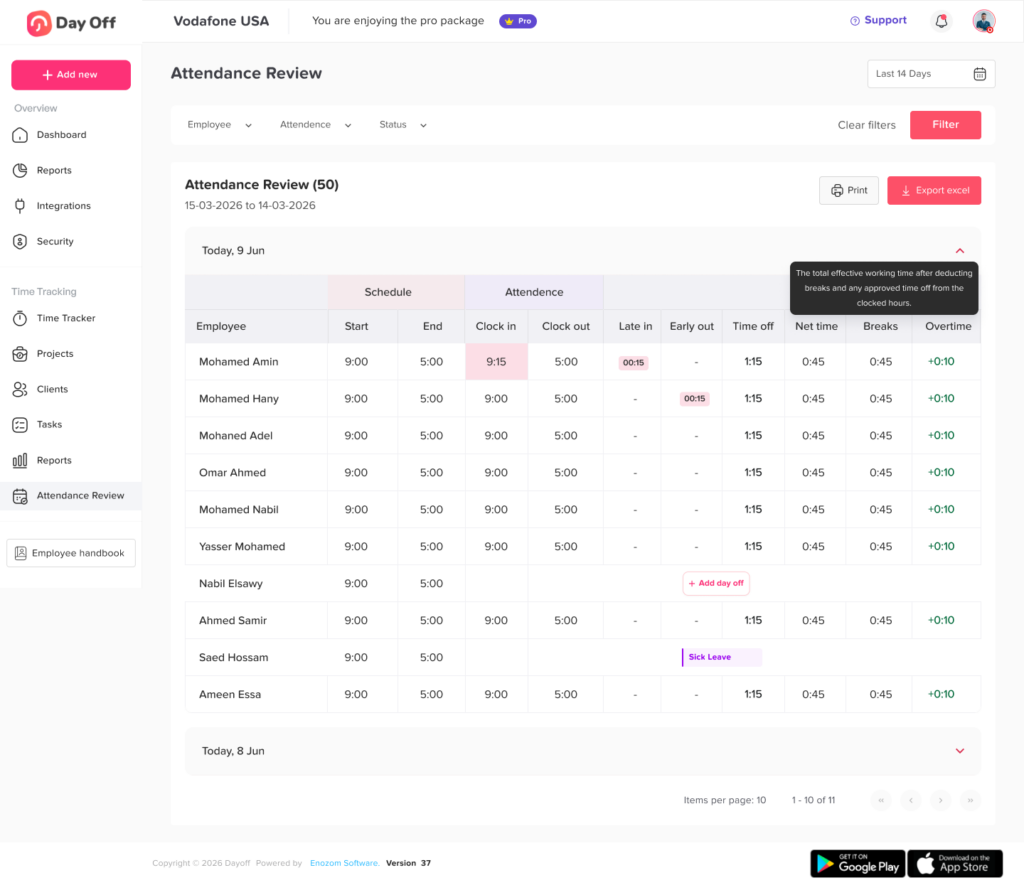
For current attendance, Day Off’s Attendance Review places the expected schedule next to actual clock-in and clock out information. Managers can review scheduled start and end times alongside late arrival, early departure, time off, net working time, breaks, and overtime. Filters can also be applied by employee, team, location, and date range.
This creates a more complete availability workflow.
Managers can use Day Off to review:
- Employee work schedules
- Approved PTO and leave
- Public holidays
- Team calendars
- Shift planning
- Employee attendance
- Clock in and clock out activity
- Late arrivals
- Early departures
- Working hours
- Overtime
- Teams and locations
Day Off also provides a “Today’s Attendance” view for a quick snapshot of employees who are working in the office, working remotely, or on approved leave.
Instead of asking employees for availability through messages or maintaining separate leave and attendance spreadsheets, teams can keep the information connected.
How To Choose Employee Availability Tracking Software
When evaluating an employee availability tracker, focus on the decisions managers actually need to make.
Ask whether the system can answer:
- Who is scheduled today?
- Who is on approved leave?
- Who is available next week?
- Which employees are working remotely?
- Who has actually clocked in?
- Who is working a different shift?
- Who is available during a specific hour?
- Which employees belong to a particular team?
- Which location is understaffed?
- Are multiple employees requesting the same dates?
- Does the team still meet minimum coverage requirements?
Useful features may include:
- Shared team calendar
- PTO Employee Availability Tracking
- Work schedules
- Shift planning
- Attendance Employee Availability Tracking
- Clock in and clock out
- Partial day leave
- Hourly leave
- Holiday calendars
- Team and location filters
- Reports
- Calendar integrations
- Mobile access
- Approval workflows
The best employee availability tracking system is not necessarily the one with the most features.
It is the one that accurately connects the information your managers need to make staffing decisions.
Best Practices for Employee Availability Tracking
To keep availability information useful:
- Define what “available” means for your organization.
- Maintain accurate employee work schedules.
- Record PTO and leave in a centralized system.
- Track partial day absences accurately.
- Include location specific holidays.
- Review schedule changes promptly.
- Compare planned schedules with actual attendance.
- Allow managers to filter availability by team and location.
- Consider required roles, not just employee numbers.
- Review future availability before approving time off.
- Use reports to identify recurring coverage problems.
- Avoid relying on memory, messages, or separate spreadsheets as the main source of availability information.
The objective is not to monitor employees more closely.
It is to make workforce planning more predictable.
Frequently Asked Questions
What is employee availability tracking?
Employee availability tracking is the process of recording when employees are scheduled and able to work. It may combine work schedules, shifts, approved leave, public holidays, attendance, location, and other availability information so managers can understand who can work during a specific period.
How do you track employee availability?
Start with each employee’s normal work schedule, then account for approved PTO, leave, holidays, shift assignments, partial-day absences, and schedule changes. For real-time availability, compare the expected schedule with attendance or clock-in information.
What is the difference between employee availability and employee scheduling?
Employee scheduling defines when someone is expected to work. Availability considers whether that employee is actually able to work during the scheduled period. Approved leave, holidays, or other restrictions can make a scheduled employee unavailable.
Why is employee availability important for PTO management?
Managers need to understand team coverage before approving additional leave. Employee availability tracking shows who is already away, who is scheduled, and whether enough employees will remain available after another PTO request is approved.
What should an employee availability tracker include?
A good employee availability tracker should include work schedules, PTO and approved leave, holidays, shifts, partial-day absences, team information, location, and, when relevant, actual attendance. Businesses with operational staffing requirements may also need role or skill information.
Conclusion
Employee availability is more complicated than knowing whether someone is employed or listed on today’s schedule.
A reliable Employee Availability Tracking process combines work schedules, shifts, approved PTO, holidays, partial day absences, attendance, teams, and locations to show who can actually work when the business needs them.
For managers, that visibility makes everyday decisions easier. They can review staffing before approving leave, identify coverage gaps earlier, distribute work more effectively, and understand the difference between someone who is scheduled, someone who is absent, and someone who is genuinely available.
The most effective approach is to keep schedule, leave, and attendance information connected rather than managing each one separately.
With Day Off, businesses can manage employee PTO, work schedules, attendance, team calendars, and time Employee Availability Tracking within the same platform, giving HR teams and managers a clearer picture of workforce availability and helping them plan with more confidence.