







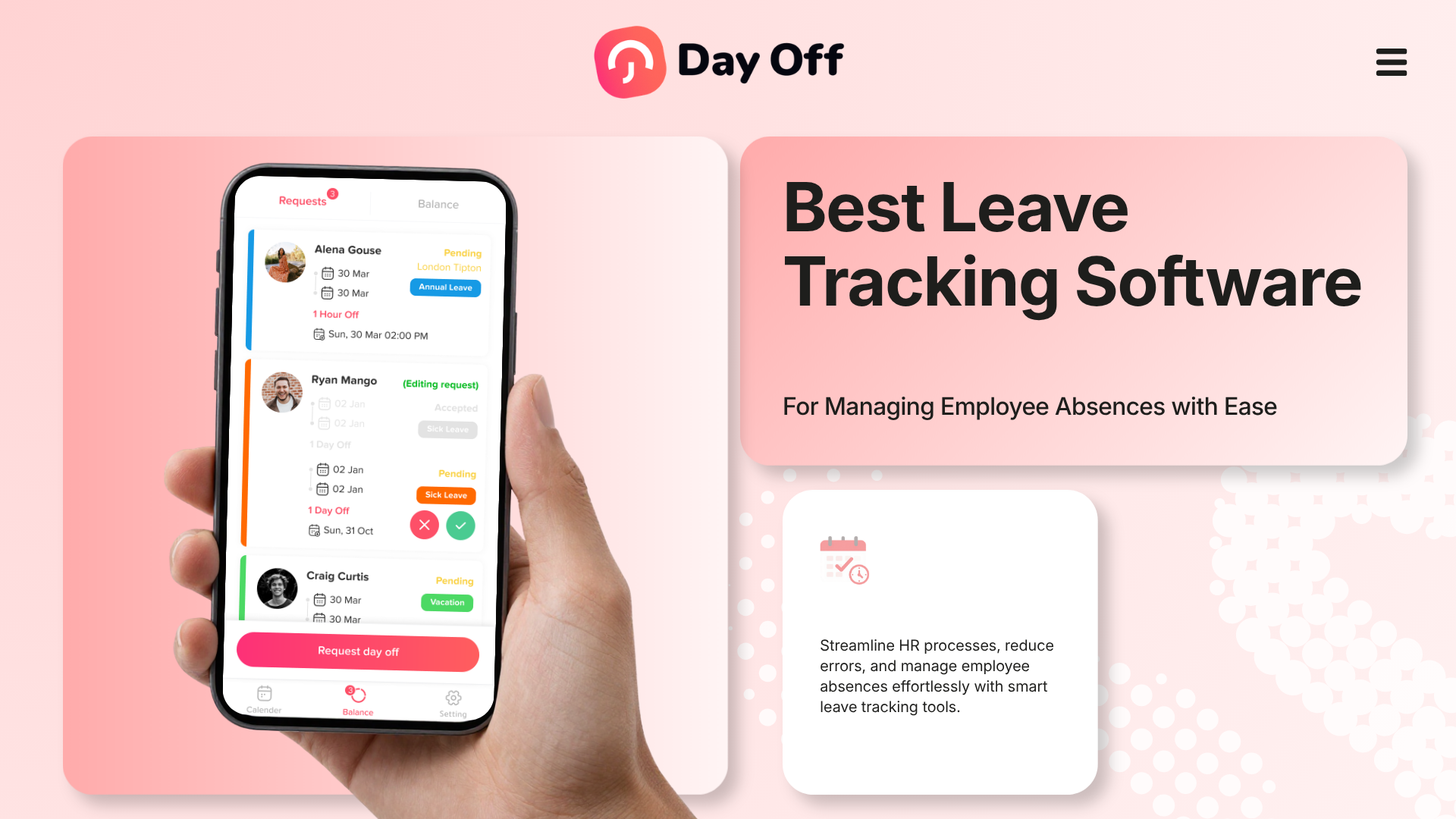
Managing employee absences becomes increasingly difficult when vacation requests, sick leave, PTO balances, public holidays, approvals, and employee schedules are spread across spreadsheets, emails, calendars, and chat messages. Leave Tracking software brings these processes together, giving employees a simpler way to request time off while giving managers and HR teams a reliable view of balances, upcoming absences, approvals, and workforce availability.

The right system does much more than replace a spreadsheet. It can automatically calculate leave balances, apply accrual and carryover policies, route requests to the correct managers, account for different work schedules, maintain absence records, and help managers understand who will actually be available before approving another request.
But leave tracking software varies considerably. Some platforms focus almost entirely on PTO and absence management, while others include attendance, time tracking, scheduling, payroll, or broader HR functions.
This guide compares some of the best leave tracking software available, explains which features genuinely matter, and shows how businesses can select a system that matches their leave policies, workforce structure, and budget.
What Is Leave Tracking Software?
Leave tracking software is a digital system used to record, calculate, request, approve, and report employee time off.
Depending on the organization, it may track:
- Paid time off (PTO)
- Vacation leave
- Annual leave
- Sick leave
- Personal leave
- Parental leave
- Bereavement leave
- Unpaid leave
- Compensatory time or TOIL
- Work-from-home or remote days
- Partial-day absences
- Hourly leave
- Public holidays
- Custom company leave types
Instead of maintaining separate spreadsheets for leave balances and sending requests through email, employees interact with one system.
A typical process looks like this:
- An employee checks their available balance.
- They select the required leave type.
- They enter their requested dates or hours.
- The system calculates the amount of leave required.
- The request is sent to the appropriate manager.
- The manager checks availability and approves or rejects it.
- The employee’s balance updates automatically.
- The absence appears on the relevant team calendar.
- The request remains available for reporting and future reference.
That creates a single source of information for employee absences.
Why Businesses Need Better Leave Tracking
A spreadsheet can work when a company has five employees and one simple vacation policy.
The problem appears as the organization grows.
Imagine a company with 80 employees across several departments and locations. Some employees receive 15 vacation days annually, others receive 20. New employees accrue leave monthly, senior employees have different entitlements, unused leave can carry over up to a limit, and different locations observe different public holidays.
Now add:
- Part time employees
- Employees with different workweeks
- Sick leave
- Hourly requests
- Half days
- Multiple approval levels
- Employees joining during the year
- Leave policies based on seniority
- Carryover expiration
- Remote employees
- Different balance reset dates
A simple spreadsheet starts becoming a small database that someone in HR must maintain manually.
The risk is not only administrative inconvenience. Poor leave tracking can result in:
- Incorrect PTO balances
- Employees receiving too much or too little leave
- Overlapping vacations
- Understaffed teams
- Delayed approvals
- Inconsistent policy application
- Difficulty answering employee balance questions
- Inaccurate end of year carryover
- Poor absence reporting
- Payroll reconciliation problems
- Limited historical records
A dedicated leave management system automates many of these calculations and creates a clearer process for everyone involved.
Best Leave Tracking Software at a Glance
| Software | Best For | Key Strength | Starting Price* |
|---|---|---|---|
| Day Off | Small, growing, remote, and global teams | Dedicated leave tracking with strong policy customization | Free up to 10 users; Pro $2/seat/month |
| Vacation Tracker | Teams using Slack, Teams, and Google Workspace | Workflow integrations and advanced leave automation | Core $2/user/month on monthly billing |
| Timetastic | Teams wanting simple absence planning | Straightforward calendar-based leave management | Business $1.50/user/month |
| LeaveBoard | Small businesses seeking affordable HR and leave tools | Low-cost leave management and HR records | Free up to 9 employees; Pro $1.35/employee/month |
| Jibble | Teams combining attendance and PTO tracking | Time clock, attendance, and leave in one system | Free plan available |
| Zoho People | Businesses wanting broader HR management | Leave, attendance, HR records, scheduling, and HR workflows | Essential HR $1.25/user/month annually |
Day Off: Best Overall Leave Tracking Software for Flexible Leave Management
Day Off is a dedicated PTO and leave tracking platform designed to manage employee absences without requiring companies to adopt a large HR system.
It is particularly suitable for organizations that need more than basic vacation tracking but still want a focused system that employees and managers can use without a complicated implementation.
Day Off supports a free plan for up to 10 employees. Its Pro plan is currently listed at $2 per seat per month with a $20 monthly minimum. The Pro plan includes advanced leave settings, work schedules, multiple approvers, multiple locations, multiple policies, accruals, carryover, blockout dates, and integrations.
Why Day Off Stands Out
One of Day Off’s strongest advantages is the amount of leave policy configuration available without turning leave management into a full HRIS implementation.
Organizations can create different leave types and policies for different groups of employees.
For example, a company could configure:
- 20 vacation days for full-time employees
- 10 vacation days for part-time employees
- Monthly vacation accrual for new hires
- Annual entitlement for senior employees
- Separate sick leave balances
- Unlimited bereavement leave
- Compensatory time
- Hour based personal leave
- Different public holidays by location
This makes Day Off particularly useful as businesses move beyond a single universal PTO policy.
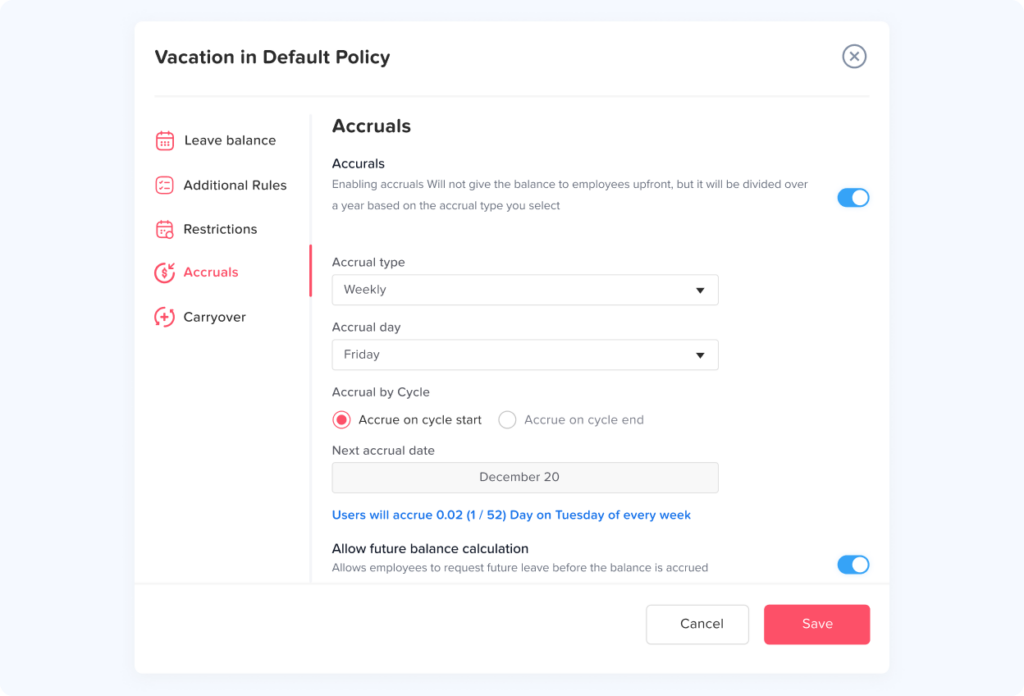
Accrual and Carryover Management
Automatic accrual is one of the most important features in modern Leave Tracking.
Instead of HR manually adding leave every month or pay period, the system can apply the company’s accrual rules automatically.
For example, suppose an employee receives 120 hours of PTO annually through monthly accrual.
The calculation would be:
120 hours ÷ 12 months = 10 hours per month
After six complete accrual periods, the employee would normally have received:
10 × 6 = 60 hours
before accounting for any PTO already used.
A leave tracking system can perform those calculations in the background.
Day Off also supports accrual and carryover configuration, which is valuable when organizations allow unused balances to move from one leave year into another.
Approval Workflows
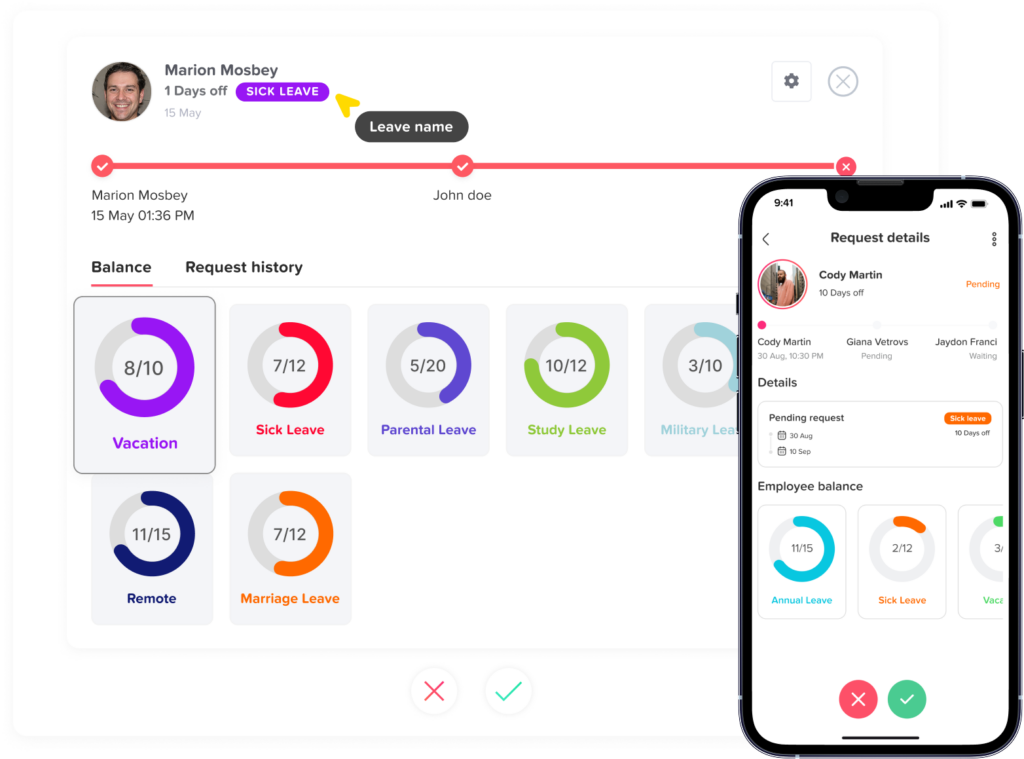
Not every company can use the same approval structure.
A small organization may simply have:
Employee → Manager
A larger company could require:
Employee → Team Manager → Department Manager
Approval workflows become particularly important when different teams have different managers.
Day Off’s Pro plan supports multiple approvers, allowing companies to create more structured workflows than the one step approval included in its Free plan.
Shared Leave Calendar
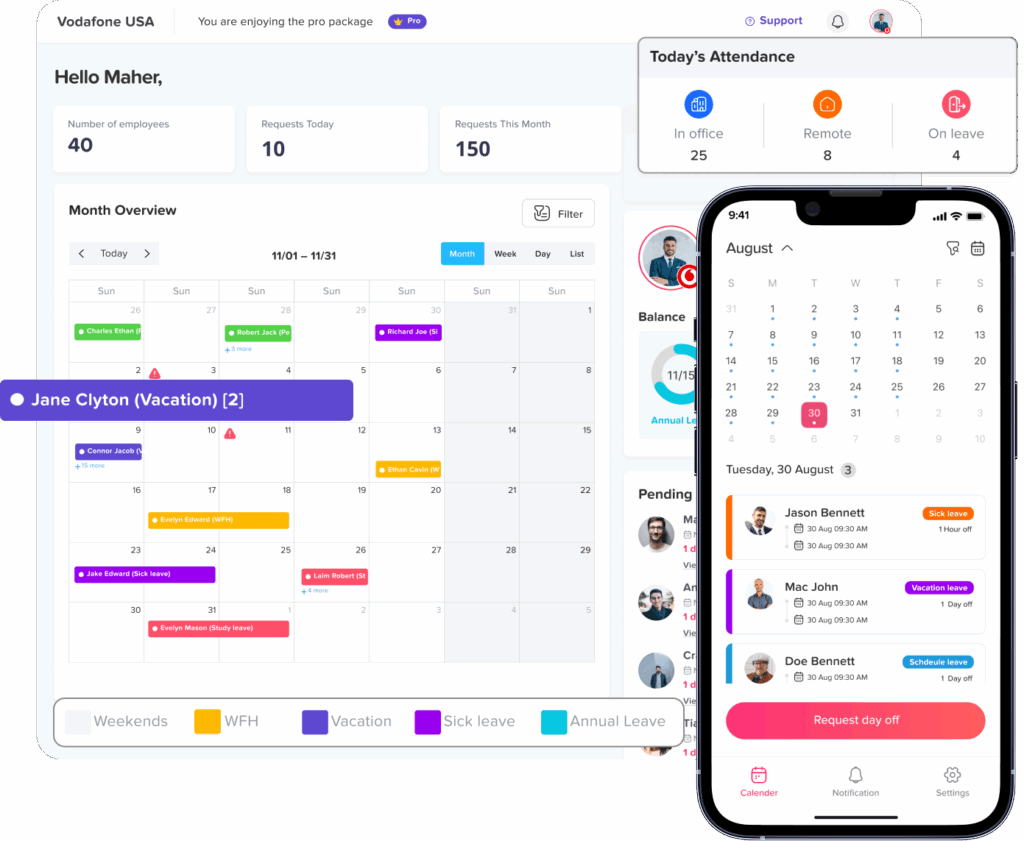
A balance tells you whether an employee is entitled to take leave.
A calendar tells you whether the team can realistically accommodate that absence.
That distinction matters.
Imagine five employees all have sufficient PTO available, but three work in the same four-person support team.
Approving all three requests for the same week could create a serious coverage problem even though every employee technically has enough leave.
Day Off provides a calendar view that helps teams see scheduled absences and make approval decisions with workforce availability in mind.
Integrations
Day Off supports integrations including:
- Google Calendar
- Outlook Calendar
- Slack
- Microsoft Teams
These integrations reduce the need to manually copy approved leave into separate workplace tools.
Day Off also provides iOS and Android applications, allowing employees and managers to manage leave without depending entirely on a desktop browser.
Best For
Day Off is particularly suitable for:
- Small businesses
- Growing organizations
- Remote teams
- Hybrid teams
- Multi location businesses
- International teams
- Companies with complex accrual rules
- Businesses with multiple leave policies
- Organizations moving away from spreadsheets
- Teams that want leave tracking without buying an entire HR platform
Vacation Tracker: Best for Workflow Integrations
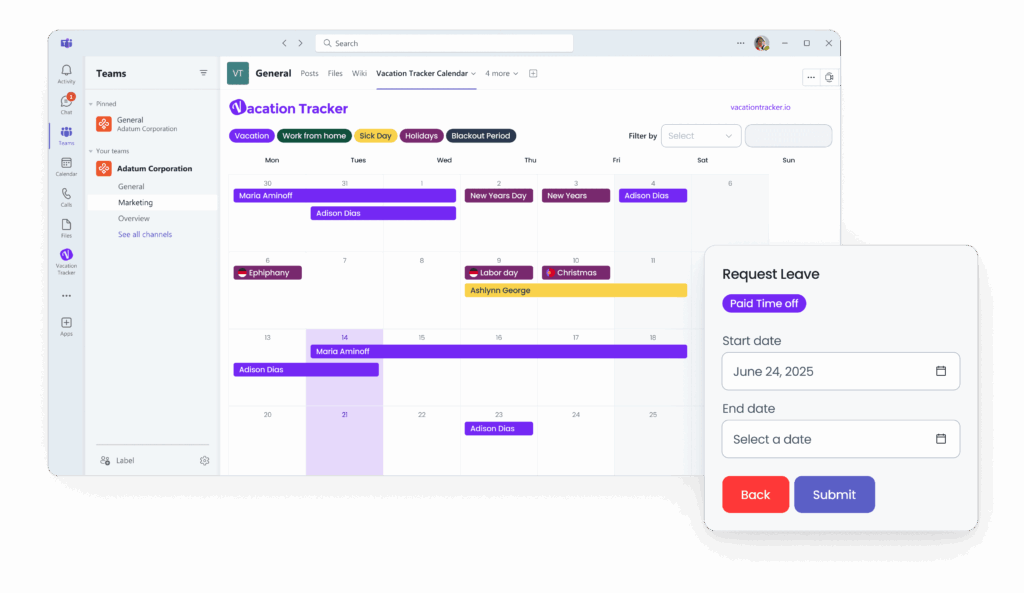
Vacation Tracker is a dedicated leave management platform that places significant emphasis on integrations with the tools employees already use.
It supports leave management through environments including Slack, Microsoft Teams, Google Workspace, and calendars.
Its current Core plan is listed at $2 per user per month on monthly billing, with a $50 minimum. The Complete plan is $4 per user per month, with a $100 monthly minimum. Annual billing is discounted.
Key Features
Vacation Tracker supports functionality such as:
- Custom leave policies
- Leave requests and approvals
- PTO accruals
- Carryover
- Hourly leave
- TOIL
- Negative leave balances
- Multi level approvals
- Substitute approvers
- Public holidays
- Leave reports
- Team availability
- Google Calendar integration
- Outlook integration
- Slack integration
- Microsoft Teams integration
Some advanced capabilities are limited to its higher tier Complete plan.
Strong Choice for Chat Centered Teams
Vacation Tracker can be particularly attractive to organizations where employees spend most of their working day inside Slack or Microsoft Teams.
Reducing the number of systems employees need to open can improve adoption.
Rather than remembering to visit a separate HR portal every time they want a day off, employees can interact with leave-management workflows alongside their regular communication tools.
Best For
Vacation Tracker is a strong candidate for:
- Slack first companies
- Microsoft Teams users
- Google Workspace environments
- Distributed teams
- Companies with complex leave rules
- Organizations needing substitute approvers
- Teams that value automated leave notifications
Timetastic: Best for Simple Employee Absence Planning
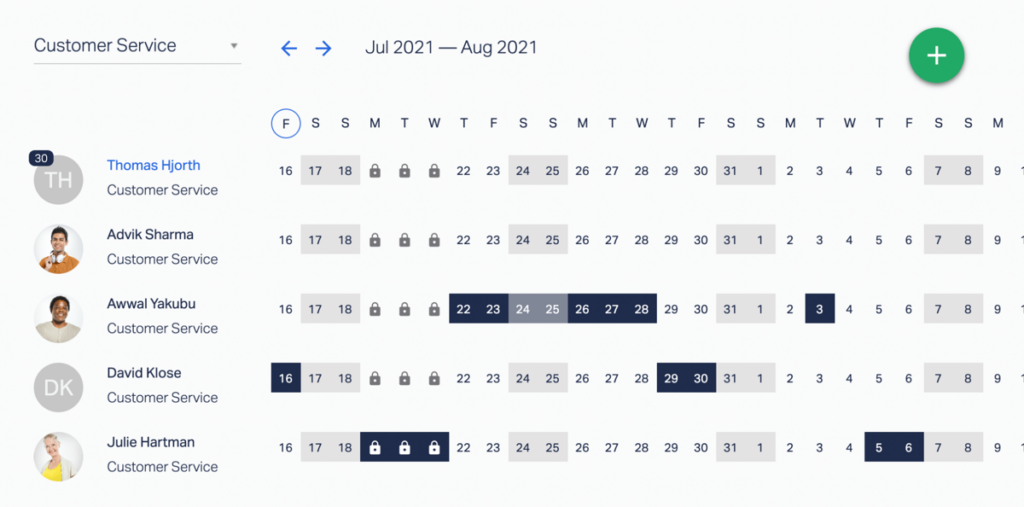
Timetastic is designed around straightforward holiday and absence management.
Its visual approach makes it particularly useful for teams that want to answer a basic but important question quickly:
Who is off, and when?
Timetastic currently lists its Business leave and absence plan at $1.50 per user per month and Pro at $2.50 per user per month. It also offers a higher-priced Rota & Time Clock product for organizations that need workforce scheduling and time tracking.
Core Leave Tracking Capabilities
Depending on the plan, Timetastic provides features including:
- Holiday allowance records
- Leave approval
- Shared calendars
- Absence management
- Mobile applications
- Leave accruals
- Maximum-absence controls
- Booking limits
- Absence trends
- Organization wide absence reports
- Calendar integrations
- Security and permission controls
Its Pro tier adds deeper absence insights and reporting.
Useful for Teams Prioritizing Visibility
Timetastic’s strength is simplicity.
Some organizations do not need deeply customized PTO calculations or a complete HR system. Their priority is:
- Stop using a spreadsheet
- Give employees an easy booking process
- See everyone’s leave in one calendar
- Track remaining allowances
- Give managers an approval process
For those teams, a lightweight system can be better than software filled with unnecessary modules.
Best For
Timetastic is worth considering for:
- Small and medium-sized teams
- Companies prioritizing ease of use
- Businesses that need clear absence calendars
- Organizations looking for a lightweight solution
- Teams wanting absence analytics without a full HRIS
LeaveBoard: Best Low Cost Option for Smaller Businesses
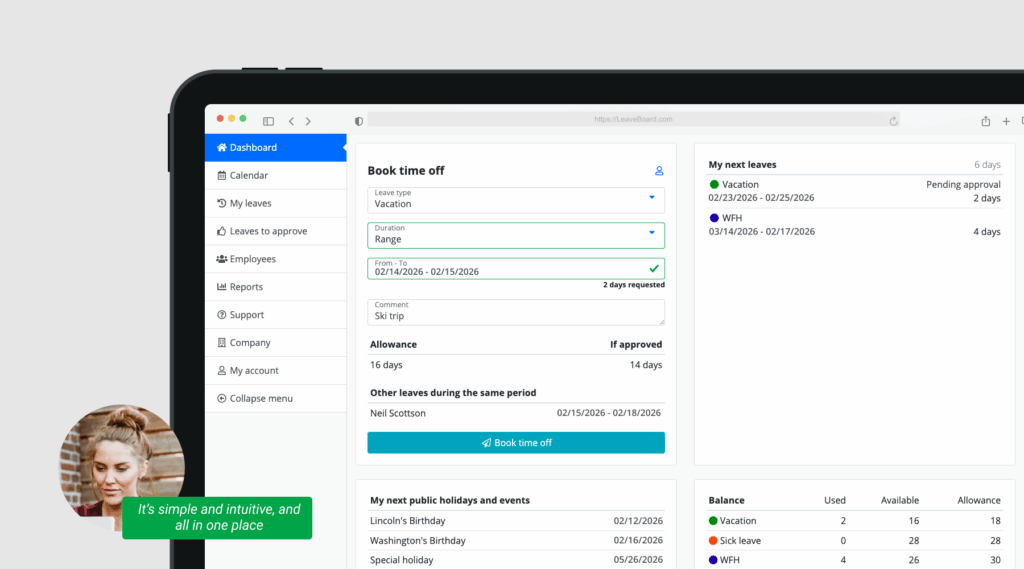
LeaveBoard combines leave management with several basic HR capabilities.
Its Free plan currently supports up to nine employees. The Pro plan is listed at $1.35 per employee per month, and annual billing receives a 17% discount according to its pricing page.
What LeaveBoard Includes
Its leave management functionality includes areas such as:
- Time-off tracking
- Leave policies
- Absence calendar
- Employee directory
- HR reports
- Leave requests
- Employee records
- Advanced leave policies on paid plans
- Calendar and workplace integrations
LeaveBoard states that integrations include Microsoft Office 365, Google Calendar, Slack, and Apple iCal.
Why It Can Work Well for Small Businesses
Companies replacing a spreadsheet often do not need dozens of enterprise HR modules.
They need a system that:
- Stores balances
- Processes requests
- Maintains leave policies
- Shows upcoming absences
- Generates reports
- Keeps employee records organized
LeaveBoard addresses those basic requirements at a relatively low entry cost.
Best For
LeaveBoard may work particularly well for:
- Startups
- Small businesses
- Cost conscious organizations
- Companies that want basic employee records alongside leave
- Teams replacing spreadsheet based PTO management
Jibble: Best for Leave Tracking Combined With Time and Attendance
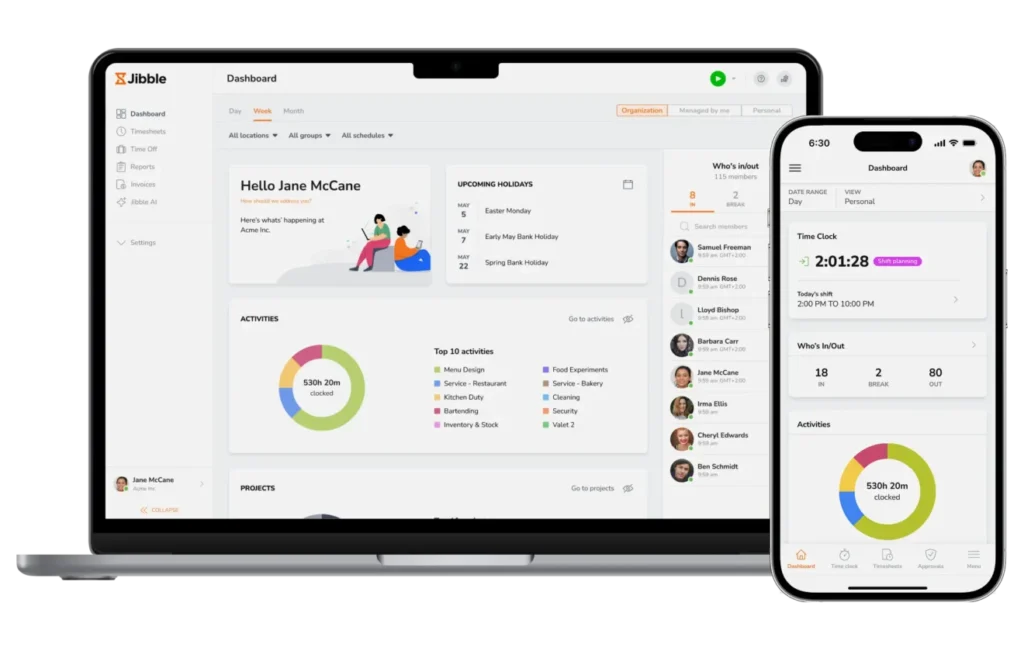
Jibble approaches absence management differently from dedicated leave only systems.
Its broader focus includes employee time tracking and attendance, while also supporting PTO and leave management.
Jibble states that its Free plan includes time tracking along with leave policies, public holidays, and exportable reports, making it particularly interesting for businesses that need attendance and absence data together.
Where Jibble Makes Sense
Consider an hourly workforce where managers need to know:
- When an employee was scheduled
- When they clocked in
- How long they worked
- Whether they were absent
- Whether that absence was paid
- How much PTO they have remaining
In that situation, separating attendance and leave into completely different systems may create more administrative work.
A combined platform can provide a more complete picture.
Key Use Cases
Jibble is particularly relevant for:
- Hourly employees
- Shift-based workplaces
- Businesses already tracking clock-in and clock-out times
- Teams that need attendance reports
- Organizations seeking a free starting option
- Businesses wanting payroll-ready working-hour information alongside leave
Best For
Jibble is a strong option when time tracking is equally important as leave tracking.
Companies focused entirely on PTO policy automation may prefer a dedicated leave-management platform, while businesses managing hourly attendance may benefit more from Jibble’s wider workforce-tracking model.
Zoho People: Best for Broader HR Management
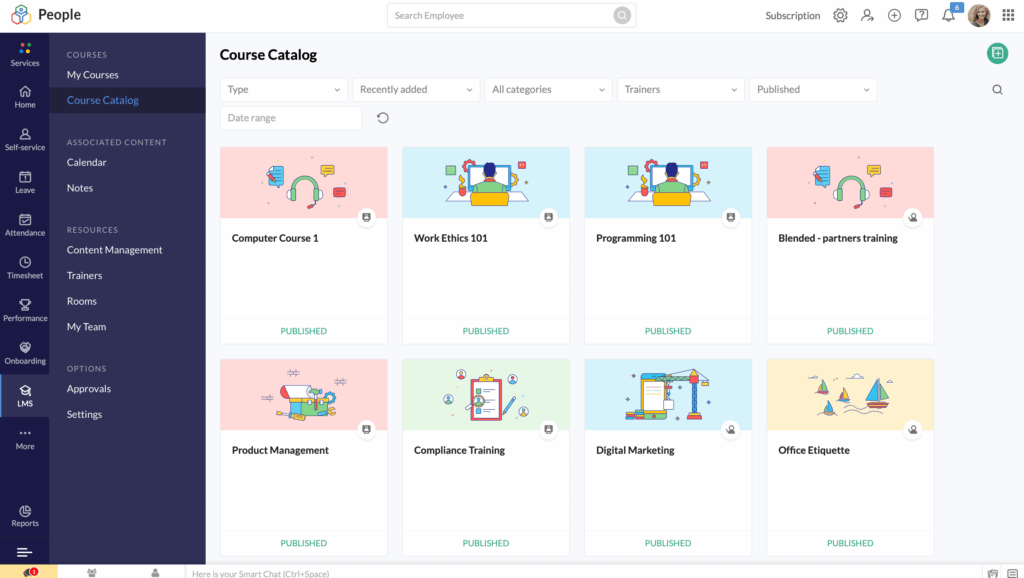
Zoho People is different from most of the dedicated leave trackers on this list because leave management is part of a larger HR platform.
Its features extend beyond PTO into areas such as:
- Employee records
- Onboarding
- Offboarding
- Attendance
- Timesheets
- Rosters
- Performance
- Compensation
- Employee engagement
- HR analytics
- HR help desk
Its Essential HR plan is currently listed at $1.25 per user per month when billed annually, while higher tiers add attendance, timesheets, scheduling, performance, and other HR functions.
Leave Management Capabilities
Zoho People’s current feature comparison includes functionality such as:
- Custom time-off policies
- Time-off approvals
- Holiday tracking
- Compensatory time
- Leave grants
- Attendance-based leave accrual in certain plans
- Vacation tracking
- Attendance integration
- Shift scheduling
Availability varies by edition.
When a Broader HR System Is Better
A dedicated leave tracker is not always the right purchase.
Suppose your business also needs to replace systems for:
- Employee records
- Onboarding
- Attendance
- Performance management
- HR documents
- Timesheets
Buying separate software for each process may make little sense.
In that case, a broader HR suite such as Zoho People can reduce the number of platforms HR needs to maintain.
Best For
Zoho People is more appropriate for:
- Growing HR departments
- Companies wanting multiple HR functions
- Businesses already using the Zoho ecosystem
- Organizations needing attendance and HR records
- Teams that have outgrown a standalone PTO tracker
How to Choose the Best Leave Tracking Software
The best software is not necessarily the platform with the longest feature list.
A better question is:
Can this system accurately represent the way our company actually manages leave?
Use the following criteria when comparing platforms.
| Area | What to Check |
|---|---|
| Leave policies | Can different employees, teams, or locations have different entitlements? |
| Accruals | Does it support your actual accrual frequency and calculation rules? |
| Carryover | Can you set limits, expiry rules, or different carryover policies? |
| Approvals | Can requests go to the correct manager or multiple approval levels? |
| Work schedules | Can the system handle part-time, flexible, or non-standard schedules? |
| Leave units | Can employees request days, half days, or hours where required? |
| Calendar | Can managers see overlapping absences before approving? |
| Reporting | Can HR export balances, requests, usage, and historical records? |
| Locations | Can you assign different public holidays and policies by location? |
| Integrations | Does it work with your calendar, Slack, Teams, or HR environment? |
| Mobile access | Can employees request leave away from their desktop? |
| Permissions | Can sensitive leave information be limited to appropriate roles? |
| Scalability | Will it still work when your headcount, teams, and policies grow? |
Automatic PTO Balance Tracking
At minimum, a leave system should know three things:
Entitlement + earned leave – used leave = available balance
For example:
An employee starts with:
120 hours annual PTO
They have used:
42 hours
They have no other adjustments.
Their balance is:
120 – 42 = 78 hours
That calculation is easy.
Real leave policies quickly become more complicated.
Suppose instead the employee:
- Accrues 10 hours each month
- Joined halfway through the year
- Carried over 12 hours
- Used 24 hours
- Received a manual 4-hour adjustment
Now the system must determine what has actually been earned before calculating what remains.
Good Leave Tracking software should automate these calculations rather than requiring HR to maintain formulas manually.
Flexible Accrual Rules
Not every company grants leave on January 1.
Common approaches include:
- Weekly accrual
- Biweekly accrual
- Semimonthly accrual
- Monthly accrual
- Quarterly accrual
- Annual accrual
- Front loaded entitlement
- Employee anniversary accrual
- Tenure based accrual
Consider a 120-hour annual entitlement.
Depending on company policy, it could be distributed approximately as:
- Weekly: 120 ÷ 52 = 2.31 hours
- Biweekly: 120 ÷ 26 = 4.62 hours
- Semimonthly: 120 ÷ 24 = 5 hours
- Monthly: 120 ÷ 12 = 10 hours
If your policy uses one of these methods, confirm that the software can reproduce it accurately before purchasing.
Carryover and Balance Caps
Another important question is what happens to unused PTO.
A company might allow employees to carry unused leave into the next year but limit the carryover to 40 hours.
Example:
Year-end balance: 67 hours
Maximum carryover: 40 hours
The employee starts the new year with:
40 carried-over hours
not 67.
Another policy may allow all unused leave to carry over but require it to be used within three months.
Your software should reflect the actual policy instead of forcing HR to calculate these adjustments manually every year.
Different Leave Policies for Different Employees
A common mistake is choosing software that works perfectly for today’s organization but cannot support future policy differences.
Consider a growing company with:
Group A: New employees
- 10 annual vacation days
- Monthly accrual
Group B: Employees with 2+ years of service
- 15 annual vacation days
- Monthly accrual
Group C: Employees with 5+ years of service
- 20 annual vacation days
- Monthly accrual
The system needs to distinguish between these groups.
The same problem appears when companies have:
- Full time and part time employees
- Salaried and hourly staff
- Multiple offices
- Employees in different countries
- Different departments
- Union and non-union rules
- Different contracts
Policy flexibility should therefore be evaluated before migration, not after employees are already using the system.
Partial Day and Hourly Leave
Not every absence lasts an entire day.
Employees may need time off for:
- Doctor appointments
- School appointments
- Personal errands
- Family responsibilities
- Medical treatment
- Late arrival
- Early departure
Suppose an employee is scheduled for eight hours but needs to leave two hours early.
A good system should be capable of deducting:
2 hours
rather than forcing HR to record an entire day or manually adjust the balance afterward.
This becomes especially important for employers that maintain PTO balances in hours.
Work Schedule Awareness
Leave cannot always be calculated accurately without understanding the employee’s work schedule.
Consider two employees.
Employee A
- Monday to Friday
- 8 hours per day
Employee B
- Monday to Thursday
- 10 hours per day
If both request Monday off, the required PTO may be different:
- Employee A: 8 hours
- Employee B: 10 hours
A leave system that assumes every workday is always eight hours can create incorrect deductions.
Organizations using:
- Four-day workweeks
- Part-time schedules
- Flexible hours
- Rotating shifts
- Split shifts
- Different working days
should pay particular attention to schedule support when selecting software.
Multi Level Approval Workflows
A simple company might only need one manager to approve leave.
Larger organizations often need more control.
Examples include:
Employee → Manager
or:
Employee → Manager → HR
or:
Employee → Team Lead → Department Head
Advanced approval workflows become valuable when:
- Teams have different approvers
- HR requires final approval
- Senior employees have different reporting structures
- Managers need substitute approvers
- Requests above a certain duration require additional review
The goal is to automate the existing decision process rather than create additional administrative steps.
Team Availability Before Approval
A leave balance answers:
Can this employee afford the time off?
Workforce planning answers:
Can the organization afford the absence at that time?
Both questions matter.
Suppose a seven-person team already has two employees away during the first week of September.
A third employee submits another vacation request.
The employee may have plenty of PTO available, but the manager needs to understand whether approving another absence would leave enough people to operate the team.
A shared leave calendar or availability view helps managers make that decision before clicking approve.
Public Holiday Management
Global businesses face another complication: holidays are not the same everywhere.
An employee in Egypt, the United States, Germany, and the United Arab Emirates may each follow different holiday calendars.
Public holidays can also affect PTO calculations.
For example, an employee requests Monday through Friday off.
If Wednesday is a public holiday and company policy excludes holidays from PTO deductions, only four leave days may need to be deducted.
The leave tracker therefore needs to understand:
- Employee location
- Local holidays
- Working days
- Company holiday rules
- Leave policy rules
Without this information, HR may need to correct balances manually.
Employee Self Service
One overlooked benefit of leave software is reducing routine HR questions.
Without employee self-service, HR repeatedly receives questions such as:
- How much PTO do I have?
- Was my request approved?
- Who is off next week?
- When does my balance reset?
- Did my vacation deduct correctly?
- Can I see my previous leave requests?
A self service portal allows employees to find many of these answers independently.
They should ideally be able to:
- View their current balance
- Review leave history
- Submit requests
- Cancel eligible requests
- Check approval status
- View upcoming absences
- Access company leave information
The result is not simply convenience for employees. It reduces repetitive administrative work for HR.
Reporting and Absence Analytics
Recording leave is only one part of effective absence management.
The accumulated data can help HR identify patterns.
Useful reports may include:
- Current leave balances
- Leave taken by employee
- Leave taken by department
- Leave type usage
- Carryover balances
- Accrual history
- Upcoming absences
- Historical requests
- Sick leave frequency
- PTO utilization
- Employees with high unused balances
For example, imagine a department where most employees still have 80% of their annual vacation entitlement remaining by October.
That could indicate employees are not taking sufficient time off, or that managers are unintentionally discouraging leave.
At the opposite extreme, unusually high unscheduled absence levels may justify a closer operational review.
The important point is that leave data becomes useful management information when it can be analyzed, not merely stored.
Leave Tracking Software vs Spreadsheets
| Task | Spreadsheet | Leave Tracking Software |
|---|---|---|
| PTO calculations | Often manual or formula-based | Automated |
| Requests | Email, chat, or separate forms | Centralized |
| Approvals | Usually manual | Workflow-based |
| Balance updates | Manual or formula-driven | Automatic |
| Calendar visibility | Requires separate maintenance | Shared and continuously updated |
| Accruals | Requires formulas | Policy-based automation |
| Carryover | Often manual | Can be automated |
| Multiple locations | Difficult to maintain | Policy/location-based |
| Audit history | Limited | Centralized records |
| Employee self-service | Usually unavailable | Built in |
| Reporting | Requires spreadsheet work | Generated from stored data |
| Mobile access | Limited | Commonly supported |
Dedicated Leave Tracker or Full HR System?
Before comparing individual vendors, decide what category of software you actually need.
Choose a Dedicated Leave Tracker If:
Your main problem is managing:
- PTO
- Vacation
- Sick leave
- Approvals
- Leave balances
- Public holidays
- Team availability
Platforms such as Day Off, Vacation Tracker, Timetastic, and LeaveBoard focus heavily on these workflows.
A specialized solution is often easier to implement and may cost less than purchasing an entire HR suite.
Choose a Broader Workforce Platform If:
You also need:
- Clock in and clock out tracking
- Timesheets
- Attendance
- Scheduling
- Employee records
- Payroll related exports
A platform such as Jibble may be more appropriate.
Choose an HR Suite If:
Your organization also needs:
- Onboarding
- Employee documents
- Performance management
- Compensation
- HR analytics
- HR help desk
- Employee lifecycle management
A broader platform such as Zoho People becomes more relevant.
How Much Does Leave Tracking Software Cost?
Pricing generally follows one of several models:
Per Employee Per Month
For example:
50 employees × $2 = $100 per month
This model scales directly with headcount.
Minimum Monthly Charge
Some platforms charge per employee but also enforce a minimum.
For example, if software costs $2 per employee but has a $20 minimum:
- 5 employees may still cost $20
- 10 employees cost $20
- 20 employees cost $40
- 100 employees cost $200
Always calculate your actual company cost rather than comparing only the advertised per-user number.
Free Plans
Free plans can work well for smaller teams.
But verify:
- Maximum number of employees
- Number of policies
- Approval limitations
- Reporting access
- Integration availability
- Accrual support
- Carryover support
- Location limits
A free plan is valuable only if it supports the workflow your organization actually needs.
What Is the Best Leave Tracking Software?
For companies wanting a focused Leave Tracking system with customizable leave policies, accruals, carryover, multiple approvers, multi location support, work schedules, integrations, mobile access, and a free option for smaller teams, Day Off is one of the strongest overall choices. Its current Free plan covers up to 10 employees, while Pro starts at $2 per seat per month with a $20 monthly minimum.
Vacation Tracker is particularly attractive for companies that want leave workflows deeply connected to Slack, Microsoft Teams, and Google Workspace.
Timetastic is well suited to businesses prioritizing straightforward absence planning, calendars, and usability.
LeaveBoard offers an affordable route into structured leave management for smaller companies.
Jibble becomes especially relevant when employee attendance and time tracking matter as much as PTO.
Zoho People is better suited to organizations that need leave management as part of a larger HR ecosystem.
The best choice therefore depends on the problem the company is trying to solve.
Frequently Asked Questions
What is leave tracking?
Leave tracking is the process of recording employee time off, including vacation, PTO, sick leave, unpaid leave, and other absences. It typically includes tracking entitlements, balances, requests, approvals, accruals, carryover, and historical leave records.
What is leave tracking software?
Leave tracking software is a digital system that helps businesses automate employee time-off management. Employees can request leave, managers can approve requests, and the software can automatically update balances, calendars, and reports.
What is the best way to track employee leave?
For very small teams with simple leave policies, a spreadsheet may be sufficient. As the workforce grows or policies become more complex, dedicated leave tracking software usually provides better automation, employee self service, approval workflows, balance calculations, and reporting.
What should leave management software include?
Useful capabilities include:
- Custom leave types
- Automatic balance tracking
- PTO accruals
- Carryover
- Approval workflows
- Public holidays
- Shared calendars
- Employee self-service
- Work schedule support
- Hourly or partial-day leave
- Reports
- Mobile access
- Integrations
- Role based permissions
The exact requirements depend on company policy.
Can leave tracking software calculate PTO automatically?
Yes. Many modern systems can automatically calculate employee PTO according to configured accrual rules, annual entitlements, carryover, balance caps, and leave already taken.
The software still needs to be configured according to the organization’s actual PTO policy.
Can leave tracking software manage sick leave?
Yes. Sick leave can normally be configured as a separate leave type with its own entitlement, accrual method, approval rules, documentation requirements, and reporting.
Can employees check their own PTO balance?
Most modern leave management platforms provide employee self-service so employees can check available balances, request time off, and review upcoming or previous requests without contacting HR.
Can leave tracking software handle different policies for different employees?
Advanced systems can assign separate leave policies based on factors such as employee group, department, location, seniority, or employment arrangement.
This is particularly important for growing and international companies.
Can leave tracking software manage hourly PTO?
Some platforms support leave balances and requests in hours rather than only full days. This is useful for partial-day absences such as doctor appointments, early departures, or employees working non-standard schedules.
Always verify hourly support before selecting a platform if your company tracks PTO in hours.
Is leave tracking software useful for remote teams?
Yes. Remote and distributed organizations often benefit significantly because a centralized leave calendar gives employees and managers visibility into availability even when team members work in different offices, countries, or time zones.
Does leave tracking software replace attendance software?
Not necessarily.
Leave tracking primarily answers:
Why is this employee scheduled to be absent?
Attendance software primarily answers:
When did this employee actually work?
Some workforce platforms combine both, while dedicated leave trackers focus more heavily on PTO policies, approvals, and absence planning.
Is free leave tracking software enough for a small business?
It can be.
A small company with straightforward policies may only need:
- Leave requests
- Approval
- Balances
- Calendar visibility
- Basic reporting
For example, Day Off currently offers a Free plan for teams of up to 10 employees, while LeaveBoard offers free use for up to nine employees.
As the company grows, advanced features such as accruals, multiple policies, integrations, or multi level approvals may justify upgrading.
Final Thoughts
Employee absence management becomes difficult when a business tries to combine policy calculations, PTO balances, manager approvals, public holidays, calendars, work schedules, and employee records through disconnected spreadsheets and messages.
A good Leave Tracking system creates one reliable workflow.
Employees know how much leave they have.
Managers know who is already away.
HR knows which policy applies.
Balances update when leave is approved.
Calendars show upcoming absences.
Reports provide historical records.
And the organization spends less time reconciling different versions of the same information.
For businesses primarily looking to replace manual PTO administration with a dedicated platform, Day Off provides a particularly strong combination of leave-policy flexibility, approvals, accruals, carryover, work schedules, calendars, integrations, mobile applications, and affordable pricing. Organizations needing a different workflow may prefer Vacation Tracker, Timetastic, LeaveBoard, Jibble, or a broader HR platform such as Zoho People.