







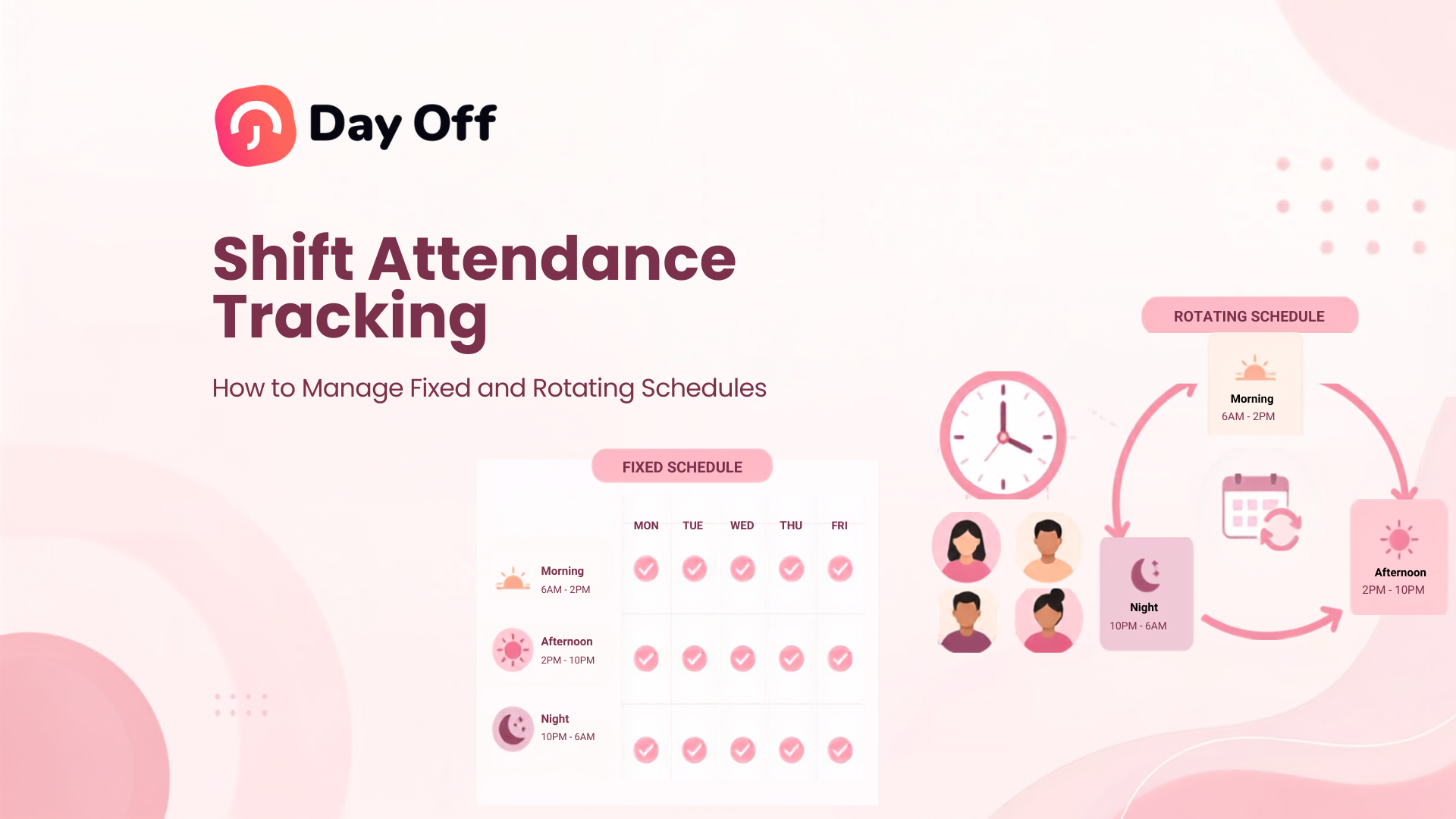
Shift Attendance Tracking is the process of comparing when employees are scheduled to work with when they actually work. For companies using fixed hours, rotating shifts, overnight schedules, or different working patterns across teams, simply recording a clock in and clock out is not enough. Managers need to know what the employee was expected to work, what actually happened, whether any time off was approved, and whether an attendance difference requires action.

A good shift attendance system connects schedules, actual working time, breaks, leave, overtime, and attendance exceptions. Instead of treating every late clock in or missing time entry as the same problem, it gives managers the context needed to understand what happened.
This guide explains how shift attendance tracking works, how to manage both fixed and rotating schedules, which attendance records matter, how to handle common exceptions, and how businesses can create a more reliable attendance process.
What Is Shift Attendance Tracking?
Shift attendance tracking records employee attendance against an assigned work schedule.
The basic comparison is:
Scheduled time vs. actual time worked
For example, an employee may be scheduled to work:
- Start: 8:00 AM
- End: 4:00 PM
Their attendance record may show:
- Clock in: 8:12 AM
- Clock out: 4:25 PM
- Break: 30 minutes
A shift attendance system can use these records to identify that the employee arrived after the scheduled start, worked past the scheduled end, and completed a certain amount of net working time.
The same principle becomes more important when schedules change.
Consider an employee working a rotating schedule:
Week 1: Monday to Friday, 7:00 AM to 3:00 PM
Week 2: Tuesday to Saturday, 3:00 PM to 11:00 PM
Week 3: Monday to Thursday, 11:00 PM to 7:00 AM
A static attendance sheet cannot accurately interpret those clock-ins unless it also knows which shift the employee was assigned on each date.
That is why schedule data should be treated as the attendance baseline.
Why Shift Attendance Tracking Matters
Attendance data without schedule context can be misleading.
A 10:00 AM clock in could represent:
- A two-hour late arrival for an 8:00 AM shift
- An on-time arrival for a 10:00 AM shift
- A normal start under a flexible schedule
- An employee covering another person’s shift
- A changed schedule that has not been updated
- A return from approved partial-day leave
The timestamp itself does not tell the whole story.
Accurate shift attendance tracking helps businesses answer more useful questions:
- Was the employee scheduled to work?
- Did they arrive on time?
- Did they leave before their scheduled end?
- Did they complete the expected number of hours?
- Did they take an unusually long break?
- Was additional time worked?
- Was the employee on approved leave?
- Was the schedule changed or swapped?
- Is the attendance record missing a punch?
- Does the record need manager review?
This is particularly important for businesses with hourly employees, multiple locations, shift rotations, part-time workers, overnight shifts, or teams that do not all follow the same Monday to Friday schedule.
Schedule and Attendance Are Not the Same Thing
One of the most important principles in attendance management is separating planned time from actual time.
A work schedule describes what an employee is expected to work.
An attendance record describes what actually happened.
These records should be compared, but they should not be treated as interchangeable.
For U.S. employers covered by the Fair Labor Standards Act, the Department of Labor requires accurate records of hours worked each day and each workweek for covered nonexempt employees. Employers may choose their timekeeping method, provided the records are complete and accurate. For employees who normally work a fixed schedule, the employer may keep the regular schedule and record exceptions when actual working time differs from that schedule.
This distinction is useful even outside payroll compliance.
If an employee is scheduled for eight hours but works nine, the schedule should not overwrite the actual nine hours worked.
Similarly, if an employee is scheduled for eight hours but only works six because of approved partial-day PTO, the attendance record should contain that context rather than simply marking the employee absent.
Fixed Schedule vs. Rotating Schedule Attendance
| Area | Fixed Schedule | Rotating Schedule |
|---|---|---|
| Working pattern | Usually repeats every week | Changes according to a repeating cycle |
| Start and end times | Usually consistent | May change by week or shift |
| Attendance baseline | Standard daily schedule | Assigned shift for the specific date |
| Late calculation | Usually straightforward | Must use that day’s assigned shift |
| Days off | Usually predictable | Can change throughout the rotation |
| Main risk | Assuming scheduled hours equal worked hours | Comparing attendance against the wrong shift |
| Best approach | Track exceptions from the normal schedule | Connect every attendance record to the correct rotation |
Neither schedule is inherently more difficult to manage when the schedule and attendance data are properly connected.
Problems usually occur when companies try to track rotating employees using attendance rules designed only for fixed schedules.
How Shift Attendance Tracking Works for Fixed Schedules
A fixed schedule assigns predictable working days and, when applicable, working hours.
For example:
Monday to Friday
9:00 AM to 5:00 PM
The attendance system therefore has a consistent reference point.
Suppose the employee records:
- Clock in: 9:17 AM
- Clock out: 5:12 PM
- Unpaid break: 30 minutes
A manager can compare this against the schedule to identify the late start, actual worked duration, and any time worked after the scheduled end.
Fixed Hours Do Not Mean Fixed Attendance
Even when the schedule rarely changes, actual attendance will.
Employees may:
- Arrive late
- Leave early
- Work overtime
- Take PTO
- Forget to clock in
- Miss a clock-out
- Work a different shift temporarily
- Take longer or shorter breaks
- Work on a normally scheduled day off
The schedule remains the expected pattern, while the time record should reflect the actual event.
Split Fixed Shifts
Some employees work separate periods within the same day.
For example:
First shift: 8:00 AM to 12:00 PM
Second shift: 4:00 PM to 8:00 PM
This should not be interpreted as one continuous 12-hour workday.
Shift Attendance Tracking should recognize the separate working periods so that the four-hour gap is not accidentally counted as working time.
Split shifts are common in industries where demand changes throughout the day, such as hospitality, transportation, healthcare, customer service, and retail.
How Shift Attendance Tracking Works for Rotating Schedules
Rotating schedules require the attendance system to determine the employee’s expected shift for the specific day being reviewed.
Imagine a three week rotation:
| Rotation Week | Working Days | Shift |
|---|---|---|
| Week 1 | Monday-Friday | 7:00 AM-3:00 PM |
| Week 2 | Tuesday-Saturday | 3:00 PM-11:00 PM |
| Week 3 | Monday-Thursday | 11:00 PM-7:00 AM |
If an employee clocks in at 3:05 PM during Week 2, that may represent a five minute late arrival.
If the system incorrectly applies the Week 1 schedule, however, it could incorrectly show the employee as eight hours late.
The attendance calculation therefore needs to answer one question first:
Which shift was assigned to this employee on this date?
Only then should it calculate lateness, early departure, scheduled hours, or overtime.
Build Rotating Schedules Before Tracking Attendance
A common mistake is beginning with time clock data before clearly defining the rotation.
A better process is:
- Define each week or cycle in the rotation.
- Assign working days.
- Set start and end times where applicable.
- Identify overnight shifts.
- Define breaks.
- Assign the schedule to the correct employees.
- Set the effective date of the rotation.
- Record schedule changes or temporary overrides.
- Then compare actual attendance against the assigned schedule.
Without a reliable schedule, the attendance system has nothing accurate to compare actual punches against.
What Data Should Shift Attendance Tracking Include?
A useful attendance record should provide more than a simple Present or Absent status.
For each scheduled working day, managers may need to review:
- Employee
- Date
- Assigned schedule
- Scheduled start
- Scheduled end
- Actual clock in
- Actual clockout
- Break duration
- Net working hours
- Late time
- Early departure
- Overtime
- Approved time off
- Attendance status
- Missing punches
- Schedule changes
- Manager adjustments
The exact fields depend on the organization’s policies and local requirements.
However, keeping the schedule and actual attendance visible together makes the record much easier to interpret.
How to Calculate Net Working Hours
The time between clock in and clock out is not always the employee’s actual working time.
A basic formula is:
Net Working Hours = Clock Out Time – Clock In Time – Unpaid Breaks
For example:
Clock in: 8:00 AM
Clock out: 5:00 PM
Unpaid break: 1 hour
Total elapsed time:
9 hours
Net working time:
8 hours
Break policies can vary by jurisdiction and company policy, so employers should determine which breaks count as paid working time and which can legally be deducted.
Calculate Late Time Against the Actual Shift
For employees with a defined start time:
Late Time = Actual Clock-In – Scheduled Start
Example:
Scheduled start: 7:00 AM
Actual clock in: 7:18 AM
Potential late time:
18 minutes
However, attendance rules should also consider company policy.
For example, an organization may have:
- A grace period
- Approved schedule adjustments
- Flexible arrival windows
- Manager approved exceptions
- Partial day leave
- Special accommodations
A system can identify the numerical difference, but the company’s policy determines whether that difference should be treated as an attendance violation.
Calculate Early Departure
A similar comparison can be made at the end of a shift.
Early Departure = Scheduled End – Actual Clock Out
Example:
Scheduled end: 5:00 PM
Actual clock out: 4:35 PM
Potential early departure:
25 minutes
Before treating the difference as a problem, managers should check whether there is an approved reason, such as partial day PTO, an adjusted schedule, or manager authorization.
Scheduled Hours, Worked Hours, and Paid Hours Are Different
These three terms are often confused.
Scheduled hours are the hours the employee was expected to work.
Worked hours are the actual hours recorded as work.
Paid hours may include worked hours plus certain paid nonworking time, depending on company policy and applicable law.
For example, an employee could have:
- Scheduled hours: 8
- Actual worked hours: 6
- Paid PTO: 2
- Paid hours: 8
From an attendance perspective, the employee did not simply “miss” two hours. Those two hours were covered by approved leave.
Keeping PTO connected with attendance helps preserve this context.
Connect PTO With Shift Attendance Tracking
PTO and attendance should not exist in completely separate processes.
Imagine an employee does not clock in for a Tuesday shift.
Without leave data, the manager may see:
No attendance record
But that missing record could mean several things:
- Approved vacation
- Sick leave
- Personal leave
- Unscheduled absence
- Schedule error
- Employee was not scheduled
- Missed punch
- Shift swap
- Technical issue
The manager should not have to manually check several spreadsheets or systems to find the answer.
Connecting approved time off with the attendance record allows HR and managers to distinguish between an authorized absence and an actual attendance exception.
Managing Rotating Shifts and PTO
Rotating schedules also affect how leave should be calculated.
Suppose an employee works:
Monday: 8 hours
Tuesday: 8 hours
Wednesday: Off
Thursday: 10 hours
Friday: 10 hours
If the employee requests leave on Thursday, the leave calculation should reflect the employee’s scheduled Thursday hours rather than assuming every working day represents eight hours.
This becomes especially important for organizations that manage PTO in hours.
The employee’s assigned work schedule should determine how many scheduled working hours are affected by the leave request.
Handle Overnight Shifts Carefully
Overnight shifts introduce another attendance challenge because the shift crosses calendar dates.
For example:
Scheduled start: Monday at 10:00 PM
Scheduled end: Tuesday at 6:00 AM
An attendance system should recognize this as one working shift rather than:
- Two hours on Monday
- Six unrelated hours on Tuesday
The organization should establish a consistent method for assigning overnight work to attendance dates and payroll periods.
Other situations also require attention:
- Breaks after midnight
- Overtime after the scheduled shift
- PTO covering overnight shifts
- Shifts crossing the end of a payroll period
- Daylight saving time changes in applicable locations
The rules should be defined before these situations occur.
Manage Shift Changes and Swaps
Rotating environments frequently involve temporary changes.
Employee A may be scheduled for the morning shift but swap with Employee B, who was assigned the evening shift.
If the schedule is not updated, both employees may appear to have attendance problems even though they worked exactly as agreed.
A good process should therefore record approved shift changes before attendance is evaluated.
The workflow could be:
Original schedule → Approved shift change → Updated expected schedule → Actual attendance → Attendance review
The final approved schedule, not an outdated original schedule, should be used when interpreting the attendance record.
Track Attendance Exceptions Instead of Reviewing Every Record
Managers generally do not need to investigate every perfectly normal attendance record.
An exception-based process allows them to focus on records that require attention.
Common attendance exceptions include:
- Late arrival
- Early departure
- Missing clock in
- Missing clock out
- No attendance for a scheduled shift
- Attendance on an unscheduled day
- Unexpected overtime
- Excessive break time
- Worked hours below expected hours
- PTO not reflected in attendance
- Shift worked outside the assigned schedule
Exception reporting is especially useful for larger teams because it reduces the amount of routine attendance data managers need to review manually.
Create Clear Attendance Statuses
Attendance statuses should have precise meanings.
For example:
Present: Employee has a valid attendance record for the assigned shift.
Late: Employee clocked in after the required start time according to company policy.
Absent: Employee was scheduled to work but has no approved attendance or leave record.
On Leave: Employee’s absence is covered by approved time off.
Missing Punch: At least one required clock-in or clock-out entry is missing.
Day Off: Employee was not scheduled to work.
Early Departure: Employee left before the scheduled shift end without an applicable approved adjustment.
These definitions should be documented in the attendance policy so that employees and managers interpret them consistently.
Establish a Missed Punch Process
Missing punches are inevitable in almost every time tracking system.
An employee may forget to clock in or clock out.
That does not mean managers should guess the missing time.
Instead, create a correction process.
For example:
- Employee identifies the missing entry.
- Employee submits the correct time.
- Manager verifies the request.
- The record is corrected.
- The adjustment is documented where appropriate.
A consistent correction process creates a clearer audit trail and reduces informal changes to employee time records.
Compare Actual Hours With Expected Hours
For some shifts, total working time is as important as the clock in time.
Example:
Scheduled shift: 8:00 AM to 4:00 PM
Expected net hours: 7.5
Actual clock in: 7:55 AM
Actual clock out: 3:00 PM
Break: 30 minutes
The employee arrived on time, but their total working time is still below the expected amount.
Reviewing only “late arrivals” would miss the issue.
A complete attendance process should therefore evaluate both:
- Time of attendance
- Duration of attendance
Review Overtime Separately
Working beyond a scheduled shift can create additional attendance and payroll considerations.
Suppose an employee is scheduled until 5:00 PM but clocks out at 7:00 PM.
The attendance record should show the additional time rather than automatically reducing it to the scheduled shift.
The organization can then determine whether:
- The extra time was authorized
- The schedule was incorrect
- The employee forgot to clock out
- The additional hours affect overtime calculations
For covered U.S. employees, employers are required to maintain accurate records of daily and weekly hours worked.
Employers should apply applicable federal, state, local, or national working time and overtime rules rather than relying only on the planned schedule.
Use Different Schedules for Different Employees
A company does not necessarily need one schedule for everyone.
For example:
Administrative team
Monday-Friday
9:00 AM-5:00 PM
Customer support Team A
Monday-Friday
7:00 AM-3:00 PM
Customer support Team B
Monday-Friday
3:00 PM-11:00 PM
Operations team
Two week rotating schedule
Attendance should always be interpreted against the schedule assigned to the specific employee.
This makes schedule assignment an important part of accurate employee data management.
Shift Attendance Tracking for Multiple Locations
Organizations operating across different locations may have additional complexity.
Locations can differ in:
- Working days
- Shift patterns
- Public holidays
- Time zones
- Break requirements
- Overtime rules
- Weekend definitions
- Local labor requirements
For example, a 9:00 AM shift in New York should not be compared directly with a 9:00 AM shift in London without respecting each employee’s assigned location and time zone.
Each employee should therefore have a clearly assigned location and work schedule.
For international organizations, HR should also review the labor and recordkeeping requirements that apply in each jurisdiction.
A Practical Daily Attendance Workflow
A reliable attendance process can follow five stages.
Define the Schedule
Assign each employee the correct fixed or rotating schedule.
Record Actual Time
Employees clock in, clock out, and record breaks or tracked work as required.
Connect Leave Records
Approved PTO and absences should be visible alongside attendance.
Identify Exceptions
Flag records such as late arrivals, missing punches, early departures, or unexpected overtime.
Review Before Payroll
Managers correct legitimate errors and resolve exceptions before attendance information is finalized or exported.
This process helps prevent payroll teams from becoming the first people to discover attendance problems.
What Managers Should Review Daily
Managers do not necessarily need to review every employee’s full time history each day.
Daily attention can focus on exceptions such as:
- Employees who did not clock in
- Late arrivals
- Missing punches
- Employees working outside their scheduled shift
- Employees recorded absent without approved leave
- Unexpected overtime
- Shift coverage gaps
More detailed reviews can then happen weekly or before payroll closes.
What HR Should Review Over Time
Daily records explain individual events.
Longer term reporting can reveal patterns.
Useful attendance metrics may include:
- Attendance rate
- Absence frequency
- Late arrival frequency
- Total late time
- Early departure frequency
- Overtime hours
- Missed punch frequency
- Scheduled hours vs. worked hours
- PTO usage
- Unplanned absence rate
These metrics should be interpreted carefully.
A single late arrival does not necessarily indicate a pattern. Looking at frequency and context over time usually provides more useful information than reacting to isolated events.
How to Create a Shift Attendance Policy
Technology alone will not solve unclear attendance rules.
Employees should understand how attendance works.
A shift attendance policy should explain:
- How employees receive their schedules
- When employees must clock in
- When employees must clock out
- How breaks are recorded
- How late arrival is defined
- Whether a grace period exists
- How shift changes are approved
- How employees report an absence
- How PTO affects attendance
- How missed punches are corrected
- How overtime should be authorized
- How overnight shifts are handled
- Who employees should contact about attendance errors
- When attendance records become final for payroll
Avoid creating rules that the actual timekeeping system cannot support.
The policy and the software configuration should match.
How Day Off Helps With Fixed and Rotating Shift Attendance
Day Off connects work schedules, leave management, time tracking, and attendance review so managers can compare expected working time with actual attendance in one system.
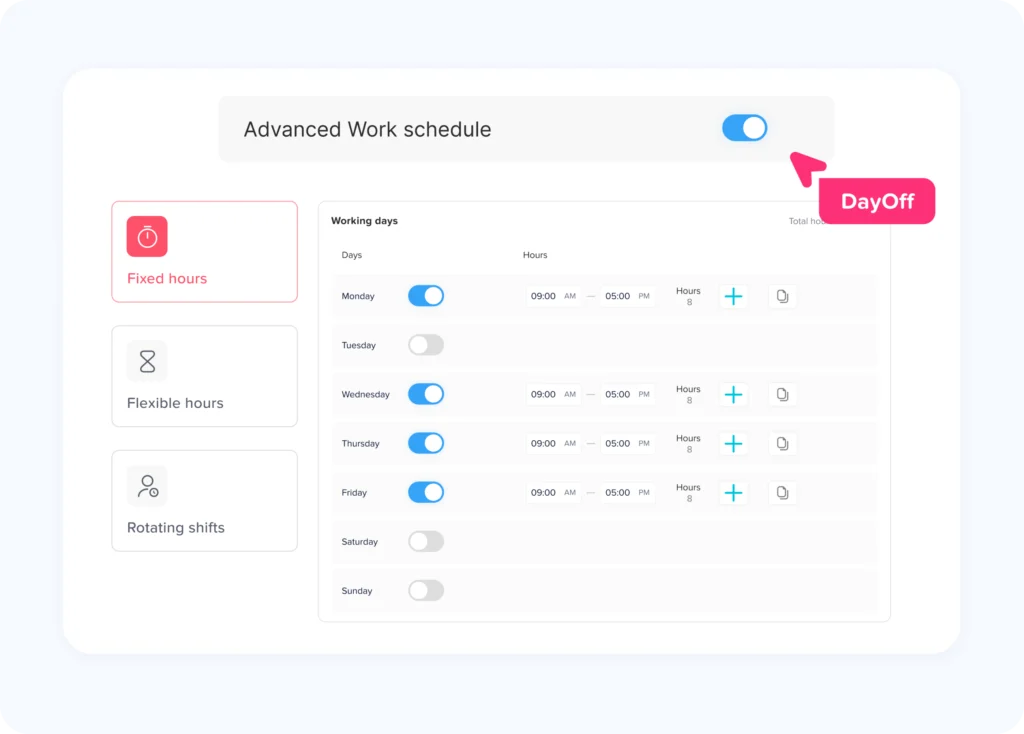
Companies can configure different work schedule structures depending on how their employees work.
Day Off currently supports Fixed Days, Fixed Hours, Flexible Hours, and Rotating Shifts. Fixed Hours can include separate working periods within a day, while Rotating Shifts allow companies to create schedules that change across multiple weeks and repeat as a rotation.
This makes it possible to give employees different schedules instead of assuming everyone follows the same pattern.
Compare Scheduled and Actual Attendance
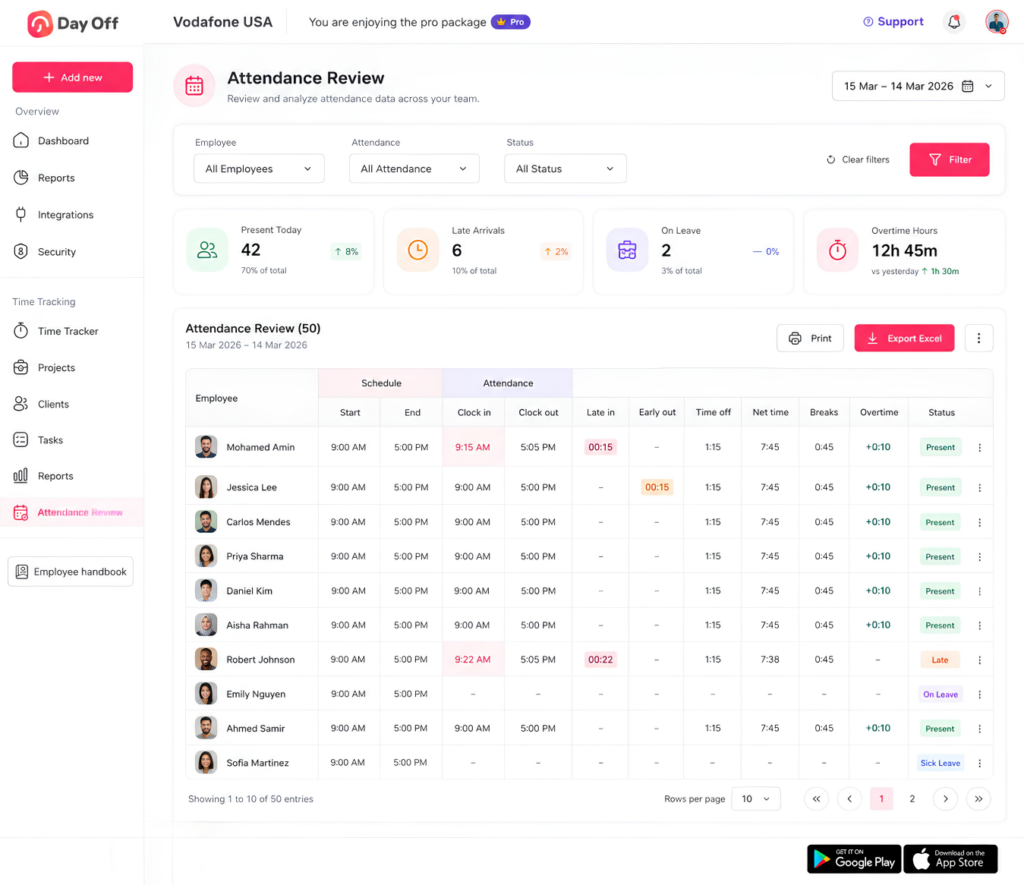
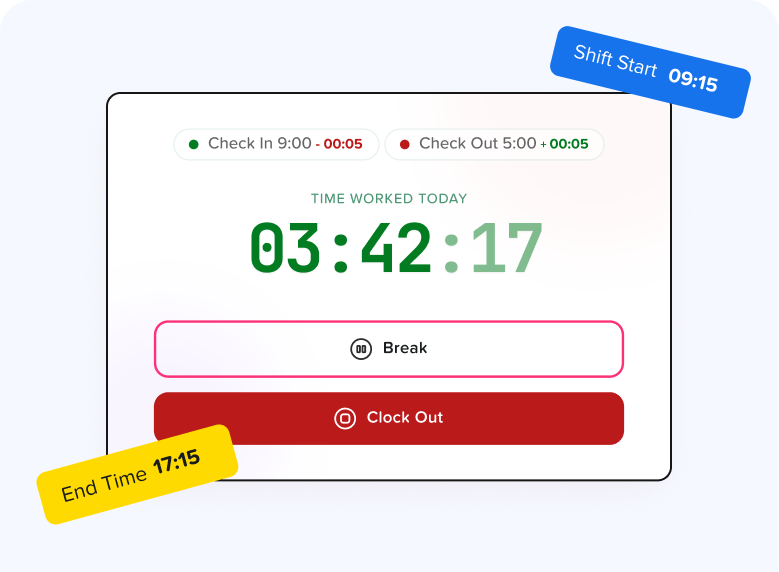
With Day Off’s Time Tracker, employees can punch in and punch out while managers can review actual attendance against assigned work schedules.
Attendance Review can provide information including:
- Scheduled working hours
- Clock in
- Clock out
- Late arrival
- Early departure
- Breaks
- Time off
- Net working hours
- Overtime
- Attendance status
Day Off uses assigned work schedules when calculating worked hours, late time, and overtime, helping managers understand an attendance record in the context of what the employee was actually expected to work.
Keep Leave and Attendance Connected
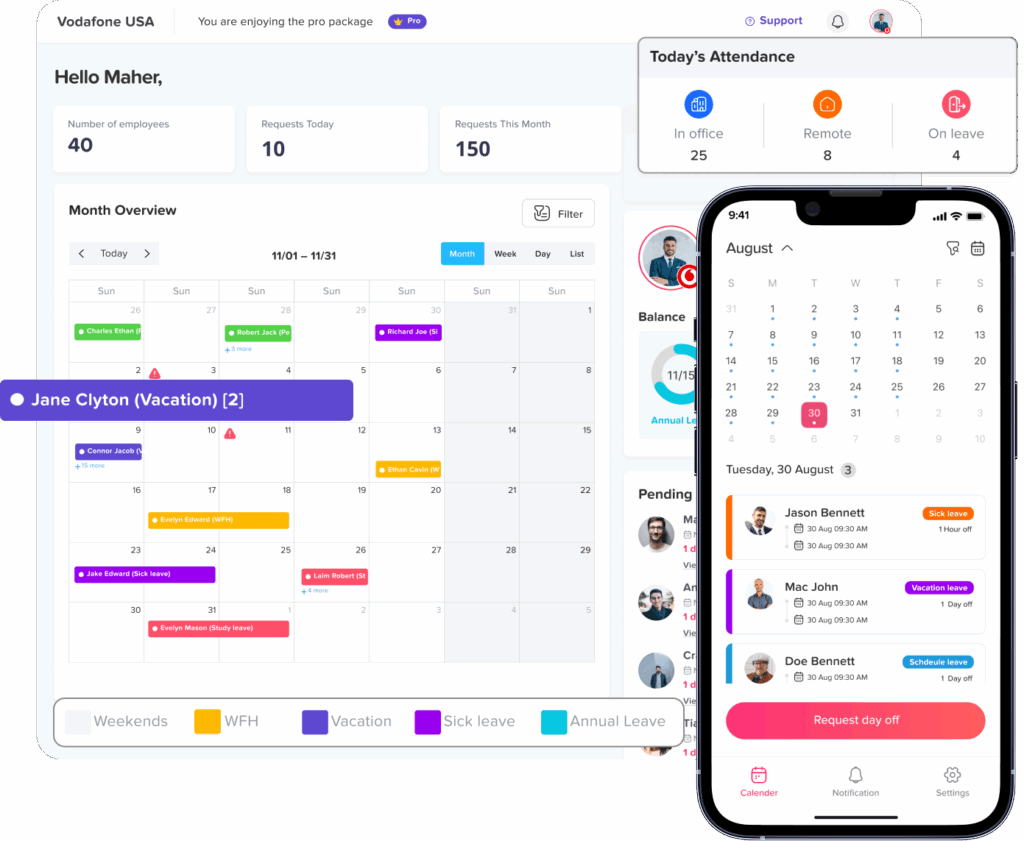
Because PTO and attendance are managed within the same platform, managers can see whether missing working time is associated with approved time off.
This is useful when an employee has no attendance record for a scheduled shift.
Instead of immediately assuming the employee was absent, a manager can determine whether the employee was on vacation, sick leave, or another approved leave type.
Review Attendance Before Payroll
Managers can review attendance records, identify missing punches, check time off, and export attendance information for reporting or payroll preparation.
This creates a more structured workflow:
Schedule → Attendance → PTO context → Manager review → Export
rather than relying on disconnected schedule spreadsheets, leave calendars, and timesheets.
Best Practices for Shift Attendance Tracking
A reliable system should follow a few basic principles:
- Assign the correct schedule first. Attendance calculations depend on accurate schedule data.
- Record actual work, not only expected work. Schedule and attendance serve different purposes.
- Connect leave with attendance. Approved PTO provides essential context for missing working time.
- Define attendance statuses clearly. Everyone should understand terms such as Late, Absent, On Leave, and Missing Punch.
- Create a formal correction process. Employees need a clear way to report incorrect or missing time entries.
- Update approved schedule changes. Shift swaps should not remain informal.
- Review exceptions before payroll. Fix problems before data moves downstream.
- Use the employee’s actual schedule. This is essential for rotating, part-time, split, and overnight schedules.
- Review patterns, not just individual events. Attendance trends can provide more useful management information.
- Check applicable labor rules. Recordkeeping, overtime, break, scheduling, and working time requirements can vary by jurisdiction.
FAQ
What is shift attendance tracking?
Shift attendance tracking compares an employee’s assigned work schedule with their actual attendance, including clock-in, clock-out, breaks, worked hours, leave, lateness, early departures, and other attendance exceptions.
How do you track attendance for rotating shifts?
Create the rotation first and assign it to the employee. Each attendance record should then be compared with the specific shift assigned for that date rather than a single standard weekly schedule.
What is the difference between a work schedule and attendance?
A work schedule records when an employee is expected to work. Attendance records when the employee actually worked. Comparing the two can reveal late arrivals, early departures, missing time, overtime, and other exceptions.
How should PTO be handled in shift attendance tracking?
Approved PTO should be connected with the employee’s schedule and attendance record. This helps managers distinguish approved time away from work from an unexplained absence or missing punch.
Can employees on rotating schedules use time tracking software?
Yes. Time tracking can work with rotating schedules when the system knows which schedule or shift applies to the employee on each date. The schedule provides the expected working pattern while clock in and clock out data records what actually happened.
Conclusion
Effective Shift Attendance Tracking requires more than collecting employee clock-in and clock-out times. Businesses need to connect those records with the schedule the employee was actually expected to work.
For employees on fixed schedules, the process may be relatively straightforward, but companies still need to account for late arrivals, early departures, breaks, overtime, PTO, and missing punches. For rotating schedules, accurate schedule assignment becomes even more important because working days and shift times can change from week to week.
The most reliable approach is to treat the schedule as the expectation and attendance as the actual record. PTO, approved schedule changes, and corrections then provide the context needed to explain differences between the two.
Platforms such as Day Off bring these elements together by connecting work schedules, time tracking, attendance review, and leave management. With fixed and rotating schedules managed alongside actual attendance, managers can spend less time reconciling disconnected records and more time resolving the exceptions that actually need attention.