







Managing public holidays is straightforward when your entire workforce operates in one country. Once your company starts hiring internationally, however, holiday management becomes much more complicated.
Employees in different countries may have different national holidays, regional holidays, weekends, working schedules, and rules for substitute days. Even employees who work for the same company may therefore have completely different days off.
For HR teams and managers, this creates a practical challenge: how do you maintain an accurate holiday calendar without creating confusion about who is expected to work?

A multi-country public holiday calendar solves this problem by organizing holidays according to employee location. Instead of maintaining separate spreadsheets or asking employees to check different calendars, companies can manage applicable holidays in one centralized system.
This guide explains how to create a multi-country public holiday calendar, what information to include, the common mistakes to avoid, and how a leave management platform such as Day Off can make the process easier.
What Is a Multi-Country Public Holiday Calendar?
A multi-country public holiday calendar is a centralized system for managing public holidays across multiple countries and, when necessary, different regions within those countries.
The important part is not simply having a long list of holidays. It is knowing which holiday applies to which employee.
Related reading: Employee benefits in Europe
For example, imagine a company with employees in the United States, Germany, India, France, and Egypt. Each country has its own holiday schedule, and some countries may also have regional differences.
If the company puts every holiday into one shared calendar, employees could easily mistake another country’s holiday for their own day off.
A properly configured international holiday calendar instead connects each holiday to the appropriate location.
For example:
- Employees in Germany see holidays applicable to their German location.
- Employees in India see the holidays configured for their location and applicable region.
- Employees in France see their relevant French holidays.
- Employees in the United States see their applicable U.S. holiday schedule.
- Company-wide holidays can be displayed separately when they apply to everyone.
This approach makes the calendar useful for both employees and managers because it reflects actual working availability rather than simply displaying dates.
Why Do You Need a Multi-Country Holiday Calendar?
Public holidays affect much more than whether an employee comes to work. They influence staffing, project schedules, customer support, payroll planning, meetings, and leave management.
As the number of countries in your organization grows, these effects become more difficult to manage manually.
It prevents scheduling problems
One of the biggest problems with international teams is assuming that everyone follows the same working calendar.
A manager in one country may schedule an important meeting without realizing that several participants are celebrating a public holiday in their location.
The same problem can affect project deadlines. If a team has employees in three countries and one country has a public holiday during a critical project period, the team’s available working capacity may temporarily decrease.
A location-based holiday calendar gives managers visibility before they schedule meetings, deadlines, training sessions, launches, or other important activities.
The goal isn’t to prevent employees from taking days off. It is to make those days visible early enough for the business to plan around them.
It makes employee leave easier to understand
Public holidays and annual leave are usually different categories of time off.
For example, an employee might have 20 days of annual leave available, while public holidays are handled separately according to company policy and applicable local requirements.
When both appear in a centralized calendar, employees can understand their availability more easily.
Instead of manually counting dates, an employee can see that a planned vacation includes a public holiday and understand how the organization’s leave policy treats that date.
This also helps managers review leave requests because they can see the employee’s surrounding availability rather than looking only at the requested vacation dates.
It improves workforce planning
International companies often need to maintain adequate staffing even when one or more locations are closed.
Consider a customer support team operating from the United Kingdom, India, and the United States. A public holiday in one location doesn’t necessarily mean that the entire support operation should stop.
By knowing which locations have upcoming holidays, managers can plan coverage in advance.
They might:
- Adjust employee schedules.
- Move deadlines.
- Arrange backup coverage.
- Notify customers about regional closures.
- Reschedule meetings.
- Avoid assigning critical tasks to unavailable employees.
The holiday calendar therefore becomes a workforce planning tool, not just a list of dates.
It reduces administrative work
Managing international holidays in spreadsheets can seem easy at first.
The problem appears when the organization grows.
HR may need to update dates, assign holidays to locations, correct employee records, communicate changes, and make sure managers are using the latest version of the calendar.
A centralized leave management system reduces the amount of manual coordination involved.
Instead of maintaining multiple documents, HR can manage locations and holiday schedules in one place and allow employees and managers to access the information they need.
It creates a better employee experience
Employees should not have to contact HR every time they want to know whether a particular day is a working day.
A clear holiday calendar gives employees visibility into the dates that apply to them.
This becomes especially important for remote employees and distributed teams. Someone working remotely from Germany, for example, may follow a different holiday schedule from colleagues working at the company’s headquarters in another country.
Giving employees access to the correct calendar makes time-off planning more transparent and reduces unnecessary questions for HR.
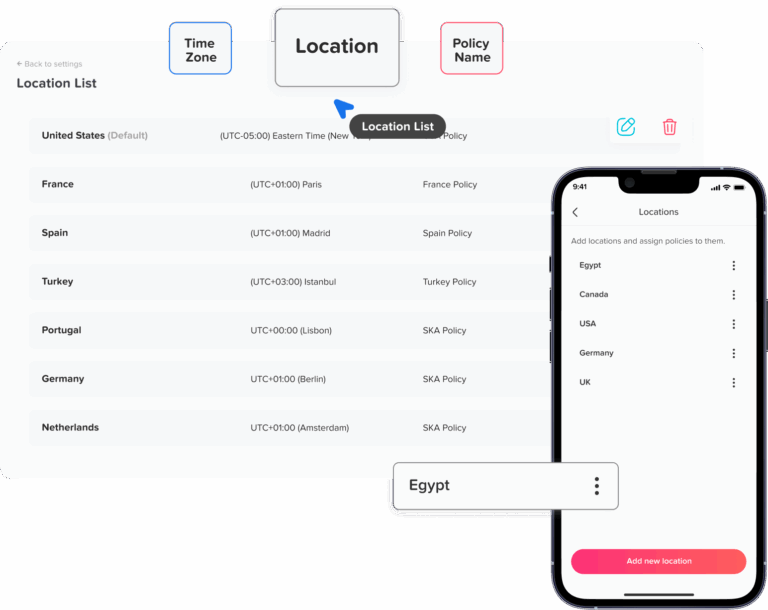
How to Set Up a Multi-Country Public Holiday Calendar
Creating an international holiday calendar is easiest when you build it around locations, policies, and actual employee working arrangements.
Follow these steps to create a system that can continue working as your organization grows.
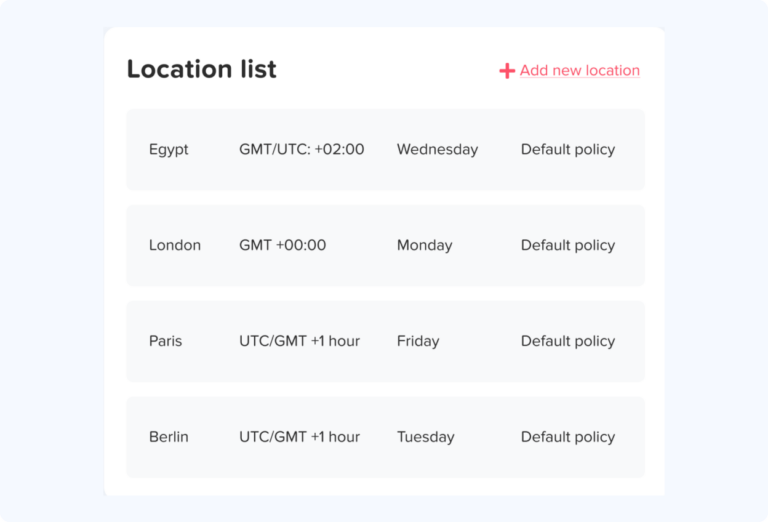
Step 1: Identify Every Employee Location
Start by making a complete list of the countries and regions where your employees work.
Do not begin by collecting holiday dates. First determine who needs which calendar.
For example, a company might have:
- 30 employees in the United States
- 20 employees in the United Kingdom
- 15 employees in Germany
- 20 employees in India
- 10 employees in France
- 10 employees in Egypt
This list gives HR a starting point for creating location-specific calendars.
However, country alone may not always be enough.
Some countries have significant regional differences in public holidays. In those cases, you may need to identify the employee’s state, province, territory, or other applicable jurisdiction.
This is particularly important when the organization’s policies depend on the employee’s actual work location.
What to check
For every employee or employee group, determine:
- Country of employment
- State, province, or region where relevant
- Normal working days
- Weekend days
- Applicable public holidays
- Company-specific holidays
- Any location-specific leave policies
Getting this foundation right prevents many problems later.
Step 2: Determine Which Holidays Actually Apply
Once you know where employees work, identify the holidays applicable to each location.
This is where many organizations make mistakes.
A country can have a large number of public holidays, but that does not necessarily mean every employee in that country receives every date as a non-working day.
Some holidays can be regional, sector-specific, or subject to particular rules.
You should therefore avoid copying a generic internet holiday list into your employee calendar without checking whether each date actually applies.
For each holiday, consider:
- Is it national?
- Is it regional?
- Does it apply to this employee group?
- Is it a mandatory non-working day?
- Is there an observed or substitute date?
- Does the company’s employment policy treat it as a paid holiday?
For payroll and employment compliance, always verify important holiday information against authoritative local sources and your organization’s applicable employment policies.
Step 3: Separate Public Holidays From Observances
Not every important date should automatically become a day off.
Calendars frequently contain a mixture of public holidays, religious observances, cultural events, and awareness days.
Those categories can have very different implications for employee availability.
For example, a company may want employees to know about an important cultural or religious observance without treating it as an automatic company-wide holiday.
Separating these categories makes your calendar more accurate.
A useful system might distinguish between:
- Public holiday
- Regional holiday
- Company holiday
- Religious observance
- Cultural observance
- Employee leave
This prevents employees from interpreting every date displayed on a calendar as an official day off.
Step 4: Check Regional and Local Differences
Country-level holiday information is not always sufficient.
Some countries have holidays that vary by region. Others may have different arrangements for local authorities, states, provinces, or territories.
This means two employees living in the same country may not necessarily have identical holiday calendars.
Before finalizing your setup, determine whether your workforce requires regional holiday calendars.
For example, if your employees are distributed across different regions within the same country, create separate location groups where the applicable holidays differ.
This approach is more accurate than creating one national calendar and manually adding exceptions to individual employees.
Step 5: Account for Observed or Substitute Holidays
Another detail that international HR teams need to consider is the difference between the official holiday date and the day employees actually receive off.
In some jurisdictions, special rules may apply when a public holiday falls on a weekend or when a substitute day is provided.
For that reason, don’t assume that a holiday’s calendar date automatically tells you the employee’s working status.
When configuring your calendar, check whether the applicable rules create an observed or substitute holiday.
This is one of the reasons an annual review of holiday calendars is important.
Step 6: Create Separate Calendars by Location
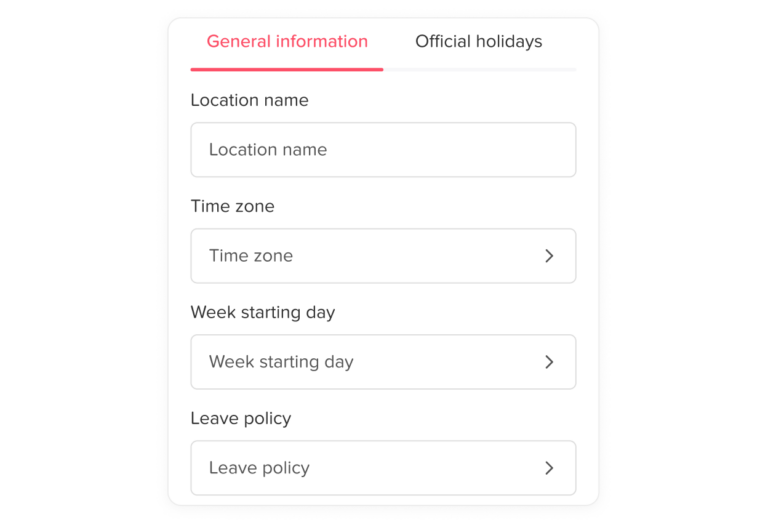
Once you’ve identified the applicable holidays, organize them into location-specific calendars.
For example:
United States
Create a calendar containing the applicable U.S. holidays for your employees and any relevant company-specific days.
Germany
Create a German holiday calendar and add regional holidays where necessary.
India
Create the applicable Indian holiday schedule and account for relevant regional differences where your workforce requires them.
France
Create the applicable French holiday schedule and add company-specific dates separately.
The objective is not to create dozens of disconnected calendars.
Instead, create one centralized holiday management system with multiple location-specific schedules.
That gives HR one place to manage the information while allowing employees to see only the holidays relevant to them.
Step 7: Assign Employees to the Correct Calendar
After creating the location calendars, connect employees to the appropriate one.
This is particularly important for remote and hybrid companies.
For example, suppose a company is headquartered in the United Kingdom but has an employee who works permanently from Germany.
That employee shouldn’t automatically inherit the UK holiday calendar simply because the company’s headquarters are in London.
The holiday calendar should reflect the employee’s applicable work location and company policy.
Keeping employee-location information accurate is therefore just as important as keeping the holiday list accurate.
Step 8: Add Company-Specific Holidays
Public holidays are only one part of an organization’s working calendar.
Many companies also provide additional days off, such as:
- Company shutdown periods
- Extra days around the end of the year
- Company anniversary days
- Office closure days
- Additional paid holidays
- Team-specific non-working days
These should be clearly distinguished from government holidays.
For example, labeling a date as a Company Holiday rather than a Public Holiday helps employees understand why the organization is closed.
It also makes reporting and administration clearer.
Step 9: Connect the Holiday Calendar to Leave Management
A holiday calendar becomes significantly more useful when it is connected to employee leave.
Imagine an employee wants to take five days off around a public holiday.
Without an integrated calendar, they may need to check a holiday list, calculate their working days, submit a leave request, and then check another calendar to understand team availability.
With an integrated leave management system, these pieces of information can appear together.
For example:
| Day | Status |
|---|---|
| Monday | Public holiday |
| Tuesday | Annual leave |
| Wednesday | Annual leave |
| Thursday | Annual leave |
| Friday | Annual leave |
This gives both the employee and manager a much clearer picture of the absence period.
Step 10: Review the Calendar Before Each New Year
Don’t treat a public holiday calendar as permanent data.
Review it before each calendar year because holiday dates, government announcements, regional rules, and company policies can change.
A good annual review should check:
- New or removed holidays
- Changed holiday dates
- Regional changes
- Substitute or observed dates
- Company shutdown periods
- New employee locations
- Changes to working schedules
- Changes to leave policies
This simple review can prevent incorrect calendars from being used throughout the year.
How Day Off Makes Multi-Country Holiday Management Easier ere
Once a company operates across several countries, maintaining holiday calendars alongside leave requests and employee schedules can become difficult.
Day Off is a leave management platform designed to bring these processes together.
Rather than using one spreadsheet for holidays, another for leave balances, and separate calendars for employee availability, organizations can manage these processes through a centralized system.
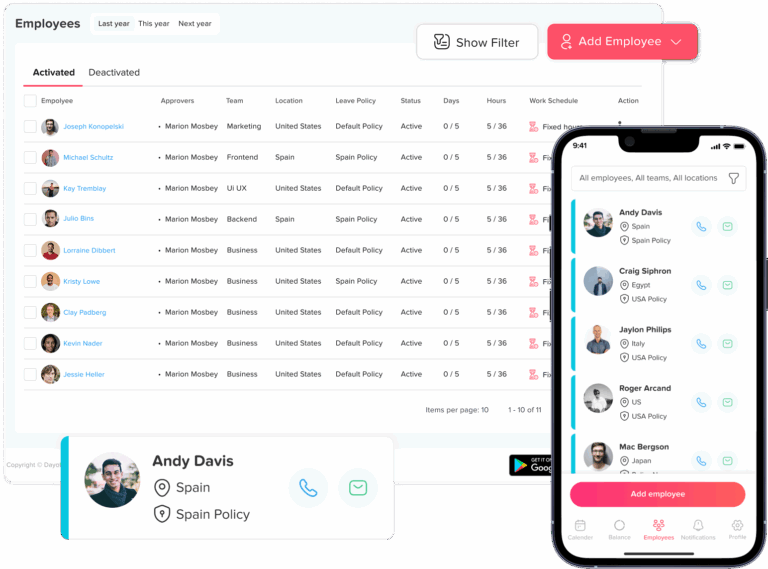
Manage Multiple Locations
One of the most useful features for international organizations is Day Off’s support for multiple locations.
Organizations can configure different locations and associate employees with the appropriate location.
This matters because an international workforce doesn’t necessarily follow one universal working calendar.
A company can have employees working in several countries while still managing them from the same platform.
Location-based configuration can also account for differences in working days and weekends, which is important for organizations operating across countries with different workweek structures.
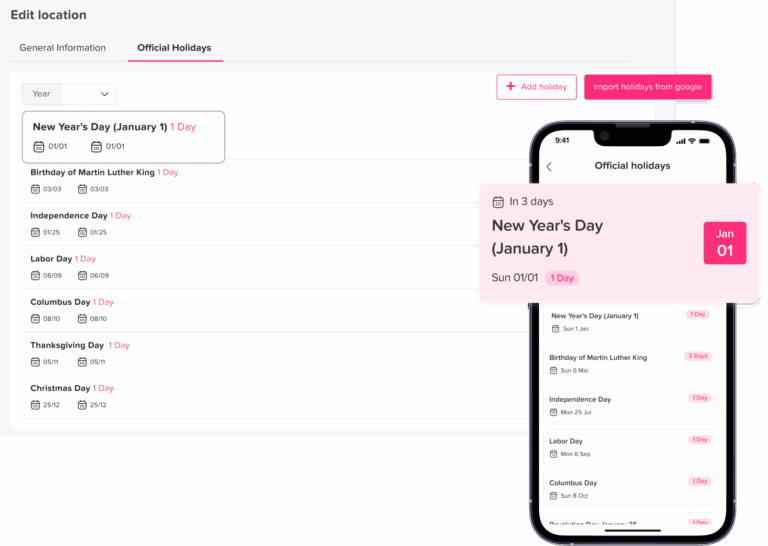
Add Official Holidays
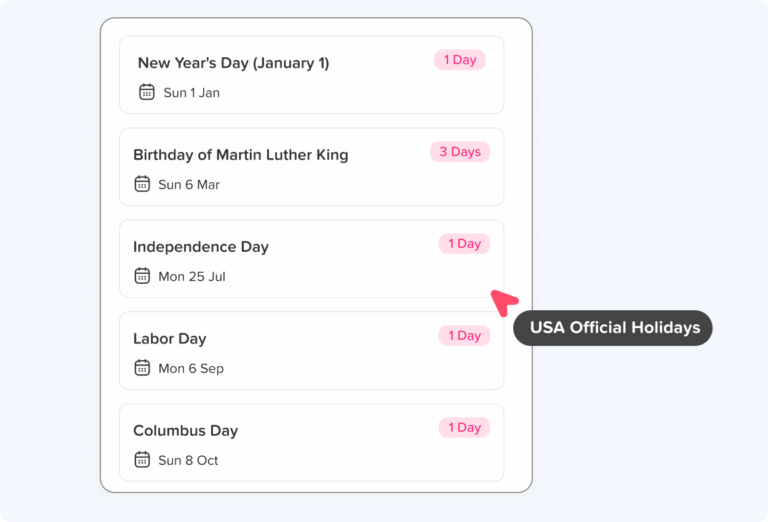
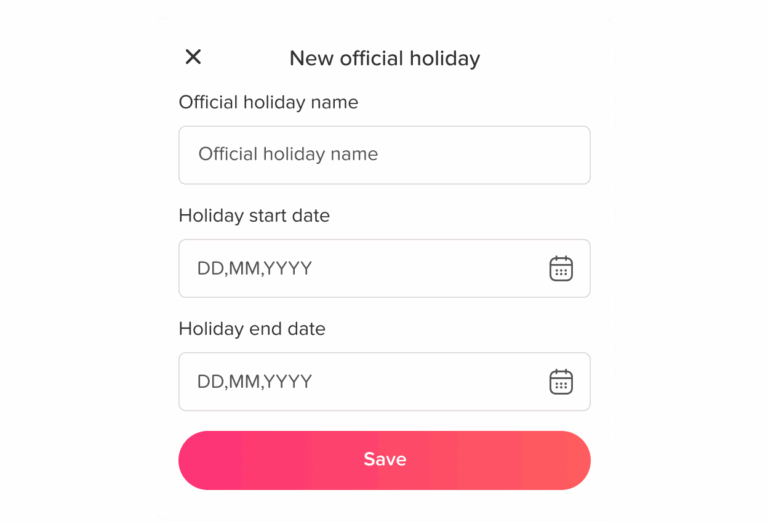
Day Off allows administrators to add holidays to their organization’s calendars.
The platform supports adding holidays manually as well as importing holidays through Google Calendar, giving HR teams flexibility when building their holiday schedules.
This is useful when an organization needs to combine official holidays with its own company-specific dates.
The key benefit is that holidays become part of the organization’s leave-management environment rather than existing in an isolated spreadsheet.
See Holidays and Leave in One Calendar
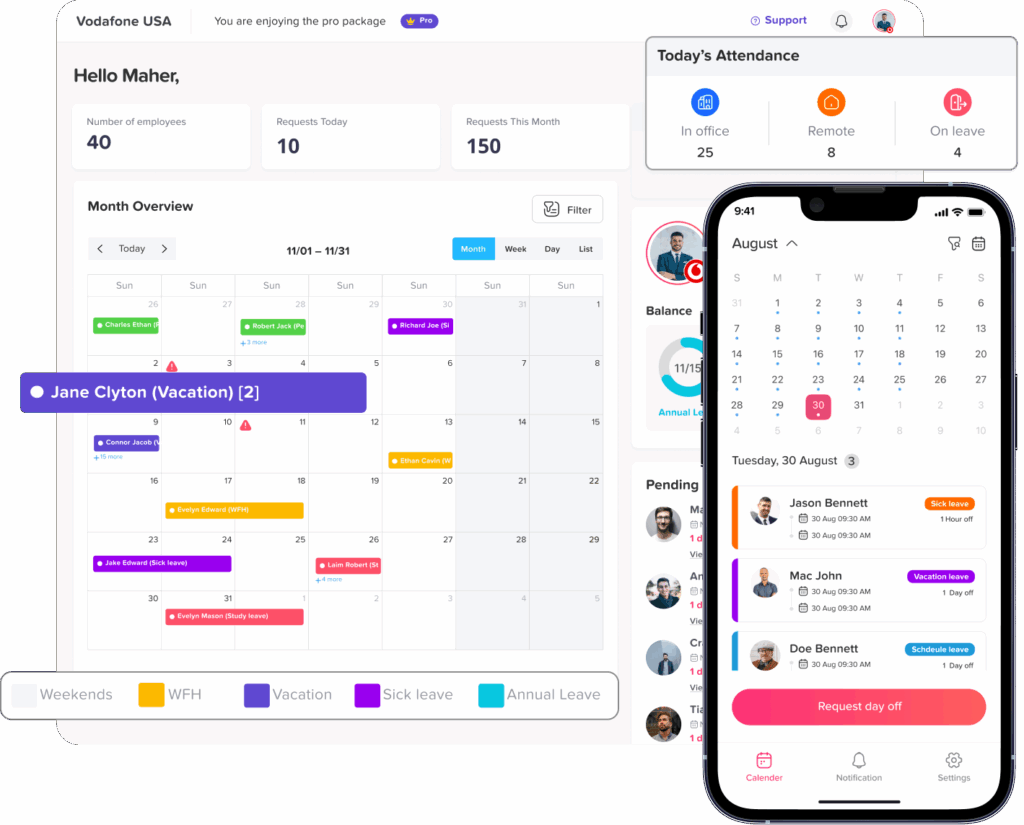
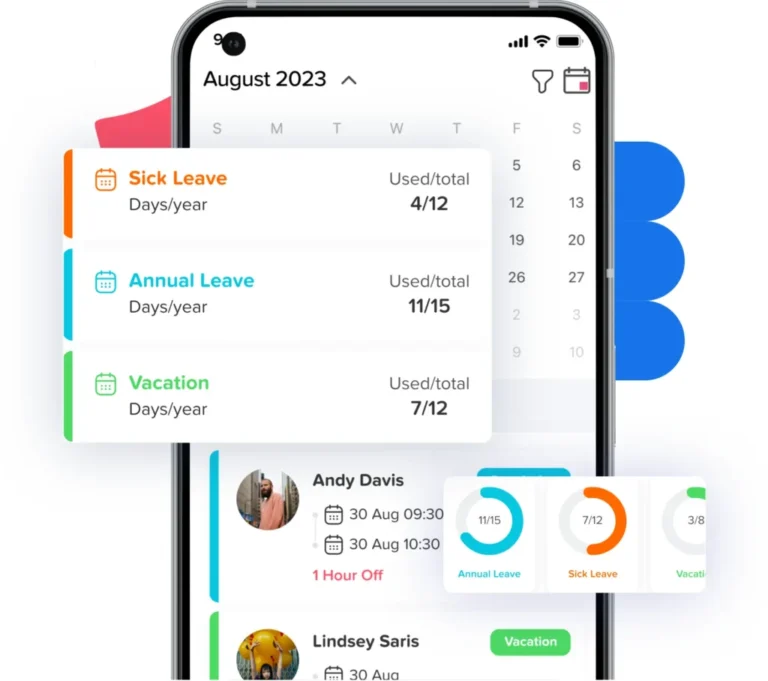
Day Off’s calendar provides a centralized view of holidays and approved leave.
According to Day Off, its Dashboard Calendar supports monthly, weekly, and list views, with filtering options that can help managers focus on particular teams.
This makes the calendar more useful for workforce planning.
A manager doesn’t simply see that a particular date is a public holiday. They can also see employee time off around that date and better understand how team availability may be affected.
Manage Leave Policies and Accruals
Holiday management is only one part of employee time-off administration.
Organizations also need to manage vacation allowances, accruals, carryover rules, and different leave policies.
Day Off provides configurable leave policies and accrual settings, allowing organizations to create different rules for different employee groups.
This can be useful for international organizations where employees may have different leave policies based on location, employment terms, or internal company rules.
Support Different Work Schedules
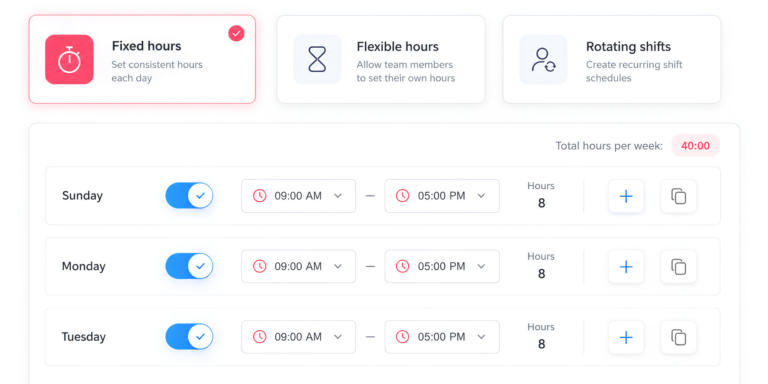
Not every employee works the same schedule.
Some organizations have standard Monday-to-Friday schedules. Others operate with flexible schedules, shifts, or different working weeks depending on location.
Day Off supports fixed, flexible, and shift-based work schedules.
This matters because holiday management should reflect an employee’s actual working pattern rather than assuming that everyone follows the same weekly schedule.
Integrate With Existing Calendars
Employees often manage their daily schedules through tools they already use.
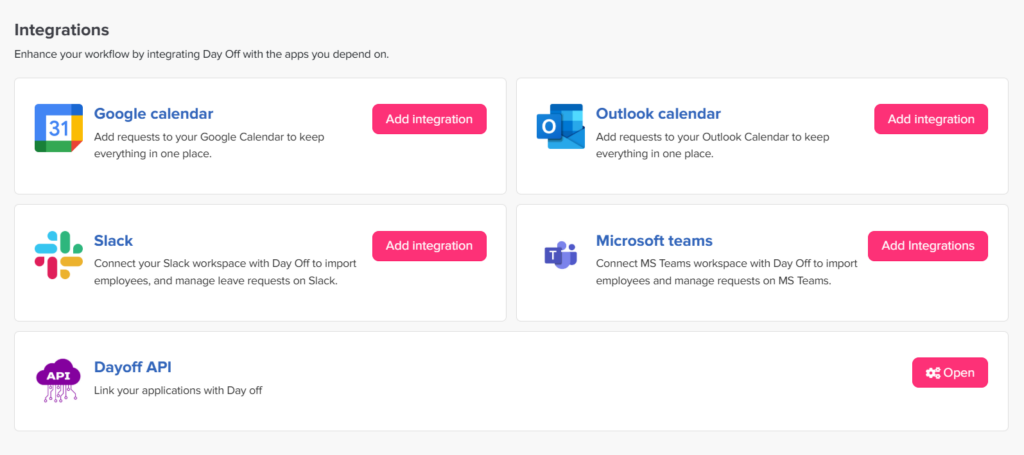
Day Off provides calendar integrations, including Google Calendar and Outlook Calendar, so approved time-off information can be synchronized with existing calendar workflows.
Day Off also provides integrations for workplace tools such as Slack and Microsoft Teams.
For organizations already using these platforms, integrations can make it easier to bring leave information into existing employee workflows.
Example: Managing a Global Team With Day Off
Consider a software company with employees in six countries.
The HR team creates location groups for:
- United States
- United Kingdom
- Germany
- France
- India
- Egypt
Each location receives the appropriate holiday schedule.
Employees are then assigned to their respective locations.
When an employee requests annual leave, the organization’s calendar can show that leave alongside applicable holidays.
Managers can then review team availability without manually comparing multiple spreadsheets.
If the company adds employees in another country, HR can create another location and configure the relevant working and holiday arrangements.
This approach scales much better than maintaining separate spreadsheets for every country.
Best Practices for Managing a Global Holiday Calendar
Use the Employee’s Actual Work Location
One of the most important rules is to assign holidays based on the location and employment arrangement that actually applies to the employee.
Don’t automatically assign every employee the holiday calendar of the company’s headquarters.
This is especially important for remote-first and distributed companies.
Keep Public Holidays and Company Holidays Separate
A government holiday and a company-provided day off are not necessarily the same thing.
Keeping them as separate categories makes the calendar easier to understand and simplifies administration.
Verify Holiday Information
Online holiday calendars are useful starting points, but important dates should be verified against authoritative sources.
This is particularly important when the date affects payroll, staffing, contractual obligations, or employment compliance.
Review Regional Rules
Don’t assume that every employee in a country has exactly the same holiday schedule.
If your workforce is distributed across regions with different holidays, reflect those differences in the calendar.
Don’t Mix Observances With Days Off
A cultural or religious observance may be important to employees without being a statutory non-working day.
If you include observances in your calendar, label them clearly so employees know whether they represent actual time off.
Give Managers Visibility
Managers need more than a list of public holidays.
They need to know how those holidays affect their team’s availability.
A useful calendar should therefore make it easy to see holidays alongside approved employee leave.
Automate Where Possible
The more countries and employees you manage, the more valuable automation becomes.
Automating leave requests, approvals, accruals, holiday calendars, notifications, and calendar synchronization reduces administrative work and limits the risk of inconsistent information.
Common Mistakes to Avoid
Creating One Global Holiday List
Putting every country’s holidays into one calendar creates noise rather than clarity.
Employees may see dozens of dates that don’t apply to them.
Instead, use location-specific calendars within a centralized system.
Assuming National Holidays Apply Everywhere
A holiday can be regional rather than national.
Always check the scope of the holiday before assigning it to employees.
Forgetting Substitute Days
When local rules provide alternative days off, the calendar needs to reflect the arrangement that actually affects employee availability.
Treating Every Observance as a Day Off
Cultural and religious observances should not automatically be classified as public holidays.
Use clear categories.
Maintaining Multiple Versions of the Same Calendar
If HR, managers, and employees all use different spreadsheets or documents, inconsistencies are almost inevitable.
Establish a single source of truth.
Forgetting to Update New Locations
As companies expand internationally, new employees are often added faster than HR updates internal calendars.
Whenever a new country or region is added to the workforce, review whether a new holiday calendar or policy is required.
Multi-Country Holiday Calendar vs. Spreadsheet
A spreadsheet can be a practical solution for a very small organization.
However, spreadsheets become increasingly difficult to manage when employee locations, leave policies, approvals, and schedules become more complex.
| Requirement | Spreadsheet | Leave Management Platform |
|---|---|---|
| Multiple countries | Manual setup | Location-based management |
| Regional holidays | Manual maintenance | Configurable |
| Employee leave requests | Manual | Built-in workflow |
| Leave approvals | Manual | Automated workflow |
| Leave balances | Formulas | Automated policies |
| Team availability | Limited | Calendar views |
| Work schedules | Manual | Configurable |
| Calendar integrations | Limited | Supported integrations |
| Reporting | Manual | Centralized |
| Scalability | Becomes difficult | Designed for growing teams |
The biggest difference isn’t simply convenience.
A spreadsheet primarily stores information. A leave management system can connect that information to employees, policies, requests, approvals, schedules, and availability.
That makes it much more useful as an organization grows.
Frequently Asked Questions
How do public holidays affect employees working remotely from another country?
The employee’s applicable holiday schedule should generally be based on the employment arrangement, work location, and policies that apply to that employee, not simply the location of the company’s headquarters.
For example, a company headquartered in the United States may employ a remote worker who permanently works from Germany. The company should determine which holiday rules and employment policies apply to that worker rather than automatically assigning the U.S. holiday calendar.
For organizations with international remote employees, keeping employee location data accurate is therefore an important part of holiday management.
Should contractors and freelancers use the same holiday calendar as employees?
Not necessarily. Contractors and freelancers may have different contractual arrangements and may not receive the same paid holidays or leave entitlements as employees.
Instead of assuming that everyone should follow the same calendar, organizations should distinguish between employees, contractors, and other worker categories where their policies differ.
A holiday calendar can still be useful for operational planning even when a particular worker is not entitled to paid time off.
How can a global holiday calendar help with customer support coverage?
A multi-country holiday calendar can help support managers identify periods when staffing may be lower in particular locations.
For example, if a support team normally operates across three countries and one location has an upcoming public holiday, the manager can review expected availability and arrange additional coverage if necessary.
This is particularly useful for businesses that provide customer support across multiple time zones and operate continuously rather than closing for every local holiday.
Should public holidays be considered when calculating project deadlines?
Yes. Public holidays can affect the number of working days available to a project team.
If a project involves employees in several countries, the same deadline may represent different amounts of available working time for different team members.
Project managers can reduce this risk by checking the applicable holiday calendars before setting important milestones and allowing enough time for location-specific non-working days.
How should companies handle employees who change countries?
When an employee permanently relocates, HR should review the employee’s work location, working schedule, applicable leave policy, and holiday calendar.
The change should be reflected in the organization’s leave management system so future holiday and leave calculations use the correct configuration.
It is also useful to establish an internal process for updating employee location information whenever someone relocates internationally.
Can a company have different public holiday policies for different offices?
Yes. A company can operate different holiday policies for different offices or employee groups.
For example, an organization may provide the statutory holidays applicable in each employee’s country while also offering additional company-wide days off.
The important part is to document the differences clearly and make sure employees understand which policy applies to them.
How do time zones affect an international holiday calendar?
Time zones become particularly important for distributed teams that schedule meetings, deadlines, or automated notifications.
A public holiday belongs to a particular local date, so a holiday occurring on Monday in one location may coincide with a different calendar date or working period elsewhere.
For operational planning, managers should consider both the employee’s local holiday calendar and their local working hours rather than relying exclusively on the company’s headquarters time zone.
What happens when two countries have different holidays on the same day?
There is no need to create separate dates if the calendar date is already the same. Instead, the system should associate the applicable holiday with the correct locations or employee groups.
For example, two countries may both have a public holiday on the same date but for completely different reasons. Employees can still be assigned the correct location-specific holiday without creating confusion in the overall calendar.
Who should be responsible for maintaining a company’s holiday calendar?
Responsibility usually sits with HR, People Operations, payroll, or another designated administrator.
The important thing is to have a clearly assigned owner.
That person or team should review holiday information, update calendars when changes occur, add new company holidays, and make sure new employee locations are configured correctly.
For larger organizations, it can also be useful to establish a process for local HR or regional managers to notify the central team about relevant changes.
How far in advance should companies publish their holiday calendar?
Ideally, employees should have access to the upcoming year’s holiday calendar before they begin making major vacation and workforce plans.
Publishing the calendar early gives employees more time to plan vacations and gives managers an opportunity to identify potential staffing gaps around major holiday periods.
Companies operating across many countries may benefit from reviewing the next year’s calendars several months in advance rather than waiting until the end of December.
What should HR do when an official holiday date changes?
If an official holiday date changes, HR should update the organization’s central calendar and communicate the change to affected employees and managers.
If the change affects payroll, leave balances, scheduled shifts, or previously approved leave, those areas should also be reviewed.
Keeping the holiday calendar centralized makes these changes easier to communicate consistently.
Can employees have more than one holiday calendar?
In some situations, yes. An employee may be subject to different calendars for different purposes, for example, a statutory holiday calendar combined with company-specific closure days.
However, organizations should avoid creating unnecessary complexity. Employees should have one clear view of the dates that affect their expected availability, with the source or category of each day clearly identified.
How can HR audit whether a global holiday calendar is accurate?
A simple annual audit can compare the organization’s configured calendars against authoritative holiday information and internal company policies.
The review should check:
- Employee locations
- Regional assignments
- Public holiday dates
- Substitute or observed holidays
- Company-wide closure dates
- Employee work schedules
- Leave policies
- Recently changed or newly added locations
Keeping a record of when the calendar was reviewed can also help HR maintain a consistent annual process.
Final Thoughts
Managing public holidays across multiple countries doesn’t have to become an administrative headache. The key is to move away from a single generic holiday list and build a system that reflects where your employees actually work, which holidays apply to them, and how those holidays affect team availability.
A well-organized multi-country public holiday calendar helps HR teams reduce confusion, gives employees a clearer view of their time off, and allows managers to plan projects, meetings, and staffing with greater confidence. It should also be reviewed regularly to account for new locations, changes to holiday dates, regional differences, and company-specific days off.
For growing international teams, combining holiday calendars with leave management makes the process even easier. Day Off brings location-based holiday management together with leave requests, approval workflows, leave policies, work schedules, and calendar integrations, giving organizations a centralized way to manage employee time off.
Whether your team operates across two countries or twenty, the goal is the same: make it easy for everyone to know when they’re working, when they’re off, and how their availability affects the rest of the team.