







Time Tracking for Agencies is more than recording when employees start and finish work. Agencies need to understand how working hours are distributed across clients, projects, campaigns, tasks, meetings, revisions, and internal work. When time is tracked accurately, managers can estimate projects more effectively, monitor billable hours, identify workload problems, understand project profitability, and make better decisions about staffing and pricing.

For a marketing, design, development, consulting, or creative agency, employee time is often one of the largest costs involved in delivering client work. A project may look profitable based on its contract value, but the result changes quickly if employees spend significantly more hours on it than expected.
A reliable Time Tracking for Agencies process connects four important pieces of information:
Employee → Client → Project → Task → Time
Instead of simply knowing that an employee worked eight hours, the agency can understand where those eight hours went and whether the work matched the project’s original expectations.
This guide explains how agencies can track employee hours by project, organize billable and non-billable work, calculate important agency metrics, avoid common time tracking mistakes, and use the resulting data to improve future projects.
Related reading: How to Track Billable vs. Non-Billable Hours
Why Time Tracking for Agencies Is Important for Agencies
Agency businesses sell expertise, execution, strategy, creative work, development, or other professional services. Even when clients are not billed by the hour, time remains an important input.
Consider a website project priced at $12,000.
The agency originally estimates:
- 20 hours of project management
- 30 hours of design
- 70 hours of development
- 20 hours of quality assurance
The expected total is 140 hours.
If the project eventually requires 210 hours because of revisions, unclear requirements, technical problems, or poor estimating, the agency has invested 50% more employee time than expected.
The client may still pay $12,000.
Without project Time Tracking for Agencies, management may simply see a completed $12,000 project. With accurate time data, management can see that the project consumed considerably more internal capacity than planned.
That information can influence future estimates, pricing, project scope, staffing, and client conversations.
What Should an Agency Track?
Good Time Tracking for Agencies does not mean recording every mouse click or monitoring every minute of an employee’s day.
The objective is to capture enough information to understand how working capacity is being used.
A useful agency structure normally includes:
| Level | Example | Why Track It? |
|---|---|---|
| Client | Northstar Retail | Groups work by customer |
| Project | Summer Campaign | Shows total time spent on a specific engagement |
| Task | Social Media Design | Identifies where project hours are going |
| Employee | Graphic Designer | Shows who performed the work |
| Time | 2 hours 30 minutes | Measures effort |
| Billable status | Billable | Separates client work from internal work |
| Estimate | 2 hours | Allows estimated vs. actual comparison |
Attendance Tracking and Project Time Tracking for Agencies Are Different
One of the most important distinctions for agencies is the difference between attendance tracking and project time tracking.
Attendance tracking answers:
How long did the employee work?
Project time tracking answers:
What did the employee work on?
For example, an employee might begin work at 9:00 AM and finish at 5:30 PM with a one-hour break.
The attendance record shows:
7.5 working hours
But those hours could have been distributed like this:
| Time | Client / Project | Task | Duration | Type |
|---|---|---|---|---|
| 9:00-11:00 | Client A Website | Development | 2h | Billable |
| 11:00-12:00 | Client B Campaign | Reporting | 1h | Billable |
| 1:00-2:00 | Internal | Team Meeting | 1h | Non-billable |
| 2:00-4:30 | Client A Website | Development | 2.5h | Billable |
| 4:30-5:30 | Internal | Proposal | 1h | Non-billable |
| Total | 7.5h |
Now management knows both how long the employee worked and how that time was used.
Agencies may need both types of records.
In the United States, for example, covered employers must maintain accurate information about hours worked for covered non-exempt employees. The U.S. Department of Labor does not require one particular timekeeping method, but the records must be complete and accurate.
Employment and recordkeeping laws vary by country and jurisdiction, so agencies should apply the requirements relevant to where their employees work.
How to Set Up Time Tracking for Agencies
The quality of reporting depends heavily on how the tracking system is organized.
If employees enter random client names, duplicate projects, and vague tasks, the agency will eventually have unreliable data.
A cleaner structure can be created using the following process.
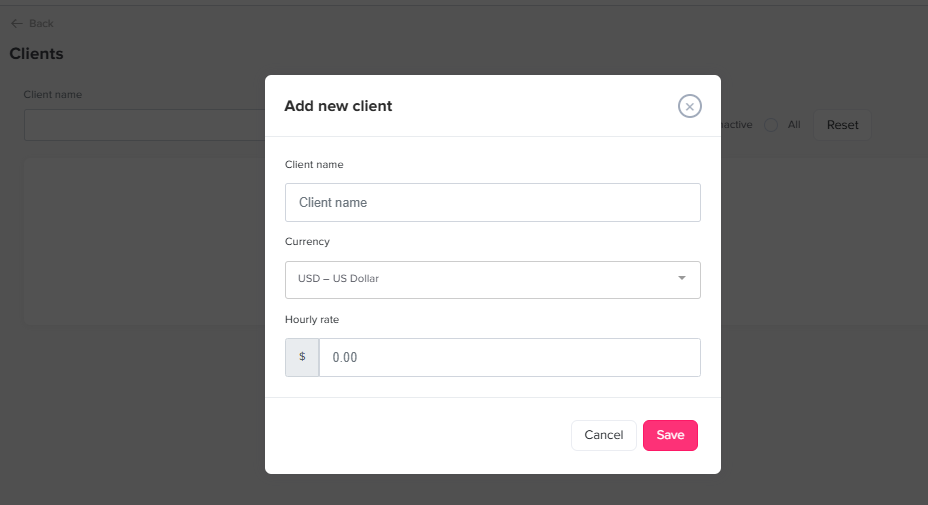
Create Clients First
Start with the highest level of organization: the client.
Examples might include:
- Acme Software
- Northstar Retail
- BluePeak Consulting
- Internal Agency
Creating clients first makes it easier to group multiple projects belonging to the same customer.
For example:
Client: Acme Software
Projects:
- Corporate Website
- SEO Retainer
- Product Launch Campaign
- Monthly Content Production
The client should remain the same even if several projects are active simultaneously.
Create a Separate Project for Each Meaningful Engagement
Avoid using one permanent project called:
Acme Work
That makes reporting difficult.
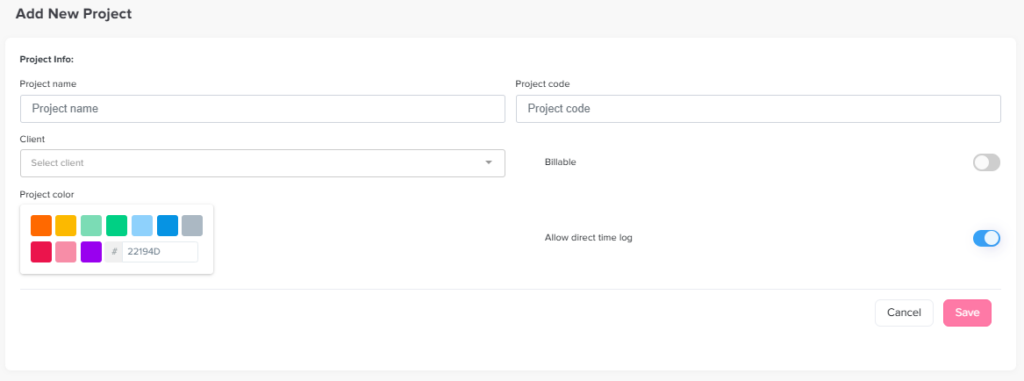
Instead, create projects around identifiable pieces of work.
For example:
- Acme Website Redesign
- Acme September PPC Campaign
- Acme SEO Retainer 2026
- Acme Product Launch
Project level tracking helps managers evaluate individual engagements instead of mixing every hour spent on the same client together.
Break Projects Into Useful Tasks
Tasks should provide useful information without becoming excessively detailed.
For a website project, tasks might include:
- Discovery
- UX research
- Wireframing
- UI design
- Front end development
- Back end development
- Content
- QA testing
- Client meetings
- Project management
Avoid tasks that are too broad, such as Website Work, because they provide little insight.
At the same time, avoid creating hundreds of tiny tasks that employees must constantly search through.
The right level of detail should help answer questions such as:
- Which stage took longer than expected?
- Where are revisions occurring?
- How much management time does this type of project require?
- Are design estimates consistently too low?
- Which services consume the most employee capacity?
If tracking data cannot help answer meaningful business questions, the task structure may be too detailed or not detailed enough.
Add Estimated Hours Before Work Begins
Estimated time provides a benchmark.
Suppose a marketing agency estimates a monthly content project as follows:
- Research: 6 hours
- Writing: 18 hours
- Design: 10 hours
- Editing: 5 hours
- Project management: 5 hours
Estimated project total:
44 hours
At the end of the month, actual tracked time is 57 hours.
That does not automatically mean the employees performed poorly.
The difference could have resulted from:
- More client revisions
- Additional deliverables
- Delayed approvals
- Poor original estimates
- Unexpected technical work
- Scope changes
- Additional meetings
- Unclear project requirements
The important point is that the agency now has data to investigate.
Without tracked time, the original 44-hour estimate and the actual effort cannot be compared.
Track Work While It Happens
Time records become less accurate when employees try to reconstruct their entire week on Friday afternoon.
They may remember which projects they worked on but forget:
- How long a meeting lasted
- Which client received an extra revision
- When they switched between two projects
- How much time was spent troubleshooting
- Whether an activity was billable
- How much internal work occurred between client tasks
For agencies working across many clients, using a running timer can reduce this problem.
A simple process is:
- Select the project.
- Select the task.
- Start the timer.
- Work on the task.
- Stop the timer when switching work.
- Start the next project or task.
Employees do not need to estimate their time at the end of the day because the duration has already been captured.
Billable vs. Non Billable Hours
Not every working hour should be billable.
Billable Hours
Billable hours are generally hours associated directly with work delivered to or performed for a client.
Examples include:
- Client strategy
- Design work
- Development
- Copywriting
- Campaign management
- Client reporting
- Paid client meetings
- Testing
- Consulting
- Research performed for the engagement
Whether an activity is actually chargeable to the client depends on the agency’s contract and pricing model.
Non Billable Hours
Non billable work can include:
- Internal meetings
- Training
- Business development
- Recruitment
- Administrative work
- Agency marketing
- Internal documentation
- Employee management
- Proposal preparation
Non billable does not mean unproductive or unnecessary.
An agency needs sales, training, administration, planning, and management to operate.
The purpose of tracking these hours is not to eliminate them. It is to understand how much capacity they require.
Important Metrics for Time Tracking for Agencies
| Metric | Basic Formula | What It Helps Measure |
|---|---|---|
| Billable utilization | Billable hours ÷ Available hours × 100 | Share of capacity used for billable client work |
| Project estimate variance | Actual hours – Estimated hours | Whether projects require more or less time than expected |
| Estimate accuracy % | Actual hours ÷ Estimated hours × 100 | How close estimates are to reality |
| Average hourly revenue | Project revenue ÷ Billable hours | Revenue generated per billable hour |
| Project labor cost | Hours worked × Internal labor cost | Approximate direct employee cost of delivery |
| Capacity | Available employee hours – committed hours | Ability to accept additional work |
Metrics should always be interpreted in context.
For example, utilization is commonly calculated as billable hours divided by available working hours. However, organizations need to define “available hours” consistently, especially regarding holidays, PTO, training, and other expected non client time.
How to Calculate Employee Utilization
Suppose an employee has:
- 160 scheduled hours in a month
- 8 hours of holiday
- 16 hours of approved PTO
- 100 billable hours
If the agency defines available capacity as scheduled hours minus holidays and approved PTO:
Available hours = 160 – 8 – 16 = 136
The employee’s billable utilization would be:
100 ÷ 136 × 100 = 73.5%
The important part is not choosing one universal formula. Different agencies define utilization differently.
The important part is using the same definition consistently so comparisons remain meaningful.
Do Not Aim for 100% Utilization
A 100% billable utilization target would leave virtually no capacity for:
- Internal meetings
- Training
- Administration
- Business development
- Knowledge sharing
- Planning
- Unexpected project issues
Utilization should therefore be used as a planning metric rather than as a simple score for individual employee performance.
A designer at 65% utilization and a consultant at 80% utilization cannot automatically be compared without considering their roles and responsibilities.
Track Estimated vs. Actual Project Hours
Estimated versus actual time is one of the most valuable reports an agency can maintain.
Suppose the last five website projects were estimated at:
- 100 hours
- 120 hours
- 110 hours
- 130 hours
- 115 hours
But actual tracked hours were:
- 128 hours
- 146 hours
- 139 hours
- 154 hours
- 141 hours
One project exceeding its estimate could be unusual.
Five projects consistently exceeding their estimates suggest a pattern.
The agency may be:
- Underestimating development
- Failing to include project management
- Offering too many revisions
- Underestimating QA
- Leaving meetings out of estimates
- Experiencing scope creep
- Pricing projects based on outdated assumptions
That information can improve the next proposal.
Instead of estimating another website at 110 hours because “that is what we normally quote,” the agency can use actual historical data.
Time Tracking for Agencies and Project Profitability
A profitable looking project can become less attractive once employee time is considered.
Suppose an agency sells a project for $15,000.
The team spends 180 hours delivering it.
If the estimated direct internal labor cost averages $45 per hour:
180 × $45 = $8,100 direct labor cost
If another $1,500 is spent on freelancers, stock assets, software, or other direct project costs:
Estimated direct project cost = $9,600
That leaves:
$15,000 – $9,600 = $5,400
before considering broader agency overhead and other expenses.
This type of analysis can help managers compare projects and identify which services consume more resources than expected.
The goal is not to turn time tracking software into an accounting system. It is to provide better operational data for pricing and planning decisions.
Track Fixed Fee Projects Too
A common mistake is assuming Time Tracking for Agencies only matters for hourly billing.
In reality, fixed fee work can make Time Tracking for Agencies even more important.
If an agency charges $8,000 regardless of whether a project requires 80 hours or 150 hours, the number of hours invested directly affects the economics of the engagement.
Tracking fixed fee projects helps agencies understand:
- Which services are consistently underestimated
- Which project types require excessive revisions
- Which clients require more management time
- Whether retainers are appropriately priced
- How much team capacity each contract consumes
- Which estimates should change in future proposals
The client does not have to receive an hourly invoice for the agency to benefit from knowing how many hours the project required.
Track Internal Work as Well as Client Work
If employees only record billable hours, managers cannot see the full working day.
Imagine an employee records six client hours.
What happened during the remaining two hours?
They may have spent that time on:
- Training
- Internal planning
- Administrative tasks
- A sales proposal
- Agency marketing
- Meetings
- Recruiting
Without internal categories, the missing hours become invisible.
Creating an Internal client or project can make reporting clearer.
Possible internal tasks include:
- Administration
- Sales
- Marketing
- Training
- Management
- Recruitment
- Team meetings
This also makes utilization data easier to interpret because managers can see where non billable capacity is being used.
How Often Should Agencies Review Time Tracking Data?
Employees should ideally record time as close to the work as practical.
Managers, however, do not need to analyze every entry every day.
A useful review cycle might include:
Daily
Employees check:
- Missing timers
- Incorrect project selection
- Forgotten tasks
- Incorrect billable status
Weekly
Project managers review:
- Project hours
- Tasks approaching estimates
- Missing employee entries
- Unusual increases in project time
- Current team workload
Monthly
Agency leadership reviews:
- Billable utilization
- Client hours
- Project estimate accuracy
- Available capacity
- Service profitability
- Non billable time
- Staffing needs
Different reporting levels answer different questions.
Daily review improves data quality. Weekly review helps projects stay on track. Monthly analysis supports operational and financial decisions.
How to Handle Employee PTO When Measuring Capacity
Vacation and other approved leave should not disappear from capacity calculations.
Suppose a developer normally works 40 hours per week but takes 16 hours of PTO.
The agency does not have 40 hours of project capacity from that employee.
It has approximately:
40 scheduled hours – 16 PTO hours = 24 available working hours
If managers ignore leave when planning capacity, employees may appear underutilized even though they were unavailable for legitimate reasons.
This is one reason combining leave information with work schedules and Time Tracking for Agencies can be valuable for agencies.
Managers can distinguish between:
- Scheduled capacity
- Approved time off
- Actual attendance
- Project time
- Billable time
That provides a more realistic picture than looking at project hours alone.
Avoid Using Time Tracking for Agencies as Employee Surveillance
Time tracking should provide operational information, not encourage employees to prove that every minute of their day was productive.
Excessively detailed tracking can create several problems:
- Employees spend too much time recording their time
- People choose inaccurate categories simply to complete timesheets
- Teams feel pressured to classify everything as billable
- Employees avoid necessary internal work
- Managers focus on individual minutes instead of project outcomes
- Timesheet data becomes less trustworthy
A better approach is to explain why the information is collected.
Employees should know whether tracked time is used for:
- Project planning
- Client billing
- Capacity planning
- Payroll or attendance
- Estimating
- Workload management
- Profitability analysis
Transparency improves the chances that time records remain useful.
How Day Off Can Help Agencies Track Time
Day Off can bring employee time tracking, projects, tasks, attendance, work schedules, and leave information together instead of keeping project time completely separate from employee availability.
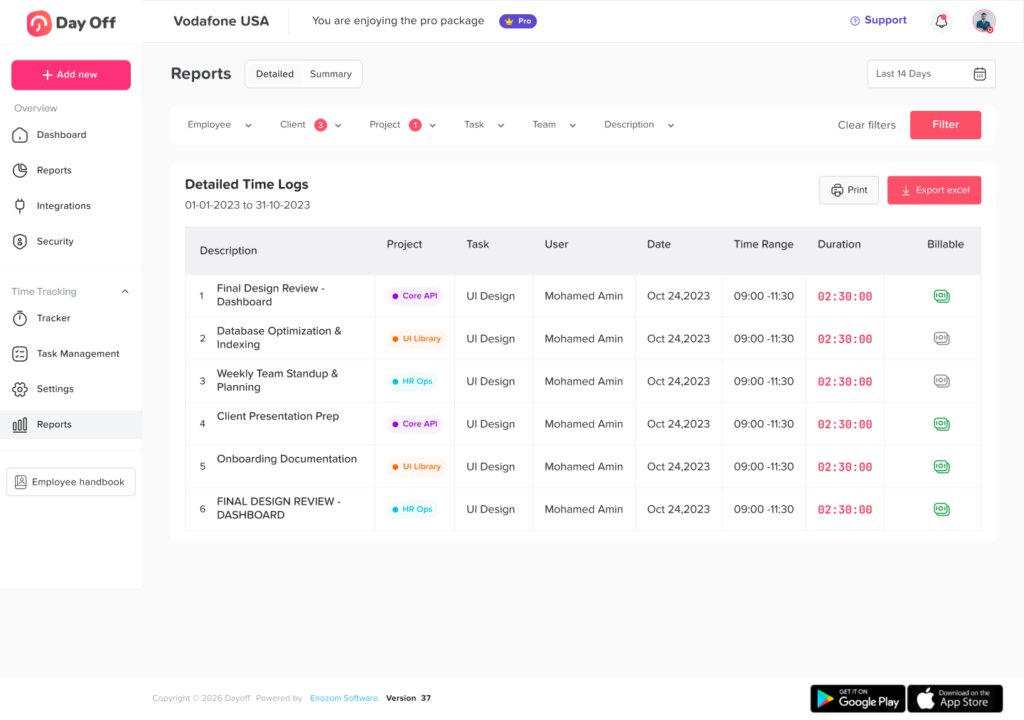
With the Day Off Time Tracker, employees can use a live start/stop timer and link tracked sessions to specific projects and tasks. Time entries include start and end times, duration, and billable status, while managers can organize client projects and compare tracked work with estimates.
For agencies that need project-level detail, the structure can work like this:
Client → Project → Task → Employee Time
For example:
Client: BrightWave
Project: Website Redesign
Task: Homepage UI Design
Employee: Designer
Estimated Time: 6 hours
Actual Time: 7.5 hours
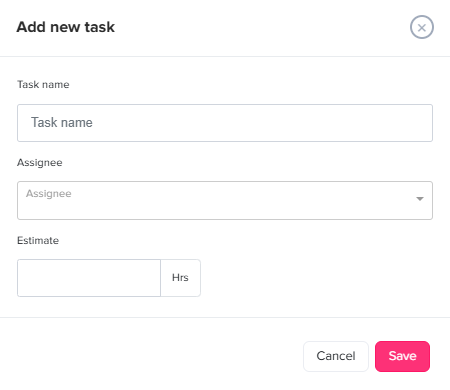
Day Off also supports creating tasks with assignees and estimated hours, helping teams compare expected effort with actual tracked work. Projects can be associated with clients so managers can review time in a more organized way.
Agencies that mainly need attendance information can use simpler clock-in and clock-out tracking, while teams requiring more detail can track work against projects and tasks.
This is particularly useful when the same company needs to understand both:
Who was available to work?
and
What projects did their working hours go toward?
A Practical Policy for Time Tracking for Agencies
A good process does not need to be complicated.
Agencies can create simple rules such as:
- Track client work under the correct client and project.
- Select the relevant task before starting work.
- Mark time as billable only when it meets the agency’s billable-time rules.
- Record meaningful internal work under internal categories.
- Update or correct forgotten timers as soon as possible.
- Review time entries before the end of the working day or week.
- Do not classify approved PTO as project work.
- Project managers should review estimated versus actual hours regularly.
- Use time data for planning and project analysis, not minute by minute employee surveillance.
The easier the rules are to understand, the more likely employees are to follow them consistently.
FAQ
What is the best way to track employee hours in an agency?
Track employee time against a clear hierarchy of clients, projects, and tasks. Employees should record their time while working or shortly afterward. Managers can then review total working hours, project hours, billable time, and estimated versus actual time.
Should agencies track time for salaried employees?
Time Tracking for Agencies can still be useful for salaried employees even when their salary does not change based on hours. Agencies can use the data for project costing, resource planning, estimating, workload analysis, and understanding how much capacity different clients consume. Employment law requirements should be evaluated separately based on the employee’s classification and jurisdiction.
Should agencies track time on fixed price projects?
Yes. Fixed price projects still consume employee capacity. Tracking actual hours helps an agency determine whether the project was estimated and priced appropriately and provides better data for future proposals.
What is billable utilization for an agency?
Billable utilization measures the proportion of available employee working time spent on billable client activities. A basic formula is:
Billable Utilization = Billable Hours ÷ Available Working Hours × 100
Agencies should define what counts as available time consistently before comparing employees, departments, or reporting periods.
How detailed should agency Time Tracking for Agencies be?
Track enough detail to support decisions without making time entry difficult. For many agencies, client, project, task, duration, employee, and billable status provide sufficient information.
Should meetings be included in project time?
If a meeting relates directly to a client project, recording it under that project helps reveal the project’s true time requirement. Whether the meeting itself is billable to the client depends on the contract and the agency’s billing policy.
How do agencies track employees working on multiple clients?
Employees can switch projects or tasks whenever their work changes. Instead of recording one eight-hour block, the working day can be divided among the different clients and projects that actually received time.
What is the difference between a timesheet and a time tracker?
A timesheet is the record of hours worked, while a time tracker is a method or tool used to capture those hours. Modern tracking systems may use running timers, project selection, task tracking, and automatic duration calculations to build the timesheet.
How can Time Tracking for Agencies improve agency project estimates?
Historical tracked time shows how long similar projects actually required. Managers can compare past estimates with actual hours and adjust future estimates for activities that regularly require more time, such as revisions, meetings, QA, project management, or development.
Can Time Tracking for Agencies help prevent agency overbooking?
Yes. When tracked work is combined with schedules and planned PTO, managers can estimate how much employee capacity is already committed and how much remains available for additional client work.
Conclusion
Effective Time Tracking for Agencies should provide more than a list of employee hours. It should connect time with clients, projects, tasks, estimates, schedules, and employee availability so managers understand how agency capacity is actually being used.
The goal is not to monitor every minute. The goal is to create reliable information.
When agencies know how long projects really take, they can improve estimates. When billable and non-billable hours are separated, they can better understand utilization. When PTO and schedules are included in capacity planning, managers can distribute work more realistically. And when actual project hours are compared with estimates, agencies gain better information for pricing future work.
A system such as Day Off can support this process by combining project and task time tracking with employee attendance, schedules, and leave management. Instead of viewing PTO, employee availability, and project hours as separate pieces of information, agencies can build a clearer picture of when employees are available and where their working time is going.
For growing agencies, that visibility can lead to better project planning, more realistic workloads, stronger estimates, and smarter decisions about how the team uses its most limited resource: time.