







FLSA timekeeping requirements require employers to maintain accurate records of employees’ hours, wages, pay rates, overtime, deductions, and other employment information when the Fair Labor Standards Act applies. For covered, non-exempt employees, one of the most important requirements is recording the total number of hours worked each workday and each workweek.
Accurate timekeeping is more than an administrative task. Employers need reliable records to calculate minimum wage and overtime correctly, investigate payroll discrepancies, manage missed punches, and respond if the U.S. Department of Labor’s Wage and Hour Division reviews their practices.

The FLSA does not require employers to use a specific timekeeping system. Employers may use paper records, spreadsheets, time clocks, and digital time tracking software. What matters is that required records are complete, accurate, preserved for the applicable period, and available when required.
This guide explains what employers must record under the FLSA, which employees require detailed hours records, what counts as working time, how long employers must retain records, common timekeeping mistakes, and how tools such as Day Off can help businesses organize attendance, working hours, breaks, PTO, schedules, and overtime information.
What Are FLSA Timekeeping Requirements?
The Fair Labor Standards Act establishes federal requirements related to minimum wage, overtime, recordkeeping, and youth employment.
For covered, non-exempt employees, federal regulations require employers to maintain payroll or other records containing specific information about the employee, their working hours, and their compensation.
The Department of Labor does not prescribe one particular recordkeeping format. Employers may choose their own system as long as it produces the required information accurately.
This means an employer might use:
Paper timesheets
Punch cards
Physical time clocks
Excel or Google Sheets
Web-based time trackers
Attendance management software
Integrated PTO and time tracking systems
Regardless of the method, the employer remains responsible for maintaining the required records.
What Employee Records Does the FLSA Require?
Under 29 CFR § 516.2, employers must preserve specific information for employees covered by the FLSA’s minimum wage provisions or its minimum wage and overtime provisions.
| Record | What Employers Should Maintain |
|---|---|
| Employee name | Full name and identifying employee number or symbol when one is used |
| Home address | Including ZIP code |
| Date of birth | Required when the employee is under 19 |
| Sex and occupation | As required by the regulation |
| Workweek | Time of day and day of week on which the employee’s workweek begins |
| Pay information | Basis on which wages are paid and applicable regular hourly rate information |
| Hours worked | Total hours worked each workday and each workweek |
| Straight-time earnings | Daily or weekly straight-time earnings or wages |
| Overtime | Total premium pay for overtime hours |
| Additions and deductions | Amount, date, and nature of additions to or deductions from wages |
| Total wages | Total wages paid for each pay period |
| Payment information | Date of payment and pay period covered |
The requirement to maintain daily and weekly hours is particularly important.
An employer should not rely only on a monthly or pay-period total that makes it impossible to determine the hours worked during individual workweeks. The FLSA generally determines overtime on a workweek basis.
Covered, non-exempt employees ordinarily must receive at least one and one-half times their regular rate for hours worked over 40 during a workweek, subject to specific exceptions.
For more detail on maintaining overtime records, see Day Off’s guide to recording employee overtime accurately.
Does the FLSA Require Employers to Record Clock-In and Clock-Out Times?
This distinction is important.
For covered, non-exempt employees, 29 CFR § 516.2 requires employers to record hours worked each workday and total hours worked each workweek. It does not say that every employer must use a time clock or that every employee must punch in and out.
The Department of Labor specifically states that employers do not have to keep records in a particular form and do not need time clocks.
However, recording actual start, end, and break times can make it considerably easier to calculate daily working hours accurately and investigate issues.
Such as:
Late arrivals
Early departures
Missed punches
Unpaid meal periods
Overtime
Work before a scheduled shift
Work performed after a scheduled shift
Employers that maintain basic time and earnings cards or sheets containing daily starting and stopping times generally must preserve those records for at least two years under 29 CFR § 516.6.
Special Rule for Employees With Fixed Schedules
The regulations provide some flexibility for employees who normally work a fixed schedule.
For an employee working a fixed schedule, an employer may maintain a record showing the normal daily and weekly schedule.
When the employee follows that schedule, the employer may indicate that the employee actually worked the scheduled hours.
When the employee works more or fewer hours than scheduled, however, the employer must record the exact number of hours actually worked each day and each week.
For example, assume an employee normally works:
Monday-Friday: 9:00 AM-5:00 PM
If the employee follows that schedule, the employer may use the fixed-schedule record the regulation allows.
But if the employee stays until 6:30 PM on Thursday, the employer cannot simply keep recording the normal schedule. The records must reflect the actual hours worked.
This is one reason comparing scheduled hours with actual attendance can be useful.
Who Needs Detailed FLSA Time Tracking?
The most significant timekeeping obligations concern covered, non-exempt employees.
These employees are generally subject to the FLSA’s minimum wage and overtime requirements.
Non-Exempt Employees
For non-exempt employees, employers generally need accurate daily and weekly hours because those hours determine whether overtime has been earned.
The FLSA generally requires covered, non-exempt employees to receive overtime after more than 40 hours worked during a workweek.
A salary does not automatically make an employee exempt.
Job title alone does not determine exemption status either.
Employers must determine whether the employee actually meets the requirements of an applicable exemption.
Exempt Employees
Different recordkeeping rules apply to employees who qualify for certain executive, administrative, professional, or outside sales exemptions.
Under 29 CFR § 516.3, employers generally do not have to maintain the same records required by § 516.2(a)(6) through (10) for these employees. They must, however, retain identifying information and sufficient information about the basis of compensation to determine their total remuneration for each pay period.
Employers should therefore handle classification carefully.
Incorrectly labeling an employee “salaried” or “manager” does not make the employee exempt from overtime requirements.
What Is a Workweek Under the FLSA?
One of the most important concepts in FLSA timekeeping requirements is the workweek.
A workweek is a fixed and regularly recurring period of seven consecutive 24-hour periods, or 168 consecutive hours.
For example, an employer might establish its workweek as:
Monday at 12:00 AM through Sunday at 11:59 PM.
Another employer could legitimately use a different recurring seven-day period.
The workweek matters because employers generally calculate federal overtime separately for each workweek.
Employers generally cannot average two weeks together to avoid overtime.
For example:
Week 1: 45 hours
Week 2: 35 hours
The average is 40 hours per week, but that does not ordinarily eliminate the overtime earned during Week 1.
For covered, non-exempt employees, the five additional hours in Week 1 generally remain overtime hours.
What Counts as Hours Worked Under the FLSA?
A compliant timekeeping process depends on more than collecting punches. Employers must also understand what time legally counts as working time.
The Department of Labor explains that hours worked generally include time during which an employee is required to be on duty, on the employer’s premises, or at another prescribed workplace, as well as additional time the employer suffers or permits the employee to work.
Common situations include:
| Situation | General FLSA Treatment |
|---|---|
| Short rest breaks | Generally compensable |
| Bona fide meal period | Generally not compensable when the employee is completely relieved from duty |
| Normal home-to-work commute | Generally not working time |
| Travel between job locations during the workday | Generally compensable |
| Employee continues working after scheduled hours | Generally compensable if the employer knows or has reason to know the work is occurring |
| Waiting while engaged to wait | May be compensable |
| On-call time | Depends on the restrictions and circumstances |
| Required job-related activities | May count as working time depending on the circumstances |
Specific situations can involve additional rules, so employers should evaluate the facts rather than relying solely on labels such as “break,” “travel,” or “on call.”
Rest Breaks and Meal Periods
Short rest periods, typically lasting about 5 to 20 minutes, generally count as compensable hours worked.
The rules treat bona fide meal periods differently. To exclude a meal period from hours worked, the employer must generally relieve the employee completely from duty.
If employees regularly work during an automatically deducted lunch period, the employer can end up understating their actual working time.
A better process allows employees to report interrupted or missed meal periods so payroll can correct the records.
Read Day Off’s guide to employee break tracking for more information about building a clearer break-recording process.
Off-the-Clock Work Must Not Be Ignored
One of the biggest timekeeping risks is work performed outside recorded working hours.
Examples can include an employee:
Answering work emails after clocking out
Preparing equipment before starting the clock
Closing a store after clocking out
Completing paperwork after a shift
Logging into a system from home
Responding to customer messages outside scheduled hours
Continuing to work through an unpaid meal period
The FLSA generally considers additional work compensable when the employer requires, allows, or permits it to occur.
A company may create a policy requiring employees to obtain approval before working overtime. Such a policy can help control scheduling and labor costs.
But an approval policy does not automatically eliminate the obligation to compensate an employee for compensable work an employee actually performed.
Employers should therefore address unauthorized work through management and disciplinary procedures rather than simply deleting the time.
For more information, see Day Off’s guide to Unauthorized Overtime Policies: How to Require Pre-Approval.
How Should Employers Handle Missed Clock-Ins?
Employees occasionally forget to clock in or clock out.
The solution should not be to guess.
A consistent missed-punch process could include:
Employee reports the missing entry.
Employee provides the actual or best-supported start or end time.
Manager reviews the correction.
Payroll updates the record before finalizing the pay run.
Employer retains supporting information when appropriate.
Time records should reflect actual hours worked as accurately as possible.
A missed punch should not automatically result in unpaid working time.
Read Day Off’s guide to handling missed clock-ins and clock-outs for a practical workflow.
FLSA Rules for Time Rounding
Some employers round employee working time rather than recording every punch to the exact minute.
Federal regulations have historically permitted certain neutral rounding practices, such as recording time to the nearest five minutes, tenth of an hour, or quarter hour, when the practice averages out over time and does not result in employees losing compensation for actual working time.
The Department of Labor explains that rounding may violate minimum wage or overtime requirements when it systematically results in employees not being credited for all time actually worked.
For example, a policy that consistently rounds in the employer’s favor creates considerably more risk than a neutral method.
Modern time tracking systems can often record time precisely, which may reduce the operational need for rounding.
Employers should also review applicable state law because state requirements may be different or more protective.
How Long Must Employers Keep FLSA Time Records?
FLSA records do not all have the same retention period.
Federal regulations establish different requirements depending on the type of record.
| Record Type | Federal Minimum Retention |
|---|---|
| Payroll records containing required employee and wage information | At least 3 years |
| Certain agreements, plans, certificates, and related records | At least 3 years |
| Basic time and earnings cards or sheets | At least 2 years |
| Wage rate tables | At least 2 years |
| Certain records supporting additions or deductions | At least 2 years |
The three-year retention requirement appears in 29 CFR § 516.5, while many supporting time and wage-computation records are covered by the two-year requirement in 29 CFR § 516.6.
Employers should remember that these are federal minimums.
A state or local law may require employers to keep records for a longer period. When multiple laws apply, businesses should determine which requirements govern their workforce.
For a detailed explanation, see Day Off’s guide to how long employers must keep timesheets and time records.
Where Must FLSA Records Be Stored?
Employers must keep required records safe and accessible at the place of employment or at an established central recordkeeping office.
If records are maintained at a central office away from the place of employment, the regulations require employers to make those records available within 72 hours following notice from the Wage and Hour Division Administrator or an authorized representative.
This is more precise than saying every employer must always be capable of delivering every FLSA record within 72 hours.
Businesses should nevertheless organize records so that they can be retrieved efficiently during:
Payroll reviews
Internal audits
Employee disputes
Department of Labor investigations
Litigation
State agency investigations
Scattered spreadsheets, paper forms, emails, and payroll files can make this much more difficult.
Can Employers Use Electronic Time Records?
Yes.
The FLSA does not require paper records.
Federal regulations expressly allow different forms of recordkeeping as long as employers can reproduce required information clearly and make it available when required. The Department of Labor also states that employers may choose the timekeeping method they use as long as records are complete and accurate.
Electronic records can therefore be appropriate for FLSA recordkeeping.
A good digital system should make it easy to identify:
Employee
Date
Hours worked
Workweek
Breaks
Schedule
Overtime
PTO or absence
Adjustments or corrections
Reports needed for payroll
The software itself does not make an employer compliant. Policies and actual practices still matter.
Paper Timesheets vs. Spreadsheets vs. Time Tracking Software
Employers can potentially use all three methods.
The operational risks, however, are different.
Paper Timesheets
Paper records can work for a small team but become difficult to manage as an organization grows.
Potential issues include:
Illegible entries
Lost documents
Manual calculations
Difficult corrections
Slow reporting
Physical storage requirements
Spreadsheets
Spreadsheets improve calculation and organization but still rely heavily on manual entry.
Common problems include:
Formula errors
Overwritten cells
Multiple file versions
Missing entries
Limited approval workflows
Separate PTO and attendance records
Time Tracking Software
Digital time tracking can reduce repetitive administrative work by capturing time as employees work.
Depending on the system, businesses may be able to manage:
Clock-in and clock-out
Breaks
Working schedules
Attendance
Overtime
PTO
Reports
Payroll preparation
Software should support accurate recordkeeping rather than encourage employers to overwrite actual working time simply because it differs from the scheduled shift.
How Day Off Can Help With Employee Time Tracking
Accurate timekeeping is easier when businesses manage work schedules, attendance, breaks, PTO, and actual working hours together instead of across separate spreadsheets and systems.
Day Off combines these areas in one platform, giving managers a clearer view of when employees were expected to work, when they actually worked, whether they took approved leave, and whether there were attendance issues that need review.
This can help businesses reduce manual reconciliation and spot missing or unusual time records before they process payroll.
For example, suppose an employee has eight scheduled hours but records only six hours of working time. A manager may need to determine whether the difference came from approved PTO, a late arrival, an early departure, a break, or a missed clock entry.
With Day Off, managers can review the employee’s schedule, attendance, PTO, and recorded working time in the same system instead of checking several separate files.
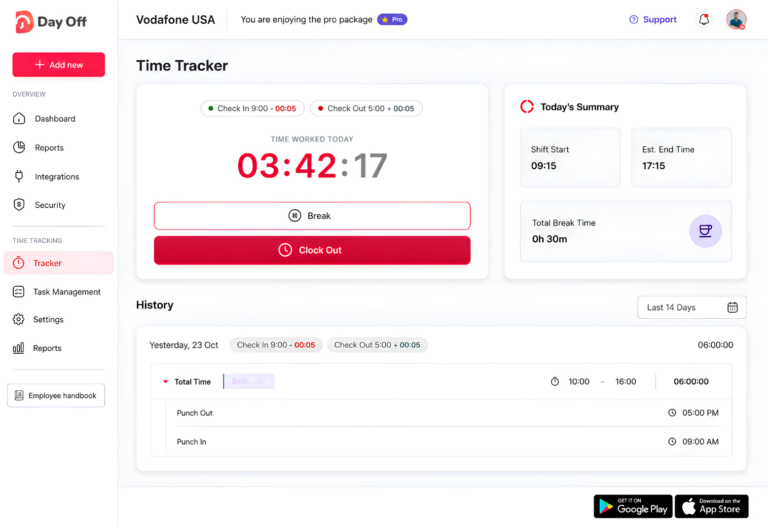
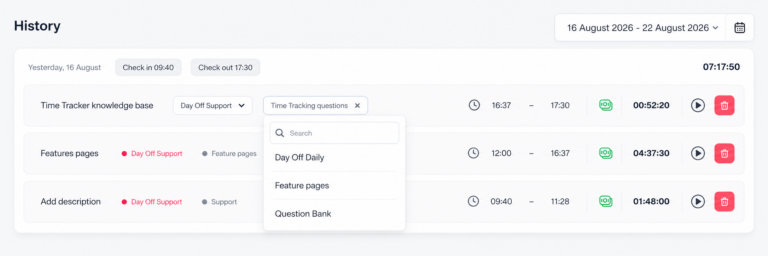
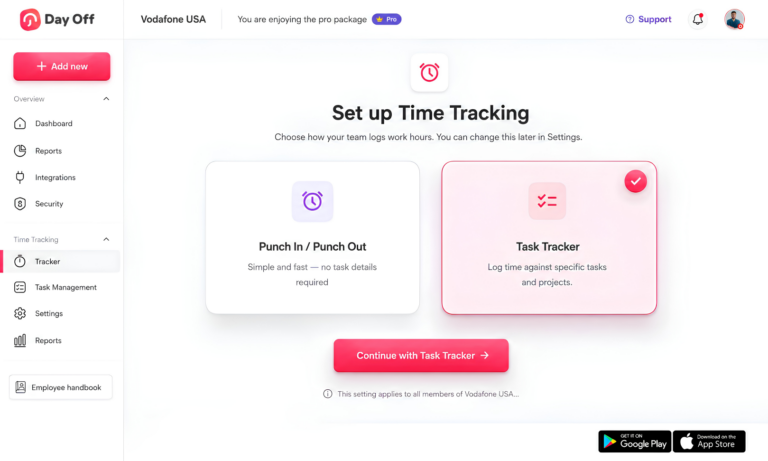
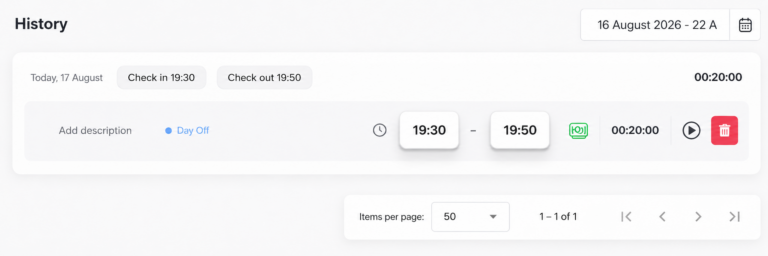
Record Clock-In and Clock-Out Times
Day Off allows employees to record when they start and finish work.
This gives managers a record of actual working time that managers can compare with the employee’s assigned schedule.
Instead of assuming an employee worked their full scheduled shift, managers can review recorded attendance and identify differences that may require attention.
This can be especially useful for:
Late arrivals
Early departures
Missing punches
Short or extended shifts
Overtime
Schedule deviations
Track Employee Breaks
Employees can also start and end breaks through Day Off’s time tracking features.
Recording breaks separately from working time helps businesses better understand how the employee structured the workday and makes it easier to investigate missing or unusual time entries.
For example, if an employee appears to have fewer working hours than expected, managers can review whether part of that difference came from recorded break time.
Clear break records can also support more accurate attendance reviews and payroll preparation.
Compare Work Schedules With Actual Attendance
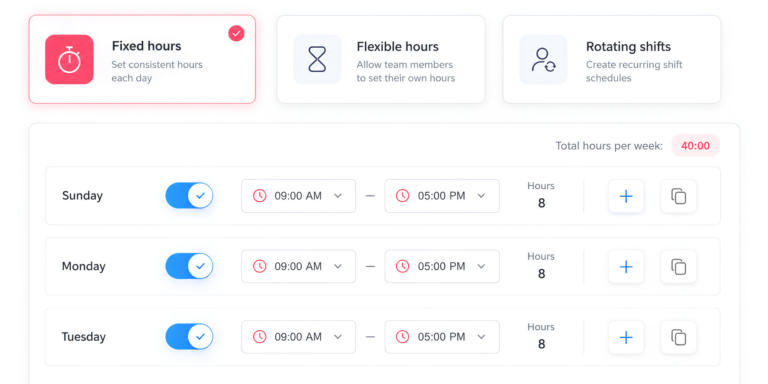
Day Off supports different work schedule types, including:
Fixed days
Fixed hours
Flexible hours
Rotating shifts
Managers can compare the employee’s assigned schedule with actual attendance information instead of relying on scheduled hours alone.
This distinction matters because scheduled time does not always equal actual hours worked.
An employee may arrive late, stay beyond the end of a shift, leave early, take approved PTO, or work additional hours. Having both schedule and attendance information available makes those differences easier to identify.
Review Attendance in More Detail
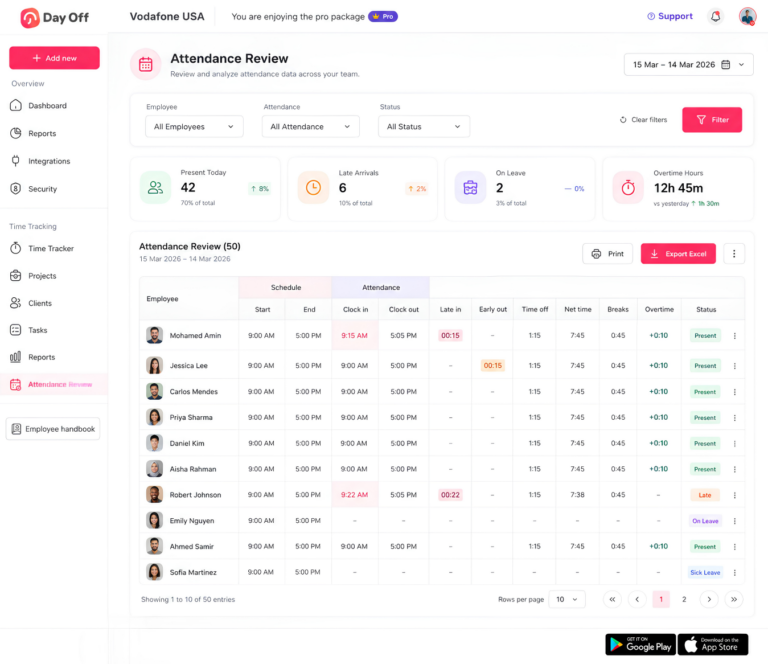
Day Off’s attendance review helps managers see how scheduled working time compares with actual employee activity.
Depending on the employee’s schedule and recorded entries, managers can review information such as:
Scheduled hours
Actual working time
Clock-in and clock-out activity
Late arrival
Early departure
Breaks
PTO
Net working hours
Overtime
This gives managers more context before approving time records or preparing information for payroll.
Rather than seeing only a final total, they can understand why an employee’s recorded time differs from the schedule.
Keep PTO and Working Time Connected
PTO and hours worked are not the same thing, but keeping them connected can make employee time records much easier to understand.
Suppose an employee has an eight-hour scheduled day but works only four hours.
If the manager sees only the time tracker, the record may appear incomplete.
With PTO information available alongside attendance, the full picture could be:
Scheduled: 8 hours
Worked: 4 hours
Approved PTO: 4 hours
The employee’s day is now much easier to understand.
This is particularly useful for businesses managing vacation, sick leave, personal leave, partial-day leave, or hourly PTO alongside employee attendance.
Identify Overtime More Easily
Day Off can also help managers identify situations where actual working time exceeds the employee’s expected schedule.
For example, if an employee has eight scheduled hours but records nine and a half hours, the manager can review the additional time rather than overlook it.
Managers can then determine whether to treat the extra time as overtime based on the employee’s classification, workweek, applicable law, and company policy.
This can make overtime reviews more structured, particularly for teams where employee schedules vary from day to day.
Reduce Manual Timekeeping Work
When businesses manage PTO, schedules, attendance, and time tracking separately, HR and payroll teams often have to reconcile several sources before they understand an employee’s week.
They may need to compare:
A timesheet
A PTO spreadsheet
A work schedule
Attendance records
Manager approvals
Day Off brings these records closer together, reducing the amount of manual cross-checking required.
For growing teams, this can help make attendance reviews faster, improve record accuracy, and make it easier to investigate missing or inconsistent entries before they affect payroll.
Build a Clearer Record of the Employee Workday
Time tracking software does not make a business automatically compliant with the FLSA, and employers are still responsible for determining which hours are compensable, how overtime should be calculated, and which federal, state, and local rules apply.
However, having accurate records is an important part of that process.
By combining clock-in and clock-out records, break tracking, work schedules, attendance, PTO, and overtime visibility, Day Off helps businesses maintain a clearer picture of how employees’ actual working time compares with their expected schedules.
That makes it easier to review attendance, investigate discrepancies, prepare payroll information, and maintain more consistent employee time records.
Common FLSA Timekeeping Mistakes Employers Should Avoid
Even employers that are trying to follow the FLSA can end up with inaccurate time records because of everyday payroll, scheduling, or management habits.
The biggest problems usually happen when the recorded time does not match the time an employee actually worked. Small errors can become more serious when they happen repeatedly across many employees or pay periods.
Here are some of the most common mistakes employers should watch for.
Recording Scheduled Hours Instead of Actual Hours Worked
An employee’s scheduled shift is not always the same as the time they actually worked.
For example, an employee may:
Arrive early and begin working
Stay after the scheduled end of a shift
Work through part of a meal break
Complete tasks from home
Respond to work messages outside normal hours
For covered, non-exempt employees, employers should make sure their records reflect actual compensable working time rather than simply copying the employee’s schedule into the timesheet.
Comparing schedules with recorded attendance can help identify differences that need review.
Automatically Deducting Meal Breaks Without a Way to Correct Them
Some employers automatically deduct a meal period from each shift.
That process can create inaccurate records when an employee works during all or part of the automatically deducted break.
For example, an employee may be interrupted by a customer, answer work calls, supervise another employee, or continue working at their desk during lunch.
Employers that use automatic meal deductions should provide a clear and practical way for employees to report missed, shortened, or interrupted meal periods.
The employer should then correct the time record so it does not exclude compensable work.
Refusing to Pay Unauthorized Overtime
Employers may require employees to obtain approval before working overtime. This can be a useful way to control labor costs and scheduling.
However, an overtime approval policy does not necessarily allow an employer to refuse payment for work an employee has already performed.
If an employer knows or has reason to know that a covered, non-exempt employee performed compensable work, that time generally must be counted and paid according to applicable FLSA rules.
Employers can address violations of an overtime approval policy through management or disciplinary procedures, but the time itself should not simply disappear from the employee’s record.
Assuming Salaried Employees Are Automatically Exempt
A salary does not automatically make an employee exempt from overtime.
Whether an employee qualifies for an exemption depends on the requirements of the applicable exemption, which may include factors such as compensation method, salary level, and job duties.
Job titles alone are not enough either.
For example, calling someone a “manager” does not automatically make that employee exempt if the actual duties do not meet the relevant exemption requirements.
Misclassification can create significant recordkeeping and overtime problems because the employer may not have maintained detailed hours records for an employee who should have been treated as non-exempt.
Using Time Rounding That Consistently Favors the Employer
Some employers round employee time to a specific interval instead of recording every minute.
The risk arises when the rounding practice consistently reduces employee working time.
For example, a system that regularly rounds clock-in times forward and clock-out times backward can gradually remove compensable time from employee records.
Employers should review any rounding practice to ensure it does not systematically underpay employees for time actually worked.
Where possible, recording actual time can also reduce disputes over whether a rounding rule is fair.
Leaving Missed Punches Uncorrected
Missed clock-ins and clock-outs are common.
What matters is how the employer handles them.
A missing punch should not automatically result in lost wages or an arbitrary estimate. Employers should have a consistent correction process that allows the employee and manager to identify the actual or best-supported working time.
For example, the process might include:
Employee reports the missing punch.
Employee provides the correct start or end time.
Manager reviews the correction.
Payroll updates the record before finalizing the pay run.
Employer documents the correction when appropriate.
The goal should be to make the final time record as accurate as reasonably possible.
Averaging Hours Across Multiple Workweeks
Employers generally calculate federal overtime separately for each workweek.
Employers should not average hours across two or more weeks simply because the payroll period is longer than one week.
For example:
Week 1: 46 hours
Week 2: 34 hours
The employee averaged 40 hours per week across the two-week pay period, but that does not generally eliminate the overtime earned in Week 1.
The employer must evaluate the six hours over 40 in the first workweek separately.
This is why employers should clearly define the beginning and end of each workweek in their timekeeping system.
Failing to Keep Records for the Required Period
Different FLSA records have different retention requirements.
Employers generally need to preserve payroll records for at least three years and certain time and wage-computation records for at least two years.
A common mistake is deleting or archiving records too early because the business uses the same retention period for every document.
Employers should also check state and local laws because those rules may require longer retention periods than federal law.
A written record-retention policy can help ensure records are not accidentally deleted too soon.
Assuming Time Tracking Software Automatically Creates Compliance
Time tracking software can make recordkeeping easier, but installing software does not automatically make a business FLSA compliant.
The system can only reflect the information and policies the business uses.
Problems can still occur if managers:
Tell employees to clock out and continue working
Delete overtime entries
Ignore missed meal periods
Refuse to correct inaccurate punches
Rely on schedules instead of actual working time
Technology should support accurate recordkeeping, not replace proper policies and management practices.
Employers should periodically compare recorded time with actual workplace practices to make sure the team uses the system correctly.
Failing to Train Managers and Supervisors
Supervisors play a major role in timekeeping because they often know when employees are working outside scheduled hours.
A manager may see an employee:
Arrive early and start working
Stay late to finish a task
Work during lunch
Respond to messages after hours
Complete work from home
If managers are not trained on timekeeping rules, they may unintentionally encourage off-the-clock work or ignore working time they should have recorded.
Training should explain:
When employees must record working time
How to correct missed punches
How to handle meal and rest periods
What to do when overtime lacks advance approval
Why managers should never ask employees to work off the clock
Clear manager training can prevent many timekeeping problems before they reach payroll.
What Can Happen When Employers Do Not Maintain Accurate Records?
Poor recordkeeping can become expensive when it results in unpaid minimum wages or overtime.
The Department of Labor may investigate workplace records and employment practices.
Depending on the circumstances, remedies for FLSA violations can include:
Recovery of unpaid minimum wages
Recovery of unpaid overtime
An equal amount in liquidated damages in applicable cases
Civil money penalties for certain repeated or willful violations
Litigation
Injunctive relief
Employees may also bring private actions in appropriate circumstances, potentially seeking unpaid compensation, liquidated damages, attorney’s fees, and court costs.
The general statute of limitations for recovery of unpaid wages under the FLSA is two years, while a three-year period generally applies to willful violations.
Accurate records are therefore important not only for payroll but also for demonstrating how the employer calculated compensation.
FLSA Timekeeping Compliance Checklist
Employers can use the following checklist when reviewing their timekeeping procedures:
Maintain required identification and wage information.
Define the beginning of each employee’s workweek.
Record total hours worked each workday.
Record total hours worked each workweek.
Distinguish scheduled hours from actual working time.
Capture or otherwise account accurately for compensable breaks.
Have a process for missed clock-ins and clock-outs.
Allow employees to report work performed outside scheduled hours.
Review overtime separately for each workweek.
Maintain information needed to calculate the regular rate.
Record additions and deductions from wages.
Preserve payroll records for at least three years when required.
Preserve applicable time and wage-computation records for at least two years.
Check whether state or local retention requirements are longer.
Keep records safe and accessible.
Review time records before payroll.
Train managers not to encourage off-the-clock work.
Establish a clear procedure for correcting inaccurate time entries.
Periodically review timekeeping practices for recurring problems.
The goal is not simply to collect punches. It is to maintain a reliable record of what employees actually worked and how the employer paid them.
Frequently Asked Questions About FLSA Timekeeping Requirements
Can an employer require employees to submit their own timesheets?
Yes. Employers can require employees to record or report their own working hours. However, responsibility for maintaining compliant records ultimately remains with the employer. Employers should review employee-submitted records and provide a process for correcting errors.
Can employees certify that their timesheets are accurate?
Employers may ask employees to review or certify timesheets as part of their internal process. Certification can help identify mistakes before payroll, but it does not eliminate the employer’s obligations under the FLSA if the employer knew or should have known additional compensable work was performed.
Does remote work need to be tracked under the FLSA?
Employers generally must compensate covered, non-exempt employees for compensable work regardless of whether it occurs at an office, home, or another location. Employers with remote employees should establish a reasonable process for reporting all working time.
Can an employer change an employee’s timesheet?
Employers may need to correct inaccurate time records, but the final records should accurately reflect hours actually worked. Businesses should have a consistent correction process and should avoid changing records simply to reduce overtime or payroll costs.
Is PTO counted toward the 40 hours required for federal overtime?
Generally, overtime under the FLSA is based on hours actually worked. Paid vacation, sick leave, holidays, and other periods when no work is performed generally do not count as hours worked for federal overtime purposes, although an employer policy, collective bargaining agreement, or state law could provide different benefits.
Does working on Saturday automatically mean overtime?
No. The FLSA generally bases overtime on hours worked during the established workweek, not on whether work occurs on Saturday, Sunday, or a holiday. A covered, non-exempt employee generally earns federal overtime after working more than 40 hours during the applicable workweek.
Can different employees have different workweeks?
An employer may establish different workweeks for different employees or groups where legitimate, provided each workweek is a fixed and regularly recurring 168-hour period. Employers should not manipulate workweeks to evade overtime requirements.
What should an employer do if an employee submits an incorrect timesheet?
The employer should investigate and correct the record so that it reflects the employee’s actual compensable working time. A documented correction and approval process can reduce payroll errors and recurring disputes.
Are employers required to provide employees with pay stubs under the FLSA?
The FLSA requires employers to maintain wage and hour records, but it does not itself require employers to provide employees with pay stubs. State law may impose separate pay-statement requirements.
Should small businesses use time tracking software for FLSA records?
The law does not require software, and a small business can maintain compliant records using another method. However, time tracking software can reduce manual calculations, centralize working-hour information, and make it easier to review breaks, schedules, overtime, and attendance as the workforce grows.
Conclusion
Understanding FLSA timekeeping requirements is essential for any employer managing covered, non-exempt employees.
Federal law gives businesses flexibility in how they keep records, but not in whether required records are accurate. Employers need reliable information about daily and weekly working hours, wages, overtime, deductions, pay periods, and other required employment information.
A strong timekeeping process should also account for real workplace situations such as missed punches, short breaks, meal periods, schedule changes, overtime, and work performed outside normal shifts.
Digital tools can make this process easier, particularly when attendance, working schedules, PTO, breaks, and time tracking are connected.
Day Off helps businesses manage these areas in one platform, allowing managers to see working time together with employee schedules, attendance, breaks, overtime information, and leave records rather than manually reconciling multiple systems.
Technology, however, is only one part of compliance. Employers should combine accurate time records with clear policies, manager training, regular payroll reviews, and an understanding of both federal and applicable state and local requirements.
