







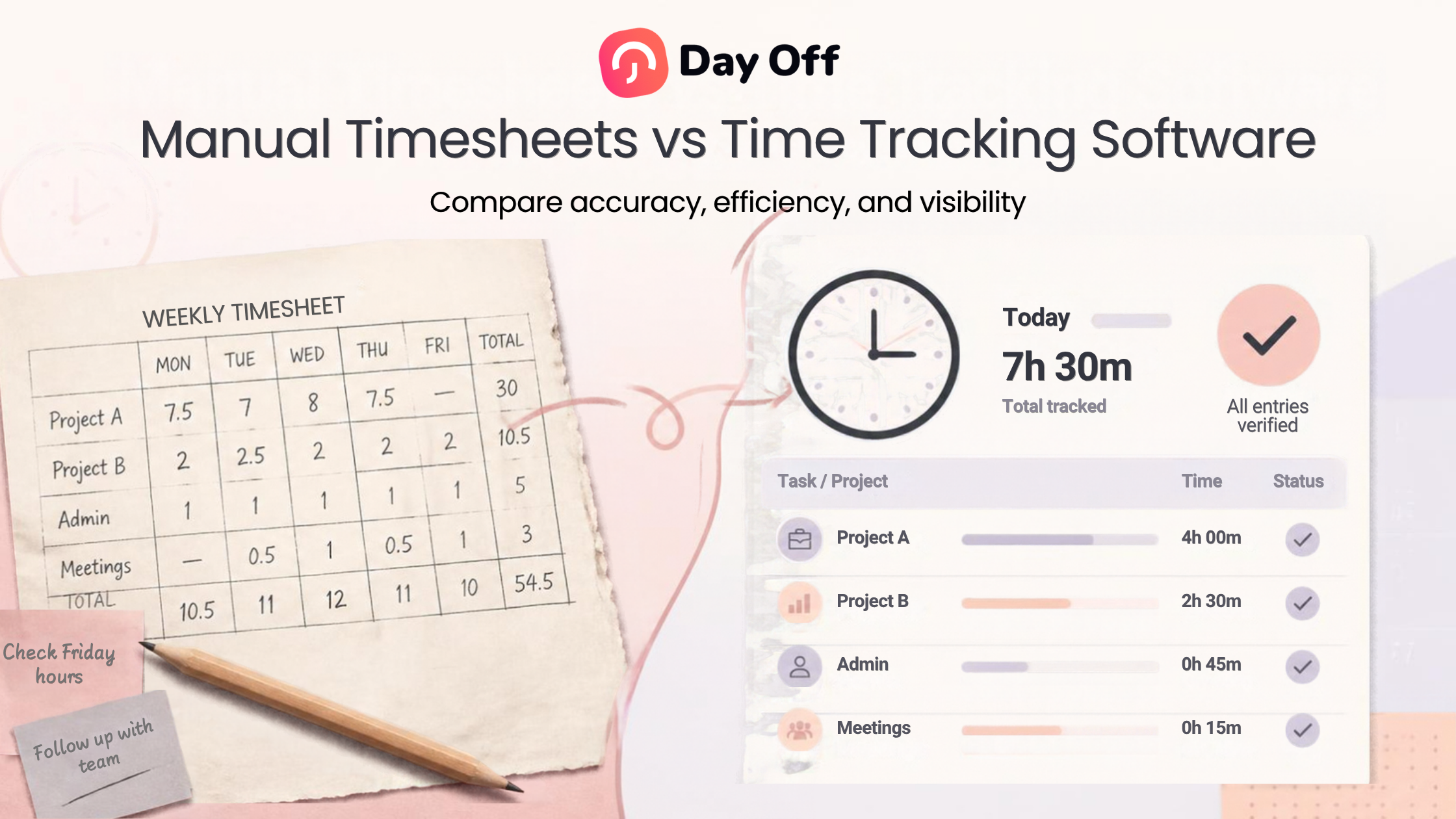
Tracking employee working hours sounds simple until a business has to deal with forgotten entries, overtime, breaks, corrections, payroll preparation, remote employees, and dozens of timesheets at the end of every pay period. While traditional spreadsheets and paper timesheets can still work for some small teams, Time Tracking Software gives businesses a more structured way to record working hours, review attendance, monitor overtime, and maintain accurate time records.

Neither method automatically guarantees accurate records. A paper timesheet can be accurate when employees complete it correctly, while a digital system can still contain mistakes if employees forget to clock in or managers fail to review entries.
The real difference is how easily each method helps businesses collect, verify, calculate, organize, and report employee time.
In this guide, we will compare manual timesheets and time tracking software, explain where each approach works best, and show what businesses should consider before choosing a system.
What Are Manual Timesheets?
Manual timesheets are records in which employee working hours are entered manually rather than captured through a digital timer or clock-in system.
They can take several forms:
Paper timesheets
Printed attendance sheets
Excel spreadsheets
Google Sheets
Word documents
Weekly time cards
Shared templates
Manually completed payroll forms
An employee might record:
Start time
End time
Break duration
Total daily hours
Overtime
Project or task
Notes about schedule changes
For example, an employee working from 9:00 AM until 5:30 PM with a 30-minute unpaid break might manually record eight hours of work.
The employee or manager may then calculate the totals before sending the timesheet to payroll.
This method requires relatively little technology, which is why many small businesses begin with manual time tracking.
However, the workload usually increases as the team grows.
What Is Time Tracking Software?
Time tracking software is a digital system used to record and organize the time employees spend working.
Depending on the platform, employees may:
Clock in when they start work
Clock out when they finish
Start and end breaks
Run timers while working
Record time against projects or tasks
View previous entries
Correct or submit missing time
Review total working hours
Managers may then use those records to monitor attendance, identify overtime, review missed punches, compare scheduled and actual hours, and prepare reports.
Instead of calculating every working day manually, the software uses recorded timestamps to calculate durations automatically.
For example:
Clock in: 9:04 AM
Break start: 1:00 PM
Break end: 1:35 PM
Clock out: 5:12 PM
The system can calculate working time from those entries rather than requiring an employee or manager to calculate the total manually.
Manual Timesheets vs Time Tracking Software at a Glance
| Area | Manual Timesheets | Time Tracking Software |
|---|---|---|
| Recording time | Employees enter hours manually | Employees clock in/out or use a timer |
| Calculating hours | Usually requires formulas or manual calculation | Usually calculated automatically |
| Break tracking | Entered manually | Can be recorded through start/end break actions |
| Missing entries | Found during review | Easier to identify systematically |
| Corrections | May overwrite previous information | Can be managed through structured entries |
| Overtime analysis | Requires spreadsheet calculations | Reports can make overtime easier to identify |
| Attendance review | Requires comparing separate records | Schedule and actual time may be reviewed together |
| Reporting | Reports must often be created manually | Data can be organized into reports |
| Scalability | Becomes more difficult as the workforce grows | Designed to handle larger amounts of time data |
| Historical records | Requires organized file storage | Stored digitally within the system |
The best option depends on the company’s size, working arrangements, reporting requirements, and complexity.
How Manual Timesheets Work
The basic manual process generally follows four steps.
Employees Record Their Hours
At the end of each day or week, employees enter their working hours.
For example:
| Day | Start | End | Break | Total |
|---|---|---|---|---|
| Monday | 9:00 AM | 5:30 PM | 30 min | 8 hrs |
| Tuesday | 8:55 AM | 5:25 PM | 30 min | 8 hrs |
| Wednesday | 9:10 AM | 6:10 PM | 1 hr | 8 hrs |
| Thursday | 9:00 AM | 5:45 PM | 30 min | 8 hrs 15 min |
| Friday | 9:00 AM | 4:30 PM | 30 min | 7 hrs |
Employees Submit the Timesheet
The employee sends the completed sheet to a supervisor, HR department, or payroll team.
Someone Reviews the Hours
The reviewer may check for:
Missing days
Incorrect calculations
Unusual overtime
Missing breaks
Hours that do not match the employee’s schedule
Incomplete information
Hours Are Transferred to Payroll or Reports
The approved totals can then be used for payroll calculations, attendance records, labor analysis, or internal reporting.
The process is straightforward when only a few employees are involved.
Problems begin when the volume of records increases.
Advantages of Manual Timesheets
Although automated systems provide significant benefits, manual timesheets are not inherently useless. They can still be appropriate in certain situations.
Low Initial Cost
A spreadsheet can be created with tools a company already uses.
There may be no additional software subscription or implementation process.
For a business with two or three employees who work predictable hours, that simplicity can be attractive.
Familiarity
Most employees understand how to complete a basic timesheet.
There is little training required for a spreadsheet containing fields such as:
Date
Start time
End time
Break
Total hours
Flexible Format
A business can customize a spreadsheet however it wants.
For example, it can add columns for:
Client
Project
Location
Overtime
Mileage
Notes
Suitable for Very Simple Work Arrangements
Manual records may be enough when employees:
Work fixed schedules
Rarely work overtime
Work at a single location
Have very few schedule variations
Do not need project-based tracking
Have a small workforce
The issue is that many organizations eventually outgrow that simplicity.
Disadvantages of Manual Timesheets
The limitations of manual timekeeping usually become more visible as a company grows.
Employees Have to Remember Their Hours
A manual timesheet depends heavily on memory.
If an employee waits until Friday afternoon to complete the entire week, they may have to remember exactly when they:
Started work on Monday
Took lunch on Tuesday
Left early on Wednesday
Worked late on Thursday
Even an honest employee may not remember those details accurately.
Recording work as it happens generally provides better information than reconstructing it days later.
Manual Calculations Create More Work
Suppose a company has 40 employees.
Every employee records five working days each week. That gives managers approximately 200 daily records to review before considering breaks, overtime, corrections, or different schedules.
Someone may need to calculate:
Daily working hours
Weekly totals
Break deductions
Overtime
Missing hours
Spreadsheet formulas reduce some of this effort, but someone still has to maintain the spreadsheet and check the data.
Errors Can Be Difficult to Detect
Imagine an employee records:
Start: 8:57 AM
End: 5:23 PM
Break: 43 minutes
The total is not immediately obvious.
Multiply similar calculations across dozens of employees and a reviewer can easily make mistakes.
Digital systems can calculate duration automatically from time entries.
Version Control Can Become Complicated
Spreadsheet based timekeeping often creates files such as:
Timesheet-John-May.xlsx
Timesheet-John-May-Final.xlsx
Timesheet-John-May-Corrected.xlsx
Timesheet-John-May-Final2.xlsx
When copies are sent through email or messaging platforms, HR may struggle to determine which version is current.
A centralized system reduces this problem because records are kept in one location.
Reporting Requires Extra Work
Knowing how many hours an employee worked is only one use of time data.
Managers may also want to know:
Who worked overtime?
Who regularly arrives late?
Which projects use the most labor hours?
How many hours did a team work last month?
Where are missed punches happening?
How often are employees working beyond their scheduled hours?
With manual timesheets, these questions often require additional spreadsheet analysis.
Advantages of Time Tracking Software
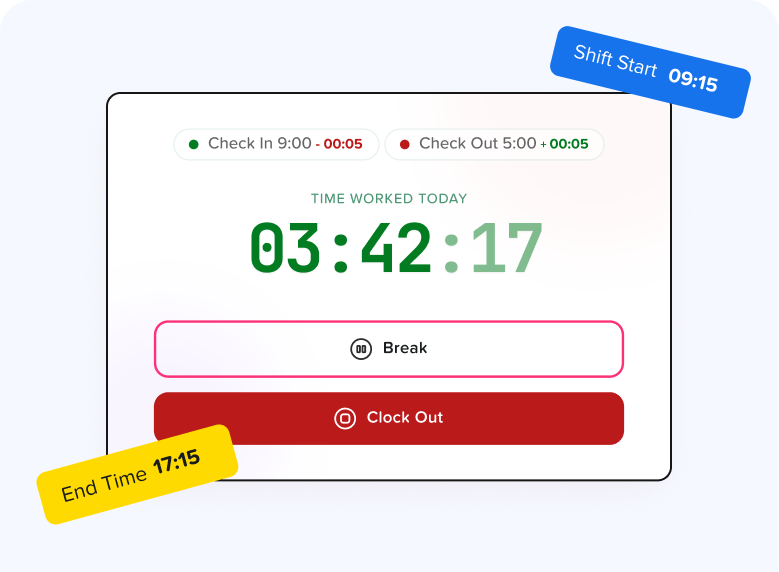
The main benefit of time tracking software is not simply replacing paper with a screen. It is turning time records into structured information that managers can review and analyze.
Employees Record Time as It Happens
Instead of remembering that they started at approximately 9:00 AM, employees can clock in when they actually begin working.
They can then:
Start work
Start a break
End a break
Finish work
This creates timestamps based on actual actions rather than retrospective estimates.
Working Hours Are Calculated Automatically
If an employee clocks in at 8:53 AM and clocks out at 5:17 PM, software can calculate the duration.
If breaks are recorded separately, those periods can also be accounted for according to the system configuration and company policy.
Managers no longer need to repeatedly calculate:
End time - Start time - Break = Total hours
Missing Entries Are Easier to Spot
Missed punches happen.
An employee may clock in and forget to clock out.
Instead of discovering the issue after payroll calculations have begun, structured time records make unusual or incomplete entries easier to review.
Businesses should still have a clear process for correcting errors.
A reasonable correction workflow might include:
Employee reports the missing entry.
Manager verifies the correct time.
Record is corrected.
The correction remains part of the company’s timekeeping process.
Overtime Becomes Easier to Identify
Software can make it easier to see employees whose recorded working hours exceed scheduled or expected hours.
This can help managers investigate overtime before patterns become costly.
However, companies should be careful not to treat an overtime policy as permission to ignore hours actually worked.
Under the U.S. Fair Labor Standards Act, covered nonexempt employees generally must be paid for compensable hours worked, including qualifying overtime.
Companies can establish approval procedures for overtime, but timekeeping systems should still accurately capture compensable work.
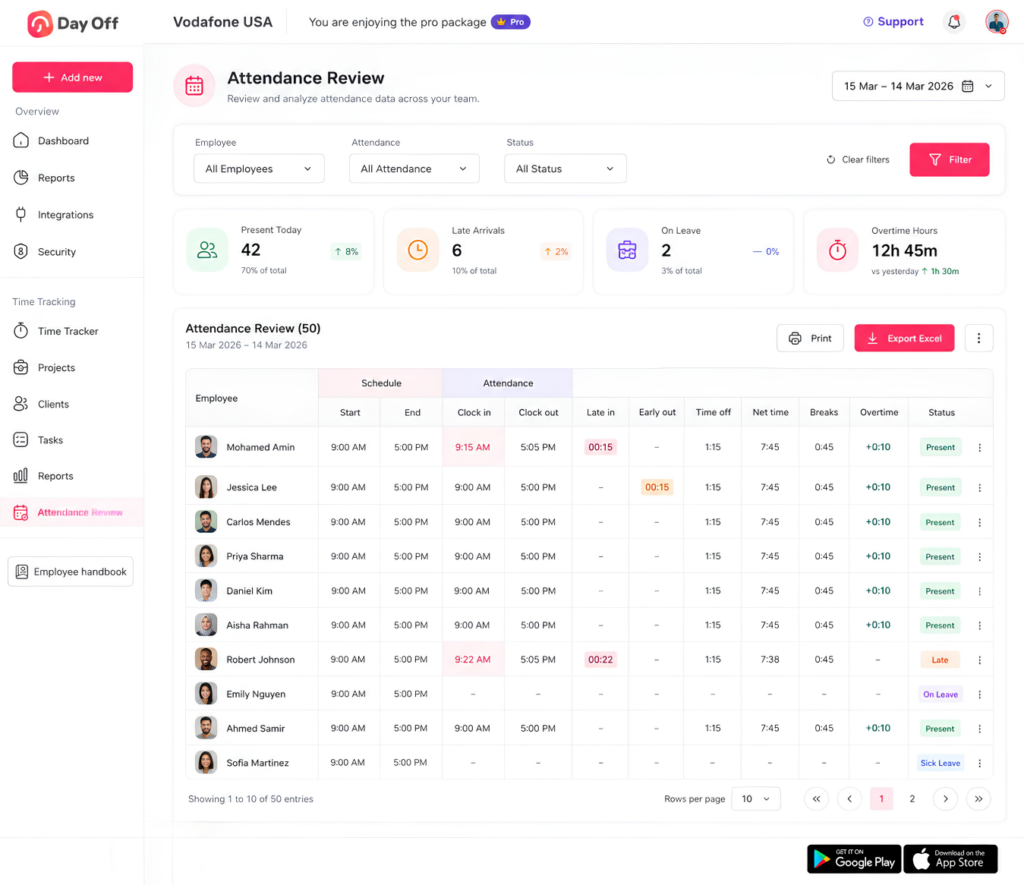
Attendance Becomes Easier to Review
Time records can provide useful context about attendance.
Instead of simply seeing:
Employee worked 7 hours 42 minutes
a manager may be able to compare:
Scheduled: 9:00 AM
Actual start: 9:18 AM
That distinction can help identify:
Late arrivals
Early departures
Absences
Schedule deviations
Overtime
Extended work periods
Attendance and payroll are not exactly the same function, but both can benefit from reliable working-time data.
Managers Gain Historical Data
Digital time records make it easier to review patterns over time.
For example, a manager could identify whether:
Overtime has increased for three consecutive months
A department regularly works beyond scheduled hours
Certain employees repeatedly miss punches
Particular projects consume more hours than expected
This information can help with workforce planning and operational decisions.
What Does U.S. Law Say About Timekeeping?
For U.S. employers covered by the Fair Labor Standards Act, accurate recordkeeping is important.
The U.S. Department of Labor explains that employers generally do not have to use a particular timekeeping format. An employer may use a time clock, allow workers to enter their own time, or use another system, provided the required records are complete and accurate.
For covered nonexempt employees, required records generally include information such as:
Hours worked each day
Total hours worked each workweek
Regular hourly pay rate where applicable
Straight time earnings
Overtime earnings
Wage additions and deductions
Total wages paid
Pay period information
The Department of Labor also states that payroll records generally must be kept for at least three years, while records used to calculate wages, including time cards and work schedules, generally should be kept for two years.
State and local laws may impose additional requirements, so employers should review the rules applicable to the jurisdictions where their employees work.
Software Does Not Remove the Employer’s Responsibility
Automating timekeeping does not automatically make records legally accurate.
In guidance addressing automated timekeeping systems, the Department of Labor has emphasized that employers remain responsible for ensuring workers are paid for all compensable hours actually worked, even when software automatically predicts or populates time entries.
That is an important distinction.
A sophisticated system with incorrect data is still incorrect.
Employers should combine technology with:
Clear timekeeping policies
Employee training
Regular record review
A method for reporting mistakes
Timely correction procedures
Manual Timesheets vs Software for Break Tracking
Breaks are one area where manual timekeeping can become difficult.
An employee might write:
Lunch: 30 minutes
But was it actually 30 minutes?
Did it begin at 12:30 or 1:15?
Was the employee completely relieved of work duties during the unpaid break?
These details can matter.
With digital tracking, employees can use actions such as:
Start Break
and later:
End Break
That creates a clearer record of when the break occurred.
Employers must still configure policies correctly and comply with applicable laws. Software records what happened, but the organization remains responsible for deciding whether particular time is compensable.
Manual Timesheets vs Software for Remote Employees
Remote work makes accurate timekeeping particularly important.
In an office, managers may have some visibility into when employees arrive or leave.
With remote teams, employees may:
Start at different times
Work from different locations
Split their workday
Take flexible breaks
Work across time zones
A weekly spreadsheet may provide total hours, but it offers limited visibility into when work actually occurred.
Time tracking software allows remote employees to create time records without requiring managers to physically observe attendance.
This does not mean employers should monitor every minute of an employee’s activity.
Time tracking should focus on legitimate business needs such as working hours, attendance, payroll, projects, and compliance rather than unnecessary surveillance.
Manual Timesheets vs Software for Payroll Preparation
Payroll accuracy depends heavily on accurate source data.
If the time records are wrong, payroll calculations can also be wrong.
With manual timesheets, payroll staff may have to:
Collect employee sheets.
Verify that each employee submitted one.
Check formulas.
Identify missing entries.
Confirm overtime.
Ask employees about unclear hours.
Correct spreadsheets.
Transfer final totals.
A structured digital process can reduce several of these administrative steps.
That does not eliminate payroll review, but it can give payroll teams cleaner source data.
When Manual Timesheets May Be Enough
Not every business needs an advanced time tracking system from its first day.
Manual tracking might be sufficient if:
The company has only a few employees.
Employees work predictable schedules.
Overtime is rare.
There are few attendance issues.
No project tracking is necessary.
Payroll is simple.
Managers spend very little time reviewing timesheets.
For example, a four person business where everyone works Monday through Friday from 9:00 AM to 5:00 PM may not immediately need a complex system.
However, businesses should reconsider their process when administrative effort begins increasing.
Signs You Have Outgrown Manual Timesheets
Businesses often wait too long before changing their timekeeping process.
Common warning signs include:
Managers Spend Too Much Time Checking Timesheets
If every payroll period requires hours of spreadsheet review, the manual system may no longer be efficient.
Employees Regularly Forget to Submit Time
A process that depends on remembering to fill out a spreadsheet on Friday may create repeated delays.
Payroll Corrections Are Increasing
Frequent disputes or corrections can indicate that the source records are not reliable enough.
Overtime Is Difficult to Monitor
If managers only learn about overtime after receiving timesheets, they have little opportunity to understand patterns during the pay period.
Your Team Works Different Schedules
Flexible work, rotating shifts, split schedules, and remote work can make basic timesheets harder to manage.
You Need Better Reports
Once management begins asking for trend analysis, project hours, attendance patterns, or overtime reports, spreadsheets may require significant manual work.
What to Look for in Time Tracking Software
Choosing software should not simply mean selecting the system with the longest feature list.
The best system is one employees can actually use consistently.
Easy Clock In and Clock Out
Starting and ending work should require as little effort as possible.
Complex processes increase the likelihood that employees will forget to use the system.
Break Tracking
If your organization records employee breaks, workers should be able to start and end breaks clearly.
Schedule Comparison
Time records become more useful when managers can compare scheduled working hours against actual attendance.
This can help identify:
Late arrivals
Early departures
Absence
Overtime
Schedule deviations
Missing Punch Management
Employees will occasionally forget an entry.
A useful system should support a practical way to identify and correct those situations.
Reports
Look for reports that answer questions your business actually asks.
Examples include:
Employee hours
Daily working time
Overtime
Project time
Task time
Attendance
Schedule versus actual hours
Project and Task Tracking
Businesses that bill clients, estimate projects, or analyze labor costs may need employees to allocate working time to particular tasks or projects.
Employee Leave Integration
Time tracking becomes more useful when it exists alongside attendance and leave data.
If an employee is not working because they are on approved PTO, managers should be able to distinguish that situation from an unexplained absence.
That is one reason combining time tracking with leave management can provide more useful workforce information than maintaining completely separate spreadsheets.
How Day Off Can Help With Time Tracking and PTO
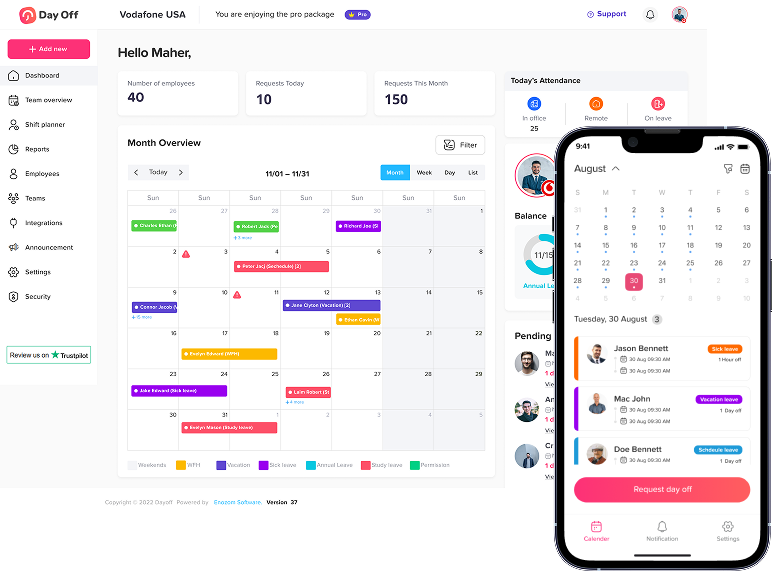
Day Off brings employee time tracking, leave management, work schedules, attendance, and PTO information into a more connected workflow.
Instead of maintaining one spreadsheet for vacation, another for schedules, and another for timesheets, businesses can manage working time alongside employee leave information.
With Day Off’s time tracking tools, employees can record their working time through a timer-based workflow and track activities against projects and tasks.
Managers can review information such as:
Employee working duration
Project and task time
Scheduled hours compared with actual hours
Late arrivals
Early departures
Breaks
PTO
Overtime
Attendance status
This creates a more complete view of the employee’s day.
For example, instead of seeing that an employee recorded only four working hours, a manager may also be able to see that the remainder of the scheduled day was covered by approved PTO.
That context makes attendance information far more useful.
Day Off can also help businesses manage:
Vacation requests
Sick leave
PTO balances
Leave accrual
Carryover
Multiple work schedules
Shift planning
Attendance
Employee leave reports
For businesses moving away from manual spreadsheets, combining PTO and working time data can reduce the number of separate systems HR and managers need to maintain.
How to Move From Manual Timesheets to Time Tracking Software
Switching systems should be planned carefully.
Step 1: Review Your Current Process
Document how employees currently record time.
Ask:
Who records hours?
When are timesheets submitted?
Who reviews them?
How are corrections handled?
How is overtime identified?
How are breaks recorded?
How does time reach payroll?
This helps identify the problems the new system needs to solve.
Step 2: Define Your Timekeeping Rules
Employees need clear answers to questions such as:
When should I clock in?
When should I clock out?
How do I record breaks?
What happens if I forget to clock out?
How do I correct an entry?
When is overtime allowed?
Who reviews time records?
Software cannot replace a clear policy.
Step 3: Configure Employee Schedules
Accurate schedules make it easier to compare planned and actual hours.
Consider differences between:
Full time employees
Part time employees
Flexible employees
Shift workers
Remote workers
Step 4: Train Employees
Explain not only how to use the system but why accurate timekeeping matters.
Employees should know that they are expected to record actual working time rather than adjust entries simply to match their scheduled hours.
Step 5: Test the Process
Start with a small group or short testing period.
Look for issues such as:
Missed clock outs
Incorrect schedules
Break confusion
Wrong project assignments
Reporting problems
Fix these problems before relying fully on the new workflow.
Is Time Tracking Software More Accurate Than Manual Timesheets?
It can be, but accuracy depends on how the system is used.
Software removes several sources of manual error, particularly:
Arithmetic mistakes
Forgotten spreadsheet formulas
Re-entering totals
Miscalculating durations
Inconsistent formats
It also encourages employees to capture timestamps closer to when work actually occurs.
However, software cannot prevent every problem.
Employees may still:
Forget to clock in
Forget to clock out
Leave a timer running
Select the wrong project
Forget to start a break
That is why good time tracking combines technology with clear policies, employee training, and manager review.
Manual Timesheets vs Time Tracking Software: Which Should You Choose?
For a very small team with simple, fixed hours, manual timesheets may still be sufficient.
But as employee count and scheduling complexity increase, manual tracking creates more administrative work.
Time tracking software becomes particularly useful when a company needs to manage:
Multiple employees
Hourly workers
Remote workers
Different schedules
Overtime
Breaks
Projects and tasks
Attendance
Payroll preparation
Historical reports
The decision should not simply be based on whether software is more modern.
Ask a more practical question:
How much work does it currently take to produce an accurate record of employee working time?
If the answer involves several spreadsheets, repeated calculations, missing records, long email chains, and hours of review every pay period, moving to a centralized time tracking system may significantly simplify the process.
FAQ
What is the difference between a timesheet and time tracking software?
A timesheet is a record of hours worked, while time tracking software is a system used to capture, calculate, organize, and analyze those records. A timesheet can be paper based, spreadsheet-based, or generated by software.
Are manual timesheets legal?
In the United States, the FLSA does not generally require employers to use one specific method of timekeeping. Employers may use different methods provided that required records are complete and accurate. Other federal, state, local, or industry-specific rules may also apply.
Can Excel be used for employee timesheets?
Yes. Excel can work for small teams, especially when schedules are straightforward. As the number of employees and records increases, however, managing formulas, submissions, corrections, permissions, and reporting can become more complicated.
Does time tracking software automatically calculate working hours?
Most systems calculate working duration from start and end times or from an active timer. Features vary by provider, so businesses should confirm exactly how breaks, overtime, and manual corrections are handled.
Can time tracking software prevent employees from forgetting to clock out?
Software can make incomplete entries easier to identify, but it cannot guarantee employees will never forget. Businesses should establish a clear missed-punch correction process.
Should salaried employees track their time?
It depends on the employee’s classification, applicable laws, and business needs. Some employers track salaried employees’ time for project costing, client billing, attendance, capacity planning, or internal analysis even when the employees’ pay is not calculated directly from hours.
How often should timesheets be reviewed?
Businesses commonly review time records before each payroll cycle, although managers may benefit from checking them more frequently so missing entries, unexpected overtime, or attendance issues can be corrected sooner.
Can time tracking software track employee breaks?
Yes, many systems allow employees to start and end breaks. Employers must still apply applicable laws and company policies correctly when determining whether break time is paid or unpaid.
Can businesses use time tracking software for remote employees?
Yes. Digital time tracking can be particularly useful for remote and distributed teams because employees can record their working time without being physically present at a workplace.
Is time tracking software worth it for a small business?
It depends on complexity rather than company size alone. Even a small company may benefit if it has hourly employees, flexible schedules, frequent overtime, project tracking requirements, or significant administrative work associated with manual timesheets.
Conclusion
Manual timesheets can be a practical starting point for small teams with predictable schedules and straightforward payroll requirements. They are inexpensive, familiar, and easy to create.
Their limitations become clearer as the business grows.
More employees mean more entries to collect, more calculations to verify, more corrections to manage, and more historical data to organize. Flexible schedules, remote work, overtime, breaks, projects, and multiple work arrangements can make spreadsheet-based tracking increasingly difficult.
Time Tracking Software provides a more structured approach by allowing employees to record work as it happens, automatically calculating durations, organizing time records, and helping managers review attendance, overtime, projects, and schedule differences.
The goal should not simply be to replace spreadsheets with software. The goal is to build a timekeeping process that produces accurate records with less administrative work.
When time tracking is combined with work schedules, attendance, and PTO management through a platform such as Day Off, managers can understand not only how long employees worked, but also how working time, leave, schedules, breaks, and attendance fit together.
For growing teams, that broader view can turn employee time records from a payroll requirement into useful information for workforce planning and day to day management.