







Managing employee schedules, work hours, attendance, and time off can become complicated fast, especially when a business depends on shifts, flexible hours, remote work, or multiple locations. This is where Time Tracking Software becomes valuable. When combined with shift scheduling, it helps managers plan who should work, track when employees actually work, reduce attendance confusion, and keep payroll records more accurate.
For many teams, scheduling and Time Tracking Software are still handled through spreadsheets, paper forms, chat messages, or separate tools that do not communicate with each other. At first, this may seem simple. But as the team grows, small mistakes become bigger problems. A missed shift, an unrecorded absence, an incorrect timesheet, or a forgotten PTO request can affect staffing, payroll, productivity, and employee trust.

Shift scheduling and time tracking software solves this problem by bringing work schedules, clock-in records, attendance, leave, and reports into one organized system. Instead of guessing who is available, managers can see planned shifts, actual hours, absences, overtime, and time off in a clearer way.
This complete guide explains what shift scheduling and time tracking software is, how it works, which features matter most, and how businesses can use it to manage teams more effectively.
What Is Shift Scheduling and Time Tracking Software?
Shift scheduling and time tracking software is a digital tool that helps businesses create employee work schedules and track actual working hours.
The scheduling side helps managers plan when employees should work. The Time Tracking Software side records when employees start work, finish work, take breaks, or miss scheduled hours. When both functions work together, businesses get a more accurate view of planned work compared with actual attendance.
In simple terms, the software answers important questions such as:
- Who is scheduled to work today?
- Who has clocked in?
- Who is late or absent?
- How many hours did each employee work?
- Did someone work overtime?
- Is an employee on approved leave?
- Are there enough people available for each shift?
- Can payroll be prepared with accurate records?
This is especially useful for businesses with hourly employees, rotating shifts, part time workers, field teams, remote employees, or departments that need strong attendance visibility.
Why Businesses Need Better Shift Scheduling and Time Tracking
Poor scheduling and manual time tracking can create daily problems for managers, HR teams, and employees. Even a small scheduling mistake can cause understaffing, payroll errors, employee frustration, or unnecessary overtime.
For example, if an employee requests time off but the schedule is not updated, a manager may expect them to work when they are actually away. If employees record their hours manually at the end of the week, they may forget exact start times, breaks, or overtime hours. If attendance is tracked separately from PTO, approved leave may look like an absence.
A digital system helps prevent these issues by keeping scheduling, Time Tracking Software, and leave information connected.
| Manual Process Problem | How It Affects the Business | How Software Helps |
|---|---|---|
| Schedules are created in spreadsheets | Easy to miss changes or duplicate shifts | Schedules are updated in one place |
| Employees forget to submit hours | Payroll records become incomplete | Clock-in and clock-out records are captured digitally |
| PTO is tracked separately | Managers may schedule employees who are on leave | Approved leave can appear in team availability |
| Overtime is calculated manually | Payroll mistakes become more likely | Extra hours can be tracked automatically |
| Shift changes happen by chat | Managers lose track of updates | Changes can be recorded and reviewed |
| Attendance reports take time | HR spends hours preparing data | Reports can be generated faster |
How Shift Scheduling Works
Shift scheduling allows managers to create work schedules based on business needs, employee availability, roles, departments, and locations.
A good shift scheduling system usually allows managers to:
- Create daily, weekly, or monthly schedules
- Assign employees to specific shifts
- Set fixed, flexible, or rotating schedules
- Manage full time and part time employees
- Avoid scheduling conflicts
- See who is unavailable
- Adjust schedules when employees request leave
- Notify employees about schedule changes
For example, a retail store may need more staff during weekends. A restaurant may need different employees for morning, afternoon, and evening shifts. A support team may need coverage across different time zones. Shift scheduling software helps managers build these schedules without relying on disconnected files or manual reminders.
How Time Tracking Software Works
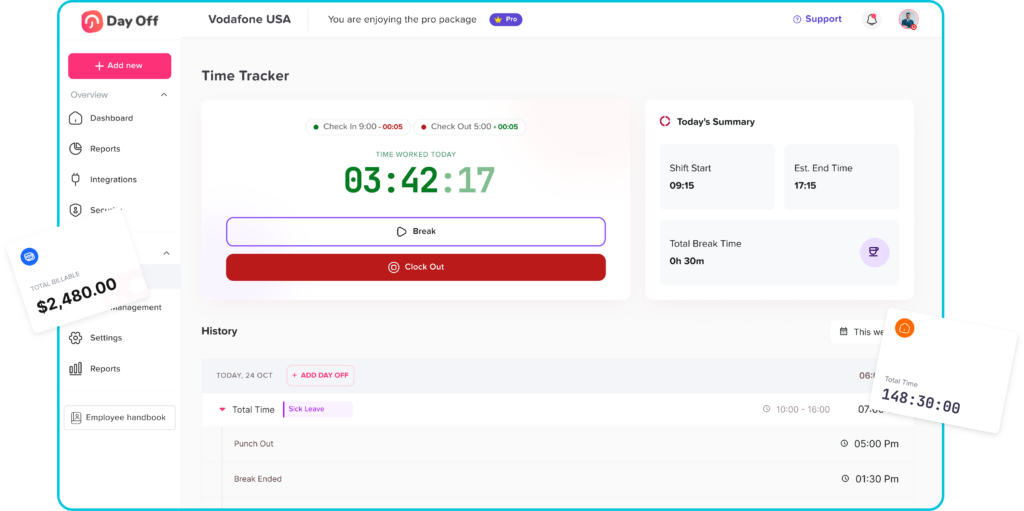
Time Tracking Software records actual working time. Employees may clock in and out using a mobile app, web dashboard, kiosk, or another approved method depending on the software.
A Time Tracking Software may record:
- Start time
- End time
- Breaks
- Total worked hours
- Late arrivals
- Early departures
- Missed shifts
- Overtime
- Attendance status
- Location or device details, if enabled
This helps managers compare scheduled hours with real worked hours. If an employee was scheduled from 9:00 AM to 5:00 PM but clocked in at 9:20 AM, the system can show the difference. If an employee worked beyond their scheduled shift, the system can help identify overtime.
The best time tracking setup should be simple for employees and useful for managers. If the process is too complicated, employees may avoid using it correctly. If the data is too basic, managers may still need manual work to understand attendance.
Why Scheduling and Time Tracking Software Should Work Together
Shift scheduling and Time Tracking Software are often treated as separate tasks, but they are closely connected.
A schedule shows what was planned. Time Tracking Software shows what actually happened.
When these two areas are connected, managers can clearly compare planned shifts with real attendance. This makes it easier to detect problems, approve corrections, prepare payroll, and plan future staffing.
For example:
- If an employee is scheduled but does not clock in, the manager can notice quickly.
- If an employee clocks in without being scheduled, the manager can review it.
- If approved PTO overlaps with a shift, the schedule can be adjusted.
- If several employees are absent, managers can see the staffing gap.
- If overtime keeps increasing, managers can identify scheduling problems.
Without this connection, managers may spend too much time checking spreadsheets, messages, calendars, and timesheets just to understand what happened during the workweek.
Key Features to Look For
Not every system offers the same level of functionality. Some tools focus mainly on employee timesheets. Others focus on shift planning. The most useful solution depends on the size of your team, type of work, and reporting needs.
Here are the most important features to look for:
| Feature | Why It Matters |
|---|---|
| Shift scheduling | Helps managers plan work coverage clearly |
| Clock in and clock out | Records actual start and end times |
| Break tracking | Improves accuracy of total working hours |
| Attendance tracking | Shows late arrivals, absences, and missed shifts |
| Overtime tracking | Helps managers control labor costs |
| PTO and leave visibility | Prevents scheduling employees who are on approved leave |
| Employee self-service | Allows employees to view schedules and time records |
| Mobile access | Supports remote, hybrid, field, and shift-based teams |
| Manager approvals | Lets managers review timesheets, changes, and exceptions |
| Reports and exports | Helps HR and payroll teams prepare accurate records |
| Notifications | Keeps employees and managers updated |
| Role-based permissions | Controls who can view, edit, or approve data |
Benefits of Shift Scheduling and Time Tracking Software
The right system can improve daily workforce management in several ways.
Better Team Visibility
Managers can see who is scheduled, who is working, who is absent, and who is on leave. This makes it easier to make staffing decisions without checking multiple places.
Fewer Payroll Errors
Accurate time records help reduce mistakes in payroll preparation. Instead of relying on memory or handwritten timesheets, HR can use recorded work hours and approved adjustments.
Easier Attendance Management
Late arrivals, missed shifts, early departures, and overtime become easier to review. Managers can identify patterns and address problems before they become bigger issues.
Less Manual Admin Work
Spreadsheets require constant updates. Chat messages get lost. Paper timesheets take time to collect and review. A digital system reduces repetitive work by keeping records organized.
Fairer Scheduling
When managers can see availability, leave, and workload, they can distribute shifts more fairly. This helps avoid overworking the same employees or accidentally ignoring availability requests.
Better Employee Experience
Employees want to know when they work, how many hours they completed, and whether their leave is approved. Self service access gives them more clarity and reduces repeated questions to HR.
Improved Planning
Reports help managers understand labor patterns. For example, they can see busy days, frequent overtime, absence trends, and staffing gaps. This helps businesses plan better schedules in the future.
Common Problems the Software Can Solve
Shift scheduling and time tracking software is not only about recording hours. It helps solve real operational problems that affect managers every week.
Employees Forgetting to Submit Timesheets
Manual timesheets are easy to forget. Employees may submit them late or enter estimated hours instead of accurate records. Time Tracking Software makes the process faster and more consistent.
Managers Losing Track of Shift Changes
When shift swaps and updates happen through messages, managers may miss important changes. A scheduling system keeps shift changes in one place.
Approved Leave Not Appearing in Schedules
If leave is approved in a separate system, managers may accidentally schedule an employee who is away. Connecting leave visibility with scheduling helps avoid this mistake.
Overtime Becoming Hard to Control
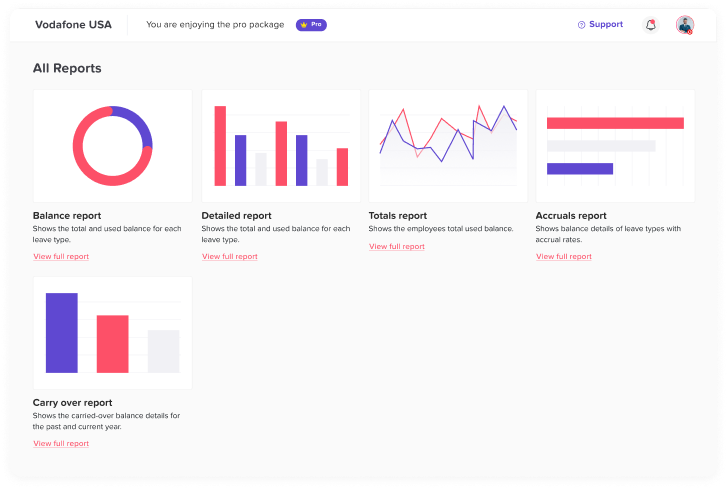
Overtime can increase when schedules are not planned properly or when managers do not have real-time visibility. Time tracking reports can show when extra hours are happening and why.
Payroll Taking Too Long
Payroll preparation becomes slower when HR needs to collect timesheets, check absences, confirm overtime, and fix missing records manually. Digital reports can make this process easier.
The Role of PTO and Leave Management
One of the most important parts of workforce planning is knowing who is available. A schedule is only useful if it reflects approved time off, sick leave, holidays, and other absences.
This is why PTO and leave management should not be ignored when choosing time tracking and scheduling software.
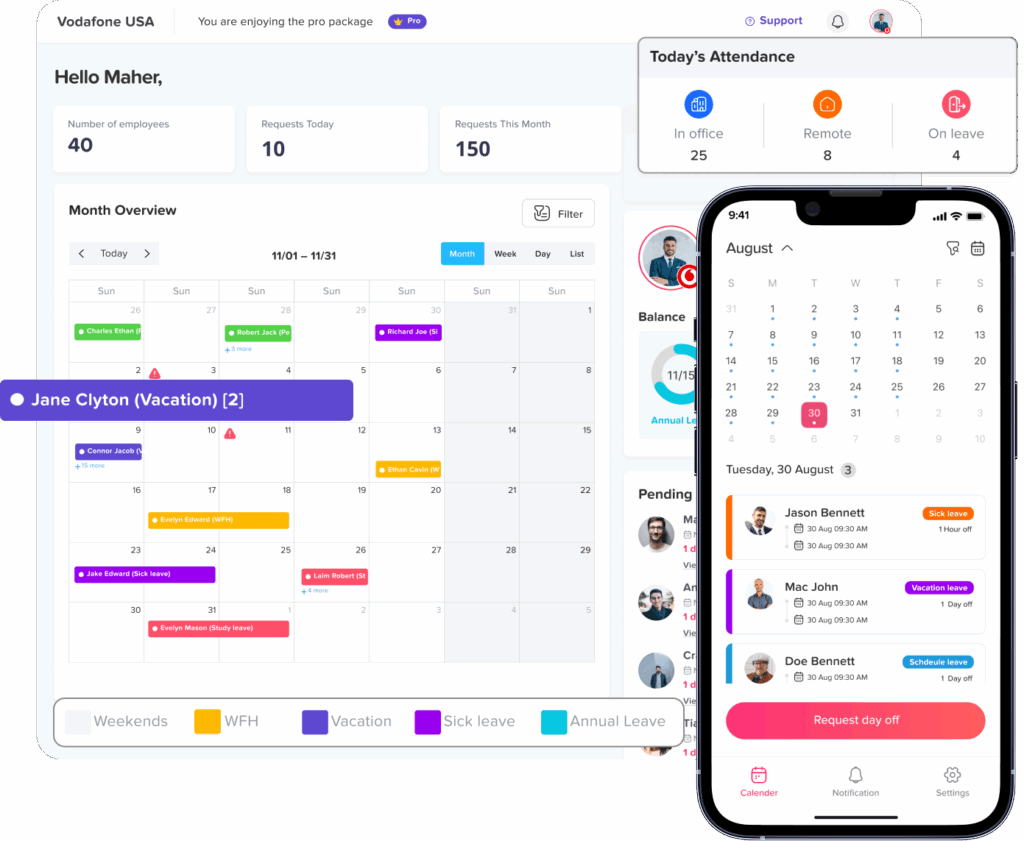
For example, Day Off helps teams manage leave requests, PTO balances, approvals, and team availability. When businesses use a tool like Day Off to organize time off, managers can better understand when employees are away and avoid planning shifts without checking leave records.
This matters because attendance and leave are connected. An employee may not clock in because they are absent, but they may also be on approved vacation, sick leave, or personal time off. Without proper leave tracking, managers may misread the situation.
A strong workforce system should help separate:
- Approved PTO
- Sick leave
- Unpaid leave
- Public holidays
- Unplanned absence
- Late arrivals
- Missed shifts
This gives HR and managers a more accurate picture of employee availability.
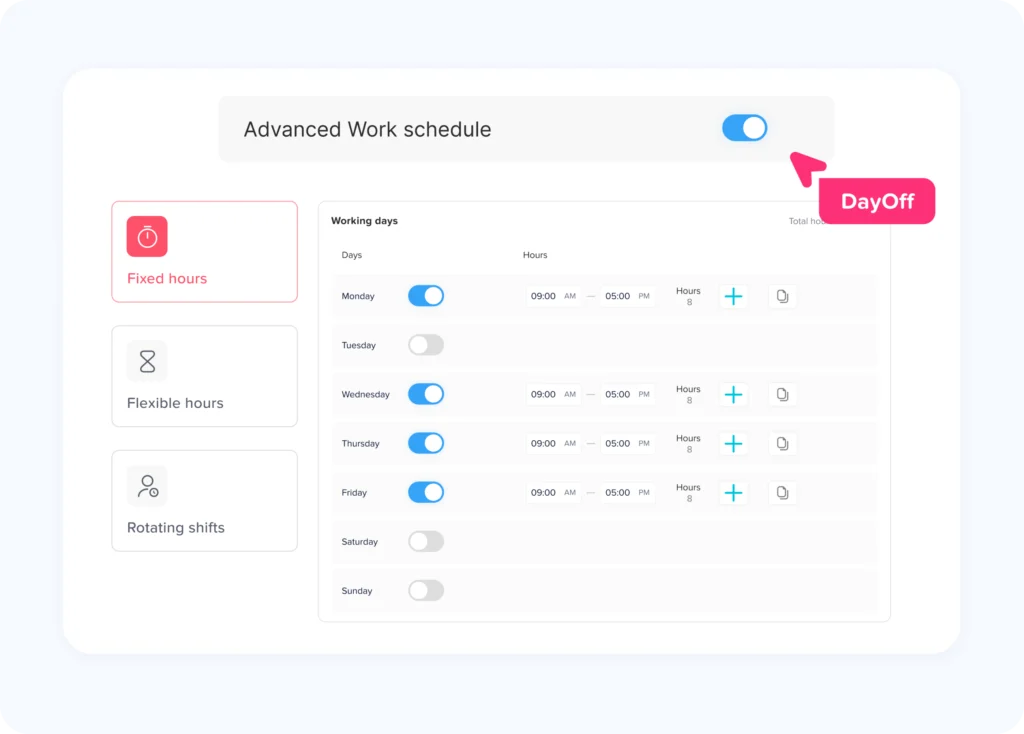
Shift Scheduling for Different Work Models
Different businesses schedule employees in different ways. Good software should support more than one scheduling style.
Fixed Schedules
A fixed schedule means employees work the same hours on regular days. For example, Monday to Friday from 9:00 AM to 5:00 PM. This is common in office-based teams.
Flexible Schedules
A flexible schedule gives employees more control over their working hours. The company may care more about total hours or completed work than exact start and end times.
Rotating Shifts
Rotating shifts change over time. For example, an employee may work mornings one week and evenings the next. This is common in healthcare, hospitality, manufacturing, and customer support.
What to Consider Before Choosing Software
Before choosing a system, businesses should review their current process and identify the main problems they want to solve.
Ask these questions:
- Do we need to track exact clock-in and clock-out times?
- Do we need shift planning, or only timesheets?
- Do employees work fixed, flexible, or rotating schedules?
- Do we need mobile access?
- Do managers approve timesheets?
- Do we need PTO and leave visibility?
- Do we manage multiple locations?
- Do we need payroll exports?
- Do we need reports by employee, team, location, or department?
- Do employees need to see their own schedules?
- Do we need notifications for schedule changes?
The best software is not always the one with the longest feature list. It is the one that matches your team’s real workflow.
How to Implement Shift Scheduling and Time Tracking Software
Introducing new software should be done carefully. If the process is unclear, employees may feel confused or managers may continue using old spreadsheets.
A good implementation plan should be simple and practical.
| Step | What to Do | Why It Matters |
|---|---|---|
| Review current process | Identify how schedules, attendance, PTO, and payroll are handled today | Helps define what needs improvement |
| Choose key features | Decide whether you need scheduling, time tracking, leave visibility, reports, or all of them | Prevents paying for unnecessary tools |
| Set clear rules | Define clock-in rules, break rules, overtime rules, and approval rules | Keeps the system consistent |
| Add employees and teams | Organize employees by department, location, role, or manager | Makes scheduling easier |
| Create schedules | Build fixed, flexible, rotating, or part-time schedules | Helps employees know when they work |
| Train managers | Show managers how to review attendance and approve changes | Reduces mistakes |
| Train employees | Explain how to view schedules and track time | Improves adoption |
| Review reports | Check attendance, overtime, absences, and schedule accuracy | Helps improve future planning |
Best Practices for Using Time Tracking Software
To get the most value from Time Tracking Software, businesses should create clear rules and communicate them to employees.
Here are some best practices:
- Keep clock-in and clock-out steps simple.
- Explain when employees should record breaks.
- Make attendance rules easy to understand.
- Review timesheets regularly instead of waiting until payroll day.
- Use reports to identify patterns, not just mistakes.
- Allow employees to review their own time records.
- Connect PTO and leave data where possible.
- Train managers to handle exceptions fairly.
- Avoid using time tracking only as a control tool.
- Use the data to improve scheduling and workload planning.
Time tracking works best when employees understand why it exists. The goal should be accuracy, fairness, and better planning, not micromanagement.
FAQ
What is shift scheduling and time tracking software?
It is software that helps businesses create employee work schedules and track actual working hours. It can show planned shifts, clock-in records, attendance, overtime, and sometimes PTO or leave information.
Why is Time Tracking Software important?
Time Tracking Software is important because it helps businesses record employee work hours accurately, reduce payroll errors, manage attendance, and understand how time is being used across the team.
Can time tracking software help with payroll?
Yes. Time tracking software can help payroll teams by providing accurate records of worked hours, overtime, breaks, and attendance. Many systems also allow reports or exports that make payroll preparation easier.
What is the difference between scheduling and time tracking?
Scheduling shows when employees are expected to work. Time tracking shows when employees actually worked. When used together, managers can compare planned hours with actual attendance.
Should PTO tracking be connected with scheduling?
Yes. PTO tracking helps managers avoid scheduling employees who are already approved for time off. It also helps separate approved leave from unplanned absence.
Conclusion
Shift scheduling and time tracking software can make workforce management clearer, faster, and more reliable. Instead of managing schedules in spreadsheets, attendance in paper timesheets, and PTO in separate messages, businesses can use one organized process to understand employee availability.
The right system helps managers plan shifts, employees track their hours, HR prepare reports, and payroll teams work with better data. It also reduces confusion around absences, overtime, schedule changes, and approved leave.
For businesses that want better visibility, fewer manual errors, and smoother team planning, shift scheduling and time tracking software is no longer just a helpful tool. It is an important part of modern workforce management.
Day Off can support this process by helping teams manage PTO, leave requests, approvals, balances, and team availability in a clearer way. When leave management works alongside scheduling and time tracking, businesses can plan work with more confidence and fewer surprises.