







Managing employee attendance is no longer just about knowing who arrived on time and who was absent. Today, businesses need a clearer way to manage shifts, working hours, attendance records, PTO, overtime, late arrivals, and employee availability. This is why many companies now use shift scheduling and time tracking software instead of relying on spreadsheets, paper timesheets, WhatsApp messages, or manual attendance sheets.

The right software helps managers create work schedules, track clock in and clock out activity, reduce attendance mistakes, prepare payroll reports, and understand who is working, who is late, who is absent, and who is on leave. For small businesses, growing teams, remote teams, restaurants, retail stores, agencies, and service based companies, this can save hours of manual work every week.
In this article, we will review the top best 3 shift scheduling and time tracking software for employee attendance, explain what each tool is best for, compare their strengths, and help you choose the right system for your business.
What Is Shift Scheduling and Time Tracking Software?
Shift scheduling and time tracking software is a digital system that helps businesses plan employee work schedules and track actual working hours.
Instead of creating schedules in spreadsheets and collecting timesheets manually, businesses can use software to:
- Create employee schedules
- Assign fixed, flexible, or rotating shifts
- Track employee clock in and clock out times
- Monitor late arrivals and absences
- Track overtime
- Manage time off requests
- View team availability
- Export reports for payroll
- Reduce manual HR work
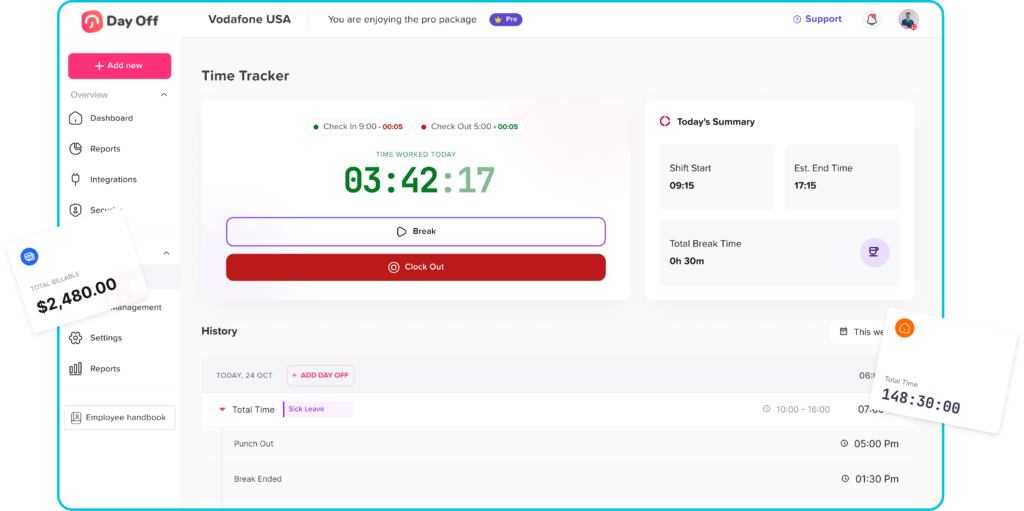
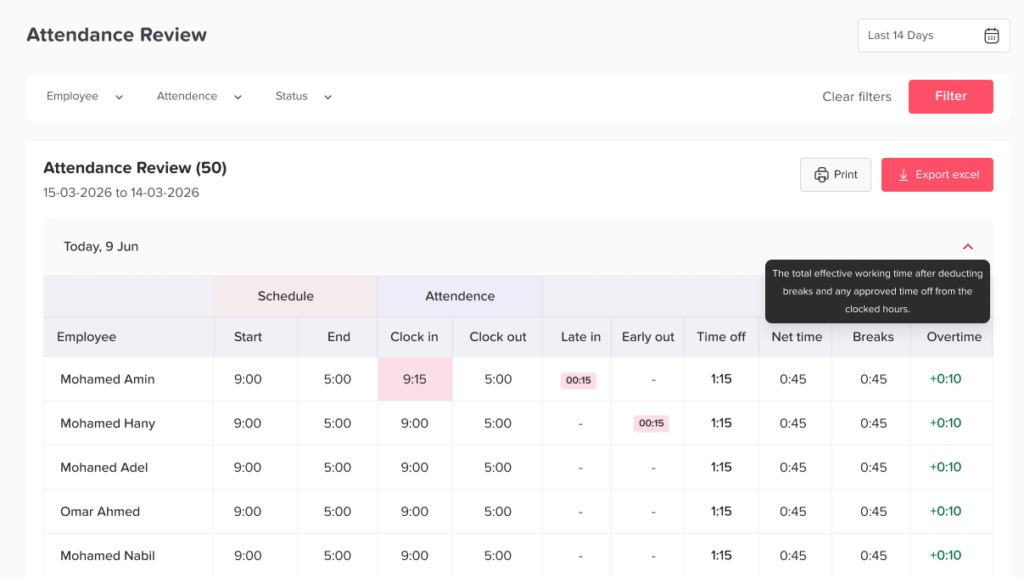
A good system connects the planned schedule with the actual attendance record. For example, if an employee is scheduled to start at 9:00 AM but clocks in at 9:20 AM, the system can help managers identify the late arrival. If another employee does not clock in because they are on approved PTO, the manager can see that the absence was planned.
This connection between scheduling, attendance, and time off is what makes modern employee attendance management more accurate.
Why Employee Attendance Needs More Than a Basic Timesheet
Many businesses start with a simple spreadsheet or manual timesheet. This may work for a very small team at the beginning, but it becomes harder as the company grows.
Manual tracking often creates problems such as:
- Employees forget to submit hours
- Managers spend time chasing attendance updates
- Late arrivals are missed
- Overtime is calculated manually
- PTO and attendance are tracked separately
- Payroll preparation takes longer
- Team availability is unclear
- Schedules become outdated quickly
- Employees are confused about shifts
- HR teams spend too much time correcting records
Attendance is not just a payroll issue. It affects staffing, customer service, productivity, employee fairness, and business planning. If managers do not know who is working and who is away, it becomes harder to keep operations running smoothly.
That is why choosing the right shift scheduling and time tracking software matters.
What to Look for in Shift Scheduling and Time Tracking Software
Before comparing the best tools, it is important to understand what features matter most.
Easy Shift Scheduling
The software should make it easy to create and manage employee schedules. Businesses may need fixed schedules, flexible hours, rotating shifts, part time schedules, or location based shifts.
A good system should help managers assign working hours clearly so employees know when they are expected to work.
Time Clock or Punch In and Punch Out
Employees should be able to record working time digitally. This may include clocking in from a mobile app, web app, tablet, or shared device, depending on the type of business.
Digital time tracking helps reduce errors caused by handwritten timesheets or memory-based reporting.
Attendance Visibility
Managers should be able to see attendance status in real time or near real time. This helps them know who is working, who is late, who has not clocked in, and who is away.
PTO and Leave Management
Attendance and PTO should not be treated as completely separate processes. If an employee is absent, managers need to know whether the person is on approved leave, sick leave, unpaid leave, or simply missing from work.
Software that connects attendance with PTO gives a clearer view of employee availability.
Overtime and Late Time Tracking
For businesses with hourly employees, overtime and late time can directly affect payroll. The software should help track extra hours, missed hours, and late arrivals more accurately.
Reports and Payroll Support
A good system should provide reports that HR or payroll teams can use to review working hours, attendance, overtime, absences, and time-off records.
Employee Self Service
Employees should be able to check their schedules, request time off, view approvals, and understand their attendance records without always asking HR.
Mobile Access
Modern teams often work across different locations, shifts, or remote setups. Mobile access is important for employees and managers who need to manage time and attendance from anywhere.
Quick Comparison: Top 3 Shift Scheduling and Time Tracking Software
| Software | Best For | Key Strength |
|---|---|---|
| Day Off | Teams that need PTO, attendance, schedules, and availability in one place | Strong connection between leave management, work schedules, and time tracking |
| Deputy | Shift-based businesses with complex scheduling needs | Advanced scheduling, shift planning, and workforce management tools |
| When I Work | Hourly teams that need simple scheduling and time clock tools | Easy employee scheduling, attendance tracking, and team communication |
Day Off
Best For: Businesses That Want Attendance, PTO, Work Schedules, and Team Availability in One Place
Day Off is a strong option for businesses that want to manage employee attendance together with leave management, PTO tracking, work schedules, and availability. It is especially useful for companies that do not want attendance tracking to be separated from time off.
Many businesses track work hours in one tool and leave requests in another. This often creates confusion. An employee may appear absent in the attendance sheet, but in reality, they may be on approved PTO. A manager may approve time off without checking shift coverage. Payroll may need to compare attendance records with leave balances manually.
Day Off helps solve this by bringing work schedules, time attendance, PTO, absences, approvals, and reports into one platform.
Key Features of Day Off
Day Off helps businesses manage:
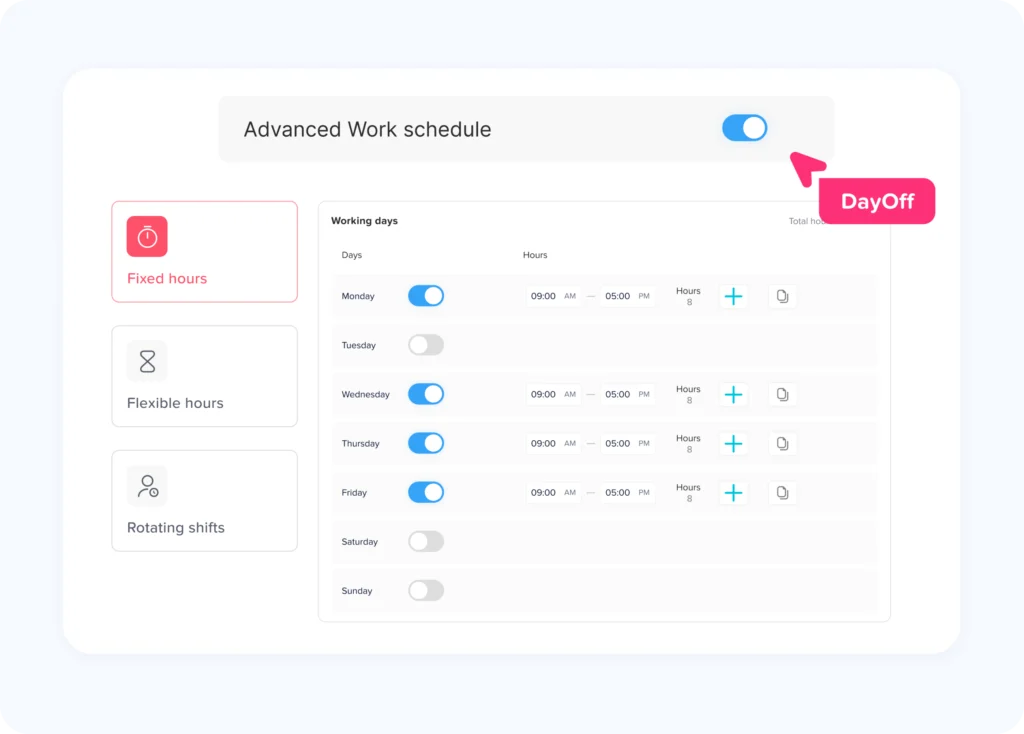
- Fixed work schedules
- Flexible work schedules
- Rotating work schedules
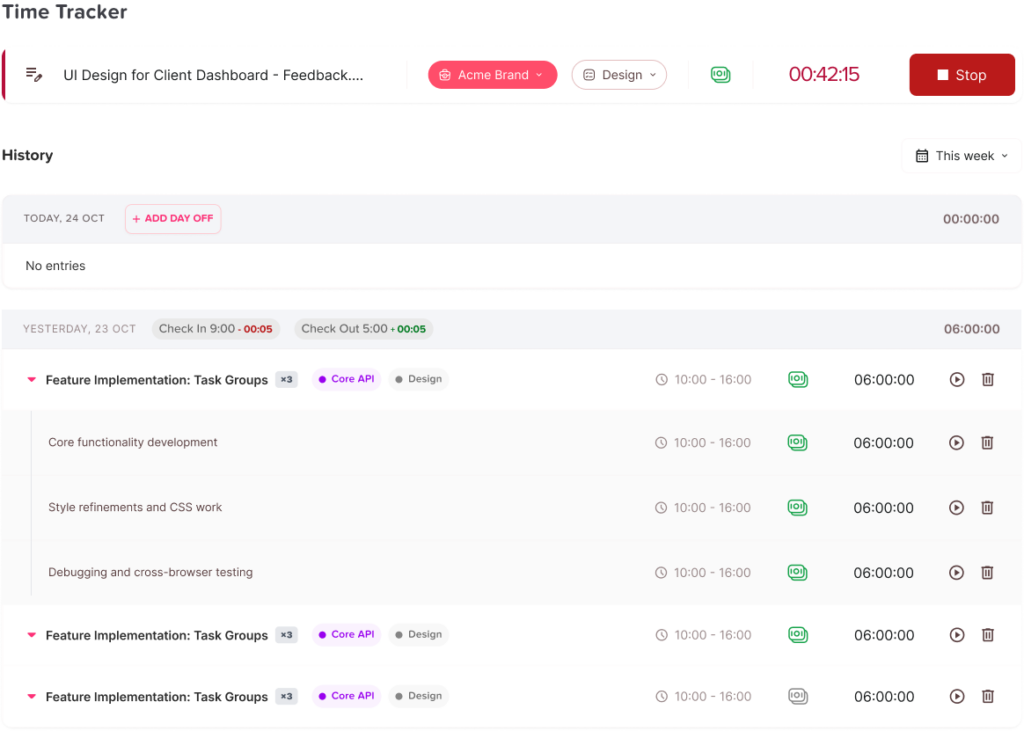
- Punch in and punch out
- Employee attendance
- Late time
- Overtime
- PTO requests
- Leave approvals
- PTO balances
- Custom leave types
- Shared leave calendar
- Absence tracking
- Team availability
- Reports and exports
- Payroll ready attendance data
This makes Day Off useful for companies that need more than a basic time clock. It gives HR teams and managers a wider view of employee time.
Why Day Off Is Useful for Employee Attendance
Employee attendance is easier to manage when managers can compare working hours with schedules and approved time off. For example, Day Off can help businesses understand whether an employee is:
- Working as scheduled
- Late
- Absent
- On approved PTO
- Taking sick leave
- Working overtime
- Following a flexible schedule
- Assigned to a rotating shift
This is important because not every absence should be treated the same way. Someone who missed work without notice is different from someone who is on approved vacation. A connected system helps reduce confusion and improves attendance accuracy.
Day Off for Different Schedule Types
Day Off supports different work schedule models, which makes it useful for modern teams.
Fixed Work Schedules
A fixed schedule means employees work the same hours on the same days. For example, Monday to Friday from 9:00 AM to 5:00 PM.
For this type of schedule, Day Off helps businesses compare employee attendance against expected working hours. This makes it easier to track late arrivals, missed workdays, and overtime.
Flexible Work Schedules
A flexible schedule allows employees to work required hours without always following the same start and end time.
For example, an employee may be required to work 8 hours per day but can start at 8:00 AM, 9:00 AM, or 10:00 AM depending on company policy.
Day Off helps businesses track working hours while still supporting flexible work arrangements.
Rotating Work Schedules
A rotating schedule means employees move between different shifts based on a repeating pattern. This is common in customer support, healthcare, retail, security, hospitality, and operations teams.
For rotating shifts, attendance must be checked against the assigned shift, not a general company schedule. Day Off helps businesses connect employee schedules with attendance and PTO so managers can understand coverage more clearly.
Day Off for PTO and Attendance Together
One of the biggest advantages of Day Off is that it connects attendance with leave management.
This matters because PTO affects employee availability. If an employee requests a day off, managers need to know how that leave affects the schedule. If an employee does not clock in, HR needs to know whether the absence was approved or unplanned.
With Day Off, businesses can manage leave requests, approval workflows, balances, and attendance records in one place. This reduces the need to switch between tools or compare spreadsheets manually.
Who Should Use Day Off?
Day Off is a good fit for:
- Small businesses
- Growing companies
- Remote teams
- Hybrid teams
- HR teams that manage PTO and attendance
- Companies that need work schedules and leave tracking together
- Teams that want a simple system without unnecessary complexity
- Businesses that need better visibility into who is working and who is away
Pros of Day Off
- Combines PTO, attendance, work schedules, and availability
- Supports fixed, flexible, and rotating schedules
- Helps track punch in, punch out, late time, and overtime
- Makes PTO and absence tracking easier
- Useful for HR, managers, and employees
- Helps reduce manual attendance and leave tracking
- Provides reports and exports for better payroll preparation
- Works well for teams that want a centralized system
Possible Limitations
Day Off is especially strong for businesses that want time tracking connected with PTO and leave management. However, companies that need very complex enterprise workforce forecasting, demand planning, or advanced labor compliance tools may want to compare it with more specialized workforce management platforms.
Best Use Case
Day Off is best for companies that want a simple, centralized way to manage employee schedules, attendance, PTO, absences, and team availability in one place.
Deputy
Best For: Shift Based Businesses With Advanced Scheduling Needs
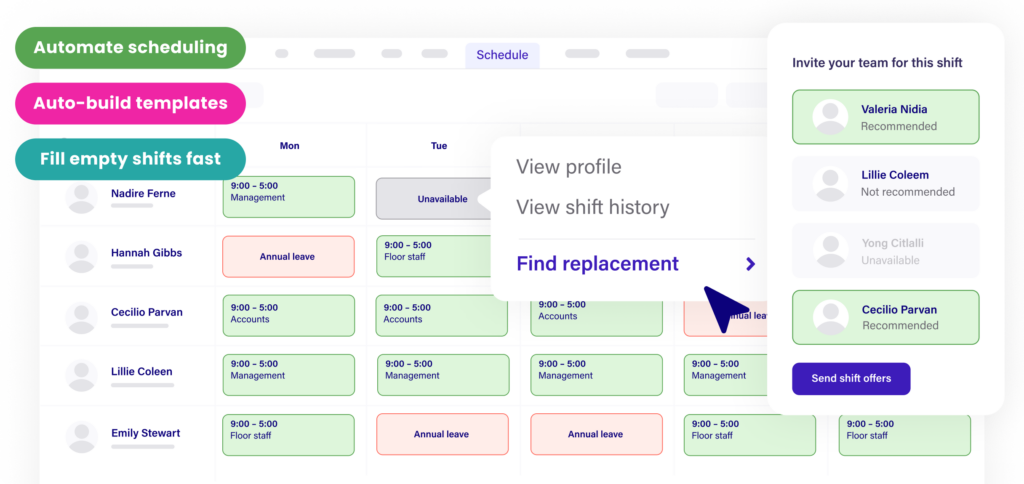
Deputy is a workforce management platform designed for businesses that rely heavily on shifts. It is commonly used by companies that need employee scheduling, shift planning, time clock tools, time tracking, team communication, and workforce management features.
Deputy can be especially useful for businesses with hourly employees, multiple locations, changing schedules, and shift swaps.
Key Features of Deputy
Deputy offers features such as:
- Employee scheduling
- Shift planning
- Shift swapping
- Smart scheduling
- Time clock app
- Time tracking
- Leave management
- Task management
- Team communication
- Workforce analytics
- Integrations
- Labor compliance tools
These features make Deputy a strong option for businesses that need a more advanced shift management system.
Why Deputy Is Useful for Employee Attendance
Deputy helps managers schedule staff based on business needs, availability, and budget. Employees can clock in and out, and managers can review attendance and timesheets.
For shift based teams, this is important because attendance is closely tied to coverage. If an employee misses a shift, the business may need to find a replacement quickly. If an employee works extra hours, managers need to know how that affects labor costs.
Deputy also supports shift swapping, which can help employees handle schedule changes while keeping managers informed.
Who Should Use Deputy?
Deputy is a good fit for:
- Restaurants
- Cafés
- Retail stores
- Healthcare teams
- Hospitality businesses
- Multi location businesses
- Shift based teams
- Businesses with frequent schedule changes
- Companies that need stronger workforce management features
Pros of Deputy
- Strong employee scheduling tools
- Good for shift based operations
- Supports shift swapping
- Includes time clock and time tracking
- Offers workforce management features beyond basic attendance
- Useful for businesses with multiple locations or changing schedules
- Includes integrations and analytics
Possible Limitations
Deputy may be more than what some small businesses need if they only want simple attendance and PTO tracking. Teams looking mainly for PTO management and leave visibility may find a more focused platform easier to use.
Best Use Case
Deputy is best for shift-heavy businesses that need advanced scheduling, shift changes, and workforce planning tools.
When I Work
Best For: Hourly Teams That Need Simple Scheduling and Time Clock Tools
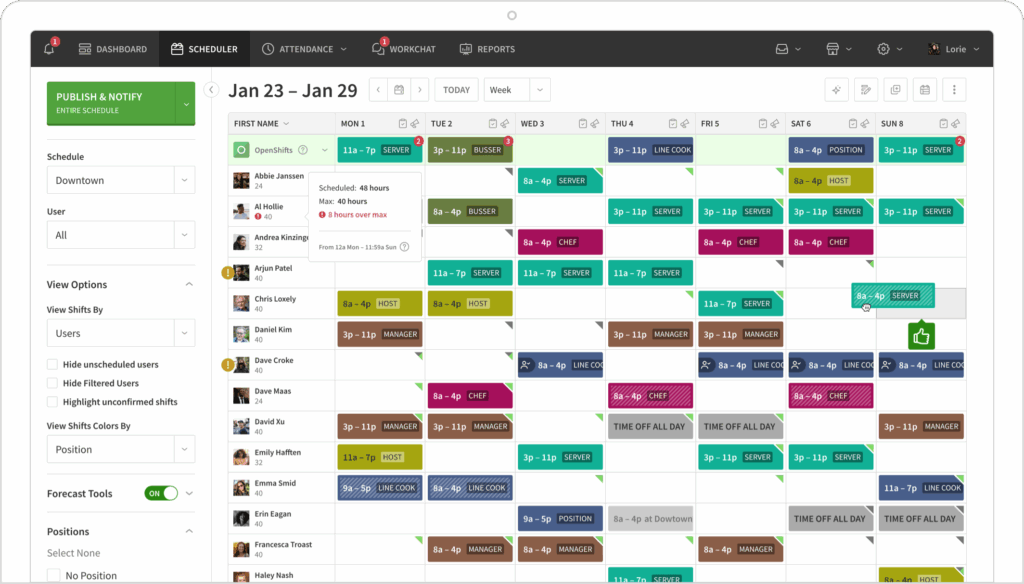
When I Work is an employee scheduling and time tracking platform built for teams that need to create schedules, track attendance, manage time off requests, and communicate with employees.
It is often a good fit for hourly teams that want an easy way to manage shifts and time clock activity without making the process too complicated.
Key Features of When I Work
When I Work includes features such as:
- Employee scheduling
- Time clock
- Time tracking
- Timesheets
- Attendance tracking
- Time off requests
- Team messaging
- Schedule updates
- Shift trades
- Timesheet approvals
- Payroll exports
These features help managers handle daily employee scheduling and attendance tasks more efficiently.
Why When I Work Is Useful for Employee Attendance
When I Work helps managers track hours worked, attendance, and labor costs. Employees can clock in using supported devices, while managers can review timesheets and approve records.
For businesses with hourly workers, this can reduce the need for paper timesheets and manual payroll calculations. It also helps keep employees informed about schedule changes.
Who Should Use When I Work?
When I Work is a good fit for:
- Small businesses
- Hourly teams
- Retail stores
- Restaurants
- Customer service teams
- Field teams
- Businesses that need simple shift scheduling
- Managers who want employee scheduling and communication in one tool
Pros of When I Work
- Easy employee scheduling
- Includes time clock and time tracking
- Supports time off requests
- Helps manage timesheets and approvals
- Useful for hourly employees
- Includes team communication features
- Good for businesses that want a simple scheduling experience
Possible Limitations
When I Work is strong for scheduling and time clock needs, but businesses that want deeper PTO policy management, leave balances, accruals, and connected leave workflows may need to review whether it fully matches their HR process.
Best Use Case
When I Work is best for hourly teams that need simple scheduling, attendance tracking, timesheets, and employee communication.
Day Off vs Deputy vs When I Work: Which One Should You Choose?
The best choice depends on how your business manages employee time.
Choose Day Off If You Want Attendance and PTO Together
Day Off is the best choice if your main goal is to manage work schedules, attendance, PTO, leave requests, absences, and team availability in one place.
It is especially useful if your business wants to avoid separating time tracking from leave management.
Choose Day Off if you need:
- PTO tracking
- Leave approvals
- Work schedules
- Punch in and punch out
- Attendance tracking
- Late time and overtime tracking
- Shared leave calendar
- Reports and exports
- Better team availability visibility
Choose Deputy If You Need Advanced Shift Management
Deputy is a strong choice if your business depends heavily on shifts, multiple locations, labor planning, shift swapping, and workforce management.
Choose Deputy if you need:
- Advanced shift scheduling
- Shift swapping
- Time clock tools
- Labor planning
- Workforce analytics
- Team communication
- Multi-location shift management
Choose When I Work If You Need Simple Scheduling and Time Clock Tools
When I Work is a good choice if you want an easy scheduling and attendance tool for hourly employees.
Choose When I Work if you need:
- Simple employee scheduling
- Time clock
- Timesheets
- Attendance tracking
- Schedule updates
- Team messaging
- Time off requests
Feature Comparison Table
| Feature | Day Off | Deputy | When I Work |
|---|---|---|---|
| Shift scheduling | Yes | Yes | Yes |
| Time tracking | Yes | Yes | Yes |
| Punch in / clock in | Yes | Yes | Yes |
| PTO management | Strong | Available | Available |
| Leave approvals | Yes | Yes | Yes |
| Shared leave calendar | Yes | Varies by setup | Varies by setup |
| Fixed schedules | Yes | Yes | Yes |
| Flexible schedules | Yes | Yes | Yes |
| Rotating schedules | Yes | Yes | Yes |
| Late time tracking | Yes | Yes | Yes |
| Overtime tracking | Yes | Yes | Yes |
| Payroll reports or exports | Yes | Yes | Yes |
| Best for | PTO + attendance in one place | Advanced shift based workforce management | Simple hourly scheduling and time clock |
Why Shift Scheduling and Time Tracking Software Improves Employee Attendance
Using the right software can improve attendance management in several ways.
It Gives Managers Better Visibility
Managers can see who is scheduled, who clocked in, who is late, and who is away. This reduces confusion and helps teams plan daily work more clearly.
It Reduces Manual Errors
Manual timesheets often depend on memory or delayed updates. Digital tracking helps create more accurate records.
It Makes Payroll Preparation Easier
When attendance, overtime, and PTO are tracked clearly, payroll teams spend less time correcting records and checking missing information.
It Helps Prevent Scheduling Conflicts
A scheduling system helps managers avoid assigning employees to overlapping shifts or approving too many time-off requests at the same time.
It Improves Employee Accountability
When employees can see their schedules and record their time clearly, expectations become easier to follow.
It Supports Fairer Attendance Management
A clear system makes attendance rules more consistent. Managers can review records based on actual data instead of guesswork.
Frequently Asked Questions
What is the best shift scheduling and time tracking software?
The best shift scheduling and time tracking software depends on your business needs. Day Off is a strong choice for teams that want attendance, PTO, work schedules, and availability in one place. Deputy is useful for advanced shift scheduling, while When I Work is good for simple hourly scheduling and time clock tracking.
Why is shift scheduling important for employee attendance?
Shift scheduling is important because attendance can only be measured correctly when the business knows when each employee is expected to work. Without a clear schedule, it is harder to know whether someone is late, absent, working overtime, or on approved leave.
Can time tracking software help reduce payroll errors?
Yes. Time tracking software helps reduce payroll errors by recording work hours, late time, overtime, absences, and approved leave more clearly. This gives payroll teams better data and reduces manual calculations.
Should PTO tracking and attendance tracking be in the same system?
For many businesses, yes. PTO and attendance both affect employee availability. When they are tracked together, managers can understand whether an employee is working, absent, late, or on approved time off.
What features should I look for in employee attendance software?
Important features include shift scheduling, punch in and punch out, attendance tracking, PTO management, overtime tracking, late time tracking, reports, payroll exports, employee self-service, and mobile access.
Is shift scheduling software useful for small businesses?
Yes. Small businesses can benefit from shift scheduling software because it reduces manual work, improves attendance accuracy, helps managers plan coverage, and makes payroll preparation easier.
What is the difference between time tracking and attendance tracking?
Time tracking focuses on recording how many hours employees worked. Attendance tracking focuses on whether employees were present, late, absent, or on leave according to their schedule. Many modern tools combine both.
Can shift scheduling software manage rotating shifts?
Yes. Many shift scheduling tools can support rotating shifts. This helps businesses assign employees to different shifts based on weekly or monthly patterns and track attendance against the correct schedule.
Conclusion
The top best 3 shift scheduling and time tracking software for employee attendance are Day Off, Deputy, and When I Work.
Day Off is the best option for businesses that want to manage attendance, PTO, work schedules, leave requests, absences, and team availability in one place. It is especially useful for teams that want a simple and connected system for employee time management.
Deputy is a strong choice for shift-based businesses that need advanced scheduling, shift swapping, workforce planning, and time clock tools. It is a good fit for restaurants, retail, hospitality, healthcare, and multi location teams.
When I Work is a good option for hourly teams that need simple scheduling, time clock, timesheets, attendance tracking, and team communication.
The best software depends on your business needs. If your biggest challenge is managing shifts, Deputy may be a good fit. If you need a simple scheduling and time clock system, When I Work is worth considering. If you want attendance, PTO, schedules, leave, and availability in one connected platform, Day Off is a strong choice.