





-
Leave Types
When creating a leave type, you need to select a category based on how you want requests to behave. Each category controls how employees can submit requests and how the system handles them.
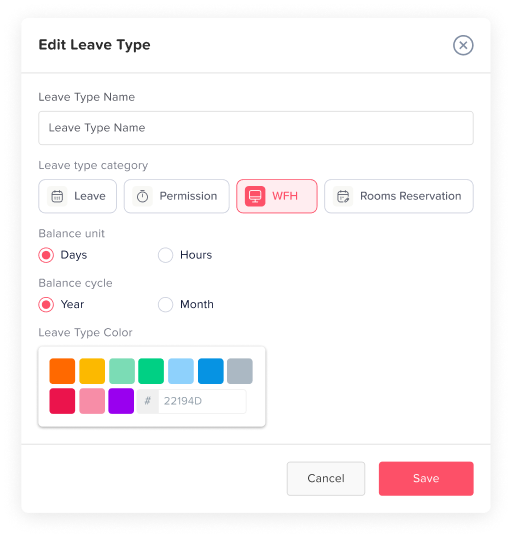
1. Leave
This category allows employees to submit only one request per day for the selected leave type. It is designed for full-day absences where the employee is not expected to work at all during that day.
This is typically used for:
- Annual leave
- Sick leave
- Any standard day-based time off
Because only one request is allowed per day, it ensures that the leave is treated as a complete absence rather than being split into multiple partial requests.
2. Permission
This category allows employees to submit multiple requests within the same day. It is ideal for situations where time off is needed for only part of the day rather than the entire day.
This is best suited for:
- Short absences (e.g., 1–3 hours)
- Personal errands or appointments
- Late arrivals or early departures
This category works especially well with hourly leave tracking, as it provides the flexibility to request and manage partial-day time off.
3. Work From Home
This category is used for employees who are working remotely instead of taking time off. Requests under this category typically follow a daily structure, similar to standard leave, but indicate that the employee is still working from a different location.
It is commonly used to:
- Track remote work days
- Maintain visibility on employee availability
- Differentiate between time off and remote work
4. Rooms Reservation
This category is used to book rooms or shared resources within the organization rather than to request time off.
It can be used for:
- Meeting room bookings
- Shared workspace reservations
- Other internal resources
Unlike other categories, this is not related to leave balances but helps manage availability and scheduling of company resources.
How Attendance Is Calculated
The Attendance section provides a real-time overview of where employees are during the day. The counts shown here are directly linked to the leave type category selected when requests are created.
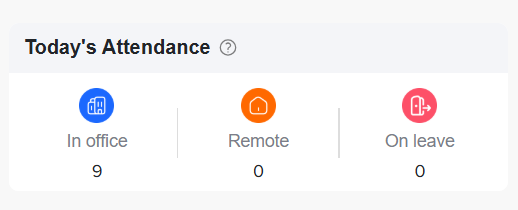
1. On Leave
Employees who have an approved request under a leave type categorized as Leave will be counted as On leave. This reflects full-day absences where the employee is not working.
2. Remote
Employees who have an approved request under the Work From Home category will be counted as Remote. This indicates that the employee is working but not physically present in the office.
3. In Office
All remaining employees who are not on leave or on remote requests are automatically counted as in-office. This assumes they are working on-site as usual.
Important Note
The attendance summary is dynamically updated based on the category of the leave type, not just the request itself. This ensures accurate visibility into who is absent, who is working remotely, and who is present in the office at any given time.