








A leave balance report is one of the most useful HR reports for managing employee time off accurately. It shows how much leave each employee has available, how much they have used, how much they have earned, and how much may carry over into the next period.
For HR teams, this report is not just a simple list of numbers. It supports payroll accuracy, reduces employee questions, improves workforce planning, and helps companies apply leave policies consistently.
Without a clear leave balance report, HR may need to check spreadsheets, emails, approval messages, calendars, and payroll notes just to answer one basic question: “How many days off does this employee have left?”

That is why companies need a reliable way to track PTO, sick leave, vacation leave, unpaid leave, carryover, accruals, and employee leave history in one place.
In this guide, we will explain what a leave balance report is, why it matters, what it should include, how HR can use it, and how Day Off helps teams manage leave balances clearly without relying on messy spreadsheets.
What Is a Leave Balance Report?
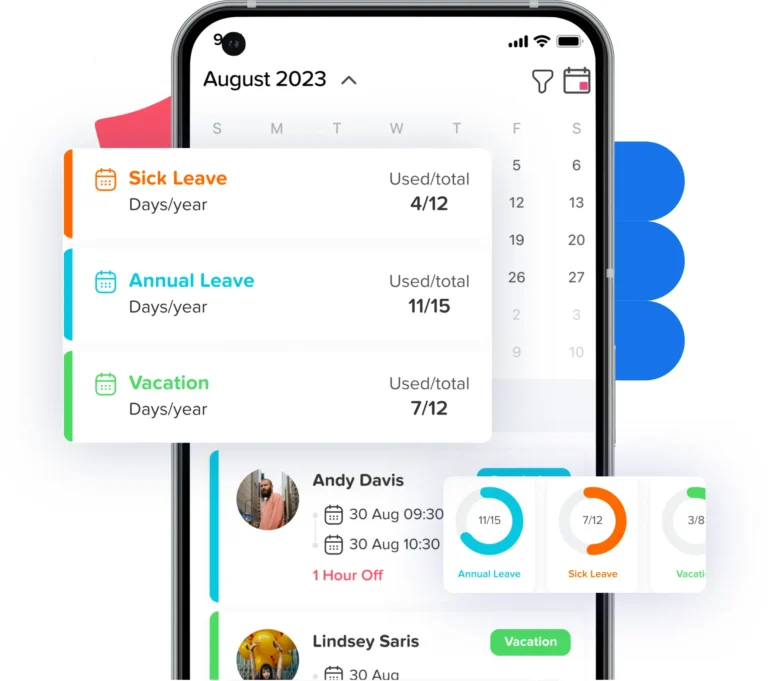
A leave balance report is an HR report that shows the current leave status of employees. It usually includes available leave, used leave, accrued leave, pending leave, carried-over leave, expired leave, and manual adjustments.
In simple terms, a leave balance report answers questions like:
- How much PTO does each employee have left?
- How many vacation days has an employee used?
- How much sick leave is available?
- How much leave has been carried over from the previous year?
- Which employees have low or negative balances?
- Which employees have too much unused leave?
- Are pending requests affecting future balances?
- Are employees assigned to the correct leave policy?
- Did accruals and carryover rules apply correctly?
A leave balance report gives HR, managers, and employees a clearer view of time off records. It also helps companies avoid confusion when employees request leave, when managers approve time off, or when payroll needs accurate records.
Why Leave Balance Reports Matter for HR
Leave tracking may feel simple when a company has only a few employees. But as the team grows, leave management becomes more complex. Employees may have different policies, work schedules, locations, leave types, accrual rules, and carryover limits.
A clear leave balance report helps HR teams manage time off with more accuracy and less manual work.
It Helps Employees Trust Their Leave Balance
Employees often ask HR questions like:
- How many PTO days do I have left?
- Did my sick leave reset?
- Was my vacation request deducted?
- Do I have carried-over days?
- Why is my balance lower than expected?
- Did my pending request already reduce my balance?
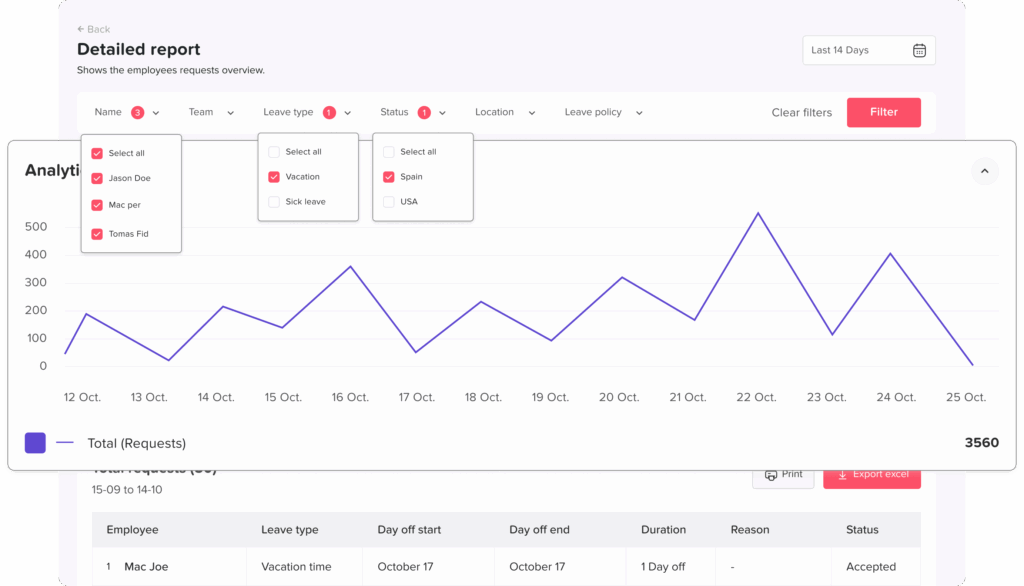
When leave balances are updated clearly, employees can check their available time off without constantly asking HR. This saves time and builds trust.
It Helps Managers Plan Work Better
Managers need to know who is available before approving time off. If leave balances and upcoming absences are not clear, managers may approve too many requests at the same time.
A leave balance report helps managers understand employee availability, especially during:
- Busy seasons
- Public holidays
- Project deadlines
- Shift coverage planning
- Payroll periods
- Remote and hybrid work schedules
When managers have clear leave data, they can approve requests more confidently and avoid coverage gaps.
It Supports Payroll Accuracy
Leave records can affect payroll, especially when employees take unpaid leave, use paid time off, work hourly schedules, or leave the company with unused PTO.
In the United States, the Fair Labor Standards Act does not require payment for time not worked, such as vacation, sick leave, or holidays. These benefits are usually based on company policy, employment agreements, or state and local rules.
Because PTO rules often depend on policy and location, HR needs accurate records to support payroll decisions and reduce disputes.
It Helps HR Find Errors Early
Manual leave tracking can lead to common mistakes, including:
- Wrong starting balances
- Missed leave deductions
- Duplicate requests
- Incorrect carryover
- Wrong accrual settings
- Canceled requests still affecting balances
- Employees assigned to the wrong policy
- Half-day leave counted incorrectly
- Unpaid leave recorded as paid leave
A leave balance report helps HR catch these issues before they become bigger problems.
What Should a Leave Balance Report Include?
A good leave balance report should show more than just the number of days an employee has left. It should give HR enough detail to understand how the balance was calculated.
| Report Field | Why It Matters |
|---|---|
| Employee name | Identifies the employee clearly |
| Employee ID | Helps match leave records with payroll or HR files |
| Department or team | Helps managers review team availability |
| Location | Useful for companies with different leave rules by location |
| Employment status | Helps separate full-time, part-time, temporary, and former employees |
| Work schedule | Important for hourly, shift-based, and part-time leave calculations |
| Leave policy | Shows which policy applies to the employee |
| Leave type | Separates PTO, sick leave, vacation, unpaid leave, and more |
| Opening balance | Shows the starting leave amount |
| Accrued leave | Shows leave earned during the period |
| Used leave | Shows leave already taken |
| Pending leave | Shows requests waiting for approval |
| Available balance | Shows what the employee can still use |
| Carryover balance | Shows unused leave moved from a previous period |
| Expired leave | Shows leave that is no longer available |
| Manual adjustments | Shows corrections made by HR |
| Reset date | Shows when the balance renews |
| Report date | Shows when the report was generated |
The more complete the report is, the easier it becomes to understand employee leave records and explain balances to employees.
Key Leave Types HR Should Track
A leave balance report should separate different leave types. Combining everything into one number can create confusion, especially if each leave type follows different rules.
PTO
Paid time off is often used for vacation, personal time, or general time away from work. Some companies offer one combined PTO bank, while others separate vacation and sick leave.
Vacation Leave
Vacation leave is planned time off for rest, travel, or personal needs. HR should track used vacation, available vacation, carryover rules, and expiration dates clearly.
Sick Leave
Sick leave should usually be tracked separately from vacation or general PTO, especially if the company has different rules for sick leave usage, accrual, carryover, or documentation.
Paid sick leave rules can also vary by location. For example, California generally requires employers to provide at least 40 hours or 5 days of paid sick leave per year, while New York requires sick leave accrual at no less than 1 hour for every 30 hours worked.
Unpaid Leave
Unpaid leave does not reduce a paid leave balance, but it still needs to be recorded. It may affect payroll, attendance, scheduling, and reporting.
Personal Leave
Personal leave may be used for personal responsibilities, family needs, or urgent situations. If the company gives personal days, HR should track them separately.
Half-Day Leave
Half-day leave can easily create balance errors if it is not recorded correctly. A good leave balance report should show partial-day deductions clearly.
Custom Leave Types
Some companies also track maternity leave, paternity leave, bereavement leave, study leave, volunteer leave, compensatory time off, or other custom leave types.
With Day Off, HR teams can create and manage different leave types, helping each category follow the correct policy instead of being mixed into one unclear balance.
How to Track PTO Balances Clearly
PTO balance tracking should be simple, consistent, and easy to review. HR should be able to see how much PTO each employee earned, used, and still has available.
A clear PTO balance report should answer:
- What was the employee’s starting PTO balance?
- How much PTO did they earn this period?
- How much PTO did they use?
- Are there pending PTO requests?
- Did any PTO carry over?
- Did any PTO expire?
- Are there manual adjustments?
- What is the available PTO balance today?
For example:
PTO Balance Overview
Employee leave balances and accrual summary
| Employee | Opening | Accrued | Used | Pending | Carryover | Available |
|---|---|---|---|---|---|---|
| Sarah Ahmed | 5 days | 8 days | 4 days | 2 days | 2 days | 9 days |
| Mark Lewis | 3 days | 6 days | 5 days | 0 days | 1 day | 5 days |
| Lina Omar | 0 days | 10 days | 7 days | 1 day | 0 days | 3 days |
This helps HR make sure employees receive the correct amount of carried-over leave and that unused leave above the allowed limit is handled according to company policy.
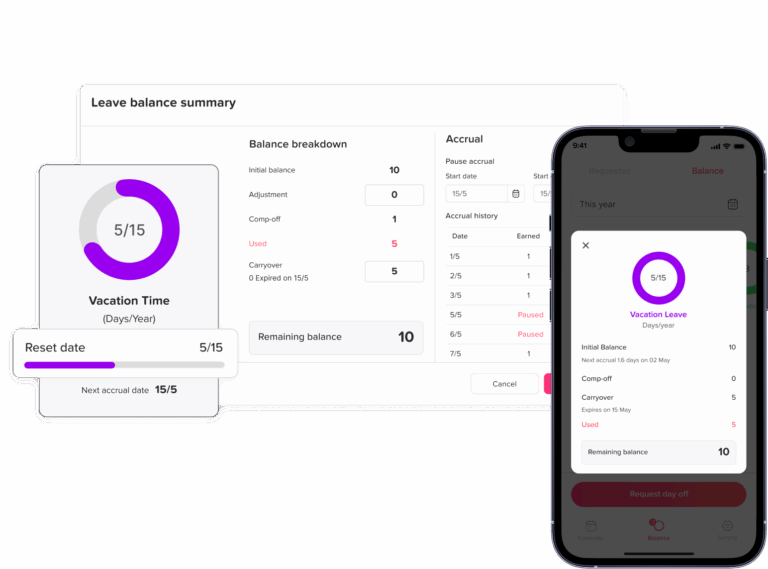
Day Off supports accrual rules, carryover limits, reset schedules, and audit trails, helping HR teams manage policy rules more clearly.
Leave Balance Report vs Leave History Report
A leave balance report and a leave history report are related, but they are not the same.
Leave Report Comparison
Understand the difference between balance and history reports
| Report Type | Main Purpose |
|---|---|
| Leave balance report | Shows current available leave balances |
| Leave history report | Shows past leave requests and absence records |
A leave balance report tells HR how much leave an employee has now. A leave history report shows how that employee used leave over time.
For example, a leave balance report may show that an employee has 6 vacation days left. A leave history report may show that the employee used 4 vacation days in March, 2 sick days in May, and 1 personal day in June.
HR teams should use both reports together for a complete view.
Leave Balance Report vs Accrual Report
A leave balance report shows the current result. An accrual report shows how the balance was built over time.
Leave Report Comparison
Compare balance reports with accrual reports
| Report Type | What It Shows |
|---|---|
| Leave balance report | Current available, used, pending, and carried-over leave |
| Accrual report | How much leave was earned and when it was added |
This is important because an employee’s balance may look wrong unless HR can review the accrual history behind it.
For example, if an employee says their PTO balance is too low, HR should check:
- The accrual start date
- The accrual frequency
- The accrual rate
- Whether the employee reached a balance cap
- Whether unpaid leave affected accrual
- Whether carryover was applied correctly
- Whether any manual adjustment changed the balance
Day Off’s carryover feature page notes that accrual reports can show how an employee’s leave balance builds over time and when the next amount will be earned.
When HR Should Review Leave Balance Reports
Leave balance reports should not only be reviewed at the end of the year. HR should check them regularly to prevent errors.
Before Payroll
HR should review leave balances before payroll if paid or unpaid leave affects salary, hourly wages, deductions, or final payouts.
Employers covered by the FLSA must keep certain wage and hour records for covered, nonexempt workers. The Department of Labor states that payroll records should generally be preserved for at least three years, while wage calculation records such as time cards, wage rate tables, work schedules, and deduction records should generally be kept for two years.
Before Year-End
Year-end is a key time to review balances, carryover, expiration, and reset rules.
HR should check:
- Which balances reset
- Which balances carry over
- Which balances expire
- Which employees are close to the cap
- Which leave types follow different reset rules
- Whether employees need reminders before leave expires
Before Policy Changes
If the company is changing leave rules, HR should review current balances first. This avoids confusion during the transition.
For example, before changing from annual front-loaded PTO to monthly accrual, HR should confirm each employee’s current balance, used leave, and carryover.
Before Employee Offboarding
When an employee leaves, HR should review final balances, used leave, unpaid leave, and any payout rules.
PTO payout rules can vary by state and company policy, so HR should not assume one rule applies everywhere. Companies should review local rules and their own written policy before making final pay decisions.
Monthly or Quarterly
Regular monthly or quarterly reviews help HR catch errors early and keep records clean.
A monthly review may be useful for:
- Hourly employees
- Shift-based teams
- Multi-location companies
- Teams with frequent leave requests
- Companies with accrual-based policies
- Companies with paid sick leave obligations
Common Leave Balance Report Mistakes
Even organized HR teams can make mistakes when tracking leave balances. Here are common issues to avoid.
Tracking Leave in Too Many Places
If PTO requests are in email, sick leave is in spreadsheets, and approvals are in chat messages, HR will struggle to keep balances accurate.
Not Updating Canceled Requests
If an employee cancels approved leave, the balance should be restored. If the request is not updated, the employee may lose leave incorrectly.
Ignoring Pending Requests
Pending requests can affect future balances. HR should review them when checking employee availability and projected leave.
Mixing Paid and Unpaid Leave
Unpaid leave should not be deducted from PTO unless company policy says otherwise. It should be tracked separately for payroll and reporting.
Forgetting Carryover Rules
Carryover limits and expiration dates can cause confusion if they are not tracked clearly.
Not Checking Manual Adjustments
Manual changes should always have a clear reason. Otherwise, HR may not understand why a balance changed.
Not Separating Leave Types
Vacation, sick leave, personal leave, and unpaid leave may follow different rules. They should be reviewed separately.
Not Matching Leave With the Employee’s Work Schedule
A full day of leave may not mean the same thing for every employee. An employee working 8-hour days, 10-hour shifts, part-time hours, or rotating schedules may need different balance calculations.
How a Leave Balance Report Helps Payroll
Payroll teams need accurate leave data. A leave balance report helps payroll review:
- Paid leave taken during the pay period
- Unpaid leave that may affect salary or wages
- Final PTO balances for departing employees
- Leave deductions for hourly employees
- Manual balance adjustments
- Half-day leave
- Leave taken during holidays or non-working days
- Negative balances, if allowed by company policy
- Sick leave usage where local rules apply
When HR and payroll work from the same leave records, there is less risk of payroll mistakes.
How a Leave Balance Report Helps Managers
Managers do not always need every HR detail, but they do need visibility into team availability.
A leave balance report helps managers:
- Understand who has upcoming leave
- Avoid approving overlapping requests
- Plan coverage during busy periods
- Encourage employees with high unused leave to take time off
- Identify employees with low balances before approving new requests
- Review team leave patterns
When managers have better visibility, they can approve requests more confidently.
How a Leave Balance Report Helps Employees
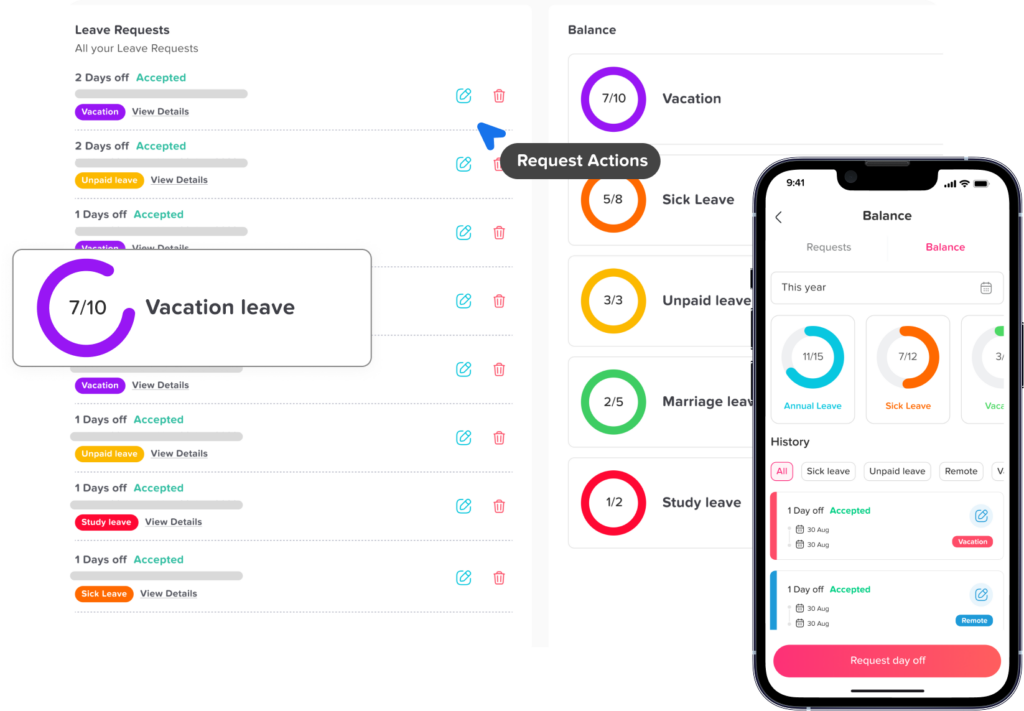
Employees also benefit from clear leave balance tracking. When employees can see their own leave balance, they are less likely to ask HR for updates.
A good leave balance view helps employees:
- Plan vacations earlier
- Avoid requesting more leave than they have
- Understand how much PTO they earned
- See whether leave was deducted correctly
- Know what carried over
- Check approval status
- Trust the company’s leave process
This improves transparency and reduces frustration.
How Day Off Helps HR Track Leave Balances
Day Off helps HR teams manage leave balances in one organized system instead of relying on spreadsheets, email threads, or manual updates.
With Day Off, HR can:
- Track PTO, sick leave, vacation, unpaid leave, and custom leave types
- Manage employee leave balances
- Set leave policies
- Track accruals and carryover
- Review pending, approved, and rejected requests
- Manage half-day leave
- Organize employees by team or location
- Use a shared leave calendar
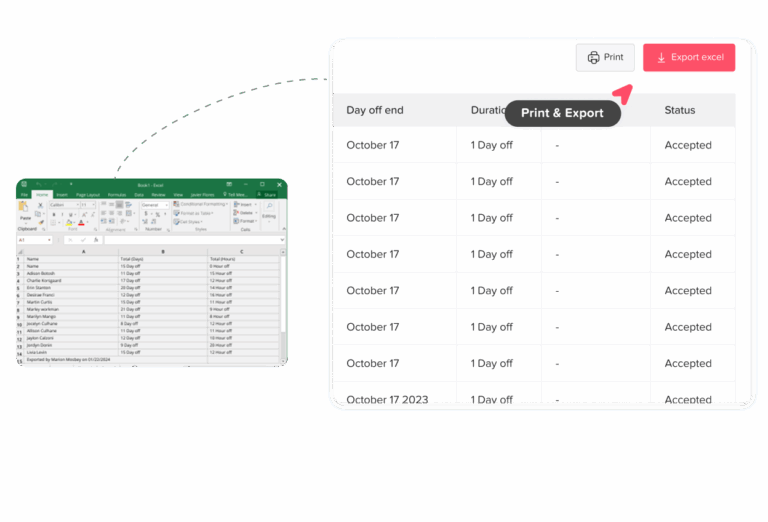
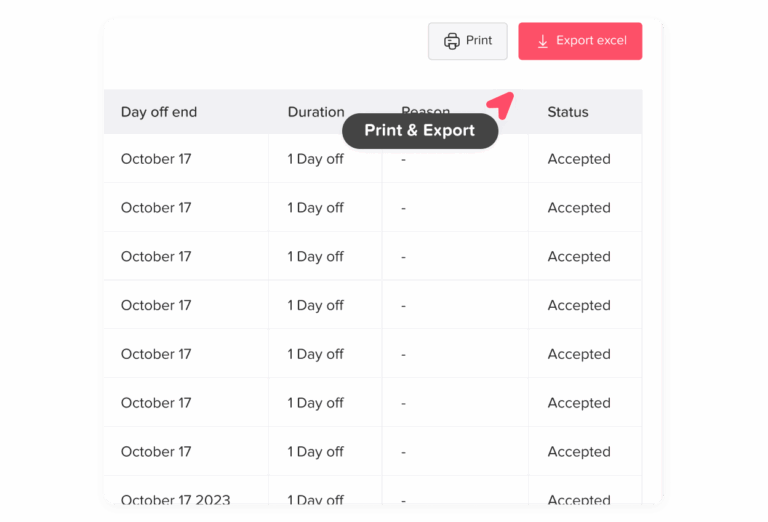
- Export reports for HR or payroll
- Give employees visibility into their available leave
Day Off’s PTO tracker page highlights automatic PTO balance updates, accrual rules, carryover limits, approval workflows, custom PTO types, and integrations with tools such as Google Calendar, Outlook Calendar, Slack, Microsoft Teams, Google Workspace, and REST API.
This makes leave balance tracking easier for HR, clearer for employees, and more useful for managers.
Instead of manually calculating balances, Day Off helps companies keep time off records updated and accessible.
Leave Balance Report Checklist
Use this checklist when reviewing employee leave balances.
Leave Balance Report Checklist
Key items HR should review when checking employee leave balances
| Checklist Item | What to Review |
|---|---|
| Employee information | Name, team, location, work schedule, employment status |
| Policy assignment | Make sure the employee is assigned to the correct leave policy |
| Leave types | Review PTO, sick leave, vacation, unpaid leave, and custom leave |
| Opening balance | Check the starting balance for the period |
| Accruals | Confirm leave earned during the period |
| Used leave | Review approved leave already taken |
| Pending leave | Check requests waiting for approval |
| Carryover | Confirm unused leave moved from the previous period |
| Expired leave | Review leave that was removed according to policy |
| Manual adjustments | Check edits, corrections, and notes |
| Available balance | Confirm the final balance is correct |
| Payroll impact | Review paid leave, unpaid leave, and final payouts |
| Reports | Export or save records for HR review |
Best Practices for Creating a Clear Leave Balance Report
A leave balance report should be easy to understand and easy to trust. Follow these best practices.
Use One Source of Truth
Keep leave requests, approvals, balances, and reports in one system. This reduces errors and avoids confusion.
Update Balances Automatically
Manual updates can lead to mistakes. Whenever possible, use a leave tracking system that updates balances after approvals.
Separate Leave Types
Do not combine all leave into one number unless your policy is designed that way. Track each leave type clearly.
Review Reports Regularly
Monthly or quarterly reviews help HR catch errors before they affect payroll or employee trust.
Give Employees Access to Their Balances
Employees should be able to check their own leave balance without asking HR every time.
Document Manual Changes
If HR adjusts a balance manually, add a reason. This keeps records clear for future audits.
Connect Reports With Workforce Planning
Use leave reports to understand team availability, busy seasons, overlapping requests, and unused PTO trends.
Example Leave Balance Report Format
Here is a simple format HR teams can use.
Example Leave Balance Report
Sample leave balances by employee and leave type
| Employee | Team | Type | Opening | Accrued | Used | Pending | Carryover | Available |
|---|---|---|---|---|---|---|---|---|
| Sarah Ahmed | Marketing | PTO | 5 | 8 | 4 | 2 | 2 | 9 |
| Sarah Ahmed | Marketing | Sick | 3 | 5 | 1 | 0 | 0 | 7 |
| Mark Lewis | Sales | PTO | 3 | 6 | 5 | 0 | 1 | 5 |
| Lina Omar | Support | PTO | 0 | 10 | 7 | 1 | 0 | 3 |
This format gives HR a clear view of balances by employee, team, and leave type.
FAQ: Leave Balance Report
What is a leave balance report?
A leave balance report is an HR report that shows how much leave each employee has available, used, accrued, pending, carried over, or expired. It helps HR teams track PTO, sick leave, vacation leave, unpaid leave, and other absence types in one clear view.
How do you calculate leave balance?
Leave balance is usually calculated by adding the opening balance, accrued leave, and carryover, then subtracting used leave, expired leave, and approved deductions. The exact formula depends on the company’s leave policy, accrual rules, carryover limits, and reset dates.
What is the difference between leave balance and PTO balance?
Leave balance is a broader term that can include PTO, vacation leave, sick leave, unpaid leave, personal leave, and other leave types. PTO balance usually refers only to the amount of paid time off an employee has available.
What should be included in a leave balance report?
A leave balance report should include employee name, team, location, leave type, opening balance, accrued leave, used leave, pending leave, carryover, expired leave, manual adjustments, and available balance. It may also include work schedule, policy assignment, and reset date.
Why is my leave balance wrong?
A leave balance may be wrong because of incorrect accrual settings, missed deductions, canceled requests that were not restored, duplicate leave entries, wrong carryover rules, manual spreadsheet errors, or an employee being assigned to the wrong leave policy.
How do you track employee leave balances?
Employee leave balances can be tracked manually in spreadsheets or automatically with leave management software. For better accuracy, HR should track requests, approvals, accruals, carryover, and adjustments in one system instead of using separate emails, calendars, and files.
How often should HR update leave balances?
Leave balances should be updated whenever leave is accrued, approved, canceled, adjusted, carried over, or expired. In an automated leave tracking system like Day Off, balances can be updated based on the company’s leave policy and approval workflow.
How often should HR review leave balance reports?
HR should review leave balance reports monthly or quarterly, and also before payroll, year-end, policy changes, and employee offboarding. Regular reviews help catch errors early and prevent incorrect balances from affecting payroll or employee trust.
What is leave accrual?
Leave accrual is the process of earning leave over time. For example, an employee may earn a certain number of PTO hours or days each month, pay period, or year. Accrual rules can depend on company policy, employee type, work schedule, and length of service.
How do you track accrued leave?
Accrued leave is tracked by recording how much leave an employee earns during each accrual period. HR should review the accrual rate, accrual frequency, start date, balance cap, and any rules that affect whether leave continues to accrue during unpaid leave or other absences.
Should sick leave be included in a leave balance report?
Yes. Sick leave should be included in a leave balance report, but it should usually be shown separately from vacation or general PTO. Sick leave may follow different rules for accrual, carryover, usage, documentation, and expiration.
How does Day Off help with leave balance reports?
Day Off helps HR track leave balances, leave types, accruals, carryover, requests, approvals, and reports in one place. Employees can view their available balances, while HR and managers can review time off records more clearly without relying on spreadsheets.
Conclusion
A leave balance report helps HR track PTO, sick leave, carryover, used leave, accruals, and employee time off records clearly. It gives HR a reliable way to review balances, support payroll, reduce employee questions, and improve workforce planning.
Without a clear report, leave tracking can quickly become confusing. Spreadsheets may work for a small team, but as employees, policies, locations, and leave types increase, manual tracking becomes harder to manage.
With Day Off, companies can manage leave balances in one place, track multiple leave types, review requests, manage policies, and generate reports more easily. This helps HR save time, gives employees better visibility, and helps managers plan work around time off with confidence.