







Leave management software with custom work schedules helps businesses calculate employee time off according to the days and hours each person is actually expected to work. Instead of assuming that every employee follows a Monday-to-Friday, eight-hour schedule, the software connects leave requests with fixed hours, flexible schedules, part-time arrangements, compressed workweeks, and rotating shifts.
This connection is important because one day of leave does not represent the same amount of working time for every employee. A full-day absence might equal four hours for a part-time worker, eight hours for an office employee, 10 hours for someone on a compressed schedule, or 12 hours for a rotating-shift employee.

When leave and work schedules are managed in separate spreadsheets or systems, HR teams may deduct the wrong amount of PTO, approve leave without seeing a coverage problem, or record an employee as absent on a day they were never scheduled to work.
Schedule-aware leave management software creates a more accurate process by using each employee’s assigned schedule when validating requests, calculating deductions, displaying availability, and preparing leave reports.
This guide explains how the software works, which schedule types it should support, what features employers should evaluate, and how Day Off connects custom work schedules with PTO, attendance, and employee availability.
What Is Leave Management Software With Custom Work Schedules?
Leave management software with custom work schedules is a digital system that manages employee time-off requests while recognizing different working patterns across the organization.
The leave management side usually handles:
- PTO and vacation requests
- Sick leave
- Unpaid leave
- Parental and family leave
- Custom leave types
- Leave balances
- Accruals
- Approval workflows
- Team absence calendars
- Reports and exports
The scheduling side defines:
- Working days
- Weekends or non-working days
- Daily working hours
- Start and finish times
- Break periods
- Flexible-hour requirements
- Shift rotations
- Temporary schedule changes
When these two parts are connected, the system can answer a question that basic PTO trackers often cannot:
How much scheduled working time will this employee actually miss?
For example, if an employee requests Friday off but Friday is already a scheduled non-working day, the software should not deduct PTO. If an employee is scheduled for a 10-hour Tuesday shift, a full-day request should normally deduct 10 hours rather than applying a default eight-hour value.
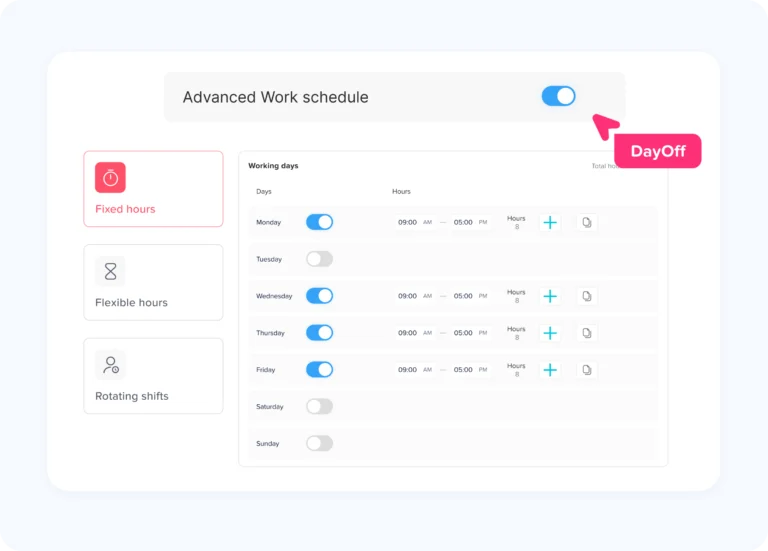
Day Off defines a work schedule as the employee’s working days and weekends and uses that schedule to calculate the time deducted when the employee submits a leave request. Its current schedule options include Fixed Days, Fixed Hours, Flexible Hours, and Rotating Shifts.
Why Custom Work Schedules Matter for Leave Management
A leave request is not simply a range of calendar dates. It represents scheduled work that the employee will not perform.
Without the employee’s real schedule, the system may know that an employee requested Monday off but not whether Monday was:
- An eight-hour office day
- A 12-hour night shift
- A four-hour part-time shift
- A flexible six-hour day
- A scheduled day off
- A public holiday
- Part of a rotating pattern
- A temporarily adjusted working day
This distinction affects several areas.
Accurate leave deductions
A full-day request should be based on the employee’s scheduled time rather than a company-wide assumption.
Incorrect deductions can result in:
- Employees losing too much leave
- Employees being credited with more paid time off than intended
- Negative balance errors
- Payroll corrections
- Disputes between employees and managers
- Inaccurate year-end balances
Better approval decisions
Managers need to understand more than the dates requested. They should be able to see:
- Who is scheduled to work
- Who is already on leave
- Which shifts require coverage
- Whether another employee has the necessary skills
- Whether the request crosses several schedule cycles
- Whether the employee is requesting working or non-working time
Fair treatment across different schedules
Employees may have equal PTO allowances measured in hours but different numbers of full scheduled days available.
For example, two employees each receive 80 PTO hours:
- An employee working eight-hour days can cover 10 complete shifts.
- An employee working 10-hour days can cover eight complete shifts.
Both employees receive the same 80 paid hours away from work. The number of full scheduled days differs because their work patterns are different.
Reliable attendance records
A missing clock-in does not always mean the employee is unexpectedly absent. The employee may be:
- On approved PTO
- On a scheduled day off
- Working later under a flexible arrangement
- Assigned to another shift
- Observing a location-specific holiday
Connecting attendance with schedules and approved leave helps managers distinguish expected absence from a potential attendance problem.
Work Schedules the Software Should Support
A useful leave-management system should support more than one company-wide schedule.
| Schedule Type | How It Works | Typical Use |
|---|---|---|
| Fixed days | Defines working days and non-working days without exact start and finish times | Standard office teams and simple PTO tracking |
| Fixed hours | Defines specific start and end times, including breaks | Hourly employees and structured daily schedules |
| Flexible hours | Defines required daily hours without one mandatory start and finish time | Remote, hybrid, and flexible teams |
| Rotating shifts | Uses multi-week cycles in which working days and hours change | Healthcare, manufacturing, hospitality, support, and 24/7 operations |
| Part-time schedule | Assigns fewer days, fewer hours, or both | Part-time and reduced-hours employees |
| Compressed schedule | Distributes weekly hours across fewer, longer days | 4/10 and similar workweeks |
| Temporary exception | Changes one day without replacing the employee’s permanent schedule | Shift swaps, special events, temporary coverage, and appointments |
Day Off currently supports four core work-schedule types: Fixed Days, Fixed Hours, Flexible Hours, and Rotating Shifts. Rotating schedules can contain multi-week cycles in which working days and hours change from one week to another.
Fixed-Day Work Schedules
A fixed-day schedule identifies which days of the week are working days and which are weekends or non-working days.
For example:
- Monday through Friday: Working
- Saturday and Sunday: Non-working
This schedule may be sufficient when:
- All working days have the same leave value
- The business tracks PTO in days
- Exact start and finish times are not needed
- Employees follow a predictable weekly pattern
The main benefit is that the system can exclude non-working days from the leave calculation.
Example
An employee requests Friday through Monday off. The employee normally works Monday through Friday and does not work weekends.
The leave request includes four calendar dates, but only two scheduled working days:
- Friday: Working day
- Saturday: Non-working day
- Sunday: Non-working day
- Monday: Working day
The correct deduction is two working days, not four calendar days.
Fixed-Hour Work Schedules
A fixed-hour schedule defines exact working times for each day.
For example:
- Monday: 8:00 a.m. to 4:30 p.m.
- Unpaid meal period: 12:00 p.m. to 12:30 p.m.
- Paid working time: Eight hours
This is useful when the system must calculate:
- Partial-day PTO
- Late arrival
- Early departure
- Missed working hours
- Time outside scheduled hours
- Break periods
- Overtime or attendance differences
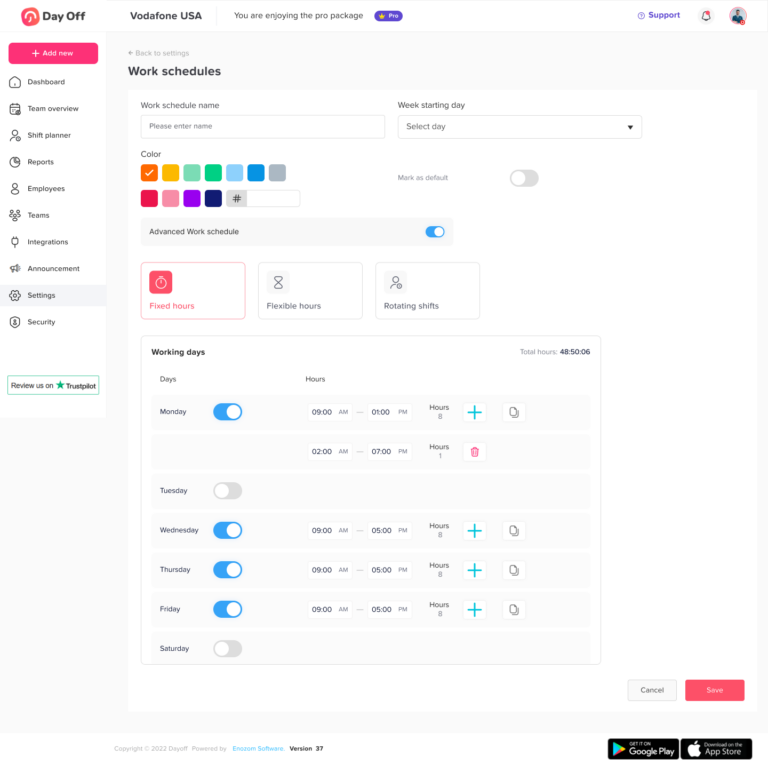
Day Off allows administrators to set exact start and end times and split the day into separate working periods to represent a break or lunch. For example, an administrator can enter 9:00 a.m. to 1:00 p.m. and 2:00 p.m. to 5:00 p.m., leaving the hour between those periods as a break.
Example
An employee is scheduled from 8:00 a.m. to 4:30 p.m. with a 30-minute unpaid break. The employee requests leave from 1:00 p.m. until the end of the day.
The system should calculate only the scheduled working time between 1:00 p.m. and 4:30 p.m., excluding any unpaid period that does not overlap with the request.
Flexible-Hour Work Schedules
A flexible schedule defines how many hours an employee must work without requiring one exact starting and finishing time.
The U.S. Department of Labor describes a flexible work schedule as an alternative to the traditional nine-to-five workweek that allows employees to vary their arrival or departure times.
For example, an employee may be required to complete eight hours between 7:00 a.m. and 8:00 p.m.
Flexible schedules can create leave-management questions such as:
- Does a two-hour appointment require PTO?
- Can the employee complete the hours later?
- How should a full-day absence be valued?
- What happens when the employee works fewer than the required hours?
- Should flexible employees request leave by day or by hour?
The organization should define whether employees can rearrange their hours within the same day or week before using PTO.
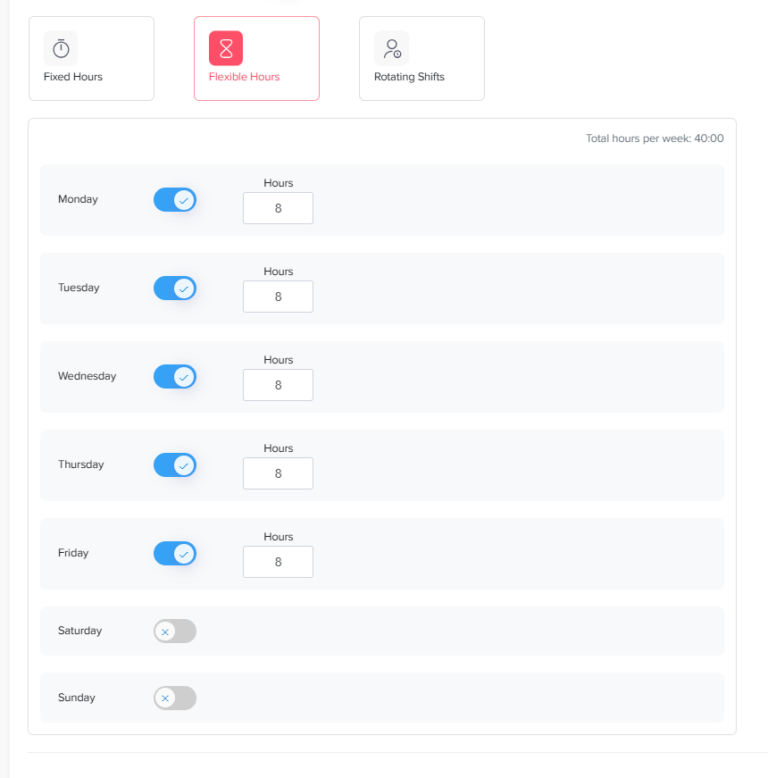
Day Off’s Flexible Hours schedule allows administrators to define the required number of hours per working day without enforcing fixed start and end times. The system then uses the required hours when calculating hourly leave deductions.
Rotating Work Schedules
A rotating schedule changes according to a repeating cycle.
An employee might work:
- Week 1: Monday, Tuesday, Friday, Saturday, and Sunday
- Week 2: Wednesday and Thursday
- Week 3: Repeat Week 1
- Week 4: Repeat Week 2
Rotating schedules are common in:
- Healthcare
- Manufacturing
- Warehousing
- Security
- Hospitality
- Emergency services
- Customer support
- Utilities
- Transportation
A standard Monday-to-Friday leave tracker may calculate these requests incorrectly because an employee’s working days change from week to week.
Schedule-aware software should identify the exact week in the rotation and deduct leave only for the shifts that overlap with the request.
Day Off allows administrators to create multi-week rotating cycles by adding each week of the pattern and defining different working days, times, and breaks.
Rotating-schedule example
Suppose an employee requests Monday through Friday off during the second week of a rotation.
The employee is scheduled to work only Wednesday and Thursday, for 12 hours each.
The request includes five calendar days, but the correct leave deduction is:
- Wednesday: 12 hours
- Thursday: 12 hours
- Total: 24 hours
The software should not deduct leave for Monday, Tuesday, or Friday because the employee was not scheduled to work on those days.
Part-Time and Individual Employee Schedules
Employees in the same department do not always follow the same schedule.
One team may include:
- Full-time employees
- Part-time employees
- Remote employees
- Employees returning gradually from leave
- Employees with temporary accommodations
- Contractors
- Employees working in different time zones
The software should allow administrators to assign schedules at the individual or group level.
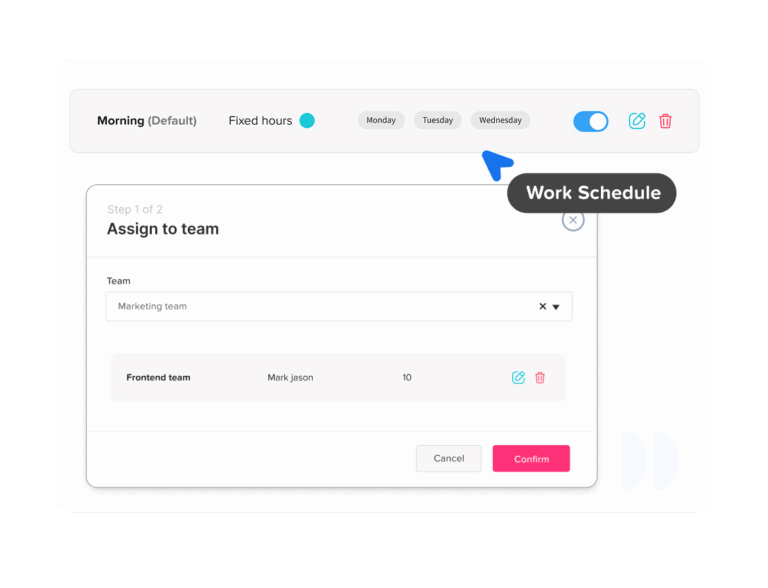
Day Off allows schedules to be assigned from an employee’s profile or through bulk actions. Administrators can also select an effective start date when changing the assigned schedule.
Effective dating matters because a schedule change should not rewrite historical calculations.
For example, if an employee moves from a five-day schedule to a three-day schedule on September 1:
- August leave should continue using the old five-day schedule.
- September leave should use the new three-day schedule.
- Previously approved requests should be reviewed according to the policy.
- Reports should preserve the schedule that applied at the time.
Temporary Schedule Changes
Not every schedule change is permanent.
An employee may:
- Swap a shift with a coworker
- Work on a normal day off
- Take a temporary reduced schedule
- Change hours for one appointment
- Cover a special weekend shift
- Move from fixed to flexible hours for one day
Replacing the employee’s entire permanent schedule for a one-day change can create unnecessary errors.
Day Off allows administrators to edit a specific day in an employee’s schedule. They can change the working hours, switch between fixed and flexible hours, turn a working day into a non-working day, or add hours to a day that is normally off.
Temporary exceptions help ensure that leave deductions reflect the schedule that was actually expected on that date.
How Custom Schedules Improve PTO Calculations
Schedule-aware software should calculate leave from the intersection of two records:
- The time the employee requested off
- The time the employee was scheduled to work
Only the overlapping scheduled time should normally be deducted.
| Request | Employee Schedule | Correct Deduction |
|---|---|---|
| Full Monday off | Monday is an eight-hour working day | 8 hours |
| Full Friday off | Friday is a scheduled non-working day | 0 hours |
| Half of a 10-hour shift | Ten-hour scheduled shift | 5 hours |
| Three hours in the afternoon | Three scheduled working hours missed | 3 hours |
| Monday through Friday | Employee works only Tuesday and Thursday | Tuesday and Thursday only |
| Leave during an unpaid break | No scheduled work during the break | 0 hours |
| Full day under a flexible eight-hour schedule | Eight required working hours | 8 hours |
Day Off’s work-schedule system is designed to validate requests against actual working time so leave is deducted when it overlaps with scheduled work.
Days-Based vs. Hours-Based Leave Tracking
Custom schedules work best when the leave unit matches the complexity of the workforce.
Track leave in days when:
- Employees work similar daily hours
- Full-day requests are the norm
- Work schedules are consistent
- Partial-day leave is uncommon
- One day has a clear and consistent value
Track leave in hours when:
- Employees work different shift lengths
- Part-time schedules vary
- Employees request partial days
- The company uses compressed workweeks
- Shifts rotate
- Start and end times matter
- Employees may leave early or arrive late
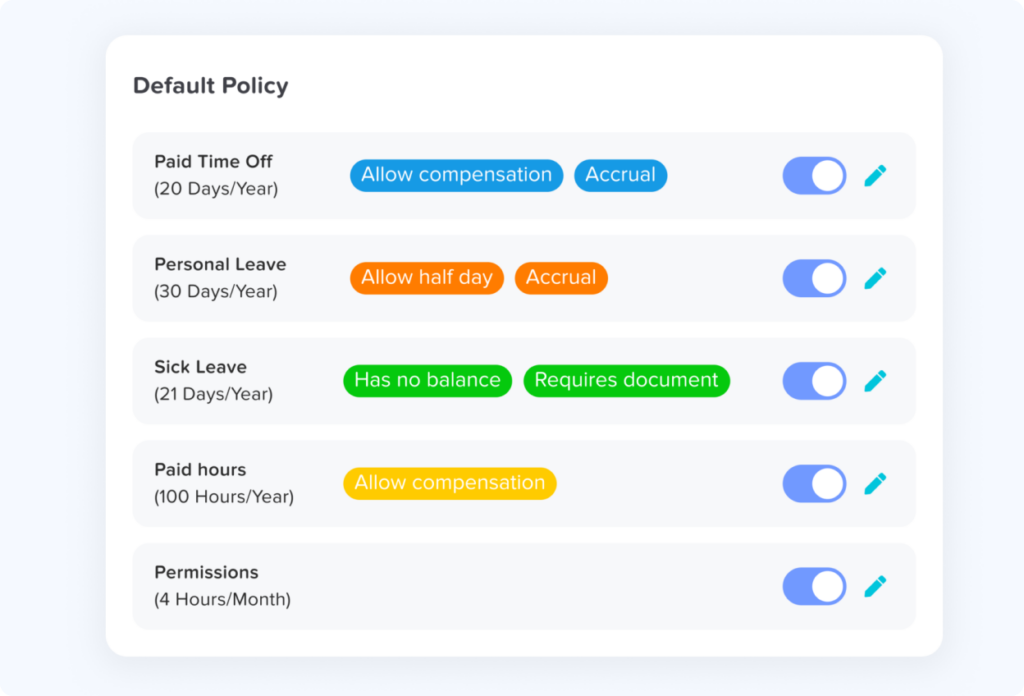
Day Off supports hour-based leave balances when the leave type, policy, and work schedule are configured in hours. Its knowledge base recommends defining the employee’s expected daily hours so the system can calculate hourly leave requests accurately.
Features to Look for in Leave Management Software
The schedule itself is only one part of the system. Businesses should evaluate how scheduling connects with the complete leave workflow.
Multiple schedule types
The system should support fixed days, fixed hours, flexible arrangements, and rotating shifts without forcing every employee into one pattern.
Individual and group assignments
Administrators should be able to assign schedules to:
- Employees
- Teams
- Departments
- Locations
- Groups of selected employees
Effective dates and schedule history
Schedule changes should take effect on a selected date without rewriting historical records.
Partial-day and hourly leave
Employees should be able to request the exact amount of scheduled time they need rather than always using a half or full day.
Break handling
Unpaid lunch and break periods should not be deducted as leave because the employee was not expected to work during those times.
Multi-week shift rotations
Rotating schedules should support complete cycles rather than requiring administrators to update the schedule manually every week.
Temporary schedule exceptions
The system should allow one-day changes without replacing the employee’s permanent assignment.
Approval workflows
Requests should go to the correct manager or approval chain based on the organization’s policy.
Shared leave calendar
Managers should be able to view approved and pending absences alongside team availability.
Public holidays and location calendars
The system should recognize holidays that apply to the employee’s location rather than applying one global calendar to everyone.
Reports and audit history
HR should be able to review:
- Leave requested
- Leave approved
- Leave rejected
- Balance deductions
- Manual adjustments
- Schedule assignments
- Historical changes
- Employee availability
Mobile and web access
Employees should be able to view schedules, balances, and requests without depending on HR to answer routine questions.
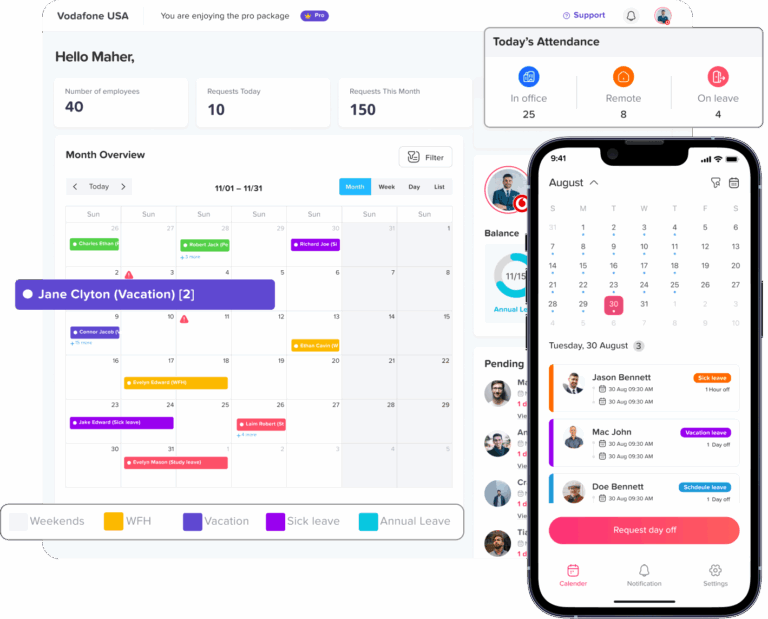
Day Off provides connected web, iOS, and Android access, with the same core leave and schedule information available across the platforms.
Why Spreadsheets Struggle With Custom Schedules
A spreadsheet can record employee names, leave dates, and balances. It becomes much harder to manage when each employee has a different working pattern.
The spreadsheet may need to determine:
- Which schedule applied on the request date
- Whether the day was working or non-working
- How many hours were scheduled
- Whether a break overlapped the request
- Which week of a rotation applied
- Whether the employee changed schedules
- Whether a public holiday should be excluded
- Whether another request already reserved the balance
These calculations require several connected tables and carefully maintained formulas.
Common spreadsheet problems include:
- Outdated schedule assignments
- Overwritten historical schedules
- Manual balance corrections
- Formula errors
- Duplicate records
- Inconsistent leave units
- Separate approval emails
- Calendars that do not update automatically
- Limited audit history
A spreadsheet may remain practical for a very small team with one simple schedule. As schedule variety and headcount increase, dedicated software usually provides stronger consistency and visibility.
Connecting Leave, Schedules, and Attendance
Leave management answers:
Why is the employee not expected to work?
Work scheduling answers:
When was the employee expected to work?
Attendance tracking answers:
When did the employee actually work?
When these records are connected, managers can distinguish between:
- Approved PTO
- Scheduled days off
- Public holidays
- Late arrivals
- Early departures
- Missed shifts
- Overtime
- Flexible working time
This produces a more complete view than any one system can provide alone.
Day Off combines work schedules with PTO requests, leave approvals, attendance, punch-in and punch-out records, late time, overtime, reports, and employee availability.
Overtime and Legal Considerations
Leave-management software is not a replacement for legal review or payroll compliance.
Under the U.S. Fair Labor Standards Act, covered nonexempt employees must generally receive overtime pay for hours worked beyond 40 in a fixed, regularly recurring workweek.
The system should therefore preserve a clear distinction between:
- Scheduled hours
- Actual hours worked
- PTO hours
- Public holiday hours
- Unpaid leave
- Overtime hours
PTO is not automatically treated as hours worked for federal overtime calculations. State laws, collective bargaining agreements, and employer policies may provide different or additional rules.
Employers should also review:
- State daily overtime requirements
- Meal and rest-break laws
- Predictive scheduling laws
- Reporting-time requirements
- Split-shift rules
- Alternative-workweek procedures
- Recordkeeping requirements
- Industry-specific regulations
The software can improve record accuracy, but the employer remains responsible for configuring policies and payroll rules correctly.
Which Businesses Need Custom Work Schedules Most?
Custom schedule support is particularly valuable for businesses that do not operate on one standard office timetable.
Healthcare
Healthcare teams may use 8-, 10-, or 12-hour shifts, overnight work, alternating weekends, and multi-week rotations.
Manufacturing
Production teams may rotate between morning, evening, and night shifts while maintaining continuous coverage.
Hospitality
Hotels and hospitality businesses often require coverage across weekends, public holidays, evenings, and overnight periods.
Retail
Retail employees may work varying hours based on store demand, seasonality, and opening times.
Customer support
Support teams may be distributed across shifts and time zones to provide longer or continuous coverage.
Logistics and transportation
Drivers, dispatchers, warehouse teams, and operations staff may use changing daily or weekly schedules.
Remote and hybrid companies
Employees may have flexible start times, different working days, or schedules based on their locations and time zones.
Professional services
Consultants and project-based employees may follow client schedules, part-time assignments, or compressed workweeks.
How to Implement the Software
Audit current schedules
List every schedule currently used across the organization.
Record:
- Working days
- Daily hours
- Breaks
- Rotation cycles
- Week start dates
- Location
- Applicable employees
- Temporary exceptions
Standardize schedule names
Use clear names such as:
- Full-Time Monday–Friday
- Part-Time Monday–Wednesday
- Customer Support Evening Shift
- Four-Day 4/10 Schedule
- Two-Week Rotating Shift
- Flexible Eight Hours
Avoid names such as “Schedule 1” or “New Schedule,” which become difficult to manage as the company grows.
Choose the correct leave unit
Decide whether each leave type should be tracked in:
- Days
- Hours
Hourly balances are usually more suitable when employees work different shift lengths.
Assign schedules with effective dates
Confirm which schedule applies to each employee and when it begins.
Do not overwrite previous assignments if historical reporting is required.
Configure leave policies
Set up:
- Allowances
- Accrual rules
- Carryover
- Expiry
- Negative-balance rules
- Request notice
- Minimum or maximum duration
- Approval workflows
Add locations and holidays
Assign the correct holiday calendar, time zone, and weekend pattern to each location.
Test common request scenarios
Before launch, test:
- A full working day
- A scheduled day off
- A partial shift
- A request crossing a weekend
- A rotating-shift request
- A public holiday
- A flexible-hours request
- A temporary schedule exception
- A request spanning a schedule change
Train managers and employees
Employees should understand:
- How to view their schedule
- How leave is deducted
- How to submit partial-day requests
- What happens on non-working days
- How to report schedule errors
Managers should understand:
- How to check coverage
- How to review requested hours
- How to handle schedule changes
- When to involve HR
- How approvals affect balances and calendars
Review the first reporting cycle
Check for:
- Unexpected deductions
- Incorrect schedules
- Missing breaks
- Duplicate assignments
- Holiday errors
- Requests calculated under the wrong schedule
Correct configuration problems early before they affect payroll or year-end balances.
How Day Off Supports Custom Work Schedules
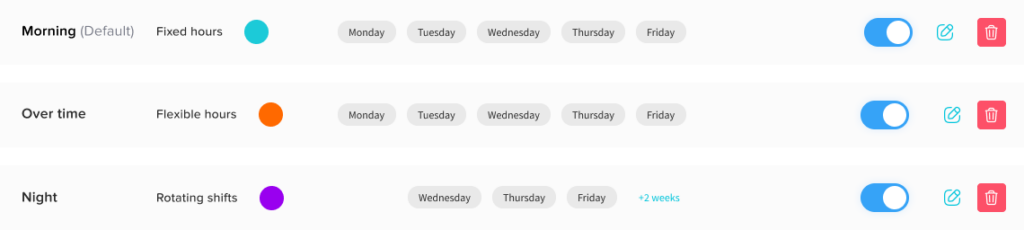
Day Off allows businesses to create and assign work schedules that reflect different employee roles and working arrangements.
Its current schedule options include:
- Fixed Days
- Fixed Hours
- Flexible Hours
- Rotating Shifts
Administrators can define working days, weekends, exact hours, breaks, daily required hours, and multi-week rotations. Schedules can be assigned to individual employees or groups, and changes can be given an effective start date.
Day Off uses the assigned schedule when calculating time-off requests. This helps ensure that leave is deducted only when it overlaps with scheduled working time.
Alongside work schedules, companies can use Day Off to manage:
- PTO requests
- Custom leave types
- Leave balances
- Approval workflows
- Shared calendars
- Public holidays
- Attendance
- Clock-in and clock-out records
- Late time
- Overtime
- Timesheets
- Reports and exports
By keeping schedules and leave records connected, HR teams can reduce manual calculations and give managers a clearer view of employee availability.
Frequently Asked Questions
What is the best leave management software for shift workers?
The best leave management software for shift workers should connect each employee’s PTO request with their actual scheduled hours. It should support rotating shifts, different shift lengths, hourly leave, partial-day requests, team calendars, approval workflows, and schedule changes.
Businesses should avoid systems that automatically treat every leave day as eight hours, since shift employees may work four, 10, or 12 hours on different days.
Can PTO software handle employees with different work schedules?
Yes. Schedule-aware PTO software can assign different working patterns to individual employees or groups. This is useful when a company has full-time, part-time, flexible, compressed, and rotating-shift employees.
Day Off supports Fixed Days, Fixed Hours, Flexible Hours, and Rotating Shifts, allowing companies to manage different employee schedules in the same system.
How does PTO work for employees on rotating shifts?
PTO should be deducted only for the shifts the employee was scheduled to work during the requested period.
For example, an employee may request Monday through Friday off but be scheduled only on Wednesday and Thursday. In that case, leave should normally be deducted only for the Wednesday and Thursday shifts.
Software that supports multi-week rotations can identify which part of the schedule cycle applies to the request. Day Off allows administrators to create rotating schedules in which working days and hours change from week to week.
How much PTO do you use for a 12-hour shift?
An employee taking a complete scheduled 12-hour shift off would normally use 12 hours of PTO when the policy tracks leave in hours.
Using only eight hours for a 12-hour absence could leave four hours unaccounted for unless the employee works those hours, uses another leave type, or takes the remaining time unpaid.
The final calculation should follow the employer’s written PTO policy and the employee’s actual scheduled hours.
Do you use PTO on a scheduled day off?
PTO should not normally be deducted when the employee was not scheduled to work.
For example, if an employee’s rotating schedule shows Wednesday as a non-working day, requesting Wednesday off should generally result in a zero-hour deduction. Leave should represent scheduled working time the employee will miss, not every calendar date included in the request.
Should PTO be tracked in hours or days for shift workers?
Tracking PTO in hours is usually more accurate for shift workers because daily shift lengths may vary.
Hourly tracking is particularly useful when employees:
- Work 10- or 12-hour shifts
- Have different hours on different days
- Request part of a shift off
- Work rotating schedules
- Follow compressed workweeks
- Change between full-time and part-time hours
Day-based tracking may still work when every employee has the same daily schedule and partial-day leave is uncommon.
How is PTO calculated for part-time employees?
PTO should be calculated according to the company’s accrual policy and the part-time employee’s actual schedule.
If a part-time employee is scheduled for six hours on Monday and takes the full day off, the system would normally deduct six PTO hours, not eight. If the employee requests a day they were not scheduled to work, no PTO should normally be deducted.
Can leave management software handle 4/10 work schedules?
Yes. Software with custom schedules can support employees who work four 10-hour days.
A full scheduled day off would normally use 10 PTO hours. The employee’s regular non-working day should not use any PTO.
The same principle applies to other compressed arrangements: the deduction should match the working time scheduled for the requested date.
Can employees request PTO in hours instead of full days?
Yes, when the software and leave policy support hourly balances.
Hourly requests are useful for:
- Doctor’s appointments
- Late arrivals
- Early departures
- Part of a long shift
- Flexible working arrangements
- Short personal absences
In Day Off, a leave type can be configured with hours as its balance unit. A corresponding work schedule in hours helps the system calculate the correct deduction.
How does PTO work for employees with flexible schedules?
The employer should first define how many hours the employee is expected to complete each day or week.
If a flexible employee must work eight hours per day, a full-day absence would normally use eight PTO hours. For a shorter absence, the policy should explain whether the employee may make up the hours later or must submit hourly PTO.
Day Off’s Flexible Hours schedule allows administrators to define the number of hours an employee is required to work each day, which can then be used for hourly leave calculations.
How should PTO be calculated for an overnight shift?
The employer should establish a consistent rule for assigning an overnight shift to a date.
Common methods include:
- Assigning the entire shift to the date on which it begins
- Splitting the shift across both calendar dates
Whichever method is selected should be used consistently across schedules, PTO requests, attendance records, timesheets, and payroll. The PTO deduction should match the scheduled working hours the employee misses.
What happens if an employee’s schedule changes after PTO is approved?
The company should decide whether the approved request will remain based on the original schedule or be recalculated using the new schedule.
For example, an employee may have received approval for an eight-hour day and later been moved to a 10-hour shift. Automatically changing the deduction could reduce the employee’s balance without a new decision or clear notice.
Good leave software should preserve schedule history, effective dates, approval records, and balance adjustments so HR can see what changed.
How do public holidays affect PTO for shift workers?
A public holiday should not automatically be deducted from PTO if the employee was not expected to work or if company policy provides paid holiday time.
For rotating-shift employees, HR should check:
- Whether the employee was scheduled to work
- Whether the holiday applies to the employee’s location
- Whether the employee receives holiday hours
- Whether another day is provided instead
- Whether the leave request crosses the holiday
The policy should explain how holidays interact with PTO for both scheduled and non-scheduled employees.
Can leave management software prevent overlapping vacation requests?
Leave software can help managers identify overlapping absences before approving a request.
A shared team calendar can show who is already away, while approval rules, blockout dates, or capacity limits can help the company manage busy periods. However, the software still needs accurate teams, schedules, and approval settings to provide useful coverage information.
Can employees have different weekends in the same leave system?
Yes. Suitable software should support different working days and weekends for employees, teams, or locations.
For example:
- One employee may have Saturday and Sunday off.
- Another may have Friday and Saturday off.
- A rotating employee may have different non-working days each week.
The system should calculate leave according to the schedule assigned to each employee rather than using one company-wide weekend.
Does leave management software connect with attendance and timesheets?
Some platforms connect approved leave with schedules, attendance, and timesheets. This helps ensure that an employee on approved PTO is not incorrectly recorded as absent or missing a clock-in.
The connection can also help managers distinguish among:
- Approved leave
- Scheduled days off
- Public holidays
- Late arrivals
- Missed shifts
- Actual working hours
Schedule, leave, and attendance records should remain separate enough to show what was planned, what was approved, and what actually occurred.
What features should leave management software with custom schedules include?
Important features include:
- Fixed, flexible, and rotating schedules
- Individual schedule assignments
- Hourly and partial-day leave
- Effective-dated schedule changes
- Multi-week rotations
- Break and non-working-day handling
- Team leave calendars
- Approval workflows
- Public holiday calendars
- Leave balances and accruals
- Reports and audit history
- Mobile and web access
The right features depend on whether the company operates standard office hours, flexible schedules, or shift-based coverage.
Does Day Off support rotating and flexible work schedules?
Yes. Day Off supports Fixed Days, Fixed Hours, Flexible Hours, and Rotating Shifts.
Rotating Shifts can include multi-week cycles with different working days and hours. Flexible Hours allow the company to define the number of required daily hours without setting one fixed start and finish time.
Can Day Off track leave in hours for shift employees?
Yes. Companies can create a leave type with hours as the balance unit, add it to a leave policy, and configure an hourly work schedule. This allows employees to submit hourly requests and helps the system deduct leave according to scheduled working time.
Conclusion
Leave management software with custom work schedules gives businesses a more accurate way to manage PTO across fixed, flexible, part-time, compressed, and rotating working patterns.
By connecting each request with the employee’s actual scheduled time, the system can avoid deductions on non-working days, calculate partial-day leave more accurately, and give managers better information about team coverage.
The strongest solutions combine schedule management with leave balances, approval workflows, shared calendars, holidays, attendance, and reports. This creates one reliable view of when employees are expected to work, when they are approved to be away, and where additional coverage may be required.
For organizations with several schedules or shift-based employees, this connection is not simply a convenient feature. It is an important part of maintaining accurate balances, fair leave calculations, and dependable workforce planning.
Related reading: How To Track Leave For Employees With Multiple Work Schedules