







Managing employee attendance is no longer just about knowing who came to work and who did not. For modern businesses, attendance management is closely connected to shift schedules, working hours, time off, overtime, team availability, payroll preparation, and overall workforce planning. This is where Time Tracking Software becomes important, as it helps companies record working hours accurately and understand employee attendance more clearly. When these areas are handled separately, HR teams and managers often deal with confusion, missing records, manual updates, and inaccurate reports.

This is why many companies are moving toward shift scheduling and time tracking software for employee attendance. Instead of relying on spreadsheets, paper timesheets, manual calendars, or scattered messages, businesses can use one organized system to plan shifts, track working hours, monitor attendance, and understand when employees are available or away.
For growing teams, this type of software is not only useful for recording time. It helps managers build better schedules, reduce attendance errors, improve accountability, and make payroll preparation much easier. When combined with PTO tracking and leave management, it gives companies a complete view of employee availability.
What Is Shift Scheduling and Time Tracking Software?
Shift scheduling and time tracking software is a digital solution that helps businesses plan employee shifts and record the actual hours employees work. It allows managers to create schedules, assign employees to shifts, track clock in and clock out times, monitor late arrivals, and review attendance records from one place.
In simple terms, shift scheduling answers the question: When is each employee expected to work?
Time Tracking Software answers the question: When did each employee actually work?
Employee attendance management connects both answers. It shows whether employees worked as scheduled, arrived late, left early, missed a shift, worked overtime, or were absent due to approved leave.
For example, if an employee is scheduled to work from 9:00 AM to 5:00 PM, the system can track whether they clocked in on time, whether they completed the full shift, and whether their absence was related to PTO, sick leave, unpaid leave, or another approved request.
This makes attendance tracking more accurate and less dependent on manual follow-ups.
Why Employee Attendance Needs More Than Manual Tracking
Many small businesses start by tracking attendance manually. A manager may write down who attended work, employees may fill out timesheets, or HR may collect attendance details through emails and messages. This can work for a very small team, but it becomes difficult as the company grows.
Manual attendance tracking often creates problems such as:
- Missing clock in or clock out records
- Employees forgetting to update timesheets
- Managers spending too much time checking attendance
- HR teams manually calculating work hours
- Confusion between absence and approved time off
- Payroll errors caused by inaccurate records
- Difficulty knowing who is available for each shift
- Overlapping schedules or uncovered shifts
The biggest issue is that manual tracking separates scheduling, attendance, and leave management. A manager may have one spreadsheet for shifts, HR may have another file for PTO balances, and employees may submit leave requests through email or chat. When these records do not connect, mistakes become more likely.
Shift scheduling and time tracking software helps solve this by centralizing attendance related information. Managers can see the planned schedule, the actual worked hours, and approved time off in one system.
Why Shift Scheduling Matters for Employee Attendance
Good attendance management starts before employees clock in. It starts with a clear schedule.
When employees know exactly when they are expected to work, attendance becomes easier to manage. A clear shift schedule helps reduce misunderstandings, missed shifts, and last minute staffing problems. It also gives managers better control over workload distribution and team coverage.
Shift scheduling software helps businesses:
- Assign employees to the right shifts
- Avoid overstaffing or understaffing
- Plan coverage during busy periods
- Manage rotating shifts and flexible schedules
- Reduce scheduling conflicts
- Improve communication between managers and employees
- Track who is expected to work each day
Without shift scheduling, attendance records may not tell the full story. For example, an employee may not clock in because they were not scheduled, because they were on approved leave, or because they missed work unexpectedly. A proper system helps separate these situations clearly.
This is especially important for businesses with hourly employees, rotating teams, multiple locations, remote teams, or different work schedules.
Why Time Tracking Software Matters for Employee Attendance
Time Tracking Software gives businesses a record of actual working hours. It shows when employees start work, when they finish, and how long they worked during the day or shift.
For employee attendance, time tracking helps companies identify:
- Late arrivals
- Early departures
- Missed shifts
- Overtime hours
- Incomplete workdays
- Attendance patterns
- Actual hours worked compared to scheduled hours
This information is useful for HR, managers, finance teams, and business owners. It supports payroll preparation, improves reporting, and helps companies make better staffing decisions.
Time tracking also creates accountability. Employees can record their work hours clearly, while managers can review attendance data without chasing updates manually.
How Shift Scheduling and Time Tracking Software Work Together
Shift scheduling and Time Tracking Software are much more powerful when they work together.
A shift schedule shows the expected working hours. Time tracking shows the actual working hours. When both are connected, managers can easily compare planned attendance with real attendance.
For example:
This connection helps businesses move from reactive attendance management to proactive workforce planning.
Instead of discovering attendance problems at the end of the month, managers can see issues earlier and take action faster.
Benefits of Shift Scheduling and Time Tracking Software for Businesses
More Accurate Attendance Records
Accurate attendance records are essential for payroll, performance tracking, and workforce planning. When attendance is tracked manually, errors are common. Employees may forget to update their hours, managers may miss a message, or HR may enter incorrect data.
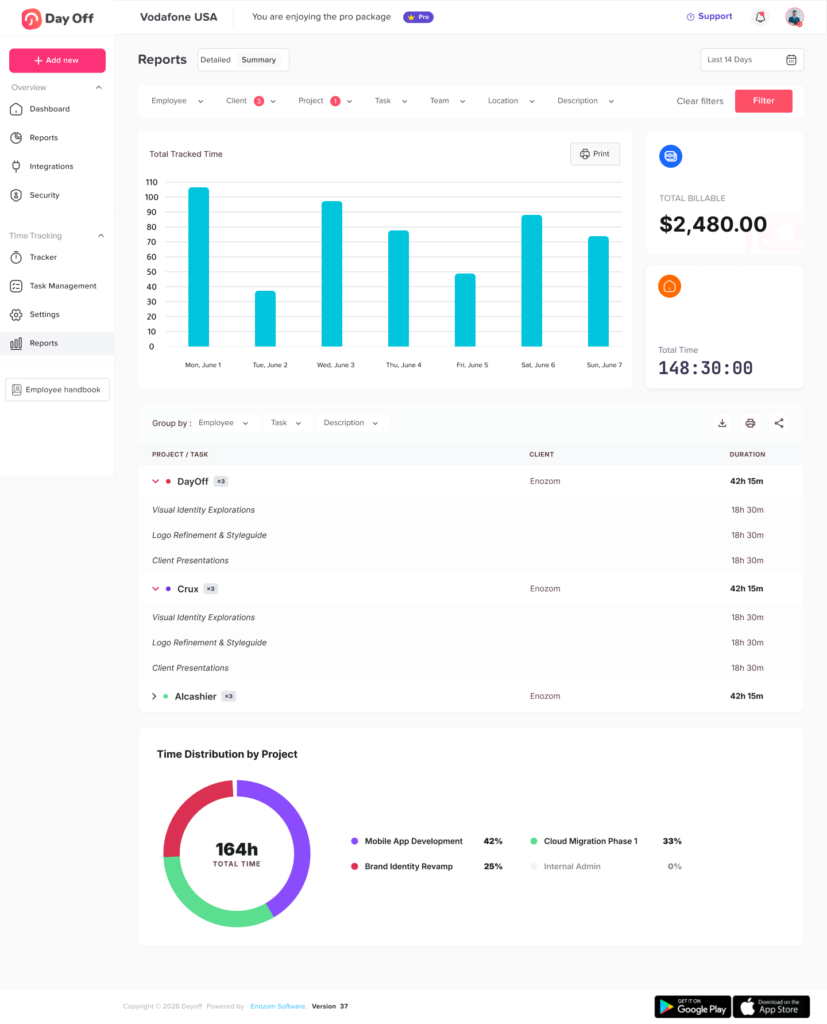
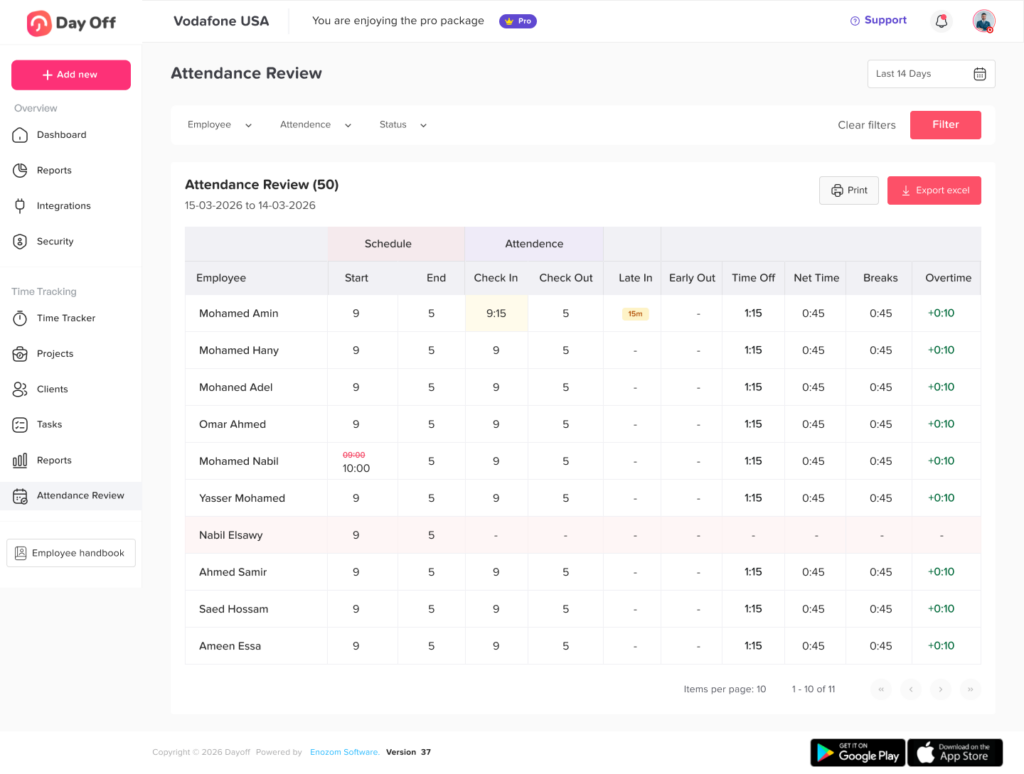
With time tracking software, attendance records become more consistent and easier to review. Managers can see clock-in and clock-out data, compare it with scheduled shifts, and identify missing or unusual records.
This helps reduce mistakes and creates a more reliable attendance process.
Better Team Planning
Scheduling employees is not only about filling shifts. It is about making sure the right people are available at the right time.
Shift scheduling software helps managers understand team availability before assigning work. When schedules are connected with PTO and attendance data, managers can avoid approving too many absences at the same time or leaving important shifts uncovered.
This is especially useful for customer support teams, retail stores, restaurants, healthcare teams, warehouses, agencies, and any business that depends on proper staff coverage.
Less Manual Work for HR
HR teams often spend a lot of time answering attendance questions, updating spreadsheets, checking leave balances, and preparing payroll reports. This becomes repetitive and time-consuming.
Shift scheduling and time tracking software reduces this workload by keeping attendance information in one place. Employees can check schedules, managers can review attendance, and HR can access reports without collecting information from multiple sources.
This gives HR more time to focus on people operations, employee experience, compliance support, and company policies.
Improved Payroll Preparation
Payroll depends on accurate working hours, overtime records, and absence data. If attendance information is incomplete or inaccurate, payroll errors can happen.
Time tracking software helps businesses prepare payroll more confidently by providing clear work hour records. When connected with PTO tracking, it also helps HR understand whether paid leave, unpaid leave, sick leave, or regular working hours should be considered.
This does not replace payroll software, but it provides cleaner data that can support payroll processing.
Better Employee Accountability
A clear attendance system helps employees understand expectations. They know when they are scheduled, when they need to clock in, and how their time is recorded.
This improves accountability without creating unnecessary pressure. Instead of relying on verbal updates or unclear processes, employees and managers can follow the same system.
When employees can see their schedules and attendance records, it also reduces confusion and helps build transparency.
Easier Management of Remote and Hybrid Teams
Employee attendance is more complex when teams work remotely or across different locations. Managers may not physically see who is working, who is away, or who is available.
Shift scheduling and time tracking software gives remote and hybrid teams a clearer structure. Employees can track time digitally, managers can view schedules, and HR can monitor attendance without needing everyone to be in the same office.
This is especially useful for companies with flexible work arrangements, international employees, or distributed teams.
Clearer View of PTO and Absences
Attendance tracking becomes incomplete when PTO is managed separately. If an employee does not clock in, the manager needs to know whether the employee is absent without notice or on approved leave.
When Time Tracking Software works with PTO tracking, this becomes much clearer. Approved time off can appear alongside attendance records, helping managers and HR understand employee availability more accurately.
This is where a solution like Day Off becomes especially useful. Day Off helps teams manage PTO requests, leave balances, shared calendars, approvals, and employee availability. When Time Tracking Software and shift scheduling are connected with leave management, businesses can manage both attendance and time off in a more organized way.
Why PTO Tracking Should Be Part of Attendance Management
Employee attendance is not just about working hours. It also includes approved time away from work.
If a company tracks time worked but does not track PTO in the same system, HR may still need to manually connect attendance records with leave requests. This can create confusion.
For example, an employee may not clock in on Monday. Without PTO tracking, the manager may think the employee is absent. But if the employee has an approved vacation request, the absence is expected and should be recorded differently.
This is why PTO tracking, shift scheduling, and Time Tracking Software should work together. They give a complete picture of employee availability.
Day Off supports this approach by helping businesses manage leave requests, PTO balances, approvals, shared calendars, and employee availability. With Time Tracking Software and shift scheduling added to the attendance workflow, teams can manage planned time off and actual working time more clearly.
Why Day Off Is a Strong Option for Attendance and PTO Management
Day Off is designed to help companies manage employee time off, PTO tracking, leave requests, approvals, and shared calendars from one easy-to-use platform. It is available on web, iOS, and Android, making it accessible for both office-based and mobile teams.
For companies looking to improve attendance management, Day Off offers an important advantage: it connects employee availability with leave management. This means teams can better understand who is working, who is away, and how time off affects daily planning.
With Day Off, businesses can manage:
- PTO requests
- Vacation days
- Sick leave
- Custom leave types
- Leave balances
- Approval workflows
- Shared leave calendars
- Teams and locations
- Reports and exports
- Employee availability
- Work schedules and attendance-related planning
As companies add shift scheduling and Time Tracking Software to their processes, Day Off can help bring attendance and leave management closer together. Instead of treating PTO and work hours as separate topics, businesses can manage them as part of one workforce planning system.
The Future of Employee Attendance Management
Employee attendance management is becoming more connected. Companies no longer want separate tools for shifts, time tracking, PTO, calendars, and reports. They want systems that give them one clear view of workforce availability.
The future of attendance management will focus on:
- Better automation
- More accurate time records
- Easier mobile access
- Stronger connection between PTO and attendance
- Smarter workforce planning
- More flexible scheduling options
- Improved reporting for HR and managers
Businesses that adopt connected systems early can reduce manual work, improve employee experience, and make attendance management more reliable.
Frequently Asked Questions
What is shift scheduling and time tracking software?
Shift scheduling and time tracking software is a digital tool that helps businesses plan employee shifts and record actual working hours. It allows managers to assign schedules, track clock-in and clock-out times, monitor attendance, and review employee availability.
Why is Time Tracking Software important for employee attendance?
Time tracking is important because it shows when employees start and finish work. It helps businesses track attendance, late arrivals, early departures, overtime, and total hours worked.
How does shift scheduling improve attendance management?
Shift scheduling improves attendance management by showing when employees are expected to work. When schedules are clear, managers can compare planned shifts with actual attendance and identify missed shifts or attendance issues more easily.
Should PTO tracking be connected with attendance tracking?
Yes. PTO tracking should be connected with attendance tracking because approved leave affects employee availability. If an employee is away on approved PTO, the attendance system should reflect that clearly.
Can shift scheduling and time tracking software help with payroll?
Yes. It can support payroll preparation by providing accurate records of employee working hours, attendance, overtime, and absences. This helps reduce manual calculations and payroll errors.
Is Day Off useful for attendance and PTO management?
Yes. Day Off helps businesses manage PTO, leave requests, approvals, balances, shared calendars, and employee availability. By connecting leave management with attendance-related planning, teams can better understand who is working, who is away, and how schedules are affected.
Conclusion
Shift scheduling and time tracking software for employee attendance helps businesses move away from manual records and disconnected tools. It gives managers a clear view of scheduled shifts, actual working hours, attendance patterns, and employee availability.
When combined with PTO tracking and leave management, it becomes even more valuable. Businesses can understand not only who worked, but also who was scheduled, who was on approved leave, and where coverage may be needed.
For HR teams, managers, and business owners, the result is less manual work, better accuracy, improved planning, and a smoother employee experience.
Day Off helps companies bring time off, availability, schedules, and attendance-related planning into one organized system. For teams that want to manage employee attendance more clearly and efficiently, using a connected solution is one of the best steps toward better workforce management.