







Part-time employees are an important part of many businesses. They support retail stores, restaurants, customer service teams, healthcare offices, agencies, startups, schools, field teams, and remote companies. Some work fixed weekly hours. Others work flexible schedules, rotating shifts, weekends, evenings, or seasonal hours. Because their schedules can change more often than full-time employees, time tracking for part-time employees needs to be accurate, fair, and easy to manage.
When time tracking is unclear, small mistakes can quickly become bigger problems. An employee may forget to clock in. A manager may approve a shift change but forget to update the schedule. HR may struggle to compare worked hours with PTO, unpaid leave, breaks, overtime, or payroll records. For part-time employees, even one missed hour can affect pay, trust, and scheduling fairness.

A good time tracking process does more than record clock-in and clock-out times. It helps companies understand who worked, when they worked, how long they worked, whether breaks were taken correctly, whether PTO explains missed time, and whether payroll records are complete.
This guide explains how businesses can track part-time employee hours fairly, what HR should record, which mistakes to avoid, and how a tool like Day Off can help connect time tracking, attendance, PTO, schedules, leave balances, and reports in one organized system.
What Is Time Tracking for Part-Time Employees?
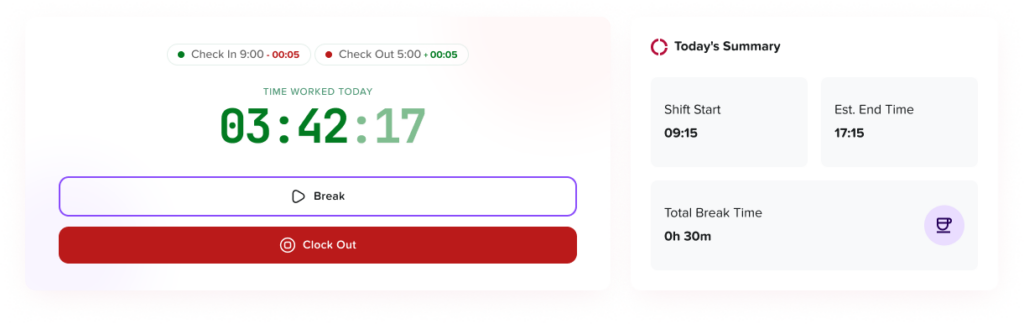
Time tracking for part-time employees is the process of recording the actual hours worked by employees who do not follow a standard full-time schedule. This may include clock-in and clock-out times, breaks, shift changes, overtime, missed punches, PTO, unpaid leave, and attendance records.
Part-time time tracking can apply to many types of employees, including:
- Hourly employees
- Weekend staff
- Seasonal workers
- Students
- Remote part-time workers
- Hybrid part-time employees
- Retail and restaurant employees
- Field employees
- Part-time administrative staff
- Employees with flexible weekly hours
- Employees who work different shifts each week
The goal is simple: every hour worked should be recorded clearly, reviewed fairly, and connected to the right schedule, leave record, and payroll process.
Why Time Tracking Matters for Part-Time Employees
Part-time employees often have schedules that change from week to week. That makes accurate time tracking especially important.
For example, a full-time employee may work Monday to Friday from 9:00 AM to 5:00 PM. A part-time employee may work Monday morning one week, Wednesday evening the next week, and a weekend shift during a busy season. Without a clear system, managers may lose track of expected hours, actual hours, missed shifts, approved leave, and last-minute schedule changes.
Time tracking helps businesses answer important questions:
- Did the employee work the scheduled shift?
- Did the employee arrive late or leave early?
- Did the employee take the correct break?
- Did the employee work extra hours?
- Was the employee absent, or were they on approved PTO?
- Are payroll records accurate?
- Are part-time employees being treated consistently?
- Are managers applying the same rules to everyone?
Accurate time tracking protects both the business and the employee. Employees get paid correctly, and employers have better records for payroll, reporting, scheduling, and compliance.
Part-Time Employees and Labor Rules: What Employers Should Know
Employers should not assume that part-time employees are outside normal wage and hour rules. In the United States, the Fair Labor Standards Act applies to covered full-time and part-time workers and sets standards for minimum wage, overtime pay, recordkeeping, and child labor. The U.S. Department of Labor also states that the FLSA does not define part-time employment, and whether an employee is full-time or part-time does not change how the FLSA applies.
This means employers should track part-time work hours carefully, especially for covered nonexempt employees. Under federal FLSA guidance, covered nonexempt employees must receive overtime pay for hours worked over 40 in a workweek at a rate of at least one and one-half times the regular rate of pay.
Employers covered by the FLSA must also keep certain records for each covered nonexempt worker. The Department of Labor explains that there is no required form, but records must include accurate information about the employee and data about hours worked and wages earned.
Labor rules can vary by country, state, city, industry, contract, and employee classification. Companies should always review local requirements or speak with a qualified advisor before finalizing time tracking, overtime, break, PTO, or payroll policies.
What Should Businesses Track for Part-Time Employees?
A fair time tracking system should record more than total hours. HR and managers need enough detail to understand the full work record.
| Time Tracking Area | What to Record | Why It Matters |
|---|---|---|
| Clock-in time | When the employee starts work | Confirms actual start time |
| Clock-out time | When the employee ends work | Confirms total worked time |
| Breaks | Paid and unpaid breaks | Helps calculate working time accurately |
| Scheduled hours | Expected shift or work period | Allows managers to compare planned vs actual hours |
| Actual hours | Time actually worked | Supports payroll accuracy |
| Late arrivals | Time difference from scheduled start | Helps review attendance patterns |
| Early departures | Time difference from scheduled end | Helps managers understand coverage gaps |
| Missed punches | Missing clock-in or clock-out records | Prevents payroll errors |
| Overtime | Hours above overtime threshold | Supports payroll and compliance review |
| PTO or leave | Approved time away from work | Explains why an employee was not working |
| Manager edits | Any manual correction to time records | Creates accountability and audit history |
| Employee notes | Reason for missed punch or adjustment | Adds context before approval |
| Approval status | Pending, approved, or rejected timesheet | Helps payroll use verified records |
This level of detail helps businesses avoid unclear records. It also gives employees confidence that their hours are being handled fairly.
Part-Time Time Tracking vs Full-Time Time Tracking
The basic goal is the same: record work hours accurately. The difference is that part-time schedules are often less predictable.
Full-time employees may have more consistent schedules, while part-time employees may work:
- Fewer days per week
- Different shifts each week
- Shorter shifts
- Split shifts
- Weekend or evening shifts
- Seasonal hours
- On-call or flexible hours
- Multiple roles or locations
Because of this, part-time time tracking should always connect actual hours to the employee’s schedule. If HR only tracks total hours, managers may not know whether the employee worked the correct shift, missed part of a shift, swapped shifts, or worked extra time.
How to Record Part-Time Hours Fairly
Fair time tracking means the same rules are applied consistently. Employees should understand how to record time, managers should know how to review it, and HR should have clean records before payroll.
Create a Clear Time Tracking Policy
A time tracking policy should explain exactly how part-time employees record their hours. It should be simple enough for employees to understand and specific enough for managers to enforce.
The policy should answer questions such as:
- When should employees clock in?
- When should employees clock out?
- Are employees allowed to clock in early?
- What happens if an employee forgets to clock in?
- Who can edit a time entry?
- How are breaks recorded?
- When are timesheets reviewed?
- What happens if an employee works extra hours?
- How should employees report schedule changes?
- How does PTO or unpaid leave affect expected hours?
A clear policy helps prevent confusion and protects fairness across teams.
Use Work Schedules as the Starting Point
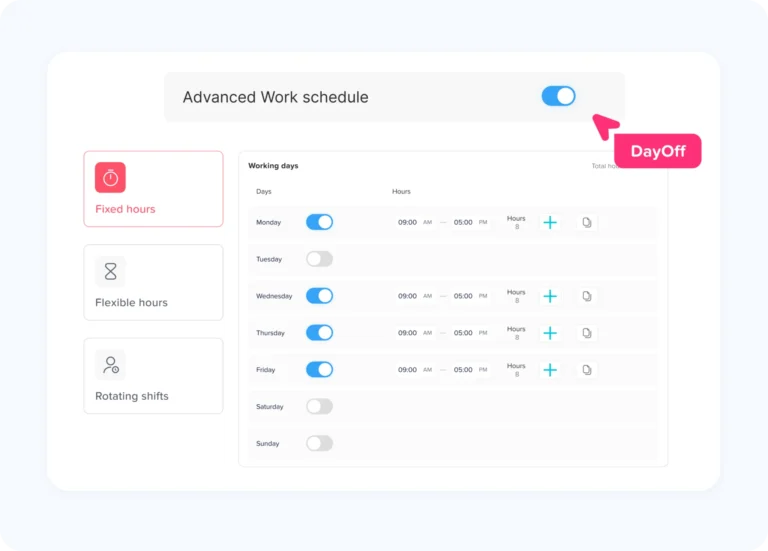
Part-time time tracking should begin with a schedule. The schedule shows when the employee was expected to work. The time record shows when the employee actually worked.
When schedules and time records are connected, managers can quickly identify:
- Late arrivals
- Early departures
- Extra hours
- Missed shifts
- Schedule changes
- Approved absences
- Coverage gaps
For example, if an employee was scheduled from 10:00 AM to 2:00 PM but clocked in at 10:20 AM, the manager can see the difference clearly. If the employee had approved leave for part of the shift, that should also be visible.
Track Actual Start and End Times
Part-time employees should record the actual time they start and stop working. This is usually more reliable than asking employees to submit total hours at the end of the week.
For example, instead of entering “4 hours,” the employee should record:
- Clock in: 10:00 AM
- Clock out: 2:00 PM
This gives HR a clearer record and helps managers review attendance more accurately.
Record Breaks Correctly
Break tracking is important because not all breaks are treated the same. Under federal FLSA guidance, employers are not required to provide meal or rest breaks, but when short rest breaks are offered, breaks of about 5 to 20 minutes are generally considered hours worked. Bona fide meal periods are generally not considered work time.
Because break rules can vary by location, employers should define how breaks work for part-time employees.
The policy should explain:
- Whether breaks are paid or unpaid
- When employees should take breaks
- Whether employees must clock out for meal breaks
- What happens if a break is missed
- Whether managers need to approve break corrections
This is especially important for short part-time shifts. For example, an employee working four hours may have different break rules than an employee working eight hours.
Require Manager Review Before Payroll
Managers should review part-time employee time records before payroll is processed. This helps catch mistakes early.
Managers should check:
- Missing clock-ins or clock-outs
- Unusual hours
- Late arrivals
- Early departures
- Break errors
- Extra hours
- Schedule changes
- PTO or unpaid leave entries
- Manual edits
A review process helps prevent payroll problems and gives employees a chance to correct mistakes before pay is finalized.
Keep a Record of Time Edits
Sometimes time records need to be corrected. An employee may forget to clock out, work through a break, or submit the wrong time. Corrections are normal, but they should be documented.
A good time tracking system should show:
- What was changed
- Who changed it
- When it was changed
- Why it was changed
- Whether the employee or manager approved the correction
This creates transparency and protects both employees and employers.
Connect PTO and Leave With Time Tracking
Part-time employees may take PTO, sick leave, unpaid leave, or other approved absences. If leave is tracked separately from work hours, managers may think an employee missed a shift when they were actually on approved leave.
That is why time tracking works best when it connects with PTO and leave management.
For example:
- If an employee is scheduled for 5 hours but takes approved PTO, the time record should show that the absence was approved.
- If an employee is absent without approval, the record should show the difference.
- If an employee works fewer hours because of unpaid leave, payroll should have the correct context.
- If an employee has a prorated PTO balance, HR should be able to review usage clearly.
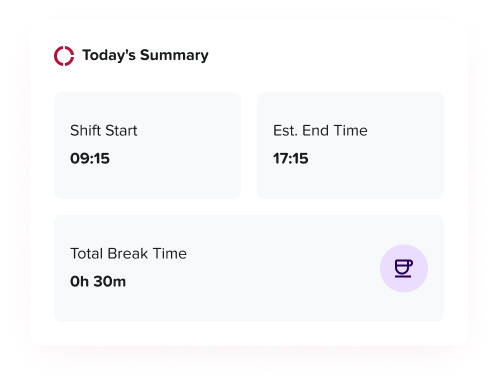
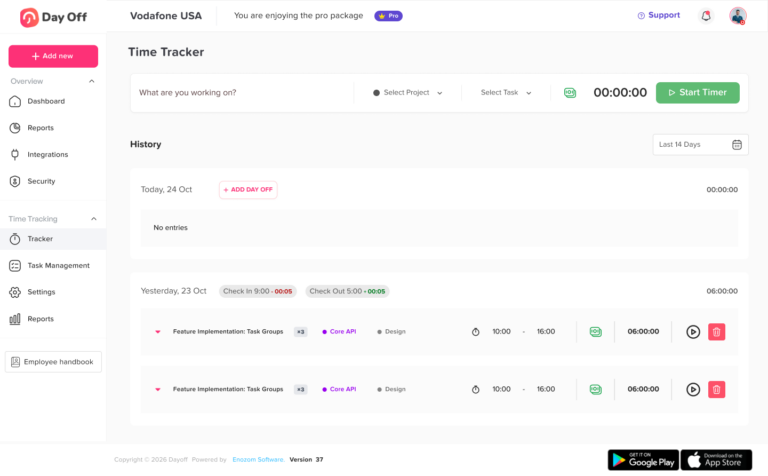
Day Off helps teams manage this connection by bringing PTO, attendance, schedules, approvals, leave balances, and reports together in one system. Day Off’s time tracking content explains that employee time tracking can include work hours, attendance, breaks, overtime, PTO, schedules, reports, and availability, which gives managers a clearer view of who is working and who is away.
Common Time Tracking Challenges for Part-Time Employees
Part-time employees can be harder to track because their schedules are often more flexible. Here are the most common challenges HR teams face.
Missed Clock-Ins and Clock-Outs
Part-time employees may forget to clock in or out, especially if they work irregular shifts. This creates incomplete records and can delay payroll.
To prevent this, companies should use reminders, simple clock-in tools, and a clear correction process.
Shift Changes That Are Not Updated
Managers may verbally approve a shift change but forget to update the schedule. Later, the time record may look incorrect.
The solution is to update the schedule before the shift begins whenever possible. If the change happens last minute, managers should add a note.
Confusing PTO With Absence
A part-time employee may not work a scheduled shift because they were on approved leave. If the leave request is not connected to the attendance record, HR may treat it as an absence.
Connecting PTO and time tracking prevents this mistake.
Inconsistent Manager Approvals
One manager may approve early clock-ins, while another may reject them. One team may allow manual edits, while another may require HR approval.
This creates unfairness. HR should create one standard process that all managers follow.
Unclear Break Rules
Part-time employees may not know whether they should clock out for breaks. This can lead to inaccurate worked hours.
The break policy should be clear, written, and easy to access.
Tracking Hours Across Multiple Locations
Some part-time employees work at different branches, stores, or job sites. If the system does not track location or department, managers may struggle to understand where the hours were worked.
For multi-location teams, time records should include the work location when needed.
Best Practices for Fair Part-Time Time Tracking
Make the Process Easy for Employees
If time tracking is complicated, employees will make more mistakes. Use a simple process that employees can follow from a phone, web browser, tablet, or shared device.
Explain the Reason Behind Time Tracking
Employees may feel uncomfortable with time tracking if it seems like surveillance. HR should explain that the goal is accurate pay, fair scheduling, clean records, and better planning.
Avoid Micromanagement
Time tracking should support payroll and workforce planning. It should not become a tool for unnecessary monitoring. Businesses should track what they need, explain why they need it, and avoid collecting excessive information.
Train Managers and Employees
Employees should know how to clock in, clock out, record breaks, report missed punches, and request PTO. Managers should know how to review time records, approve corrections, and handle exceptions consistently.
Review Reports Regularly
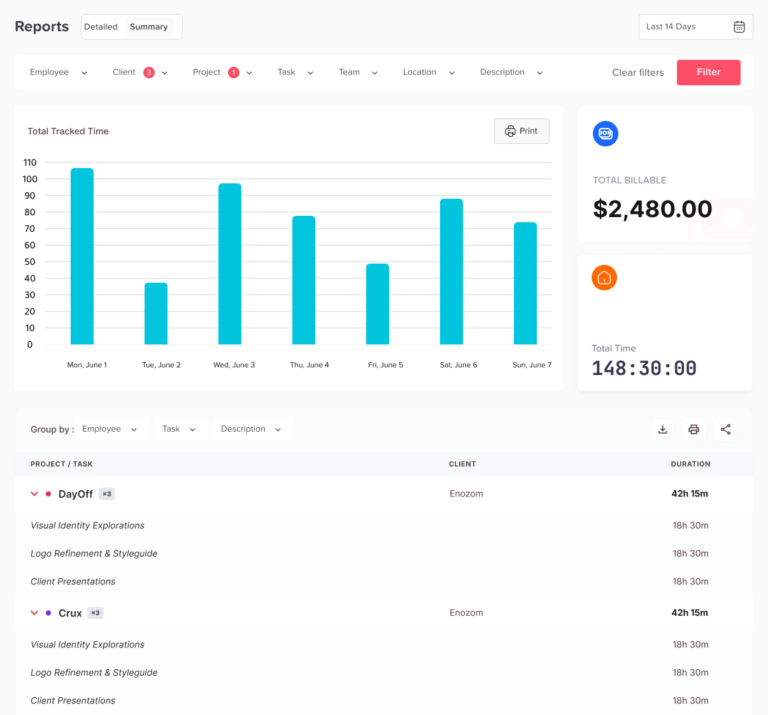
HR should review time tracking reports to find patterns, not just mistakes. Reports can show repeated late arrivals, overtime risks, understaffed shifts, unused PTO, and teams that need better scheduling support.
Connect Time Tracking With Payroll
Before payroll, HR should review approved time records, PTO, unpaid leave, overtime, and corrections. This reduces manual work and helps payroll teams process wages more confidently.
Use the Same Rules for Similar Employees
Fairness matters. Employees in similar roles and locations should follow the same time tracking rules unless there is a clear business or legal reason for a difference.

Time Tracking and PTO for Part-Time Employees
PTO for part-time employees can be more complex than PTO for full-time employees. Some companies offer prorated PTO based on scheduled hours. Others offer PTO based on hours worked. Some do not offer PTO to certain part-time employees, depending on company policy and legal requirements. Whatever approach the company uses, HR should make the rule clear.
For part-time employees, PTO tracking should answer:
- Is the employee eligible for PTO?
- Is PTO prorated?
- Is PTO based on scheduled hours or hours worked?
- Can PTO be used for partial shifts?
- How are sick leave and unpaid leave tracked?
- Does PTO affect expected weekly hours?
- Are PTO balances visible to employees?
When PTO and time tracking are connected, HR can see the full picture. An employee’s record does not only show that they worked fewer hours. It can show whether they worked fewer hours because of approved PTO, sick leave, unpaid leave, a holiday, or a schedule change.
Example: Fair Time Tracking for a Part-Time Employee
Imagine a part-time employee named Sara. She is scheduled to work three shifts this week:
| Day | Scheduled Time | Expected Hours |
|---|---|---|
| Monday | 9:00 AM–1:00 PM | 4 hours |
| Wednesday | 12:00 PM–5:00 PM | 5 hours |
| Saturday | 10:00 AM–2:00 PM | 4 hours |
Her expected total is 13 hours.
During the week:
- On Monday, she clocks in at 9:03 AM and clocks out at 1:00 PM.
- On Wednesday, she takes approved unpaid leave for the full shift.
- On Saturday, she works from 10:00 AM to 2:30 PM because the store is busy.
A fair time tracking system should show:
| Day | Record | Result |
|---|---|---|
| Monday | Slight late clock-in | Manager can review based on company policy |
| Wednesday | Approved unpaid leave | Not treated as an unexplained absence |
| Saturday | 30 extra minutes worked | Added to payroll record if approved |
Without connected scheduling, leave, and time tracking, HR may see only confusing hour differences. With a clear system, the record tells the full story.
How Day Off Helps Track Part-Time Employee Hours
Day Off helps businesses manage employee time, attendance, PTO, schedules, approvals, and reports in one place. This is especially useful for part-time teams because their work patterns are often more flexible.
With Day Off, businesses can manage:
- Employee clock-in and clock-out records
- Work schedules
- PTO and leave requests
- Sick leave and unpaid leave
- Attendance visibility
- Leave balances
- Manager approvals
- Team availability
- Reports for HR and payroll
- Employee self-service access
Day Off’s web-based time clock tracker content highlights the value of connecting attendance, work hours, paid time off, leave balances, approvals, and reports in one place instead of managing them through scattered spreadsheets or messages.
For part-time employees, this helps managers see whether someone is working, away, late, on leave, or scheduled for another shift. It also helps employees understand their records instead of asking HR for updates.
Time Tracking Checklist for Part-Time Employees
HR teams can use this checklist to review whether their time tracking process is fair and complete.
| Checklist Item | What HR Should Review |
|---|---|
| Employee classification | Whether the employee is part-time, hourly, nonexempt, or another classification |
| Work schedule | Whether expected hours are clearly assigned |
| Clock-in process | How employees record the start of work |
| Clock-out process | How employees record the end of work |
| Break rules | Whether breaks are paid, unpaid, required, or optional |
| PTO connection | Whether approved leave is visible in time records |
| Missed punches | How missing entries are corrected |
| Manual edits | Who can edit records and how edits are documented |
| Overtime review | Whether extra hours are reviewed before payroll |
| Manager approval | Whether timesheets are approved consistently |
| Employee visibility | Whether employees can review their own records |
| Payroll exports | Whether approved records can be shared with payroll |
| Reports | Whether HR can review trends, errors, and attendance patterns |
| Policy documentation | Whether the rules are written clearly for employees |
Mistakes to Avoid
Using Spreadsheets for Too Long
Spreadsheets may work for a small team, but they become risky as part-time schedules change. Manual updates can lead to missing hours, wrong totals, and unclear approvals.
Not Tracking Breaks
Ignoring breaks can lead to inaccurate working time records. Break tracking should be clear and consistent.
Not Connecting Time Off With Work Hours
If PTO and time tracking are separate, managers may misunderstand why an employee did not work. Connecting both gives better context.
Allowing Too Many Manual Changes
Manual edits should be possible, but they should not be uncontrolled. Every edit should have a reason and approval trail.
Waiting Until Payroll to Review Errors
Time tracking errors should be reviewed regularly. Waiting until payroll creates pressure and increases the chance of mistakes.
Applying Different Rules to Different Employees
If employees in the same role are treated differently, the process may feel unfair. HR should standardize rules wherever possible.
How to Introduce Time Tracking to Part-Time Employees
A new time tracking process works best when employees understand it before it starts.
HR should explain:
- Why the company is tracking hours
- How employees should clock in and out
- How breaks should be recorded
- How PTO connects with schedules
- What to do if they forget to clock in
- When managers review records
- How payroll uses approved time records
- Who to contact with questions
The message should be clear and supportive. Time tracking should not feel like punishment. It should feel like a fair process that protects accurate pay and helps everyone plan better.
FAQ: Time Tracking for Part-Time Employees
How do you track hours for part-time employees?
The best way to track hours for part-time employees is to record their clock-in time, clock-out time, breaks, scheduled hours, actual worked hours, PTO, unpaid leave, and manager-approved corrections. A digital time tracking system is usually more accurate than spreadsheets because it keeps schedules, attendance, and payroll records organized in one place.
Do part-time employees have to clock in and out?
Many part-time employees should clock in and out, especially if they are paid hourly or classified as nonexempt. Clocking in and out helps employers record actual hours worked, calculate pay correctly, review breaks, and confirm whether employees worked their scheduled shifts.
Do employers have to track hours for part-time employees?
Employers covered by the Fair Labor Standards Act must keep accurate records for covered nonexempt employees, including information about hours worked and wages earned. The U.S. Department of Labor explains that there is no required format for these records, but the records must be accurate.
How do you calculate part-time employee hours?
To calculate part-time employee hours, subtract the clock-in time from the clock-out time, then subtract unpaid breaks if they apply. HR should also review schedule changes, PTO, unpaid leave, missed punches, and manager-approved edits before sending hours to payroll.
Can part-time employees get overtime?
Yes, part-time employees can get overtime if they are covered nonexempt employees and work more than the overtime threshold. Under the federal FLSA, covered nonexempt employees must receive overtime pay for hours worked over 40 in a workweek at not less than one and one-half times their regular rate of pay.
Are part-time employees paid for breaks?
It depends on the type of break and the applicable rules. Under federal guidance, short rest breaks of about 5 to 20 minutes are generally counted as hours worked, while bona fide meal periods are generally not counted as work time. Employers should also check state, local, and industry rules before setting break policies.
What should a part-time employee timesheet include?
A part-time employee timesheet should include the employee name, date, scheduled hours, clock-in time, clock-out time, break time, total worked hours, PTO or unpaid leave, notes, manager edits, and approval status. This gives HR and payroll a clearer record before pay is processed.
What happens if a part-time employee forgets to clock in?
If a part-time employee forgets to clock in, they should report the missed punch as soon as possible. The manager should review the correction, confirm the actual start time, and document the edit. A fair time tracking process should show who changed the record, when it was changed, and why.
Can a manager change an employee’s timesheet?
A manager may correct a timesheet when there is a real error, such as a missed punch or incorrect break entry. However, edits should be documented and should not remove valid hours worked. Keeping a clear approval history helps protect both the employee and the employer.
How many hours is considered part-time?
There is no single universal number of hours that defines part-time work. The FLSA does not define full-time or part-time employment, so employers often define part-time status in their own policies. However, wage, hour, overtime, and recordkeeping rules may still apply depending on the employee’s classification and location.
Should part-time employees get PTO?
Part-time PTO depends on company policy and applicable laws. Some companies offer prorated PTO based on scheduled hours or hours worked, while others offer separate sick leave, unpaid leave, or no PTO for certain part-time roles. Whatever the rule is, HR should explain it clearly and track balances accurately.
How do you track PTO for part-time employees?
PTO for part-time employees can be tracked by creating a separate leave balance based on company policy. The balance may be prorated, earned through accrual, or calculated based on hours worked. Connecting PTO with time tracking helps managers understand whether missed work was approved leave or an unexplained absence.
What is the best time tracking app for part-time employees?
The best time tracking app for part-time employees should support clock-in and clock-out records, break tracking, work schedules, PTO, leave balances, manager approvals, reports, and payroll exports. Day Off helps teams connect time tracking with PTO, attendance, schedules, approvals, and employee availability, making it easier to manage part-time hours fairly.
How can small businesses track part-time employee hours?
Small businesses can track part-time employee hours using a digital time tracker instead of manual spreadsheets. A good system should let employees record hours, managers approve timesheets, HR review attendance, and payroll access accurate reports. This reduces errors and saves time as the team grows.
Why is time tracking important for part-time employees?
Time tracking is important for part-time employees because their schedules often change. Accurate records help prevent payroll mistakes, missed hours, unfair scheduling, unclear absences, and overtime issues. It also gives employees more confidence that their worked hours and approved time off are being handled correctly.
Final Thoughts
Time tracking for part-time employees is not just an administrative task. It is a key part of fair pay, accurate scheduling, clean payroll records, and better workforce planning.
Because part-time employees often work changing schedules, companies need a system that records more than total hours. HR and managers should track clock-ins, clock-outs, breaks, schedules, PTO, unpaid leave, overtime, missed punches, edits, and approvals. They should also make the process simple, transparent, and consistent.
The best time tracking process connects work hours with employee availability. It shows who was scheduled, who worked, who was away, and whether the absence was approved. This reduces confusion and helps managers make better decisions.
With Day Off, companies can connect time tracking, PTO, attendance, schedules, leave balances, approvals, and reports in one organized platform. That makes it easier to manage part-time employees fairly, reduce manual errors, and keep HR records clear as the team grows.