







Managing employee time is one of the most important parts of running a productive and organized business. Companies need to know when employees are working, when they are away, how many hours they worked, whether they arrived late, whether they worked overtime, and whether an absence was approved or unplanned. Without a clear system, employee time management can quickly become confusing for HR teams, managers, payroll teams, and employees.
Many businesses track employee work hours in one system and manage time off in another. Some use a time clock tool for attendance, spreadsheets for PTO balances, emails for leave requests, and manual reports for payroll. While this may seem manageable at first, it creates disconnected information. HR teams spend more time checking records, managers lack visibility, employees ask more questions, and payroll becomes harder to prepare accurately.

When work hours and time off are managed in one place, companies get a complete view of employee availability. They can understand who is working, who is on approved leave, who arrived late, who worked overtime, and who is absent. This helps reduce manual work, improve payroll accuracy, support better workforce planning, and create a smoother employee experience.
Day Off helps businesses manage employee time more clearly by combining PTO tracking, leave management, work schedules, absence tracking, and time attendance features. With Day Off, teams can manage leave requests, PTO balances, approvals, punch in and punch out records, late time, overtime, reports, and payroll-ready attendance sheets from one centralized platform.
In this article, we will explain how to track employee work hours and time off together, why it matters, what problems happen when these processes are separated, and how Day Off can help businesses simplify employee time management.
What Does It Mean to Track Employee Work Hours and Time Off Together?
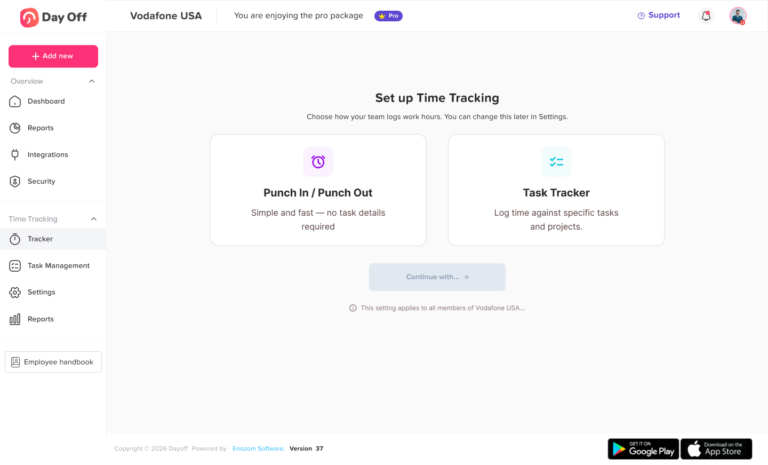
Tracking employee work hours and time off together means managing attendance records and leave records in one connected system.
Work hours show when employees are working. Time off shows when employees are approved to be away from work. Together, they give businesses a complete picture of employee availability.
Employee work hours may include:
- Clock in time
- Clock out time
- Total daily working hours
- Late arrivals
- Early departures
- Overtime
- Breaks
- Work schedules
- Attendance history
- Payroll-ready timesheets
Employee time off may include:
- Vacation leave
- Sick leave
- Personal leave
- Unpaid leave
- Public holidays
- Half-day leave
- Emergency leave
- Maternity leave
- Paternity leave
- Custom leave types
- PTO balances
- Leave approvals
When these records work together, HR teams can easily answer important questions such as:
- Did the employee work today?
- Was the employee on approved leave?
- Did the employee forget to clock in?
- Was the employee late?
- Did the employee work overtime?
- Should the absence be counted as PTO or unpaid leave?
- Is the attendance data ready for payroll?
- Is the team properly staffed this week?
This is much easier than checking multiple spreadsheets, emails, calendars, and attendance reports.
Why Businesses Need to Track Work Hours and Time Off Together
Employee work hours and time off are closely connected. A company cannot fully understand attendance without knowing who is on leave, and it cannot fully understand time off without knowing how employees actually work.
For example, if an employee does not clock in on Monday, the attendance record may show a missing workday. But that does not always mean the employee was absent without notice. They may have had approved vacation, sick leave, unpaid leave, or a public holiday. Without a connected leave management system, HR needs to check manually.
The same applies to overtime. If an employee works extra hours during the week and takes a half-day off later, HR needs accurate records to understand both the extra time worked and the time off taken.
Tracking work hours and time off together gives businesses better accuracy and better visibility.
The Problems with Tracking Work Hours and Time Off Separately
Many companies still manage attendance and leave in separate systems. This often creates more work than expected.
A company may use one tool for punch in and punch out, another tool for PTO requests, a spreadsheet for PTO balances, and a shared calendar for vacations. Managers may approve leave through email or chat, while HR manually updates records later.
This disconnected process creates several problems.
HR Teams Spend Too Much Time Checking Records
When work hours and time off are stored in different places, HR teams need to compare multiple records manually.
They may need to check:
- Timesheets
- Attendance logs
- PTO spreadsheets
- Leave request emails
- Manager approvals
- Shared calendars
- Payroll notes
- Employee messages
This takes time and increases the chance of mistakes. Instead of focusing on employee engagement, policy improvement, or workforce planning, HR teams spend hours reviewing and correcting employee time data.
A centralized system reduces this manual work by keeping attendance and PTO information connected.
Absences Can Be Misunderstood
A missing clock-in does not always mean an employee is absent without approval. It may mean the employee is on vacation, sick leave, personal leave, unpaid leave, or another approved absence.
When attendance and PTO are not connected, absences can be misunderstood or recorded incorrectly.
For example, an employee may have an approved vacation day, but the attendance system shows them as absent because they did not clock in. HR then needs to manually correct the attendance record. If this happens often, it creates unnecessary work and confusion.
When work hours and time off are tracked together, approved leave can be clearly connected to attendance records.
Payroll Mistakes Become More Likely
Payroll depends on accurate time data. If attendance records, PTO balances, overtime, and unpaid leave are stored separately, payroll preparation becomes harder.
Payroll mistakes may happen when:
- Overtime is missed
- Approved PTO is recorded incorrectly
- Unpaid leave is treated as paid leave
- Paid leave is treated as absence
- Late time is calculated manually
- Attendance records are incomplete
- Leave balances are outdated
- Half-days are entered incorrectly
These mistakes can affect employee trust and create extra work for HR and finance teams.
Tracking work hours and time off together helps payroll teams work with cleaner and more accurate data.
Managers Do Not Have Full Visibility
Managers need to know who is available before assigning tasks, approving leave, scheduling shifts, or planning deadlines. If work hours and time off are managed separately, managers may only see part of the picture.
- They may know who worked yesterday, but not who is scheduled to be off tomorrow.
- They may approve leave without knowing that other team members are already away.
- They may not notice repeated late arrivals or overtime patterns.
A connected system helps managers see employee availability more clearly.
Employees Ask More Questions
Employees want to know how many PTO days they have, whether their leave request was approved, whether their work hours were recorded correctly, and whether overtime was counted.
When systems are disconnected, employees often need to ask HR for answers. This creates repeated messages and slows down the process.
A connected PTO and attendance system gives employees better access to their own information, reducing confusion and improving transparency.
Reports Become Harder to Prepare
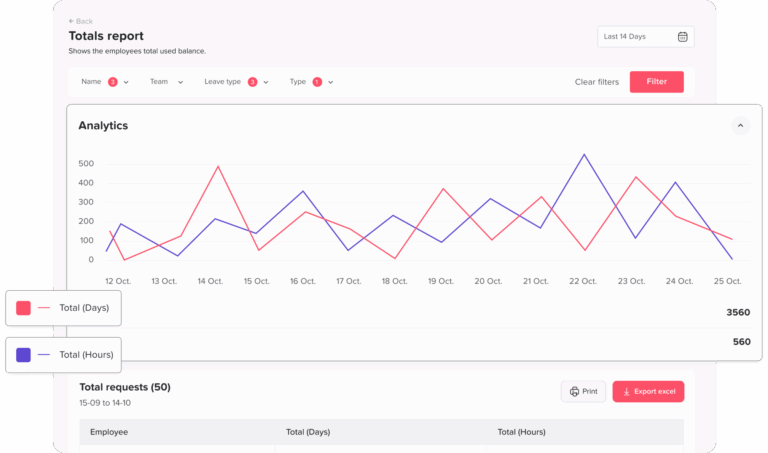
HR teams often need reports on attendance, absences, PTO usage, overtime, late arrivals, and employee availability. When data is stored in different tools, creating reports becomes time-consuming.
Manual reports may also contain errors because information needs to be copied from different sources.
A centralized system makes reporting easier by keeping employee time data in one place.
Benefits of Tracking Employee Work Hours and Time Off Together
Managing work hours and time off together gives businesses a stronger and more accurate way to manage employee time.
Here are the main benefits.
A Complete View of Employee Availability
Employee availability is not only about whether someone clocked in. It also includes whether they are on approved PTO, sick leave, unpaid leave, public holiday, or another type of absence.
When work hours and time off are tracked together, businesses can clearly see:
- Who is working
- Who is late
- Who is absent
- Who is on approved leave
- Who is working overtime
- Who has upcoming PTO
- Who may need coverage
- Which teams are fully staffed
This complete view helps managers and HR teams make better decisions.
Better Attendance Accuracy
Attendance records become more accurate when they are connected with time off records.
Instead of marking every missing clock-in as an absence, HR can see whether the employee had approved leave. Instead of manually checking leave calendars, the system can help connect time off with attendance records.
This helps avoid misclassification and reduces manual corrections.
Easier Payroll Preparation
Payroll teams need accurate records of work hours, PTO, overtime, absences, and unpaid leave. When this information is connected, payroll preparation becomes easier.
HR teams can generate clearer reports and attendance sheets that support payroll. This reduces the time spent checking records and helps prevent payroll mistakes.
Reduced HR Workload
A centralized system reduces repetitive HR tasks.
Instead of manually calculating PTO balances, checking attendance logs, correcting absence records, and answering employee questions, HR teams can manage everything from one platform.
This saves time and allows HR professionals to focus on more valuable work.
Faster Leave Approvals
Managers can approve leave requests faster when they can see employee availability and PTO balances clearly.
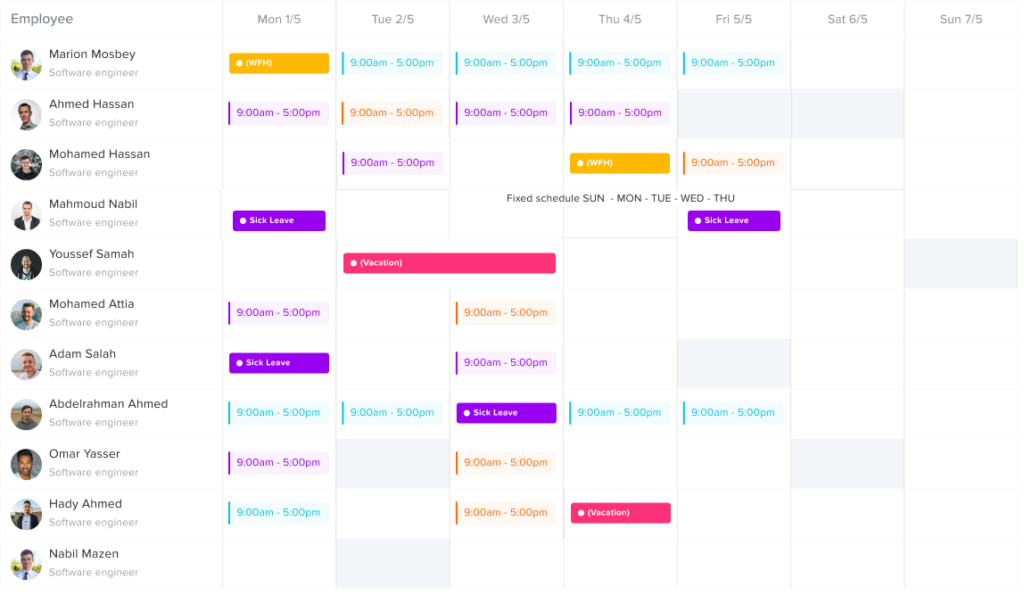
Before approving a request, managers can check whether the employee has enough PTO, whether other team members are already away, and whether the team has enough coverage.
This makes the approval process faster, fairer, and more organized.
Better Workforce Planning
Tracking work hours and time off together helps managers plan workloads and team coverage more effectively.
For example, managers can see if several employees are scheduled to be away during the same week. They can also identify if certain employees are working too much overtime or if repeated late arrivals are affecting team performance.
This helps businesses reduce scheduling conflicts and improve team planning.
More Transparency for Employees
Employees benefit when they can clearly see their work hours, PTO balances, leave requests, and approvals.
A transparent system helps employees understand their time records and reduces the need to ask HR for updates. This improves trust and creates a better employee experience.
Better Support for Remote and Hybrid Teams
Remote and hybrid teams need digital systems because employees may work from different locations and schedules.
Tracking work hours and time off together helps remote teams stay organized. Employees can record attendance, request leave, and check balances online, while managers can view availability without constant manual follow-ups.
How to Track Employee Work Hours and Time Off Together
To manage employee time properly, companies need a clear process and the right system. Here are the main steps.
Step 1: Create Clear Work Hour and Time Off Policies
Before tracking employee time, businesses need clear rules. Employees should understand when they are expected to work, how to record their hours, how to request PTO, and how absences are handled.
A clear policy should explain:
- Work schedules
- Clock in and clock out rules
- Flexible working hours
- Late arrival rules
- Overtime rules
- PTO request process
- Sick leave process
- Unpaid leave rules
- Approval workflows
- Payroll impact
- Absence reporting process
Clear policies help employees know what to expect and reduce confusion.
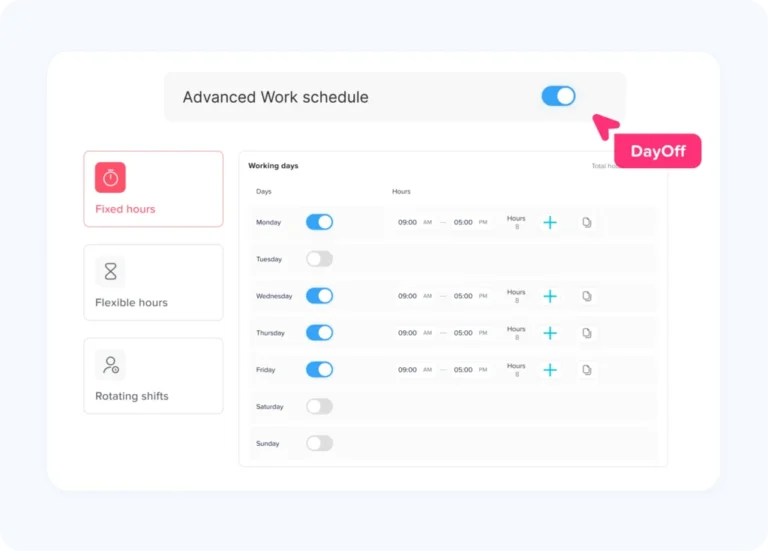
Step 2: Set Up Employee Work Schedules
Work schedules are essential for accurate attendance tracking. Without schedules, it is difficult to know whether someone is late, working overtime, or following flexible hours.
Companies may use different schedule types, such as:
- Fixed hours
- Flexible hours
- Rotating shifts
- Part-time schedules
- Remote schedules
- Shift-based schedules
A good time attendance system should support different work schedules so employees are tracked fairly.
Day Off supports work schedules, helping companies manage late time, overtime, and employee availability more accurately.
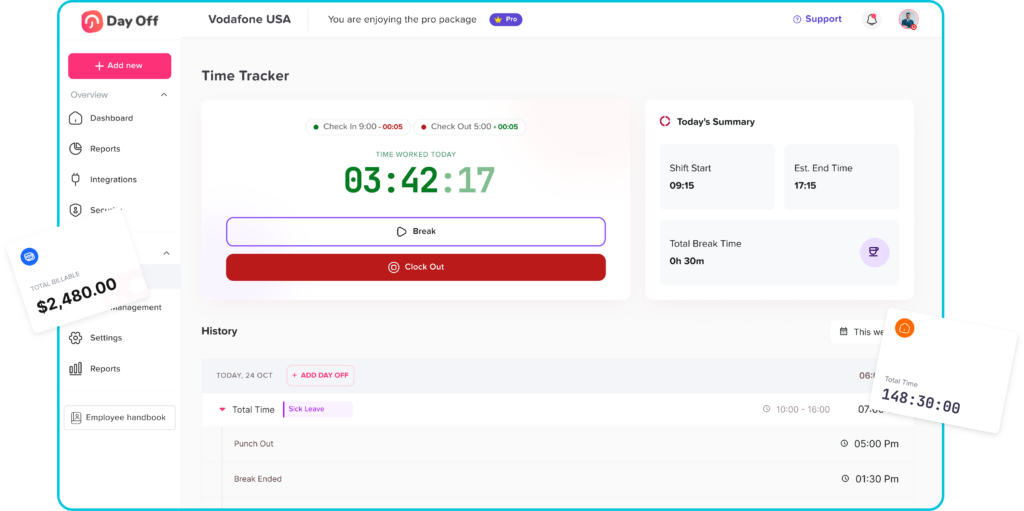
Step 3: Use Digital Clock In and Clock Out
Digital clock in and clock out allows employees to record when they start and finish work. This creates accurate attendance records and reduces the need for manual timesheets.
A digital attendance system can help track:
- Start time
- End time
- Total working hours
- Late arrivals
- Early departures
- Overtime
- Attendance history
- Daily records
- Monthly summaries
Digital tracking is more reliable than paper forms or manual messages because it keeps records organized and easier to review.
Step 4: Centralize PTO Requests
Employees should be able to request time off through one system. Using emails, chat messages, or verbal approvals can lead to missed requests and inaccurate records.
A centralized PTO tracking system allows employees to:
- View PTO balances
- Choose leave type
- Submit leave requests
- Add notes if needed
- Check request status
- See approved time off
- Review leave history
Managers can approve or reject requests, and HR can maintain accurate records.
Step 5: Connect PTO with Attendance Records
The most important step is connecting time off with attendance records. This helps businesses understand whether an employee was working, absent, late, or on approved leave.
For example:
- If an employee does not clock in but has approved PTO, the system should reflect approved leave.
- If an employee leaves early without approval, the system should record the attendance issue.
- If an employee works extra hours, overtime should be tracked.
- If an employee takes unpaid leave, the record should support payroll.
This connection gives companies a more accurate view of employee time.
Step 6: Track Absences Clearly
Absence tracking should separate planned absences from unplanned absences.
Planned absences may include approved vacation, sick leave, personal leave, or unpaid leave. Unplanned absences may happen when an employee does not show up or does not report an absence properly.
A good system should help HR understand:
- Why the employee was away
- Whether the absence was approved
- Which leave type was used
- Whether PTO should be deducted
- Whether the absence affects payroll
- Whether there is a repeated pattern
Clear absence tracking helps businesses manage attendance fairly and accurately.
Step 7: Review Reports Regularly
Reports help HR teams and managers understand employee time trends.
Useful reports include:
- Attendance reports
- PTO balance reports
- Leave usage reports
- Absence reports
- Late arrival reports
- Overtime reports
- Payroll-ready attendance sheets
- Team availability reports
- Monthly work hour reports
Reviewing these reports helps businesses identify problems early and make better decisions.
Key Features to Look for in a Work Hours and Time Off Tracking System
When choosing a system to track employee work hours and time off together, companies should look for features that support HR, managers, employees, and payroll.
Important features include:
- Punch in and punch out
- Time attendance tracking
- PTO tracking
- Leave requests
- Approval workflows
- PTO balance visibility
- Work schedule management
- Late time calculation
- Overtime tracking
- Absence tracking
- Shared leave calendar
- Reports and exports
- Payroll-ready attendance sheets
- Employee self-service
- Manager visibility
- Support for teams and locations
- Support for remote and hybrid teams
- Support for different leave types
- Easy setup and use
The best system should reduce manual work, improve accuracy, and give everyone a clearer view of employee availability.
How Day Off Helps Track Employee Work Hours and Time Off Together
Day Off helps businesses manage employee time from one centralized platform. Instead of using separate tools for PTO, attendance, absences, and reports, companies can use Day Off to connect these processes.
Day Off supports both leave management and time attendance, making it easier for HR teams and managers to understand employee availability.
With Day Off, businesses can manage:
- Employee work hours
- Punch in and punch out
- Time attendance records
- Work schedules
- Late arrivals
- Overtime
- PTO requests
- Leave approvals
- PTO balances
- Absence tracking
- Shared leave calendars
- Reports
- Payroll-ready attendance sheets
- Teams and locations
This makes Day Off a strong option for companies that want to simplify employee time management and reduce manual HR work.
Day Off for Work Hours Tracking
Day Off helps companies track employee work hours through time attendance features. Employees can punch in and punch out, while managers and HR teams can review attendance records.
This helps businesses understand when employees worked, how many hours they completed, and whether there were attendance issues such as late arrivals or overtime.
Day Off for PTO Tracking
Day Off also helps companies manage PTO tracking. Employees can request time off, view their balances, and check approval status. Managers can approve or reject requests, and HR can keep leave records organized.
This creates a smoother leave management process and reduces the need for manual spreadsheets.
Day Off for Work Schedules
Work schedules are important because they help calculate attendance accurately. Day Off supports work schedules so companies can manage different employee schedules, including fixed hours, flexible hours, and rotating shifts.
This helps businesses track late time and overtime more fairly and accurately.
Day Off for Absence Tracking
Day Off helps businesses understand when employees are away and why. By connecting leave requests with attendance records, companies can separate approved leave from unplanned absences.
This helps reduce confusion and improves employee availability tracking.
Day Off for Reports and Payroll Preparation
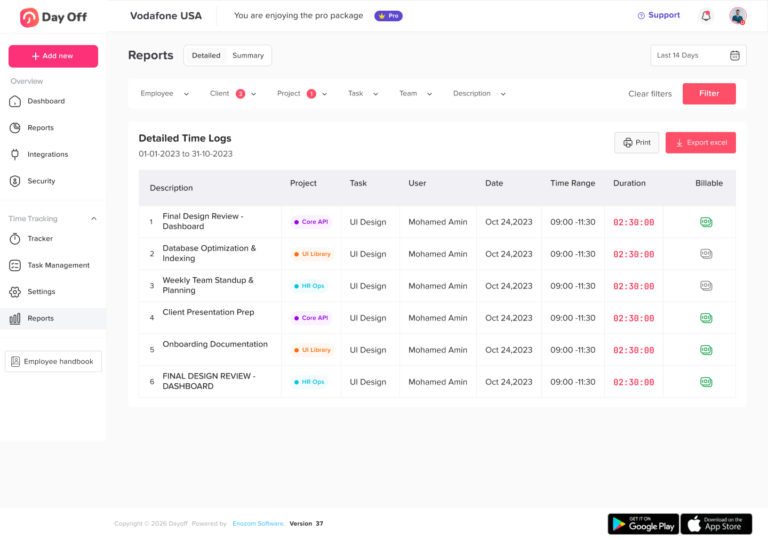
Day Off helps HR teams generate reports and extract attendance sheets that can support payroll preparation. By keeping work hours and time off data in one place, companies can reduce manual calculations and improve payroll accuracy.
Best Practices for Tracking Employee Work Hours
Tracking work hours should be simple, accurate, and consistent.
Best practices include:
- Use a digital clock in and clock out system
- Set clear work schedules
- Define late arrival rules
- Track overtime accurately
- Review attendance reports regularly
- Make attendance rules clear to employees
- Avoid relying on manual timesheets
- Use reports to identify patterns
- Connect attendance with PTO and absences
- Keep records organized for payroll
These practices help companies manage attendance more effectively.
Best Practices for Tracking Employee Time Off
Time off tracking should be transparent and easy for employees to understand.
Best practices include:
- Use a centralized PTO tracker
- Let employees view PTO balances
- Create clear leave policies
- Use approval workflows
- Track different leave types separately
- Use a shared leave calendar
- Update balances automatically
- Review overlapping requests carefully
- Generate PTO reports
- Encourage employees to plan time off early
A good PTO tracking system makes leave management easier for employees, managers, and HR teams.
Best Practices for Tracking Work Hours and Time Off Together
To get the best results, companies should connect attendance and PTO tracking.
Best practices include:
- Use one platform for employee time data
- Connect PTO requests with attendance records
- Separate approved leave from unplanned absence
- Track late arrivals based on work schedules
- Track overtime accurately
- Give employees access to their balances and records
- Give managers visibility into team availability
- Export reports for payroll
- Review attendance and PTO trends together
- Keep policies clear and consistent
This approach creates better accuracy and reduces confusion.
Tracking Work Hours and Time Off for Remote Teams
Remote teams need strong digital systems because employees may work from different locations and time zones.
For remote teams, tracking work hours and time off together helps managers understand availability without constant check-ins.
A good system should allow remote employees to:
- Record work hours online
- Request PTO digitally
- View PTO balances
- Check approvals
- Follow work schedules
- Report absences clearly
- Access records from anywhere
Day Off supports remote and hybrid teams by helping them manage attendance, PTO, and availability in one platform.
Tracking Work Hours and Time Off for Small Businesses
Small businesses often start with spreadsheets, but manual tracking can quickly become difficult.
Even small teams need accurate records for work hours, PTO, absences, and payroll. If the process depends on manual updates, mistakes can happen.
A system like Day Off helps small businesses create a more organized process without adding complexity. Employees can request time off, track attendance, and view balances, while managers can see availability more clearly.
Tracking Work Hours and Time Off for Growing Companies
As companies grow, employee time management becomes more complex. More employees means more work schedules, leave requests, attendance records, approvals, and reports.
Growing companies need a system that can scale.
Day Off helps growing teams manage employee time by supporting PTO tracking, attendance, work schedules, teams, locations, reports, and approvals from one platform.
This makes it easier to maintain accuracy as the business expands.
Why Spreadsheets Are Not Enough
Spreadsheets are common, but they are not ideal for tracking employee work hours and time off together.
Spreadsheets can create problems such as:
- Manual calculation errors
- Outdated information
- Duplicate entries
- Missing leave requests
- Incorrect PTO balances
- No real-time attendance tracking
- No approval workflow
- No employee self-service
- Difficult reporting
- Version control issues
- More HR workload
A dedicated system gives businesses better accuracy, visibility, and control.
How Tracking Work Hours and Time Off Together Improves Payroll
Payroll becomes easier when work hours and time off are connected.
A connected system helps payroll teams understand:
- How many hours employees worked
- Whether employees worked overtime
- Whether employees were late
- Which days were approved PTO
- Which absences were unpaid
- Whether leave balances were deducted correctly
- Whether attendance sheets are ready for payroll
This reduces manual checking and helps prevent payroll mistakes.
How Tracking Work Hours and Time Off Together Improves Employee Experience
Employees benefit from a simpler and more transparent process.
They can:
- View PTO balances
- Request time off easily
- Track approval status
- Record work hours
- Understand attendance records
- Avoid repeated HR questions
- Trust that their records are accurate
When employees have access to clear information, they feel more confident and less frustrated.
How Tracking Work Hours and Time Off Together Improves Management
Managers benefit from better visibility.
They can:
- See who is working
- See who is away
- Review upcoming PTO
- Approve requests faster
- Plan team coverage
- Monitor attendance trends
- Identify overtime patterns
- Avoid scheduling conflicts
This helps managers plan work more effectively and keep teams organized.
Frequently Asked Questions
What is the best way to track employee work hours and time off together?
The best way is to use one centralized system that combines time attendance, punch in and punch out, work schedules, PTO tracking, leave requests, absence tracking, and reports.
Why should work hours and time off be tracked together?
They should be tracked together because both affect employee availability. If an employee does not clock in, HR needs to know whether they are absent, late, or on approved leave.
Can Day Off track employee work hours?
Yes. Day Off includes time attendance features that help businesses track employee work hours, punch in and punch out, late time, overtime, and attendance records.
Can Day Off manage PTO tracking?
Yes. Day Off helps businesses manage PTO requests, approvals, balances, leave types, shared calendars, and reports.
How does tracking work hours and PTO together help payroll?
It helps payroll by connecting work hours, overtime, PTO, absences, and unpaid leave in one place. This reduces manual calculations and helps improve payroll accuracy.
Is tracking work hours and time off useful for remote teams?
Yes. Remote and hybrid teams benefit from digital attendance and PTO tracking because employees can record work hours and request time off from anywhere.
Why are spreadsheets not enough for tracking employee time?
Spreadsheets require manual updates, are prone to errors, and do not provide real-time visibility, employee self-service, approval workflows, or automatic attendance tracking.
What features should a work hours and PTO tracking system include?
A good system should include time attendance, punch in and punch out, work schedules, PTO tracking, leave requests, approval workflows, PTO balances, absence tracking, reports, and payroll-ready exports.
Final Thoughts
Tracking employee work hours and time off together is one of the best ways to improve employee time management. When attendance and PTO are managed separately, HR teams deal with manual work, managers lack visibility, payroll becomes harder, and employees experience confusion.
A connected system gives businesses a clearer view of employee availability. It helps teams understand who is working, who is on approved leave, who is absent, who arrived late, and who worked overtime.
Day Off helps businesses bring work hours and time off together in one platform. With PTO tracking, leave requests, approvals, work schedules, time attendance, punch in and punch out, late time, overtime, absence tracking, reports, and payroll-ready attendance sheets, Day Off gives HR teams, managers, and employees a simpler way to manage employee time.
For companies that want to reduce manual work, improve payroll accuracy, support better workforce planning, and move away from spreadsheets, tracking work hours and time off together is the smarter approach.