







Hybrid work sounded simple at first, just a mix of remote and office work. But in reality, it has changed how teams function daily. People are working from different places, at different times, and often with more flexibility than ever before.
While that flexibility is great for employees, it creates a real challenge behind the scenes: keeping track of who’s working, who’s off, and when.
In the past, this was easy. You could walk into the office and instantly know who was there. Now, someone might be working from home, offline for a few hours, or actually on leave, and it’s not always obvious which is which.
In the context of Hybrid Work, understanding the dynamics of absence management is crucial. Hybrid Work presents unique challenges that traditional offices did not face.

That’s where absence management becomes critical.
- People working some days remotely and in the office on others
- Half days, flexible hours, and quick time offs
- Sick days that might not be clearly communicated
- Different working patterns across teams
Someone might be “online” but actually on leave. Another person might be working odd hours. Without a clear system, things get messy very quickly.
This is why companies are moving toward simple, centralized tools like Day Off, where everything is in one place. Instead of guessing or asking around, you can instantly see who’s off, who’s available, and what’s coming up.
Managing absences in a Hybrid Work setup means recognizing different patterns of work. Hybrid Work allows for diverse working schedules that need effective tracking.
Key Challenges of Absence Management in Hybrid Work
During Hybrid Work, visibility is key. Teams need to adapt to Hybrid Work’s demands and ensure everyone knows when colleagues are present or absent.
Lack of Visibility
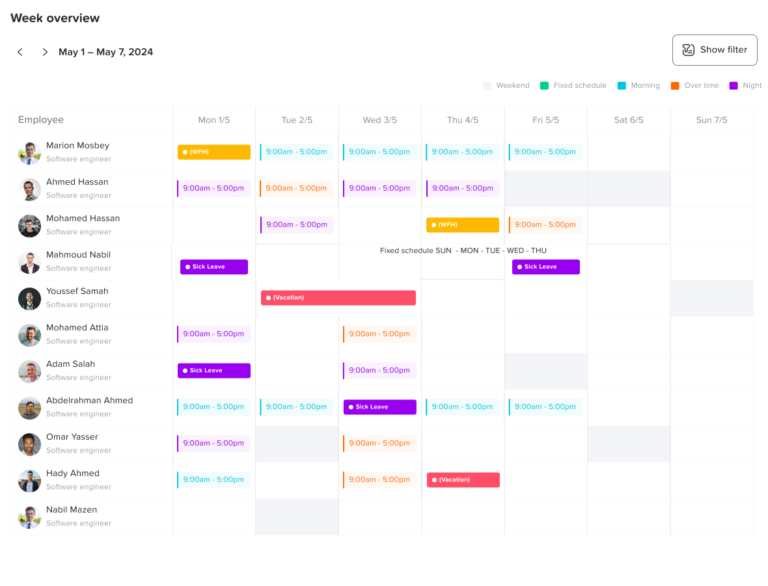
One of the biggest changes with hybrid work is that you can’t “see” your team anymore.
And that creates a simple but serious problem:
you don’t always know who’s actually available.
Is someone offline because they’re focusing? Because they stepped out? Or because they’re on leave?
Without clear visibility:
- Managers hesitate to assign work
- Teammates wait on replies that won’t come
- Planning becomes guesswork
Having a shared system like Day Off removes that uncertainty. Everyone can quickly check availability without needing to message or follow up.
For teams operating under Hybrid Work, the lack of visibility can be detrimental. It’s essential to communicate who is working in the office versus remotely in a Hybrid Work model.
Inconsistent Communication
In a Hybrid Work scenario, communication must be consistent to prevent misunderstandings regarding absences. Hybrid Work requires clear protocols.
This is something almost every team struggles with.
One person sends a leave request via email.
Another sends a Slack message.
Someone else mentions it casually in a meeting.
And then… it gets forgotten.
This inconsistency leads to:
- Missed approvals
- Confusion about who’s off
- Repeated questions like “Wait, are you on leave today?”
By using one simple system like Day Off, everything becomes consistent. Requests are submitted the same way, tracked in one place, and never lost.
Scheduling Conflicts
Scheduling in a Hybrid Work environment can lead to conflicts if not properly managed. Teams must coordinate schedules effectively in Hybrid Work.
Hybrid teams often try to align on certain days, especially for office collaboration.
But when absences aren’t clearly tracked, you end up with situations like:
- Key people missing from important meetings
- Too many people off at the same time
- Projects slowing down unexpectedly
These problems usually aren’t about bad planning, they’re about missing visibility.
With Day Off, teams can see upcoming leave in advance and avoid these conflicts before they happen.
Time Zone Differences
Time zone challenges are often magnified in Hybrid Work settings. Understanding these differences is vital for effective collaboration in Hybrid Work.
If your team is spread across different locations, things get even trickier.
A “day off” for someone in one country might overlap partially with working hours somewhere else.
Without a clear system:
- People expect replies from colleagues who are off
- Handoffs don’t happen properly
- Work gets delayed
A centralized tool like Day Off helps everyone stay aligned, no matter where they are.
Policy Confusion
Policy clarity is essential in a Hybrid Work environment. Policies need to be communicated clearly to avoid confusion in Hybrid Work.
Hybrid work has exposed something many companies didn’t think about before:
their leave policies aren’t always clear.
Questions come up like:
- Can I take a half-day if I’m working from home?
- Does stepping away for a few hours count as leave?
- What’s the rule for flexible schedules?
If these aren’t clearly defined, people start doing things differently, and that can feel unfair.
Using a structured system like Day Off helps ensure policies are applied consistently, so everyone is on the same page.
What is Day Off?
Day Off is designed to support teams navigating the complexities of Hybrid Work. It helps streamline absence management in Hybrid Work contexts.
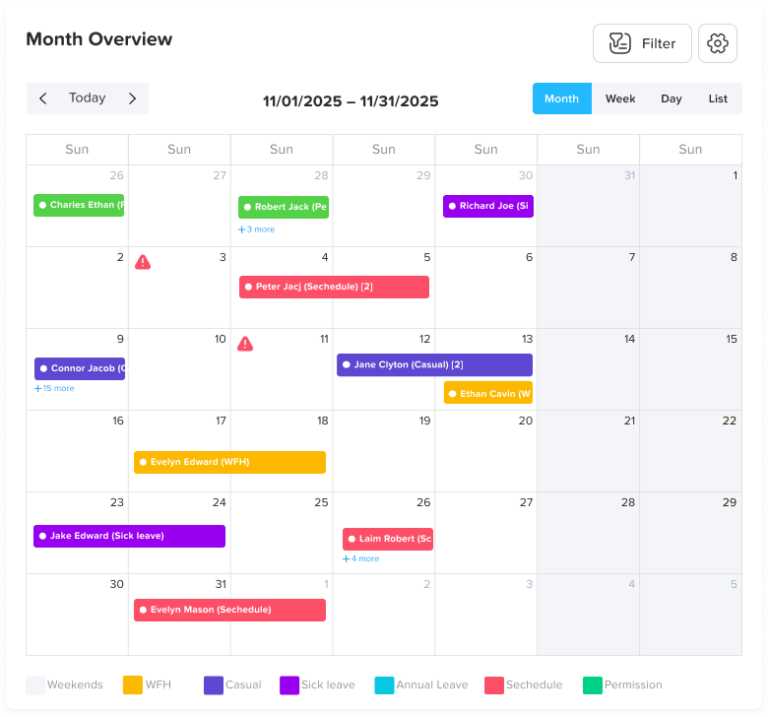
Day Off is a leave and absence management app that helps teams handle time off in a clear and organized way. Instead of relying on emails, spreadsheets, or scattered messages, everything is managed in one place.
It gives both employees and managers a simple way to track who’s off, when they’re off, and how it affects the team. This is especially valuable in hybrid or remote environments, where it’s not always obvious who is available.
How Day Off Works
Employees Request Time Off
Requesting leave is quick and straightforward. Employees just select the type of leave, choose the dates, and submit the request.
Because everything goes through the same system, requests don’t get lost or forgotten, and there’s no need to follow up multiple times.
Managers Approve (or Decline)
Managers are notified instantly when a request is submitted. They can review it, check team availability, and make a decision in seconds.
Having all the information in one place helps managers approve fairly and avoid conflicts within the team.
In a Hybrid Work environment, managers need to make decisions quickly based on visibility. Hybrid Work demands agile management practices.
Everyone Sees the Schedule
Once a request is approved, it appears on a shared team calendar. This makes it easy for everyone to see who is on leave and plan work accordingly.
It reduces unnecessary questions and helps teams avoid scheduling issues.
Effective absence management is crucial for successful Hybrid Work. A well-managed Hybrid Work system can significantly enhance team productivity.
Automatic Tracking & Balances
Day Off automatically tracks leave balances and updates them after each request.
This removes the need for manual tracking and ensures that records are always accurate and up to date.
Key Features of Day Off
Centralized management is essential for any Hybrid Work strategy. Such systems ensure all aspects of absence management are covered in Hybrid Work.
Centralized Management
All leave requests and records are stored in one place, so nothing gets lost or overlooked. Instead of searching through emails or chat messages, HR and managers can quickly access a complete history of requests, approvals, and balances. This makes day-to-day management easier and also helps when reviewing past data or making decisions.
Shared Calendar
A shared calendar is particularly useful in Hybrid Work environments to visualize who is off and when. It simplifies planning in Hybrid Work.
The shared calendar gives everyone a clear view of who is on leave and when. This makes it much easier to plan meetings, manage workloads, and avoid scheduling conflicts. Instead of asking around or double-checking availability, teams can instantly see the full picture and plan with confidence.
Quick Approvals
Managers can swiftly handle requests in a Hybrid Work environment, ensuring that absence management is efficient and effective in Hybrid Work.
Managers can review and approve requests in just a few clicks, without going through long email threads or manual checks. Because all the relevant information, such as overlapping leaves and employee balances, is visible, decisions can be made faster and more fairly. This keeps things moving and avoids unnecessary delays.
Mobile Access
Mobile access is a game-changer for Hybrid Work setups, allowing for timely management of absences no matter the location in Hybrid Work.
Day Off is accessible from mobile devices, allowing employees to request leave or check their balance anytime, from anywhere. Whether someone is working remotely, traveling, or away from their desk, they can still stay connected and manage their time off.
Custom Leave Types
Custom leave types can be especially beneficial in Hybrid Work. Tailoring leave options in Hybrid Work can enhance employee satisfaction.
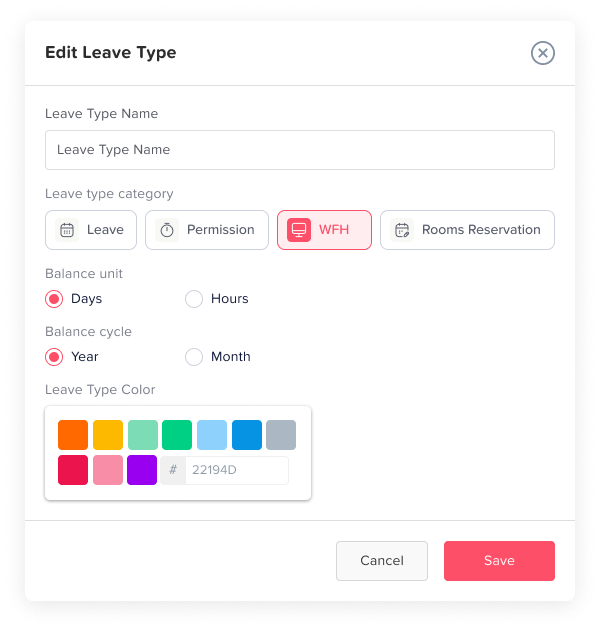
Every company has different policies, and Day Off adapts to that. You can create and manage different leave types such as vacation, sick leave, unpaid leave, or any custom category that fits your needs. This flexibility ensures the system works for your business, not the other way around.
Real-Time Updates
Real-time updates keep teams aligned in Hybrid Work. This immediacy is vital for managing absences effectively in Hybrid Work scenarios.
Any change, whether it’s a new request, an approval, or an update, is reflected instantly. This keeps everyone on the same page without the need for follow-ups or reminders. Real-time updates reduce miscommunication and help teams stay aligned at all times.
Tools That Support Hybrid Absence Management
Trying to manage absences manually in a hybrid environment might work for very small teams, but it quickly becomes overwhelming as the team grows. Information gets scattered, requests are missed, and managers lose visibility.
That’s why having the right tool is essential. A good absence management solution should be:
- Easy to use: So employees actually use it without confusion or training
- Accessible from anywhere: Especially important for remote and hybrid teams
- Built for flexibility: Able to handle different schedules, leave types, and work styles
Day Off is a strong example of this. It keeps the process simple while still offering everything teams need, clear visibility, automated workflows, and structured tracking. Instead of adding complexity, it removes it, allowing teams to manage absences without extra effort.
Absence management tools are crucial in Hybrid Work settings. Effective solutions can make a significant difference in Hybrid Work dynamics.
Handling Common Situations
Last-Minute Absences
Unexpected absences are unavoidable, people get sick, emergencies happen, or plans suddenly change.
The important part is how quickly the team can respond. Without a clear system, these situations can lead to confusion and delays.
Having a defined process, supported by a tool like Day Off, allows employees to submit requests instantly while notifying the right people. This ensures managers and teammates are aware right away and can adjust plans or redistribute work without disruption.
Partial-Day Leave
In hybrid work, not every absence is a full day. Employees might need a few hours off for appointments or personal tasks.
If this isn’t tracked properly, it can create misunderstandings around availability and workload. Some team members may assume someone is fully available when they’re not.
By formally tracking partial-day leave through a system like Day Off, expectations stay clear. Managers can plan better, and employees can take flexible time off without causing confusion.
Overlapping Requests
When multiple people request time off at the same time, it can create gaps in coverage, especially in smaller teams or critical roles.
Without visibility, managers may approve requests without realizing the impact.
With a tool like Day Off, overlapping requests are immediately visible. This helps managers make informed, fair decisions and ensures the team remains balanced and productive.
The Role of Managers
Managers play a bigger role than just approving requests, they shape how absence management works within the team.
When managers:
- Communicate clearly about expectations and policies
- Approve fairly based on visibility and consistency
- Encourage time off to prevent burnout
…it creates a healthier and more trusting work environment.
Using Day Off makes this much easier. Managers have a complete view of team availability, making it simpler to make quick, fair decisions while keeping everything organized.
What’s Next for Absence Management?
Hybrid work is not a temporary trend, it’s becoming the standard. As a result, absence management is evolving to keep up.
We’re already seeing a shift toward:
- More automation: Reducing manual work and speeding up processes
- Smarter insights: Using data to improve planning and policies
- More flexibility: Supporting different work styles and schedules
Companies that keep their processes simple and adopt modern tools like Day Off will be better equipped to handle these changes. They’ll spend less time managing absences and more time focusing on productivity and team well-being.
FAQ: Absence Management in Hybrid Work Environments
What’s the biggest mistake companies make with absence management in hybrid teams?
The most common mistake is relying on informal methods like emails or chat messages. This might work short-term, but it quickly leads to lost requests, confusion, and lack of visibility. Hybrid teams need a structured system where everything is tracked consistently in one place.
Structured systems are necessary for Hybrid Work to ensure clarity and transparency in absence management. Hybrid Work necessitates this level of organization.
How can small teams manage absences without a full HR system?
Small teams don’t need complex HR software, but they still need structure. A simple tool like Day Off is often enough, it provides organization and visibility without adding unnecessary complexity or setup time.
Small teams can also thrive in Hybrid Work with the right absence management tools. Hybrid Work doesn’t have to complicate things.
How far in advance should employees request time off?
This depends on the company, but a common approach is:
- A few days’ notice for short leave
- 1–2 weeks for longer vacations
What matters most is having clear expectations and a system that makes planning visible to everyone.
Clear communication around time-off requests is essential in Hybrid Work. This ensures that all team members know what to expect in Hybrid Work.
Should remote days be tracked the same as leave?
No, remote work and leave are different. However, in hybrid setups, it’s helpful to track both in a shared calendar so teams understand availability. This avoids confusion about whether someone is working remotely or actually off.
Tracking remote work and leave in Hybrid Work can prevent confusion about availability. This clarity is vital in Hybrid Work environments.
How do you handle employees who forget to submit leave requests?
This usually happens when the process is unclear or inconvenient. The solution is to make it simple and consistent. When using a tool like Day Off, employees are more likely to follow the process because it’s quick and easy.
Visibility in absence management is essential in Hybrid Work. It helps keep the workflow smooth in a Hybrid Work setup.
What’s the best way to avoid too many people being off at the same time?
The key is visibility. Managers should be able to see all upcoming leave before approving new requests. Setting basic rules (like limiting how many people can be off at once) also helps maintain balance.
How can absence management improve employee experience?
When done right, it removes uncertainty and makes things feel fair. Employees know:
- How to request time off
- How decisions are made
- That their requests won’t be ignored
This builds trust and encourages healthier work habits, like actually taking time off.
Absence management can significantly enhance the employee experience in Hybrid Work by ensuring transparency and fairness. Hybrid Work benefits from this clarity.
Is it necessary to track sick leave in detail?
It depends on company policy, but at minimum, sick leave should be recorded to maintain accurate records and understand patterns. A simple system ensures it’s tracked without making the process difficult for employees.
Tracking sick leave in Hybrid Work is essential for maintaining records. Hybrid Work environments must prioritize clear documentation.
How do hybrid teams handle public holidays across different countries?
For distributed teams, it’s important to account for regional holidays. A centralized system allows teams to track different holiday calendars and avoid confusion when some team members are off while others are working.
For teams operating across different countries, managing holidays in Hybrid Work is crucial to avoid confusion. Hybrid Work requires adaptability.
When should a company switch from manual tracking to a tool?
As soon as:
- Leave requests start getting missed
- Teams grow beyond a few people
- Managers lose visibility
At that point, manual tracking is no longer reliable. Switching to a tool like Day Off helps prevent problems before they scale.
Switching to tools for absence management is vital as teams grow in Hybrid Work. This transition can help streamline processes in Hybrid Work.
Conclusion
In conclusion, managing absences effectively in Hybrid Work is key to organizational success. Hybrid Work offers unique opportunities when managed well.
Managing absences in a hybrid workplace doesn’t have to be complicated, but it does need structure. With teams working across different locations and schedules, having clear processes and visibility is essential to avoid confusion and keep things running smoothly.
By using a simple, centralized approach, and tools like Day Off, companies can make absence management easier for everyone. This means fewer mistakes, better planning, and a more organized team overall.
In the end, when absence management is done right, it supports both productivity and employee well-being, helping teams work better together wherever they are.