







Choosing between Day Off vs Clockify can look straightforward at first. Both let teams track working hours, manage time entries, and understand where employees are spending their time.
But they are designed around different priorities.
Clockify is primarily a time tracking and project-management platform. It is particularly useful for companies that need detailed project hours, billable time, invoicing, budgets, profitability reporting, scheduling, and other tools built around tracked time.

Day Off takes a different route. It combines leave management, attendance, work schedules, and time tracking in one system. It is designed for companies that want to know not only how many hours employees worked, but also who is on leave, how much PTO they have, when they are scheduled to work, and how their attendance compares with those schedules.
That distinction makes the choice less about which software has the longest feature list and more about what your company actually needs to manage.
The 30-second verdict
Pick Day Off if your main priority is employees, attendance, PTO, and working hours.
Pick Clockify if your main priority is projects, billable hours, clients, invoicing, and profitability.
And if you want a Clockify alternative without screenshots or employee activity monitoring, Day Off is worth a closer look.
First, what are you actually buying?
Think about the main question your software needs to answer.
If your question is:
“Who is working, who is off, and how many hours did everyone work?”
Day Off is the better fit.
If your question is:
“How many hours did we spend on each client and project, and how much should we bill?”
Clockify is the better fit.
If your question is:
“Can I manage PTO and attendance while also tracking employee hours?”
Day Off has the stronger focus.
If your question is:
“Can I turn tracked hours into invoices and understand project profitability?”
Clockify has the advantage.
That difference is the foundation for the rest of the comparison.
The two products in one table
| Need | Day Off | Clockify |
|---|---|---|
| Employee time tracking | Excellent | Excellent |
| Clock in / clock out | Yes | Yes |
| Attendance | Strong | Strong |
| PTO management | Strong | Strong |
| Leave balances | Yes | Yes |
| Leave accrual | Yes | Yes |
| Holiday management | Yes | Yes |
| Work schedules | Yes | Yes |
| Project time tracking | Yes | Excellent |
| Task tracking | Yes | Yes |
| Billable hours | Yes | Yes |
| Invoicing | No | Yes |
| Project profitability | Limited | Strong |
| Project budgets | Limited | Strong |
| Resource scheduling | No | Yes |
| Screenshots | No | Pro |
| Activity monitoring | No | Pro |
| GPS | No | Pro |
| Best fit | HR + employee management | Projects + billing |
Clockify’s current paid plans expand from basic time tracking into time off, attendance, invoicing, project management, activity monitoring, GPS, screenshots, scheduling, and forecasting.
Where Day Off stands out
Day Off makes the most sense when leave and attendance are not secondary features.
Imagine an employee starts Monday at 9:00 AM.
You may want to know:
- Were they scheduled to work?
- When did they clock in?
- How long were their breaks?
- When did they finish?
- Did they work overtime?
- Were they late?
- Are they working remotely?
- How much PTO do they have?
- Are they taking Wednesday off?
- Is Wednesday a public holiday at their location?
Day Off brings these questions into the same employee-management workflow.
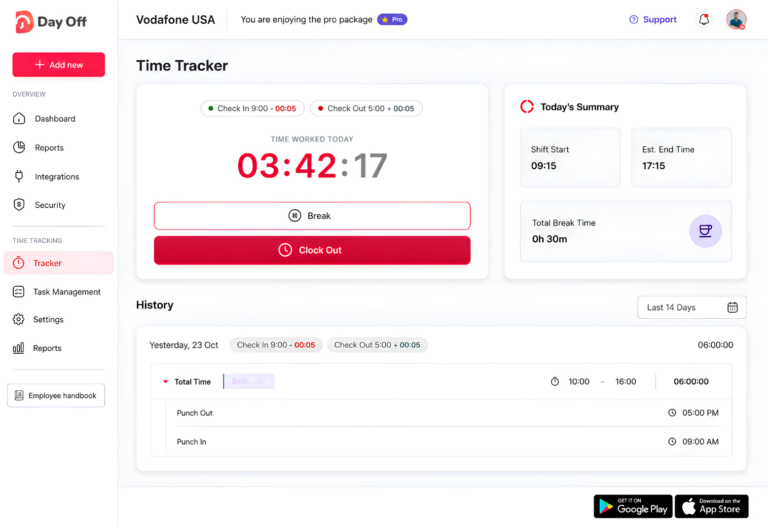
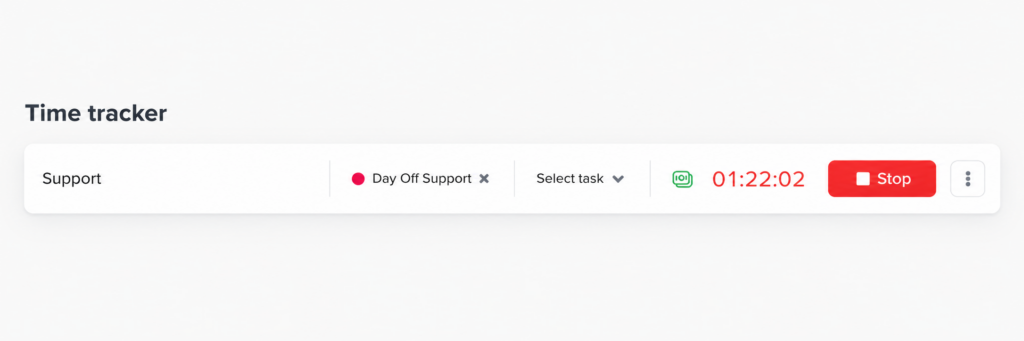
Its time tracker supports clock-in/clock-out as well as project and task-based tracking, while attendance information can be reviewed against employee work schedules.
That is different from simply maintaining a database of timesheets.
Where Clockify pulls ahead
Clockify becomes more attractive when the tracked hour has a commercial value attached to it.
For example, an agency might have:
Client A → Website redesign → 14.5 hours
SEO campaign for Client B → 23 hours
Client C → Consulting → 8 hours
The agency may then need to calculate:
- Billable amount
- Project cost
- Employee labor cost
- Project profitability
- Remaining budget
- Estimated completion
- Client invoice
This is where Clockify’s broader project and billing functionality becomes useful.
Its paid plans include features for invoicing, budgets, estimates, labor costs, profitability, scheduling, forecasting, and related project-management workflows.
So if you are buying software primarily because time equals revenue, Clockify deserves serious consideration.
PTO: similar feature, different emphasis
One of the biggest misconceptions about this comparison would be saying that Clockify does not have proper PTO management.
It does.
Clockify supports time-off policies, accruals, holidays, requests, approvals, and balances on its paid plans.
The question is whether PTO is the main reason you’re buying the software.
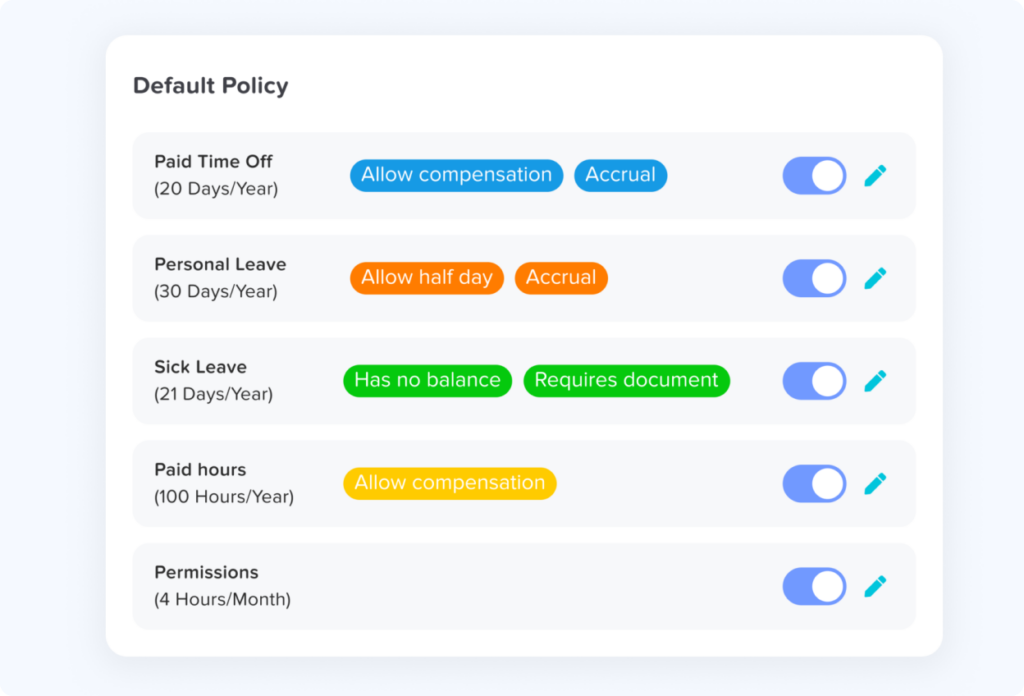
With Day Off, leave management is central to the product.
That means features such as:
- Leave types
- Leave policies
- Accrual rules
- Carryover
- Leave balances
- Holiday calendars
- Approval workflows
- Employee availability
- Team leave visibility
- Attendance
- Work schedules
are part of the core experience.
For an HR manager, that focus can matter more than having another project-reporting feature.
A real-world example
Let’s say you have a company with 25 employees.
You need to manage:
- Annual leave
- Sick leave
- Public holidays
- Remote work
- Attendance
- Working hours
- Overtime
- Project time
You don’t invoice clients based on employee hours.
Day Off
This is almost exactly the problem Day Off is designed to solve.
Clockify
Clockify can handle much of it, particularly once you’re on a paid plan.
But you may be paying for capabilities that your HR team doesn’t actually need.
Now change the company.
You have 25 consultants who work across 50 client projects.
Every hour needs to be allocated to a client.
You invoice clients based on those hours.
You need project budgets and profitability reports.
Day Off
It can track the hours.
Clockify
It can track the hours and build a larger workflow around those hours.
That’s the difference.
Pricing changes the calculation
Day Off currently offers:
Pro — $2/user/month
for time-off tracking.
Pro+ — $3/user/month
for time-off tracking plus time tracking.
For a company comparing the two products specifically for PTO + employee time tracking, Pro+ is the relevant Day Off plan.
Clockify has a free plan and several paid tiers. Its current pricing includes:
| Plan | Annual price | Main purpose |
|---|---|---|
| Free | $0 | Basic time tracking |
| Basic | $3.99/user/month | Additional time-tracking controls |
| Standard | $5.49/user/month | Time off, invoicing, approvals, attendance |
| Pro | $7.99/user/month | Monitoring, GPS, scheduling, forecasting |
| Enterprise | $11.99/user/month | Enterprise features |
Clockify’s pricing page lists the above annual-billing prices and the features included at each level.
This creates an interesting situation.
If you only need basic time tracking and have five or fewer users, Clockify’s free plan is hard to beat.
But if you need PTO + attendance + time tracking, Day Off Pro+ can be considerably less expensive.
Day Off: when attendance matters
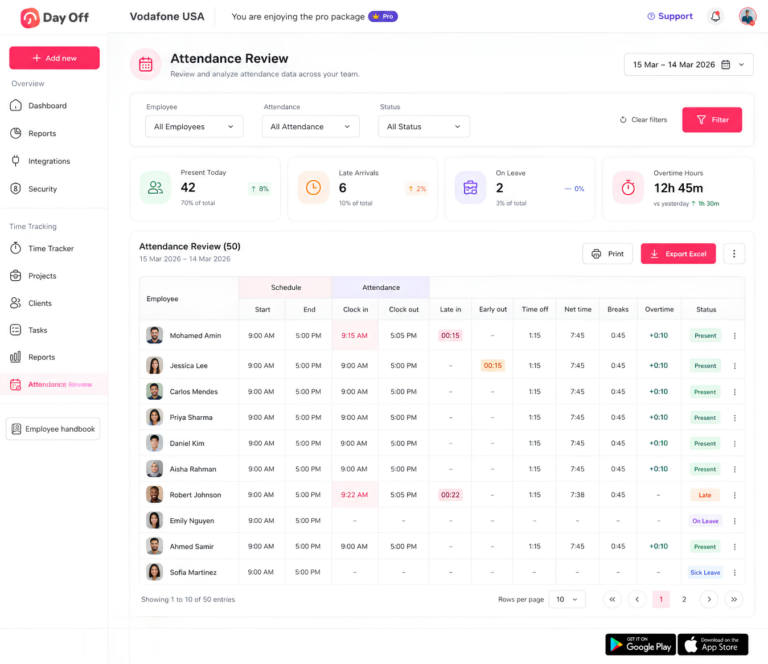
For many companies, “time tracking” actually means attendance tracking.
The manager doesn’t need to know that Sarah spent 47 minutes in one application and 23 minutes in another.
They need to know whether Sarah worked her scheduled hours.
Day Off is built around that distinction.
Its attendance tools can connect actual working time with configured employee schedules, making it easier to identify things such as late arrivals, early departures, breaks, overtime, and total worked hours.
That information becomes even more useful when it sits next to leave data.
For example:
Monday: Worked 8 hours
Tuesday: Worked 7.5 hours
Wednesday: Annual leave
Thursday: Worked 8 hours
Friday: Worked 8.5 hours
HR can see the employee’s working pattern and leave record without having to combine information from separate systems.
That is one of Day Off’s biggest advantages.
But if you don’t need them, a more expensive platform can simply mean paying for functionality that your team rarely uses.
Clockify: when projects matter
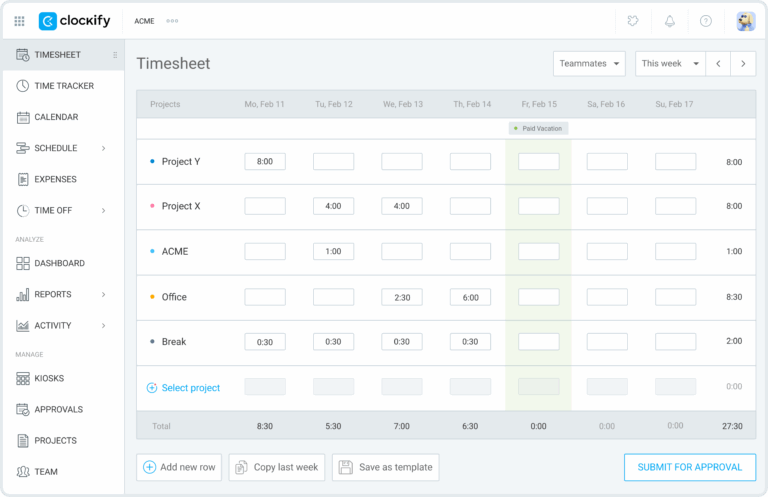
Now consider a 30-person software consultancy.
The company may have 40 active clients and hundreds of projects.
Its questions are different:
- How many hours did Client A receive this month?
- Which projects are over budget?
- How much time did each consultant spend on the account?
- What percentage of those hours were billable?
- Is a project still profitable?
- How much time remains against the estimate?
- What should appear on the client’s invoice?
Clockify is much closer to this workflow.
Its project and reporting capabilities are designed around turning tracked time into useful business information. Paid plans add features such as invoicing, budgets, estimates, labor costs, profitability, scheduling, and forecasting.
For project-driven businesses, that can be a major advantage.
PTO is not an afterthought for Day Off
This is where the two platforms become less interchangeable.
Clockify does offer time-off management. Paid plans include functionality for time off policies, holidays, requests, approvals, balances, and accruals.
So if you already use Clockify for time tracking, you don’t necessarily need another system just to handle basic PTO.
But Day Off starts from the opposite direction.
Leave management is one of its core jobs.
That means the platform is designed around the everyday questions that come with managing employee leave:
- Who is off?
- How much leave does each employee have?
- Which holidays apply to each location
- Who needs to approve this request?
- How much leave has already been used?
- What happens to unused days at the end of the leave year?
- How many people will be available next week?
For companies where those questions come up constantly, that focus can matter more than having a longer list of project-management features.
What happens when you have employees in different locations?
A distributed company can make leave management surprisingly complicated.
An employee in Egypt may not have the same public holidays as an employee in Germany. An employee in the UK may have a different leave policy from someone in the US.
The software therefore needs to understand more than just “vacation.”
Day Off supports location-based holiday management and leave policies, helping distributed teams manage employees under different calendars and working arrangements.
Clockify also supports holidays and time-off policies, so it can handle distributed teams as well.
The difference is again one of emphasis.
If you’re managing a global project workforce, Clockify can work well.
If you’re primarily managing a global employee workforce and need leave and attendance at the center of that process, Day Off is more naturally aligned with the problem.
What about billable hours?
This is an area where the answer is surprisingly close.
Day Off can track billable time, allowing teams to distinguish between billable and non-billable work.
That is useful for companies that need to report the number of hours spent on client work.
But Clockify goes further by connecting those hours to invoicing and broader project-financial workflows.
So there is an important distinction:
Day Off:
Track billable hours.
Clockify:
Track billable hours and build a billing workflow around them.
If all you need is a report showing 120 billable hours, Day Off can cover the requirement.
If you want those hours to feed directly into client invoices and project profitability analysis, Clockify has the stronger system.
Screenshots change the nature of the product
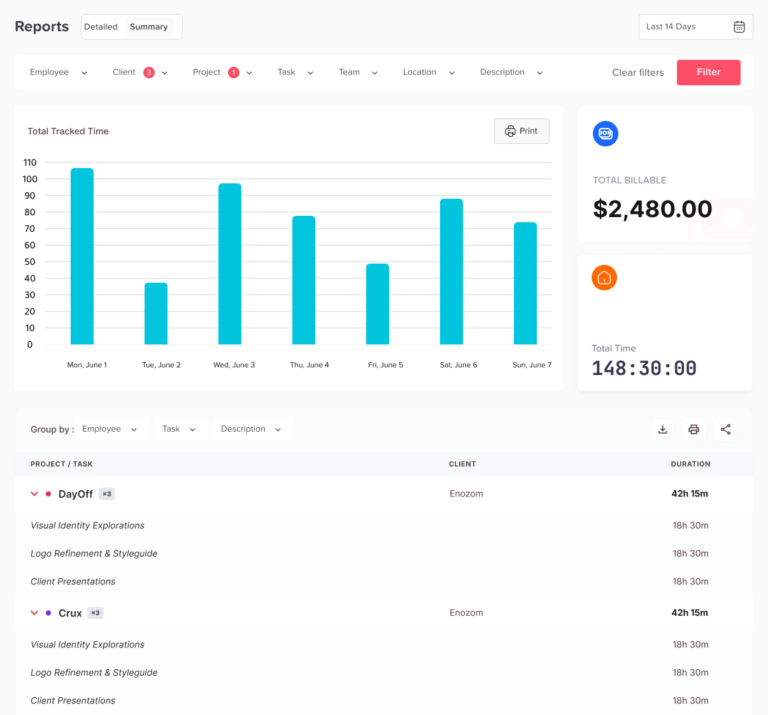
Time tracking doesn’t have to mean monitoring.
This is an important distinction for companies choosing software for employees.
Day Off does not use screenshots, keyboard activity, or mouse activity as part of its time-tracking model.
The basic idea is straightforward:
Record working time.
Clockify offers a more extensive monitoring layer on its Pro plan, including screenshots and activity monitoring.
That can be useful in certain situations.
A company managing remote contractors may deliberately want additional evidence that tracked hours correspond to active work.
But many employers don’t want that level of monitoring.
For them, screenshots create additional questions:
- Do employees know when screenshots are taken?
- Who can see them?
- How long are they stored?
- Do they contain confidential information?
- Does the company actually need them?
- Will employees perceive the software as surveillance?
If the answer is that you simply need reliable working-hour records, Day Off’s approach is considerably simpler.
Can you use Clockify without screenshots?
Yes.
Clockify’s basic time tracking functionality does not require you to use screenshots.
Screenshots and activity monitoring are advanced features associated with its Pro offering.
That makes Clockify different from a product where monitoring is fundamental to the entire platform.
So the comparison isn’t:
Clockify = screenshots
and
Day Off = no screenshots.
It is more accurately:
Clockify gives you the option of going deeper into employee activity.
Day Off keeps its time tracking model focused on working hours, attendance, leave, and projects.
For businesses that want a conventional time tracker without monitoring, either can potentially work. Day Off simply takes a more deliberately non-monitoring approach.
Pricing: the important part isn’t just the monthly number
Price comparisons can be misleading when the plans are designed differently.
Day Off currently offers:
- Pro: $2/user/month for time-off tracking
- Pro+: $3/user/month for time-off tracking and time tracking
For this comparison, Pro+ is the relevant Day Off plan for teams that want both PTO and time tracking.
Clockify has a free plan and several paid tiers.
Its current annual-billing prices are:
| Plan | Price per user/month | Highlights |
|---|---|---|
| Free | $0 | Basic time tracking |
| Basic | $3.99 | Additional time-tracking features |
| Standard | $5.49 | Time off, attendance, approvals, invoicing |
| Pro | $7.99 | Monitoring, GPS, scheduling, forecasting |
| Enterprise | $11.99 | Enterprise functionality |
Clockify’s monthly-billing prices are higher, and its current pricing page should be checked before publication because plan names, limits, and feature availability can change.
A 20-person team: what would it cost?
Here’s where the difference becomes easier to visualize.
Day Off Pro+
20 employees × $3
$60/month
$720/year
Clockify Standard
20 employees × $5.49
$109.80/month
$1,317.60/year
Clockify Pro
20 employees × $7.99
$159.80/month
$1,917.60/year
That makes Day Off considerably less expensive for a team whose main requirements are PTO and time tracking.
But price should not be viewed in isolation.
If Clockify saves your finance team hours every month by handling invoicing and project profitability, its higher price may be easy to justify.
If your company never sends invoices based on tracked time, those features may have little practical value.
The free-plan question
There is one situation where Clockify has a very obvious pricing advantage.
If you have a very small team and only need basic time tracking, Clockify’s free plan supports up to five users.
That makes it an attractive starting point for freelancers and tiny teams.
But once you start looking for a complete combination of PTO + attendance + time tracking, you’re comparing paid functionality rather than simply comparing free plans.
That is where Day Off Pro+ becomes particularly competitive at $3 per user per month.
Which one makes more sense for different teams?
The best choice becomes much easier when you stop asking which platform is “better” and start asking which platform fits your business model.
A traditional employee-based company
You have salaried employees.
Your team needs PTO, attendance, holidays, schedules, and working hours.
You don’t invoice clients based on tracked hours.
Day Off is the better fit.
A consulting agency
Your employees work on multiple clients.
Every hour needs to be assigned to a project.
Clients are billed based on time.
You need project budgets and profitability reports.
Clockify is the stronger choice.
A remote company that does not want surveillance
You want employees to record their hours.
Managers need to understand attendance and availability.
You don’t want screenshots or keyboard activity monitoring.
Day Off is a natural fit.1
A field-service business
Employees work at different locations.
You need GPS, location information, and project-based tracking.
Clockify has the advantage.
A small team that only needs a timer
You have fewer than five people.
Sophisticated PTO or project management isn’t necessary.
You simply want to track hours.
Clockify’s free plan is probably the easiest place to start.
Where Day Off wins
Day Off is the stronger option when your company thinks about time primarily as an employee-management issue.
Its biggest advantages are:
- PTO and leave management
- Attendance
- Work schedules
- Leave balances
- Holiday management
- Employee availability
- Time tracking
- A non-monitoring approach
- A low-cost Pro+ plan for PTO plus time tracking
The biggest benefit isn’t any single feature.
It’s having those employee-management functions connected instead of spread across multiple tools.
Where Clockify wins
Clockify is the stronger option when time is primarily a project and financial resource.
Its biggest advantages include:
- Detailed project tracking
- Billable time
- Client management
- Invoicing
- Project budgets
- Profitability reporting
- Scheduling
- Forecasting
- GPS
- Optional screenshots and activity monitoring
- A free plan for small teams
If your finance or operations team lives inside project reports, Clockify’s broader ecosystem can be much more valuable than a simpler employee time tracker.
What you give up with each choice
Every software decision involves trade-offs.
Choosing Day Off means you may still need another tool for:
- Client invoicing
- Advanced project profitability
- Resource forecasting
- Sophisticated project budgets
- GPS tracking
Choosing Clockify means you may be paying for functionality you don’t need:
- Advanced project reporting
- Invoicing
- Profitability tools
- GPS
- Monitoring
- Forecasting
Neither is a problem if you actually use those features.
The mistake is choosing based on the size of the feature list rather than the needs of your team.
A simple decision rule
If you’re still undecided, use this:
Choose Day Off when:
People → Leave → Attendance → Working hours
is your primary workflow.
Choose Clockify when:
Projects → Hours → Billing → Profitability
is your primary workflow.
And if both matter?
Look at which side creates more administrative work for your company today.
That is usually the side your software should solve first.
Moving from Clockify to Day Off
If you’re considering Day Off after using Clockify, the transition doesn’t need to be complicated.
Start by identifying exactly what your team uses Clockify for.
If you’re mainly using it for:
- Employee hours
- Attendance
- PTO
- Holidays
- Projects
- Tasks
Day Off can cover much of that workflow.
Before switching, export the historical reports your business needs to retain. Then configure Day Off around your actual employee structure rather than trying to recreate every Clockify setting.
Set up:
- Employees
- Locations
- Work schedules
- Leave types
- Accrual rules
- Opening leave balances
- Holiday calendars
- Projects
- Tasks
Run both systems for a short period if the time records feed payroll or another important process.
And don’t overlook the human side of the migration.
If your company is moving away from screenshots or activity monitoring, tell employees clearly.
“We’re no longer taking screenshots. We’re moving to a system that tracks working hours and attendance without monitoring your screen.”
That is a meaningful change, and employees should hear it directly.
So, which one should you buy?
The answer is surprisingly simple once you identify what matters most.
Day Off is the better choice if your priority is:
PTO + attendance + schedules + employee time tracking
You get a focused employee-management system without screenshots or activity monitoring, and Pro+ costs $3 per user per month.
Clockify is the better choice if your priority is:
Projects + billable hours + invoices + profitability
You get a much broader project and time-management platform, with advanced features available as you move up the pricing tiers.
And if you’re somewhere in the middle?
Look at your team’s daily workflow.
If HR spends more time dealing with leave and attendance than finance spends creating project invoices, Day Off is probably closer to what you need.
If your finance and project teams depend on tracked hours to bill clients and measure profitability, Clockify is likely worth the additional functionality.
Frequently Asked Questions
Is Day Off better than Clockify for employee time tracking?
It depends on what you want to do with the time data. Day Off is a stronger fit when time tracking is connected to attendance, PTO, leave, work schedules, and employee availability. Clockify is better suited to teams that need detailed project tracking, billable hours, budgets, invoicing, and profitability reporting.
Can Day Off replace Clockify?
For some teams, yes. If you mainly use Clockify to record employee hours, track attendance, manage PTO, and assign time to projects or tasks, Day Off can cover those needs.
However, Day Off is not intended to replace Clockify’s more advanced project, invoicing, profitability, scheduling, GPS, or employee-monitoring features. If those are central to your workflow, advanced features are available through its paid plans.
The right price comparison depends on which features your team actually needs are core parts of Day Off. Teams can manage leave types, requests, approvals, balances, accruals, holidays, and employee availability alongside attendance Clockify may remain the better choice.
Is Day Off cheaper than Clockify?
For teams that need both time-off tracking and time tracking, Day Off Pro+ costs $3 per user per month.
Clockify offers a free plan for basic time tracking, while more advanced features are available through its paid plans. The right price comparison depends on which features your team actually needs rather than simply comparing the starting prices.
Does Day Off have PTO and leave management?
Yes. PTO and leave management are core parts of Day Off. Teams can manage leave types, requests, approvals, balances, accruals, holidays, and employee availability alongside attendance and working hours.
This makes Day Off particularly suitable for companies looking for time tracking and leave management in the same system.
Does Clockify have PTO tracking?
Yes. Clockify includes time-off functionality on its paid plans, including time-off policies, requests, approvals, balances, accruals, and holidays.
The main difference is that Clockify’s broader platform is centered on time and project management, while Day Off puts leave and employee attendance much closer to the center of the experience.
Does Day Off track employee attendance?
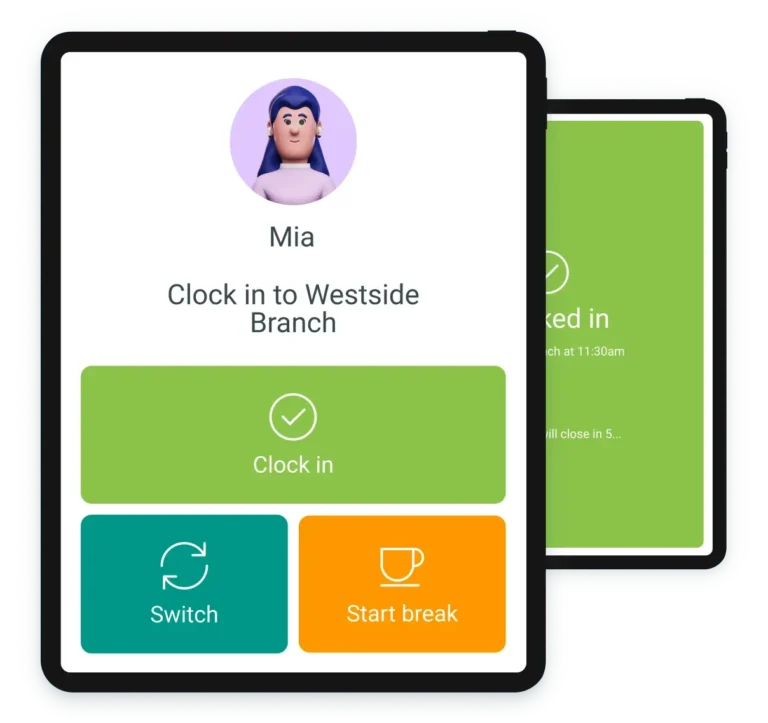
Yes. Day Off can record clock-in and clock-out times, breaks, and worked hours. Attendance can also be reviewed against an employee’s configured work schedule.
That makes it useful for companies that want to monitor attendance and working hours without monitoring employee activity on their computers.
Does Clockify track attendance capabilities without necessarily using employee screenshots. Day Off goes a step further by not offering screenshot-based monitoring as?
Yes. Clockify includes attendance and overtime features on its paid plans. This makes it possible to use Clockify for more than project timers and timesheets.
However, teams that primarily need attendance, PTO, holidays, and employee schedules may find Day Off’s more focused approach easier to manage.
Does Day Off take screenshots?
No. Day Off does not use screenshots to track employee working time.
It focuses on information such as clock-in and clock-out times, breaks, attendance, leave, projects, and tasks rather than capturing employees’ screens.
Does Clockify take screenshots?
Yes. Clockify offers screenshots as part of its Pro features.
This can be useful for companies that need additional visibility into remote or contractor work, but it is not necessary for basic Clockify time tracking.
Can I use Clockify without screenshots?
Yes. You can use Clockify for time tracking without enabling screenshots.
This makes Clockify a possible option for teams that want its project and billing capabilities without necessarily using employee screenshots. Day Off goes a step further by not offering screenshot-based monitoring as part of its time tracking approach.
Does Day Off monitor employee activity?
No. Day Off does not measure keyboard or mouse activity, capture screenshots, or track which applications and websites employees use.
Its approach is based on recording working time rather than measuring employee activity.
Does Clockify monitor employee activity?
Clockify offers activity monitoring and screenshots on its Pro plan. These features provide employers with additional information about employee activity while tracked time is running.
Whether that is useful depends on your company’s management style, workforce, and monitoring requirements.
Which is better for remote employees: Day Off or Clockify?
For remote employees who need PTO, attendance, schedules, and working-hour tracking without screenshots, Day Off is likely the better fit.
Clockify may be a better choice for remote teams that need detailed project tracking, client billing, profitability reports, or optional activity monitoring.
Which is better for freelancers and consultants?
Clockify is generally the better choice for freelancers and consultants who need to track time against clients, projects clients based on hours. Its project tracking, billable-time reporting, invoicing, budgets, and profitability features are particularly, and billable work.
Day Off becomes more attractive when you are managing a larger employee team and need leave, attendance, PTO, and working hours alongside basic time tracking.
Which is better for agencies?
Clockify is usually the stronger choice for agencies that bill clients based on hours. Its project tracking, billable-time reporting, invoicing, budgets, and profitability features are particularly relevant to agency workflows.
Day Off is worth considering when the agency’s bigger challenge is managing employees, PTO, attendance, and working schedules.
Does Day Off support billable hours?
Yes. Day Off can distinguish billable and non-billable time and track hours against projects or tasks.
However, it does not provide the same end-to-end invoicing and project-profitability workflow as Clockify better fit for field teams where knowing an employee’s location during working hours is part is particularly suitable for companies that care more about accurate working-hour records and employee availability than monitoring what employees.
Does Clockify have invoicing?
Yes. Clockify includes invoicing functionality on its paid plans, allowing businesses to use tracked time as part of their client billing workflow.
If your main reason for tracking time is to produce client invoices, this is one of Clockify’s clearest advantages over Day Off.
Does Day Off have invoicing?
No. Day Off can track billable hours, but it is not an invoicing platform.
If you need to turn tracked hours directly into client invoices, you will need an accounting or invoicing tool alongside Day Off.
Does Clockify have GPS tracking?
Yes. Clockify offers GPS tracking on its Pro plan.
This can make it a better fit for field teams where knowing an employee’s location during working hours is part of the business requirement.
Does Day Off have GPS tracking?
No. Day Off does not offer GPS employee tracking.
If your business needs location-based clock-ins or employee GPS data, Clockify is the stronger option.
What is the best Clockify alternative without screenshots?
Day Off is a strong Clockify alternative for teams that want employee time tracking, attendance, PTO, and leave management without screenshots or activity monitoring.
It is particularly suitable for companies that care more about accurate working-hour records and employee availability than monitoring what employees do on their devices.
Is Day Off good for companies with multiple locations?
Yes. Day Off is designed to support employee leave and attendance across different locations, including location-specific holiday calendars.
This can be useful for distributed companies where employees in different countries or offices follow different public holidays and leave policies.
Should I choose Day Off or Clockify for a small team?
For a small team that only needs basic time tracking, Clockify’s free plan can be attractive.
If the team also needs structured PTO and leave management, attendance, and employee working-hour tracking, Day Off Pro+ may provide a better fit at $3 per user per month.
Which is easier to choose: Day Off or Clockify?
A simple rule can help:
Choose Day Off if your workflow starts with the employee.
You need to know who is working, who is away, how much PTO remains, and how many hours were worked.
Choose Clockify if your workflow starts with the project.
You need to know how many hours went into each client, what those hours cost, what can be billed, and whether the project is profitable.
What is the main difference between Day Off and Clockify?
The simplest way to put it is:
Day Off connects time tracking with leave and attendance. Clockify connects time tracking with projects and billing.
Both can record working hours, but they are optimized for different business needs.
The bottom line
Day Off and Clockify can both track time, but that does not make them the same kind of product.
Clockify is built for businesses that need to turn tracked hours into project insight, client billing, and profitability.
Day Off is built for businesses that need to connect working hours with employees, attendance, PTO, and leave.
That distinction matters more than the number of features either platform offers.
If your team needs a powerful project-time platform, Clockify is difficult to ignore.
If your team needs a simpler way to manage leave, attendance, and working hours without employee monitoring, Day Off is the more focused choice.
And at $3 per user per month for Pro+, Day Off offers a particularly straightforward option for companies that want PTO and time tracking together without paying for a large collection of project-management features they may never use.
Choose the platform that matches the way your team actually works—not the one with the longest feature list.
This version is intentionally more editorial and less repetitive than the Hubstaff article. It also avoids making every section a “winner” comparison, which should make your comparison pages feel like individual, useful articles rather than variations of the same template.