







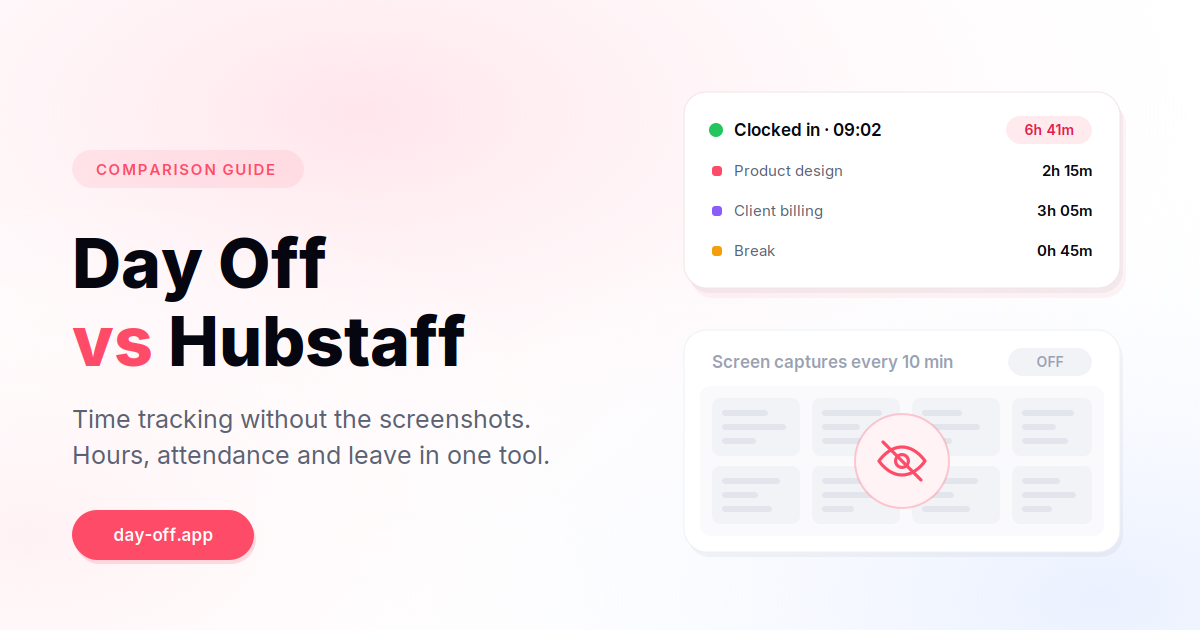
Day Off and Hubstaff can both track employee working hours, but they are designed around different jobs.
Hubstaff is built around time tracking, workforce visibility, productivity monitoring, project tracking, and payments. Day Off is built around leave management, attendance, work schedules, and employee time tracking, with project and task tracking added for teams that need more detail about where working hours go.
That distinction matters more than the number of features on either product’s pricing page.

If you need screenshots, activity levels, application and website tracking, GPS, contractor payments, or invoicing, Hubstaff has capabilities Day Off does not try to replicate. Hubstaff’s desktop applications can capture screenshots, keyboard and mouse activity, app and URL data, and idle time, while its mobile apps can support location tracking. These features are configurable and vary by app and plan.
If your main problem is knowing when employees worked, who is absent, who is on leave, how much PTO remains, and how working time is distributed across projects, Day Off is the more focused option. Its current product combines time tracking with attendance, work schedules, leave, holidays, projects, tasks, and reporting.
The short answer
Choose Hubstaff if you need:
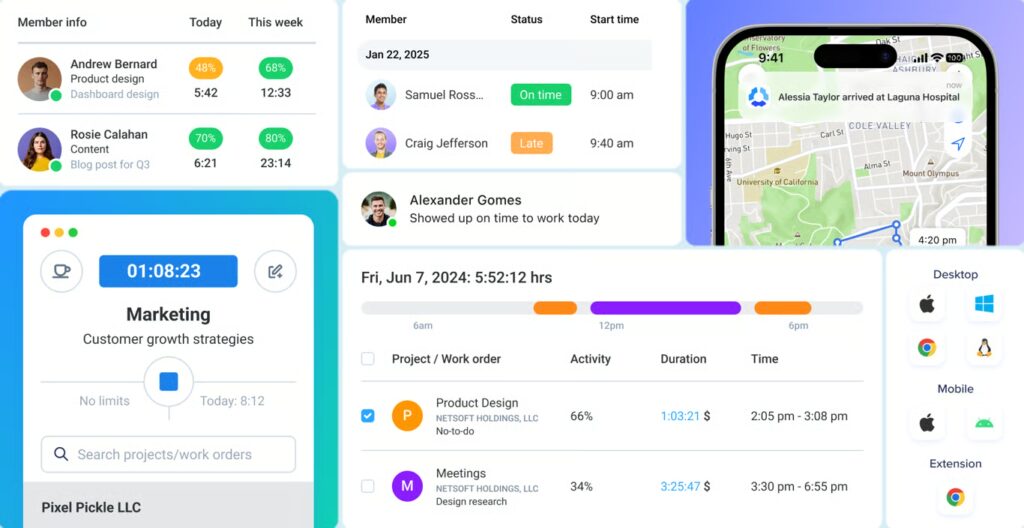
- Employee or contractor time tracking with activity monitoring
- Optional screenshots and app/website usage data
- GPS and geofencing for field teams
- Contractor payments tied to tracked time
- Client invoicing
- More extensive workforce and productivity analytics
Choose Day Off if you need:
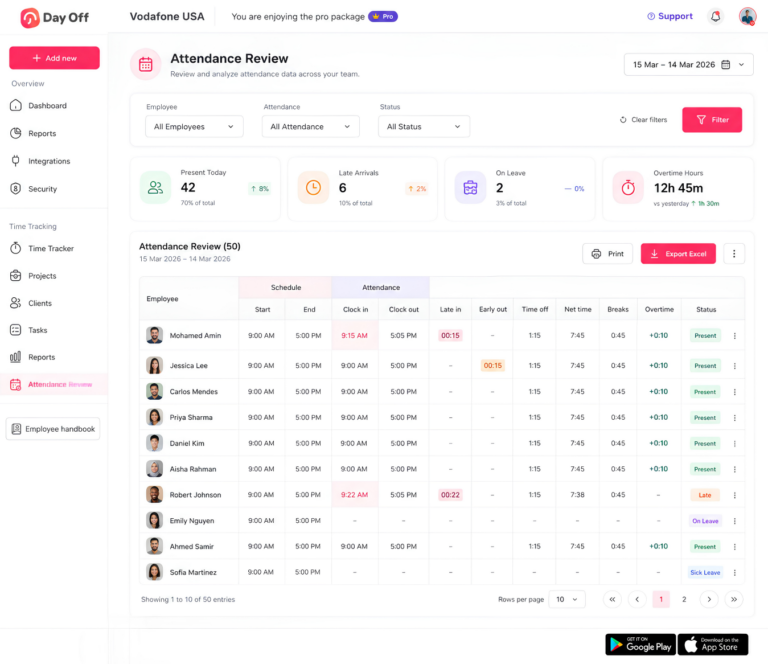
- Time tracking and attendance in the same system as leave
- PTO requests, balances, accruals, and carryover
- Work schedules and attendance review
- Location-based holiday calendars
- Project and task time tracking without employee surveillance
- A simpler alternative to Hubstaff for teams that do not need screenshots or activity monitoring
The important point is that Hubstaff is not simply a more feature-rich version of Day Off, and Day Off is not simply a less expensive version of Hubstaff. They solve different operational problems.
Day Off vs Hubstaff at a glance
| Capability | Day Off | Hubstaff |
|---|---|---|
| Primary focus | Leave, attendance, and time tracking | Time tracking, workforce visibility, and productivity monitoring |
| Clock in / out | Yes | Yes |
| Live time tracking | Yes | Yes |
| Project tracking | Yes | Yes |
| Task tracking | Yes | Yes |
| Billable time | Yes | Yes |
| Timesheets | Yes | Yes |
| Attendance | Strong | Yes |
| Work schedules | Yes | Yes |
| PTO / leave requests | Strong | Yes |
| Leave balances | Yes | Yes |
| Leave accruals | Yes | Plan-dependent |
| Carryover rules | Yes | Plan-dependent |
| Multi-location holidays | Yes | More limited |
| Team leave calendar | Yes | Yes |
| Screenshots | No | Yes, configurable |
| Keyboard/mouse activity | No | Yes |
| App tracking | No | Yes |
| URL tracking | No | Yes |
| Idle time | No | Yes |
| GPS/location tracking | No | Yes, with location features/add-ons |
| Geofencing | No | Yes |
| Contractor payments | No | Yes |
| Client invoicing | No | Yes |
| Workforce analytics | Attendance/project reporting | Extensive |
| Best for | Employees, HR teams, distributed teams | Contractors, monitored workforces, field teams, project-based businesses |
Feature availability can vary by plan, app, or add-on, so buyers should verify the exact configuration before purchasing.
The real difference: time tracking vs workforce monitoring
The easiest way to compare the two products is to ask what happens after an employee starts the timer.
With Day Off, the emphasis is on the employment record.
You can answer questions such as:
- When did the employee start work?
- When did they finish?
- How many hours did they work?
- How much overtime did they have?
- Were they late?
- Were they absent?
- Were they on approved leave?
- Which project or task did they work on?
- How much PTO do they have remaining?
Day Off’s attendance system connects working hours with employee schedules, absences, and leave. It can calculate late time, overtime, and total worked hours based on assigned schedules.
With Hubstaff, the question can go further:
- What time was tracked?
- Which project was selected?
- How active was the computer?
- Which applications were used?
- Which websites were visited?
- Were screenshots captured?
- Was the person idle?
- Where was the worker located when using supported mobile tracking?
Hubstaff describes these as configurable tracking features rather than mandatory components of every tracking session. Its current documentation says screenshots, app/URL tracking, and activity rates are captured when those features are enabled and the user is actively tracking time.
That creates two fundamentally different management philosophies.
Day Off asks: “How much time did this person work, and how does that fit with their attendance, schedule, leave, and projects?”
Hubstaff can also ask: “What evidence do we have about how that tracked time was spent?”
Neither model is automatically right or wrong. The right choice depends on why you are tracking time in the first place.
Time tracking: Day Off vs Hubstaff
Both products cover the basic mechanics of digital time tracking.
Employees can record working time, associate it with projects, and produce reports. Both can therefore replace spreadsheets and manual timesheets.
The difference becomes clearer at the next level.
Day Off time tracking
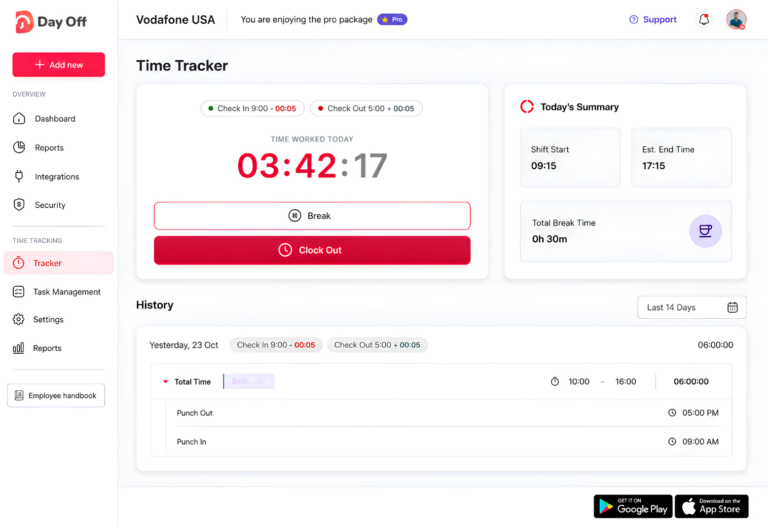
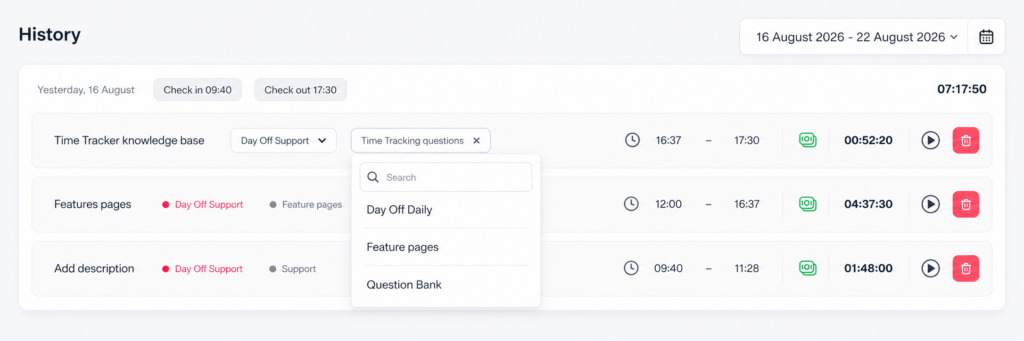
Day Off’s Time Tracker uses a start/stop timer connected to projects and tasks. Each completed session is saved with start and end times, duration, description, and billable status. Entries can also be edited after they have been recorded.
A typical workflow looks like this:
- Start the timer.
- Select the project.
- Select a task when task-level tracking is needed.
- Work normally.
- Stop the timer.
- Review the recorded session.
- Correct or update the entry if necessary.
Projects can also be associated with clients and estimated hours, allowing managers to compare estimated time with actual time spent.
For companies that need billable time, Day Off can mark projects and individual time entries as billable.
That makes Day Off more than a basic attendance clock. It can function as a lightweight project time tracker while keeping employee attendance and leave in the same system.
Hubstaff time tracking
Hubstaff’s core workflow is similarly simple: select a project or task and start tracking.
But Hubstaff adds another layer of data around the time entry.
Depending on the configuration and application, Hubstaff can collect activity levels, screenshots, application usage, URLs, idle time, and location data. Its desktop applications support more monitoring features than the web timer or mobile applications.
This makes Hubstaff particularly useful when a company needs more than a timesheet.
For example, a business paying contractors by the hour may want to see:
32.5 hours tracked → projects worked on → activity information → approved timesheet → payment
That is a very different use case from:
32.5 hours worked → attendance record → payroll review
Both are valid. The question is which one your organization actually needs.
Project and task tracking
This is one area where the difference is smaller than you might expect.
Both products can connect time to projects and tasks.
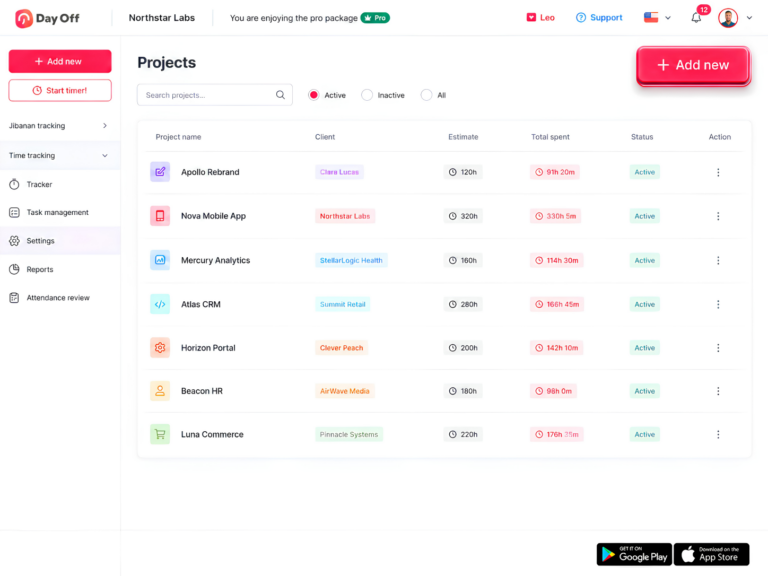
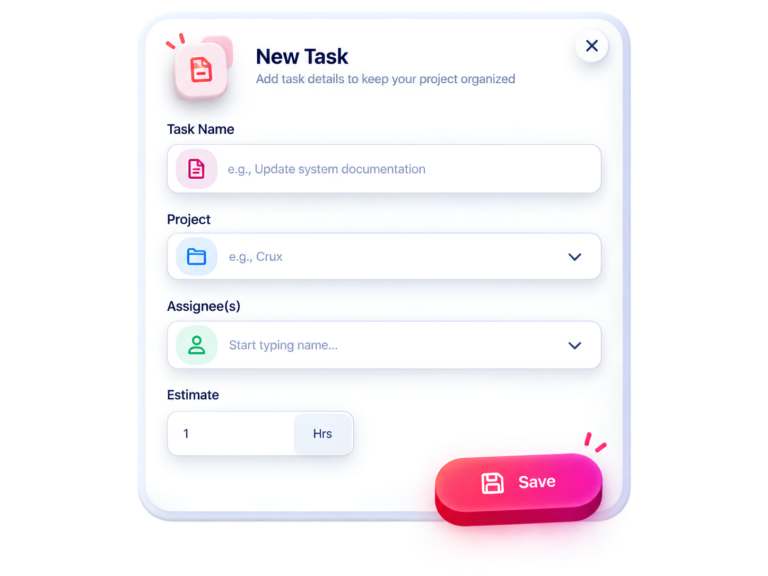
Day Off’s current project system allows companies to create projects, associate them with clients, set estimates, track actual hours, and mark projects as billable. Tasks can be assigned to employees and given estimated durations.
Day Off therefore supports a structure such as:
Client → Project → Task → Employee → Time
For example:
| Client | Project | Task | Employee | Time |
|---|---|---|---|---|
| Acme | Website redesign | Homepage development | Developer | 4.5h |
| Acme | Website redesign | QA testing | QA engineer | 2h |
| Acme | Website redesign | Client meeting | Account manager | 1h |
Managers can filter time reports by employee, client, project, task, team, location, or description and export detailed data.
Hubstaff is stronger when project time tracking needs to connect to broader workforce monitoring, integrations, payments, and client reporting.
Which is better for project tracking?
Choose Day Off when project tracking is primarily about understanding where employee hours go.
Choose Hubstaff when project tracking is part of a larger system for contractor management, productivity monitoring, client billing, or payments.
Leave and PTO management: Day Off has the advantage
This is where Day Off becomes much more differentiated.
Hubstaff has time off functionality on appropriate plans. Its current plan documentation includes time off and holidays alongside scheduling, attendance, overtime, and work-break functionality on higher plans.
So it would be inaccurate to describe Hubstaff as having no leave management.
The more useful question is how central leave management is to the product.
For Day Off, it is central.
Day Off supports configurable leave policies, accruals, carryover rules, multiple employee policies, and location-based holiday management.
That matters for HR teams managing employees rather than simply tracking contractors.
Day Off is especially strong for:
- Vacation and PTO requests
- Sick leave
- Custom leave types
- Approval workflows
- Leave balances
- Accrual schedules
- Carryover rules
- Multiple leave policies
- Work schedules
- Public holidays
- Location-based holiday calendars
- Employee availability
- Attendance and absence reporting
For example, an organization with employees in Egypt, Germany, the United Kingdom, and the United States may need different holiday calendars and potentially different leave policies.
Day Off supports location-based holiday configuration, allowing holidays to be assigned to specific locations rather than applying one universal calendar to everyone
That is an important difference for distributed companies.
Attendance is where Day Off becomes more than a PTO tool
There is another important distinction between leave management and attendance management.
A leave system answers: “Is this person supposed to be off?”
An attendance system answers: “Did this person actually work when they were scheduled to?”
Day Off connects the two.
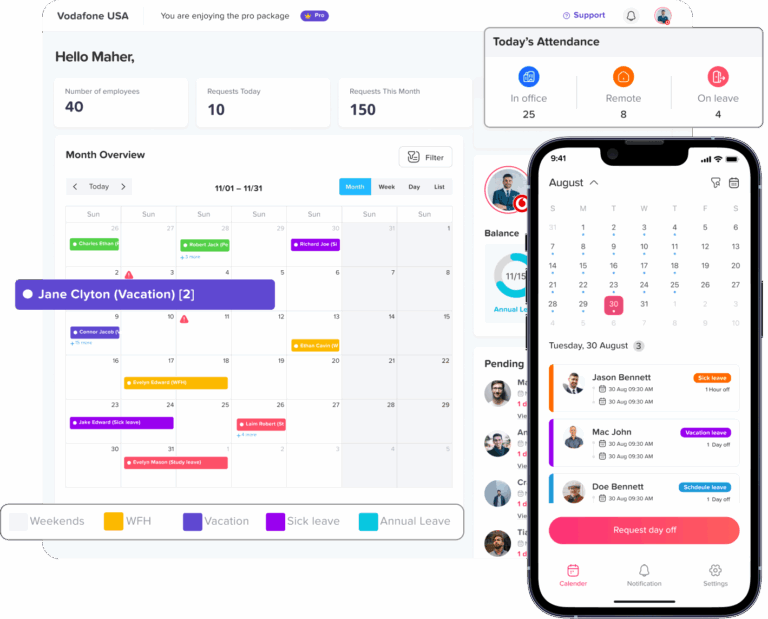
Its attendance functionality can compare scheduled hours with actual attendance and account for lateness, overtime, breaks, absences, and worked hours.
That means an HR or operations manager can use one system to understand:
Schedule → Attendance → Leave → Worked hours → Overtime
That is particularly useful for teams where payroll accuracy depends on attendance.
Hubstaff can also handle scheduling and attendance, particularly on its higher plans, but its broader product philosophy remains centered on time tracking and workforce visibility.
Screenshots: the biggest philosophical difference
If your team is specifically searching for a Hubstaff alternative without screenshots, this is probably the section that matters most.
Hubstaff supports screenshot capture. Its documentation says screenshots can be configured from zero to three screenshots per 10-minute interval in supported desktop apps, with additional screenshot options available through its current plans/add-ons.
Day Off does not have a screenshot monitoring layer.
That means there is no question of:
- How often should screenshots be captured?
- Who can view them?
- How long should they be retained?
- Should screenshots be blurred?
- Should employees be notified?
- What happens if sensitive information appears?
- What legal basis supports collecting them?
With Day Off, the system records work time, attendance, leave, projects, and tasks rather than creating an archive of employee screens.
This is not necessarily about whether screenshots are “good” or “bad.”
Screenshots can have legitimate business uses.
For example, a company hiring independent contractors across multiple time zones may want additional evidence that paid hours correspond to active work. Hubstaff is designed to support that model.
But for a salaried employee working in an office, writing strategy documents, attending meetings, talking to customers, or solving problems away from their keyboard, a screenshot or keyboard-activity percentage may tell you surprisingly little about the value of the work.
That is why the monitoring question should be decided before the software question.
Can you use Hubstaff without screenshots?
Yes.
This deserves a precise answer because “Hubstaff without screenshots” does not mean “Hubstaff without monitoring.”
Hubstaff allows administrators to disable screenshot capture.
However, other tracking capabilities can remain available depending on the configuration. Hubstaff separately supports activity levels and application/URL tracking, and those features can provide visibility into how tracked time is being spent.
So there are really three different setups:
Hubstaff with full monitoring
Screenshots + activity levels + app/URL tracking + other enabled tracking features.
Hubstaff with screenshots disabled
No screenshots, but other activity or usage tracking may remain enabled.
Day Off
No screenshots, keyboard/mouse activity scoring, app/URL tracking, or employee-monitoring layer.
If your only objection to Hubstaff is screenshots, you may be able to configure Hubstaff accordingly.
If your objection is employee monitoring itself, disabling screenshots does not solve the entire issue.
App and URL tracking
Hubstaff also records application and website usage when the relevant feature is enabled.
Its documentation describes records such as:
- Application name
- Time spent
- Number of sessions
- Time of day
- Associated project
- Websites visited
- Time spent on specific sites or pages
The feature can be turned on or off by organization settings and can be configured for team members.
Day Off does not attempt to replicate this.
That creates a clean dividing line:
Day Off: What hours were worked?
Hubstaff: What hours were worked, and what applications or websites were being used during those hours?
Again, neither is inherently the correct answer. It depends on the management problem.
GPS and field teams
This is an area where Hubstaff is clearly stronger.
Hubstaff’s mobile application supports GPS location tracking, including current locations, previous routes, and location timestamps. Location tracking is available through its location functionality and is separate from desktop screenshots and activity monitoring.
This can make Hubstaff a better fit for:
- Field service companies
- Cleaning teams
- Delivery operations
- Construction
- Property maintenance
- Mobile sales teams
- On-site contractors
If your employees need to clock in at a job site and management needs location information, Hubstaff has a capability Day Off does not currently provide.
If your team works primarily from offices or remotely from laptops, GPS may be irrelevant.
Contractor payments and invoicing
This is another decisive Hubstaff advantage.
Hubstaff’s current plans include functionality around payments, invoices, and workforce management, with payments and payroll features appearing on higher plans.
This matters if your workflow looks like:
Track contractor time → approve time → calculate payment → pay contractor
or:
Track client work → approve hours → create invoice
Day Off can track billable hours and provide reporting, but it is not positioned as a contractor payment or invoicing platform.
So if automatic contractor payments or integrated invoicing is a core requirement, Hubstaff should be on your shortlist.
Pricing: Day Off vs Hubstaff
Pricing is one of the areas that changes most frequently, so it should always be checked immediately before publication or purchase.
As of September 2026, Day Off’s public pricing page lists:
| Day Off | |
|---|---|
| Free plan | $0 |
| Free users | Up to 10 |
| Pro+ | $3/seat/month |
| Pro minimum | $30/month |
| Annual discount | Listed as 17% |
| Trial | Free trial |
Day Off’s free plan includes up to 10 employees, calendar view, customizable leave types, one-step approval, and management reports. The Pro plan adds unlimited employees, advanced leave settings, work schedules, bulk actions, integrations, and other features.
Hubstaff’s current public pricing documentation lists plans ranging from approximately $4.99 to $25 per user/month when billed annually, depending on the plan. Its current plan structure includes Starter, Grow, Team, and Enterprise, with different combinations of time tracking, activity monitoring, scheduling, attendance, payments, and workforce features.
App and URL tracking
Hubstaff also records application and website usage when the relevant feature is enabled.
Its documentation describes records such as:
- Application name
- Time spent
- Number of sessions
- Time of day
- Associated project
- Websites visited
- Time spent on specific sites or pages
This can make Hubstaff a better fit for:
- A leave management system
- An attendance tracker
- A time tracker
- A project time tracker
If Day Off covers the first three adequately, its effective cost may be lower even before considering administrative time.
On the other hand, if a company needs:
- Time tracking
- Screenshots
- App and URL tracking
- Contractor payments
- Client invoices
- GPS
- Workforce analytics
then Hubstaff may provide significantly more value because those capabilities are part of the same platform.
Day Off vs Hubstaff: which is cheaper?
For a small team primarily looking for leave management and employee time tracking, Day Off is currently the lower-cost option on published entry-level pricing.
Its free tier supports up to 10 employees, while the paid Pro plan is listed at $3 per seat per month with a $30 monthly minimum.
Hubstaff starts at a higher price point for paid plans, although its higher tiers include capabilities that Day Off intentionally does not offer.
So the better question is:
“Which product costs less for the capabilities we actually need?”
If you do not need screenshots, activity monitoring, GPS, contractor payments, or invoicing, paying for those capabilities may not make financial sense.
If you do need them, choosing a cheaper product that cannot perform those jobs may create more costs elsewhere.
Compliance and employee privacy
Time tracking and employee monitoring should not be treated as the same privacy question.
Recording working hours can serve legitimate operational, payroll, health-and-safety, and legal purposes.
The Court of Justice of the European Union ruled in CCOO v Deutsche Bank (C-55/18) that EU member states must require employers to establish a system capable of measuring the daily working time of each worker. The Court described the system as needing to enable measurement of daily working time, with the broader purpose of protecting workers’ rights around working time and rest.
Employee monitoring can involve substantially more personal data.
Under GDPR, organizations need an appropriate legal basis for processing personal data. The European Data Protection Board lists several possible legal bases, including legal obligation, contractual necessity, public interest, and legitimate interests, depending on the circumstances.
That does not mean:
“Screenshots are illegal under GDPR.”
Nor does it mean:
“Hubstaff is illegal in Europe.”
Those statements would be far too broad.
The practical issue is that collecting screenshots, application usage, URLs, activity levels, and location information creates a larger data-processing footprint than simply recording clock-in and clock-out times.
Before deploying employee monitoring, an employer should consider:
When Hubstaff is the better choice
An honest comparison should not pretend that Day Off wins every category.
Hubstaff is the stronger product when you need capabilities such as:
Proof around tracked work
If the business needs screenshots, activity levels, app usage, URLs, or idle-time information, Hubstaff has a much deeper monitoring layer.
Contractor payments
If approved tracked hours should flow into a contractor payment workflow, Hubstaff is a better fit.
Client invoicing
If tracked time needs to support client invoices inside the same platform, Hubstaff has an advantage.
Field workforce tracking
GPS and location functionality make Hubstaff more suitable for teams that work at customer locations or job sites.
Workforce analytics
Companies that want deeper productivity and workforce analytics have more to work with in Hubstaff.
You already have a separate HR/leave system
If leave management is already handled elsewhere, Hubstaff’s relative weakness in HR-style leave administration may not matter.
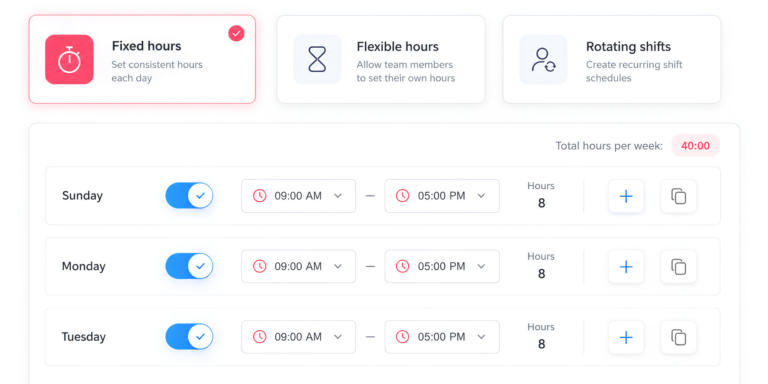
When Day Off is the better choice
Day Off is the stronger choice when your priority is employee administration rather than employee surveillance.
You need leave and time tracking together
This is the strongest reason to choose Day Off.
Leave, attendance, schedules, absences, and working hours can be managed together rather than reconstructed across multiple tools.
You manage salaried employees
For salaried teams, activity percentages and screenshots may provide little useful information compared with attendance, leave, schedules, and project hours.
You operate across locations
Location-based holiday calendars and multiple policies are particularly useful for distributed organizations.
You want time tracking without surveillance
If your team needs accurate hours but you deliberately do not want screenshots, app tracking, or keyboard/mouse activity scoring, Day Off has a fundamentally different data model.
You want a lower-cost starting point
Day Off currently offers a free plan for up to 10 employees and a $3/seat/month Pro plan with a $30 monthly minimum.
Which tool should you choose?
Use this decision tree.
Choose Day Off if:
Verdict for remote teams
Salaried employees: Day Off is usually the better starting point.
An honest comparison should not pretend that Day Off wins every category.
Hubstaff is the stronger product when you need capabilities such as:
Proof around tracked work
Contractor payments
Client invoicing
Field workforce tracking
GPS and location functionality make Hubstaff more suitable for teams that work at customer locations or job sites.
Workforce analytics
You already have a separate HR/leave system
Frequently Asked Questions
Is Day Off a good Hubstaff alternative?
Yes, if your team needs time off management, attendance, and time tracking rather than employee monitoring.
Day Off is particularly suited to companies that want PTO requests, leave balances, approval workflows, work schedules, attendance records, holidays, and time tracking in one platform. It does not use screenshots, keyboard and mouse activity scoring, or application and URL monitoring.
Hubstaff is a better fit when you need additional workforce-monitoring capabilities, GPS tracking, contractor payments, invoicing, or detailed activity data.
Can I use Hubstaff without screenshots?
Yes. Hubstaff allows administrators to disable screenshot capture.
However, turning off screenshots does not necessarily turn Hubstaff into a non-monitoring time tracker. Depending on the configuration and plan, Hubstaff can still provide activity levels, application tracking, URL tracking, idle-time information, and other workforce data.
If you want time tracking without screenshots or employee activity monitoring, Day Off is a more direct alternative.
What is the difference between Day Off and Hubstaff?
The biggest difference is what each platform is designed to manage.
Day Off focuses on time-off management, attendance, work schedules, and time tracking. It is designed to help businesses understand who is working, who is absent, how much leave employees have, and how working hours are allocated.
Hubstaff focuses more heavily on time tracking and workforce visibility. It adds features such as screenshots, activity tracking, application and URL tracking, GPS, payments, and invoicing.
In simple terms, Day Off is closer to leave and attendance software with time tracking, while Hubstaff is closer to workforce time tracking with monitoring and productivity features.
Does Day Off track employee activity?
No. Day Off does not use keyboard and mouse activity scoring, screenshots, application tracking, or URL tracking to measure employee productivity.
It tracks working hours, attendance, breaks, projects, tasks, and related records instead.
This makes it useful for companies that want employee time tracking without turning the software into a computer-monitoring system.
Does Hubstaff track employee activity?
Yes. Hubstaff can calculate activity levels based on keyboard and mouse input during tracked time. It can also provide application and URL tracking and screenshot functionality when those features are enabled.
Activity tracking is intended to provide additional context around tracked hours, but it should not automatically be treated as a measure of productivity. A low activity percentage can occur during meetings, phone calls, reading, research, planning, or other work that does not involve continuous keyboard or mouse input.
Does Day Off take screenshots?
No. Day Off does not capture screenshots of employees’ computers.
Its time-tracking model records information such as clock-in and clock-out times, breaks, projects, tasks, descriptions, and billable status rather than images of an employee’s screen.
Does Hubstaff take screenshots?
Yes. Hubstaff supports automated screenshots during tracked time, with configuration options that allow organizations to control screenshot capture.
Administrators can also disable screenshots if their organization does not need them.
Whether screenshots should be used is a separate question from whether time tracking is needed. Companies should consider their business purpose, employee expectations, privacy requirements, and applicable employment laws before enabling monitoring features.
Does Day Off have PTO and leave management?
Yes. Leave and time-off management is one of Day Off’s core functions.
Depending on the plan, Day Off can manage leave types, requests, approvals, balances, accruals, carryover rules, holidays, and employee availability.
This makes it particularly useful for HR teams that want time tracking and leave management in the same system.
Does Hubstaff have PTO and leave management?
Yes. Hubstaff provides time-off and holiday functionality on eligible plans.
However, leave management is not the sole focus of Hubstaff. Its broader platform is built around time tracking, workforce management, productivity monitoring, project tracking, and related features.
If PTO and leave administration are the primary reason you are buying software, Day Off is the more specialized option.
Does Day Off track working hours?
Yes. Day Off Pro+ combines time-off management with time tracking.
Employees can track working time and associate it with projects and tasks. Managers can review attendance and working hours and generate reports covering employee and project time.
This makes Pro+ the appropriate Day Off plan for teams that need both time-off tracking and time tracking.
How much does Day Off cost?
Day Off has separate plans for time-off management and time tracking.
The Pro plan costs $2 per user per month and focuses on time-off tracking.
The Pro+ plan costs $3 per user per month and adds time tracking to the time-off management functionality.
For a company specifically comparing Day Off with Hubstaff, Pro+ is the relevant Day Off plan because it combines leave management with working-time tracking.
Pricing and feature availability can change, so check the current pricing page before purchasing.
Is Day Off cheaper than Hubstaff?
Day Off is generally positioned at a lower price point, particularly for companies that need leave management and basic time tracking rather than workforce monitoring.
Day Off Pro is $2 per user per month for time-off tracking, while Pro+ is $3 per user per month for time-off management plus time tracking.
Hubstaff has multiple paid tiers with additional capabilities such as activity monitoring, screenshots, GPS, payments, and invoicing.
The better comparison is therefore not simply the monthly price. Consider which features your team actually needs and whether you would otherwise need separate software for PTO, attendance, or time tracking.
Which Day Off plan should I choose for time tracking?
Choose Day Off Pro+ if you need both time-off management and employee time tracking.
The Pro plan is intended for teams that primarily need time-off tracking. Pro+ adds working-time tracking, making it the better choice for companies comparing Day Off with Hubstaff.
Which is better for remote employees: Day Off or Hubstaff?
For salaried remote employees who need attendance, leave, schedules, and time tracking, Day Off is often the better fit.
It provides visibility into working hours without requiring screenshots, application monitoring, or keyboard and mouse activity scoring.
Hubstaff can be a better choice for remote contractors or other workers where the company has a specific business need to verify tracked activity or connect tracked hours to payments.
Which is better for hourly contractors?
Hubstaff is generally the stronger option when hourly contractors are paid based on tracked time and the business needs additional verification around those hours.
Its combination of time tracking, activity data, screenshots, project tracking, and payment functionality can support contractor workflows.
Day Off can track working hours and projects, but it is not designed as a contractor-payment and workforce-monitoring platform.
Which is better for field employees?
Hubstaff is the stronger choice if GPS tracking, location history, or geofencing is an important part of the workflow.
These capabilities can be useful for businesses with employees working at customer locations, construction sites, cleaning locations, delivery routes, or other field environments.
Day Off does not currently provide the same GPS-based workforce tracking functionality.
Does Day Off support project and task time tracking?
Yes. Day Off Pro+ can track time against projects and tasks.
Teams can use project and task records to understand how working hours are distributed and identify how much time is being spent on different types of work.
Day Off can also distinguish billable time, making the feature useful for agencies, consultants, and other businesses that need to report on client-related hours.
Does Hubstaff track projects and tasks?
Yes. Project and task time tracking is a core part of Hubstaff.
Hubstaff can connect tracked hours with projects and tasks and then combine that information with its broader reporting, activity, payment, and workforce-management features.
The difference is that Hubstaff adds considerably more monitoring information around those tracked hours.
Can Day Off replace Hubstaff?
It can replace Hubstaff for some teams, but not every Hubstaff use case.
Day Off is a strong replacement when your requirements are primarily:
- Time tracking
- Attendance
- PTO and leave
- Leave balances
- Work schedules
- Holiday management
- Project and task tracking
- Billable hours
It is not a one-for-one replacement if you depend on:
- Screenshots
- Keyboard and mouse activity tracking
- Application monitoring
- URL tracking
- GPS
- Geofencing
- Contractor payments
- Integrated invoicing
Before switching, make a list of the Hubstaff features your team actually uses. If most of them relate to monitoring or payments, Hubstaff may still be the better fit.
Can Day Off track billable hours?
Yes. Day Off can mark time as billable and report on billable hours associated with projects.
This makes it possible for teams to distinguish client-billable work from internal or non-billable work.
Day Off does not, however, provide the same integrated contractor payment and invoicing workflow as Hubstaff.
Does Day Off support employee attendance?
Yes. Attendance is an important part of Day Off’s time-tracking functionality.
Managers can compare actual working time against employee schedules and review attendance information such as worked hours, breaks, lateness, overtime, and absences.
This makes Day Off useful when the goal is to manage attendance rather than monitor computer activity.
Is employee time tracking legal in the EU?
Employee time tracking is not generally prohibited in the EU. In fact, EU case law has established requirements around employers maintaining systems capable of measuring employees’ daily working time.
However, collecting additional employee data—such as screenshots, application usage, URLs, activity levels, or location information, creates additional privacy and employment-law considerations.
Organizations should assess the applicable GDPR requirements and national employment laws before introducing employee-monitoring features.
This is general information, not legal advice.
Is Hubstaff GDPR compliant?
Whether a particular Hubstaff implementation complies with GDPR depends on how the organization configures and uses the product, not simply on whether the software is called “GDPR compliant.”
An employer using screenshots, application tracking, URLs, activity data, or location information needs to consider issues such as legal basis, transparency, data minimization, retention, access controls, security, and proportionality.
The same principle applies to any employee-monitoring technology.
Is Day Off better for GDPR because it does not take screenshots?
Not automatically, but using a system that collects less employee-monitoring data can reduce the amount of personal data an organization needs to govern.
Day Off’s approach focuses on attendance, leave, schedules, and working hours rather than screenshots, application monitoring, and keyboard/mouse activity.
That can make the data-protection assessment simpler for organizations that do not have a business need for employee monitoring.
Companies should still assess their own GDPR obligations and applicable local laws.
What is the best Hubstaff alternative without screenshots?
For teams that want time tracking without screenshots, Day Off is one option worth considering.
Its Pro+ plan combines time-off management and time tracking without adding screenshots, keyboard/mouse activity scoring, or application and URL monitoring.
Other alternatives may also fit, particularly if your primary need is project time tracking rather than leave and attendance.
The right choice depends on whether you need PTO, attendance, project tracking, invoicing, contractor payments, or other features alongside time tracking.
Should I switch from Hubstaff to Day Off?
Consider switching if your team mainly uses Hubstaff for basic time tracking but does not actually need screenshots, activity monitoring, GPS, contractor payments, or invoicing.
Day Off can be particularly attractive if you have discovered that your organization also needs stronger PTO, leave, attendance, holiday, and work-schedule management.
Before switching, export your historical Hubstaff data, configure employees and schedules in Day Off, set up leave policies and balances, recreate active projects, and run both systems in parallel for at least one reporting or payroll cycle.
Which is better overall: Day Off or Hubstaff?
Neither is universally better.
Day Off is the better choice for teams that want time tracking combined with leave, PTO, attendance, schedules, and holiday managemen, especially when they do not want screenshots or employee activity monitoring.
Hubstaff is the better choice for businesses that need screenshots, activity tracking, GPS, contractor payments, invoicing, or deeper workforce-monitoring capabilities.
The best choice is the platform that matches the type of visibility your business actually needs.
The Bottom Line: Day Off vs Hubstaff
When comparing Day Off vs Hubstaff, the right choice depends on what your team actually needs from time tracking software.
If you need time tracking and leave management in one place, Day Off is the more focused option. With Day Off Pro+ at $3 per user per month, teams can manage time off while also tracking working hours, attendance, projects, and tasks, without screenshots, activity scoring, or app and URL monitoring.
Hubstaff is the better choice for businesses that need more advanced workforce monitoring, including screenshots, activity tracking, GPS, contractor payments, or invoicing. These features can be especially useful for hourly contractors and field teams where verifying tracked time is an important part of the workflow.
Ultimately, Day Off is a strong Hubstaff alternative for teams that want accurate time tracking without employee surveillance. If your priority is knowing who worked, who is off, and where working hours are going, Day Off provides the tools you need without collecting more employee activity data than necessary.