







Managing employee time off is one of the most important parts of running an organized workplace. At first, vacation tracking days, sick leave, and PTO may seem simple. An employee requests time off, a manager approves it, and HR updates the balance.

But as the team grows, the process becomes more complex.
Employees may have different leave policies. Managers need to avoid scheduling conflicts. HR teams need accurate records. Employees want to know how many days they have left without asking HR every time.
That is why every business needs a clear and reliable way to track time off.
The best way to track vacation days, sick leave, and PTO is to use a dedicated leave management system that keeps requests, approvals, balances, calendars, and reports in one place. This helps companies reduce manual work, avoid mistakes, and create a better experience for both employees and managers.
Why PTO tracking matters more than you think
PTO tracking is more important than many businesses realize because it affects daily operations, employee satisfaction, payroll accuracy, and overall workforce planning. When time off is not tracked properly, companies can face incorrect leave balances, overlapping absences, delayed approvals, and confusion between employees, managers, and HR teams.
A reliable PTO tracking process gives employees a clear view of their available time off, helps managers plan workloads with confidence, and allows HR teams to keep accurate records without constant manual updates. It also creates a more transparent workplace, where employees feel confident requesting time off and managers can make fair, informed decisions. In the long run, proper PTO tracking helps reduce administrative work, prevent scheduling issues, and support a healthier, more organized work environment.
Types of leave: knowing what you’re tracking
Before you can build an effective tracking system, you need clarity on what categories of leave exist within your organization.
track vacation days, sick leave, and PTO means keeping an accurate record of the time employees take away from work. This includes:
- Vacation days
- Sick leave
- Paid time off
- Personal days
- Unpaid leave
- Maternity or paternity leave
- Public holidays
- Half-days
- Pending leave requests
- Approved and rejected requests
- Remaining leave balances
Each type of leave may follow a different policy. For example,
vacation days are often planned in advance, while sick leave may be requested suddenly.
PTO may combine several types of leave into one balance, depending on how the company manages employee time off.
Because every company has its own rules, tracking leave manually can become confusing, especially when different employees follow different policies.
Family & Medical Leave
FMLA, parental, bereavement often governed by federal or state law with strict eligibility rules.
Military Leave
Protected by USERRA federally. Requires careful documentation and coordination with payroll.
Jury & Civic Duty
Must be tracked separately; pay continuation during jury service varies by state law.
Floating Holidays
Discretionary days often tied to cultural or personal observances, separate from fixed company holidays.
Why Accurate Leave Tracking Matters
Accurate leave tracking is important for employees, managers, and HR teams. When time off is tracked correctly, everyone has a clear view of leave balances, approved requests, and team availability.
For employees, accurate tracking means they can:
- Know track vacation days or PTO days they have left
- Plan time off with confidence
- Avoid confusion about their remaining balance
- See the status of their leave requests
- Understand company leave policies more clearly
For managers, accurate tracking helps them:
- Review leave requests faster
- Avoid too many employees being away at the same time
- Plan workloads more effectively
- Maintain team productivity
- Make fair and informed approval decisions
For HR teams, accurate tracking makes it easier to:
- Keep employee records organized
- Prepare leave reports
- Manage different leave policies
- Reduce manual data entry
- Avoid balance errors
- Support payroll and internal recordkeeping
When leave tracking is not accurate, small mistakes can quickly lead to bigger problems. Employees may think they have more days available than they actually do. Managers may approve overlapping requests. HR may spend too much time correcting records and answering repeated questions.
Common Problems with Manual Leave Tracking
Many companies start by track vacation days, sick leave, and PTO manually. They may use spreadsheets, emails, chat messages, paper forms, or shared calendars.
This can work for a very small team, but it usually becomes difficult as the company grows.
Common problems with manual leave tracking include:
- Incorrect leave balances
Manual updates can lead to calculation mistakes, missed requests, or outdated records. - Delayed approvals
Leave requests sent by email or chat can be forgotten, missed, or delayed. - Overlapping vacations
Managers may approve time off without realizing that other team members are already away. - Poor visibility
Employees may not know their available balance, and managers may not have a clear view of team availability. - Too much admin work
HR teams spend extra time updating spreadsheets, checking balances, following up with managers, and creating reports manually. - Scattered information
Leave details may be spread across emails, spreadsheets, calendars, and messages, making it harder to find accurate information. - Difficult reporting
Preparing reports manually can take time and may lead to errors.
The more employees a company has, the harder it becomes to manage leave manually. What starts as a simple spreadsheet can quickly become a source of confusion.
The Best Way to Track Vacation Days, Sick Leave, and PTO
The best way to track employee time off is to use a dedicated leave tracking app or leave management system.
Instead of managing leave through spreadsheets, emails, and manual updates, a leave tracking system keeps everything in one organized place.
A good leave tracking system allows companies to manage:
- Leave requests
- Manager approvals
- Employee leave balances
- Vacation days
- Sick leave
- PTO policies
- Public holidays
- Team calendars
- Leave reports
- Employee records
This makes the entire process easier, faster, and more accurate.
Employees can request time off and check their balances without contacting HR. Managers can approve or reject requests while viewing team availability. HR teams can manage policies, track balances, and create reports without relying on manual spreadsheets.
Why a Leave Tracking App Is Better Than Spreadsheets
Spreadsheets are commonly used for leave tracking because they are familiar and easy to start with. However, they are not the best long term solution.
Spreadsheets require constant manual updates. Every approved leave request must be entered correctly. Every balance must be calculated accurately. Every policy change must be updated manually.
This creates room for error.
A leave tracking app is better because it can:
- Automatically update leave balances
- Store all requests in one place
- Show real time team availability
- Reduce manual calculations
- Make approvals faster
- Keep records organized
- Improve transparency for employees
- Help HR save time
Spreadsheets may work for very small teams, but they become harder to manage as the company grows. A dedicated system gives businesses a more reliable and scalable way to manage employee time off.
Key Features to Look for in a PTO Tracking System
Choosing the right PTO tracking system is important. The system should be simple enough for employees to use, but powerful enough for HR and managers to manage leave properly.
Here are the most important features to look for:
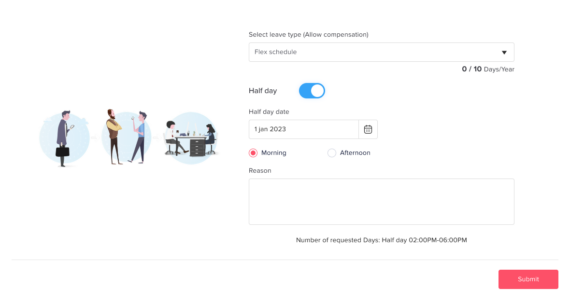
Easy Leave Requests
Employees should be able to request vacation days, sick leave, or PTO in a simple way.
A good system should allow employees to:
- Select the leave type
- Choose the requested dates
- Add a reason or note if needed
- Submit the request quickly
- Track the request status
This removes the need for long email threads or manual forms.
Automatic Leave Balance Tracking
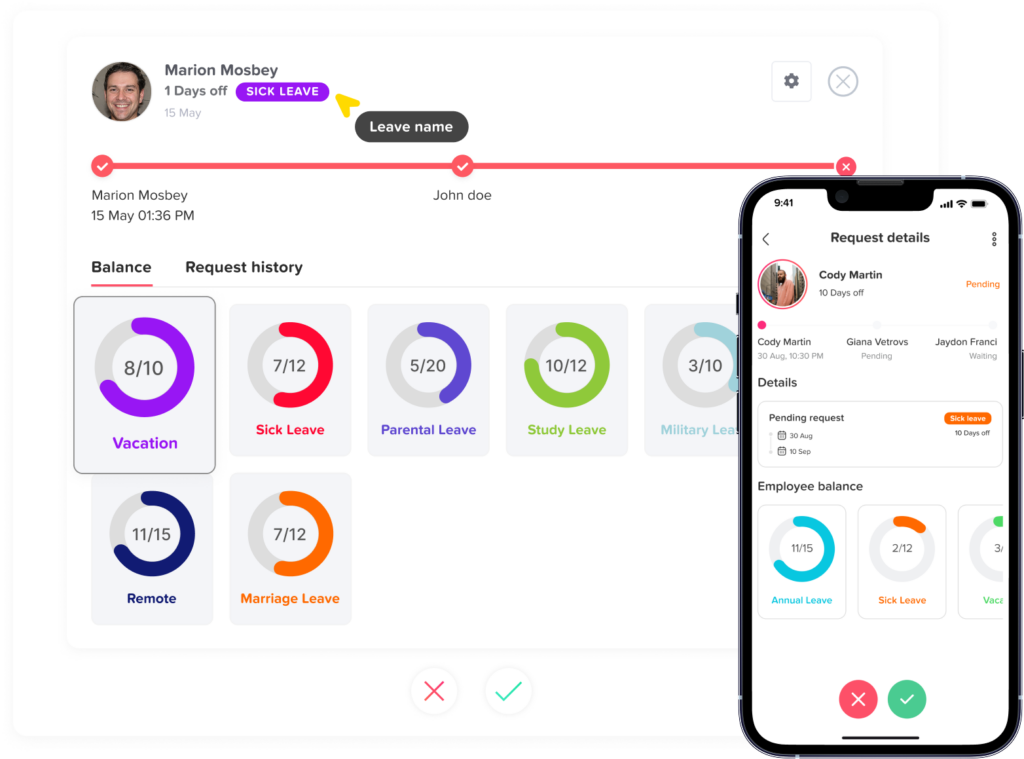
Leave balances should update automatically when a request is approved.
Employees should be able to see:
- Available leave balance
- Used days
- Pending requests
- Remaining days
- Leave history
This reduces the number of questions HR receives and gives employees more control over their time off planning.
Custom Leave Types
Every company has different types of leave. A good system should allow businesses to create and manage custom leave types, such as:
- Vacation leave
- Sick leave
- Personal leave
- Unpaid leave
- Maternity leave
- Paternity leave
- Bereavement leave
- Study leave
- Half day leave
Custom leave types help companies match the system to their actual policies.
Approval Workflows
A leave tracking system should make approvals clear and organized.
Managers should be able to:
- Review leave requests
- Check employee balances
- See who else is away
- Approve or reject requests
- Add comments when needed
Some companies may also need multi-level approvals, where requests go through more than one manager or HR before final approval.
Shared Leave Calendar
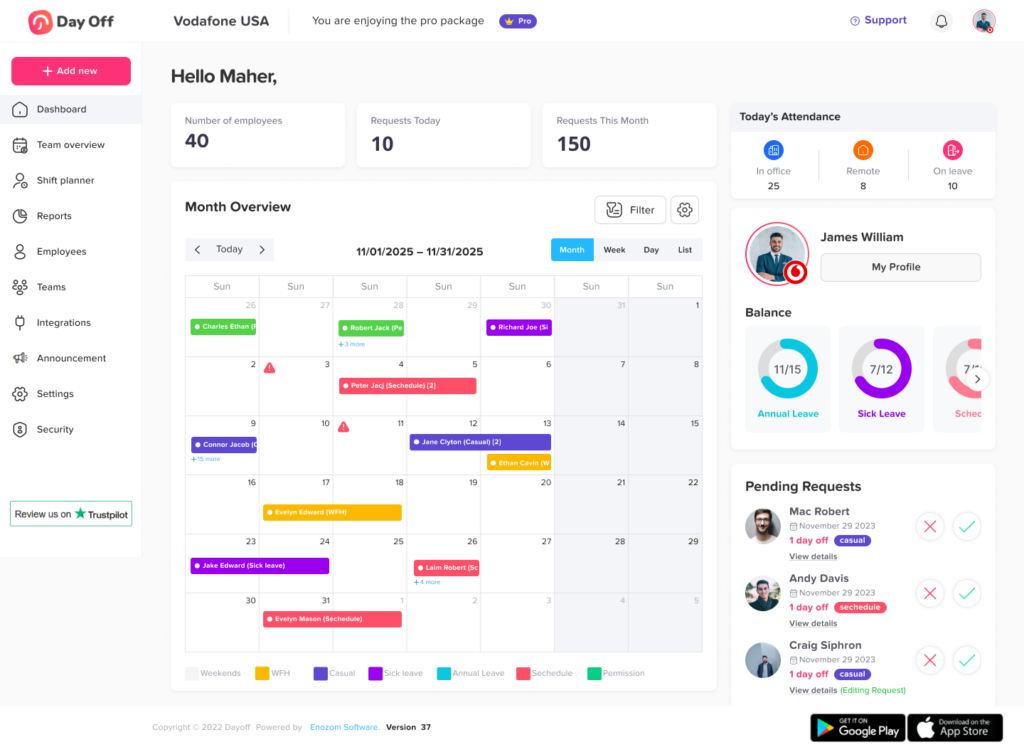
A shared leave calendar gives managers and teams a clear view of who is away and when.
This helps companies:
- Avoid overlapping absences
- Plan projects better
- Manage team capacity
- Improve scheduling
- Maintain productivity
A calendar view is especially useful for teams that depend on coverage, such as customer support, operations, sales, and project based teams.
Leave Policies and Accrual Rules
Not all employees follow the same leave policy. Some companies offer a fixed number of days per year, while others allow leave to accrue over time.
A good leave tracking system should support:
- Annual leave policies
- Monthly accruals
- Weekly or biweekly accruals
- Carryover rules
- Expiry dates
- Different policies for different teams or locations
This makes it easier for HR to manage leave accurately without manual calculations.
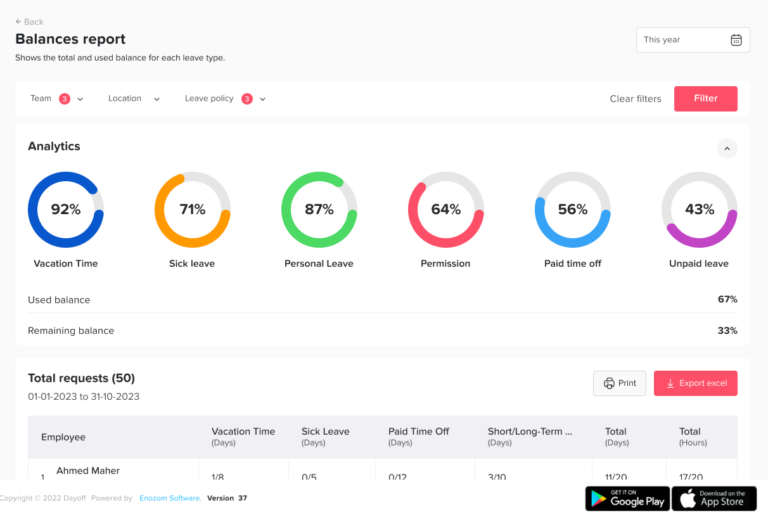
Reports and Exports
Reports help HR understand leave usage and keep accurate records.
Useful reports may include:
- Employee leave balances
- Used leave days
- Pending requests
- Leave by department
- Leave by type
- Leave trends
- Absence history
Export options are also helpful when HR needs to share data with management, finance, or payroll teams.
How Leave Tracking Improves the Employee Experience
Employees want a simple and transparent process when requesting time off. They do not want to wait for HR to check their balance or search through old emails to confirm whether a request was approved.
A leave tracking app improves the employee experience by giving employees:
- Easy access to their leave balance
- A simple way to request time off
- Clear request status updates
- Better visibility into their leave history
- More confidence when planning track vacation or personal time
This creates a smoother process and reduces confusion. Employees know exactly where to go, what to do, and how much time off they have available.
How Managers Benefit from Better Leave Tracking
Managers need to support employees while also keeping work running smoothly. Without a clear system, it can be difficult to know whether approving a request will affect team capacity.
A leave tracking system helps managers by giving them:
- A clear view of team availability
- Easy access to pending requests
- Employee balance information
- A shared calendar
- Faster approval tools
- Better scheduling visibility
This helps managers make fair decisions and avoid last-minute staffing problems.
For example, before approving a track vacation request, a manager can quickly check whether other team members are already away during the same period. This helps prevent overlapping leave and keeps work organized.
How HR Teams Save Time with Automated PTO Tracking
HR teams often handle many repetitive leave-related tasks. They may need to answer balance questions, update spreadsheets, follow up on approvals, prepare reports, and correct manual errors.
A leave management system reduces this workload by automating many of these tasks.
With automated PTO tracking, HR teams can:
- Spend less time updating records manually
- Reduce balance mistakes
- Manage multiple policies more easily
- Keep all leave data in one place
- Generate reports faster
- Improve communication between employees and managers
- Focus on more valuable HR work
Instead of managing every request manually, HR can rely on a system that keeps records accurate and organized.
Tracking Vacation Days vs. Sick Leave vs. PTO
Track vacationdays, sick leave, and PTO are often used together, but they are not always the same.
Vacation Days
Track vacation days are usually planned in advance. Employees use them for rest, travel, personal plans, or family time.
Tracking vacation days helps companies:
- Plan around employee absences
- Prevent overlapping vacations
- Encourage employees to take time off
- Maintain accurate balances
Sick Leave
Sick leave is used when an employee is ill, recovering, or needs time for health-related reasons.
Tracking sick leave helps companies:
- Keep accurate absence records
- Understand leave patterns
- Support employee wellbeing
- Manage unexpected absences
PTO
PTO stands for paid time off. Some companies combine vacation, sick leave, and personal days into one PTO balance.
Tracking PTO helps companies:
- Give employees more flexibility
- Simplify leave policies
- Manage all paid time off in one place
- Reduce confusion between different leave types
Whether a company separates leave types or combines them into one PTO policy, the most important thing is to track everything clearly and accurately.
| Leave Type | What It Means | Common Use | Why Tracking It Matters |
|---|---|---|---|
| Vacation Days | Planned time off that employees use for rest, travel, family time, or personal activities. | Used when employees schedule time away from work in advance. | Helps managers plan workloads, avoid overlapping vacations, and maintain team coverage. |
| Sick Leave | Time off used when an employee is ill, recovering, or needs time for health-related reasons. | Often requested unexpectedly when an employee cannot work due to sickness or medical needs. | Helps companies keep accurate absence records, support employee wellbeing, and manage sudden staffing gaps. |
| PTO | Paid time off that may combine vacation days, sick leave, personal days, or other paid leave into one balance. | Used flexibly depending on the company’s leave policy and the employee’s needs. | Helps simplify leave management, give employees more flexibility, and keep all paid time off records organized. |
Best Practices for Track vacation Days, Sick Leave, and PTO
To manage employee time off effectively, companies should follow a clear and consistent process.
Here are some best practices:
- Create clear leave policies
Employees should understand how much leave they receive, how it is earned, and how they can request it. - Use one central system
Avoid tracking leave across emails, spreadsheets, messages, and calendars. Keep everything in one place. - Make balances visible to employees
Employees should be able to check their own vacation, sick leave, or PTO balance anytime. - Use a shared leave calendar
A calendar helps managers and teams see who is away and plan work accordingly. - Automate approvals when possible
A clear approval workflow helps requests move faster and reduces delays. - Review reports regularly
Leave reports help HR understand absence trends, policy usage, and team availability. - Keep records updated
Accurate records help avoid disputes and support better planning. - Choose a system that is easy to use
The best leave tracking tool should make the process simpler, not more complicated.
Why Day Off Is a Simple Way to Track Leave
Day Off is a leave management and PTO tracking app that helps companies manage employee time off in one place. It is designed to make leave tracking simple for employees, managers, and HR teams.
With Day Off, businesses can track:
- Vacation days
- Sick leave
- PTO
- Custom leave types
- Public holidays
- Leave balances
- Employee requests
- Manager approvals
- Team availability
- Leave reports
Employees can easily request time off and check their balances. Managers can review requests and see who is away before approving leave. HR teams can manage policies, locations, teams, and reports without depending on manual spreadsheets.
Day Off is available on web, iOS, and Android, making it easy for teams to manage leave from anywhere.
It helps companies replace manual tracking with a simpler, clearer, and more organized process.
Final Thoughts
The best way to track vacation days, sick leave, and PTO is to use a dedicated leave tracking system instead of relying on spreadsheets, emails, or paper forms.
Manual tracking may work for a small team at the beginning, but it often leads to mistakes, delays, and confusion as the company grows. A leave management system helps businesses keep everything organized in one place.
With the right system, employees can check their balances, managers can approve requests faster, and HR teams can save time on manual work.
For companies that want a simple and reliable way to manage employee time off, using a leave tracking app like Day Off can make the entire process easier, more accurate, and more transparent.