







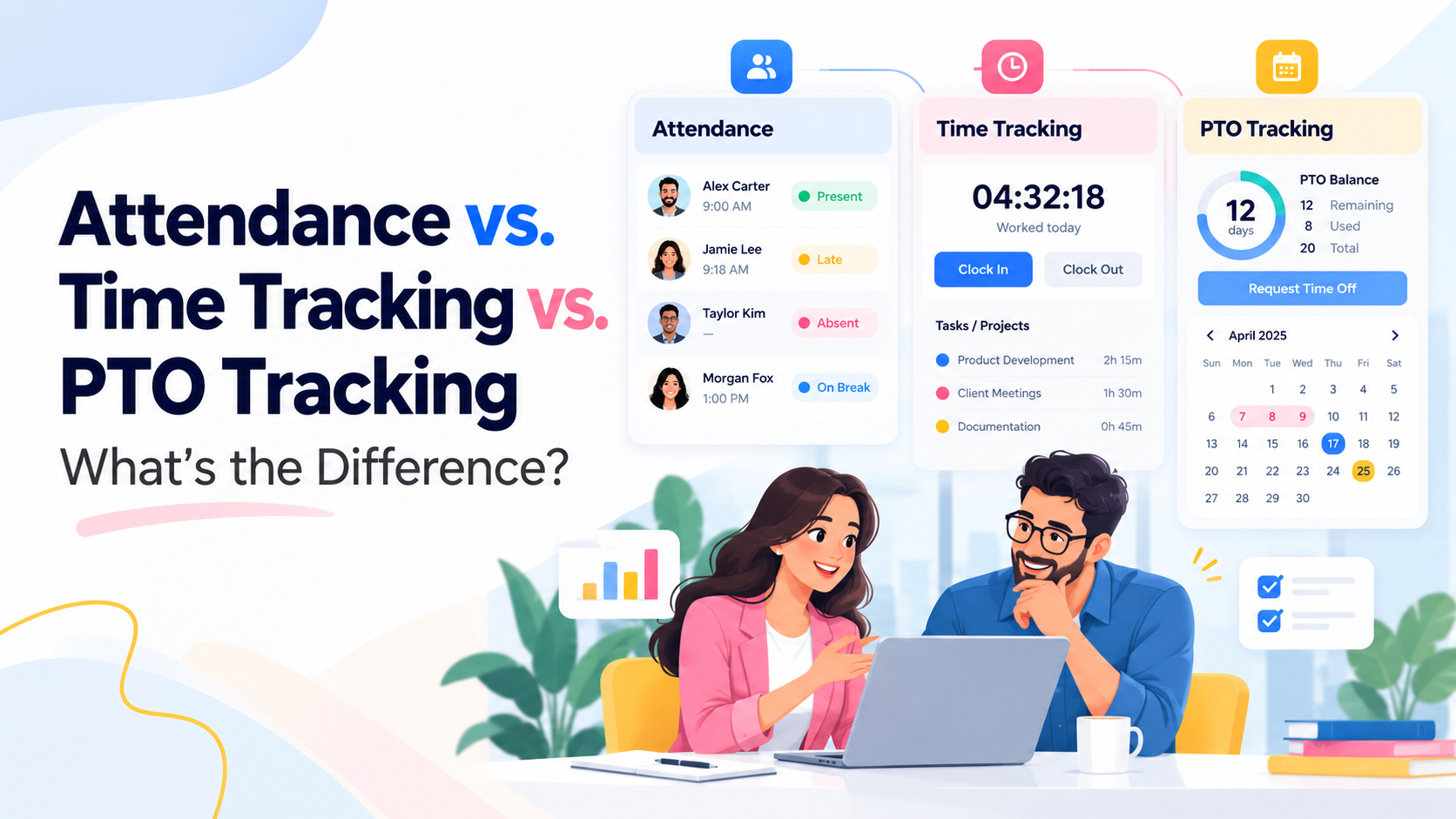
Employee Attendance vs Time Tracking vs PTO Tracking are closely related, but they are not the same thing.
Attendance tracking tells you whether an employee was present, late, absent, on break, or on leave. Time tracking tells you how long the employee worked and, in some systems, what they worked on. PTO tracking tells you how much paid or unpaid leave an employee has, how managers approve requests, and how time off affects their balance.
Many companies manage these areas separately. Attendance may live in one spreadsheet, working hours in another system, and PTO requests in email or chat. That approach can work for a very small team, but it becomes harder to manage as the company adds employees, schedules, locations, projects, and leave policies.

A connected system gives managers a clearer answer to a simple question: What happened with this employee’s time today?
For example, if an employee does not clock in on Tuesday, managers need context. Was the employee absent? Was Tuesday a scheduled day off? Did the employee have approved PTO? Or did they simply forget to clock in? Attendance, time tracking, and PTO tracking answer different parts of that question.
This guide explains the difference between all three, when each one is useful, and how a platform such as Day Off can bring PTO, attendance, schedules, and employee time tracking together in one place.
What Is Attendance Tracking?
Attendance tracking records whether employees are present according to their expected work schedule.
The focus is not primarily on how an employee spends every minute. Instead, attendance management helps answer questions such as:
- Did the employee show up for work?
- Were they on time?
- Did they leave early?
- Were they absent?
- Were they on an approved leave?
- Did they take a scheduled break?
- Did they work beyond their expected hours?
Attendance becomes especially useful when a company has fixed shifts, rotating schedules, flexible hours, or employees working from different locations.
For example, suppose an employee’s schedule runs from 9:00 a.m. to 5:00 p.m.
If the employee clocks in at 9:18 a.m., an attendance system may mark the employee as late. If the employee leaves before the scheduled end time, the system may record an early departure.
Attendance is therefore mainly about comparing expected presence with actual presence.
What Is Time Tracking?
Time tracking records the amount of time an employee actually works.
At its simplest, this may mean recording:
- Clock-in time
- Clock-out time
- Breaks
- Total working hours
More advanced time tracking can also record:
- Tasks
- Projects
- Clients
- Time spent on specific activities
- Overtime
- Billable or non-billable work
This makes time tracking useful not only for attendance, but also for payroll support, workload visibility, project management, and productivity analysis.
The U.S. Department of Labor requires covered employers to maintain accurate records of hours worked for covered, nonexempt employees. Employers do not have to use a specific type of timekeeping system, but the records must accurately show daily and weekly hours worked. Department of Labor
The Department of Labor also states that employers may use a time clock, a timekeeper, employee-entered records, or another method, as long as the records are complete and accurate.
What Is PTO Tracking?
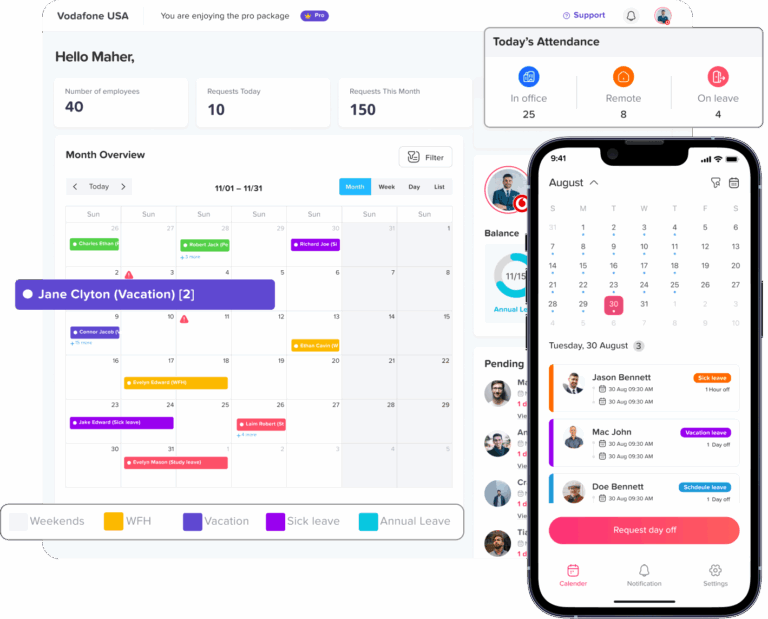
PTO tracking manages employee time away from work.
PTO may include:
- Vacation
- Sick leave
- Personal leave
- Unpaid leave
- Maternity or paternity leave
- Bereavement
- Compensatory time off
- Half-day leave
- Hourly leave
- Other company-specific leave types
A PTO tracking system usually records:
- Available leave balance
- Used leave
- Pending requests
- Approved requests
- Accruals
- Carryover
- Expiration rules
- Leave policies
- Approval workflows
- Holidays
- Employee availability
Unlike time tracking, PTO tracking focuses on time the employee is not working.
It also helps distinguish an approved absence from an unexplained absence.
If an employee does not appear at work, an attendance system may initially show them as absent. But if the employee has an approved vacation request, the PTO system provides the reason and keeps the absence from counting as an attendance problem.
Attendance vs. Time Tracking vs. PTO Tracking
The easiest way to understand the difference is to look at the question each system answers.
| System | Main Question | Typical Information |
|---|---|---|
| Attendance Tracking | Was the employee present as expected? | Late arrival, absence, early departure, breaks, attendance status |
| Time Tracking | How long did the employee work and what did they work on? | Clock-in/out, hours worked, tasks, projects, clients, overtime |
| PTO Tracking | Why is the employee away, and how much leave do they have? | Leave balances, requests, approvals, accruals, carryover, holidays |
These systems overlap, but each one serves a different purpose.
A Simple Example
Imagine Maria’s schedule runs from 8:00 a.m. to 4:00 p.m.
Scenario 1: Maria arrives at 8:25 a.m.
Attendance tracking identifies that Maria arrived 25 minutes late.
Time tracking records her actual clock-in time and calculates how long she worked.
PTO tracking may not be involved unless Maria submitted an approved request covering the missing time.
Scenario 2: Maria takes the entire day as vacation
Attendance tracking shows that she is not expected to be working because she is on approved leave.
Time tracking should not show normal worked hours for that day.
PTO tracking records the vacation request and deducts the appropriate leave from her balance.
Scenario 3: Maria works on Client A for three hours and Client B for five hours
Attendance tracking shows that she was present.
Time tracking records eight total working hours and can associate those hours with different clients or projects.
PTO tracking is not involved because Maria did not take leave.
This is why one system cannot always replace all three functions.
Attendance Tracking vs. Time Tracking
Attendance and time tracking are often confused because both deal with the workday.
The key difference is that attendance compares presence against the schedule, while time tracking measures the hours employees actually work.
Suppose an employee has an eight-hour schedule.
If the employee clocks in at 9:00 a.m. and clocks out at 5:00 p.m., attendance may show that they completed the expected schedule.
Time tracking may go further by showing:
- 8 total recorded hours
- 1 hour on Project A
- 3 hours on Project B
- 4 hours on Project C
Attendance tells the manager whether the employee was there. Time tracking shows where the employee’s working time went.
PTO Tracking vs. Attendance Tracking
PTO tracking and attendance tracking also overlap.
Attendance identifies when an employee is absent. PTO tracking explains whether the employer authorized the absence.
For example, two employees may both be away on Monday.
Employee A submitted a vacation request, and a manager approved it last week.
Employee B simply did not attend work.
From a basic attendance perspective, both are not present.
From a workforce management perspective, however, the situations are very different.
The PTO record distinguishes approved time off from unplanned absence.
This connection is particularly useful when managers review absence patterns or attendance reports.
PTO Tracking vs. Time Tracking
PTO tracking records time away from work, while time tracking records actual working time.
The two become especially important when an employee takes a partial day.
Imagine an employee has an eight-hour schedule but takes three hours of PTO for an appointment.
The employee may work five hours and use three hours of PTO.
A connected system can show:
- 5 actual working hours
- 3 approved PTO hours
- 8 scheduled hours
Without both systems, managers may see only five tracked hours and assume the employee failed to complete the schedule.
PTO provides the missing context.
Why Companies Need Accurate Attendance Records
Attendance data helps organizations understand how employees are following their expected schedules.
It can help identify:
- Frequent lateness
- Repeated early departures
- Unplanned absences
- Missed shifts
- Overtime
- Schedule adherence
- Break patterns
- Approved leave
Accurate attendance information also helps managers plan coverage.
If several employees are on leave, the company may need to adjust schedules, move tasks, or arrange additional coverage.
Attendance data becomes far more useful when you connect it to work schedules and approved PTO.
Why Time Tracking Matters
For covered, nonexempt employees, accurate work-hour records are a core part of FLSA recordkeeping.
The Department of Labor states that employers generally need records showing hours worked each day and total hours worked each workweek for covered, nonexempt workers. Department of Labor
Time tracking can also support business needs beyond compliance.
Companies can use time data to understand:
- How long projects take
- Which tasks consume the most employee time
- How much time employees spend on each client
- Whether employees are working beyond their schedules
- How workloads spread across the team
- Where overtime is occurring
This makes time tracking particularly useful for agencies, consulting firms, professional services teams, remote teams, and companies that manage project-based work.
Why PTO Tracking Matters
PTO tracking gives employees and managers a clear record of time-off entitlement and usage.
Without a central system, companies often end up maintaining leave information in:
- Spreadsheets
- Email threads
- Chat messages
- Shared calendars
- Payroll notes
- Manager records
That can create conflicting balances and make it harder to determine which requests managers approved.
A PTO management system keeps leave balances, policies, requests, approvals, and calendars connected.
It also helps employees know how much time they can request before they submit leave.
How Work Schedules Connect All Three
Work schedules provide the baseline that attendance, time tracking, and PTO tracking need.
Suppose Employee A works eight hours Monday through Friday.
Employee B works four 10-hour days.
If both take Monday off:
- Employee A may need 8 PTO hours.
- Employee B may need 10 PTO hours.
If both clock out after eight hours:
- Employee A may have completed the scheduled day.
- Employee B may have left two hours early.
The same raw number has a different meaning depending on the schedule.
That is why work schedules belong together with leave and attendance data.
What Is an Attendance Review?
An attendance review combines schedule information with actual employee activity.
Instead of simply showing whether an employee clocked in, the review can compare:
- Scheduled start time
- Actual start time
- Scheduled end time
- Actual end time
- Breaks
- PTO
- Late time
- Early departure
- Net working time
- Overtime
This gives managers more context than a simple timesheet.
A timesheet may show that someone worked seven hours. An attendance review can help explain whether that was expected, whether the employee arrived late, or whether approved PTO covered one hour.
How Day Off Combines PTO, Attendance, and Time Tracking
Day Off connects leave management with employee schedules and time tracking, helping businesses avoid managing these areas in separate systems.
The current Day Off plans include Free, Pro, and Pro + Time Tracker. The Free plan supports up to 10 employees. Pro costs $2 per seat per month, and the Pro + Time Tracker plan costs $3 per seat per month with a $30 monthly minimum.
PTO and Leave Management
Day Off supports PTO and leave management through:
- Customizable leave types
- Leave balances
- Leave requests
- Approval workflows
- Calendar visibility
- Management reports
With Pro, companies can also use more advanced leave settings, advanced work schedules, bulk actions, and integrations.
Advanced Work Schedules
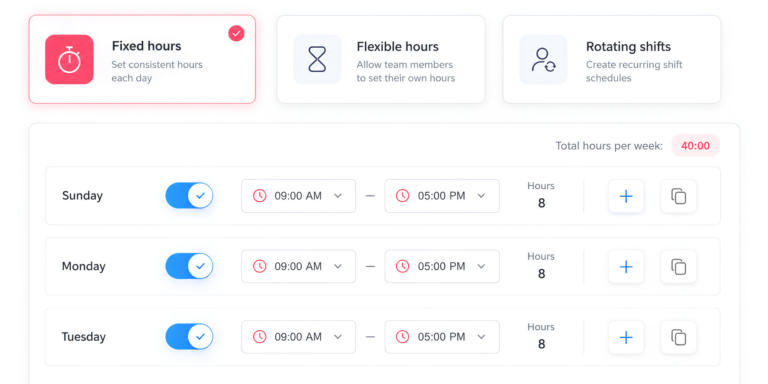
Day Off supports advanced work schedule structures, which is important because attendance and PTO deductions depend on each employee’s actual schedule.
The platform can support different scheduling patterns rather than assuming that every employee works the same daily hours.
Clock In / Clock Out Mode
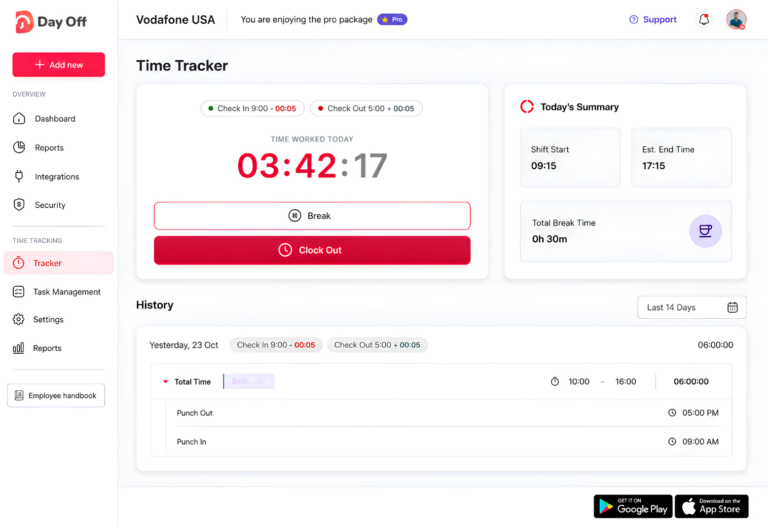
The Pro + Time Tracker plan includes a Clock In / Clock Out mode that helps teams record actual working hours more accurately. Employees can clock in when they start work and clock out when they finish, giving managers a clear view of when the workday began and ended.
This makes it easier to compare scheduled hours with actual attendance, review late arrivals or early departures, and maintain more reliable time records without relying on manual timesheets.
Task Tracking Mode
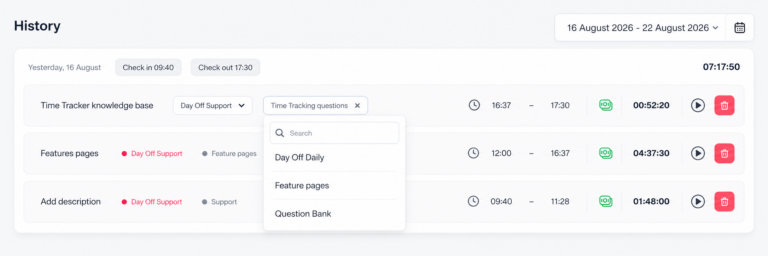
The Pro + Time Tracker plan includes Task Tracking Mode, giving employees a more detailed way to record how they spend their working time. Instead of tracking only the start and end of the workday, employees can log time against specific tasks and activities.
This gives managers better visibility into how employees divide their hours and makes it easier to understand how much time different types of work actually require.
Projects, Tasks, and Clients
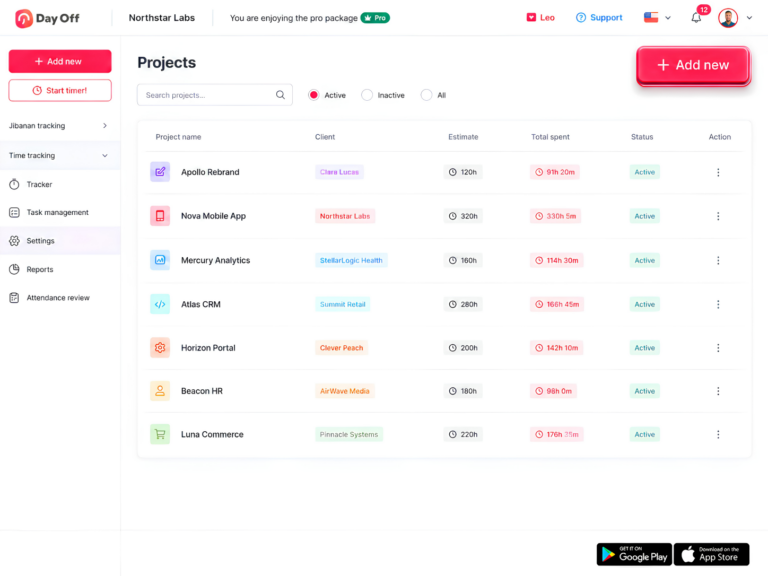
Day Off lets teams organize tracked time around projects, tasks, and clients, making time records more useful than a simple total-hours figure.
Managers can see how much time employees spend on specific projects, which tasks take the most effort, and how working hours spread across different clients. This is especially useful for teams that manage project-based or client work and need clearer visibility into where employee time is going.
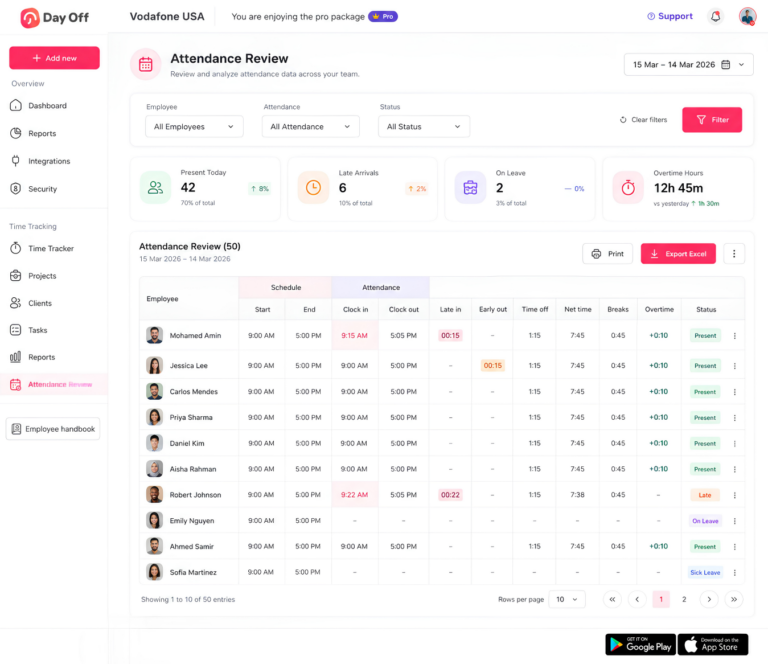
Attendance Review
Attendance Review brings schedules, tracked hours, and leave information together in one place.
Managers can compare scheduled working time with actual attendance and review key details such as late arrivals, early departures, breaks, PTO, net working hours, overtime, and attendance status.
This provides more context than a basic timesheet. If an employee works fewer hours than scheduled, managers can quickly see whether approved PTO, a late arrival, an early departure, or another attendance event caused the difference.
Detailed and Summary Reports
The Pro + Time Tracker plan includes both detailed reports and summary reports, giving managers different levels of visibility into employee time.
Detailed reports make it easier to review tracked hours across employees, tasks, projects, and clients, while summary reports provide a quick overview of working time and activity.
Together, these reports help teams understand how employees use their time, identify patterns, and maintain clearer records without having to review every individual time entry manually.
How Day Off Brings PTO and Time Tracking Together
One of the biggest advantages of managing PTO and time tracking in the same system is having the right context behind every recorded hour.
Suppose an employee has an eight-hour schedule but records only five hours of work. A time tracker alone may show a three-hour gap, but it does not explain why that time is missing.
If the employee has an approved three-hour PTO request, the full picture becomes clear:
5 worked hours + 3 PTO hours = 8 scheduled hours
The same applies to full-day leave. If an employee is on approved vacation, a missing clock-in should not count the same as an unexplained absence or missed shift.
By connecting schedules, tracked hours, attendance, and approved leave, Day Off gives managers a clearer understanding of what happened during the employee’s workday.
Which System Does Your Company Need?
The right system depends on what your company wants to track. Attendance vs Time Tracking vs PTO Tracking each solve a different part of workforce management.
Choose Attendance Tracking If You Need To:
Attendance tracking is useful when your main goal is to understand whether employees are following their expected schedules.
It can help you:
- Monitor employee presence and absence
- Identify late arrivals
- Review early departures
- Compare scheduled hours with actual attendance
- Track attendance status
- Monitor missed work
- Review overtime and schedule differences
This is especially useful for teams with fixed schedules, shifts, or defined start and end times.
Choose Time Tracking If You Need To:
Time tracking is the better option when you need a detailed record of how long employees work and where their time is spent.
It can help you:
- Record total hours worked
- Track clock-in and clock-out times
- Monitor breaks
- Track employee time by task
- Organize time by project and client
- Review timesheets
- Monitor overtime
- See how working hours spread across the team
For project-based teams, this can provide useful insight into how much time different clients, tasks, or projects require.
Choose PTO Tracking If You Need To:
PTO tracking focuses on managing employee time away from work.
It can help you:
- Manage vacation and sick leave
- Track available and used leave balances
- Process employee leave requests
- Manage approval workflows
- Configure different leave policies
- Track PTO accruals
- Manage carryover and expiration rules
- View team availability
- Plan around employee absences
PTO tracking gives managers the context they need to distinguish approved time off from unplanned absence.
Use All Three Together for a Complete View
For many companies, the most useful approach is not choosing one system over another.
Attendance tells you whether an employee was present.
Time tracking tells you how long they worked and where that time went.
PTO tracking tells you when approved leave explains time away from work.
When you connect all three, managers get a much clearer view of employee time without having to compare multiple spreadsheets or separate systems.
Common Mistakes When Managing Attendance, Time, and PTO
Using One Spreadsheet for Everything
Spreadsheets can work for a very small team, but they become harder to maintain as the company grows.
Schedules change, PTO balances update, employees submit new requests, and teams add time entries every day. Managing all of this manually increases the risk of outdated balances, missed changes, and inconsistent records.
Treating Approved PTO as an Attendance Issue
Managers should not treat an employee on approved vacation the same way as an employee who misses work without notice.
If PTO data lives apart from attendance records, managers may see an absence without immediately knowing whether it was approved.
Connecting PTO with attendance provides that missing context.
Ignoring Employee Work Schedules
The number of hours an employee works only makes sense when compared with their expected schedule.
An eight-hour shift may represent a complete workday for one employee, while another employee may normally work 10 or 12 hours.
Schedule information is therefore essential when reviewing attendance, overtime, early departures, and PTO usage.
Tracking Total Hours Without Knowing Where the Time Went
Knowing that an employee worked eight hours does not always tell managers enough.
For teams that work on multiple projects or clients, task and project tracking can show how people spent those hours.
This can help companies understand workloads, project effort, and how employees use their time.
Managing PTO and Time Tracking in Separate Systems
Separate systems can create gaps in workforce data.
A manager may see that an employee worked five hours instead of eight, but without access to the PTO record, the missing three hours may appear unexplained.
Keeping leave and time tracking connected makes those differences easier to understand.
Attendance, Time Tracking, and Payroll
Attendance vs Time Tracking vs PTO Tracking can all support payroll processes, but none of them is the same as payroll itself.
Time tracking records actual working hours.
Attendance tracking shows whether employees followed their expected schedules.
PTO tracking records approved paid or unpaid time away from work.
Payroll then uses relevant information from these systems along with pay rates, overtime rules, deductions, taxes, and other compensation details to calculate employee pay.
Keeping these functions clearly separated helps companies use each system correctly while maintaining more accurate payroll records.
How Long Should Employee Time Records Be Kept?
Under the Fair Labor Standards Act, employers generally must keep payroll records for at least three years.
Employers generally must keep records used to calculate wages, including time cards, work schedules, and wage rate tables, for two years.
State laws, collective bargaining agreements, employment contracts, or other regulations may require employers to keep records longer, so employers should always review the requirements that apply to their workforce.
FAQ: Attendance, Time Tracking, and PTO Tracking
What is the main difference between attendance tracking and time tracking?
Attendance tracking focuses on whether employees are present and following their expected schedules. It helps managers identify absences, late arrivals, early departures, missed shifts, and other attendance events.
Time tracking goes deeper by recording how many hours employees actually work. Depending on the system, it may also show how employees split those hours across tasks, projects, and clients.
In simple terms, attendance tracking answers “Was the employee there?” while time tracking answers “How long did they work, and what did they work on?”
Is PTO tracking the same as attendance tracking?
No. PTO tracking manages approved time away from work, while attendance tracking records whether employees are present or absent according to their schedules.
For example, an employee who is on approved vacation may appear absent from work, but that absence should not be treated the same way as an unexplained missed shift. PTO tracking provides the context behind the absence by showing the approved leave request and the employee’s remaining leave balance.
Can a company track PTO and working hours in the same system?
Yes. Using the same platform for PTO and working hours can make employee time records much easier to understand.
For example, if an employee has an eight-hour schedule but only works five, a connected system can show whether approved PTO covers the remaining three hours. Without that connection, managers may see a time gap without knowing why it happened.
Platforms such as Day Off can combine leave management, work schedules, attendance review, and time tracking so managers have a clearer view of the employee’s full day.
Should salaried employees track their working hours?
In some organizations, yes. Salaried employees may still benefit from time tracking even when their pay is not based directly on hourly records.
Time tracking can help companies understand project workloads, client effort, capacity, overtime patterns, and how employees spend time across different activities. It can also provide useful operational data for planning and resource allocation.
Whether salaried employees are required to track time depends on the company, role, legal classification, and business needs.
What happens if an employee forgets to clock in or clock out?
The company should have a clear process for correcting missed time entries. The goal is to make sure the final record reflects the hours the employee actually worked.
A manager or administrator may need to review the employee’s schedule, confirm the correct start or end time, and update the entry according to company policy. Managers should not simply ignore missed punches, because inaccurate time records can create problems for payroll, attendance reporting, and overtime calculations.
Can an employee use PTO and work on the same day?
Yes, if the employer allows partial-day PTO.
For example, an employee with an eight-hour schedule may work five hours and use three hours of PTO for a medical appointment or personal matter. In that case, the employee’s day could show:
5 worked hours + 3 PTO hours = 8 scheduled hours
This is one of the reasons it is useful to connect PTO tracking with time and attendance records.
How does project time tracking help managers?
Project time tracking shows where employees spend their working hours.
Instead of only seeing that an employee worked eight hours, managers can see how much time went toward specific tasks, projects, or clients. This can help with workload planning, project costing, estimating future work, and identifying activities that are taking longer than expected.
For client-based or project-based teams, this level of detail can be much more useful than a basic clock-in and clock-out record.
Is attendance tracking useful for remote and hybrid teams?
Yes. Remote and hybrid employees still have work schedules, attendance expectations, PTO, and working hours that still need managing.
Attendance tracking can help managers understand whether employees are working according to their expected schedules, while time tracking can provide visibility into actual hours worked and project activity.
For distributed teams, combining attendance, time tracking, and PTO can also make it easier to manage employees across different locations and time zones.
How often should companies review attendance and time tracking records?
Companies should review time and attendance records regularly rather than waiting until a problem appears.
The right frequency depends on the organization, but many teams benefit from reviewing records daily, weekly, or before each payroll period. Frequent reviews make it easier to identify missed punches, unusual overtime, late arrivals, scheduling issues, and incorrect time entries while the information is still easy to verify.
Regular review also helps keep payroll and workforce reporting more accurate.
What are the benefits of combining attendance, time tracking, and PTO tracking?
Combining Attendance vs Time Tracking vs PTO Tracking gives managers a more complete picture of employee time.
Attendance tracking shows whether employees followed their schedules. Time tracking shows how long they worked and where their time went. PTO tracking explains approved time away from work and keeps leave balances and requests organized.
When these systems are connected, companies can reduce manual reconciliation between spreadsheets, calendars, leave tools, and timesheets. Managers can understand why hours are missing, employees get clearer visibility into their schedules and leave, and HR teams can maintain more accurate workforce records.
Conclusion
Attendance vs Time Tracking vs PTO Tracking each answer a different question, but together they give managers a much clearer view of employee time. Attendance shows whether employees are present and following their schedules, time tracking records actual working hours and activities, and PTO tracking explains approved time away from work.
Using separate tools for each process can create gaps and extra manual work. With Day Off, companies can manage PTO, schedules, approvals, attendance, and employee time in one platform. The Pro + Time Tracker plan adds Clock In / Clock Out, Task Tracking Mode, Projects, Tasks & Clients, Attendance Review, and detailed reporting.