







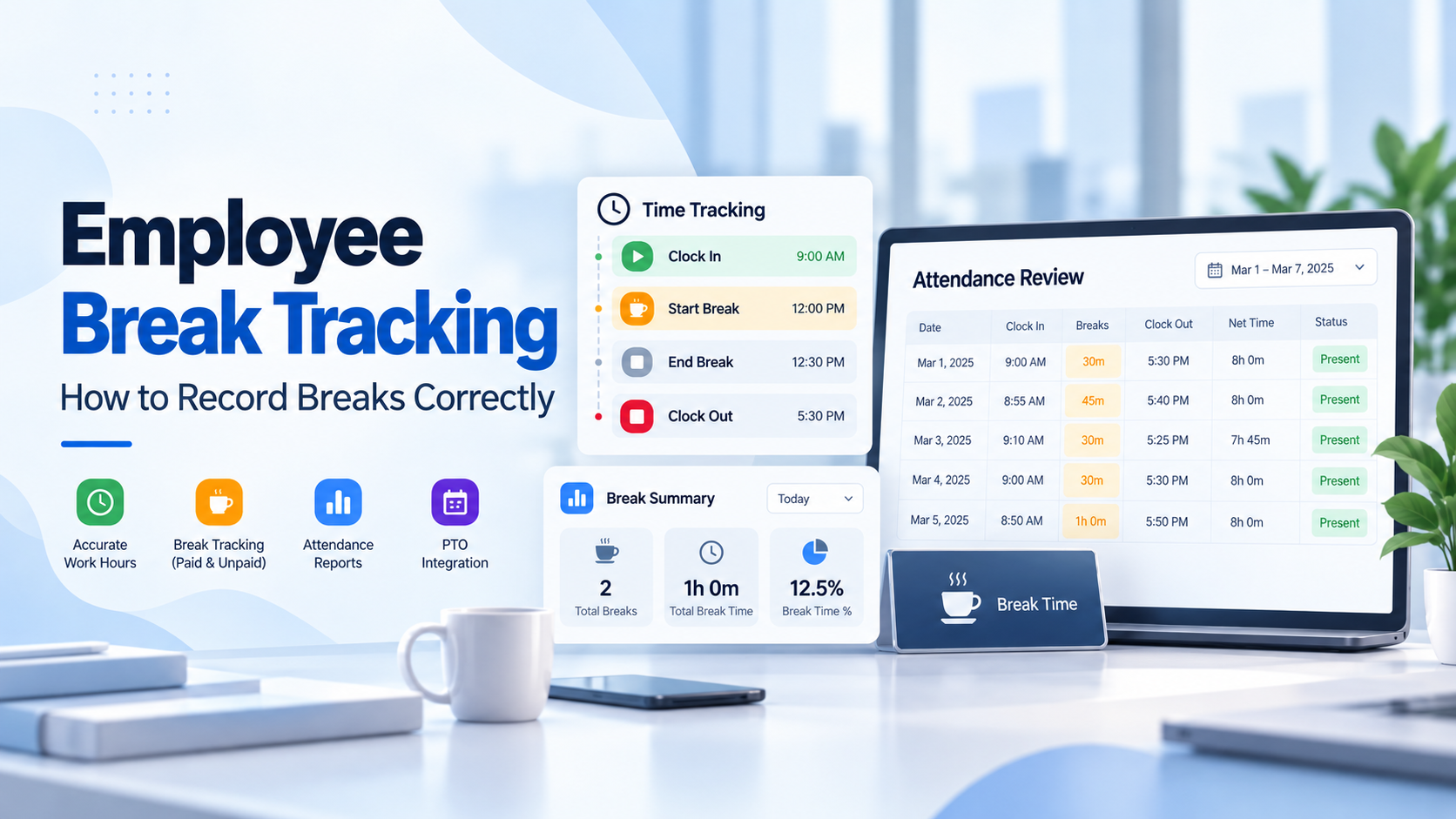
Employee break tracking is the process of recording when employees start and end breaks during the workday so employers can understand actual working time, distinguish paid rest periods from unpaid meal periods, and maintain more accurate attendance and time records.
For employers, break tracking is not simply about knowing when someone stepped away from their desk. It can affect payroll, overtime calculations, attendance reviews, timekeeping records, and compliance with federal or state labor rules.

Under the federal Fair Labor Standards Act (FLSA), short rest breaks of about 5 to 20 minutes are generally counted as paid working time. Bona fide meal periods are treated differently. Meal periods are typically at least 30 minutes and generally do not have to be paid when the employee is completely relieved from work duties. Department of Labor
That makes accurate break records important. A company that automatically deducts meal time, ignores interrupted lunches, or treats every break as unpaid can end up with inaccurate work-hour records.
This guide explains how employee break tracking works, the difference between paid and unpaid breaks, how breaks affect working hours and overtime, and how Day Off can help employees record their workday by clocking in, starting and ending breaks, and clocking out.
What Is Employee Break Tracking?
Employee break tracking means recording the periods during a workday when an employee temporarily stops working.
Depending on the workplace and applicable rules, those breaks may include:
- Rest breaks
- Coffee breaks
- Meal periods
- Lunch breaks
- Personal breaks
- Other authorized pauses during the shift
A break-tracking record may include:
- Employee name
- Work date
- Scheduled working hours
- Clock-in time
- Break start time
- Break end time
- Total break duration
- Clock-out time
- Net working time
The purpose is to create a clearer record of what happened during the employee’s scheduled day.
For example, an employee might have the following record:
Clock in: 9:00 a.m.
Break start: 1:00 p.m.
Break end: 1:30 p.m.
Clock out: 5:30 p.m.
If the 30-minute period qualifies as an unpaid meal period, the employee’s net working time would be:
8.5 elapsed hours – 0.5 hour meal break = 8 working hours
Accurate break tracking prevents HR or payroll teams from having to reconstruct these details later.
Why Employee Break Tracking Matters
Break tracking connects directly with accurate timekeeping.
Imagine an employee clocks in at 8:00 a.m. and clocks out at 5:00 p.m. A simple clock-in and clock-out record shows nine elapsed hours.
But that does not tell you whether the employee:
- Worked for all nine hours
- Took a 30-minute meal break
- Took a one-hour lunch
- Worked through lunch
- Had an interrupted meal period
Those details change the number of hours that may need to be counted as working time.
It can help employers: –
- Calculate net working hours more accurately
- Review attendance records
- Identify unusually long or missing breaks
- Reduce payroll corrections
- Review overtime
- Investigate missed meal periods
- Maintain clearer employee time records
Are Employee Breaks Required by Federal Law?
The FLSA does not generally require employers to provide meal periods or rest breaks.
However, when an employer chooses to provide breaks, federal law affects whether those breaks must be treated as compensable working time.
State laws may impose additional requirements.
Some states require meal periods or rest breaks based on shift length, employee age, industry, or other factors. Where both federal and state rules apply, employers need to comply with the applicable requirements. The Department of Labor specifically notes that state break requirements may provide protections beyond federal law. DOL Web Apps
That is why employers should avoid creating a company-wide break policy based only on the FLSA if they have employees in multiple states.
Paid Breaks vs. Unpaid Breaks
One of the most important distinctions in employee break tracking is whether the break counts as working time.
Short Rest Breaks Are Generally Paid
Under federal rules, short rest periods of around 5 to 20 minutes are generally considered compensable work time.
The Department of Labor explains that these short breaks are commonly provided in workplaces and must generally be included in total hours worked. Department of Labor
For example, if an employee:
- Works 7 hours and 40 minutes
- Takes two 10-minute rest breaks
Those two short breaks normally remain part of the employee’s paid working time under the FLSA.
Employers generally should not subtract those 20 minutes simply because the employee temporarily stopped performing work.
Bona Fide Meal Periods May Be Unpaid
Meal periods are treated differently.
A bona fide meal period is generally not counted as working time when the employee is completely relieved from duty.
The Department of Labor notes that meal periods are typically at least 30 minutes, although shorter periods may qualify in some circumstances. Department of Labor
For example, an employee who takes a 30-minute lunch and performs no work during that period may have that time excluded from hours worked.
However, simply labeling a period “lunch” does not automatically make it unpaid.
When a Meal Break May Need to Be Paid
An unpaid meal period normally requires the employee to be relieved from work duties.
If the employee is still expected to work during the break, the time may need to be counted as hours worked.
Examples could include an employee who:
- Answers customer calls during lunch
- Continues monitoring equipment
- Responds regularly to work messages
- Serves customers while eating
- Performs administrative tasks during the meal
- Experiences significant work-related interruptions
The Department of Labor explains that bona fide meal periods generally require employees to be completely relieved of duty. In healthcare guidance, it also gives an example of employees whose meal periods are frequently interrupted by work duties and explains that those periods may need to be compensated.
How to Record Employee Breaks Correctly
A good break-tracking process should be simple enough for employees to use consistently and detailed enough to provide reliable work-hour records.
Record the Start of the Workday
Employees should first record when they actually begin working.
For example:
Clock in: 8:55 a.m.
The clock-in establishes the beginning of the employee’s tracked work period.
Record When the Break Starts
When the employee begins a break that the company tracks separately, the start time should be recorded.
For example:
Break start: 12:32 p.m.
This is especially important for meal periods because employers need to know how long the employee was actually away from work.
Record When the Break Ends
When the employee returns to work, they should end the break.
For example:
Break end: 1:03 p.m.
The recorded break duration is:
31 minutes
The employee’s working timer can then continue until the end of the workday.
Record the End of the Workday
The employee clocks out when work is complete.
For example:
Clock out: 5:26 p.m.
The employer can now distinguish between total elapsed time and actual working time.
Example of a Break Tracking Calculation
Consider this employee record:
| Activity | Time |
|---|---|
| Clock in | 8:30 a.m. |
| Break start | 12:30 p.m. |
| Break end | 1:00 p.m. |
| Clock out | 5:00 p.m. |
| Net worked | 8h |
The employee was present from 8:30 a.m. until 5:00 p.m.
That equals:
8 hours 30 minutes elapsed time
The employee also recorded a:
30-minute meal break
So the net tracked working time is:
8 hours 30 minutes – 30 minutes = 8 hours
This basic calculation becomes more important when managers are reviewing dozens or hundreds of employee records.
How Breaks Affect Overtime
Break tracking can affect overtime calculations because compensable breaks are part of hours worked.
Under federal law, short breaks that qualify as compensable time generally remain included when determining total weekly working hours. Department of Labor
Suppose a nonexempt employee records:
- 39 hours and 40 minutes of active work
- Two paid 10-minute rest breaks
The total hours worked would reach:
40 hours
Those short paid breaks should not simply be deducted from the FLSA work-hour total.
By contrast, a qualifying unpaid meal period may be excluded.
Accurate break classification is therefore necessary before calculating overtime.
Should Employees Clock Out for Every Break?
Not necessarily.
Whether an employee should clock out, pause a timer, or simply remain clocked in depends on the type of break and the employer’s timekeeping process.
For federal wage-and-hour purposes, short compensable rest breaks generally remain working time. Employers should be careful not to configure their systems in a way that automatically treats those breaks as unpaid. Department of Labor
A longer unpaid meal period may be recorded separately so that it can be excluded from net working time when appropriate.
The timekeeping workflow should match the employer’s break policy and applicable federal, state, and local requirements.
What About Automatic Meal Break Deductions?
Some employers automatically deduct a set amount of time, such as 30 minutes, from an employee’s workday for lunch.
Automatic deductions are not automatically prohibited, but they create risk if employees do not actually receive the full uninterrupted meal period.
The Department of Labor’s healthcare guidance explains that an employer using an automatic 30-minute meal deduction is still responsible for ensuring employees receive the full break. If the meal is interrupted enough that the employee is not genuinely relieved from duty, the time may need to be treated as working time. Department of Labor
A stronger process is to give employees an easy way to record the break they actually took and a process for reporting missed or interrupted meal periods.
Employee Break Tracking for Remote Workers
The same federal principles apply to remote employees.
The Department of Labor states that short breaks of 20 minutes or less are generally compensable whether work takes place at the employer’s location, the employee’s home, or another location. Department of Labor
Remote teams still need a practical way to distinguish:
- Working time
- Paid short breaks
- Meal periods
- Off-duty time
Because managers cannot physically observe when remote employees leave or return from lunch, a consistent digital time-tracking process can make the record much clearer.
Common Employee Break Tracking Mistakes
Automatically Treating Every Break as Unpaid
Not all breaks can be deducted from working time.
Short rest breaks of about 5 to 20 minutes are generally compensable under federal rules.
Deducting Lunch When the Employee Worked Through It
A scheduled lunch break does not necessarily mean an employee actually stopped working.
If the employee performed work or was not properly relieved from duty, the time may need to be counted.
Failing to Record the Actual Break Length
If employees are expected to take 30 minutes but sometimes take 22 or 40 minutes, a fixed assumption may not reflect what really occurred.
Actual start and end times provide a more reliable record.
Ignoring Interrupted Meal Periods
An employee may have started a meal break but been called back to work.
The time record should reflect what actually happened rather than assuming the scheduled break was completed.
Forgetting State Requirements
Federal law does not generally require breaks, but state laws may.
Companies with employees in several locations should review the rules that apply to each location.
Making the Tracking Process Too Complicated
If employees need several manual steps to record each break, they are more likely to forget or enter incorrect information.
A simple Start Break and End Break workflow makes consistent tracking easier.
How Day Off Helps With Employee Break Tracking
Day Off’s Pro + Time Tracker plan combines PTO management with employee time and attendance tracking. The current plan costs $3 per employee per month, with a minimum of $30 per month, and includes Clock In / Clock Out mode, Task Tracking Mode, Projects, Tasks & Clients, detailed reports, summary reports, and Attendance Review. Day Off
For break tracking, the key advantage is that an employee’s working day can be recorded as a sequence of actual events rather than a single total number of hours.
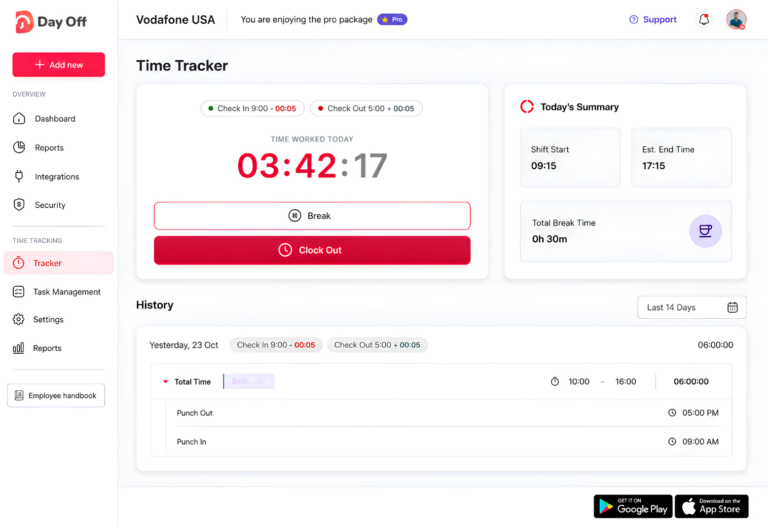
Clock In at the Start of the Workday
In Day Off’s Clock In / Clock Out mode, employees can start their workday using the time tracker.
Day Off documents this mode as the simpler time-logging option for teams that want to record when employees work without requiring project or task details. Day Off
This establishes the beginning of the employee’s tracked attendance.
Start a Break
During the workday, an employee can start their break so the system records that they are temporarily away from active work.
Instead of requiring HR to assume that every employee took the same lunch period, the break can be tied to the employee’s actual workday.
End the Break
When the employee returns, they end the break and continue their workday.
This allows the system to maintain a clearer distinction between:
- Total time between clock-in and clock-out
- Break time
- Net working time
For managers, that is much more useful than seeing only a start time and an end time.
Clock Out at the End of the Day
When work is complete, the employee ends the workday.
Day Off’s Clock In / Clock Out workflow records the employee’s actual working session, while its time-tracking tools provide managers with records they can review later.
Review Breaks in Attendance Review
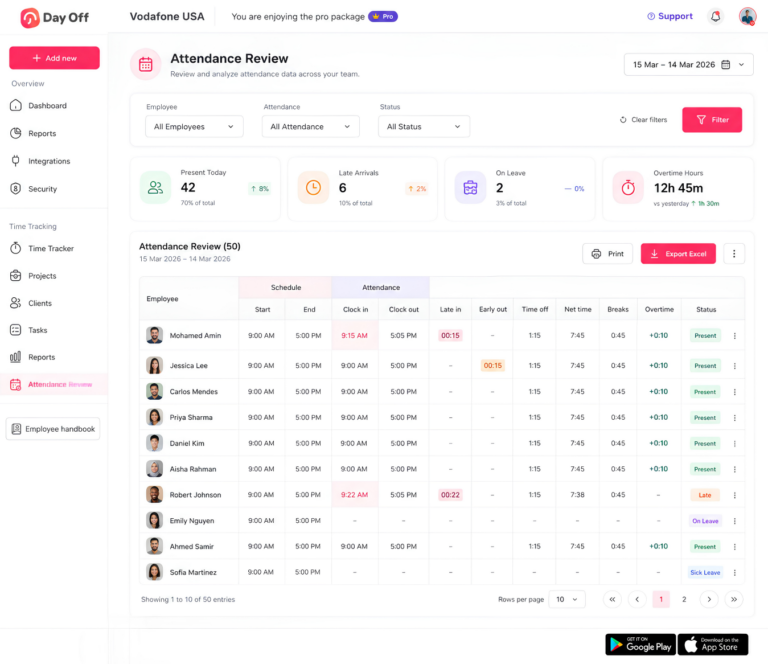
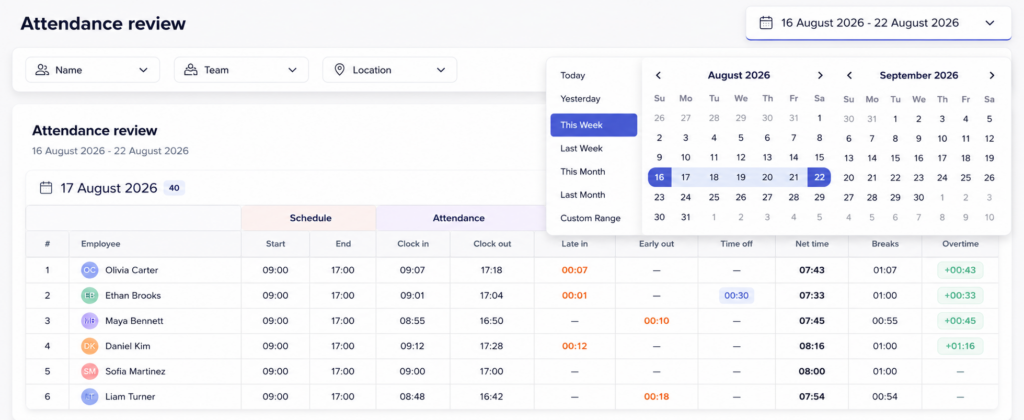
Day Off’s Attendance Review brings schedules and actual attendance records together.
The report includes columns for:
- Scheduled start
- Scheduled end
- Clock in
- Clock out
- Late in
- Early out
- Time off
- Net time
- Breaks
- Overtime
Day Off’s Knowledge Base explains that Net time represents actual worked time after breaks are deducted, while the Breaks column shows total paused time for the day. Day Off
This gives managers a practical way to review more than just whether someone came to work.
For example, a manager might see:
Scheduled: 9:00 a.m. to 5:30 p.m.
Clock in: 9:02 a.m.
Clock out: 5:31 p.m.
Breaks: 30 minutes
Net time: 7 hours 59 minutes
That makes the employee’s day much easier to understand.
Day Off Also Connects Breaks With PTO and Schedules
Break tracking becomes more useful when it is connected to the employee’s wider attendance record.
Day Off can also maintain:
- Employee work schedules
- PTO and leave requests
- Time off
- Attendance records
- Late time
- Early departures
- Overtime
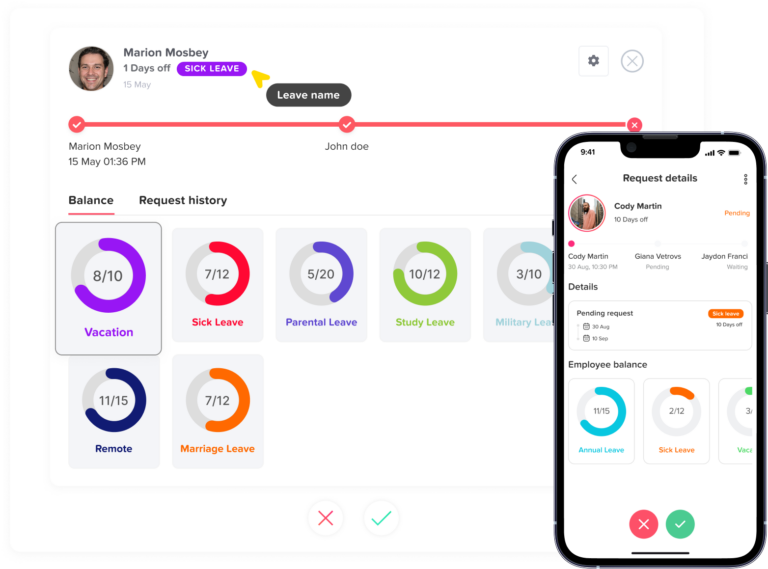
Attendance Review includes approved time-off hours alongside attendance and break information, helping managers understand why an employee may have fewer worked hours on a particular day. Day Off
That prevents a partial-day PTO request from looking like unexplained missing time.
Clock In / Clock Out vs. Task Tracking for Break Management
Day Off offers two company-wide time-tracking modes.
Clock In / Clock Out
This mode is designed for straightforward attendance tracking.
Employees record the beginning and end of their workday without attaching every working period to a project or task. Day Off
This works well for companies mainly interested in:
- Attendance
- Working hours
- Breaks
- Late time
- Early departures
- Overtime
Task Tracker
Task Tracker is more detailed.
Employees select a project and can optionally select a task before starting a timer. The completed entry records the project, task, time range, and duration. Day Off
This is useful when a company wants to understand both when employees worked and what they worked on.
Employee Break Tracking Policy: What Should It Include?
Technology works best when employees also understand the policy behind it.
A break policy should clearly explain:
- Which breaks employees receive
- Which breaks are paid
- Which breaks are unpaid
- Expected meal period length
- How to start and end a break
- Whether employees must remain completely off duty
- What to do if a meal break is interrupted
- What to do if a break is missed
- How errors in time records should be corrected
- Who employees should contact with questions
Policies should also reflect applicable state and local law.
Clear instructions reduce uncertainty and make time records more consistent.
Best Practices for Accurate Employee Break Tracking
Make the Process Easy
Employees should be able to start and end breaks without complicated manual forms.
Record Actual Time
When possible, track when breaks actually begin and end rather than automatically assuming the same break duration every day.
Separate Paid and Unpaid Time Correctly
Do not automatically deduct short compensable breaks simply because the employee is not actively working.
Give Employees a Correction Process
Employees should know how to report a missed break entry, forgotten clock-in, or interrupted meal period.
Review Exceptions
Managers should pay attention to unusually long breaks, missing breaks, incomplete clock-outs, or repeated schedule differences.
Keep Schedules Updated
Attendance analysis is more useful when actual records can be compared with the employee’s correct expected schedule.
Review Local Requirements
Businesses with employees in several states should avoid assuming that one break policy satisfies every jurisdiction.
Employee Break Tracking FAQ
Are employee breaks required by federal law?
Not always. The Fair Labor Standards Act does not generally require employers to provide meal periods or rest breaks. However, if short breaks are offered, federal rules usually require breaks of about 5 to 20 minutes to be counted as paid working time. State laws may require additional meal or rest periods, so employers should always check the rules that apply where their employees work.
What is the difference between a paid rest break and an unpaid meal break?
A paid rest break is usually a short break, often around 5 to 20 minutes, that still counts as working time. An unpaid meal break is typically longer and can generally be excluded from working time only if the employee is completely relieved from work duties. If the employee continues answering calls, helping customers, or completing tasks during lunch, the break may need to be treated as paid time.
Should employees clock out for a 15-minute break?
Usually not if the 15-minute break is a compensable rest break under federal rules. Short rest breaks generally count as hours worked, so employers should be careful not to deduct them automatically. The timekeeping process should match the company’s break policy and applicable labor laws.
What happens if an employee works during an unpaid lunch break?
If an employee performs work during a meal period, the employer may need to count that time as working time. For example, an employee who continues responding to emails, handling customer requests, or monitoring equipment may not be fully relieved from duty. Employers should have a clear process for employees to report interrupted or worked-through meal periods.
Can an employer automatically deduct 30 minutes for lunch?
Automatic meal deductions can be used, but they can create problems if the employee does not actually receive the full meal period. Employers should make sure employees have a simple way to report missed, shortened, or interrupted lunches so the time record can be corrected. Relying only on an automatic deduction can lead to inaccurate hours if the employee worked during the deducted period.
What should an employee do if they forget to start or end a break?
The employee should report the mistake as soon as possible so the record can be corrected. Employers should have a documented process for fixing missed break entries, forgotten clock-ins, and incorrect clock-outs. The goal is for the final time record to reflect what actually happened, not simply what the system originally captured.
Do employee breaks count toward overtime?
Paid, compensable breaks generally count toward total hours worked and can therefore affect overtime calculations. A qualifying unpaid meal period usually does not count as working time. This is why break classification matters. Incorrectly deducting a paid break could understate total hours worked, while incorrectly paying an unpaid meal period could overstate them.
How should employers track breaks for remote employees?
Remote employees should follow the same break-recording process used for other workers. A digital time tracker can make this easier by letting employees record when they start work, begin a break, return from the break, and end the workday. This creates a clearer record even when managers are not physically present to observe the employee’s schedule.
What should an employee break policy include?
A strong break policy should explain which breaks are available, which are paid or unpaid, how long breaks should last, how employees should record them, and what to do if a meal period is interrupted or missed. It should also explain how corrections are handled and make clear that break rules may vary by location where required by state or local law.
How can Day Off help with employee break tracking?
With the Pro + Time Tracker plan, Day Off lets employees clock in at the start of the workday, start and end breaks, and clock out when work is complete. Managers can then review break time alongside scheduled hours, actual clock-in and clock-out times, net working time, late arrivals, early departures, PTO, overtime, and attendance status. This gives teams a more complete view of the workday and reduces the need to reconstruct break information manually.
Conclusion
Accurate employee break tracking helps businesses maintain clearer time records, calculate working hours correctly, and distinguish paid rest breaks from unpaid meal periods. A reliable process also makes it easier to review overtime, attendance, and missed or interrupted breaks without relying on manual corrections.
With Day Off’s Pro + Time Tracker plan, employees can clock in, start and end breaks, and clock out, while managers review break time alongside schedules, net working hours, PTO, late arrivals, early departures, and overtime. Keeping these records connected gives teams a more complete picture of each workday and makes time and attendance management easier to handle.