







Managing employee leave is an essential part of every organization. Whether you run a small business or a growing company, keeping track of vacation days, sick leave, remote work requests, and other absences is critical for maintaining productivity and compliance.
For years, many businesses have relied on Excel leave trackers to manage employee time off. However, modern leave management solutions like Day Off have transformed how companies handle leave requests and approvals.

In this article, we’ll compare Excel Leave Tracker vs Day Off, highlighting the advantages, disadvantages, and key differences to help you choose the best leave management solution for your organization.
What Is an Excel Leave Tracker?
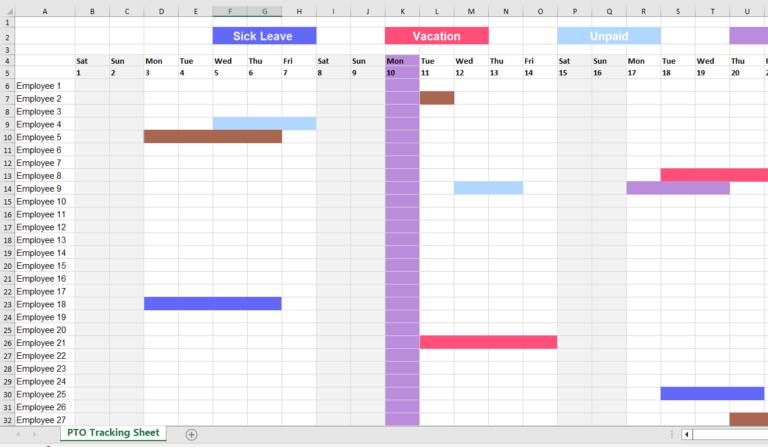
An Excel Leave Tracker is a spreadsheet-based system used to record and monitor employee leave balances, vacation requests, sick days, and other types of absences.
Many organizations start with Excel because it is familiar, inexpensive, and easy to customize. HR teams can create formulas, leave calendars, and reports without purchasing additional software.
Benefits of Using an Excel Leave Tracker
- Low initial cost
- Easy to set up for small teams
- Highly customizable
- No additional software required
- Familiar interface for most users
Limitations of Excel Leave Trackers
While Excel can work for very small teams, it becomes increasingly difficult to manage as a company grows.
Common challenges include:
- Manual data entry errors
- Difficult approval workflows
- Lack of real-time updates
- No employee self-service portal
- Limited reporting capabilities
- Version control issues
- Time-consuming administration
- Difficulty tracking multiple leave policies
As employee numbers increase, spreadsheets often become harder to maintain and more prone to mistakes.
What Is Day Off Vacation Tracker?
Day Off is a modern leave management software that helps businesses track employee time off, automate leave requests, and simplify absence management. Instead of relying on spreadsheets, Day Off provides a centralized platform where employees can request leave, managers can approve requests, and HR teams can monitor leave balances in real time.
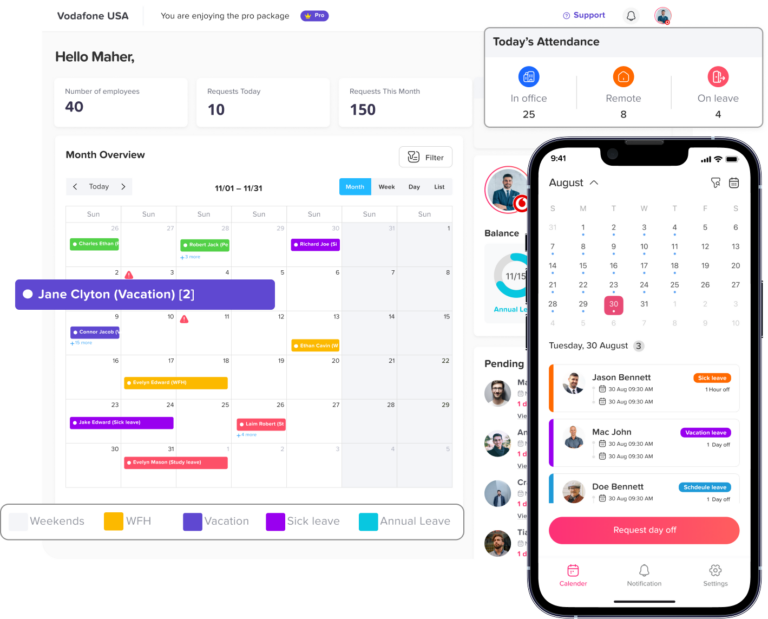
The platform automates key processes such as leave accruals, balance calculations, carryovers, approval workflows, and public holiday management. It also includes features like team calendars, employee self-service, mobile access, reporting, and customizable leave policies.
By replacing manual leave tracking with automation, Day Off helps businesses save time, reduce errors, and improve visibility into employee availability.
Excel Leave Tracker vs Day Off: Feature Comparison
1. Ease of Use
Excel Leave Tracker
Excel is easy to start with, but managing leave often requires manual updates, formulas, and email-based approval processes. As teams grow, spreadsheets become more difficult to maintain.
Day Off
Day Off is specifically designed for employee leave management, offering an intuitive and user-friendly experience for employees, managers, and HR teams. Employees can submit leave requests in just a few clicks, view their remaining leave balances instantly, and track the status of their requests without contacting HR.
Managers can approve or reject requests directly from the platform, while HR teams benefit from a centralized dashboard that provides complete visibility into employee absences and leave schedules.
2. Automation
Excel Leave Tracker
Most leave calculations, balance updates, and reports must be handled manually, which increases administrative work and the risk of errors.
Day Off
Day Off automates virtually every aspect of the leave management process. The platform automatically calculates leave balances, accrual rates, carryovers, public holidays, and policy-based leave entitlements. Approval workflows can also be automated, ensuring requests move quickly through the organization.
3. Accuracy and Data Reliability
Excel Leave Tracker
Because spreadsheets rely on manual data entry, mistakes such as incorrect formulas, duplicate records, and outdated information can occur.
Day Off
Day Off automatically updates employee leave records in real time, ensuring that balances, approvals, and absence records are always accurate and up to date. Every leave request is recorded within the system, reducing the risk of missing information or conflicting records.
Because all data is stored centrally, managers and HR teams always have access to a single source of truth.
4. Employee Experience
Excel Leave Tracker
Employees often need to email HR or managers to request leave or check their remaining balances, which can slow down the process.
Day Off
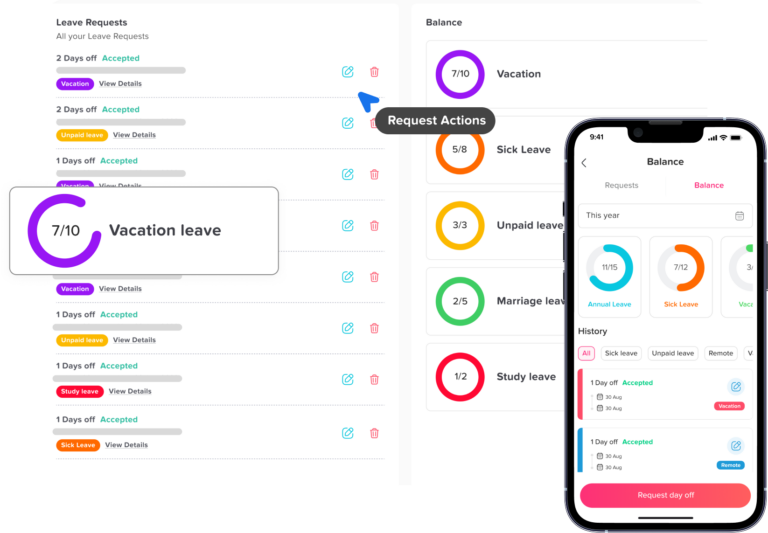
Day Off delivers a modern employee self-service experience. Employees can view leave balances, submit requests, receive approval notifications, and access leave history whenever they need it.
The platform empowers employees to manage their own time off requests while giving them greater visibility into their available leave and upcoming absences.
A smoother leave request process contributes to higher employee satisfaction and a better workplace experience overall.
5. Reporting and Analytics
Excel Leave Tracker
Creating reports usually requires manual work and spreadsheet expertise, especially as the organization grows.
Day Off
Day Off includes built-in reporting and analytics tools that provide valuable insights into employee absences, leave utilization, department availability, and workforce trends. HR teams can quickly generate reports and use real-time data to support better planning and decision-making.
These insights help organizations improve workforce management, reduce scheduling conflicts, and identify potential staffing gaps before they become operational issues.
6. Scalability and Business Growth
Excel Leave Tracker
Excel can work for very small teams, but managing leave becomes more challenging as employee numbers and leave policies increase.
Day Off
Day Off is built to scale alongside growing businesses. Whether your organization has 10 employees or thousands, the platform can support multiple teams, departments, locations, leave policies, and approval structures without increasing administrative complexity.
This scalability makes Day Off a long-term leave management solution rather than a temporary workaround.
Excel Leave Tracker vs Day Off: Quick Comparison Table
Why teams move from spreadsheets to Day Off
Replace manual leave tracking with automated requests, approvals, balances, calendars, and reports.
| Feature | Excel Leave Tracker | Day Off |
|---|---|---|
| Leave Request Submission | Manual (Email/Chat) | Automated Self-Service |
| Leave Approvals | Manual | Automated Workflows |
| Leave Balance Tracking | Manual Formulas | Automatic Calculations |
| PTO Accrual Management | Manual | Automated |
| Public Holiday Management | Manual Updates | Built-In |
| Employee Self-Service | ❌ No | ✅ Yes |
| Mobile App | ❌ No | ✅ iOS & Android |
| Team Calendar | Limited | Real-Time Team Calendar |
| Reporting & Analytics | Basic | Advanced Reports |
| Multiple Leave Policies | Difficult | Easy |
| Audit Trail | Limited | Complete History |
| Scalability | Small Teams Only | Small to Enterprise Teams |
| Data Accuracy | Prone to Errors | Automated & Reliable |
| Time Required by HR | High | Low |
| Cost | Low Initial Cost | Subscription-Based |
Why Companies Are Moving Away from Excel Leave Trackers
As businesses grow, managing employee vacation tracking, PTO management, sick leave requests, and remote work scheduling through spreadsheets becomes increasingly difficult.
HR teams often spend hours updating records, correcting errors, and responding to employee inquiries about leave balances.Modern leave management software like Day Off eliminates these challenges by automating repetitive tasks, improving visibility, and providing employees with instant access to their leave information.
Organizations that switch from Excel to automated leave tracking software often experience:
- Reduced administrative workload
- Faster leave approvals
- Fewer payroll and leave balance errors
- Better workforce planning
- Improved employee satisfaction
- Greater visibility into team availability
Key Features of Day Off Leave Management Software
Day Off is designed to simplify employee leave management by providing a complete solution for tracking time off, managing approvals, and maintaining accurate leave records. Whether you’re a small business or a large organization, Day Off helps eliminate manual processes and streamline absence management.
Employee Self-Service Portal
Employees can submit leave requests, check their leave balances, view leave history, and monitor request statuses without contacting HR. This self-service approach reduces administrative work and gives employees greater control over their time off.
Automated Leave Tracking
Day Off automatically updates leave balances whenever a request is approved. HR teams no longer need to manually update spreadsheets or calculate remaining vacation days, reducing the risk of errors and ensuring accurate records at all times.
Custom Leave Policies
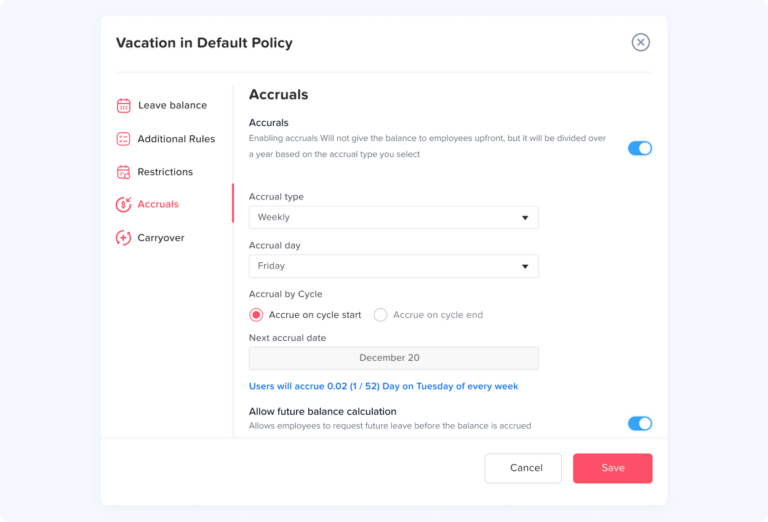
Every organization has unique leave requirements. Day Off allows businesses to create customized leave types and policies, including:
- Annual leave
- Vacation leave
- Sick leave
- Maternity leave
- Paternity leave
- Unpaid leave
- Compensatory leave
- Work-from-home requests
- Custom leave categories
This flexibility allows companies to align the platform with their existing HR policies.
Automated Leave Accruals and Carryovers
Day Off automatically handles leave accrual calculations based on company policies. The platform can also manage annual carryover rules, ensuring leave balances remain accurate without requiring manual calculations.
Approval Workflows
Managers can approve or reject leave requests instantly through web or mobile applications. Organizations can configure single-level or multi-level approval workflows to match their internal processes and ensure requests are reviewed by the appropriate stakeholders.
Team Calendar and Availability Tracking
The shared team calendar provides a clear view of employee absences, approved vacations, public holidays, and remote work schedules. This visibility helps managers avoid scheduling conflicts and maintain adequate staffing levels throughout the year.
Mobile Apps for iOS and Android
Day Off enables employees and managers to manage leave requests on the go. Users can submit requests, approve leave, receive notifications, and access leave information directly from their smartphones, making the platform ideal for remote and distributed teams.
Real-Time Notifications
The platform sends instant notifications whenever leave requests are submitted, approved, rejected, or updated. This ensures employees and managers remain informed without relying on emails or manual follow-ups.
Reporting and Analytics
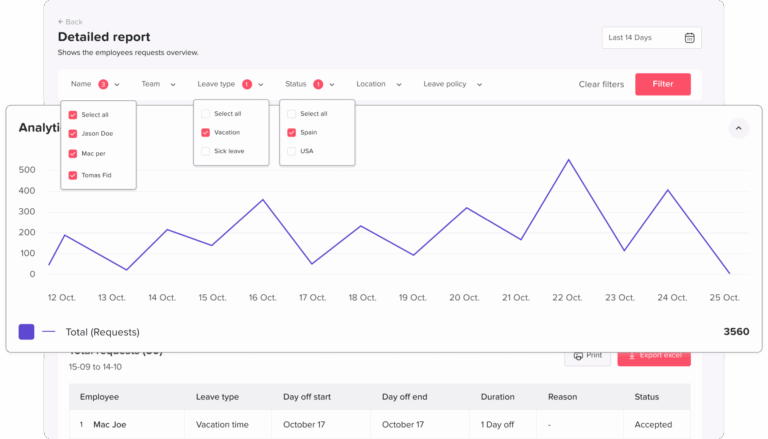
Day Off includes powerful reporting tools that help HR teams analyze leave trends, monitor absenteeism, track leave utilization, and generate workforce planning reports. These insights support data-driven decision-making and improve resource allocation.
Public Holiday Management
Organizations can automatically configure public holidays based on country or region. The system takes these holidays into account when calculating leave durations and employee availability.
Multi-Department and Multi-Location Support
For growing businesses, Day Off supports multiple teams, departments, offices, and locations within a single platform. Different leave policies and approval structures can be applied across various groups while maintaining centralized management.
Secure Cloud-Based Access
All leave data is securely stored in the cloud, allowing authorized users to access information from anywhere while maintaining data security and reliability.
Why Businesses Choose Day Off
Companies choose Day Off because it combines ease of use with powerful automation. Instead of spending hours managing spreadsheets and manual approval processes, organizations can automate leave administration, improve employee satisfaction, and gain real-time visibility into workforce availability.
By centralizing leave requests, approvals, balances, and reporting in one platform, Day Off helps businesses save time, reduce errors, and build a more efficient leave management process.
Frequently Asked Questions (FAQ)
Is Excel good for tracking employee leave?
Excel can be a practical solution for very small businesses with a limited number of employees and simple leave policies. However, as teams grow, spreadsheets become harder to maintain and more susceptible to errors, making dedicated leave management software a better long-term option.
What are the disadvantages of using an Excel leave tracker?
Common disadvantages include manual data entry, formula errors, lack of automated approvals, version control problems, limited reporting capabilities, and the absence of employee self-service features.
What is the best alternative to an Excel leave tracker?
Day Off is a popular alternative that automates leave requests, approvals, leave accruals, PTO tracking, employee self-service, and reporting while providing real-time visibility into employee absences.
Can Day Off calculate PTO and leave balances automatically?
Yes. Day Off automatically calculates PTO balances, vacation accruals, carryovers, compensatory time, and other leave entitlements based on your organization’s policies.
Does Day Off support multiple leave types?
Yes. Organizations can create and manage multiple leave types, including annual leave, vacation leave, sick leave, maternity leave, paternity leave, unpaid leave, work-from-home requests, and custom leave categories.
Is Day Off suitable for small businesses?
Absolutely. Day Off is designed for businesses of all sizes, from startups and small businesses to large organizations with multiple departments and locations.
Can employees request leave from their phones?
Yes. Day Off provides mobile apps that allow employees to submit leave requests, check balances, view team calendars, and receive approval notifications from anywhere.
Does Day Off help with workforce planning?
Yes. Real-time team calendars and reporting tools help managers identify staffing gaps, avoid scheduling conflicts, and make informed workforce planning decisions.
How does Day Off improve leave management?
Day Off centralizes all leave-related processes in one platform. It automates calculations, approval workflows, reporting, and leave tracking, reducing administrative work while improving accuracy and transparency.
Conclusion
Choosing between an Excel Leave Tracker and Day Off ultimately depends on your organization’s size, complexity, and growth plans. While Excel remains a low-cost solution for basic leave tracking, it often becomes difficult to manage as employee numbers increase.
Day Off offers a more scalable and efficient approach by automating leave management, simplifying approvals, improving employee experiences, and providing real-time visibility into workforce availability.
For organizations looking to modernize their PTO tracking, vacation management, and employee leave processes, Day Off delivers a powerful solution that saves time, reduces errors, and supports long-term business growth.
Related reading: Best HR Software for Canadian Companies (2026 Complete Guide)